- CEF Overview
- Configuring Basic Cisco Express Forwarding
- Enabling or Disabling CEF or dCEF
- Configuring a Load-Balancing Scheme
- Configuring Epochs
- Configuring CEF Consistency Checkers
- Configuring CEF Network Accounting
- Customizing the Display of Recorded CEF Events
- Customizing the Display of CEF Event Trace Messages
- SNMP CEF-MIB Support
- Cisco Express Forwarding Command Changes
- IPv6 CEF-Switched Tunnels
Contents
- SNMP CEF-MIB Support
- Finding Feature Information
- Prerequisites for SNMP CEF-MIB Support
- Information About SNMP CEF-MIB Support
- CEF Functional Overview
- Benefits of CISCO-CEF-MIB
- Information Managed by the CISCO-CEF-MIB
- CISCO-CEF-MIB Object Groups
- CISCO-CEF-MIB Tables
- Operations Available Through the CISCO-CEF-MIB
- CISCO-CEF-MIB Notifications
- How to Configure SNMP CEF-MIB Support
- Configuring the Router to Use SNMP
- Configuring a Host to Receive Notifications
- Configuring SNMP Notifications with the CLI
- Configuring SNMP Notifications with SNMP Commands
- Configuring the Throttling Interval with the CLI
- Configuring the Throttling Interval using SNMP Commands
- Configuration Examples for SNMP CEF-MIB Support
- Example Configuring a Host to Receive Notifications
- Example Configuring SNMP Notifications
- Example Configuring the Throttling Interval
- Additional References
- Feature Information for SNMP CEF-MIB Support
- Glossary
SNMP CEF-MIB Support
The Cisco Express Forwarding--SNMP CEF-MIB Support feature introduces the CISCO-CEF-MIB, which allows management applications through the use of the Simple Network Management Protocol (SNMP) to configure and monitor Cisco Express Forwarding operational data and to provide notification when Cisco Express Forwarding encounters specific configured events. This module describes how to use the CISCO-CEF-MIB to manage and monitor objects related to Cisco Express Forwarding operation.
Cisco Express Forwarding is an advanced Layer 3 IP switching technology. It optimizes network performance and scalability for all kinds of networks: those that carry small amounts of traffic and those that carry large amounts of traffic in complex patterns, such as the Internet and networks characterized by intensive web-based applications or interactive sessions.
- Finding Feature Information
- Prerequisites for SNMP CEF-MIB Support
- Information About SNMP CEF-MIB Support
- How to Configure SNMP CEF-MIB Support
- Configuration Examples for SNMP CEF-MIB Support
- Additional References
- Feature Information for SNMP CEF-MIB Support
- Glossary
Finding Feature Information
Your software release may not support all the features documented in this module. For the latest caveats and feature information, see Bug Search Tool and the release notes for your platform and software release. To find information about the features documented in this module, and to see a list of the releases in which each feature is supported, see the feature information table at the end of this module.
Use Cisco Feature Navigator to find information about platform support and Cisco software image support. To access Cisco Feature Navigator, go to www.cisco.com/go/cfn. An account on Cisco.com is not required.
Prerequisites for SNMP CEF-MIB Support
Cisco Express Forwarding or distributed Cisco Express Forwarding must be configured on your system.
The Cisco Express Forwarding infrastructure introduced in Cisco IOS Release12.2(25)S must be included in the image on your system.
The router on which the Cisco Express Forwarding--SNMP CEF-MIB Support features is to be used must be configured for SNMP access. See the Configuring the Router to Use SNMP of this document for more information.
Information About SNMP CEF-MIB Support
- CEF Functional Overview
- Benefits of CISCO-CEF-MIB
- Information Managed by the CISCO-CEF-MIB
- CISCO-CEF-MIB Object Groups
- CISCO-CEF-MIB Tables
- Operations Available Through the CISCO-CEF-MIB
- CISCO-CEF-MIB Notifications
CEF Functional Overview
Cisco Express Forwarding is an advanced Layer 3 IP switching technology. It uses a Forwarding Information Base (FIB) to make IP destination prefix-based switching decisions. The FIB is conceptually similar to a routing table or information base. It maintains the forwarding information contained in the IP routing table. When routing or topology changes occur in the network, the IP routing table is updated, and those changes are propagated to the FIB. The FIB maintains next-hop address information based on the information in the IP routing table. The two main components of Cisco Express Forwarding operation are the FIB and adjacency tables.
Cisco Express Forwarding uses adjacency tables to prepend Layer 2 addressing information. An adjacency table maintains Layer 2 next-hop addresses for all FIB entries. Nodes in the network are said to be adjacent if they can reach each other with a single hop across a link layer. Cisco Express Forwarding discovers and solves adjacencies and populates the adjacency tables.
 Note | The CISCO-CEF-MIB prefix database and its related database can be very large. Therefore, executing a command that displays the prefix table could take a considerable amount of time. |
Benefits of CISCO-CEF-MIB
Command-line interface (CLI) show commands are available to obtain Cisco Express Forwarding operational information. Managing Cisco Express Forwarding using the CLI can be a time-consuming task. The increasing capacity of Cisco routers makes parsing the show commands output to obtain the needed Cisco Express Forwarding operational parameters more and more difficult.
In Cisco IOS Release 12.2(31)SB and later releases, the CISCO-CEF-MIB allows you to manage and monitor the Cisco Express Forwarding operation using SNMP. In addition, you can configure SNMP to notify you if Cisco Express Forwarding encounters errors.
The CISCO-CEF-MIB introduced with the Cisco Express Forwarding--SNMP CEF-MIB Support feature gives you real-time access to operational information stored in the FIB and adjacency tables, switching statistics, and information on resource failures. The feature enables you to configure parameters related to Cisco Express Forwarding features by utilizing a MIB implementation based on SNMP. This information is accessed using get and set commands entered on the network management system (NMS) workstation or host system for which SNMP has been implemented. The NMS workstation is also known as the SNMP manager.
Cisco Express Forwarding is available in all Cisco routers. However, CISCO-CEF-MIB support of Cisco Express Forwarding management is dependent on the infrastructure introduced in Cisco IOS Release 12.2(22)S.
The implementation of the CISCO-CEF-MIB in Cisco IOS Release 12.2(31)SB2, Cisco IOS Release 12.2(33)SRC,and Cisco IOS Release 12.2(33)SB manages Cisco Express Forwarding instances running on the Route Processor (RP). Information about Cisco Express Forwarding running on the line cards is available to the RP in reference to Cisco Express Forwarding peers only.
The CISCO-CEF-MIB supports configuration and monitoring for both IP versions, IP Version 4 (IPv4) and IP Version 6 (IPv6).
Information Managed by the CISCO-CEF-MIB
SNMP has historically been used to collect network information. SNMP permits retrieval of critical information from network elements such as routers, switches, and workstations.
The CISCO-CEF-MIB provides managed objects that enable a network administrator to monitor the following:
Cisco Express Forwarding administrative and operational states as displayed in the output of the show ip cef summary command
Notifications for Cisco Express Forwarding events: Cisco Express Forwarding state changes, Cisco Express Forwarding failures (with a predefined reason), and Route Processor (RP) and line card inconsistencies
Parameters related to Cisco Express Forwarding for the associated interface as displayed by the show cef interface command
Line card Cisco Express Forwarding states and line card Cisco Express Forwarding FIB states in the Linecard table as displayed by the show cef linecardcommand
Cisco Express Forwarding statistics: switching statistics, punt counters and punt-to-host counters as displayed by the show ip cef switching statscommand, and per-prefix counters and nonrecursive counters
IPv4 and IPv6 notification, when Cisco Express Forwarding is switched between disable and enable and between Cisco Express Forwarding and distributed Cisco Express Forwarding
The SNMP CISCO-CEF-MIB provides managed objects that enable a network administrator to configure the following:
Cisco Express Forwarding and distributed Cisco Express Forwarding administration status
Cisco Express Forwarding accounting-related parameters
Cisco Express Forwarding load sharing-related parameters
Traffic-related configuration parameters
CISCO-CEF-MIB Object Groups
The SNMP CISCO-CEF-MIB allows the configuration and management of objects related to Cisco Express Forwarding. The MIB contains the following object groups:
CEF FIB group
CEF Adjacency group
CEF Forwarding Element group
CEF Cfg group
CEF Interface group
CEF Peer group
CEF Consistency (CC) group
CEF State Group
CEF Notification Control group
In the CISCO-CEF-MIB, configuration objects are defined as read-write, and the other objects are defined as read only.
The CISCO-CEF-MIB contains tables related to the Cisco Express Forwarding object groups. These tables provide information about prefixes, forwarding paths, adjacencies, output chain elements (OCEs), prefix-based statistics, information about Cisco Express Forwarding configuration, consistency checkers, switching statistics, and managed objects specific to line card-specific.
The CISCO-CEF-MIB also defines Cisco Express Forwarding notifications that you can enable or disable through the MIB or CLI commands.
The index for most tables in the CISCO-CEF-MIB is entPhysicalIndex.
CISCO-CEF-MIB Tables
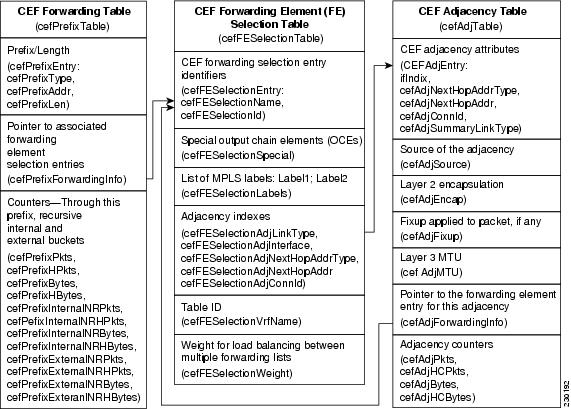
The CEF FIB Summary table (cefFIBSummaryTable) contains the number of forwarding prefixes for both IPv4 and IPv6 protocols. It is a summary of the CEF Forwarding table.
The CEF Forwarding table (cefPrefixTable) lists all the prefixes and related counters. It also contains a pointer to the CEF Forwarding Element Selection table.
The CEF Longest Match Prefix table (cefLMPrefixTable) returns the longest prefix match for the given destination address. An optional cefLMPrefixSpinLock object is provided to reduce conflict in instances when more than one application acts on the CEF Longest Match Prefix table.
The CEF Path table (cefPathTable) lists all the Cisco Express Forwarding paths.
The CEF Adjacency Summary table (cefAdJSummaryTable) contains the total number of complete, incomplete, fixup, and redirect adjacencies for all link types.
The CEF Adjacency table (cefAdjTable) lists all the adjacencies. It contains the adjacency source, encapsulation string, fixup, and Layer 3 maximum transmission unit (MTU) associated with the adjacency entry. It contains a pointer to the forwarding element selection table (if the adjacency is a MID chain adjacency).
The CEF Forwarding Element Selection table (cefFESelectionTable) represents the OCE chains in flattened format. This table shows only the labels, table ID, and adjacency traversed in the OCE chain. It also contains the weight associated with each OCE chain.
CEF Cfg table (cefCfgTable) contains all the global configuration parameters related to Cisco Express Forwarding: administration and operational status, accounting-related configuration parameters, load-sharing algorithms and IDs, and traffic statistics parameters.
CEF Resource table (cefResourceTable) contains information about resources for Cisco Express Forwarding: the memory status of the process memory pool and reasons for the Cisco Express Forwarding resource failure notifications.
CEF Interface table (cefIntTable) contains the interface-specific Cisco Express Forwarding parameters: interface switching state, interface load sharing (per packet and per destination), and interface nonrecursive routing (internal and external).
CEF Peer table or Linecard table (cefPeerTable) contains Cisco Express Forwarding information related to peers on a managed line card: line card operational state and the number of times the line card session resets.
CEF Peer FIB table (cefPeerFIBTable) contains information about the operational state of the Forwarding Information Bases (FIBs) on each line card.
The CEF Prefix Length Statistics table (cefStatsPrefixTable) maintains prefix length-based statistics.
CEF Switching Statistics table (cefSwitchingStatsTable) contains the switching statistics for each switching path: drop counters, punt counters, and punt-to-host counters.
CEF IP Prefix Consistency Checker Global group (cefCCGlobalTable) contains all global configuration parameters for the consistency checkers: auto repair, enable and disable, delay, and hold down; enable or disable the passive consistency checkers; enable or disable the error messages for consistency detection; and the mechanism to activate the full scan consistency checkers. This table also displays the state of full scan consistency checkers.
CEF Consistency Checker Type table (cefCCTypeTable) contains the consistency checker type specific parameters: frequency and count of scan for passive scanners and the queries sent, ignored, checked, and iterated.
CEF Inconsistency Record table (cefInconsistencyRecordTable) contains the detected inconsistency records: prefix address and length, table ID, consistency checker type, slot ID, and the reason for the inconsistency (missing or checksum error).
See theOperations Available Through the CISCO-CEF-MIB for information about the specific objects available through the CISCO-CEF-MIB tables.
The figure below shows the contents of the CISCO-CEF-MIB main tables and the relationships of the tables to one another.
Operations Available Through the CISCO-CEF-MIB
You can use SNMP getand setcommands to configure and monitor Cisco Express Forwarding operations that are available through the CISCO-CEF-MIB tables. This section describes the configuration and monitoring operations for each table.
The table below lists the Cisco Express Forwarding monitoring operations and associated MIB objects provided by the CEF FIB Summary table (cefFIBSummaryTable).
|
Cisco Express Forwarding Operation |
Description |
|---|---|
|
Gets the number of forwarding prefixes for IPv4 and IPv6 |
cefFIBSummaryFwdPrefixes |
The table below lists the Cisco Express Forwarding monitoring operations and associated MIB objects provided by the CEF Forwarding table (cefPrefixTable).
|
Cisco Express Forwarding Operation |
MIB Object |
|---|---|
|
Gets the forwarding information for the entry |
cefPrefixForwardingInfo |
|
Gets the number of packets forwarded by the prefix |
cefPrefixPkts |
|
Gets the number of packets forwarded by the prefix in a 64-bit value |
cefPrefixHCPkts |
|
Gets the number of bytes forwarded by the prefix |
cefPrefixBytes |
|
Gets the number of bytes forwarded by the prefix in a 64-bit value |
cefPrefixHCBytes |
|
Gets the number of internal nonrecursive packets forwarded by the prefix |
cefPrefixInternalNRPkts |
|
Gets the number of internal nonrecursive packets forwarded by the prefix in a 64-bit value |
cefPrefixInternalNRHCPkts |
|
Gets the number of internal nonrecursive bytes forwarded by the prefix |
cefPrefixInternalNRBytes |
|
Gets the number of internal nonrecursive bytes forwarded by the prefix in a 64-bit value |
cefPrefixInternalNRHCBytes |
|
Gets the number of external nonrecursive packets forwarded by the prefix |
cefPrefixExternalNRPkts |
|
Gets the number of external nonrecursive packets forwarded by the prefix in a 64-bit value |
cefPrefixExternalNRHCPkts |
|
Gets the number of external nonrecursive bytes forwarded by the prefix |
cefPrefixExternalNRBytes |
|
Gets the number of external nonrecursive bytes forwarded by the prefix in 64-bit value |
cefPrefixExternalNRHCBytes |
The table below lists the Cisco Express Forwarding monitoring operations and associated MIB objects provided by the CEF Longest Match Prefix table (cefLMPrefixTable).
|
Cisco Express Forwarding Operation |
MIB Object |
|---|---|
|
Gets or sets the lock for creation or modification of the longest match prefix entries |
cefLMPrefixSpinLock |
|
Gets the state of the destination prefix request |
cefLMPrefixState |
|
Gets the network prefix address for the destination prefix request |
cefLMPrefixAddr |
|
Gets the network prefix length for the destination prefix request (the same display as the show ip cef exact-route command) |
cefLMPrefixLen |
|
Gets the status of a table entry |
cefLMPrefixRowStatus |
The table below lists the Cisco Express Forwarding monitoring operations and associated MIB objects provided by the CEF Path table (cefPathTable).
|
Cisco Express Forwarding Operation |
MIB Object |
|---|---|
|
Gets the type of Cisco Express Forwarding path for a prefix |
cefPathType |
|
Gets the interface associated with this Cisco Express Forwarding path |
cefPathInterface |
|
Gets the next-hop address for the Cisco Express Forwarding path |
cefPathNextHopAddr |
|
Gets the recursive Virtual Private Network (VPN) routing and forwarding (VRF) instance name associated with this path |
cefPathRecurseVrfName |
The table below lists the Cisco Express Forwarding monitoring operations and associated MIB objects provided by the CEF Adjacency Summary table (cefAdjSummaryTable).
|
Cisco Express Forwarding Operation |
MIB Objects |
|---|---|
|
Gets the number of complete adjacencies |
cefAdjSummaryComplete |
|
Gets the number of incomplete adjacencies |
cefAdjSummaryInComplete |
|
Gets the number of adjacencies for Layer 2 encapsulation |
cefAdjSummaryFixup |
|
Gets the number of adjacencies for IP redirect |
cefAdjSummaryRedirect |
The table below lists the Cisco Express Forwarding monitoring operations and associated MIB objects provided by the CEF Adjacency table (cefAdjTable).
|
Cisco Express Forwarding Operation |
MIB Object |
|---|---|
|
Gets the adjacency source |
cefAdjSource |
|
Gets the adjacency Layer 2 encapsulation |
cefAdjEncap |
|
Gets the adjacency fixup |
cefAdjFixup |
|
Gets the Layer 3 maximum transmission unit (MTU) for the adjacency |
cefAdjMTU |
|
Gets the forwarding information in cefFESelectionTable |
cefAdjForwardingInfo |
|
Gets the number of packets transmitted |
cefAdjPkts |
|
Gets the number of packets transmitted in a 64-bit version |
cefAdjHCPkts |
|
Gets the number of bytes transmitted |
cefAdjBytes |
|
Gets the number of bytes transmitted in a 64-bit version |
cefAdjHCBytes |
The table below lists the Cisco Express Forwarding monitoring operations and associated MIB objects provided by the CEF Forwarding Element Selection table (cefFESelectionTable).
|
Cisco Express Forwarding Operation |
MIB Object |
|---|---|
|
Gets any special processing for a forwarding element |
cefFESelectionSpecial |
|
Gets the Multiprotocol Label Switching (MPLS) labels for a forwarding element |
cefFESelectionLabels |
|
Gets the adjancency type for a forwarding element |
cefFESelectionAdjLinkType |
|
Gets the interface for the adjacency for a forwarding element |
cefFESelectionAdjInterface |
|
Gets the next-hop address type for the adjacency for a forwarding element |
cefFESelectionAdjNextHopAddrType |
|
Gets the next-hop address for the adjacency for a forwarding element |
cefFESelectionAdjNextHopAddr |
|
Gets the connection ID for the adjacency for a forwarding element |
cefFESelectionAdjConnId |
|
Gets the VRF name for the lookup for a forwarding element |
cefFESelectionVrfName |
|
Gets the weighting for load balancing for a forwarding element |
cefFESelectionWeight |
The table below lists the Cisco Express Forwarding configuration and monitoring operations and associated MIB objects provided by the CEF Cfg table (cefCfgTable).
The table below lists the Cisco Express Forwarding monitoring operations and associated MIB objects provided by the CEF Resource table (cefResourceTable).
|
Cisco Express Forwarding Operation |
MIB Object |
|---|---|
|
Gets the memory status of process memory pool for Cisco Express Forwarding |
cefResourceMemoryUsed |
|
Gets the reason for the Cisco Express Forwarding resource failure notification |
cefResourceFailureReason |
The table below lists the Cisco Express Forwarding configuration and monitoring operations and associated MIB objects provided by the CEF Interface table (cefIntTable).
The table below lists the Cisco Express Forwarding monitoring operations and associated MIB objects provided by the CEF Peer table (or Linecard table) (cefPeerTable).
|
Cisco Express Forwarding Operation |
MIB Objects |
|---|---|
|
Gets the Cisco Express Forwarding operational instance of the peer entity |
cefPeerOperState |
|
Gets how many times the session with the Peer resets |
cefPeerNumberOfResets |
The table below lists the Cisco Express Forwarding monitoring operation and associated MIB object provided by the CEF Peer FIB table (cefPeerFIBTable).
|
Cisco Express Forwarding Operation |
MIB Objects |
|---|---|
|
Gets the current Cisco Express Forwarding FIB operation state of the peer entity |
cefPeerFIBOperState |
The table below lists the Cisco Express Forwarding monitoring operations and associated MIB objects provided by the CEF Prefix Length Statistics table (cefStatsPrefixTable).
|
Cisco Express Forwarding Operation |
MIB Object |
|---|---|
|
Gets the number of queries (lookups) in the FIB database for a prefix length |
cefStatsPrefixQueries |
|
Gets the number of queries (lookups) in the FIB database for a prefix length in a 64-bit value |
cefStatsPrefixHCQueries |
|
Gets the number of inserts in the FIB database for a prefix length |
cefStatsPrefixInserts |
|
Gets the number of inserts in the FIB database for a prefix length in a 64-bit value |
cefStatsPrefixHCInsert |
|
Gets the number of deletes in the FIB database for a prefix length |
cefStatsPrefixDeletes |
|
Gets the number of deletes in the FIB database for a prefix length in a 64-bit version |
cefStatsPrefixHCDeletes |
|
Gets the number of elements in the FIB database for a prefix length |
cefStatsPrefixElements |
|
Gets the number of elements in the FIB database for a prefix length in a 64-bit value |
cefStatsPrefixHCElements |
The table below lists the Cisco Express Forwarding monitoring operations and associated MIB objects provided by the CEF Switching Statistics table (cefSwitchingStatsTable).
|
Cisco Express Forwarding Operation |
MIB Objects |
|---|---|
|
Gets the switching path of a Cisco Express Forwarding instance |
cefSwitchingPath |
|
Gets the number of packets dropped by a Cisco Express Forwarding instance |
cefSwitchingDrop |
|
Gets the number of packets dropped by a Cisco Express Forwarding instance in a 64-bit value |
cefSwitchingHCDrop |
|
Gets the number of packets that could be punted |
cefSwitchingPunt |
|
Gets the number of packets that could be punted in a 64-bit value |
cefSwitchingHCPunt |
|
Gets the number of packets that are punted to the host |
cefSwitchingPunt2Host |
|
Gets the number of packets that are punted to the host in a 64-bit value |
cefSwitchingHCPunt2Host |
The table below lists the Cisco Express Forwarding configuration and monitoring operations and associated MIB objects provided by the CEF IP Prefix Consistency Global Checker group (cefCCGlobalTable).
|
Cisco Express Forwarding Operation |
MIB Objects |
|---|---|
|
Enables or disables auto repairing of the consistency checkers |
cefCCGlobalAutoRepairEnabled |
|
Gets or sets the consistency checker wait time before fixing the inconsistency |
cefCCGlobalAutoRepairDelay |
|
Gets or sets the consistency checker wait time to reenable auto repair after auto repair runs |
cefCCGlobalAutoRepairHoldDown |
|
Enables or disables error message generation for an inconsistency |
cefCCGlobalErrorMsgEnabled |
The table below lists the Cisco Express Forwarding configuration and monitoring operations and associated MIB objects provided by the CEF Consistency Checker Type table (cefCCTypeTable).
|
Cisco Express Forwarding Operation |
MIB Objects |
|---|---|
|
Enables or disables the passive consistency checker |
cefCCEnabled |
|
Gets or sets the maximum number of prefixes per scan |
cefCCCount |
|
Gets or sets the period between scans for the consistency checker |
cefCCPeriod |
|
Gets the number of prefix consistency queries sent to the Cisco Express Forwarding FIB |
cefCCQueriesSent |
|
Gets the number of prefix consistency queries ignored by the consistent checker |
cefCCQueriesIgnored |
|
Gets the number of prefix consistent queries iterated back to the database |
cefCCQueriesIterated |
|
Gets the number of prefix consistent queries processed |
cefCCQueriesChecked |
The table below lists the Cisco Express Forwarding configuration and monitoring operations and associated MIB objects provided by the CEF Inconsistency Record table (cefInconsistencyRecordTable).
CISCO-CEF-MIB Notifications
The table below lists the Cisco Express Forwarding operations associated with the CISCO-CEF-MIB objects that enable the sending of Cisco Express Forwarding notifications.
|
Cisco Express Forwarding Operation |
MIB Object |
|---|---|
|
Enables the sending of a notification on the detection of a Cisco Express Forwarding resource failure |
cefResourceFailureNotifEnable |
|
Enables the sending of a notification on the detection of a Cisco Express Forwarding peer state change |
cefPeerStateChangeNotifEnable |
|
Enables the sending of a notification on the detection of a Cisco Express Forwarding FIB peer state change |
cefPeerFIBStateChangeNotifEnable |
|
Sets the period of time after the sending of each notification event |
cefNotifThrottlingInterval |
|
Enables the sending of a notification on the detection of an inconsistency |
cefInconcsistencyNotifEnable |
You can enable or disable these notifications through the MIB or by entering a CLI command. The table below contains a description of the notifications and the commands you use to enable each notification.
Note | You must enter a snmp-server host command before you enter a command to enable or disable a CISCO-CEF-MIB notification. |
|
Notification |
Generated for |
Commands |
|---|---|---|
|
Cisco Express Forwarding resource failure notification |
A malloc failure, an Inter-Process Communication (IPC) failure, and any other type of failure related to External Data Representation (XDR) messages |
CLI: snmp-server enable traps cef resource-failure MIB: setany version ip-address community-string cefResourceFailureNotifEnable.0 -i 1 |
|
Cisco Express Forwarding peer state change notification |
A change in the operational state of a peer on the line cards |
CLI: snmp-server enable traps cef peer-state-change MIB: setany version ip-address community-string cefPeerStateChangeNotifEnable.0 -i 1 |
|
Cisco Express Forwarding peer FIB state change notification |
A change in the operational state of the peer FIB |
CLI: snmp-server enable traps cef peer-fib-state-change MIB: setany version ip-address community-string cefPeerFIBStateChangeNotifEnable.0 -i 1 |
|
Cisco Express Forwarding inconsistency detection notification |
An inconsistency detected by the consistency checkers |
CLI: snmp-server enable traps cef inconsistency MIB: setany version ip-address community-string cefInconsistencyNotifEnable.0 -i 1 |
How to Configure SNMP CEF-MIB Support
- Configuring the Router to Use SNMP
- Configuring a Host to Receive Notifications
- Configuring SNMP Notifications with the CLI
- Configuring SNMP Notifications with SNMP Commands
- Configuring the Throttling Interval with the CLI
- Configuring the Throttling Interval using SNMP Commands
Configuring the Router to Use SNMP
Perform the following task to configure a router to use SNMP.
Before you can use the Cisco Express Forwarding--SNMP CEF-MIB Support feature, you must configure the SNMP server for the router.
1.
enable
2.
configure
terminal
3.
snmp-server
community
string
[view view-name] [ro | rw] [ipv6 nacl] [access-list-number]
4.
snmp-server
community
string2
rw
5.
end
DETAILED STEPS
Configuring a Host to Receive Notifications
Perform the following task to configure an SNMP host to receive CISCO-CEF-MIB notifications. Notifications provide information to assist you in the monitoring and managing of Cisco Express Forwarding operations.
1.
enable
2.
configure
terminal
3.
snmp-server
community
string
[ro | rw]
4.
snmp-server
community
string2
rw
5.
snmp-server
host
ip-address
[vrf vrf-name] [traps | informs] [version {1| 2c | 3 [auth | noauth | priv]}] community-string [udp-port port] cef
6.
end
DETAILED STEPS
| Command or Action | Purpose | |||
|---|---|---|---|---|
| Step 1 |
enable
Example: Router> enable |
Enables privileged EXEC mode.
| ||
| Step 2 |
configure
terminal
Example: Router# configure terminal |
Enters global configuration mode. | ||
| Step 3 |
snmp-server
community
string
[ro | rw] Example: Router(config)# snmp-server community public ro |
Sets up the community access string to permit access to SNMP.
| ||
| Step 4 |
snmp-server
community
string2
rw
Example: Router(config)# snmp-server community private rw |
Sets up the community access string to permit access to SNMP.
This example allows MIB objects to be retrieved and set because a string is specified with read-write access.
| ||
| Step 5 |
snmp-server
host
ip-address
[vrf vrf-name] [traps | informs] [version {1| 2c | 3 [auth | noauth | priv]}] community-string [udp-port port] cef Example: Router(config)# snmp-server host 10.56.125.47 informs version 2c public cef |
Specifies the recipient of an SNMP notification operation.
The SNMP notification host is typically a network management station (NMS or SNMP manager). This host is the recipient of the SNMP traps or informs.
If you use the version keyword, one of the following keywords must be specified:
| ||
| Step 6 |
end
Example: Router(config)# end |
Exits to privileged EXEC mode. |
Configuring SNMP Notifications with the CLI
Perform the following task to configure SNMP notifications for Cisco Express Forwarding events. To configure this feature using SNMP commands instead of the CLI, see the Configuring SNMP Notifications with SNMP Commands.
You must have configured an NMS or SNMP agent to receive the SNMPCISCO-CEF-MIB notification. See the Configuring a Host to Receive Notifications.
1.
enable
2.
configure
terminal
3.
snmp-server
enable
traps
cef
[peer-state-change] [resource-failure] [inconsistency] [peer-fib-state-change]
4.
snmp-server
host
ip-address
[traps | informs] [version {1| 2c | 3 [auth | noauth | priv]}] community-string cef
5.
end
DETAILED STEPS
| Command or Action | Purpose | |
|---|---|---|
| Step 1 |
enable
Example: Router> enable |
Enables privileged EXEC mode.
|
| Step 2 |
configure
terminal
Example: Router# configure terminal |
Enters global configuration mode. |
| Step 3 |
snmp-server
enable
traps
cef
[peer-state-change] [resource-failure] [inconsistency] [peer-fib-state-change] Example: Router(config)# snmp-server enable traps cef resource-failure |
Enables Cisco Express Forwarding support of SNMP notifications on an NMS.
You can set the throttling interval for sending inconsistency notifications. See the Configuring the Throttling Interval with the CLI.
|
| Step 4 |
snmp-server
host
ip-address
[traps | informs] [version {1| 2c | 3 [auth | noauth | priv]}] community-string cef Example: Router(config)# snmp-server host 10.56.125.47 informs version 2c public cef |
Specifies the recipient of an SNMP notification operation.
The SNMP notification host is typically a network management station (NMS or SNMP manager). This host is the recipient of the SNMP traps or informs.
If you use the version keyword, one of the following keywords must be specified:
|
| Step 5 |
end
Example: Router(config)# end |
Exits to privileged EXEC mode. |
Configuring SNMP Notifications with SNMP Commands
Perform the following task to configure SNMP notifications for Cisco Express Forwarding events. To configure this feature using the CLI instead of SNMP commands, see the Configuring SNMP Notifications with the CLI.
You must have configured an NMS or SNMP agent to receive the SNMPCISCO-CEF-MIB notification. See the Configuring a Host to Receive Notifications.
1.
setany
version
ip-address
community-string
cefPeerStateChangeNotifEnable.0
-i
TruthValue
2.
setany
version
ip-address
community-string
cefPeerFIBStateChangeNotifEnable
.0 -i TruthValue
3.
setany
version
ip-address
community-string cefResourceFailureNotifEnable. 0 -i TruthValue
4.
setany
version
ip-address
community-string
cefInconsistencyNotifEnable
.0 -i TruthValue
DETAILED STEPS
| Command or Action | Purpose | |
|---|---|---|
| Step 1 |
setany
version
ip-address
community-string
cefPeerStateChangeNotifEnable.0
-i
TruthValue
Example: workstation% setany -v2c 10.56.125.47 public cefPeeStateStateChangeNotifEnable.0 -1 1 |
Enables the sending of CISCO-CEF-MIB SNMP notifications for changes in operational state of Cisco Express Forwarding peers.
The SNMP notification host is typically a network management station (NMS or SNMP manager). This host is the recipient of the SNMP traps or informs.
These arguments and keywords apply to the Cisco-CEF-MIB notifications in Steps 2, 3, and 4. |
| Step 2 |
setany
version
ip-address
community-string
cefPeerFIBStateChangeNotifEnable
.0 -i TruthValue Example: workstation% setany -v2c 10.56.125.47 public cefPeerFIBStateChangeNotifEnable.0 -1 1 |
Enables the sending of CISCO-CEF-MIB SNMP notifications for changes in the operational state of the Cisco Express Forwarding peer FIB.
|
| Step 3 |
setany
version
ip-address
community-string cefResourceFailureNotifEnable. 0 -i TruthValue Example: workstation% setany -v2c 10.56.125.47 public cefResourceFailureNotifEnable.0 -i 1 |
Enables the sending of CISCO-CEF-MIB SNMP notifications for resource failures that affect Cisco Express Forwarding operations.
|
| Step 4 |
setany
version
ip-address
community-string
cefInconsistencyNotifEnable
.0 -i TruthValue Example: workstation% setany -v2c 10.56.125.47 public cefInconsistencyNotifEnable.0 -i 1 |
Enables the sending of CISCO-CEF-MIB SNMP notifications for inconsistencies that occur when routing information is updated from the RIB to the Cisco Express Forwarding FIB on the RP and to the Cisco Express Forwarding FIB on the line cards.
|
Configuring the Throttling Interval with the CLI
Perform the following task to configure the throttling interval for CISCO-CEF-MIB inconsistency notifications. To configure this feature using SNMP commands instead of the CLI, see the Configuring the Throttling Interval with SNMP Commands section.
Configuring a throttling interval allows some time before an inconsistency notification is sent during the process of updating forwarding information from the Routing Information Base (RIB) to the RP and to the line card databases. As these databases are updated, inconsistencies might occur as a result of the asynchronous nature of the distribution mechanism for these databases. The throttling interval allows fleeting inconsistencies to resolve themselves before an inconsistency notification is sent.
1.
enable
2.
configure
terminal
3.
snmp-server
enable
traps
cef
inconsistency
4.
snmp
mib
cef
throttling-interval
seconds
5.
end
DETAILED STEPS
| Command or Action | Purpose | |
|---|---|---|
| Step 1 |
enable
Example: Router> enable |
Enables privileged EXEC mode. |
| Step 2 |
configure
terminal
Example: Router# configure terminal |
Enters global configuration mode. |
| Step 3 |
snmp-server
enable
traps
cef
inconsistency
Example: Router(config)# snmp-server enable traps cef inconsistency |
Enables the sending of CISCO-CEF-MIB SNMP notifications for inconsistencies in Cisco Express Forwarding. |
| Step 4 |
snmp
mib
cef
throttling-interval
seconds
Example: Router(config)# snmp mib cef throttling-interval 2500 |
Sets the throttling interval for the CISCO-CEF-MIB inconsistency notifications. |
| Step 5 |
end
Example: Router(config)# end |
Exits to privileged EXEC mode. |
Configuring the Throttling Interval using SNMP Commands
Perform the following task to configure the throttling interval for CISCO-CEF-MIB inconsistency notifications. To configure this feature using the CLI instead of SNMP commands, see the Configuring the Throttling Interval with the CLI.
Configuring a throttling interval allows some time before an inconsistency notification is sent during the process of updating forwarding information from the Routing Information Base (RIB) to the RP and to the line card databases. As these databases are updated, inconsistencies might occur as a result of the asynchronous nature of the distribution mechanism for these databases. The throttling interval allows fleeting inconsistencies to resolve themselves before an inconsistency notification is sent.
1.
setany
version
ip-address
community-string
cefNotifThrottlingInterval.0
-i
seconds
DETAILED STEPS
| Command or Action | Purpose | |
|---|---|---|
| Step 1 |
setany
version
ip-address
community-string
cefNotifThrottlingInterval.0
-i
seconds
Example: workstation% setany -v2c 10.56.125.47 public cefNotifThrottlingInterval.0 -1 3600 |
Sets the throttling interval for the CISCO-CEF-MIB inconsistency notifications.
The SNMP notification host is typically a network management station (NMS or SNMP manager). This host is the recipient of the SNMP traps or informs.
|
Configuration Examples for SNMP CEF-MIB Support
- Example Configuring a Host to Receive Notifications
- Example Configuring SNMP Notifications
- Example Configuring the Throttling Interval
Example Configuring a Host to Receive Notifications
The following example shows how to configure an SNMP host to receive CISCO-CEF-MIB notifications:
configure terminal
!
snmp-server community public ro
snmp-server community private rw
snmp-server host 10.56.125.47 informs version 2vc public cef
end
This example sets up SNMP host 10.56.125.47 to receive CISCO-CEF-MIB notifications as informs.
Example Configuring SNMP Notifications
This section contains examples for configuring SNMP notifications for Cisco Express Forwarding events using the CLI and using SNMP commands.
Configuring SNMP Notifications for Cisco Express Forwarding Events Using the CLI
This example shows how to use the CLI to configure CISCO-CEF-MIB SNMP notifications to be sent to host 10.56.125.47 as informs for changes in Cisco Express Forwarding peer states and peer FIB states, for Cisco Express Forwarding resource failures, and for inconsistencies in Cisco Express Forwarding events:
configure terminal
!
snmp-server community public ro
snmp-server host 10.56.125.47 informs version 2c public cef
!
snmp-server enable traps cef peer-state-change
snmp-server enable traps cef peer-fib-state-change
snmp-server enable traps cef inconsistency
snmp-server enable traps cef resource-failure
end
Configuring SNMP Notifications for Cisco Express Forwarding Events Using SNMP Commands
This example shows the use of SNMP command to configure CISCO-CEF-MIB SNMP notifications to be sent to host 10.56.125.47 for changes in Cisco Express Forwarding peer states and peer FIB states, for Cisco Express Forwarding resource failures, and for inconsistencies in Cisco Express Forwarding events:
setany -v2c 10.56.125.47 public cefPeerStateChangeNotifEnable.0 -i 1
setany -v2c 10.56.125.47 public cefPeerFIBStateChangeNotifEnable.0 -i 1
setany -v2c 10.56.125.47 public cefResourceFailureNotifEnable.0 -i 1
setany -v2c 10.56.125.47 public cefInconsistencyNotifEnabled.0 -i 1
Example Configuring the Throttling Interval
This example shows the configuration of a throttling interval for the sending of Cisco Express Forwarding inconsistency notifications to the SNMP host using CLI commands and SNMP commands. The throttling interval is the amount of time that passes between the time that the inconsistency occurs and the sending of the notification to the SNMP host.
Configuring the Throttling Interval for CISCO-CEF-MIB Inconsistency Notifications Using CLI Commands
This example shows the addition of a throttling interval of 1000 seconds for the sending of Cisco Express Forwarding inconsistency notifications to the SNMP host using CLI commands:
configure terminal
!
snmp-server community public ro
snmp-server host 10.56.125.47 informs version 2c public cef
!
snmp-server enable traps cef peer-state-change
snmp-server enable traps cef peer-fib-state-change
snmp-server enable traps cef inconsistency
snmp-server enable traps cef resource-failure
!
snmp mib cef throttling-interval 1000
end
Configuring the Throttling Interval for CISCO-CEF-MIB Inconsistency Notifications Using SNMP Commands
This example shows the addition of a throttling interval of 1000 seconds for the sending of Cisco Express Forwarding inconsistency notifications to the SNMP host using an SNMP command:
setany -v2c 10.56.125.47 public cefNotifThrottlingInterval.0 -1 1000
Additional References
Related Documents
|
Related Topic |
Document Title |
|---|---|
|
Cisco IOS commands |
|
|
IP switching commands: complete command syntax, command modes, command history, defaults, usage guidelines, and examples. |
Cisco IOS IP Switching Command Reference |
|
Overview of Cisco Express Forwarding, and links to related Cisco Express Forwarding documents |
"Cisco Express Forwarding Overview" module |
Standards
|
Standard |
Title |
|---|---|
|
No new or modified standards are supported by this feature, and support for existing standards has not been modified by this feature. |
-- |
MIBs
|
MIB |
MIBs Link |
|---|---|
|
No new or modified MIBs are supported by this feature, and support for existing MIBs has not been modified by this feature. |
To locate and download MIBs for selected platforms, Cisco IOS releases, and feature sets, use Cisco MIB Locator found at the following URL: |
RFCs
|
RFC |
Title |
|---|---|
|
RFC 3291 |
Textual Conventions for Internet Network Addresses |
|
RFC 3413 |
Simple Network Management Protocol (SNMP) Applications |
Technical Assistance
|
Description |
Link |
|---|---|
|
The Cisco Support and Documentation website provides online resources to download documentation, software, and tools. Use these resources to install and configure the software and to troubleshoot and resolve technical issues with Cisco products and technologies. Access to most tools on the Cisco Support and Documentation website requires a Cisco.com user ID and password. |
Feature Information for SNMP CEF-MIB Support
The following table provides release information about the feature or features described in this module. This table lists only the software release that introduced support for a given feature in a given software release train. Unless noted otherwise, subsequent releases of that software release train also support that feature.
Use Cisco Feature Navigator to find information about platform support and Cisco software image support. To access Cisco Feature Navigator, go to www.cisco.com/go/cfn. An account on Cisco.com is not required.
|
Feature Name |
Release |
Feature Information |
|---|---|---|
|
Cisco Express Forwarding--SNMP CEF-MIB Support |
12.2(31)SB2 12.2(33)SRC 12.2(33)SB 12.4(20)T 15.0(1)M 12.2(33)SRE 12.2(50)SY |
The Cisco Express Forwarding--SNMP CEF-MIB Support feature introduces the CISCO-CEF-MIB that allows management applications through the use of the Simple Network Management Protocol (SNMP) to configure and monitor Cisco Express Forwarding operational data and to provide notification when Cisco Express Forwarding encounters specific configured events. This module describes how to use the CISCO-CEF-MIB to manage and monitor objects related to Cisco Express Forwarding operation. The following commands were introduced or modified: snmp mib cef throttling-interval, snmp-server enable traps cef, snmp-server host. |
Glossary
inform --A type of notification message that is more reliable than a conventional trap notification message because the informs message notification requires acknowledgment, but a trap notification does not.
IPC --Inter-Process Communication. The protocol used by routers that support distributed packet forwarding. The Cisco IOS version of IPC provides a reliable ordered delivery of messages using an underlying platform driver transport or User Date Protocol (UDP) transport protocol. Cisco IOS software IPC services allow line cards (LCs) and the central route processor (RP) in a distributed system, such as a Cisco 7500 series router, to communicate with each other by exchanging messages from the RP to the LCs. Communication messages are also exchanged between active and standby RPs. The IPC messages include configuration commands, responses to the configuration commands, and other events that are reported by an LC to the RP.
MIB --Management Information Base. A database of network management information that is used and maintained by a network management protocol such as Simple Network Management Protocol (SNMP). The value of a MIB object can be changed or retrieved by the use of SNMP commands, usually through a network management system. MIB objects are organized in a tree structure that includes public (standard) and private (proprietary) branches.
NMS --network management station. A powerful, well-equipped computer (typically an engineering workstation) that is used by a network administrator to communicate with other devices in the network. An NMS is typically used to manage network resources, gather statistics, and perform a variety of network administration and configuration tasks. In the context of SNMP, an NMS is a device that performs SNMP queries to the SNMP agent of a managed device to retrieve or modify information.
notification --A message sent by a Simple Network Management Protocol (SNMP) agent to a network management station, console, or terminal to indicate that a significant network event has occurred.
SNMP --Simple Network Management Protocol. A network management protocol used almost exclusively in TCP/IP networks. SNMP enables a user to monitor and control network devices, manage configurations, collect statistics, monitor performance, and ensure network security.
SNMP community --An authentication scheme that enables an intelligent network device to validate SNMP requests.
SNMPv2c --Version 2c of the Simple Network Management Protocol. SNMPv2c supports centralized as well as distributed network management strategies and includes improvements in the Structure of Management Information (SMI), protocol operations, management architecture, and security.
SNMPv3 --Version 3 of the Simple Network Management Protocol. Interoperable standards-based protocol for network management. SNMPv3 provides secure access to devices by a combination of authenticating and encrypting packets over the network.
trap --A message sent by an SNMP agent to a network management station, console, or terminal to indicate that a significant network event has occurred. Traps are less reliable than inform requests, because the receiver of the trap does not send an acknowledgment of receipt; furthermore, the sender of the trap cannot determine if the trap was received.