- Cisco BGP Overview
- BGP 4
- Configuring a Basic BGP Network
- BGP 4 Soft Configuration
- BGP Support for 4-byte ASN
- IPv6 Routing: Multiprotocol BGP Extensions for IPv6
- IPv6 Routing: Multiprotocol BGP Link-Local Address Peering
- IPv6 Multicast Address Family Support for Multiprotocol BGP
- Configuring Multiprotocol BGP (MP-BGP) Support for CLNS
- Connecting to a Service Provider Using External BGP
- BGP Route-Map Continue
- BGP Route-Map Continue Support for Outbound Policy
- Removing Private AS Numbers from the AS Path in BGP
- Configuring BGP Neighbor Session Options
- BGP Neighbor Policy
- BGP Dynamic Neighbors
- BGP Support for Next-Hop Address Tracking
- BGP Restart Neighbor Session After Max-Prefix Limit Reached
- BGP Support for Dual AS Configuration for Network AS Migrations
- Configuring Internal BGP Features
- BGP VPLS Auto Discovery Support on Route Reflector
- BGP FlowSpec Route-reflector Support
- BGP Flow Specification Client
- BGP NSF Awareness
- BGP Graceful Restart per Neighbor
- BGP Support for BFD
- IPv6 NSF and Graceful Restart for MP-BGP IPv6 Address Family
- BGP Link Bandwidth
- iBGP Multipath Load Sharing
- BGP Multipath Load Sharing for Both eBGP and iBGP in an MPLS-VPN
- Loadsharing IP Packets over More Than Six Parallel Paths
- BGP Policy Accounting
- BGP Policy Accounting Output Interface Accounting
- BGP Cost Community
- BGP Support for IP Prefix Import from Global Table into a VRF Table
- BGP Support for IP Prefix Export from a VRF Table into the Global Table
- BGP per Neighbor SoO Configuration
- Per-VRF Assignment of BGP Router ID
- BGP Next Hop Unchanged
- BGP Support for the L2VPN Address Family
- BGP Event-Based VPN Import
- BGP Best External
- BGP PIC Edge for IP and MPLS-VPN
- Detecting and Mitigating a BGP Slow Peer
- Configuring BGP: RT Constrained Route Distribution
- Configuring a BGP Route Server
- BGP Diverse Path Using a Diverse-Path Route Reflector
- BGP Enhanced Route Refresh
- Configuring BGP Consistency Checker
- BGP—Origin AS Validation
- BGP MIB Support
- BGP 4 MIB Support for Per-Peer Received Routes
- BGP Support for Nonstop Routing (NSR) with Stateful Switchover (SSO)
- BGP NSR Auto Sense
- BGP NSR Support for iBGP Peers
- BGP Graceful Shutdown
- BGP — mVPN BGP sAFI 129 - IPv4
- BGP-MVPN SAFI 129 IPv6
- BFD—BGP Multihop Client Support, cBit (IPv4 and IPv6), and Strict Mode
- BGP Attribute Filter and Enhanced Attribute Error Handling
- BGP Additional Paths
- BGP-Multiple Cluster IDs
- BGP-VPN Distinguisher Attribute
- BGP-RT and VPN Distinguisher Attribute Rewrite Wildcard
- VPLS BGP Signaling
- Multicast VPN BGP Dampening
- BGP—IPv6 NSR
- BGP-VRF-Aware Conditional Advertisement
- BGP—Selective Route Download
- BGP—Support for iBGP Local-AS
- eiBGP Multipath for Non-VRF Interfaces (IPv4/IPv6)
- L3VPN iBGP PE-CE
- BGP NSR Support for MPLS VPNv4 and VPNv6 Inter-AS Option B
- BGP-RTC for Legacy PE
- BGP PBB EVPN Route Reflector Support
- BGP Monitoring Protocol
- VRF Aware BGP Translate-Update
- BGP Support for MTR
- BGP Accumulated IGP
- BGP MVPN Source-AS Extended Community Filtering
- BGP AS-Override Split-Horizon
- BGP Support for Multiple Sourced Paths Per Redistributed Route
Contents
- BGP Best External
- Finding Feature Information
- Prerequisites for BGP Best External
- Restrictions for BGP Best External
- Information About BGP Best External
- BGP Best External Overview
- What the Best External Route Means
- How the BGP Best External Feature Works
- Configuration Modes for Enabling BGP Best External
- BGP Best External Path on RR for Intercluster
- CLI Differences for Best External Path on an RR for Intercluster
- Rules Used to Calculate the BGP Best External Path for Intercluster RRs
- How to Configure BGP Best External
- Configuring the BGP Best External Feature
- Verifying the BGP Best External Feature
- Configuring Best External Path on an RR for an Intercluster
- Configuration Examples for BGP Best External
- Example: Configuring the BGP Best External Feature
- Example: Configuring a Best External Path on an RR for an Intercluster
- Additional References
- Feature Information for BGP Best External
BGP Best External
The BGP Best External feature provides the network with a backup external route to avoid loss of connectivity of the primary external route. The BGP Best External feature advertises the most preferred route among those received from external neighbors as a backup route. This feature is beneficial in active-backup topologies, where service providers use routing policies that cause a border router to choose a path received over an Interior Border Gateway Protocol (iBGP) session (of another border router) as the best path for a prefix even if it has an Exterior Border Gateway Protocol (eBGP) learned path. This active-backup topology defines one exit or egress point for the prefix in the autonomous system and uses the other points as backups if the primary link or eBGP peering is unavailable. The policy causes the border router to hide the paths learned over its eBGP sessions from the autonomous system because it does not advertise any path for such prefixes. To cope with this situation, some devices advertise one externally learned path called the best external path.
- Finding Feature Information
- Prerequisites for BGP Best External
- Restrictions for BGP Best External
- Information About BGP Best External
- How to Configure BGP Best External
- Configuration Examples for BGP Best External
- Additional References
- Feature Information for BGP Best External
Finding Feature Information
Your software release may not support all the features documented in this module. For the latest caveats and feature information, see Bug Search Tool and the release notes for your platform and software release. To find information about the features documented in this module, and to see a list of the releases in which each feature is supported, see the feature information table at the end of this module.
Use Cisco Feature Navigator to find information about platform support and Cisco software image support. To access Cisco Feature Navigator, go to www.cisco.com/go/cfn. An account on Cisco.com is not required.
Prerequisites for BGP Best External
The Bidirectional Forwarding Detection (BFD) protocol must be enabled to quickly detect link failures.
Ensure that the BGP and theMultiprotocol Label Switching (MPLS) network is up and running with the customer site connected to the provider site by more than one path (multihomed).
The backup path must have a unique next hop that is not the same as the next hop of the best path.
BGP must support lossless switchover between operational paths.
Restrictions for BGP Best External
The BGP Best External feature will not install a backup path if BGP Multipath is installed and a multipath exists in the BGP table. One of the multipaths automatically acts as a backup for the other paths.
The BGP Best External feature is not supported with the following features: The BGP Best External feature cannot be configured with Multicast or L2VPN VRF address families.
The BGP Best External feature cannot be configured on a route reflector, unless it is running Cisco IOS XE Release 3.4S or later.
The BGP Best External feature does not support NSF/SSO. However, ISSU is supported if both Route Processors have the BGP Best External feature configured.
The BGP Best External feature can only be configured on VPNv4, VPNv6, IPv4 VRF, and IPv6 VRF address families.
When you configure the BGP Best External feature using the bgp advertise-best-external command, you need not enable the BGP PIC feature with the bgp additional-paths install command. The BGP PIC feature is automatically enabled by the BGP Best External feature.
When you configure the BGP Best External feature, it will override the functionality of the "MPLS VPN--BGP Local Convergence" feature. However, you do not have to remove the protection local-prefixes command from the configuration.
Information About BGP Best External
BGP Best External Overview
Service providers use routing policies that cause a border router to choose a path received over an iBGP session (of another border router) as the best path for a prefix even if it has an eBGP learned path. This practice is popularly known as active-backup topology and is done to define one exit or egress point for the prefix in the autonomous system and to use the other points as backups if the primary link or eBGP peering is unavailable.
The policy, though beneficial, causes the border router to hide the paths learned over its eBGP sessions from the autonomous system because the border router does not advertise any path for such prefixes. To cope with this situation, some routers advertise one externally learned path called the best external path. The best external behavior causes the BGP selection process to select two paths to every destination:
The best path is selected from the complete set of routes known to that destination.
The best external path is selected from the set of routes received from its external peers.
BGP advertises the best path to external peers. Instead of withdrawing the best path from its internal peers when it selects an iBGP path as the best path, BGP advertises the best external path to the internal peers.
The BGP Best External feature is an essential component of the Prefix-Independent Convergence (PIC) edge for both Internet access and MPLS VPN scenarios and makes alternate paths available in the network in the active-backup topology.
What the Best External Route Means
The BGP Best External feature uses a “best external route” as a backup path, which, according to draft-marques-idr-best-external, is the most preferred route among those received from external neighbors. The most preferred route from external neighbors can be the following:
Two routers in different clusters that have an Interior Border Gateway Protocol (iBGP) session between them.
Two routers in different autonomous systems of a confederation that have an External Border Gateway Protocol (eBGP) session between them.
The best external route might be different from the best route installed in the Routing Information Base (RIB). The best route could be an internal route. By allowing the best external route to be advertised and stored, in addition to the best route, networks gain faster restoration of connectivity by providing additional paths that may be used if the primary path fails.
How the BGP Best External Feature Works
The BGP Best External feature is based on Internet Engineering Task Force (IETF) draft-marques-idr-best-external.txt. The BGP Best External feature advertises a best external route to its internal peers as a backup route. The backup route is stored in the RIB and Cisco Express Forwarding. If the primary path fails, the BGP PIC functionality enables the best external path to take over, enabling faster restoration of connectivity.
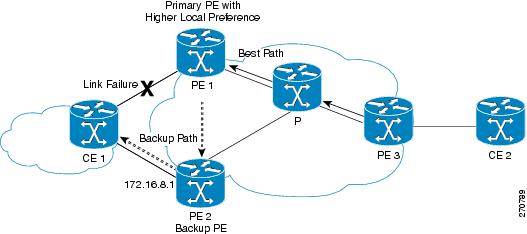
The figure above shows an MPLS VPN using the BGP Best External feature. The network includes the following components:
eBGP sessions exist between the provider edge (PE) and customer edge (CE) routers.
PE1 is the primary router and has a higher local preference setting.
Traffic from CE2 uses PE1 to reach router CE1.
PE1 has two paths to reach CE1.
CE1 is dual-homed with PE1 and PE2.
PE1 is the primary path and PE2 is the backup path.
In the figure above, traffic in the MPLS cloud flows through PE1 to reach CE1. Therefore, PE2 uses PE1 as the best path and PE2 as the backup path.
PE1 and PE2 are configured with the BGP Best External feature. BGP computes both the best path (the PE1-CE1 link) and a backup path (PE2) and installs both paths into the RIB and Cisco Express Forwarding. The best external path (PE2) is advertised to the peer routers, in addition to the best path.
When Cisco Express Forwarding detects a link failure on the PE1-CE1 link, Cisco Express Forwarding immediately switches to the backup path PE2. Traffic is quickly rerouted due to local Fast Convergence in Cisco Express Forwarding using the backup path. Thus, traffic loss is minimized and fast convergence is achieved.
Configuration Modes for Enabling BGP Best External
You can enable the BGP Best External feature in different modes, each of which protects Virtual Routing and Forwarding (VRF) in its own way:
If you issue the bgp advertise-best-external command in VPNv4 address family configuration mode, it applies to all IPv4 VRFs. If you issue the command in this mode, you need not issue it for specific VRFs.
If you issue the bgp advertise-best-external command in IPv4 address family configuration mode, it applies only to that VRF.
BGP Best External Path on RR for Intercluster
Beginning with Cisco IOS XE Release 3.4S, BGP Best External is extended to BGP Best External for Intercluster RRs. This feature provides path diversity between RR clusters, providing best external functionality toward non-client iBGP peers. The feature is also known as the “intercluster best external path.”
Best external path at an RR means the best path within the RR’s cluster. This path might also be referred to as the best internal path.
When an RR (RR1) chooses a non-client iBGP path (that is, a path learned from another RR, let’s say RR2) as its overall best, with the BGP Best External for Intercluster RRs feature, RR1 will be able to advertise its best internal path to the non-client iBGP peers. This will help RR2 to learn an additional path, providing a diverse path.
Best external functionality at RRs is only for non-client iBGP peers. An RR cannot advertise best external paths to its clients because it has to advertise its overall bestpath (which can be either a client path or non-client or eBGP path).
The best external path calculated by the RR is the best internal path for the cluster. It will be advertised to the non-client iBGP peers only when the overall best path at this RR is a non-client iBGP path.
When there are multiple RRs, each in its own cluster, each RR must have the neighbor advertise best-external command configured for each of its neighbor RRs.
If the RR is in the forwarding plane, the bgp additional paths install command is necessary.
CLI Differences for Best External Path on an RR for Intercluster
Prior to Cisco IOS XE Release 3.4S, the BGP Best External feature was allowed on a PE only, and it was configured by the bgp advertise-best-external command. The calculation of the backup path, installation, and advertisement were tied together in one command.
Beginning with Cisco IOS XE Release 3.4S, the BGP Best External feature is allowed on PEs and RRs. The functionality of the bgp advertise-best-external command is divided among the following three commands that calculate, install, and advertise the best external path:
bgp additional-path select best-external
bgp additional-path install
neighbor advertise diverse-path best-external
If the bgp additional-path select best-external command is not configured, the system will calculate and install the best external path, but not advertise it.
The neighbor advertise diverse-path best-external command enables the advertisement of the best external path to the specified neighbor.
Rules Used to Calculate the BGP Best External Path for Intercluster RRs
The best internal path implementation on an RR toward non-clients (different cluster RRs) is calculated based on the following rules:
Calculate the overall primary bestpath on the RR per the normal bestpath selection rules.
If a backup path configuration is enabled, calculate the second bestpath (which is a different path from the primary bestpath selected in Rule 1 and has a different nexthop from this bestpath), which is marked as the backup path. Backup path selection is enabled using the bgp additional-paths install or bgp additional-paths select [best-external] [backup] command.
If the overall best path on the RR is a non-client iBGP path and not an eBGP path, calculate the best external/internal path from the remaining paths after excluding results from Rule 1 and Rule 2 and by ignoring all the other paths from the other clusters and run normal bestpath rules by including all the remaining eBGP and iBGP paths. Select the newly obtained bestpath and mark it as the best internal path.
Advertise this best internal path, which is either eBGP (received from CE peers for RR/ASBR) or iBGP (received from RR clients) toward the non-client RRs when neighbor advertise best-external is configured towards the non-client RRs.
If the overall bestpath is a path received from either an RR client or eBGP peer (in case of RR/ASBR) either an iBGP or an eBGP path will be chosen as bestpath per the normal bestpath algorithm. Because the overall bestpath is an internal client path, the normal advertisement rules will automatically advertise this path to non-client iBGP peers/RRs. This behavior is the same as the existing behavior (when best external is not enabled on RRs) when an RR client’s path is chosen as the overall bestpath.
We do not allow a best external path to be configured on an RR towards RR-clients. The neighbor advertise best-external command can be configured on RR/ASBR only for non-clients or peering with RRs in the other clusters.
When multipath is enabled on the RR and only when the overall bestpath is from a non-client and if some of the intracluster client paths are also marked as multipaths, when best external is enabled on the RR (neighbor advertise best-external towards the RR non-client), the algorithm selects the older multipath among the intra-cluster client multipaths (paths obtained from RR clients and eBGP peers within the cluster) and marks it as best internal path and announces it to the non-clients as best external path, so that the non-clients get path diversity from this cluster. If there are no intra-cluster multipaths found, we choose the best external path per Rules 3 through 5.
How to Configure BGP Best External
Configuring the BGP Best External Feature
Perform the following task to configure the BGP Best External feature. This task shows how to configure the BGP Best External feature in either an IPv4 or VPNv4 address family. In VPNv4 address family configuration mode, the BGP Best External feature applies to all IPv4 Virtural Routing Forwarding (VRF); you need not configure it for specific VRFs. If you issue the bgp advertise-best-external command in IPv4 VRF address family configuration mode, the BGP Best External feature applies only to that VRF.
Configure the MPLS VPN and verify that it is working properly before configuring the BGP Best External feature. See the "Configuring MPLS Layer 3 VPNs" section for more information.
Configure multiprotocol VRFs to allow you to share route-target policies (import and export) between IPv4 and IPv6 or configure separate route-target policies for IPv4 and IPv6 VPNs. For information about configuring multiprotocol VRFs, see the "MPLS VPN--VRF CLI for IPv4 and IPv6 VPNs section".
Ensure that the customer edge (CE) router is connected to the network by at least two paths.
1.
enable
2.
configure
terminal
3.
router
bgp
autonomous-system-number
5.
bgp
advertise-best-external
6.
neighbor
ip-address
remote-as
autonomous-system-number
7.
neighbor
ip-address
activate
8.
neighbor
ip-address
fall-over
[bfd |
route-map
map-name]
9.
end
DETAILED STEPS
Verifying the BGP Best External Feature
Perform the following task to verify that the BGP Best External feature is configured correctly.
1.
enable
2.
show
vrf
detail
3.
show
ip
bgp
ipv4
mdt
all
|
rd
vrf} |
multicast |
tunnel
unicast
or show
ip bgp vpn4
all
rd
route-distinguisher
|
vrf
vrf-name
rib-failure
ip-prefix/length
longer-prefixes]]
network-address
mask
longer-prefixes]]
cidr-only
community
community-list
dampened-paths
filter-list] [flap-statistics
inconsistent-as
neighbors
paths
line]]
peer-group
quote-regexp
regexp] [summary
labels
4.
show
bgp
vpnv4
unicast
vrf
vrf-name
ip-address
5.
show
ip
route
vrf
vrf-name
repair-paths
ip-address
6.
show
ip
cef
vrf
vrf-name
ip-address
detail
DETAILED STEPS
| Step 1 |
enable
Use this command to enable privileged EXEC mode. Enter your password, if prompted. For example: Example: Router> enable Router# |
| Step 2 |
show
vrf
detail
Use this command to verify that the BGP Best External feature is enabled. The following show vrf detail command output shows that the BGP Best External feature is enabled. Example:
Router# show vrf detail
VRF test1 (VRF Id = 1); default RD 400:1; default VPNID <not set>
  Interfaces:
    Se4/0
Address family ipv4 (Table ID = 1 (0x1)):
  Export VPN route-target communities
    RT:100:1                 RT:200:1                 RT:300:1
    RT:400:1
  Import VPN route-target communities
    RT:100:1                 RT:200:1                 RT:300:1
    RT:400:1
  No import route-map
  No export route-map
  VRF label distribution protocol: not configured
  VRF label allocation mode: per-prefix

 Prefix protection with additional path enabled
Address family ipv6 not active.
|
| Step 3 |
show
ip
bgp
ipv4
mdt
all
|
rd
vrf} |
multicast |
tunnel
unicast
or show
ip bgp vpn4
all
rd
route-distinguisher
|
vrf
vrf-name
rib-failure
ip-prefix/length
longer-prefixes]]
network-address
mask
longer-prefixes]]
cidr-only
community
community-list
dampened-paths
filter-list] [flap-statistics
inconsistent-as
neighbors
paths
line]]
peer-group
quote-regexp
regexp] [summary
labels
Use this command to verify that the best external route is advertised. In the command output, the code b indicates a backup path and the code x designates the best external path. Example:
Router# show ip bgp vpnv4 all
BGP table version is 1104964, local router ID is 10.2.2.2
Status codes: s suppressed, d damped, h history, * valid, > best, i - internal,
              r RIB-failure, S Stale, multipath,
b backup-path, x best-external
Origin codes: i - IGP, e - EGP, ? - incomplete
   Network          Next Hop            Metric LocPrf Weight Path
Route Distinguisher: 11:12 (default for vrf blue)
*>i1.0.0.1/32       10.10.3.3                  0     200     0 1 ?
* i                 10.10.3.3                  0     200     0 1 ?
*                   10.0.0.1                                 0 1 ?
*bx                 10.0.0.1                   0             0 1 ?
*                   10.0.0.1                                 0 1 ?
|
| Step 4 |
show
bgp
vpnv4
unicast
vrf
vrf-name
ip-address
Use this command to verify that the best external route is advertised. Example:
Router# show bgp vpnv4 unicast vrf vpn1 10.10.10.10
BGP routing table entry for 10:10:10.10.10.10/32, version 10
Paths: (2 available, best #1, table vpn1)
  Advertise-best-external
  Advertised to update-groups:
    1          2
  200
    10.6.6.6 (metric 21) from 10.6.6.6 (10.6.6.6)
    Origin incomplete, metric 0, localpref 200, valid, internal, best
    Extended Community: RT:1:1
    mpls labels in/out 23/23
  200
    10.1.2.1 from 10.1.2.1 (10.1.1.1)
    Origin incomplete, metric 0, localpref 100, valid,
external, backup/repair,     advertise-best-external
    Extended Community: RT:1:1 , recursive-via-connected
    mpls labels in/out 23/nolabel
|
| Step 5 |
show
ip
route
vrf
vrf-name
repair-paths
ip-address
Use this command to display the repair route. Example:
Router# show ip route vrf vpn1 repair-paths

Routing Table: vpn1
Codes: L - local, C - connected, S - static, R - RIP, M - mobile, B - BGP
       D - EIGRP, EX - EIGRP external, O - OSPF, IA - OSPF inter area
       N1 - OSPF NSSA external type 1, N2 - OSPF NSSA external type 2
       E1 - OSPF external type 1, E2 - OSPF external type 2
       i - IS-IS, su - IS-IS summary, L1 - IS-IS level-1, L2 - IS-IS level-2
       ia - IS-IS inter area, * - candidate default, U - per-user static route
       o - ODR, P - periodic downloaded static route, H - NHRP
       + - replicated route, % - next hop override
Gateway of last resort is not set
      10.0.0.0/8 is variably subnetted, 2 subnets, 2 masks
B        10.1.1.0/24 [200/0] via 10.6.6.6, 00:38:33
                    [RPR][200/0] via 10.1.2.1, 00:38:33
B        10.1.1.1/32 [200/0] via 10.6.6.6, 00:38:33
                    [RPR][200/0] via 10.1.2.1, 00:38:33
      10.0.0.0/8 is variably subnetted, 3 subnets, 2 masks
C        10.1.2.0/24 is directly connected, Ethernet0/0
L        10.1.2.2/32 is directly connected, Ethernet0/0
B        10.1.6.0/24 [200/0] via 10.6.6.6, 00:38:33
                     [RPR][200/0] via 10.1.2.1, 00:38:33
|
| Step 6 |
show
ip
cef
vrf
vrf-name
ip-address
detail
Use this command to display the best external route. Example: Router# show ip cef vrf test 10.71.8.164 detail 10.71.8.164/30, epoch 0, flags rib defined all labels recursive via 10.249.0.102 label 35 nexthop 10.249.246.101 Ethernet0/0 label 25 recursive via 10.249.0.104 label 28, repair nexthop 10.249.246.101 Ethernet0/0 label 24 |
Configuring Best External Path on an RR for an Intercluster
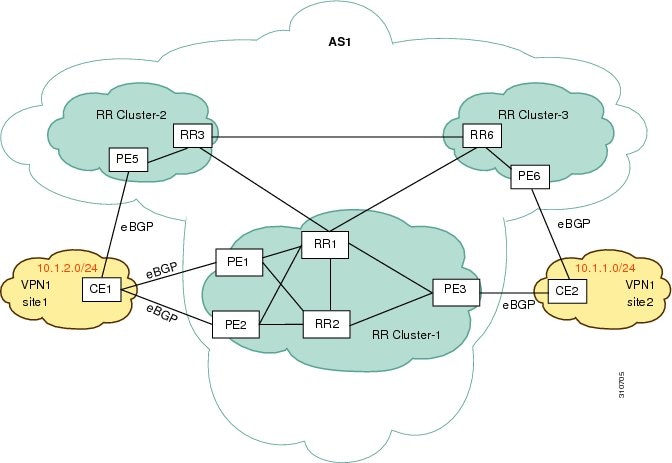
Perform the following task to configure a best external path on an RR for an intercluster. The steps in this particular task configure RR1 in the figure below, in the IPv4 address family. The step that configures address family lists the other address families supported.
1.
enable
2.
configure
terminal
3.
router bgp
autonomous-system-number
4.
neighbor
ip-address
remote-as
autonomous-system-number
5.
neighbor
ip-address
remote-as
autonomous-system-number
6.
address-family
ipv4 unicast
7.
neighbor ip-address
activate
8.
neighbor ip-address
activate
9.
bgp additional-paths select best-external
10.
bgp additional-paths install
11.
neighbor
ip-address
advertise best-external
12.
neighbor
ip-address
advertise best-external
13.
end
DETAILED STEPS
In the scenario shown above, the following paths are selected as best path, backup bath, and best internal path on the three RRs located in the three different clusters:
On RR1:
|
To Reach Prefix 10/8 |
Next Hop: |
|
PE5 (best path, local preference = 200) |
|
PE3 (backup path, local preference = 150) |
|
PE3 (best internal path, local preference = 150) |
To Reach Prefix 10/8 |
Next Hop: |
|
PE5 (best path, local preference = 200) |
|
PE6 (backup path, local preference = 50) |
|
PE3 (received as best external path from RR1, local preference = 150) |
To Reach Prefix 10/8 |
Next Hop: |
|
PE5 (best path, local preference = 200) |
|
PE6 (backup path, local preference = 50) |
|
PE3 (received as best external path from RR1, local preference = 150) |
Configuration Examples for BGP Best External
Example: Configuring the BGP Best External Feature
The following example shows how to configure the BGP Best External feature in VPNv4 mode:
vrf definition test1
 rd 400:1
 route-target export 100:1
 route-target export 200:1
 route-target export 300:1
 route-target export 400:1
 route-target import 100:1
 route-target import 200:1
 route-target import 300:1
 route-target import 400:1
 address-family ipv4
 exit-address-family
 exit
!
interface Ethernet1/0
 vrf forwarding test1
 ip address 10.0.0.1 255.0.0.0
 exit
!
router bgp 64500
 no synchronization
 bgp log-neighbor-changes
 neighbor 10.5.5.5 remote-as 64500
 neighbor 10.5.5.5 update-source Loopback0
 neighbor 10.6.6.6 remote-as 64500
 neighbor 10.6.6.6 update-source Loopback0
 no auto-summary
 !
 address-family vpnv4

bgp advertise-best-external
  neighbor 10.5.5.5 activate
  neighbor 10.5.5.5 send-community extended
  neighbor 10.6.6.6 activate
  neighbor 10.6.6.6 send-community extended
 exit-address-family
 !
 address-family ipv4 vrf test1
  no synchronization
bgp recursion host
  neighbor 192.168.13.2 remote-as 64511
  neighbor 192.168.13.2 fall-over bfd
  neighbor 192.168.13.2 activate
  neighbor 192.168.13.2 as-override
 exit-address-family
Example: Configuring a Best External Path on an RR for an Intercluster
The following example configures RR1 in the figure shown in the “Configuring a Best External Path on an RR for an Intercluster” section. RR1 is configured to calculate, install, and advertise the best external path to its intercluster RR neighbors.
RR1
router bgp 1
 neighbor 10.5.1.1 remote-as 1
 neighbor 10.5.1.2 remote-as 1
 address-family ipv4 unicast
 neighbor 10.5.1.1 activate
 neighbor 10.5.1.2 activate
 bgp additional-paths select best-external
 bgp additional-paths install
 neighbor 10.5.1.1 advertise best-external
 neighbor 10.5.1.2 advertise best-external
 end
Additional References
Related Documents
|
Related Topic |
Document Title |
|---|---|
|
Cisco IOS commands |
|
|
BGP commands |
|
|
Basic MPLS VPNs |
“Configuring MPLS Layer 3 VPNs” module in the MPLS: Layer 3 VPNs Configuration Guide |
|
Multiprotocol VRFs |
“MPLS VPN VRF CLI for IPv4 and IPv6 VPNs” module in the MPLS: Layer 3 VPNs Configuration Guide |
|
A failover feature that creates a new path after a link or node failure |
Standards
|
Standard |
Title |
|---|---|
|
draft-marques-idr-best-external |
BGP Best External, Advertisement of the best external route to iBGP |
MIBs
|
MIB |
MIBs Link |
|---|---|
|
— |
To locate and download MIBs for selected platforms, Cisco software releases, and feature sets, use Cisco MIB Locator found at the following URL: |
RFCs
|
RFC |
Title |
|---|---|
|
RFC 1771 |
A Border Gateway Protocol 4 (BGP-4) |
|
RFC 2547 |
BGP/MPLS VPNs |
Technical Assistance
|
Description |
Link |
|---|---|
|
The Cisco Support and Documentation website provides online resources to download documentation, software, and tools. Use these resources to install and configure the software and to troubleshoot and resolve technical issues with Cisco products and technologies. Access to most tools on the Cisco Support and Documentation website requires a Cisco.com user ID and password. |
Feature Information for BGP Best External
The following table provides release information about the feature or features described in this module. This table lists only the software release that introduced support for a given feature in a given software release train. Unless noted otherwise, subsequent releases of that software release train also support that feature.
Use Cisco Feature Navigator to find information about platform support and Cisco software image support. To access Cisco Feature Navigator, go to www.cisco.com/go/cfn. An account on Cisco.com is not required.
|
Feature Name |
Releases |
Feature Information |
|---|---|---|
|
BGP Best External |
Cisco IOS XE Release 3.2S |
The BGP Best External feature provides the network with a backup external route to avoid loss of connectivity of the primary external route. This feature advertises the most preferred route among those received from external neighbors as a backup route. In Cisco IOS XE Release 3.2S, this feature was introduced. The following commands were introduced or modified: bgp advertise-best-external, bgp recursion host, show ip bgp, show ip bgp vpnv4, show ip cef, show ip cef vrf, show ip route, show ip route vrf |
|
BGP Best External Path on an RR for Intercluster |
Cisco IOS XE Release 3.4S |
The BGP Best External Path on RR for Intercluster feature provides path diversity between RR clusters. The feature provides best external functionality toward non-client iBGP peers, and is also known as "intercluster best external path." The following commands were introduced: bgp additional-pathsselect, neighbor advertise best-external. |