- Cisco IOS Flexible NetFlow Overview
- Getting Started with Configuring Cisco IOS Flexible NetFlow
- Configuring Cisco IOS Flexible NetFlow with Predefined Records
- Configuring Data Export for Flexible NetFlow with Flow Exporters
- Customizing Flexible NetFlow Flow Records and Flow Monitors
- Using Flexible NetFlow Flow Sampling
- Finding Feature Information
- Information About Flexible NetFlow
- Where to Go Next
- Additional References
Cisco IOS Flexible NetFlow Overview
NetFlow is a Cisco IOS technology that provides statistics on packets flowing through the router. NetFlow is the standard for acquiring IP operational data from IP networks. NetFlow provides data to enable network and security monitoring, network planning, traffic analysis, and IP accounting.
Flexible NetFlow improves on original NetFlow by adding the capability to customize the traffic analysis parameters for your specific requirements. Flexible NetFlow facilitates the creation of more complex configurations for traffic analysis and data export through the use of reusable configuration components.
This module provides an overview of Flexible NetFlow and the advanced Flexible NetFlow features and services.
Finding Feature Information
Your software release may not support all the features documented in this module. For the latest caveats and feature information, see Bug Search Tool and the release notes for your platform and software release. To find information about the features documented in this module, and to see a list of the releases in which each feature is supported, see the feature information table at the end of this module.
Use Cisco Feature Navigator to find information about platform support and Cisco software image support. To access Cisco Feature Navigator, go to www.cisco.com/go/cfn. An account on Cisco.com is not required.
Information About Flexible NetFlow
- Typical Uses for NetFlow
- Use of Flows in Original NetFlow and Flexible NetFlow
- Original NetFlow and Flexible NetFlow
- Flexible NetFlow Components
- Security Monitoring with Flexible NetFlow
- Feature Comparison of Original NetFlow and Flexible NetFlow
- Limitations
Typical Uses for NetFlow
NetFlow is typically used for several key customer applications, including the following:
- Network monitoring. NetFlow data enables extensive near-real-time network monitoring capabilities. Flow-based analysis techniques are used by network operators to visualize traffic patterns associated with individual routers and switches and network-wide traffic patterns (providing aggregate traffic or application-based views) to provide proactive problem detection, efficient troubleshooting, and rapid problem resolution.
- Application monitoring and profiling. NetFlow data enables network managers to gain a detailed time-based view of application usage over the network. This information is used to plan, understand new services, and allocate network and application resources (for example, web server sizing and VoIP deployment) to meet customer demands responsively.
- User monitoring and profiling. NetFlow data enables network engineers to gain detailed understanding of customer and user use of network and application resources. This information may then be used to efficiently plan and allocate access, backbone, and application resources and to detect and resolve potential security and policy violations.
- Network planning. NetFlow can be used to capture data over a long period of time, affording the opportunity to track and anticipate network growth and plan upgrades to increase the number of routing devices, ports, and higher-bandwidth interfaces. NetFlow services data optimizes network planning for peering, backbone upgrades, and routing policy. NetFlow helps to minimize the total cost of network operations while maximizing network performance, capacity, and reliability. NetFlow detects unwanted WAN traffic, validates bandwidth and quality of service (QoS), and allows the analysis of new network applications. NetFlow will give you valuable information to reduce the cost of operating your network.
- Security analysis. NetFlow identifies and classifies distributed denial of service (dDoS) attacks, viruses, and worms in real time. Changes in network behavior indicate anomalies that are clearly demonstrated in Flexible NetFlow data. The data is also a valuable forensic tool to understand and replay the history of security incidents.
- Billing and accounting. NetFlow data provides fine-grained metering (for instance, flow data includes details such as IP addresses, packet and byte counts, time stamps, type of service (ToS), and application ports) for highly flexible and detailed resource utilization accounting. Service providers may use the information for billing based on time of day, bandwidth usage, application usage, quality of service, and so on. Enterprise customers may use the information for departmental charge back or cost allocation for resource utilization.
- NetFlow data warehousing and data mining. NetFlow data (or derived information) can be warehoused for later retrieval and analysis in support of proactive marketing and customer service programs (for example, discovering which applications and services are being used by internal and external users and targeting them for improved service, advertising, and so on). In addition, Flexible NetFlow data gives market researchers access to the "who," "what," "where," and "how long" information relevant to enterprises and service providers.
Use of Flows in Original NetFlow and Flexible NetFlow
Original NetFlow and Flexible NetFlow both use the concept of flows. A flow is defined as a stream of packets between a given source and a given destination.
Original NetFlow and Flexible NetFlow both use the values in key fields in IP datagrams, such as the IP source or destination address and the source or destination transport protocol port, as the criteria for determining when a new flow must be created in the cache while network traffic is being monitored. When the value of the data in the key field of a datagram is unique with respect to the flows that already exist, a new flow is created.
Original NetFlow and Flexible NetFlow both use nonkey fields as the criteria for identifying fields from which data is captured from the flows. The flows are populated with data that is captured from the values in the nonkey fields.
The figure below is an example of the process for inspecting packets and creating flow records in the cache. In this example, two unique flows are created in the cache because different values are in the source and destination IP address key fields.
| Figure 1 | Packet Inspection |

Original NetFlow and Flexible NetFlow
Original NetFlow uses a fixed seven tuples of IP information to identify a flow. Flexible NetFlow allows the flow to be user defined. The benefits of Flexible NetFlow include:
- High-capacity flow recognition, including scalability and aggregation of flow information.
- Enhanced flow infrastructure for security monitoring and dDoS detection and identification.
- New information from packets to adapt flow information to a particular service or operation in the network. The flow information available will be customizable by Flexible NetFlow users.
- Extensive use of Cisco's flexible and extensible NetFlow Version 9 export format.
- A comprehensive IP accounting feature that can be used to replace many accounting features, such as IP accounting, Border Gateway Protocol (BGP) Policy Accounting, and persistent caches.
Original NetFlow allows you to understand the activities in the network and thus to optimize network design and reduce operational costs. Flexible NetFlow allows you to understand network behavior with more efficiency, with specific flow information tailored for various services used in the network. The following are some example applications for a Flexible NetFlow feature:
- Flexible NetFlow enhances Cisco NetFlow as a security monitoring tool. For instance, new flow keys can be defined for packet length or MAC address, allowing users to search for a specific type of attack in the network.
- Flexible NetFlow allows you to quickly identify how much application traffic is being sent between hosts by specifically tracking TCP or UDP applications by the class of service (CoS) in the packets.
- The accounting of traffic entering a Multiprotocol Label Switching (MPLS) or IP core network and its destination for each next hop per class of service. This capability allows the building of an edge-to-edge traffic matrix.
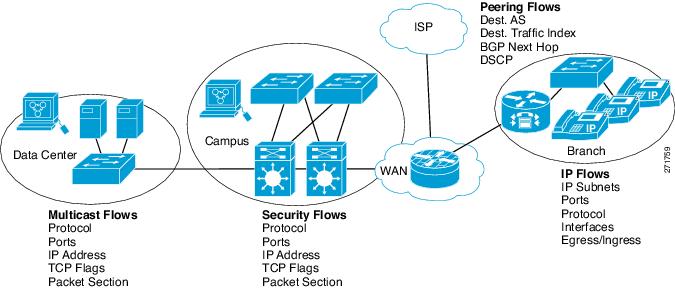
The figure below is an example of how Flexible NetFlow might be deployed in a network.
| Figure 2 | Typical Deployment for Flexible NetFlow |
Flexible NetFlow Components
Flexible NetFlow consists of components that can be used together in several variations to perform traffic analysis and data export. The user-defined flow records and the component structure of Flexible NetFlow facilitates the creation of various configurations for traffic analysis and data export on a networking device with a minimum number of configuration commands. Each flow monitor can have a unique combination of flow record, flow exporter, and cache type. If you change a parameter such as the destination IP address for a flow exporter, it is automatically changed for all the flow monitors that use the flow exporter. The same flow monitor can be used in conjunction with different flow samplers to sample the same type of network traffic at different rates on different interfaces. The following sections provide more information on Flexible NetFlow components:
Records
In Flexible NetFlow a combination of key and nonkey fields is called a record . Flexible NetFlow records are assigned to Flexible NetFlow flow monitors to define the cache that is used for storing flow data. Flexible NetFlow includes several predefined records that can help you get started using Flexible NetFlow. To use Flexible NetFlow to its fullest potential, you need to create your own customized records, as described in the following section(s):
NetFlow Predefined Records
Flexible NetFlow includes several predefined records that you can use to start monitoring traffic in your network. The predefined records are available to help you quickly deploy Flexible NetFlow and are easier to use than user-defined flow records. You can choose from a list of already defined records that may meet the needs for network monitoring. As Flexible NetFlow evolves, popular user-defined flow records will be made available as predefined records to make them easier to implement.
The predefined records ensure backward compatibility with your existing NetFlow collector configurations for the data that is exported. Each of the predefined records has a unique combination of key and nonkey fields that offer you the built-in ability to monitor various types of traffic in your network without customizing Flexible NetFlow on your router.
Two of the predefined records (NetFlow original and NetFlow IPv4/IPv6 original output), which are functionally equivalent, emulate original (ingress) NetFlow and the Egress NetFlow Accounting feature in original NetFlow, respectively. Some of the other Flexible NetFlow predefined records are based on the aggregation cache schemes available in original NetFlow. The Flexible NetFlow predefined records that are based on the aggregation cache schemes available in original NetFlow do not perform aggregation. Instead each flow is tracked separately by the predefined records.
User-Defined Records
Flexible NetFlow enables you to define your own records for a Flexible NetFlow flow monitor cache by specifying the key and nonkey fields to customize the data collection to your specific requirements. When you define your own records for a Flexible NetFlow flow monitor cache, they are referred to as user-defined records . The values in nonkey fields are added to flows to provide additional information about the traffic in the flows. A change in the value of a nonkey field does not create a new flow. In most cases the values for nonkey fields are taken from only the first packet in the flow. Flexible NetFlow enables you to capture counter values such as the number of bytes and packets in a flow as nonkey fields.
Flexible NetFlow adds a new Version 9 export format field type for the header and packet section types. Flexible NetFlow will communicate to the NetFlow collector the configured section sizes in the corresponding Version 9 export template fields. The payload sections will have a corresponding length field that can be used to collect the actual size of the collected section.
Flow Monitors
Flow monitors are the Flexible NetFlow component that is applied to interfaces to perform network traffic monitoring.
Flow data is collected from the network traffic and added to the flow monitor cache during the monitoring process based on the key and nonkey fields in the flow record.
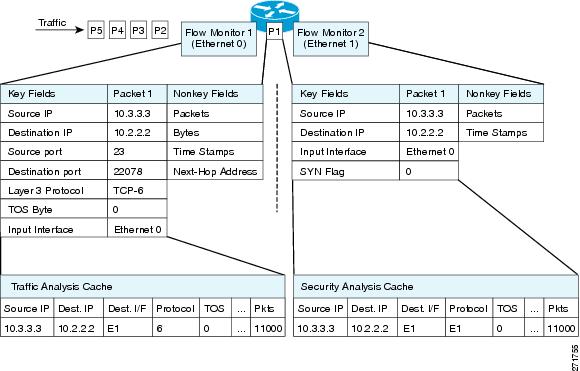
Flexible NetFlow can be used to perform different types of analysis on the same traffic. In the figure below, packet 1 is analyzed using a record designed for standard traffic analysis on the input interface and a record designed for security analysis on the output interface.
| Figure 3 | Example of Using Two Flow Monitors to Analyze the Same Traffic |
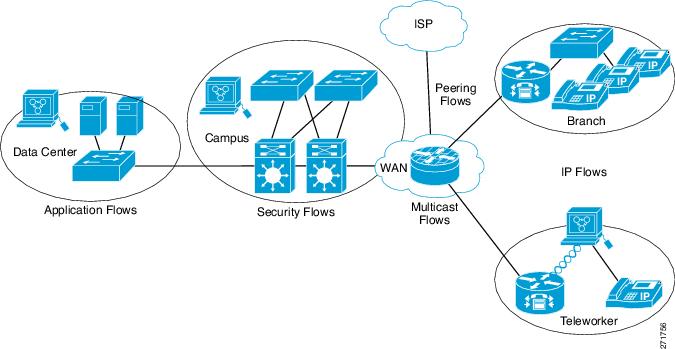
The figure below shows a more complex example of how you can apply different types of flow monitors with custom records.
| Figure 4 | Complex Example of Using Multiple Types of Flow Monitors with Custom Records |
Normal
The default cache type is "normal." In this mode, the entries in the cache are aged out according to the timeout active and timeout inactive settings. When a cache entry is aged out, it is removed from the cache and exported via any exporters configured.
Flow Exporters
Flow exporters export the data in the flow monitor cache to a remote system, such as a server running NetFlow collector, for analysis and storage. Flow exporters are created as separate entities in the configuration. Flow exporters are assigned to flow monitors to provide data export capability for the flow monitors. You can create several flow exporters and assign them to one or more flow monitors to provide several export destinations. You can create one flow exporter and apply it to several flow monitors.
NetFlow Data Export Format Version 9
The basic output of NetFlow is a flow record. Several different formats for flow records have evolved as NetFlow has matured. The most recent evolution of the NetFlow export format is known as Version 9. The distinguishing feature of the NetFlow Version 9 export format is that it is template-based. Templates provide an extensible design to the record format, a feature that should allow future enhancements to NetFlow services without requiring concurrent changes to the basic flow-record format. Using templates provides several key benefits:
- Third-party business partners who produce applications that provide collector or display services for NetFlow do not have to recompile their applications each time a new NetFlow feature is added. Instead, they should be able to use an external data file that documents the known template formats.
- New features can be added to NetFlow quickly without breaking current implementations.
- NetFlow is "future-proofed" against new or developing protocols because the Version 9 format can be adapted to provide support for them.
The Version 9 export format consists of a packet header followed by one or more template flow or data flow sets. A template flow set provides a description of the fields that will be present in future data flow sets. These data flow sets may occur later within the same export packet or in subsequent export packets. Template flow and data flow sets can be intermingled within a single export packet, as illustrated in the figure below.
| Figure 5 | Version 9 Export Packet |

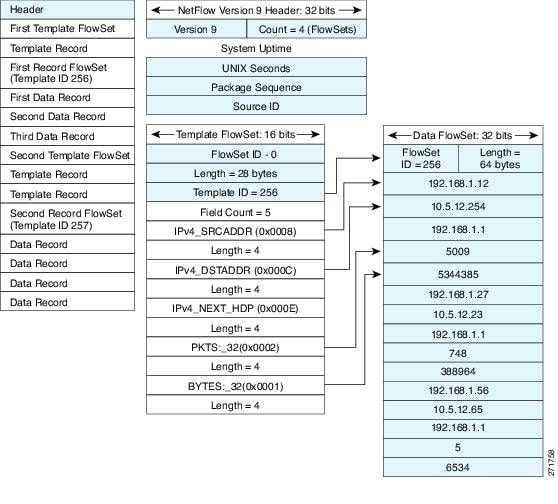
NetFlow Version 9 will periodically export the template data so the NetFlow collector will understand what data is to be sent and also export the data flow set for the template. The key advantage to Flexible NetFlow is that the user configures a flow record, which is effectively converted to a Version 9 template and then forwarded to the collector. The figure below is a detailed example of the NetFlow Version 9 export format, including the header, template flow, and data flow sets.
| Figure 6 | Detailed Example of the NetFlow Version 9 Export Format |
For more information on the Version 9 export format, refer to the white paper titled Cisco IOS NetFlow Version 9 Flow-Record Format, available at this URL: http://www.cisco.com/en/US/tech/tk648/tk362/technologies_white_paper09186a00800a3db9.shtml .
Flow Samplers
Flow samplers are created as separate components in a router's configuration. Flow samplers are used to reduce the load on the device that is running Flexible NetFlow by limiting the number of packets that are selected for analysis.
Flow sampling exchanges monitoring accuracy for router performance. When you apply a sampler to a flow monitor, the overhead load on the router of running the flow monitor is reduced because the number of packets that the flow monitor must analyze is reduced. The reduction in the number of packets that are analyzed by the flow monitor causes a corresponding reduction in the accuracy of the information stored in the flow monitor's cache.
Samplers are combined with flow monitors when they are applied to an interface with the ip flow monitor command.
Security Monitoring with Flexible NetFlow
Flexible NetFlow can be used as a network attack detection tool with capabilities to track all parts of the IP header and even packet sections and characterize this information into flows. Security monitoring systems can analyze Flexible NetFlow data, and upon finding an issue in the network, create a virtual bucket or virtual cache that will be configured to track specific information and identify details about the attack pattern or worm propagation. The capability to create caches dynamically with specific information combined with input filtering (for example, filtering all flows to a specific destination) makes Flexible NetFlow a powerful security monitoring tool.
One common type of attack occurs when TCP flags are used to flood open TCP requests to a destination server (for example, a SYN flood attack). The attacking device sends a stream of TCP SYNs to a given destination address but never sends the ACK in response to the servers SYN-ACK as part of the TCP three-way handshake. The flow information needed for a security detection server requires the tracking of three key fields: destination address or subnet, TCP flags, and packet count. The security detection server may be monitoring general Flexible NetFlow information, and this data may trigger a detailed view of this particular attack by the Flexible NetFlow dynamically creating a new flow monitor in the router's configuration. The new flow monitor might include input filtering to limit what traffic is visible in the Flexible NetFlow cache along with the tracking of the specific information to diagnose the TCP-based attack. In this case the user may want to filter all flow information to the server destination address or subnet to limit the amount of information the security detection server needs to evaluate. If the security detection server decided it understood this attack, it might then program another flow monitor to collect and export payload information or sections of packets to take a deeper look at a signature within the packet. This example is just one of many possible ways that Flexible NetFlow can be used to detect security incidents.
Feature Comparison of Original NetFlow and Flexible NetFlow
The table below provides a feature-by-feature comparison of original NetFlow and Flexible NetFlow.
| Table 1 | Feature-by-Feature Comparison of Original NetFlow and Flexible NetFlow |
| Feature |
Original NetFlow |
Flexible NetFlow |
Comments |
|---|---|---|---|
| NetFlow Data Capture |
Supported |
Supported |
Data capture is available with the predefined and user-defined records in Flexible NetFlow. Flexible NetFlow has several predefined keys that emulate the traffic analysis capabilities of original NetFlow. |
| NetFlow Data Export |
Supported |
Supported |
Flow exporters export data from the Flexible NetFlow flow monitor caches to remote systems. |
| NetFlow for IPv6 |
Supported |
Supported |
IPv6 support was removed from original NetFlow in Cisco IOS Release 12.4(20)T. The Flexible NetFlow--IPv6 Unicast Flows feature implemented IPv6 support for Flexible NetFlow in Cisco IOS Release 12.4(20)T. |
| MPLS-Aware NetFlow |
Supported |
Not supported |
-- |
| MPLS Egress NetFlow |
Supported |
Supported |
The Flexible NetFlow--MPLS Egress NetFlow feature implemented MPLS NetFlow egress support for Flexible NetFlow in Cisco IOS Release 12.4(22)T. |
| NetFlow BGP Next Hop Support |
Supported |
Supported |
Available in the predefined and user-defined keys in Flexible NetFlow records. |
| Random Packet Sampled NetFlow |
Supported |
Supported |
Available with Flexible NetFlow sampling. |
| NetFlow v9 Export Format |
Supported |
Supported |
Available with Flexible NetFlow exporters. |
| NetFlow Subinterface Support |
Supported |
Supported |
Flexible NetFlow monitors can be assigned to subinterfaces. |
| NetFlow Multiple Export Destinations |
Supported |
Supported |
Available with Flexible NetFlow exporters. |
| NetFlow ToS-Based Router Aggregation |
Supported |
Supported |
Available in the predefined and user-defined records in Flexible NetFlow records. |
| NetFlow Minimum Prefix Mask for Router-Based Aggregation |
Supported |
Supported |
Available in the predefined and user-defined records. |
| NetFlow Input Filters |
Supported |
Not supported |
-- |
| NetFlow MIB |
Supported |
Not supported |
-- |
| NetFlow MIB and Top Talkers |
Supported |
Not supported |
-- |
| NetFlow Multicast Support |
Supported |
Supported |
In Cisco IOS Release 12.4(9)T through 12.4(20)T Flexible NetFlow collects statistics for multicast flows. However, specific additional fields such as replication counts for bytes and packets are not supported. The Flexible NetFlow--IPv4 Multicast Statistics Support feature implemented support for capturing multicast replication counts for bytes and packets in Cisco IOS Release 12.4(22)T. |
| NetFlow Layer 2 and Security Monitoring Exports |
Supported |
Partially supported |
The Flexible NetFlow--Layer 2 Fields feature implemented support for capturing MAC addresses and virtual LAN (VLAN) IDs in Cisco IOS Release 12.4(22)T. |
| Egress NetFlow Accounting |
Supported |
Supported |
Flexible NetFlow monitors can be used to monitor egress traffic on interfaces and subinterfaces. |
| NetFlow Reliable Export with SCTP |
Supported |
Not supported |
-- |
| NetFlow Dynamic Top Talkers CLI |
Supported |
Supported |
The Flexible NetFlow--Top N Talkers Support feature implemented in Cisco IOS Release 12.4(22)T provides the same functionailty. |
Limitations
When using Flexible NetFlow to monitor outbound traffic on a router at the edge of an MPLS cloud, for IP traffic that leaves over a VRF, the following fields are not collected and have a value of 0:
Where to Go Next
To implement a basic Flexible NetFlow configuration that emulates original NetFlow traffic analysis and data export, refer to the "Getting Started with Configuring Cisco IOS Flexible NetFlow" module. To implement other Flexible NetFlow configurations, refer to the Where to Go Next.
Additional References
Related Documents
| Related Topic |
Document Title |
|---|---|
| Cisco IOS commands |
|
| Emulating original NetFlow with Flexible NetFlow |
"Getting Started with Configuring Cisco IOS Flexible NetFlow" |
| Configuring flow exporters to export Flexible NetFlow data |
"Configuring Data Export for Cisco IOS Flexible NetFlow with Flow Exporters" |
| Customizing Flexible NetFlow for your network |
"Customizing Cisco IOS Flexible NetFlow Flow Records and Flow Monitors" |
| Configuring flow sampling to reduce the overhead of monitoring traffic with Flexible NetFlow |
"Using Cisco IOS Flexible NetFlow Flow Sampling to Reduce the CPU Overhead of Analyzing Traffic" |
| Configuring Flexible NetFlow using predefined records |
"Configuring Cisco IOS Flexible NetFlow with Predefined Records" |
| Using Flexible NetFlow Top N Talkers to analyze network traffic |
"Using Cisco IOS Flexible NetFlow Top N Talkers to Analyze Network Traffic" |
| Configuring IPv4 multicast statistics support for Flexible NetFlow |
"Configuring IPv4 Multicast Statistics Support for Cisco IOS Flexible NetFlow" |
| Configuration commands for Flexible NetFlow |
Cisco IOS Flexible NetFlow Command Reference |
RFCs
| RFC |
Title |
|---|---|
| RFC 3954 |
Cisco Systems NetFlow Services Export Version 9 |
Technical Assistance
| Description |
Link |
|---|---|
| The Cisco Support and Documentation website provides online resources to download documentation, software, and tools. Use these resources to install and configure the software and to troubleshoot and resolve technical issues with Cisco products and technologies. Access to most tools on the Cisco Support and Documentation website requires a Cisco.com user ID and password. |
Cisco and the Cisco logo are trademarks or registered trademarks of Cisco and/or its affiliates in the U.S. and other countries. To view a list of Cisco trademarks, go to this URL: www.cisco.com/go/trademarks. Third-party trademarks mentioned are the property of their respective owners. The use of the word partner does not imply a partnership relationship between Cisco and any other company. (1110R)
Any Internet Protocol (IP) addresses and phone numbers used in this document are not intended to be actual addresses and phone numbers. Any examples, command display output, network topology diagrams, and other figures included in the document are shown for illustrative purposes only. Any use of actual IP addresses or phone numbers in illustrative content is unintentional and coincidental.
 Feedback