- Using Ethernet Operations Administration and Maintenance
- Configuring IEEE Standard-Compliant Ethernet CFM in a Service Provider Network
- Configuring ITU-T Y.1731 Fault Management Functions in IEEE CFM
- Configuring Ethernet Connectivity Fault Management in a Service Provider Network
- Enabling Ethernet Local Management Interface
- Using Link Layer Discovery Protocol in Multivendor Networks
- CFM Over Double-Tagged Layer 3 VLANs with EVC
- Finding Feature Information
- Prerequisites for Configuring IEEE Ethernet CFM in a Service Provider Network
- Restrictions for Configuring IEEE Ethernet CFM in a Service Provider Network
- Information About Configuring IEEE Ethernet CFM in a Service Provider Network
- How to Set Up IEEE Ethernet CFM in a Service Provider Network
- Configuring Ethernet OAM 802.3ah Interaction with CFM
- Configuring CFM over Bridge Domains
Configuring IEEE Standard-Compliant Ethernet CFM in a Service Provider Network
Ethernet Connectivity Fault Management (CFM) is an end-to-end per-service Ethernet layer operations, administration, and maintenance (OAM) protocol. CFM includes proactive connectivity monitoring, fault verification, and fault isolation for large Ethernet metropolitan-area networks (MANs) and WANs.
The advent of Ethernet as a MAN and WAN technology imposes a new set of OAM requirements on Ethernet’s traditional operations, which were centered on enterprise networks only. The expansion of Ethernet technology into the domain of service providers, where networks are substantially larger and more complex than enterprise networks and the user base is wider, makes operational management of link uptime crucial. More importantly, the timeliness in isolating and responding to a failure becomes mandatory for normal day-to-day operations, and OAM translates directly to the competitiveness of the service provider.
This document describes the implementation of IEEE 802.1ag Standard-Compliant CFM (IEEE CFM) in Cisco IOS software.
- Finding Feature Information
- Prerequisites for Configuring IEEE Ethernet CFM in a Service Provider Network
- Restrictions for Configuring IEEE Ethernet CFM in a Service Provider Network
- Information About Configuring IEEE Ethernet CFM in a Service Provider Network
- How to Set Up IEEE Ethernet CFM in a Service Provider Network
- Configuration Examples for Configuring IEEE Ethernet CFM in a Service Provider Network
- Additional References
- Feature Information for Configuring IEEE Ethernet CFM in a Service Provider Network
- Glossary
Finding Feature Information
Your software release may not support all the features documented in this module. For the latest caveats and feature information, see Bug Search Tool and the release notes for your platform and software release. To find information about the features documented in this module, and to see a list of the releases in which each feature is supported, see the feature information table.
Use Cisco Feature Navigator to find information about platform support and Cisco software image support. To access Cisco Feature Navigator, go to www.cisco.com/go/cfn. An account on Cisco.com is not required.
Prerequisites for Configuring IEEE Ethernet CFM in a Service Provider Network
Network topology and network administration have been evaluated.
Business and service policies have been established.
Parser return codes (PRCs) have been implemented for all supported commands related to configuring CFM on a maintenance endpoint (MEP), maintenance intermediate point (MIP), level, service instance ID, cross-check timer, cross-check, and domain.
To use Non-Stop Forwarding (NSF) and In Service Software Upgrade (ISSU), Stateful Switchover (SSO) must be configured and working properly.
To deploy CFM and the Per VLAN Spanning Tree (PVST) Simulation feature, the Spanning Tree Protocol (STP) root switch must be inside the Multiple Spanning-Tree (MST) region.
Restrictions for Configuring IEEE Ethernet CFM in a Service Provider Network
The IEEE CFM subsystem does not coexist in the same image as the Cisco pre-Standard CFM Draft 1 subsystem.
IEEE CFM is supported on LAN cards. Linecards that do not support CFM will not boot up, but they display an error message.
Unsupported line cards must be either removed or turned off.
When physical ports are configured to a port channel on which CFM is configured, the following constraints apply: CFM is not fully supported on an MPLS provider edge (PE) device. There is no interaction between CFM and an EoMPLS pseudowire. CFM packets can be transparently passed like regular data packets only via pseudowire, with the following restrictions: - For Policy Feature Card (PFC)-based EoMPLS, which uses a Cisco Catalyst LAN card as the MPLS uplink port, a CFM packet can be transparently passed via an EoMPLS pseudowire like regular data packets. The EoMPLS endpoint interface, however, cannot be a MEP or a MIP, although a CFM MEP or MIP can be supported on regular Layer 2 switchport interfaces.
High Availability (HA) feature support in CFM is platform dependent.
CFM loopback messages will not be confined within a maintenance domain according to their maintenance level. The impact of not having CFM loopback messages confined to their maintenance levels occurs at these levels: - Architecture--CFM layering is violated for loopback messages.
- Deployment--A user may potentially misconfigure a network and have loopback messages succeed.
- Security--A malicious device that recognizes devices’ MAC addresses and levels may potentially explore a network topology that should be transparent.
PVST simulation is not supported on blocked ports.
Information About Configuring IEEE Ethernet CFM in a Service Provider Network
- IEEE CFM
- Customer Service Instance
- Maintenance Association
- Maintenance Domain
- Maintenance Point
- CFM Messages
- Cross-Check Function
- SNMP Traps
- Ethernet CFM and Ethernet OAM Interworking
- HA Feature Support in CFM
- IEEE CFM Bridge Domain Support
IEEE CFM
IEEE CFM is an end-to-end per-service Ethernet layer OAM protocol that includes proactive connectivity monitoring, fault verification, and fault isolation. End to end can be PE to PE or customer edge to customer edge (CE to CE). A service can be identified as a service provider VLAN (S-VLAN) or an Ethernet virtual circuit (EVC) service.
Being an end-to-end technology is the distinction between CFM and other metro-Ethernet OAM protocols. For example, MPLS, ATM, and SONET OAM help in debugging Ethernet wires but are not always end to end. 802.3ah OAM is a single-hop and per-physical-wire protocol. It is not end to end or service aware. Ethernet Local Management Interface (E-LMI) is confined between the user-end provider edge (uPE) and CE and relies on CFM for reporting status of the metro-Ethernet network to the CE.
Troubleshooting carrier networks offering Ethernet Layer 2 services is challenging. Customers contract with service providers for end-to-end Ethernet service and service providers may subcontract with operators to provide equipment and networks. Compared to enterprise networks, where Ethernet traditionally has been implemented, these constituent networks belong to distinct organizations or departments, are substantially larger and more complex, and have a wider user base. Ethernet CFM provides a competitive advantage to service providers for which the operational management of link uptime and timeliness in isolating and responding to failures is crucial to daily operations.
Benefits of IEEE CFM
End-to-end service-level OAM technology
Reduced operating expense for service provider Ethernet networks
Competitive advantage for service providers
Support for both distribution and access network environments with Down (toward the wire) MEPs
Customer Service Instance
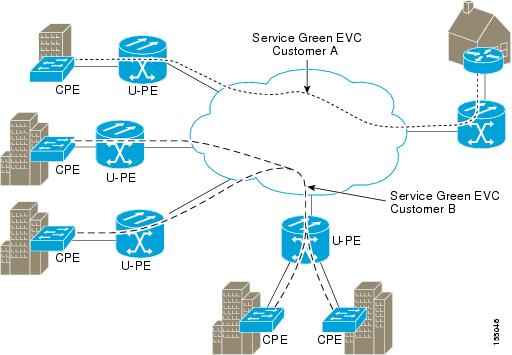
A customer service is an EVC, which is identified by the encapsulation VLAN within an Ethernet island, and is identified by a globally unique service ID. A customer service can be point-to-point or multipoint-to-multipoint. The figure below shows two customer services. Service Green is point to point; Service Blue is multipoint to multipoint.
Maintenance Association
A maintenance association (MA) identifies a service that can be uniquely identified within a maintenance domain. There can be many MAs within a domain. The MA direction is specified when the MA is configured. The short MA name must be configured on a domain before MEPs can be configured. Configuring a MA is not required for devices that have only MIPs.
The CFM protocol runs for a specific MA.
Maintenance Domain
A maintenance domain is a management space for the purpose of managing and administering a network. A domain is owned and operated by a single entity and defined by the set of ports internal to it and at its boundary. The figure below illustrates a typical maintenance domain.
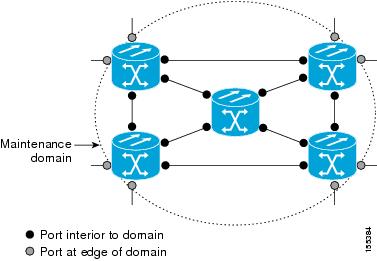
A unique maintenance level in the range of 0 to 7 is assigned to each domain by a network administrator. Levels and domain names are useful for defining the hierarchical relationship that exists among domains. The hierarchical relationship of domains parallels the structure of customer, service provider, and operator. The larger the domain, the higher the level value. For example, a customer domain would be larger than an operator domain. The customer domain may have a maintenance level of 7 and the operator domain may have a maintenance level of 0. Typically, operators would have the smallest domains and customers the largest domains, with service provider domains between them in size. All levels of the hierarchy must operate together.
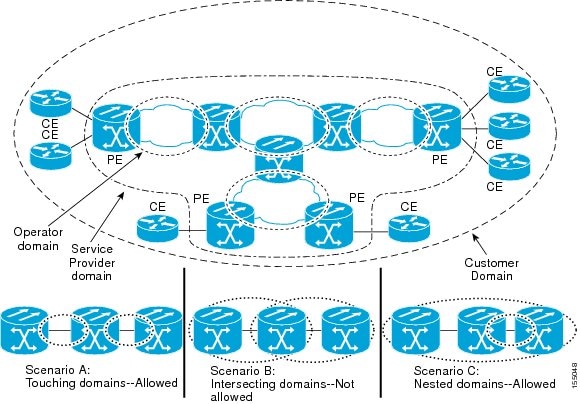
Domains should not intersect because intersecting would mean management by more than one entity, which is not allowed. Domains may nest or touch but when two domains nest, the outer domain must have a higher maintenance level than the domain nested within it. Nesting maintenance domains is useful in the business model where a service provider contracts with one or more operators to provide Ethernet service to a customer. Each operator would have its own maintenance domain and the service provider would define its domain--a superset of the operator domains. Furthermore, the customer has its own end-to-end domain, which is in turn a superset of the service provider domain. Maintenance levels of various nesting domains should be communicated among the administering organizations. For example, one approach would be to have the service provider assign maintenance levels to operators.
CFM exchanges messages and performs operations on a per-domain basis. For example, running CFM at the operator level does not allow discovery of the network by the higher provider and customer levels.
Network designers decide on domains and configurations.
The following characteristics of domains are supported:
Name is a maximum of 154 characters
Domain “null” is supported; the short maintenance association name is used as the identifier
Domain configuration is not required for devices that have only MIPs
Direction is specified when the maintenance association is configured
Mix of Up (toward the bridge) and Down (toward the wire) MEPs is supported
A domain can be removed when all maintenance points within the domain have been removed and all remote MEP entries in the CCDB for the domain have been purged.
The figure below illustrates a hierarchy of operator, service provider, and customer domains and also illustrates touching, intersecting, and nested domains.
Maintenance Point
A maintenance point is a demarcation point on an interface or port that participates in CFM within a maintenance domain. Maintenance points on device ports act as filters that confine CFM frames within the bounds of a domain by dropping frames that do not belong to the correct level. Maintenance points must be explicitly configured on Cisco devices. Two classes of maintenance points exist, MEPs and MIPs.
Maintenance Association Endpoints
Maintenance association endpoints (MEPs) reside at the edge of a maintenance domain and confine CFM messages within the domain via the maintenance domain level. MEPs periodically transmit and receive continuity check messages (CCMs) from other MEPs within the domain. At the request of an administrator, linktrace and loopback messages can also be transmitted. MEPs are either “Up” (toward the bridge) or “Down” (toward the wire). The default direction is Up.
MEP supports multicast loopback and ping. When a multicast ping is done for a particular domain or service or vlan, all the related remote MEPs reply to the ping.
A port MEP supports a Down MEP with no VLAN and if a static remote MEP has not been detected, normal data traffic is stopped.
MEP configurations can be removed after all pending loopback and traceroute replies are removed and the service on the interface is set to transparent mode. To set the service to transparent mode, MIP filtering should not be configured.
Up MEPs
Up MEPs communicate through the Bridge Relay function and use the Bridge-Brain MAC address. An Up MEP performs the following functions:
Sends and receives CFM frames at its level through the Bridge relay, not via the wire connected to the port on which the MEP is configured.
Drops all CFM frames at its level (or lower level) that come from the direction of the wire.
Processes all CFM frames at its level coming from the direction of the bridge.
Drops all CFM frames at a lower level coming from the direction of the bridge.
Transparently forwards all CFM frames at a higher level, independent of whether they come in from the bridge side or the wire side.
If the port on which the Up MEP is configured is blocked by Spanning-Tree Protocol, the MEP can still transmit or receive CFM messages via the bridge function.
Down MEPs for Routed Ports and Switch Ports
Down MEPs communicate through the wire. They can be configured on routed ports and switch ports. A MIP configuration at a level higher than the level of a Down MEP is not required.
Down MEPs use the port MAC address. Down MEPs on port channels use the MAC address of the first member port. When port channel members change, the identities of Down MEPs do not have to change.
A Down MEP performs the following functions:
Sends and receives CFM frames at its level via the wire connected to the port where the MEP is configured.
Drops all CFM frames at its level (or at a lower level) that come from the direction of the bridge.
Processes all CFM frames at its level coming from the direction of the wire.
Drops all CFM frames at a lower level coming from the direction of the wire.
If the port on which the Down MEP is configured is blocked by Spanning-Tree Protocol, the MEP can still transmit and receive CFM messages via the wire.
Transparently forwards all CFM frames at a higher level, independent of whether they came in from the bridge or wire.
Maintenance Intermediate Points
Maintenance intermediate points (MIPs) are within a maintenance domain and catalog and forward information received from MEPs. MIPs are passive points that respond only to CFM linktrace and loopback messages. A MIP has only one level associated with it.
MIPs are defined as two MIP half functions (MHFs): An Up MHF that resides above the port filtering entities and a Down MHF that resides below the port filtering entities. The same configuration parameters and characteristics apply to both MHFs of a MIP, as follows:
Can be created manually or dynamically (auto MIPs)
Dynamically created depending on configured policies at managed objects (MA, maintenance domain, or the default domain level)
Manual MIPs can be created under an interface and under a service instance within an interface.
Auto MIP commands can be issued globally or under a domain or service.
Auto MIPs can be created for VLANs at the default maintenance domain level if they are not attached to a specific MA, or they can be: - Created at a specified level for a maintenance domain or MA on any bridge port.
- When a lower MEP-only option is given, auto MIPs are created at a specified level only where a MEP is configured at the next lower level for a maintenance domain or MA.
- When an auto MIP command is not issued at the domain level or the MA level, auto MIPs are not created for a maintenance domain or MA level.
- When an auto MIP command is not issued at the domain level but is issued at the MA level, auto MIPs are created at the MA level.
Can be created per MA, which means that a MIP in a MA can be lower level than a MEP in another MA.
Auto MIP creation command can be issued at the maintenance domain (level), which will create MIPs for all S-VLANs enabled or allowed on a port.
Internal to a domain, not at the boundary.
CFM frames received from MEPs and other MIPs are cataloged and forwarded, using both the wire and the Bridge relay.
When MIP filtering is enabled, all CFM frames at a lower level are stopped and dropped, independent of whether they originate from the wire or the Bridge relay.
All CFM frames at a higher level are forwarded, independent of whether they arrive from the wire or from the Bridge relay.
Passive points respond only when triggered by CFM traceroute and loopback messages.
Bridge-Brain MAC addresses are used.
If the port on which a MIP is configured is blocked by Spanning-Tree Protocol, the MIP can receive CFM messages and catalog them but cannot send them toward the Bridge relay. The MIP can receive and respond to CFM messages from the wire.
A MIP has only one level associated with it. The level filtering option is supported.
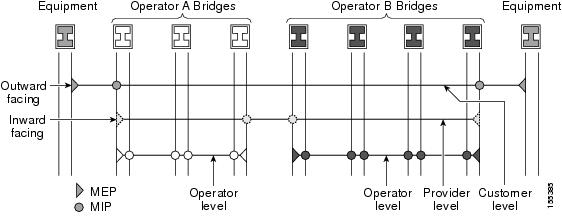
The figure below illustrates MEPs and MIPs at the operator, service provider, and customer levels.
CFM Messages
CFM uses standard Ethernet frames. CFM frames are distinguishable by EtherType and for multicast messages by MAC address. CFM frames are sourced, terminated, processed, and relayed by bridges. Routers can support only limited CFM functions.
Bridges that cannot interpret CFM messages forward them as normal data frames. All CFM messages are confined to a maintenance domain and to an MA. Three types of messages are supported:
Continuity Check
Linktrace
Loopback
Continuity Check Messages
CFM continuity check messages (CCMs) are multicast heartbeat messages exchanged periodically among MEPs. They allow MEPs to discover other MEPs within a domain and allow MIPs to discover MEPs. CCMs are confined to a domain.
CFM CCMs have the following characteristics:
Transmitted at a periodic interval by MEPs. The interval can be one of the following configurable values. The default is 10 seconds. - 10 seconds
- 1 minute
- 10 minutes
 Note | Default and supported interval values are platform dependent. |
Cataloged by MIPs at the same maintenance level.
Terminated by remote MEPs at the same maintenance level.
Unidirectional and do not solicit a response.
Indicate the status of the bridge port on which the MEP is configured.
Linktrace Messages
CFM linktrace messages (LTMs) are multicast frames that a MEP transmits, at the request of an administrator, to track the path (hop-by-hop) to a destination MEP. They are similar to Layer 3 traceroute messages. LTMs allow the transmitting node to discover vital connectivity data about the path and allow the discovery of all MIPs along the path that belong to the same maintenance domain. LTMs are intercepted by maintenance points along the path and processed, transmitted, or dropped. At each hop where there is a maintenance point at the same level, a linktrace message reply (LTR) is transmitted back to the originating MEP. For each visible MIP, linktrace messages indicate ingress action, relay action, and egress action.
Linktrace messages include the destination MAC address, VLAN, and maintenance domain and they have Time To Live (TTL) to limit propagation within the network. They can be generated on demand using the CLI. LTMs are multicast and LTRs are unicast.
Loopback Messages
CFM loopback messages (LBMs) are unicast frames that a MEP transmits, at the request of an administrator, to verify connectivity to a particular maintenance point. A reply to a loopback message (LBR) indicates whether a destination is reachable but does not allow hop-by-hop discovery of the path. A loopback message is similar in concept to an Internet Control Message Protocol (ICMP) Echo (ping) message.
Because LBMs are unicast, they are forwarded like normal data frames except with the maintenance level restriction. If the outgoing port is known in the bridge’s forwarding database and allows CFM frames at the message’s maintenance level to pass through, the frame is sent out on that port. If the outgoing port is unknown, the message is broadcast on all ports in that domain.
A CFM LBM can be generated on demand using the CLI. The source of a loopback message must be a MEP; the destination may be a MEP or a MIP. Both CFM LBMs and LBRs are unicast. CFM LBMs specify the destination MAC address or MPID, VLAN, and maintenance domain.
Cross-Check Function
The cross-check function is a timer-driven postprovisioning service verification between dynamically discovered MEPs (via continuity check messages CCMs)) and expected MEPs (via configuration) for a service. The cross-check function verifies that all endpoints of a multipoint or point-to-point service are operational. The function supports notifications when the service is operational; otherwise it provides alarms and notifications for unexpected or missing endpoints.
The cross-check function is performed one time. You must initiate the cross-check function from the CLI every time you want a service verification.
SNMP Traps
The support provided by the Cisco IOS software implementation of CFM traps is Cisco proprietary information. MEPs generate two types of Simple Network Management Protocol (SNMP) traps, continuity check (CC) traps and cross-check traps.
CC Traps
MEP up--Sent when a new MEP is discovered, the status of a remote port changes, or connectivity from a previously discovered MEP is restored after interruption.
MEP down--Sent when a timeout or last gasp event occurs.
Cross-connect--Sent when a service ID does not match the VLAN.
Loop--Sent when a MEP receives its own CCMs.
Configuration error--Sent when a MEP receives a continuity check with an overlapping MPID.
Cross-Check Traps
Service up--Sent when all expected remote MEPs are up in time.
MEP missing--Sent when an expected MEP is down.
Unknown MEP--Sent when a CCM is received from an unexpected MEP.
Ethernet CFM and Ethernet OAM Interworking
Ethernet Virtual Circuit
An EVC as defined by the Metro Ethernet Forum is a port-level point-to-point or multipoint-to-multipoint Layer 2 circuit. EVC status can be used by a CE device either to find an alternative path in to the service provider network or in some cases, to fall back to a backup path over Ethernet or over another alternative service such as Frame Relay or ATM.
OAM Manager
The OAM manager is an infrastructure element that streamlines interaction between OAM protocols. The OAM manager requires two interworking OAM protocols; for example, Ethernet CFM 802.1ag and link level Ethernet OAM 802.3ah. Interaction is unidirectional from the OAM manager to the CFM protocol and the only information exchanged is the user network interface (UNI) port status. Additional port status values available include
REMOTE_EE--Remote excessive errors
LOCAL_EE--Local excessive errors
TEST--Either remote or local loopback
After CFM receives the port status, it communicates that status across the CFM domain.
HA Feature Support in CFM
In access and service provider networks using Ethernet technology, HA is a requirement, especially on Ethernet OAM components that manage EVC connectivity. End-to-end connectivity status information is critical and must be maintained on a hot standby route processor (RP).
Note | A hot standby RP has the same software image as the active RP and supports synchronization of line card, protocol, and application state information between RPs for supported features and protocols. |
End-to-end connectivity status is maintained on the CE, PE, and access aggregation PE (uPE) network nodes based on information received by protocols such as Ethernet LMI, CFM, and 802.3ah. This status information is used to either stop traffic or switch to backup paths when an EVC is down.
Every transaction involves either accessing or updating data among various databases. If the database is synchronized across active and standby modules, the modules are transparent to clients.
The Cisco IOS infrastructure provides various component application program interfaces (APIs) that help to maintain a hot standby RP. Metro Ethernet HA clients E-LMI HA/ISSU, CFM HA/ISSU, and 802.3ah HA/ISSU interact with these components, update the database, and trigger necessary events to other components.
Benefits of CFM HA
Elimination of network downtime for Cisco IOS software image upgrades, allowing for faster upgrades that result in high availability.
Elimination of resource scheduling challenges associated with planned outages and late night maintenance windows.
Accelerated deployment of new services and applications and facilitation of faster implementation of new features, hardware, and fixes than if HA wasn’t supported.
Reduced operating costs due to outages while delivering high service levels.
CFM updates its databases and controls its own HA messaging and versioning, and this control facilitates maintenance.
CFM HA in a Metro Ethernet Network
A standalone CFM implementation does not have explicit HA requirements. When CFM is implemented on a CE or PE with E-LMI, CFM must maintain the EVC state, which requires HA because the EVC state is critical in maintaining end-to-end connectivity. CFM configures the platform with maintenance level, domain, and maintenance point, learns the remote maintenance point information, and maps it to the appropriate EVC. CFM then aggregates data received from all remote ports and updates E-LMI; consequently HA requirements vary for CE and PE.
None of the protocols used in a Metro Ethernet Network (MEN) take action based on an EVC state, but a CE device that uses the E-LMI protocol and receives EVC information will stop sending traffic to the MEN when the EVC is down. When an EVC is down, the CE may also use a backup network, if available.
The CE receives the EVC ID, associated customer VLANs, UNI information, EVC state, and remote UNI ID and state from the MEN. The CE relies on the EVC state to send or stop traffic to the MEN via E-LMI.
The PE has EVC configuration and associated customer VLAN information and derives the EVC state and remote UNI from CFM. This information is sent to the CE using E-LMI.
Note | PEs and CEs running 802.3ah OAM must maintain the port state so peers are not affected by a switchover. This information is also sent to remote nodes in CFM CCMs. |
NSF SSO Support in IEEE CFM
The redundancy configurations SSO and NSF are both supported in IEEE CFM and are automatically enabled. A switchover from an active to a standby RP occurs when the active RP fails, is removed from the networking device, or is manually taken down for maintenance. NSF interoperates with the SSO feature to minimize network downtime following a switchover. The primary function of Cisco NSF is to continue forwarding packets following an RP switchover.
For detailed information about SSO, see the “Stateful Switchover” chapter of the Cisco IOS High Availability Configuration Guide. For detailed information about the NSF feature, see the “Cisco Nonstop Forwarding” chapter of the Cisco IOS High Availability Configuration Guide.
ISSU Support in IEEE CFM
ISSU allows you to perform a Cisco IOS software upgrade or downgrade without disrupting packet flow. CFM performs a bulk update and a runtime update of the continuity check database to the standby RP, including adding, deleting, or updating a row. This checkpoint data requires ISSU capability to transform messages from one release to another. All the components that perform active RP to standby RP updates using messages require ISSU support.
ISSU is automatically enabled in CFM and lowers the impact that planned maintenance activities have on network availability by allowing software changes while the system is in service. For detailed information about ISSU, see the “Cisco IOS In Service Software Upgrade Process” chapter of the Cisco IOS High Availability Configuration Guide.
IEEE CFM Bridge Domain Support
Note | When an EFP with an inward-facing MEP (a PE interface toward a uPE interface) is configured with the default EFP encapsulation, the inward-facing MEPs on both ends receive CCMs from each other at a preset time interval. However, with the default encapsulation configured, packets are dropped and as a result, the CCMs are dropped at the ingress port. To stop packets from being dropped, at the default EFP configure the desired encapsulation using the cfm encapsulation command. |
An Ethernet flow point (EFP) or a service instance is a logical demarcation point of a bridge domain on an interface. VLAN tags are used to match and map traffic to the EFP. VLAN IDs have local significance per port similar to ATM/Frame Relay virtual circuits. CFM is supported on a bridge domain associated with an EFP. The association between the bridge domain and the EFP allows CFM to use the encapsulation on the EFP. All EFPs in the same bridge domain form a broadcast domain. The bridge domain ID determines the broadcast domain.
The distinction between a VLAN port and the EFP is the encapsulation. VLAN ports use a default dot1q encapsulation. For EFPs untagged, single tagged, and double tagged, encapsulation exists with dot1q and IEEE dot1ad EtherTypes. Different EFPs belonging to the same bridge domain can use different encapsulations.
Note | IEEE CFM support for bridge domains is available only on ES20 and ES40 line cards. |
Untagged CFM packets can be associated with a maintenance point. An incoming untagged customer CFM packet has an EtherType of CFM and is mapped to an EVC (bridge domain) based on the encapsulation configured on the EFP. The EFP can be configured specifically to recognize these untagged packets.
Switchport VLANs and EFPs configured with bridge domains handle MEPs and MIPs for a service independently. The bridge domain-to-VLAN space mapping is different for different platforms. For bridge domain and switchport VLAN interworking (maintenance points, ingress and egress are on both switchports and EFPs), a bridge domain-VLAN service should be configured on platforms where the bridge domain and switchport VLAN represent the same broadcast domain. On the Cisco 7600 series router, a bridge domain and a switchport VLAN with the same number form a single broadcast domain.
How to Set Up IEEE Ethernet CFM in a Service Provider Network
- Designing CFM Domains
- Configuring IEEE Ethernet CFM
- Configuring Ethernet OAM 802.3ah Interaction with CFM
- Configuring CFM over Bridge Domains
Designing CFM Domains
Note | To have an operator, service provider, or customer domain is optional. A network may have a single domain or multiple domains. The steps listed here show the sequence when all three types of domains will be assigned. |
Knowledge and understanding of the network topology.
Understanding of organizational entities involved in managing the network; for example, operators, service providers, network operations centers (NOCs), and customer service centers.
Understanding of the type and scale of services to be offered.
Agreement by all organizational entities on the responsibilities, roles, and restrictions for each organizational entity.
Determination of the number of maintenance domains in the network.
Determination of the nesting and disjoint maintenance domains.
Assignment of maintenance levels and names to domains based on agreement between the service provider and operator or operators.
Determination of whether the domain should be inward or outward.
1. Determine operator level MIPs.
2. Determine operator level MEPs.
3. Determine service provider MIPs.
4. Determine service provider MEPs.
5. Determine customer MIPs.
6. Determine customer MEPs.
DETAILED STEPS
Examples
The figure below shows an example of a network with a service provider and two operators, A and B. Three domains are to be established to map to each operator and the service provider. In this example, for simplicity we assume that the network uses Ethernet transport end to end. CFM, however, can be used with other transports.
Configuring IEEE Ethernet CFM
Provisioning the Network
- Provisioning the Network for CE-A
- Provisioning the Network for U-PE A
- Provisioning the Network for PE-AGG A
- Provisioning the Network for N-PE A
- Provisioning the Network for U-PE B
- Provisioning the Network for PE-AGG B
- Provisioning the Network for U-PE B
- Provisioning the Network for CE-B
Provisioning the Network for CE-A
Perform this task to prepare the network for Ethernet CFM.
To configure MIPs at different interfaces and service instances, you must configure an auto MIP under the domain and service.
1.
enable
2.
configure
terminal
3.
ethernet
cfm
domain
domain-name
level
level-id
4.
mep
archive-hold-time
minutes
5.
exit
6.
ethernet
cfm
global
7.
ethernet
cfm
ieee
8.
ethernet
cfm
traceroute
cache
9.
ethernet
cfm
traceroute
cache
size
entries
10.
ethernet
cfm
traceroute
cache
hold-time
minutes
11.
snmp-server
enable
traps
ethernet
cfm
cc
[mep-up][mep-down][config] [loop] [cross-connect]
12.
snmp-server
enable
traps
ethernet
cfm
crosscheck
[mep-unknown| mep-missing| service-up]
13.
end
DETAILED STEPS
Provisioning the Network for U-PE A
1.
enable
2.
configure
terminal
3.
ethernet
cfm
domain
domain-name
level
level-id
4.
exit
5.
ethernet
cfm
domain
domain-name
level
level-id
6.
mep
archive-hold-time
minutes
7.
exit
8.
ethernet
cfm
mip
{auto-create
level
level-id
vlan
{vlan-id|
vlan-id-vlan-id|
,
vlan-id-vlan-id}[lower-mep-only] [sender-id
chassis]|
filter}
9.
ethernet
cfm
domain
domain-name
level
level-id
10.
mep
archive-hold-time
minutes
11.
mip
auto-create
[lower-mep-only]
12.
exit
13.
ethernet
cfm
global
14.
ethernet
cfm
ieee
15.
ethernet
cfm
traceroute
cache
16.
ethernet
cfm
traceroute
cache
size
entries
17.
ethernet
cfm
traceroute
cache
hold-time
minutes
18.
interface
type
number
19.
ethernet
cfm
mip
level
level-id
20.
exit
21.
snmp-server
enable
traps
ethernet
cfm
cc
[mep-up][mep-down][config] [loop] [cross-connect]
22.
snmp-server
enable
traps
ethernet
cfm
crosscheck
[mep-unknown|
mep-missing|
service-up]
23.
end
DETAILED STEPS
Provisioning the Network for PE-AGG A
1.
enable
2.
configure
terminal
3.
ethernet
cfm
domain
domain-name
level
level-id
4.
mip
auto-create
[lower-mep-only]
5.
mep
archive-hold-time
minutes
6.
exit
7.
ethernet
cfm
global
8.
ethernet
cfm
ieee
9.
interface
type
number
10.
ethernet
cfm
mip
level
level-id
11.
interface
type
number
12.
ethernet
cfm
mip
level
level-id
13.
end
DETAILED STEPS
Provisioning the Network for N-PE A
1.
enable
2.
configure
terminal
3.
ethernet
cfm
domain
domain-name
level
level-id
4.
mep
archive-hold-time
minutes
5.
mip
auto-create
[lower-mep-only]
6.
exit
7.
ethernet
cfm
domain
domain-name
level
level-id
8.
mep
archive-hold-time
minutes
9.
exit
10.
ethernet
cfm
global
11.
ethernet
cfm
ieee
12.
ethernet
cfm
traceroute
cache
13.
ethernet
cfm
traceroute
cache
size
entries
14.
ethernet
cfm
traceroute
cache
hold-time
minutes
15.
interface
type
number
16.
ethernet
cfm
mip
level
level-id
17.
exit
18.
snmp-server
enable
traps
ethernet
cfm
cc
[mep-up][mep-down][config] [loop] [cross-connect]
19.
snmp-server
enable
traps
ethernet
cfm
crosscheck
[mep-unknown|
mep-missing|
service-up]
20.
end
DETAILED STEPS
Provisioning the Network for U-PE B
1.
enable
2.
configure
terminal
3.
ethernet
cfm
domain
domain-name
level
level-id
4.
exit
5.
ethernet
cfm
domain
domain-name
level
level-id
6.
mep
archive-hold-time
minutes
7.
exit
8.
ethernet
cfm
domain
domain-name
level
level-id
9.
mep
archive-hold-time
minutes
10.
exit
11.
ethernet
cfm
global
12.
ethernet
cfm
ieee
13.
ethernet
cfm
traceroute
cache
14.
ethernet
cfm
traceroute
cache
size
entries
15.
ethernet
cfm
traceroute
cache
hold-time
minutes
16.
interface
type
number
17.
ethernet
cfm
mip
level
level-id
18.
exit
19.
snmp-server
enable
traps
ethernet
cfm
cc
[mep-up][mep-down][config] [loop] [cross-connect]
20.
snmp-server
enable
traps
ethernet
cfm
crosscheck
[mep-unknown|
mep-missing|
service-up]
21.
end
DETAILED STEPS
Provisioning the Network for PE-AGG B
1.
enable
2.
configure
terminal
3.
ethernet
cfm
domain
domain-name
level
level-id
4.
mep
archive-hold-time
minutes
5.
mip
auto-create
[lower-mep-only]
6.
exit
7.
ethernet
cfm
global
8.
ethernet
cfm
ieee
9.
interface
type
number
10.
ethernet
cfm
mip
level
level-id
11.
interface
type
number
12.
ethernet
cfm
mip
level
level-id
13.
end
DETAILED STEPS
Provisioning the Network for U-PE B
1.
enable
2.
configure
terminal
3.
ethernet
cfm
domain
domain-name
level
level-id
4.
mep
archive-hold-time
minutes
5.
exit
6.
ethernet
cfm
domain
domain-name
level
level-id
7.
mep
archive-hold-time
minutes
8.
mip
auto-create
[lower-mep-only]
9.
exit
10.
ethernet
cfm
global
11.
ethernet
cfm
ieee
12.
ethernet
cfm
traceroute
cache
13.
ethernet
cfm
traceroute
cache
size
entries
14.
ethernet
cfm
traceroute
cache
hold-time
minutes
15.
interface
type
number
16.
ethernet
cfm
mip
level
level-id
17.
exit
18.
snmp-server
enable
traps
ethernet
cfm
cc
[mep-up][mep-down][config] [loop] [cross-connect]
19.
snmp-server
enable
traps
ethernet
cfm
crosscheck
[mep-unknown| mep-missing| service-up]
20.
end
DETAILED STEPS
Provisioning the Network for CE-B
1.
2.
enable
3.
configure
terminal
4.
ethernet
cfm
domain
domain-name
level
level-id
[direction outward]
5.
mep
archive-hold-time
minutes
6.
exit
7.
ethernet
cfm
global
8.
ethernet
cfm
ieee
9.
ethernet
cfm
traceroute
cache
10.
ethernet
cfm
traceroute
cache
size
entries
11.
ethernet
cfm
traceroute
cache
hold-time
minutes
12.
snmp-server
enable
traps
ethernet
cfm
cc
[mep-up][mep-down][config] [loop] [cross-connect]
13.
snmp-server
enable
traps
ethernet
cfm
crosscheck
[mep-unknown| mep-missing| service-up]
14.
end
DETAILED STEPS
Provisioning Service
- Provisioning Service for CE-A
- Provisioning Service for U-PE A
- Provisioning Service for PE-AGG A
- Provisioning Service for N-PE A
- Provisioning Service for U-PE B
- Provisioning Service for PE-AGG B
- Provisioning Service for N-PE B
- Provisioning Service for CE-B
Provisioning Service for CE-A
Perform this task to set up service for Ethernet CFM. Optionally, when this task is completed, you may configure and enable the cross-check function. To perform this optional task, see "Configuring and Enabling the Cross-Check Function".
1.
enable
2.
configure
terminal
3.
ethernet
cfm
domain
domain-name
level
level-id
4.
service
{ma-name |
ma-num |
vlan-id
vlan-id |
vpn-id
vpn-id} [port |
vlan
vlan-id [direction
down]]
5.
continuity-check
[interval
time |
loss-threshold
threshold |
static
rmep]
6.
continuity-check
[interval
time |
loss-threshold
threshold |
static
rmep]
7.
continuity-check
[interval
time |
loss-threshold
threshold |
static
rmep]
8.
exit
9.
mep
archive-hold-time
minutes
10.
exit
11.
ethernet
cfm
global
12.
ethernet
cfm
ieee
13.
ethernet
cfm
traceroute
cache
14.
ethernet
cfm
traceroute
cache
size
entries
15.
ethernet
cfm
traceroute
cache
hold-time
minutes
16.
interface
type
number
17.
ethernet
cfm
mep
domain
domain-name
mpid
mpid
{port |
vlan
vlan-id}
19.
ethernet
cfm
mep
domain
domain-name
mpid
mpid
{port |
vlan
vlan-id}
20.
end
DETAILED STEPS
Provisioning Service for U-PE A
1.
enable
2.
configure
terminal
3.
ethernet
cfm
domain
domain-name
level
level-id
4.
exit
5.
exit
6.
ethernet
cfm
domain
domain-name
level
level-id
7.
mep
archive-hold-time
minutes
8.
service
{ma-name | ma-num | vlan-id vlan-id | vpn-id vpn-id} [port | vlan vlan-id [direction down]]
9.
continuity-check
[interval time | loss-threshold threshold | static rmep]
10.
continuity-check
[interval time | loss-threshold threshold | static rmep]
11.
continuity-check
[interval time | loss-threshold threshold | static rmep]
12.
exit
13.
exit
14.
ethernet
cfm
domain
domain-name
level
level-id
15.
service
{ma-name | ma-num | vlan-id vlan-id | vpn-id vpn-id} [port | vlan vlan-id [direction down]]
16.
continuity-check
[interval time | loss-threshold threshold | static rmep]
17.
continuity-check
[interval time | loss-threshold threshold | static rmep]
18.
continuity-check
[interval time | loss-threshold threshold | static rmep]
19.
exit
20.
mep
archive-hold-time
minutes
21.
exit
22.
ethernet
cfm
global
23.
ethernet
cfm
ieee
24.
ethernet
cfm
traceroute
cache
25.
ethernet
cfm
traceroute
cache
size
entries
26.
ethernet
cfm
traceroute
cache
hold-time
minutes
27.
interface
type
number
28.
ethernet
cfm
mip
level
level-id
29.
ethernet
cfm
mep
domain
domain-name
mpid
mpid
{port | vlan vlan-id}
30.
interface
type
number
31.
ethernet
cfm
mip
level
level-id
32.
end
DETAILED STEPS
Provisioning Service for PE-AGG A
1.
enable
2.
configure
terminal
3.
ethernet
cfm
domain
domain-name
level
level-id
4.
mep
archive-hold-time
minutes
5.
mip
auto-create
[lower-mep-only]
6.
service
{ma-name | ma-num | vlan-id vlan-id | vpn-id vpn-id} [port | vlan vlan-id [direction down]]
7.
exit
8.
exit
9.
ethernet
cfm
global
10.
ethernet
cfm
ieee
11.
interface
type
number
12.
ethernet
cfm
mip
level
level-id
13.
interface
type
number
14.
ethernet
cfm
mip
level
level-id
15.
end
DETAILED STEPS
Provisioning Service for N-PE A
1.
enable
2.
configure
terminal
3.
ethernet
cfm
domain
domain-name
level
level-id
4.
mep
archive-hold-time
minutes
5.
mip
auto-create
[lower-mep-only]
6.
service
{ma-name | ma-num | vlan-id vlan-id | vpn-id vpn-id} [port | vlan vlan-id [direction down]]
7.
continuity-check
[interval time | loss-threshold threshold | static rmep]
8.
continuity-check
[interval time | loss-threshold threshold | static rmep]
9.
continuity-check
[interval time | loss-threshold threshold | static rmep]
10.
exit
11.
exit
12.
ethernet
cfm
domain
domain-name
level
level-id
13.
mep
archive-hold-time
minutes
14.
mip
auto-create
[lower-mep-only]
15.
service
{ma-name | ma-num | vlan-id vlan-id | vpn-id vpn-id} [port | vlan vlan-id [direction down]]
16.
continuity-check
[interval time | loss-threshold threshold | static rmep]
17.
continuity-check
[interval time | loss-threshold threshold | static rmep]
18.
continuity-check
[interval time | loss-threshold threshold | static rmep]
19.
exit
20.
exit
21.
ethernet
cfm
global
22.
ethernet
cfm
ieee
23.
ethernet
cfm
traceroute
cache
24.
ethernet
cfm
traceroute
cache
size
entries
25.
ethernet
cfm
traceroute
cache
hold-time
minutes
26.
interface
type
number
27.
ethernet
cfm
mip
level
level-id
28.
interface
type
number
29.
ethernet
cfm
mip
level
level-id
30.
ethernet
cfm
mep
domain
domain-name
mpid
mpid
{port | vlan vlan-id}
31.
end
DETAILED STEPS
Provisioning Service for U-PE B
1.
enable
2.
configure
terminal
3.
ethernet
cfm
domain
domain-name
level
level-id
4.
exit
5.
ethernet
cfm
domain
domain-name
level
level-id
6.
mep
archive-hold-time
minutes
7.
service
{ma-name |
ma-num |
vlan-id
vlan-id |
vpn-id
vpn-id} [port |
vlan
vlan-id
[direction
down]]
8.
continuity-check
[interval
time |
loss-threshold
threshold |
static
rmep]
9.
continuity-check
[interval
time |
loss-threshold
threshold |
static
rmep]
10.
continuity-check
[interval
time |
loss-threshold
threshold |
static
rmep]
11.
exit
12.
exit
13.
ethernet
cfm
domain
domain-name
level
level-id
14.
mep
archive-hold-time
minutes
15.
service
{ma-name |
ma-num |
vlan-id
vlan-id |
vpn-id
vpn-id}
[port |
vlan
vlan-id
[direction
down]]
16.
continuity-check
[interval
time |
loss-threshold
threshold |
static
rmep]
17.
continuity-check
[interval
time |
loss-threshold
threshold |
static
rmep]
18.
continuity-check
[interval
time |
loss-threshold
threshold |
static
rmep]
19.
exit
20.
exit
21.
ethernet
cfm
global
22.
ethernet
cfm
ieee
23.
ethernet
cfm
traceroute
cache
24.
ethernet
cfm
traceroute
cache
size
entries
25.
ethernet
cfm
traceroute
cache
hold-time
minutes
26.
interface
type
number
27.
ethernet
cfm
mip
level
level-id
28.
ethernet
cfm
mep
domain
domain-name
mpid
mpid
{port |
vlan
vlan-id}
29.
interface
type
number
30.
ethernet
cfm
mip
level
level-id
31.
end
DETAILED STEPS
Provisioning Service for PE-AGG B
1.
enable
2.
configure
terminal
3.
ethernet
cfm
domain
domain-name
level
level-id
4.
mep
archive-hold-time
minutes
5.
service
{ma-name | ma-num | vlan-id vlan-id | vpn-id vpn-id} [port | vlan vlan-id [direction down]]
6.
exit
7.
exit
8.
ethernet
cfm
global
9.
ethernet
cfm
ieee
10.
interface
type
number
11.
ethernet
cfm
mip
level
level-id
12.
interface
type
number
13.
ethernet
cfm
mip
level
level-id
14.
end
DETAILED STEPS
Provisioning Service for N-PE B
1.
enable
2.
configure
terminal
3.
ethernet
cfm
domain
domain-name
level
level-id
4.
mep
archive-hold-time
minutes
5.
service
{ma-name |
ma-num |
vlan-id
vlan-id |
vpn-id
vpn-id} [port |
vlan
vlan-id [direction
down]]
6.
exit
7.
ethernet
cfm
domain
domain-name
level
level-id
8.
mep
archive-hold-time
minutes
9.
service
{ma-name |
ma-num |
vlan-id
vlan-id |
vpn-id
vpn-id}
[port |
vlan
vlan-id
[direction
down]]
10.
continuity-check
[interval
time |
loss-threshold
threshold |
static
rmep]
11.
continuity-check
[interval
time |
loss-threshold
threshold |
static
rmep]
12.
continuity-check
[interval
time |
loss-threshold
threshold |
static
rmep]
13.
exit
14.
exit
15.
ethernet
cfm
global
16.
ethernet
cfm
ieee
17.
ethernet
cfm
traceroute
cache
18.
ethernet
cfm
traceroute
cache
size
entries
19.
ethernet
cfm
traceroute
cache
hold-time
minutes
20.
interface
type
number
21.
ethernet
cfm
mip
level
level-id
22.
interface
type
number
23.
ethernet
cfm
mip
level
level-id
24.
ethernet
cfm
mep
domain
domain-name
mpid
mpid
{port |
vlan
vlan-id}
25.
end
DETAILED STEPS
Provisioning Service for CE-B
- switchport
- switchport mode trunk
1.
enable
2.
configure
terminal
3.
ethernet
cfm
domain
domain-name
level
level-id
[direction outward]
4.
mep
archive-hold-time
minutes
5.
service
{ma-name | ma-num | vlan-id vlan-id | vpn-id vpn-id} [port | vlan vlan-id [direction down]]
6.
continuity-check
[interval time | loss-threshold threshold | static rmep]
7.
continuity-check
[interval time | loss-threshold threshold | static rmep]
8.
continuity-check
[interval time | loss-threshold threshold | static rmep]
9.
exit
10.
exit
11.
ethernet
cfm
global
12.
ethernet
cfm
ieee
13.
ethernet
cfm
traceroute
cache
14.
ethernet
cfm
traceroute
cache
size
entries
15.
ethernet
cfm
traceroute
cache
hold-time
minutes
16.
interface
type
number
17.
ethernet
cfm
mep
level
level-id
[inward| outward domain domain-name] mpid id vlan {any | vlan-id | , vlan-id| vlan-id - vlan-id| , vlan-id - vlan-id}
18.
Do one of the following:
19.
ethernet
cfm
mep
level
level-id
[inward| outward domain domain-name] mpid id vlan {any | vlan-id | , vlan-id| vlan-id - vlan-id| , vlan-id - vlan-id}
20.
end
DETAILED STEPS
Configuring and Enabling the Cross-Check Function
Perform this task to configure and enable cross-checking for an Up MEP. This task requires you to configure and enable cross-checking on two devices. This task is optional.
- Configuring and Enabling Cross-Checking for an Up MEP (U-PE A)
- Configuring and Enabling Cross-Checking for an Up MEP (U-PE B)
- Configuring and Enabling Cross-Checking for a Down MEP (CE-A)
- Configuring and Enabling Cross-Checking for a Down MEP (CE-B)
Configuring and Enabling Cross-Checking for an Up MEP (U-PE A)
1.
enable
2.
configure
terminal
3.
ethernet
cfm
domain
domain-name
level
level-id
4.
mep
crosscheck
mpid
id
vlan
vlan-id
[mac
mac-address]
5.
exit
6.
ethernet
cfm
mep
crosscheck
start-delay
delay
7.
exit
8.
ethernet
cfm
mep
crosscheck
{enable |
disable}
domain
domain-name {port |
vlan{vlan-id |
vlan-id
-
vlan-id |
,
vlan-id
-
vlan-id}}
DETAILED STEPS
Examples
The following example configures cross-checking on an Up MEP (U-PE A):
U-PE A
ethernet cfm domain ServiceProvider level 4
mep mpid 402
!
ethernet cfm mep crosscheck start-delay 60
The following example enables cross-checking on an Up MEP (U-PE A):
U-PE A
U-PEA# ethernet cfm mep crosscheck enable domain cust4 vlan 100
Configuring and Enabling Cross-Checking for an Up MEP (U-PE B)
1.
enable
2.
configure
terminal
3.
ethernet
cfm
domain
domain-name
level
level-id
4.
mep
crosscheck
mpid
id
vlan
vlan-id
[mac
mac-address]
5.
exit
6.
ethernet
cfm
mep
crosscheck
start-delay
delay
7.
exit
8.
ethernet
cfm
mep
crosscheck
{enable |
disable}
domain
domain-name {port |
vlan{vlan-id |
vlan-id
-
vlan-id |
,
vlan-id
-
vlan-id}}
DETAILED STEPS
Examples
The following example configures cross-checking on an Up MEP (U-PE B):
U-PE B
ethernet cfm domain ServiceProvider level 4
mep mpid 401
!
ethernet cfm mep crosscheck start-delay 60
The following example enables cross-checking on an Up MEP (U-PE B):
U-PE B
U-PEB# ethernet cfm mep crosscheck enable domain cust4 vlan 100
Configuring and Enabling Cross-Checking for a Down MEP (CE-A)
1.
enable
2.
configure
terminal
3.
ethernet
cfm
domain
domain-name
level
level-id
4.
mep
mpid
mpid
5.
exit
6.
ethernet
cfm
mep
crosscheck
start-delay
delay
7.
exit
8.
ethernet
cfm
mep
crosscheck
{enable | disable} domain domain-name {port | vlan{vlan-id | vlan-id - vlan-id | , vlan-id - vlan-id}}
DETAILED STEPS
Configuring and Enabling Cross-Checking for a Down MEP (CE-B)
1.
enable
2.
configure
terminal
3.
ethernet
cfm
domain
domain-name
level
level-id
4.
mep
mpid
mpid
5.
exit
6.
ethernet
cfm
mep
crosscheck
start-delay
delay
7.
exit
8.
ethernet
cfm
mep
crosscheck
{enable | disable} domain domain-name {port | vlan{vlan-id | vlan-id - vlan-id | , vlan-id - vlan-id}}
DETAILED STEPS
Configuring Ethernet OAM 802.3ah Interaction with CFM
For Ethernet OAM to function with CFM, you must configure an EVC and the OAM manager and associate the EVC with CFM. Additionally, you must use an Up MEP when you want interaction with the OAM manager.
Configuring the OAM Manager
Note | If you configure, change, or remove a UNI service type, EVC, Ethernet service instance, or CE-VLAN configuration, all configurations are checked to ensure that UNI service types are matched with EVC configurations and Ethernet service instances are matched with CE-VLAN configurations. Configurations are rejected if the pairings do not match. |
1.
enable
2.
configure
terminal
3.
ethernet
cfm
domain
domain-name
level
level-id
4.
service
{ma-name | ma-num | vlan-id vlan-id | vpn-id vpn-id} [port | vlan vlan-id [direction down]
5.
exit
6.
exit
7.
ethernet
evc
evc-id
8.
oam
protocol
{cfm svlan svlan-id domain
9.
exit
10. Repeat Steps 3 through 9 to define other CFM domains that you want OAM manager to monitor.
11.
end
DETAILED STEPS
Enabling Ethernet OAM
The order in which the global and interface configuration commands are issued determines the configuration. The last command that is issued has precedence.
Perform this task to enable Ethernet OAM on a device or on an interface.
1.
enable
2.
configure
terminal
3.
interface
type
number
4.
switchport
5.
ethernet
oam
[max-rate oampdus | min-rate num-seconds| mode {active | passive} | timeout seconds]
6.
ethernet
oam
remote-loopback
{supported | timeout seconds}
7.
ethernet
cfm
mep
domain
domain-name
mpid
mpid
{port | vlan vlan-id}
8.
service
instance
id
ethernet
[evc-name]
9.
end
DETAILED STEPS
Configuring CFM over Bridge Domains
Perform this task to configure Ethernet CFM for bridge domains. This task is optional.
- service {ma-name | ma-num | vlan-id vlan-id | vpn-id vpn-id} [port | vlan vlan-id [direction down]
1.
enable
2.
configure
terminal
3.
ethernet
cfm
domain
domain-name
level
level-id
4.
Do one of the
following:
5.
continuity-check
[interval
time |
loss-threshold
threshold |
static
rmep]
6.
continuity-check
[interval
time |
loss-threshold
threshold |
static
rmep]
7.
mep
mpid
mpid
8.
exit
9.
ethernet
evc
evc-name
10.
exit
11.
interface
type
number
12.
no
ip
address
13.
service
instance
id
ethernet
[evc-name]
14.
encapsulation
dot1q
vlan-id
15.
bridge-domain
bridge-id
16.
cfm
mep
domain
domain-name
mpid
mpid-value
17.
end
18.
end
DETAILED STEPS
Troubleshooting Tips
To verify and isolate a fault, start at the highest level maintenance domain and do the following:
Check the device error status.
When a error exists, perform a loopback test to confirm the error.
Run a traceroute to the destination to isolate the fault.
If the fault is identified, correct the fault.
If the fault is not identified, go to the next lower maintenance domain and repeat steps 1 through 4 at that maintenance domain level.
Repeat the first four steps, as needed, to identify and correct the fault.
Configuration Examples for Configuring IEEE Ethernet CFM in a Service Provider Network
Example: Provisioning a Network
This configuration example shows only CFM-related commands. All commands that are required to set up the data path and configure the VLANs on the device are not shown. However, it should be noted that CFM traffic will not flow into or out of the device if the VLANs are not properly configured.
CE-A Configuration
!
ethernet cfm global
ethernet cfm ieee
!
ethernet cfm traceroute cache
ethernet cfm traceroute cache size 200
ethernet cfm traceroute cache hold-time 60
!
ethernet cfm mip auto-create level 7 vlan 1-4094
!
interface
 ethernet cfm mip level 7 vlan 101   <<<< Manual MIP
 ethernet cfm mep domain ServiceProvider-L4 mpid 401 vlan 101
 ethernet cfm mep domain OperatorA-L1 mpid 101 vlan 101
!
interface
 ethernet cfm mip level 1 vlan 101   <<<< Manual MIP
!
snmp-server enable traps ethernet cfm cc mep-up mep-down cross-connect loop config
snmp-server enable traps ethernet cfm crosscheck mep-missing mep-unknown service-up
U-PE A Configuration
!
ethernet cfm global
ethernet cfm ieee
!
ethernet cfm traceroute cache
ethernet cfm traceroute cache size 200
ethernet cfm traceroute cache hold-time 60
!
ethernet cfm mip auto-create level 7 vlan 1-4094
!
interface
 ethernet cfm mip level 7 vlan 101   <<<< Manual MIP
 ethernet cfm mep domain ServiceProvider-L4 mpid 401 vlan 101
 ethernet cfm mep domain OperatorA-L1 mpid 101 vlan 101
!
interface
 ethernet cfm mip level 1 vlan 101   <<<< Manual MIP
!
snmp-server enable traps ethernet cfm cc mep-up mep-down cross-connect loop config
snmp-server enable traps ethernet cfm crosscheck mep-missing mep-unknown service-up
PE-AGG A Configuration
ethernet cfm global
ethernet cfm ieee
ethernet cfm domain OperatorA-L1 level 1
mep archive-hold-time 65
  mip auto-create
  service MetroCustomer1OpA vlan 101
!
interface
 ethernet cfm mip level 1 vlan 101   <<<< Manual MIP
!
interface
 ethernet cfm mip level 1    <<<< Manual MIP
N-PE A Configuration
!
ethernet cfm global
ethernet cfm ieee
!
ethernet cfm traceroute cache
ethernet cfm traceroute cache size 200
ethernet cfm traceroute cache hold-time 60
!
ethernet cfm domain ServiceProvider-L4 level 4
 mep archive-hold-time 60
 mip auto-create
 service MetroCustomer1 vlan 101
  continuity-check
!
ethernet cfm domain OperatorA level 1
mep archive-hold-time 65
 mip auto-create
service MetroCustomer1OpA vlan 101
  continuity-check
!
interface
 ethernet cfm mip level 1 		 <<<< manual MIP
!
interface
 ethernet cfm mip level 4    <<<< manual MIP
!
snmp-server enable traps ethernet cfm cc mep-up mep-down cross-connect loop config
snmp-server enable traps ethernet cfm crosscheck mep-missing mep-unknown service-up
U-PE B Configuration
!
ethernet cfm global
ethernet cfm ieee
ethernet cfm traceroute cache
ethernet cfm traceroute cache size 200
ethernet cfm traceroute cache hold-time 60
!
ethernet cfm domain Customer-L7 level 7
 mip auto-create
 service Customer1 vlan 101 direction down
!
ethernet cfm domain ServiceProvider-L4 level 4
 mep archive-hold-time 60
 service MetroCustomer1 vlan 101
  continuity-check
!
ethernet cfm domain OperatorB level 2
 mip auto-create
 mep archive-hold-time 65
 service MetroCustomer1OpB vlan 101
  continuity-check
!
interface
 ethernet cfm mip level 7   <<<< manual MIP
!
interface
 ethernet cfm mip level 2   <<<< manual MIP
!
snmp-server enable traps ethernet cfm cc mep-up mep-down cross-connect loop config
snmp-server enable traps ethernet cfm crosscheck mep-missing mep-unknown service-up
PE-AGG B Configuration
ethernet cfm global
ethernet cfm ieee
!
ethernet cfm domain OperatorB level 2
 mep archive-hold-time 65
 mip auto-create
 service MetroCustomer1OpB vlan 101
!
interface
 ethernet cfm mip level 2   <<<< manual MIP
!
interface
 ethernet cfm mip level 2   <<<< manual MIP
N-PE B Configuration
!
ethernet cfm global
ethernet cfm ieee
!
ethernet cfm traceroute cache
ethernet cfm traceroute cache size 200
ethernet cfm traceroute cache hold-time 60
!
ethernet cfm domain ServiceProvider level 4
 mep archive-hold-time 60
 mip auto-create
 service MetroCustomer1 vlan 101
  continuity-check
!
ethernet cfm domain OperatorB level 2
 mep archive-hold-time 65
 mip auto-create
 service MetroCustomer1OpB vlan 101
  continuity-check
!
interface
ethernet cfm mip level 2    <<<< manual MIP
!
interface
 ethernet cfm mip level 4   <<<< manual MIP
!
snmp-server enable traps ethernet cfm cc mep-up mep-down cross-connect loop config
snmp-server enable traps ethernet cfm crosscheck mep-missing mep-unknown service-up
CE-B Configuration
!
ethernet cfm global
ethernet cfm ieee
ethernet cfm traceroute cache
ethernet cfm traceroute cache size 200
ethernet cfm traceroute cache hold-time 60
!
ethernet cfm domain Customer-L7 level 7
 service Customer1 vlan 101 direction down
  continuity-check
!
snmp-server enable traps ethernet cfm cc mep-up mep-down cross-connect loop config
snmp-server enable traps ethernet cfm crosscheck mep-missing mep-unknown service-up
Example: Provisioning Service
CE-A Configuration
!
ethernet cfm global
ethernet cfm ieee
ethernet cfm traceroute cache
ethernet cfm traceroute cache size 200
ethernet cfm traceroute cache hold-time 60
!
ethernet cfm domain Customer-L7 level 7
 service Customer1 vlan 101 direction down
  continuity-check
!
interface
 ethernet cfm mep domain Customer-L7 mpid 701 vlan 101
U-PE A Configuration
!
ethernet cfm global
ethernet cfm ieee
ethernet cfm traceroute cache
ethernet cfm traceroute cache size 200
ethernet cfm traceroute cache hold-time 60
!
ethernet cfm mip auto-create level 7 vlan 1-4094
!
ethernet cfm domain ServiceProvider-L4 level 4
 mep archive-hold-time 60
 service MetroCustomer1 vlan 101
  continuity-check
!
ethernet cfm domain OperatorA-L1 level 1
 mep archive-hold-time 65
 mip auto-create
 service MetroCustomer1OpA vlan 101
  continuity-check
!
interface
 ethernet cfm mip level 7 vlan 101   <<<< Manual MIP
 ethernet cfm mep domain ServiceProvider-L4 mpid 401 vlan 101
 ethernet cfm mep domain OperatorA-L1 mpid 101 vlan 101
!
interface
 ethernet cfm mip level 1 vlan 101   <<<< Manual MIP
PE-AGG A Configuration
ethernet cfm global
ethernet cfm ieee
ethernet cfm domain OperatorA-L1 level 1
mep archive-hold-time 65
  mip auto-create
  service MetroCustomer1OpA vlan 101
!
interface
 ethernet cfm mip level 1 vlan 101   <<<< Manual MIP
!
interface
 ethernet cfm mip level 1    <<<< Manual MIP
N-PE A Configuration
!
ethernet cfm global
ethernet cfm ieee
!
ethernet cfm traceroute cache
ethernet cfm traceroute cache size 200
ethernet cfm traceroute cache hold-time 60
!
ethernet cfm domain ServiceProvider-L4 level 4
 mep archive-hold-time 60
 mip auto-create
 service MetroCustomer1 vlan 101
  continuity-check
!
ethernet cfm domain OperatorA level 1
mep archive-hold-time 65
 mip auto-create
service MetroCustomer1OpA vlan 101
  continuity-check
!
interface
 ethernet cfm mip level 1    <<<< manual MIP
!
interface
 ethernet cfm mip level 4    <<<< manual MIP
 ethernet cfm mep domain OperatorA mpid 102 vlan 101
U-PE B Configuration
!
ethernet cfm global
ethernet cfm ieee
ethernet cfm traceroute cache
ethernet cfm traceroute cache size 200
ethernet cfm traceroute cache hold-time 60
!
ethernet cfm domain Customer-L7 level 7
 mip auto-create
 service Customer1 vlan 101 direction down
!
ethernet cfm domain ServiceProvider-L4 level 4
 mep archive-hold-time 60
 service MetroCustomer1 vlan 101
  continuity-check
!
ethernet cfm domain OperatorB level 2
 mep archive-hold-time 65
 service MetroCustomer1OpB vlan 101
  continuity-check
!
interface
 ethernet cfm mip level 7   <<<< manual MIP
 ethernet cfm mep domain ServiceProvider-L4 mpid 402 vlan 101
 ethernet cfm mep domain OperatorB mpid 201 vlan 101
!
interface
 ethernet cfm mip level 2   <<<< manual MIP
N-PE B Configuration
!
ethernet cfm global
ethernet cfm ieee
ethernet cfm traceroute cache
ethernet cfm traceroute cache size 200
ethernet cfm traceroute cache hold-time 60
!
ethernet cfm domain ServiceProvider level 4
 mep archive-hold-time 60
 mip auto-create
 service MetroCustomer1 vlan 101
  continuity-check
!
ethernet cfm domain OperatorB level 2
 mep archive-hold-time 65
 mip auto-create
 service MetroCustomer1OpB vlan 101
  continuity-check
!
interface
ethernet cfm mip level 2      <<<< manual MIP
!
interface
 ethernet cfm mip level 4     <<<< manual MIP
 ethernet cfm mep domain OperatorB mpid 202 vlan 101
CE-B Configuration
!
ethernet cfm global
ethernet cfm ieee
ethernet cfm traceroute cache
ethernet cfm traceroute cache size 200
ethernet cfm traceroute cache hold-time 60
!
ethernet cfm domain Customer-L7 level 7
 service Customer1 vlan 101 direction down
  continuity-check
!
interface
 ethernet cfm mep domain Customer-L7 mpid 702 vlan 101
Additional References
Related Documents
|
Related Topic |
Document Title |
|---|---|
|
CFM commands: complete command syntax, command mode, command history, defaults, usage guidelines, and examples |
Cisco IOS Carrier Ethernet Command Reference |
|
Cisco IOS commands: master list of commands with complete command syntax, command mode, command history, defaults, usage guidelines, and examples |
|
|
Configuring Ethernet connectivity fault management in a service provider network (Cisco pre-Standard CFM Draft 1) |
"Configuring Ethernet Connectivity Fault Management in a Service Provider Network” module in the Cisco IOS Carrier Ethernet Configuration Guide |
|
Ethernet Local Management Interface on a provider edge device |
"Configuring Ethernet Local Management Interface on a Provider Edge Device” module in the Cisco IOS Carrier Ethernet Configuration Guide |
|
IP SLAs for Metro Ethernet |
"IP SLAs for Metro Ethernet" |
|
NSF/SSO and MPLS |
"NSF/SSO - MPLS LDP and LDP Graceful Restart" |
|
ISSU feature and functions |
"Cisco IOS Broadband High Availability In Service Software Upgrade" |
|
Performing an ISSU |
"Cisco IOS In Service Software Upgrade Process and Enhanced Fast Software Upgrade Process" |
|
SSO |
“Stateful Switchover” chapter of the Cisco IOS High Availability Configuration Guide |
Standards
|
Standard |
Title |
|---|---|
|
IEEE 802.1ag Standard |
802.1ag - Connectivity Fault Management |
|
IEEE 802.3ah |
IEEE 802.3ah Ethernet in the First Mile |
|
IETF VPLS OAM |
L2VPN OAM Requirements and Framework |
|
ITU-T |
ITU-T Y.1731 OAM Mechanisms for Ethernet-Based Networks |
MIBs
|
MIB |
MIBs Link |
|---|---|
|
CISCO-ETHER-CFM-MIB |
To locate and download MIBs for selected platforms, Cisco software releases, and feature sets, use Cisco MIB Locator found at the following URL: |
RFCs
|
RFC |
Title |
|---|---|
|
No new or modified RFCs are supported by this feature, and support for existing RFCs has not been modified. |
-- |
Technical Assistance
|
Description |
Link |
|---|---|
|
The Cisco Support and Documentation website provides online resources to download documentation, software, and tools. Use these resources to install and configure the software and to troubleshoot and resolve technical issues with Cisco products and technologies. Access to most tools on the Cisco Support and Documentation website requires a Cisco.com user ID and password. |
Feature Information for Configuring IEEE Ethernet CFM in a Service Provider Network
The following table provides release information about the feature or features described in this module. This table lists only the software release that introduced support for a given feature in a given software release train. Unless noted otherwise, subsequent releases of that software release train also support that feature.
Use Cisco Feature Navigator to find information about platform support and Cisco software image support. To access Cisco Feature Navigator, go to . An account on Cisco.com is not required.|
Feature Name |
Releases |
Feature Information |
|---|---|---|
|
802.1ag - IEEE D8.1 Standard-Compliant CFM, Y.1731 multicast LBM / AIS / RDI / LCK, IP SLA for Ethernet |
12.2(33)SXI2 15.1(1)T |
Ethernet CFM is an end-to-end per-service-instance Ethernet layer OAM protocol. CFM includes proactive connectivity monitoring, fault verification, and fault isolation for large Ethernet MANs and WANs. This feature is the implementation of IEEE 802.1ag Standard-Compliant CFM in Cisco software. The following commands were introduced or modified: alarm, clear ethernet cfm errors, clear ethernet cfm maintenance-points remote, clear ethernet cfm statistics, clear ethernet cfm traceroute-cache, continuity-check, cos(CFM), debug cfm, debug ethernet cfm all, debug ethernet cfm diagnostic, debug ethernet cfm error, debug ethernet cfm events, debug ethernet cfm ha, debug ethernet cfm packets, ethernet cfm alarm, ethernet cfm cc, ethernet cfm domain level, ethernet cfm global, ethernet cfm ieee, ethernet cfm interface, ethernet cfm logging, ethernet cfm mep crosscheck, ethernet cfm mep crosscheck start-delay, ethernet cfm mep domain mpid, ethernet cfm mip, ethernet cfm mip level, ethernet cfm traceroute cache, ethernet cfm traceroute cache hold-time, ethernet cfm traceroute cache size, id (CFM), maximum meps, mep archive-hold-time, mep mpid, mip auto-create, mip auto-create(cfm-srv), ping ethernet, sender-id, sender-id (cfm-srv), service, show ethernet cfm domain, show ethernet cfm errors, show ethernet cfm maintenance-points local, show ethernet cfm maintenance-points remote, show ethernet cfm maintenance-points remote detail, show ethernet cfm mpdb, show ethernet cfm statistics, show ethernet cfm traceroute-cache, snmp-server enable traps ethernet cfm cc, snmp-server enable traps ethernet cfm crosscheck, traceroute ethernet. |
|
IEEE 802.1ag-2007 Compliant CFM - Bridge Domain Support |
12.2(33)SRE 12.2(50)SY |
This feature provides support for bridge domains in IEEE 802.1ag Standard-Compliant CFM in Cisco IOS software. The following commands were introduced or modified: cfm encapsulation, cfm mep domain, debug ethernet cfm all, debug ethernet cfm events, debug ethernet cfm packets, ethernet cfm mep crosscheck, service evc, show ethernet cfm maintenance-points remote crosscheck, show ethernet cfm maintenance-points remote detail. |
Glossary
CCM --continuity check message. A multicast CFM frame that a MEP transmits periodically to ensure continuity across the maintenance entities to which the transmitting MEP belongs, at the MA level on which the CCM is sent. No reply is sent in response to receiving a CCM.
configuration error list --Used to maintain a list of informational configuration errors for the port whenever a MEP is created or deleted. The information is displayed using the show ethernet cfm command
EVC --Ethernet virtual connection. An association of two or more user-network interfaces.
fault alarm --An out-of-band signal, typically an SNMP notification, that notifies a system administrator of a connectivity failure.
maintenance domain --The network or part of the network belonging to a single administration for which faults in connectivity are to be managed. The boundary of a maintenance domain is defined by a set of destination service access points (DSAPs), each of which may become a point of connectivity to a service instance.
maintenance domain name --The unique identifier of a domain that CFM is to protect against accidental concatenation of service instances.
MCL --maximum configured level. The highest level (0-7) service for Up MEPs, Down MEPs, or a MIP. This value is kept per service, either VLAN or bridge domain.
MEP --maintenance endpoint. An actively managed CFM entity associated with a specific DSAP of a service instance, which can generate and receive CFM frames and track any responses. It is an endpoint of a single MA, and terminates a separate maintenance entity for each of the other MEPs in the same MA.
MEP CCDB --A database, maintained by every MEP, that maintains received information about other MEPs in the maintenance domain.
MIP --maintenance intermediate point. A CFM entity, associated with a specific pair of ISS SAPs or EISS Service Access Points, which reacts and responds to CFM frames. It is associated with a single maintenance association and is an intermediate point within one or more maintenance entities.
MIP CCDB --A database of information about the MEPs in the maintenance domain. The MIP CCDB can be maintained by a MIP.
MP --maintenance point. Either a MEP or a MIP.
MPID --maintenance endpoint identifier. A small integer, unique over a given MA, that identifies a specific MEP.
OAM --operations, administration, and maintenance. A term used by several standards bodies to describe protocols and procedures for operating, administrating, and maintaining networks. Examples are ATM OAM and IEEE Std. 802.3ah OAM.
operator --Entity that provides a service provider a single network of provider bridges or a single Layer 2 or Layer 3 backbone network. An operator may be identical to or a part of the same organization as the service provider. For purposes of IEEE P802.1ag/D1.0, Draft Standard for Local and Metropolitan Area Networks, the operator and service provider are presumed to be separate organizations.
Terms such as “customer,” “service provider,” and “operator” reflect common business relationships among organizations and individuals that use equipment implemented in accordance with IEEE P802.1ag/D1.0.
UNI --user-network interface. A common term for the connection point between an operator’s bridge and customer equipment. A UNI often includes a C-VLAN-aware bridge component. The term UNI is used broadly in the IEEE P802.1ag/D1.0 standard when the purpose for various features of CFM are explained. UNI has no normative meaning.
Up MEP --A MEP that resides in a bridge and transmits to and receives CFM messages from the direction of the bridge relay entity.
 Feedback