- Finding Feature Information
- Restrictions for Setting Time and Calendar Services
- Information About Setting Time and Calendar Services
- VINES Time Service
- Hardware Clock
- Time Ranges
Setting Time and Calendar Services
All Cisco devices provide an array of time-of-day services. These services allow the products to accurately keep track of the current time and date, synchronize multiple devices to the same time, and provide time services to other systems.
Most Cisco devices have two clocks: a battery-powered hardware clock (referred to as calendar in Cisco IOS software) and a software clock (referred to as clock in Cisco IOS software). These two clocks are managed separately.
This module describes how to update the software clock from various sources.
- Finding Feature Information
- Restrictions for Setting Time and Calendar Services
- Information About Setting Time and Calendar Services
- How to Set Time and Calendar Services
- Configuration Examples for Setting Time and Calendar Services
- Additional References
- Feature Information for Setting Time and Calendar Services
Finding Feature Information
Your software release may not support all the features documented in this module. For the latest caveats and feature information, see Bug Search Tool and the release notes for your platform and software release. To find information about the features documented in this module, and to see a list of the releases in which each feature is supported, see the feature information table at the end of this module.
Use Cisco Feature Navigator to find information about platform support and Cisco software image support. To access Cisco Feature Navigator, go to www.cisco.com/go/cfn. An account on Cisco.com is not required.
Restrictions for Setting Time and Calendar Services
The Network Time Protocol (NTP) package contains a vulnerability that can allow an unauthenticated, remote attacker to cause a denial of service (DoS) condition. NTP version 4.2.4p7 and earlier are vulnerable.
The vulnerability is due to an error in handling certain malformed messages. An unauthenticated, remote attacker could send a malicious NTP packet with a spoofed source IP address to a vulnerable host. The host that processes the packet sends a response packet back to the transmitter. This action could start a loop of messages between the two hosts that could cause both the hosts to consume excessive CPU resources, use up the disk space writing messages to log files, and consume the network bandwidth. These could cause a DoS condition on the affected hosts.
For more information, see the Network Time Protocol Package Remote Message Loop Denial of Service Vulnerability web page.
Cisco software releases that support NTP Version 4 (NTPv4) are not affected. All other versions of Cisco software are affected.
To determine whether a device is configured with NTP, use the show running-config | include ntp command. If the output returns any of the following commands, it indicates that device is vulnerable to the attack:
For more information about Cisco software releases, see the White Paper: Cisco IOS Reference Guide.
There are no workarounds other than disabling NTP on the device. Only packets destined for a configured IP address on the device can exploit this vulnerability. Transit traffic will not exploit this vulnerability.
NTP services are disabled on all interfaces by default.
Networking devices running NTP can be configured to operate in various association modes when synchronizing time with reference time sources. A networking device can obtain time information on a network in two ways: by polling host servers and by listening to NTP broadcasts.
Information About Setting Time and Calendar Services
Time and Calendar Services
The primary source for time data on your system is the software clock. This clock starts at system startup and keeps track of the current date and time. The software clock can be set from a number of sources, and in turn, can be used to distribute the current time through various mechanisms to other systems. When a device with a hardware clock is initialized or rebooted, the software clock is initially set based on the time in the hardware clock. The software clock can then be updated from the following sources:
- Manual configuration (using the hardware clock)
- Network Time Protocol (NTP)
- Simple Network Time Protocol (SNTP)
- Virtual Integrated Network Service (VINES) time service
Because the software clock can be dynamically updated, it is more accurate than the hardware clock.
The software clock can provide time to the following services:
- Access lists
- Logging and debugging messages
- NTP
- Hardware clock
- User show commands
- VINES time service
 Note |
The software clock cannot provide time to NTP or VINES Time Service if the software clock is set by using SNTP. |
The software clock keeps track of time internally based on the Coordinated Universal Time (UTC), also known as Greenwich Mean Time (GMT). You can configure information about the local time zone and summer time (daylight saving time) so that time is displayed correctly relative to the local time zone.
The software clock keeps track of whether the time is authoritative (that is, whether it has been set by using a time source considered to be authoritative). If the time source is not authoritative, the time will be available only for display purposes and will not be redistributed.
Network Time Protocol
Network Time Protocol (NTP) is a protocol designed to time-synchronize a network of machines. NTP runs on UDP, which in turn runs on IP. NTP Version 3 (NTPv3) is documented in RFC 1305.
An NTP network usually gets its time from an authoritative time source such as a radio clock or an atomic clock attached to a time server. NTP then distributes this time across the network. NTP is extremely efficient; no more than one packet per minute is necessary to synchronize two machines to the accuracy of within a millisecond of one another.
NTP uses the concept of a stratum to describe how many NTP hops away a machine is from an authoritative time source. A stratum 1 time server typically has an authoritative time source (such as a radio or atomic clock or a Global Positioning System [GPS] time source) directly attached, a stratum 2 time server receives its time via NTP from a stratum 1 time server, and so on.
NTP has two ways to avoid synchronizing to a machine whose time may not be accurate. NTP does not synchronize to a machine that is not in turn synchronized with the NTP. NTP compares the time reported by several machines and does not synchronize to a machine whose time is significantly different from others, even if its stratum is lower. This strategy effectively builds a self-organizing tree of NTP servers.
Our implementation of NTP does not support stratum 1 service; that is, you cannot connect to a radio or atomic clock (for some specific platforms, however, you can connect to a GPS time-source device). We recommend that the time service you derive for your network from the public NTP servers that are available in the IP Internet.
If the network is isolated from the Internet, our implementation of NTP allows a machine to be configured so that it acts as though it is synchronized via NTP, when in fact the network has determined the time by using other means. Other machines can then synchronize to that machine via NTP.
A number of manufacturers include NTP software for their host systems and a publicly available version for systems running UNIX. This software also allows UNIX-derivative servers to acquire the time directly from an atomic clock, which would subsequently propagate time information along to Cisco devices.
The communication between machines running NTP (known as associations) are usually statically configured; each machine is given the IP address of all machines with which it should form associations. Accurate timekeeping is made possible through exchange of NTP messages between each pair of machines with an association.
However, in a LAN environment, NTP can be configured to use IP broadcast messages instead. This alternative reduces configuration complexity because each machine can be configured to send or receive broadcast messages. However, the accuracy of timekeeping is marginally reduced because the information flow is only one way.
The time kept on a machine is a critical resource, so we strongly recommend that you use the security features of NTP to avoid the accidental or malicious setting of incorrect time. Two security mechanisms are available: an access-list-based restriction scheme and an encrypted authentication mechanism.
When multiple sources of time (VINES, hardware clock, manual configuration) are available, NTP is always considered to be more authoritative. NTP time overrides the time set by any other method.
NTP services are disabled on all interfaces by default.
Note |
NTP runs within IOS daemon (IOSd), which updates the time on the Linux kernel. Because the Linux kernel updates the hardware clock every 11 minutes, NTP does not interact with the hardware clock directly. So, the calendar-related commands need not be configured. |
For more information about NTP, see the following sections:
- Poll-Based NTP Associations
- Broadcast-Based NTP Associations
- NTP Access Group
- NTP Services on a Specific Interface
- Source IP Address for NTP Packets
- Authoritative NTP Server
- Orphan Mode
Poll-Based NTP Associations
Networking devices running NTP can be configured to operate in variety of association modes when synchronizing time with reference time sources. A networking device can obtain time information on a network in two ways: by polling host servers and by listening to NTP broadcasts. This section describes the poll-based association modes. Broadcast-based NTP associations are described in "Broadcast-Based NTP Associations".
The following are the two most commonly used poll-based association modes:
The client and the symmetric active modes should be used when NTP is required to provide a high level of time accuracy and reliability.
When a networking device is operating in the client mode, the device polls its assigned time-serving hosts for the current time. The networking device then picks a host from among all the polled time servers to synchronize the time. Because the relationship that is established in this case is a client-host relationship, the host does not capture or use any time information sent by the local client device. This mode is most suited for file-server and workstation clients that are not required to provide any form of time synchronization to other local clients. Use the ntp server command to individually specify the time-serving hosts with which you want to synchronize your networking device and to set your networking device to operate in the client or symmetric active mode.
When a networking device is operating in the symmetric active mode, the device polls its assigned time-serving hosts for the current time and it responds to polls by its hosts. Because this is a peer-to-peer relationship, the host will also retain time-related information of the local networking device with which the host is communicating. This mode should be used when a number of mutually redundant servers are interconnected via diverse network paths. Most stratum 1 and stratum 2 servers on the Internet adopt this form of network setup. Use the ntp peer command to individually specify the time servers with which you want your networking device to consider synchronizing and set your networking device to operate in the symmetric active mode.
The specific mode that you should set on each of your networking devices depends primarily on the role that you want them to assume as a timekeeping device (server or client) and their proximity to a stratum 1 timekeeping server.
A networking device engages in polling when it is operating as a client or a host in the client mode or when the device is acting as a peer in the symmetric active mode. Although polling does not usually place a burden on memory and CPU resources such as bandwidth, an exceedingly large number of ongoing and simultaneous polls on a system can seriously impact the performance of a device or slow the performance of a given network. To avoid having an excessive number of ongoing polls on a network, you should limit the number of direct, peer-to-peer, or client-to-server associations. Instead, you should consider using NTP broadcasts to propagate time information within a localized network.
Broadcast-Based NTP Associations
Broadcast-based NTP associations should be used if time accuracy and reliability requirements are modest and your network is localized and has more than 20 clients. Broadcast-based NTP associations are also recommended for use on networks that have limited bandwidth, system memory, or CPU resources.
A networking device operating in the broadcast client mode does not engage in any polling. Instead, the device listens for NTP broadcast packets that are transmitted by broadcast time servers. Consequently, time accuracy can be marginally reduced because time information flows only one way.
Use the ntp broadcast client command to set your networking device to listen for NTP broadcast packets propagated through a network. For broadcast client mode to work, the broadcast server and its clients must be located on the same subnet. The time server that is transmitting NTP broadcast packets will also have to be enabled on the interface of the given device by using the ntp broadcast command.
NTP Access Group
The access-list-based restriction scheme allows you to grant or deny certain access privileges to an entire network, a subnet within a network, or a host within a subnet. To define an NTP access group, use the ntp access-group command in global configuration mode.
The access group options are scanned in the following order, from least restrictive to the most restrictive:
- ipv4--Configures IPv4 access lists.
- ipv6--Configures IPv6 access lists.
- peer--Allows time requests and NTP control queries and allows the device to synchronize itself to a device whose address passes the access list criteria.
- serve--Allows time requests and NTP control queries but does not allow the device to synchronize itself to a device whose address passes the access list criteria.
- serve-only--Allows only time requests from a device whose address passes the access list criteria.
- query-only--Allows only NTP control queries from a device whose address passes the access list criteria.
If the source IP address matches the access lists for more than one access type, the first type is granted access. If no access groups are specified, all access types are granted to all devices. If access groups are specified, only the specified access types are granted access.
For details about NTP control queries, see RFC 1305 (NTP Version 3).
The encrypted NTP authentication scheme should be used when a reliable form of access control is required. Unlike the access-list-based restriction scheme that is based on IP addresses, the encrypted authentication scheme uses authentication keys and an authentication process to determine if NTP synchronization packets sent by designated peers or servers on a local network are deemed as trusted before the time information that they carry along with them is accepted.
The authentication process begins from the moment an NTP packet is created. Cryptographic checksum keys are generated using the message digest algorithm 5 (MD5) and are embedded into the NTP synchronization packet that is sent to a receiving client. After a packet is received by a client, the packet's cryptographic checksum key is decrypted and checked against a list of trusted keys. If the packet contains a matching authentication key, the time-stamp information that is contained within the packet is accepted by the receiving client. NTP synchronization packets that do not contain a matching authentication key are ignored.
Note |
In large networks, where many trusted keys must be configured, the Range of Trusted Key Configuration feature enables configuring multiple keys simultaneously. |
It is important to note that the encryption and decryption processes used in NTP authentication can be very CPU-intensive and can seriously degrade the accuracy of the time that is propagated within a network. If your network setup permits a more comprehensive model of access control, you should consider the use of the access-list-based form of control instead.
After NTP authentication is properly configured, your networking device synchronizes with and provide synchronization only to trusted time sources.
NTP Services on a Specific Interface
NTP services are disabled on all interfaces by default. NTP is enabled globally when an NTP command is entered. You can selectively prevent NTP packets from being received through a specific interface by using the ntp disable command in interface configuration mode.
Source IP Address for NTP Packets
When the system sends an NTP packet, the source IP address is normally set to the address of the interface through which the NTP packet is sent. Use the ntp source command in global configuration mode to configure a specific interface from which the IP source address will be taken.
This interface is used for the source address for all packets sent to all destinations. If a source address is to be used for a specific association, use the source keyword in the ntp peer or ntp server command.
Authoritative NTP Server
Use the ntp master command in global configuration mode if you want the device to be an authoritative NTP server, even if the device is not synchronized to an outside time source.
Note |
Use the ntp master command with caution. It is very easy to override valid time sources by using this command, especially if a low stratum number is configured. Configuring multiple devices in the same network with the ntp master command can cause instability in timekeeping if the devices do not agree on the time. |
Orphan Mode
The Network Time Protocol (NTP) subnet is sometimes isolated from local reference clocks or Internet clock servers. During this period of isolation, subnet servers and clients are synchronized to a common time scale. The local clock driver simulates a Coordinated Universal Time (UTC) source to provide a common time scale. A server connected to the driver directly or indirectly synchronizes the other hosts in the subnet.
Using a local clock driver may sometimes result in irrecoverable failures of the subnet, and maintaining redundancy using multiple servers is not feasible. The orphan mode feature, which does not have any such disadvantages, removes the need for a local clock driver. The orphan mode feature provides a single simulated UTC source with multiple servers and a seamless switching as servers recover from failure.
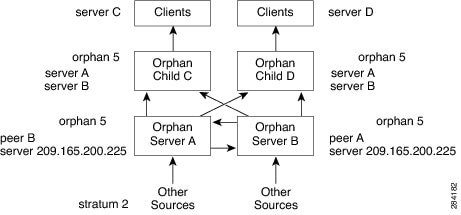
In private networks, one or multiple core servers operating at the lowest stratum is normally included. You must configure each of these servers as backups for other servers using symmetric or broadcast modes. Even if one core server reaches a UTC source, the entire subnet synchronizes to the simulating server. If none of the servers reach a UTC source, one of the servers, which is known as the orphan parent, can simulate a UTC source and serve as the simulated UTC source for all the other hosts, known as orphan children, in the subnet.
Use the ntp orphan stratum command to enable a host for orphan mode. The stratum argument is a value less than 16 and greater than any stratum value that occurs in the configured Internet time servers. However, you must provide sufficient headroom so that every subnet host dependent on the orphan children has a stratum value less than 16. If no associations for other servers or reference clocks are configured, you must set the orphan stratum value to 1.
An orphan parent operating at stratum 1 with no sources displays the reference ID LOOP. An orphan parent not operating at stratum 1 displays the UNIX loopback address 127.0.0.1. Ordinary NTP clients use a selection metric based on delay and dispersion, whereas orphan children use a metric computed from the IP address of each core server in the subnet. Each orphan child selects the orphan parent with the smallest metric as the root server.
The figure below illustrates how orphan mode is set up and a peer network is configured. In this peer network, two primary or secondary (stratum 2) servers are configured with reference clocks or public Internet primary servers, with each using symmetric modes. A server that loses all sources continuously synchronizes the local clock driver with other servers, thus backing up the server. Enable orphan mode only in core servers and orphan children.
| Figure 1 | Orphan Mode Setup |
Prerequisites for Orphan Mode
To ensure smooth function of the orphan mode, you must configure each core server with available sources to operate at the same stratum. Configure the ntp orphan command in all the core servers and the orphan children. Configure each orphan child with all root servers.
VINES Time Service
Time service is available when Banyan VINES is configured. This protocol is a standard part of VINES. Our implementation allows the VINES time service to be used in two ways. First, if the device has learned the time from some other source, it can act as a VINES time server and provide time to other machines running VINES. Second, it can use the VINES time service to set the software clock if no other form of time service is available.
Hardware Clock
Some devices contain a battery-powered hardware clock that tracks the date and time across system restarts and power outages. The hardware clock maintains time separately from the software clock. The hardware clock continues to run when the system is restarted or when the power is turned off. Typically, the hardware clock needs to be manually set only once, when the system is installed.
Note |
The hardware clock is referred to as the system calendar in Cisco IOS software. |
If no other source is available, the hardware clock can be considered to be an authoritative source of time and be redistributed via NTP or VINES time service. If NTP is running, the hardware clock can be updated periodically from NTP, compensating for the inherent drift, which is the consistent gain or loss of time at a certain rate if the hardware clock is left to run.
You can configure a hardware clock (system calendar) on any device to be periodically updated from the software clock. This configuration is advisable for any device using NTP because the time and date on the software clock (set using NTP) is more accurate than the hardware clock and the time setting on the hardware clock has the potential to drift slightly over time.
Use the command in global configuration mode if a routing device is synchronized to an outside time source via NTP and you want the hardware clock to be synchronized to NTP time.
Note |
Avoid setting the hardware clock manually if you have access to a reliable external time source. Time synchronization should instead be established using NTP. |
Time Ranges
Cisco software allows implementation of features based on the time of day. The time-range command in global configuration mode defines specific times of the day and week, which then can be referenced by a function, so that those time restrictions are imposed on the function itself.
Note |
The time range relies on the device's software clock. For the Time Range feature to work the way you intend, you need a reliable clock source. We recommend that you use NTP to synchronize the system's software clock. |
Time ranges provide the following benefits:
- The network administrator can permit or deny a user access to resources. These resources could be an application (identified by an IP address/mask pair and a port number), policy routing, or an on-demand link (identified as interesting traffic to the dialer).
- Network administrators can set a time-based security policy, including the following:
- Policy-based routing and queuing functions are enhanced.
- When provider access rates vary by time of day, traffic can be rerouted automatically and cost-effectively.
- Service providers can dynamically change a committed access rate (CAR) configuration to support the quality of service (QoS) service level agreements (SLAs) that are negotiated for certain times of the day.
Network administrators can control logging messages. Access list entries can log traffic at certain times of the day but not constantly. Therefore, administrators can deny access without the need to analyze the logs that are generated during peak hours.
How to Set Time and Calendar Services
- Configuring NTP
- Configuring VINES Time Service
- Configuring the Time and Date
- Setting the Hardware Clock
- Configuring Time Ranges
- Verifying Time and Calendar Services
Configuring NTP
Network Time Protocol (NTP) services are disabled on all interfaces by default. Perform this task to configure NTP service on your networking device:
- Configuring Poll-Based NTP Associations
- Configuring Broadcast-Based NTP Associations
- Configuring Simple Network Time Protocol(SNTP) Authentication
- Configuring an External Reference Clock
- Configuring Orphan Mode
Configuring Poll-Based NTP Associations
You can specify the time-serving hosts with which you want your networking device to consider synchronizing and set your networking device to operate in the client or symmetric active mode.
Perform this task to configure the Network Time Protocol (NTP) server-peer relationship.
Note |
Only one end of an association needs to be configured; the other device will automatically establish the association. |
DETAILED STEPS
Configuring Broadcast-Based NTP Associations
You can set your networking device to listen for Network Time Protocol (NTP) broadcast packets propagated through a network. The time server that is transmitting NTP broadcast packets also has to be enabled on the interface of the given device.
Perform this task to configure broadcast-based NTP associations.
DETAILED STEPS
Configuring Simple Network Time Protocol(SNTP) Authentication
DETAILED STEPS
Configuring an External Reference Clock
Our implementation of Network Time Protocol (NTP) does not support stratum 1 service. So, you cannot connect to a radio or atomic clock (for some specific platforms, however, you can connect to a Global Positioning System [GPS] time source device). However, certain Cisco devices allow you to connect to an external GPS-based time source device for the purposes of distributing a time signal to your network using NTP.
For example, the Trimble Palisade NTP Synchronization Kit can be connected to the auxiliary port of the device.
DETAILED STEPS
Configuring Orphan Mode
DETAILED STEPS
Configuring VINES Time Service
Time service is available when Banyan VINES is configured. This protocol is a standard part of VINES. Perform this task to configure VINES Time Service.
DETAILED STEPS
| Command or Action | Purpose | |
|---|---|---|
|
|
Example: Device> enable |
Enables privileged EXEC mode. |
|
|
Example: Device# configure terminal |
Enters global configuration mode. |
|
|
Example: Device(config)# vines time use-system |
Distributes the system software clock time to other VINES systems. |
|
|
Example: Device(config)# vines time set-system |
Sets the software clock system time and date as derived from VINES time services.
|
|
|
Example: Device(config)# exit |
Exits global configuration mode and returns to privileged EXEC mode. |
Configuring the Time and Date
If no other source of time is available, you can manually configure the current time and date after the system is restarted. The time will remain accurate until the next system restart. We recommend that you use manual configuration only as a last resort.
If you have an outside source to which the device can synchronize, you need not manually set the software clock. Perform this task to configure the time and date manually.
DETAILED STEPS
| Command or Action | Purpose | |||
|---|---|---|---|---|
|
|
Example: Device> enable |
Enables privileged EXEC mode. |
||
|
|
Example: Device# configure terminal |
Enters global configuration mode. |
||
|
|
Example: Device(config)# clock timezone PST 2 30 |
Configures the time zone used by the Cisco software.
|
||
|
|
Example: Device(config)# clock summer-time PST recurring 1 monday january 12:12 4 Tuesday december 12:12 120 |
Configures summer time (daylight saving time) in areas where it starts and ends on a particular day of the week each year. |
||
|
|
Example: Device(config)# clock summer-time PST date 1 january 1999 12:12 4 december 2001 12:12 120 |
Configures a specific summer time start and end date.
|
||
|
|
Example: Device(config)# exit |
Exits global configuration mode and returns to privileged EXEC mode. |
||
|
|
Example: Device# clock set 12:12:12 1 january 2011 |
Sets the software clock. |
Setting the Hardware Clock
DETAILED STEPS
| Command or Action | Purpose | |||
|---|---|---|---|---|
|
|
Example: Device> enable |
Enables privileged EXEC mode. |
||
|
|
Example: Router# calendar set 10:12:15 monday june 1999 |
Sets the hardware clock manually.
|
||
|
|
Example: Device# configure terminal |
Enters global configuration mode. |
||
|
|
Example: Device(config)# clock calendar-valid |
Enables the device to act as a valid time source to which network peers can synchronize. |
||
|
|
Example: Device(config)# exit |
Exits global configuration mode and returns to privileged EXEC mode. |
||
|
|
Example: Device# clock read-calendar |
Sets the software clock to the new hardware clock setting. |
||
|
|
Example: Device# clock update-calendar |
Updates the hardware clock with a new software clock setting. |
||
|
|
Example: Device# show calendar |
Displays the current hardware clock time. |
||
|
|
Example: Device# show clock detail |
Displays the current software clock time. |
||
|
|
Example: Device# show ntp associations detail |
Displays the status of NTP associations. |
||
|
|
Example: Device# show ntp status |
Displays the status of NTP. |
Configuring Time Ranges
DETAILED STEPS
| Command or Action | Purpose | |
|---|---|---|
|
|
Example: Device> enable |
Enables privileged EXEC mode. |
|
|
Example: Device# configure terminal |
Enters global configuration mode. |
|
|
Example: Device(config)# time-range range1 |
Assigns a name to the time range to be configured and enters time range configuration mode.
|
|
|
Example: Device(config-time-range)# absolute start 12:12 30 January 1999 end 12:12 30 December 2000 Example: Device(config-time-range)# periodic monday 12:12 to friday 12:12 |
Specifies when the time range will be in effect. |
|
|
Example: Device(config-time-range)# end |
Exits time range configuration mode and returns to privileged EXEC mode. |
Verifying Time and Calendar Services
To monitor clock, calendar, and NTP EXEC services, use the following commands in privileged EXEC mode, as needed.
DETAILED STEPS
| Step 1 |
show calendar This command displays the current hardware clock time. The following is sample output from this command. Example:
Device# show calendar

18:34:29 UTC Tue Jan 4 2011
|
| Step 2 |
show clock [detail] This command displays the current software clock time. The following is sample output from this command. Example:
Device# show clock detail

*18:38:21.655 UTC Tue Jan 4 2011
Time source is hardware calendar
|
| Step 3 |
show ntp associations detail This command displays the status of NTP associations. The following is sample output from this command. Example:
Device# show ntp associations detail

192.168.10.1 configured, insane, invalid, unsynced, stratum 16
ref ID .INIT., time 00000000.00000000 (00:00:00.000 UTC Mon Jan 1 1900)
our mode active, peer mode unspec, our poll intvl 64, peer poll intvl 1024
root delay 0.00 msec, root disp 0.00, reach 0, sync dist 15940.56
delay 0.00 msec, offset 0.0000 msec, dispersion 15937.50
precision 2**24, version 4
org time 00000000.00000000 (00:00:00.000 UTC Mon Jan 1 1900)
rec time 00000000.00000000 (00:00:00.000 UTC Mon Jan 1 1900)
xmt time D0CDE881.9A6A9005 (18:42:09.603 UTC Tue Jan 4 2011)
filtdelay =     0.00    0.00    0.00    0.00    0.00    0.00    0.00    0.00
filtoffset =    0.00    0.00    0.00    0.00    0.00    0.00    0.00    0.00
filterror =  16000.0 16000.0 16000.0 16000.0 16000.0 16000.0 16000.0 16000.0
minpoll = 6, maxpoll = 10
192.168.45.1 configured, insane, invalid, unsynced, stratum 16
ref ID .INIT., time 00000000.00000000 (00:00:00.000 UTC Mon Jan 1 1900)
our mode client, peer mode unspec, our poll intvl 64, peer poll intvl 1024
root delay 0.00 msec, root disp 0.00, reach 0, sync dist 16003.08
delay 0.00 msec, offset 0.0000 msec, dispersion 16000.00
precision 2**24, version 4
org time 00000000.00000000 (00:00:00.000 UTC Mon Jan 1 1900)
rec time 00000000.00000000 (00:00:00.000 UTC Mon Jan 1 1900)
xmt time 00000000.00000000 (00:00:00.000 UTC Mon Jan 1 1900)
filtdelay =     0.00    0.00    0.00    0.00    0.00    0.00    0.00    0.00
filtoffset =    0.00    0.00    0.00    0.00    0.00    0.00    0.00    0.00
filterror =  16000.0 16000.0 16000.0 16000.0 16000.0 16000.0 16000.0 16000.0
minpoll = 6, maxpoll = 10
|
| Step 4 |
show ntp status This command displays the status of NTP. The following is sample output from this command. Example:
Device# show ntp status

Clock is synchronized, stratum 8, reference is 127.127.1.1
nominal freq is 250.0000 Hz, actual freq is 250.0000 Hz, precision is 2**10
reference time is D25AF07C.4B439650 (15:26:04.294 PDT Tue Oct 21 2011)
clock offset is 0.0000 msec, root delay is 0.00 msec
root dispersion is 2.31 msec, peer dispersion is 1.20 msec
loopfilter state is 'CTRL' (Normal Controlled Loop), drift is 0.000000000 s/s
system poll interval is 16, last update was 10 sec ago.
|
Configuration Examples for Setting Time and Calendar Services
Example: Configuring Clock Calendar and NTP
In the following example, a device with a hardware clock that has server associations with two other systems sends broadcast NTP packets, periodically updates the hardware clock, and redistributes time into VINES:
In the following example, a device with a hardware clock has no outside time source, so it uses the hardware clock as an authoritative time source and distributes the time via NTP broadcast packets:
clock timezone MET 2
clock calendar-valid
ntp master
interface fddi 0/0
 ntp broadcast
Additional References
Related Documents
| Related Topic |
Document Title |
|---|---|
| Cisco IOS commands |
|
| Basic System Management commands |
|
| IP extended access lists |
Cisco IOS IP Addressing Configuration Guide |
| IPX extended access lists |
"Configuring Novell IPX" module of the Cisco IOS XE Novell IPX Configuration Guide |
| NTP package vulnerability |
Network Time Protocol Package Remote Message Loop Denial of Service Vulnerability |
| Cisco software releases |
Standards and RFCs
| Standard/RFCs |
Title |
|---|---|
| RFC 1305 |
Network Time Protocol (Version 3) Specification, Implementation and Analysis |
Technical Assistance
| Description |
Link |
|---|---|
| The Cisco Support and Documentation website provides online resources to download documentation, software, and tools. Use these resources to install and configure the software and to troubleshoot and resolve technical issues with Cisco products and technologies. Access to most tools on the Cisco Support and Documentation website requires a Cisco.com user ID and password. |
Feature Information for Setting Time and Calendar Services
The following table provides release information about the feature or features described in this module. This table lists only the software release that introduced support for a given feature in a given software release train. Unless noted otherwise, subsequent releases of that software release train also support that feature.
Use Cisco Feature Navigator to find information about platform support and Cisco software image support. To access Cisco Feature Navigator, go to www.cisco.com/go/cfn. An account on Cisco.com is not required.
| Table 1 | Feature Information for Setting Time and Calendar Services |
| Feature Name |
Releases |
Feature Information |
|---|---|---|
| Network Time Protocol |
Cisco IOS XE Release 2.1 Cisco IOS XE Release 3.4SG Cisco IOS XE Release 3.3S |
NTP is a protocol designed to time-synchronize a network of machines. NTP runs on UDP, which in turn runs on IP. NTP is documented in RFC 1305. The following commands were introduced or modified: ntp access-group, ntp allow mode passive, ntp authenticate, ntp authentication-key, ntp broadcast, ntp broadcast client, ntp broadcastdelay, ntp clear drift, ntp clock-period, ntp disable, ntp logging, ntp master, ntp max-associations, ntp multicast, ntp multicast client, ntp server, ntp source, ntp trusted-key, and ntp update-calendar. |
| NTPv4 Orphan Mode Support |
Cisco IOS XE Release 3.4SG Cisco IOS XE Release 3.5S |
The NTPv4 Orphan Mode Support feature provides a single simulated UTC source with multiple servers and a seamless switching when the servers recover from failure. The following commands were introduced or modified: ntp orphan. |
| Range for Trusted Key Configuration |
Cisco IOS XE Release 3.4SG Cisco IOS XE Release 3.5S |
In large networks where many trusted keys must be configured, the Range for Trusted Key Configuration feature enables configuring multiple keys simultaneously. The following commands were introduced or modified: ntp trusted-key. |
Cisco and the Cisco logo are trademarks or registered trademarks of Cisco and/or its affiliates in the U.S. and other countries. To view a list of Cisco trademarks, go to this URL: www.cisco.com/go/trademarks. Third-party trademarks mentioned are the property of their respective owners. The use of the word partner does not imply a partnership relationship between Cisco and any other company. (1110R)
Any Internet Protocol (IP) addresses and phone numbers used in this document are not intended to be actual addresses and phone numbers. Any examples, command display output, network topology diagrams, and other figures included in the document are shown for illustrative purposes only. Any use of actual IP addresses or phone numbers in illustrative content is unintentional and coincidental.
 Feedback