Table Of Contents
Cisco SFP and SFP+ Transceiver Module Installation Notes
Contents
Overview
Safety
Statement 1071—Warning Definition
Required Tools
Installing SFP Transceiver Modules
Removing SFP Transceiver Modules
Standards and Compliance Specifications for the DWDM SFPs
FCC Class A Compliance
Class 1 Laser Compliance
Translated Safety Warnings
Statement 1008—Class 1 Laser Product
Statement 1014—Laser Radiation
Statement 1030—Equipment Installation
Obtaining Documentation and Submitting a Service Request
Cisco SFP and SFP+ Transceiver Module Installation Notes
Revised: September 10, 2009
Product Numbers:
SFP-10G-SR
|
SFP-10G-LR
|
SFP-10G-LRM
|
SFP-OC48-LR2
|
SFP-OC12-MM
|
SFP-GE-Z=
|
SFP-OC3-MM
|
SFP-OC3-SR
|
SFP-OC12-LR2
|
DWDM-SFP-xxxx=
|
SFP-OC3-LR2
|
SFP-GE-L=
|
SFP-OC12-SR
|
GLC-SX-MM-RGD=
|
SFP-OC12-LR1
|
SFP-OC3-LR1
|
SFP-OC48-SR
|
SFP-OC48-IR1
|
GLC-ZX-SM-RGD=
|
CWDM-SFP-xxxx=
|
SFP-GE-S=
|
GLC-SX-MM=
|
SFP-OC3-IR1
|
GLC-FE-100FX=
|
GLC-LX-SM-RGD=
|
GLC-ZX-SM=
|
SFP-OC12-IR1
|
GLC-T=
|
GLC-FE-100FX-RGD=
|
GLC-GE-100FX=
|
GLC-LH-SM=
|
GLC-BX-D=
|
GLC-BX-U=
|
GLC-FE-100BX-D=
|
GLC-FE-100LX-RGD=
|
GLC-FE-100BX-U=
|
GLC-FE-100EX=
|
GLC-FE-100LX=
|
GLC-FE-100ZX=
|
|
This installation note provides the installation instructions for the Cisco small form-factor pluggable (SFP) and SFP+ transceiver modules. These transceiver modules are hot-swappable input/output (I/O) devices that plug into 100BASE, 1000BASE and 10GBASE ports (for SFP+), which connect the module port with the fiber-optic or copper network.
Contents
This document contains these sections:
•
Overview
•
Safety
•
Required Tools
•
Installing SFP Transceiver Modules
•
Removing SFP Transceiver Modules
•
Obtaining Documentation and Submitting a Service Request
Overview
The SFP transceiver modules are hot-pluggable I/O devices that plug into module sockets. The transceiver connects the electrical circuitry of the module with the optical or copper network.
You can use any combination of SFP transceiver modules that your Cisco device supports. The only restrictions are that each port must match the wavelength specifications on the other end of the cable and that the cable must not exceed the stipulated cable length for reliable communications.
Use only Cisco SFP transceiver modules on your Cisco device. Each SFP transceiver module supports the Cisco Quality Identification (ID) feature which allows a Cisco switch or router to identify and validate that the transceiver module is certified and tested by Cisco.
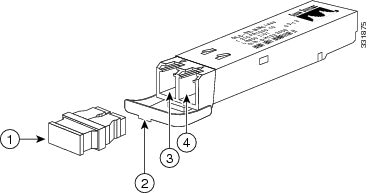
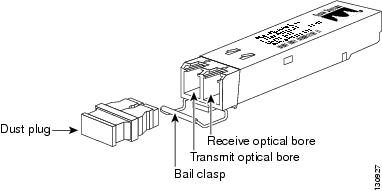
An optical SFP transceiver module is shown in Figure 1.
Figure 1 SFP Transceiver Module (Fiber-Optic LC Connector)
Note
SFP transceiver modules that operate with single-strand SMF, have only one optical bore; the other bore is blocked off.
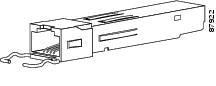
A copper SFP transceiver module in shown in Figure 2.
Figure 2 1000BASE-T SFP Transceiver Module (RJ-45 Connector)
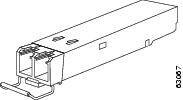
An SFP+ transceiver module is shown in Figure 1.
Figure 3 SFP+ Transceiver Module (Fiber-Optic LC Connector)
The product numbers and brief description of the SFP and SFP+ transceiver modules are listed in Table 1.
Table 1 Product Numbers
SFP Transceiver Module Product Number
|
Transceiver Description
|
10-Gigabit Ethernet
|
SFP-10G-SR
|
Cisco 10GBASE-SR SFP+ transceiver module for MMF, 850-nm wavelength
|
SFP-10G-LR
|
Cisco 10GBASE-LR SFP+ transceiver module for SMF, 1310-nm wavelength
|
SFP-H10GB-CU1M
|
Cisco 10GBASE-CU Twinax SFP+ cable assembly, 1 meter
|
SFP-H10GB-CU3M
|
Cisco 10GBASE-CU Twinax SFP+ cable assembly, 3 meters
|
SFP-H10GB-CU5M
|
Cisco 10GBASE-CU Twinax SFP+ cable assembly, 5 meters
|
1-Gigabit Ethernet
|
GLC-SX-MM=
|
Cisco 1000BASE-SX SFP transceiver module for MMF, 850-nm wavelength, commercial operating temperature range, 23°F to 158°F (-5°C to 70°C).
|
GLC-SX-MM-RGD=
|
Cisco 1000BASE-SX SFP transceiver module for MMF, 850-nm wavelength, industrial operating temperature range, -40°F to 185°F (-40°C to 85°C).
|
SFP-GE-S=
|
Cisco 1000BASE-SX SFP transceiver module for MMF, 850-nm wavelength, extended operating temperature range, 23°F to 185°F (-5°C to 85°C).
|
GLC-LH-SM=
|
Cisco 1000BASE-LX/LH SFP transceiver module for SMF, 1300-nm wavelength, commercial operating temperature range, 23°F to 158°F (-5°C to 70°C).
|
GLC-LX-SM-RGD=
|
Cisco 1000BASE-LX/LH SFP transceiver module for SMF, 1300-nm wavelength, industrial operating temperature range, -40°F to 185°F (-40°C to 85°C).
|
SFP-GE-L=
|
Cisco 1000BASE-LX/LH SFP transceiver module for SMF, 1300-nm wavelength, extended operating temperature range, 23°F to 185°F (-5°C to 85°C).
|
GLC-EX-SMD=
|
Cisco 1000BASE-EX SFP transceiver module for SMF, 1310 nm wavelength, extended operating temperature range 23°F to 185°F (-5°C to 85°C).
|
GLC-ZX-SM=
|
Cisco 1000BASE-ZX SFP transceiver module for SMF, 1550-nm wavelength, commercial operating temperature range, 23°F to 158°F (-5°C to 70°C).
|
GLC-ZX-SM-RGD=
|
Cisco 1000BASE-ZX SFP transceiver module for SMF, 1550-nm wavelength, industrial operating temperature range, -40°F to 185°F (-40°C to 85°C).
|
SFP-GE-Z=
|
Cisco 1000BASE-ZX SFP transceiver module for SMF, 1550-nm wavelength, extended operating temperature range, 23°F to 185°F (-5°C to 85°C).
|
GLC-T=
|
1000BASE-T SFP transceiver module for copper networks, commercial operating temperature range, 23°F to 158°F (-5°C to 70°C).
|
SFP-GE-T=
|
1000BASE-T SFP transceiver module for copper networks, extended operating temperature range, 23°F to 185°F (-5°C to 85°C).
|
GLC-BX-D=
|
1000BASE-BX10 SFP module for single-strand SMF, 1490-nm TX/1310-nm RX wavelength, commercial operating temperature range, 23°F to 158°F (-5°C to 70°C).
|
GLC-BX-U=
|
1000BASE-BX10 SFP module for single-strand SMF, 1310-nm TX/1490-nm RX wavelength, commercial operating temperature range, 23°F to 158°F (-5°C to 70°C).
|
Fast Ethernet
|
GLC-FE-100FX=
|
100BASE-FX SFP module for 100-Mb ports, MMF, 1310-nm wavelength, commercial operating temperature range, 23°F to 158°F (-5°C to 70°C).
|
GLC-FE-100FX-RGD=
|
100BASE-FX SFP module for 100-Mb ports, MMF, 1310-nm wavelength, industrial operating temperature range, -40°F to 185°F (-40°C to 85°C).
|
GLC-GE-100FX=
|
100BASE-FX SFP module for Gigabit Ethernet ports, MMF, 1310-nm wavelength, commercial operating temperature range, 23°F to 158°F (-5°C to 70°C).
|
GLC-FE-100LX=
|
100BASE-LX10 SFP module for 100-Mb ports, SMF, 1310-nm wavelength, commercial operating temperature range, 23°F to 158°F (-5°C to 70°C).
|
GLC-FE-100LX-RGD=
|
100BASE-LX10 SFP module for 100-Mb ports, SMF, 1310-nm wavelength, industrial operating temperature range, -40°F to 185°F (-40°C to 85°C).
|
GLC-FE-100BX-D=
|
100BASE-BX10-D SFP module for single-strand SMF, 1550-nm TX/1310-nm RX wavelength, commercial operating temperature range, 23°F to 158°F (-5°C to 70°C).
|
GLC-FE-100BX-U=
|
100BASE-BX10-U SFP module for single-strand SMF, 1310-nm TX/1550-nm RX wavelength, commercial operating temperature range, 23°F to 158°F (-5°C to 70°C).
|
GLC-FE-100EX=
|
100BASE-EX SFP module for 100-Mb ports, SMF, 1310-nm wavelength, commercial operating temperature range, 23°F to 158°F (-5°C to 70°C).
|
GLC-FE-100ZX=
|
100BASE-ZX SFP module for 100-Mb ports, SMF, 1550-nm wavelength, commercial operating temperature range, 23°F to 158°F (-5°C to 70°C).
|
SONET/SDH
|
SFP-OC3-MM
|
SFP OC-3/STM-1 Multimode
|
SFP-OC3-SR
|
SFP OC-3/STM-1 Short-Reach
|
SFP-OC3-IR1
|
SFP OC-3/STM-1 Intermediate-Reach
|
SFP-OC3-LR1
|
SFP OC-3/STM-1 Long-Reach (40 km)
|
SFP-OC3-LR2
|
SFP OC-3/STM-1 Long-Reach (80 km)
|
SFP-OC12-MM
|
SFP OC-12/STM-4 Multimode
|
SFP-OC12-SR
|
SFP OC-12/STM-4 Short-Reach
|
SFP-OC12-IR1
|
SFP OC-12/STM-4 Intermediate-Reach
|
SFP-OC12-LR1
|
SFP OC-12/STM-4 Long-Reach (40 km)
|
SFP-OC12-LR2
|
SFP OC-12/STM-4 Long-Reach (80 km)
|
SFP-OC48-SR
|
SFP OC-48/STM-16 Short-Reach
|
SFP-OC48-IR1
|
SFP OC-48/STM-16 Intermediate-Reach
|
SFP-OC48-LR2
|
SFP OC-48/STM-16 Long-Reach (80 km)
|
CWDM
(OC-12/STM4, 1-Gigabit Ethernet, 1-Gigabit Fiber Channel, 2-Gigabit Fiber Channel, OC-48/STM-16)
|
CWDM-SFP-1470=
|
Longwave 1470 nm laser, single mode
|
CWDM-SFP-1490=
|
Longwave 1490 nm laser, single mode
|
CWDM-SFP-1510=
|
Longwave 1510 nm laser, single mode
|
CWDM-SFP-1530=
|
Longwave 1530 nm laser, single mode
|
CWDM-SFP-1550=
|
Longwave 1550 nm laser, single mode
|
CWDM-SFP-1570=
|
Longwave 1570 nm laser, single mode
|
CWDM-SFP-1590=
|
Longwave 1590 nm laser, single mode
|
CWDM-SFP-1610=
|
Longwave 1610 nm laser, single mode
|
DWDM
(OC-12/STM4, 1-Gigabit Ethernet, 1-Gigabit Fibre Channel, 2-Gigabit Fibre Channel, OC-48/STM-16)
|
DWDM-SFP-6141=
|
Longwave 1561.42 nm laser (100-GHz ITU channel 20), single mode
|
DWDM-SFP-6061=
|
Longwave 1560.61 nm laser (100-GHz ITU channel 21), single mode
|
DWDM-SFP-5979=
|
Longwave 1559.79 nm laser (100-GHz ITU channel 22), single mode
|
DWDM-SFP-5898=
|
Longwave 1558.98 nm laser (100-GHz ITU channel 23), single mode
|
DWDM-SFP-5817=
|
Longwave 1558.17 nm laser (100-GHz ITU channel 24), single mode
|
DWDM-SFP-5736=
|
Longwave 1557.36 nm laser (100-GHz ITU channel 25), single mode
|
DWDM-SFP-5655=
|
Longwave 1556.55 nm laser (100-GHz ITU channel 26), single mode
|
DWDM-SFP-5575=
|
Longwave 1555.75 nm laser (100-GHz ITU channel 27), single mode
|
DWDM-SFP-5494=
|
Longwave 1554.94 nm laser (100-GHz ITU channel 28), single mode
|
DWDM-SFP-5413=
|
Longwave 1554.13 nm laser (100-GHz ITU channel 29), single mode
|
DWDM-SFP-5332=
|
Longwave 1553.33 nm laser (100-GHz ITU channel 30), single mode
|
DWDM-SFP-5252=
|
Longwave 1552.52 nm laser (100-GHz ITU channel 31), single mode
|
DWDM-SFP-5172=
|
Longwave 1551.72 nm laser (100-GHz ITU channel 32), single mode
|
DWDM-SFP-5092=
|
Longwave 1550.92 nm laser (100-GHz ITU channel 33), single mode
|
DWDM-SFP-5012=
|
Longwave 1550.12 nm laser (100-GHz ITU channel 34), single mode
|
DWDM-SFP-4931=
|
Longwave 1549.32 nm laser (100-GHz ITU channel 35), single mode
|
DWDM-SFP-4851=
|
Longwave 1548.51 nm laser (100-GHz ITU channel 36), single mode
|
DWDM-SFP-4772=
|
Longwave 1547.72 nm laser (100-GHz ITU channel 37), single mode
|
DWDM-SFP-4692=
|
Longwave 1546.92 nm laser (100-GHz ITU channel 38), single mode
|
DWDM-SFP-4612=
|
Longwave 1546.12 nm laser (100-GHz ITU channel 39), single mode
|
DWDM-SFP-4532=
|
Longwave 1545.32 nm laser (100-GHz ITU channel 40), single mode
|
DWDM-SFP-4453=
|
Longwave 1544.53 nm laser (100-GHz ITU channel 41), single mode
|
DWDM-SFP-4373=
|
Longwave 1543.73 nm laser (100-GHz ITU channel 42), single mode
|
DWDM-SFP-4294=
|
Longwave 1542.94 nm laser (100-GHz ITU channel 43), single mode
|
DWDM-SFP-4214=
|
Longwave 1542.14 nm laser (100-GHz ITU channel 44), single mode
|
DWDM-SFP-4134=
|
Longwave 1541.35 nm laser (100-GHz ITU channel 45), single mode
|
DWDM-SFP-4056=
|
Longwave 1540.56 nm laser (100-GHz ITU channel 46), single mode
|
DWDM-SFP-3977=
|
Longwave 1539.77 nm laser (100-GHz ITU channel 47), single mode
|
DWDM-SFP-3898=
|
Longwave 1538.98 nm laser (100-GHz ITU channel 48), single mode
|
DWDM-SFP-3819=
|
Longwave 1538.19 nm laser (100-GHz ITU channel 49), single mode
|
DWDM-SFP-3739=
|
Longwave 1537.40 nm laser (100-GHz ITU channel 50), single mode
|
DWDM-SFP-3661=
|
Longwave 1536.61 nm laser (100-GHz ITU channel 51), single mode
|
DWDM-SFP-3582=
|
Longwave 1535.82 nm laser (100-GHz ITU channel 52), single mode
|
DWDM-SFP-3504=
|
Longwave 1535.04 nm laser (100-GHz ITU channel 53), single mode
|
DWDM-SFP-3425=
|
Longwave 1534.25 nm laser (100-GHz ITU channel 54), single mode
|
DWDM-SFP-3346=
|
Longwave 1533.47 nm laser (100-GHz ITU channel 55), single mode
|
DWDM-SFP-3268=
|
Longwave 1532.68 nm laser (100-GHz ITU channel 56), single mode
|
DWDM-SFP-3190=
|
Longwave 1531.90 nm laser (100-GHz ITU channel 57), single mode
|
DWDM-SFP-3112=
|
Longwave 1531.12 nm laser (100-GHz ITU channel 58), single mode
|
DWDM-SFP-3033=
|
Longwave 1530.33 nm laser (100-GHz ITU channel 59), single mode
|
The transceiver module optical transmit and receive specifications are listed in Table 2 through Table 9.
Table 2 SFP+ Optical Transceiver Module Cabling Specifications
SFP+ Transceiver Module Model
|
Wavelength (nm)
|
Fiber Type
|
Core Size (µm)
|
Modal Bandwidth (MHz/km)
|
Cable Distance (ft/m)
|
SFP-10G-SR
|
850
|
MMF
|
62.5 62.5 50.0 50.0 50.0
|
160 200 400 500 2000
|
85/26 108/33 216/66 269/82 984/300
|
SFP-10G-LR
|
1310
|
SMF
|
G.652
|
—
|
6.2 miles (10 km)
|
Table 3 SFP+ Transceiver Module Optical Transmit and Receive Specifications
SFP+ Transceiver Module Model
|
Transceiver Type
|
Transmit Power (dBm)
|
Receive Power (dBm)
|
Transmit and Receive Wavelength (nm)
|
SFP-10G-SR
|
10GBASE-SR, 850-nm MMF
|
-1.3 (Max) -7.3 (Min)
|
-1.0 (Max) -9.9 (Min)
|
840 to 860
|
SFP-10G-LR
|
10GBASE-LR, 1310-nm SMF
|
0.5 (Max) -8.2 (Min)
|
0.5 (Max) -14.4 (Min)
|
1260 to 1355
|
Table 4 100-Mb and 1-Gigabit Optical SFP Transceiver Module Cabling Specifications
SFP Module Model
|
Wavelength (nanometers)
|
Fiber Type
|
Core Size (micron)
|
Modal Bandwidth (MHz/km)
|
Cable Distance
|
GLC-SX-MM SFP-GE-S GLC-SX-MM-RGD
|
850
|
MMF
|
62.5 62.5 50.0 50.0
|
160 200 400 500
|
722 feet (220 m) 902 feet (275 m) 1640 feet (500 m) 1804 feet (550 m)
|
GLC-LH-SM SFP-GE-L GLC-LX-SM-RGD
|
1310
|
MMF1
SMF
|
62.5 50.0 50.0 G.652
|
500 400 500 —
|
1804 feet (550 m) 1804 feet (550 m) 1804 feet (550 m) 6.2 miles (10 km)
|
GLC-BX-D
|
1490 (downstream)
|
SMF
|
G.652
|
—
|
6.2 miles (10 km)
|
GLC-BX-U
|
1310 (upstream)
|
SMF
|
G.652
|
—
|
6.2 miles (10 km)
|
GLC-EX-SMD
|
1310
|
SMF
|
G.652
|
—
|
24.9 miles (40 km)
|
GLC-ZX-SM GLC-ZX-SM-RGD SFP-GE-Z
|
1550
|
SMF
|
G.652
|
—
|
43.4 to 62 miles (70 to 100 km)
|
GLC-FE-100FX GLC-FE-100FX-RGD
|
1310
|
MMF
|
62.5 62.5 50.0 50.0
|
160 200 400 500
|
1.24 miles (2 km)
|
GLC-FE-100LX GLC-FE-100LX-RGD
|
1310
|
SMF
|
G.652
|
—
|
6.2 miles (10 km)
|
GLC-FE-100BX-D
|
1550 (downstream)
|
SMF
|
G.652
|
—
|
6.2 miles (10 km)
|
GLC-FE-100BX-U
|
1310 (upstream)
|
SMF
|
G.652
|
—
|
6.2 miles (10 km)
|
GLC-FE-100EX
|
1310
|
SMF
|
G.652
|
—
|
24.9 miles (40 km)
|
GLC-FE-100ZX
|
1550
|
SMF
|
G.652
|
—
|
49.7 miles (80 km)
|

Note
For the GLC-ZX-SM, the minimum attenuation between the transmit bore (TX) and the receive bore (RX) is 8 dB. When using shorter distances of single-mode fiber cable, you might need to insert an inline optical attenuator in the link to avoid overloading the receiver.
Copper SFP transceiver modules can operate at 10, 100, or 1000 Mbps on some Cisco devices. To find the supported speeds for the 1000BASE-T SFP transceiver modules in your Cisco device, see the Compatibility Matrix for 1000BASE-T Small Form-Factor Pluggable Modules.
Copper 1000BASE-T SFP transceiver modules use standard four twisted-pair, Category 5 cable at lengths up to 328.08 feet (100 meters).
Table 5 100M and 1-Gigabit SFP Transceiver Module Optical Transmit and Receive Specifications
SFP Transceiver Module Model
|
Transceiver Type
|
Transmit Power (dBm)
|
Receive Power (dBm)
|
Transmit and Receive Wavelength (nm)
|
GLC-SX-MM SFP-GE-S GLC-SX-MM-RGD
|
1000BASE-SX, 850-nm MMF
|
-3 (Max) -9.5 (Min)
|
0 (Max) -17 (Min)
|
770 to 860
|
GLC-LH-SM SFP-GE-L GLC-LX-SM-RGD
|
1000BASE-LX/LH, 1310-nm SMF
|
-3 (Max) -9.5 (Min)
|
-3 (Max) -20 (Min)
|
1260 to 1355
|
GLC-BX-D
|
1000BASE-BX-D, 1490-nm SMF
|
-3 (Max) -9 (Min)
|
-3 (Max) -19.5 (Min)
|
1480 to 1500 (transmit), 1260 to 1360 (receive)
|
GLC-BX-U
|
1000BASE-BX-U, 1310-nm SMF
|
-3 (Max) -9 (Min)
|
-3 (Max) -19.5 (Min)
|
1260 to 1360 (transmit), 1480 to 1500 (receive)
|
GLC-EX-SMD
|
1000BASE-EX, 1310 nm
|
+3 (Max) -1 (Min)
|
+1 (Max) -22 (Min)
|
1290 to 1335
|
GLC-ZX-SM GLC-ZX-SM-RGD SFP-GE-Z
|
1000BASE-ZX, 1550 nm SMF
|
+5 (Max) 0 (Min)
|
-3 (Max) -23 (Min)
|
1500 to 1580
|
GLC-FE-100FX GLC-FE-100FX-RGD GLC-GE-100FX
|
100BASE-FX, 1310 nm MMF
|
-14 (Max) -20 (Min)
|
-14 (Max) -31 (Min)
|
1270 to 1380
|
GLC-FE-100LX GLC-FE-100LX-RGD
|
100BASE-LX, 1310 nm SMF
|
-8 (Max) -15 (Min)
|
-8 (Max) -28 (Min)
|
1260 to 1360
|
GLC-FE-100BX-D
|
100BASE-BX-D, 1550 nm SMF
|
-8 (Max) -14 (Min)
|
-7 (Max) -28.2 (Min)
|
1480 to 1580 (transmit), 1260 to 1360 (receive)
|
GLC-FE-100BX-U
|
100BASE-BX-U, 1310 nm SMF
|
-8 (Max) -14 (Min)
|
-7 (Max) -28.2 (Min)
|
1260 to 1360 (transmit), 1480 to 1580 (receive)
|
GLC-FE-100EX
|
100BASE-EX, 1310 nm SMF
|
0 (Max) -5 (Min)
|
-8 (Max) -28 (Min)
|
1260 to 1360
|
GLC-FE-100ZX
|
100BASE-ZX, 1550 nm SMF
|
+2 (Max) -3 (Min)
|
-8 (Max) -30 (Min)
|
1480 to 1600
|
Table 6 SONET/SDH Optical SFP Transceiver Module Cabling Specifications
SFP Module Model
|
Wavelength (nanometers)
|
Fiber Type
|
Core Size (micron)
|
Modal Bandwidth (MHz/km)
|
Cable Distance
|
SFP-OC3-MM
|
1310
|
MMF
|
62.5 50.0
|
500 500
|
1.24 miles (2 km) 1.24 miles (2 km)
|
SFP-OC3-SR
|
1310
|
SMF
|
G.652
|
—
|
1.24 miles (2 km)
|
SFP-OC3-IR1
|
1310
|
SMF
|
G.652
|
—
|
9.3 miles (15 km)
|
SFP-OC3-LR1
|
1310
|
SMF
|
G.652
|
—
|
24.9 miles (40 km)
|
SFP-OC3-LR2
|
1550
|
SMF
|
G.652
|
—
|
49.7 miles (80 km)
|
SFP-OC12-MM
|
1310
|
MMF
|
62.5 50.0
|
500 500
|
1640 feet (500 m) 1640 feet (500 m)
|
SFP-OC12-SR
|
1310
|
SMF
|
G.652
|
—
|
1.24 miles (2 km)
|
SFP-OC12-IR1
|
1310
|
SMF
|
G.652
|
—
|
9.3 miles (15 km)
|
SFP-OC12-LR1
|
1310
|
SMF
|
G.652
|
—
|
24.9 miles (40 km)
|
SFP-OC12-LR2
|
1550
|
SMF
|
G.652
|
—
|
49.7 miles (80 km)
|
SFP-OC48-SR
|
1310
|
SMF
|
G.652
|
—
|
1.24 miles (2 km)
|
SFP-OC48-IR1
|
1310
|
SMF
|
G.652
|
—
|
9.3 miles (15 km)
|
SFP-OC48-LR2
|
1550
|
SMF
|
G.652
|
—
|
49.7 miles (80 km)
|
Table 7 SONET/SDH SFP Transceiver Module Optical Transmit and Receive Specifications
SFP Transceiver Module Model
|
Transceiver Type
|
Transmit Power (dBm)
|
Receive Power (dBm)
|
Transmit and Receive Wavelength (nm)
|
SFP-OC3-MM
|
OC3-SR0, 1310 nm MMF
|
-14 (Max) -19 (Min)
|
-5 (Max) -30 (Min)
|
1270 to 1380
|
SFP-OC3-SR
|
OC3-SR1/STM1-I-1, 1310 nm SMF
|
-8 (Max) -15 (Min)
|
-8 (Max) -23 (Min)
|
1260 to 1360
|
SFP-OC3-IR1
|
OC3-IR1/STM1-S-1.1, 1310 nm SMF
|
-8 (Max) -15 (Min
|
-8 (Max) -28 (Min)
|
1261 to 1360
|
SFP-OC3-LR1
|
OC3-LR1/STM1-L-1.1, 1310 nm SMF
|
0 (Max) -5 (Min)
|
-10 (Max) -34 (Min)
|
1263 to 1360
|
SFP-OC3-LR2
|
OC3-LR2/STM1-L-1.2, 1550 nm SMF
|
0 (Max) -5 (Min)
|
-10 (Max) -34 (Min)
|
1480 to 1580
|
SFP-OC12-MM
|
OC12-SR0, 1310 nm MMF
|
-14 (Max) -20 (Min)
|
-6 (Max) -26 (Min)
|
1270 to 1380
|
SFP-OC12-SR
|
OC12-SR1/STM4-I-4, 1310 nm SMF
|
-8 (Max) -15 (Min)
|
-8 (Max) -23 (Min)
|
1261 to 1360
|
SFP-OC12-IR1
|
OC12-IR1/STM4-S-4.1, 1310 nm SMF
|
-8 (Max) -15 (Min
|
-8 (Max) -28 (Min)
|
1293 to 1334
|
SFP-OC12-LR1
|
OC12-LR1/STM4-L-4.1, 1310 nm SMF
|
+2 (Max) -3 (Min)
|
-8 (Max) -28 (Min)
|
1280 to 1335
|
SFP-OC12-LR2
|
OC12-LR2/STM4-L-4.2, 1550 nm SMF
|
+2 (Max) -3 (Min)
|
-8 (Max) -28 (Min)
|
1480 to 1580
|
SFP-OC48-SR
|
OC48-SR/STM16-I-16, 1310 nm SMF
|
-3 (Max) -10 (Min)
|
-3 (Max) -18 (Min)
|
1266 to 1360
|
SFP-OC48-IR1
|
OC48-IR1/STM16-S-16.1, 1310 nm SMF
|
0 (Max) -5 (Min)
|
0 (Max) -18 (Min)
|
1260 to 1360
|
SFP-OC48-LR2
|
OC48-LR2/STM16-L-16.2, 1550 nm SMF
|
+3 (Max) -2 (Min)
|
-9 (Max) -28 (Min)
|
1500 to 1580
|
Table 8 CWDM SFP Transceiver Module Optical Parameters
Parameter
|
Minimum
|
Typical
|
Maximum
|
Units
|
Notes and Conditions
|
Transmitter Center Wavelength
|
(x-4)
|
—
|
(x + 7)
|
nm
|
Available center wavelengths are 1470, 1490, 1510, 1530, 1550, 1570, 1590, and 1610 nm
|
Side-Mode Suppression Ratio
|
30
|
—
|
|
dB
|
|
Transmitter Optical Output Power
|
0
|
—
|
5.0
|
dBm
|
Average power coupled into single-mode fiber
|
Receiver Optical Input Power (BER <10-12 with PRBS 2-7-1)
|
-28.0
|
—
|
-7.0
|
dBm
|
Measured at 2.12 Gbps, 140°F (60°C) case temperature
|
Receiver Optical Input Power (BER <10-12 with PRBS 2-7-1)
|
-29.0
|
—
|
-7.0
|
dBm
|
Measured at 1.25 Gbps, 140°F (60°C) case temperature
|
Receiver Optical Input Wavelength
|
1450
|
—
|
1620
|
nm
|
|
Transmitter Extinction Ratio
|
9
|
—
|
|
dB
|
|
Dispersion Penalty at 100 km
|
—
|
—
|
3
|
dB
|
Measured at 2.12 Gbps
|
Dispersion Penalty at 100 km
|
—
|
—
|
2
|
dB
|
Measured at 1.25 Gbps
|
Table 9 DWDM SFP Transceiver Module Optical Parameters
Parameter
|
Minimum
|
Typical
|
Maximum
|
Units
|
Notes and Conditions
|
Transmitter
|
Spectral Width
|
—
|
—
|
0.2
|
nm
|
Full width, -20dB from maximum, with resolution bandwidth (RBW) = 0.01 nm
|
Transmitter Center Wavelength
|
x - 100
|
x
|
x + 100
|
pm
|
See Table 1 for center wavelengths
|
Side-Mode Suppression Ratio
|
30
|
—
|
—
|
dB
|
—
|
Transmitter Extinction Ratio
|
8.2
|
—
|
—
|
dB
|
—
|
Transmitter Optical Output Power
|
0
|
—
|
4.0
|
dBm
|
Average power coupled into single-mode fiber
|
Receiver
|
Receiver Optical Input Wavelength
|
1530
|
—
|
1565
|
nm
|
—
|
Receiver Damage Threshold
|
—
|
—
|
+5
|
dBm
|
—
|
Power-Limited Performance at OSNR of 20 dB (1 GbE or 1-Gbps FC) or 21 dB (2 Gbps FC) at 0.1-nm RBW
|
Optical Input Power
|
-28.0
|
—
|
-9.0
|
dBm
|
—
|
Dispersion Power Penalty < 1 GbE and 1 Gbps FC
|
—
|
—
|
3
|
dB
|
-800/+3600 ps/nm
|
Dispersion Power Penalty > 2 Gbps FC
|
—
|
—
|
3
|
dB
|
-800/+2400 ps/nm
|
Noise-Limited Performance at OSNR of 19 dB 1 GbE or 1 Gbps FC) or 20 dB (2 Gbps FC) at 0.1-nm RBW
|
Optical Input Power
|
-22.0
|
—
|
-9.0
|
dB
|
—
|
Dispersion OSNR Penalty < 1 GbE and 1 Gbps FC
|
—
|
—
|
2
|
dB
|
-800/+3600 ps/nm
|
Dispersion OSNR Penalty > 2 Gbps FC
|
—
|
—
|
3
|
—
|
-800/+2400 ps/nm
|
Safety
Safety warnings appear throughout this publication in procedures that may harm you if performed incorrectly or are ignored. A warning symbol precedes each warning statement.
Statement 1071—Warning Definition
|
Warning 
|
IMPORTANT SAFETY INSTRUCTIONS
This warning symbol means danger. You are in a situation that could cause bodily injury. Before you work on any equipment, be aware of the hazards involved with electrical circuitry and be familiar with standard practices for preventing accidents. Use the statement number provided at the end of each warning to locate its translation in the translated safety warnings that accompanied this device.
SAVE THESE INSTRUCTIONS
|
Waarschuwing
|
BELANGRIJKE VEILIGHEIDSINSTRUCTIES
Dit waarschuwingssymbool betekent gevaar. U verkeert in een situatie die lichamelijk letsel kan veroorzaken. Voordat u aan enige apparatuur gaat werken, dient u zich bewust te zijn van de bij elektrische schakelingen betrokken risico's en dient u op de hoogte te zijn van de standaard praktijken om ongelukken te voorkomen. Gebruik het nummer van de verklaring onderaan de waarschuwing als u een vertaling van de waarschuwing die bij het apparaat wordt geleverd, wilt raadplegen.
BEWAAR DEZE INSTRUCTIES
|
Varoitus
|
TÄRKEITÄ TURVALLISUUSOHJEITA
Tämä varoitusmerkki merkitsee vaaraa. Tilanne voi aiheuttaa ruumiillisia vammoja. Ennen kuin käsittelet laitteistoa, huomioi sähköpiirien käsittelemiseen liittyvät riskit ja tutustu onnettomuuksien yleisiin ehkäisytapoihin. Turvallisuusvaroitusten käännökset löytyvät laitteen mukana toimitettujen käännettyjen turvallisuusvaroitusten joukosta varoitusten lopussa näkyvien lausuntonumeroiden avulla.
SÄILYTÄ NÄMÄ OHJEET
|
Attention
|
IMPORTANTES INFORMATIONS DE SÉCURITÉ
Ce symbole d'avertissement indique un danger. Vous vous trouvez dans une situation pouvant entraîner des blessures ou des dommages corporels. Avant de travailler sur un équipement, soyez conscient des dangers liés aux circuits électriques et familiarisez-vous avec les procédures couramment utilisées pour éviter les accidents. Pour prendre connaissance des traductions des avertissements figurant dans les consignes de sécurité traduites qui accompagnent cet appareil, référez-vous au numéro de l'instruction situé à la fin de chaque avertissement.
CONSERVEZ CES INFORMATIONS
|
Warnung
|
WICHTIGE SICHERHEITSHINWEISE
Dieses Warnsymbol bedeutet Gefahr. Sie befinden sich in einer Situation, die zu Verletzungen führen kann. Machen Sie sich vor der Arbeit mit Geräten mit den Gefahren elektrischer Schaltungen und den üblichen Verfahren zur Vorbeugung vor Unfällen vertraut. Suchen Sie mit der am Ende jeder Warnung angegebenen Anweisungsnummer nach der jeweiligen Übersetzung in den übersetzten Sicherheitshinweisen, die zusammen mit diesem Gerät ausgeliefert wurden.
BEWAHREN SIE DIESE HINWEISE GUT AUF.
|
Avvertenza
|
IMPORTANTI ISTRUZIONI SULLA SICUREZZA
Questo simbolo di avvertenza indica un pericolo. La situazione potrebbe causare infortuni alle persone. Prima di intervenire su qualsiasi apparecchiatura, occorre essere al corrente dei pericoli relativi ai circuiti elettrici e conoscere le procedure standard per la prevenzione di incidenti. Utilizzare il numero di istruzione presente alla fine di ciascuna avvertenza per individuare le traduzioni delle avvertenze riportate in questo documento.
CONSERVARE QUESTE ISTRUZIONI
|
Advarsel
|
VIKTIGE SIKKERHETSINSTRUKSJONER
Dette advarselssymbolet betyr fare. Du er i en situasjon som kan føre til skade på person. Før du begynner å arbeide med noe av utstyret, må du være oppmerksom på farene forbundet med elektriske kretser, og kjenne til standardprosedyrer for å forhindre ulykker. Bruk nummeret i slutten av hver advarsel for å finne oversettelsen i de oversatte sikkerhetsadvarslene som fulgte med denne enheten.
TA VARE PÅ DISSE INSTRUKSJONENE
|
Aviso
|
INSTRUÇÕES IMPORTANTES DE SEGURANÇA
Este símbolo de aviso significa perigo. Você está em uma situação que poderá ser causadora de lesões corporais. Antes de iniciar a utilização de qualquer equipamento, tenha conhecimento dos perigos envolvidos no manuseio de circuitos elétricos e familiarize-se com as práticas habituais de prevenção de acidentes. Utilize o número da instrução fornecido ao final de cada aviso para localizar sua tradução nos avisos de segurança traduzidos que acompanham este dispositivo.
GUARDE ESTAS INSTRUÇÕES
|
¡Advertencia!
|
INSTRUCCIONES IMPORTANTES DE SEGURIDAD
Este símbolo de aviso indica peligro. Existe riesgo para su integridad física. Antes de manipular cualquier equipo, considere los riesgos de la corriente eléctrica y familiarícese con los procedimientos estándar de prevención de accidentes. Al final de cada advertencia encontrará el número que le ayudará a encontrar el texto traducido en el apartado de traducciones que acompaña a este dispositivo.
GUARDE ESTAS INSTRUCCIONES
|
Varning!
|
VIKTIGA SÄKERHETSANVISNINGAR
Denna varningssignal signalerar fara. Du befinner dig i en situation som kan leda till personskada. Innan du utför arbete på någon utrustning måste du vara medveten om farorna med elkretsar och känna till vanliga förfaranden för att förebygga olyckor. Använd det nummer som finns i slutet av varje varning för att hitta dess översättning i de översatta säkerhetsvarningar som medföljer denna anordning.
SPARA DESSA ANVISNINGAR
|
|
|
|
|
|
|
|
|
|
|
Aviso
|
INSTRUÇÕES IMPORTANTES DE SEGURANÇA
Este símbolo de aviso significa perigo. Você se encontra em uma situação em que há risco de lesões corporais. Antes de trabalhar com qualquer equipamento, esteja ciente dos riscos que envolvem os circuitos elétricos e familiarize-se com as práticas padrão de prevenção de acidentes. Use o número da declaração fornecido ao final de cada aviso para localizar sua tradução nos avisos de segurança traduzidos que acompanham o dispositivo.
GUARDE ESTAS INSTRUÇÕES
|
Advarsel
|
VIGTIGE SIKKERHEDSANVISNINGER
Dette advarselssymbol betyder fare. Du befinder dig i en situation med risiko for legemesbeskadigelse. Før du begynder arbejde på udstyr, skal du være opmærksom på de involverede risici, der er ved elektriske kredsløb, og du skal sætte dig ind i standardprocedurer til undgåelse af ulykker. Brug erklæringsnummeret efter hver advarsel for at finde oversættelsen i de oversatte advarsler, der fulgte med denne enhed.
GEM DISSE ANVISNINGER
|
|
|
|
|
|
|
|
|
|
|
|
|
|
|
|
|

Warning
Class 1 laser product. Statement 1008
Warning
Laser radiation is present when the system is open and interlocks bypassed. Statement 1014
Warning
Only trained and qualified personnel should be allowed to install, replace, or service this equipment. Statement 1030
Required Tools
You will need these tools to install the SFP transceiver module:
•
Wrist strap or other personal grounding device to prevent ESD occurrences.
•
Antistatic mat or antistatic foam to set the transceiver on.
•
Fiber-optic end-face cleaning tools and inspection equipment. For complete information on inspecting and cleaning fiber-optic connections, see the white-paper document at this URL:
http://www.cisco.com/en/US/tech/tk482/tk876/technologies_white_paper09186a0080254eba.shtml
Installing SFP Transceiver Modules
SFP transceiver modules can have three types of latching devices to secure an SFP transceiver module in a port socket:
•
Figure 4 shows an SFP transceiver module with a Mylar tab latch.
•
Figure 5 shows an SFP transceiver module with an actuator button latch.
•
Figure 6 shows an SFP transceiver module that has a bale-clasp latch.
Determine which type of latch your SFP transceiver module uses before following the installation and removal procedures.
Caution 
Do not install or remove the SFP transceiver module with fiber-optic cables still attached to it. Doing so may damage cables, cable connectors, or the optical interfaces and may interfere with the SFP transceiver module latching properly into its socket connector. Disconnect all cables before removing or installing an SFP transceiver module.
Removing and installing an SFP transceiver module can shorten its useful life. Do not remove and insert SFP transceiver modules more often than is absolutely necessary.
Caution 
The SFP transceiver modules are static sensitive devices. Always use an ESD wrist strap or similar individual grounding device when handling SFP transceiver modules or coming in contact with modules.
Figure 4 SFP Transceiver Module with a Mylar Tab Latch
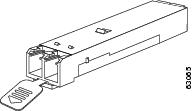
Figure 5 SFP Transceiver Module with an Actuator Button Latch
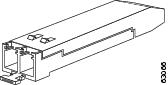
Figure 6 SFP Module with a Bale-Clasp Latch
To install an SFP transceiver module, follow these steps:
Step 1
Attach an ESD-preventive wrist strap to your wrist and to the ESD ground connector or a bare metal surface on your chassis.
Step 2
Remove the SFP transceiver module from its protective packaging.
Note
Do not remove the optical bore dust plugs until directed to do so later in the procedure.
Step 3
Check the label on the SFP transceiver module body to verify that you have the correct model for your network.
Step 4
Find the send (TX) and receive (RX) markings that identify the top side of the SFP transceiver module.
Note
On some SFP transceiver modules, the TX and RX marking might be replaced by arrowheads pointing from the SFP transceiver module connector (transmit direction or TX) and toward the connector (receive direction or RX).
Step 5
Position the SFP transceiver module in front of the socket opening.
Note
Different Cisco devices have different SFP module socket configurations. Your Cisco device could have either a latch-up or a latch-down orientation. Ensure that you are installing the SFP transceiver module in the correct orientation for your Cisco device. For more details, see the hardware installation instructions that came with your Cisco device.
Step 6
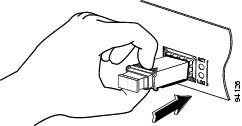
Holding it as shown in Figure 7, insert the SFP into the socket until you feel the connector latch into place.
Figure 7 Inserting an SFP Transceiver Module into a Module Socket
Step 7
Press the SFP into the slot firmly with your thumb as shown in Figure 8.
Figure 8 Latching the SFP
Step 8
To verify that the SFP is seated and latched properly:
a.
Grasp the SFP as shown in Figure 9 and try to remove it without releasing the latch.
b.
If the SFP can not be removed, it is installed and seated properly. If the SFP can be removed, reinsert it and press harder with your thumb, repeating if necessary until it is latched securely into the socket.
Figure 9 Verifying SFP Installation
Note
For optical SFP transceiver modules, before removing the dust plugs and making any optical connections, observe the following guidelines:
•
Always keep the protective dust plugs on the unplugged fiber-optic cable connectors and the transceiver optical bores until you are ready to make a connection.
•
Always inspect and clean the LC connector end-faces just before making any connections. See the Tip on this page for a pointer to a fiber-optic inspection and cleaning white paper.
•
Always grasp the LC connector housing to plug or unplug a fiber-optic cable.
Step 9
Remove the dust plugs from the network interface cable LC connectors. Save the dust plugs for future use.
Step 10
Inspect and clean the LC connector's fiber-optic end-faces. See the following Tip for a pointer to a fiber-optic inspection and cleaning white paper.
Tip
For complete information on inspecting and cleaning fiber-optic connections, see the white-paper document at this URL:
http://www.cisco.com/en/US/tech/tk482/tk876/technologies_white_paper09186a0080254eba.shtml
Step 11
Remove the dust plugs from the SFP transceiver module optical bores.
Step 12
Immediately attach the network interface cable LC connector to the SFP transceiver module.
Step 13
To connect 1000BASE-T SFP transceiver modules to a copper network, follow these substeps:
Caution 
To comply with GR-1089 intrabuilding lightning immunity requirements, you must use grounded, shielded, twisted-pair Category 5 cabling.
a.
Insert the Category 5 network cable RJ-45 connector into the SFP transceiver module RJ-45 connector.
Note
When connecting to a 1000BASE-T-compatible server, workstation, or router, use four twisted-pair, straight-through Category 5 cabling for the SFP transceiver module port. When connecting to a 1000BASE-T-compatible switch or repeater, use four twisted-pair, crossover Category 5 cabling.
b.
Insert the other end of the network cable into an RJ-45 connector on a 1000BASE-T-compatible target device.
Step 14
Observe the port status LED:
•
The LED turns green when the SFP transceiver module and the target device have an established link.
•
The LED turns amber while the STP feature discovers the network topology and searches for loops. This process takes about 30 seconds, and then the LED turns green.
•
If the LED is off, the target device might not be turned on, there might be a cable problem, or there might be a problem with the adapter installed in the target device. See the Troubleshooting section of your switch hardware guide for solutions to cabling problems.
Step 15
Reconfigure and reboot the target device if necessary.
Removing SFP Transceiver Modules
Caution 
The SFP transceiver modules are static sensitive devices. Always use an ESD wrist strap or similar individual grounding device when handling SFP transceiver modules or coming in contact with modules.
Caution 
Be careful when removing GLC-GE-100FX SFPs from a WS-C3750G-12S-S switch. The SFP transceiver module temperature might go over 160°F (70°C) and be too hot to touch with bare hands.
If you are removing an SFP transceiver module, follow these steps:
Step 1
Attach an ESD-preventive wrist strap to your wrist and to the ESD ground connector or a bare metal surface on your chassis.
Step 2
Disconnect the network fiber-optic cable or network copper cable from the SFP transceiver module connector. For optical SFP transceiver modules, immediately reinstall the dust plugs in the SFP transceiver module's optical bores and the fiber-optic cable LC connectors.
Tip
For reattachment of fiber-optic cables, note which connector plug is send (TX) and which is receive (RX).
Step 3
Release and remove the SFP transceiver module from the socket connector, as shown in Figure 10, Figure 11, and Figure 12.
•
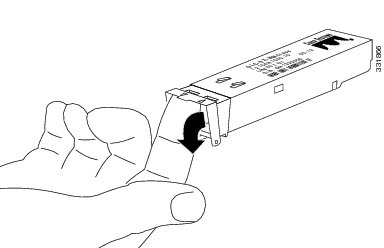
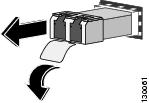
If the SFP transceiver module has a Mylar tab latch, pull the tab gently in a slightly downward direction until the transceiver disengages from the socket connector, and then pull the SFP transceiver module straight out. Do not twist or pull the Mylar tab because you could detach it from the SFP transceiver module.
Figure 10 Removing an SFP Transceiver Module Equipped with a Mylar Tab
•
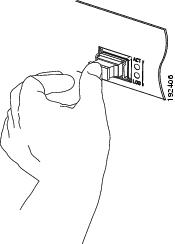
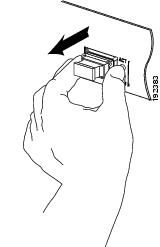
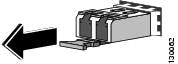
If the SFP transceiver module has an actuator button latch, gently press the actuator button on the front of the SFP transceiver module until it clicks and the latch mechanism releases the SFP transceiver module from the socket connector. Grasp the actuator button between your thumb and index finger, and carefully pull the SFP transceiver module straight from the module slot.
Figure 11 Removing an SFP Transceiver Module Equipped with an Actuator Button Latch
•
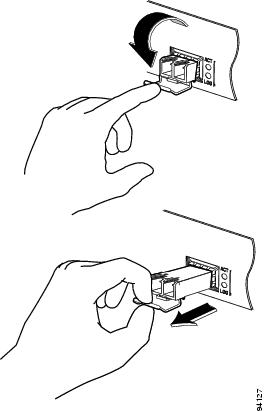
If the SFP transceiver module has a bale-clasp latch, pull the bale out and down to eject the SFP transceiver module from the socket connector. If the bale-clasp latch is obstructed and you cannot use your index finger to open it, use a small, flat-blade screwdriver or other long, narrow instrument to open the bale-clasp latch. Grasp the SFP transceiver module between your thumb and index finger, and carefully remove it from the socket.
Figure 12 Removing an SFP Transceiver Module Equipped with a Bale-Clasp Latch
Step 4
Place the removed SFP transceiver module in an antistatic bag or other protective environment.
Standards and Compliance Specifications for the DWDM SFPs
This section provides compliance information for the DWDM SFP.
FCC Class A Compliance
This equipment has been tested and found to comply with the limits for a Class A digital device, pursuant to part 15 of the FCC rules. These limits are designed to provide reasonable protection against harmful interference when the equipment is operated in a commercial environment. This equipment generates, uses, and can radiate radio-frequency energy and, if not installed and used in accordance with the instruction manual, may cause harmful interference to radio communications. Operation of this equipment in a residential area is likely to cause harmful interference, in which case users will be required to correct the interference at their own expense.
You can determine whether your equipment is causing interference by turning it off. If the interference stops, it was probably caused by the Cisco equipment or one of its peripheral devices. If the equipment causes interference to radio or television reception, try to correct the interference by using one or more of the following measures:
•
Turn the television or radio antenna until the interference stops.
•
Move the equipment to one side or the other of the television or radio.
•
Move the equipment farther away from the television or radio.
•
Plug the equipment into an outlet that is on a different circuit from the television or radio. (That is, make certain the equipment and the television or radio are on circuits controlled by different circuit breakers or fuses.)
Modifications to this product not authorized by Cisco Systems could void the FCC approval and negate your authority to operate the product.
Class 1 Laser Compliance
This product has been tested and found to comply with the limits for Class 1 laser for IEC60825, EN60825, and 21CFR1040 specifications.
Translated Safety Warnings
This section repeats in multiple languages the basic warnings that appear in this document.

Statement 1008—Class 1 Laser Product
|
Warning 
|
Class 1 laser product. Statement 1008
|
Waarschuwing
|
Klasse-1 laser produkt.
|
Varoitus
|
Luokan 1 lasertuote.
|
Attention
|
Produit laser de classe 1.
|
Warnung
|
Laserprodukt der Klasse 1.
|
Avvertenza
|
Prodotto laser di Classe 1.
|
Advarsel
|
Laserprodukt av klasse 1.
|
Aviso
|
Produto laser de classe 1.
|
¡Advertencia!
|
Producto láser Clase I.
|
Varning!
|
Laserprodukt av klass 1.
|
|
|
|
|
|
|
|
|
|
|
Aviso
|
Produto a laser de classe 1.
|
Advarsel
|
Klasse 1 laserprodukt.
|
|
|
|
|
|
|
|
|
|
|
|
|
|
|
|
|
|
|
Statement 1014—Laser Radiation

|
Warning 
|
Laser radiation is present when the system is open and interlocks bypassed. Statement 1014
|
Waarschuwing
|
Laserstraling is aanwezig wanneer het systeem open is en onderlinge vergrendelingen ongedaan zijn gemaakt.
|
Varoitus
|
Lasersäteitä järjestelmän ollessa avoinna ja suojalukituksen ohitettuna.
|
Attention
|
Production d'un rayonnement laser en position ouverte avec les verrouillages désactivés.
|
Warnung
|
Laserstrahlung in geöffnetem Zustand oder bei deaktivierter Verriegelung.
|
Avvertenza
|
Emissione di radiazioni laser quando il sistema è aperto e i dispositivi di blocco sono disattivati.
|
Advarsel
|
Laserstråling er til stede når enheten er åpen og låsemekanismene er omgått.
|
Aviso
|
Radiação presente quando o sistema estiver aberto e os bloqueios estiverem desviados.
|
¡Advertencia!
|
Radiación láser presente si el sistema está abierto y con los enclavamientos desirados.
|
Varning!
|
Laserstrålning pågår när enheten är öppen och förregleringen är förbikopplad.
|
|
|
|
|
|
|
|
|
Statement 1030—Equipment Installation
|
Warning 
|
Only trained and qualified personnel should be allowed to install, replace, or service this equipment. Statement 1030
|
Waarschuwing
|
Deze apparatuur mag alleen worden geïnstalleerd, vervangen of hersteld door bevoegd geschoold personeel.
|
Varoitus
|
Tämän laitteen saa asentaa, vaihtaa tai huoltaa ainoastaan koulutettu ja laitteen tunteva henkilökunta.
|
Attention
|
Il est vivement recommandé de confier l'installation, le remplacement et la maintenance de ces équipements à des personnels qualifiés et expérimentés.
|
Warnung
|
Das Installieren, Ersetzen oder Bedienen dieser Ausrüstung sollte nur geschultem, qualifiziertem Personal gestattet werden.
|
Avvertenza
|
Questo apparato può essere installato, sostituito o mantenuto unicamente da un personale competente.
|
Advarsel
|
Bare opplært og kvalifisert personell skal foreta installasjoner, utskiftninger eller service på dette utstyret.
|
Aviso
|
Apenas pessoal treinado e qualificado deve ser autorizado a instalar, substituir ou fazer a revisão deste equipamento.
|
¡Advertencia!
|
Solamente el personal calificado debe instalar, reemplazar o utilizar este equipo.
|
Varning!
|
Endast utbildad och kvalificerad personal bör få tillåtelse att installera, byta ut eller reparera denna utrustning.
|
|
|
|
|
|
|
|
|
|
|
Aviso
|
Somente uma equipe treinada e qualificada tem permissão para instalar, substituir ou dar manutenção a este equipamento.
|
Advarsel
|
Kun uddannede personer må installere, udskifte komponenter i eller servicere dette udstyr.
|
|
|
|
|
|
|
|
|
|
|
|
|
|
|
|
|
|
|
|
|
Obtaining Documentation and Submitting a Service Request
For information on obtaining documentation, submitting a service request, and gathering additional information, see the monthly What's New in Cisco Product Documentation, which also lists all new and revised Cisco technical documentation, at:
http://www.cisco.com/en/US/docs/general/whatsnew/whatsnew.html
Subscribe to the What's New in Cisco Product Documentation as a Really Simple Syndication (RSS) feed and set content to be delivered directly to your desktop using a reader application. The RSS feeds are a free service and Cisco currently supports RSS version 2.0.
CCDE, CCENT, CCSI, Cisco Eos, Cisco HealthPresence, Cisco IronPort, the Cisco logo, Cisco Lumin, Cisco Nexus, Cisco Nurse Connect, Cisco Pulse, Cisco StackPower, Cisco StadiumVision, Cisco TelePresence, Cisco Unified Computing System, Cisco WebEx, DCE, Flip Channels, Flip for Good, Flip Mino, Flipshare (Design), Flip Ultra, Flip Video, Flip Video (Design), Instant Broadband, and Welcome to the Human Network are trademarks; Changing the Way We Work, Live, Play, and Learn, Cisco Capital, Cisco Capital (Design), Cisco:Financed (Stylized), Cisco Store, and Flip Gift Card are service marks; and Access Registrar, Aironet, AllTouch, AsyncOS, Bringing the Meeting To You, Catalyst, CCDA, CCDP, CCIE, CCIP, CCNA, CCNP, CCSP, CCVP, Cisco, the Cisco Certified Internetwork Expert logo, Cisco IOS, Cisco Press, Cisco Systems, Cisco Systems Capital, the Cisco Systems logo, Cisco Unity, Collaboration Without Limitation, Continuum, EtherFast, EtherSwitch, Event Center, Explorer, Fast Step, Follow Me Browsing, FormShare, GainMaker, GigaDrive, HomeLink, iLYNX, Internet Quotient, IOS, iPhone, iQuick Study, IronPort, the IronPort logo, Laser Link, LightStream, Linksys, MediaTone, MeetingPlace, MeetingPlace Chime Sound, MGX, Networkers, Networking Academy, Network Registrar, PCNow, PIX, PowerKEY, PowerPanels, PowerTV, PowerTV (Design), PowerVu, Prisma, ProConnect, ROSA, ScriptShare, SenderBase, SMARTnet, Spectrum Expert, StackWise, The Fastest Way to Increase Your Internet Quotient, TransPath, WebEx, and the WebEx logo are registered trademarks of Cisco Systems, Inc. and/or its affiliates in the United States and certain other countries.
All other trademarks mentioned in this document or website are the property of their respective owners. The use of the word partner does not imply a partnership relationship between Cisco and any other company. (0908R)
Copyright © 2003-2009, Cisco Systems, Inc. All rights reserved.