Cisco Wide Area Application Services Monitoring Guide (Software Version 5.0.1)
Bias-Free Language
The documentation set for this product strives to use bias-free language. For the purposes of this documentation set, bias-free is defined as language that does not imply discrimination based on age, disability, gender, racial identity, ethnic identity, sexual orientation, socioeconomic status, and intersectionality. Exceptions may be present in the documentation due to language that is hardcoded in the user interfaces of the product software, language used based on RFP documentation, or language that is used by a referenced third-party product. Learn more about how Cisco is using Inclusive Language.
- Updated:
- March 18, 2015
Chapter: Monitoring WAAS Using SNMP
Monitoring WAAS Using SNMP
This chapter describes how to use the Simple Network Management Protocol (SNMP) to monitor your WAAS devices. SNMP is an interoperable standards-based protocol that allows for external monitoring of WAAS devices through an SNMP agent.
For more information about using and configuring SNMP, see the "Configuring SNMP Monitoring" chapter in the Cisco Wide Area Application Services Configuration Guide.
This chapter contains the following sections:
• Information About Supported MIBs
•Information About Common SNMP MIB OIDS
Information About Supported MIBs
This section describes the Cisco-specific MIBs that are supported by WAAS as shown in Table 3-1.
Downloading Supported MIBs
All supported MIB files can be downloaded from the following Cisco FTP locations:
•ftp://ftp.cisco.com/pub/mibs/v2
•ftp://ftp.cisco.com/pub/mibs/v1
The MIB objects that are defined in each MIB are described in the MIB files and are self-explanatory.
Working with SNMP Traps
This section contains the following topics:
Enabling SNMP Traps
To send SNMP traps, follow these steps:
Step 1 From the WAAS Central Manager menu, choose Devices > device-name (or Device Groups > device-group-name).
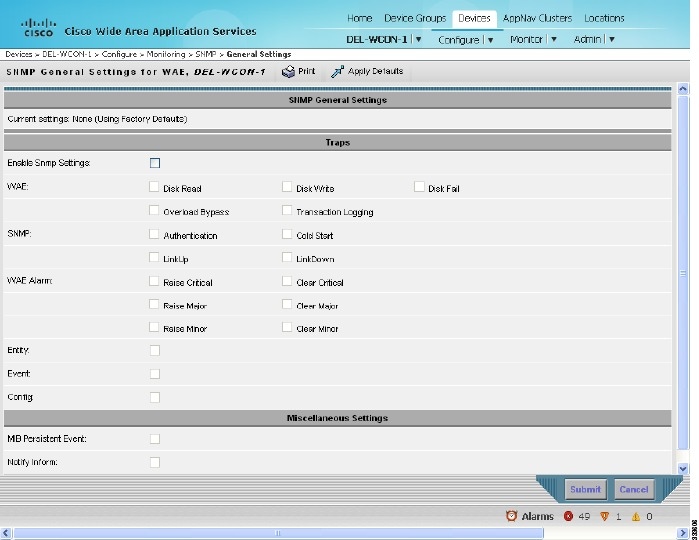
Step 2 Choose Configure > Monitoring > SNMP > General Settings. The SNMP General Settings window appears. See Figure 3-1. The settings window display which traps are enabled for the device or group.
Step 3 Configure the trap settings as desired. For more information, see the "Configuring SNMP Monitoring" chapter in the Cisco Wide Area Application Services Configuration Guide.
Figure 3-1 SNMP General Settings Window
Viewing SNMP Trigger Lists
To view the list of SNMP trap triggers defined for a device or group, follow these steps:
Step 1 From the WAAS Central Manager menu, choose Devices > device-name (or Device Groups > device-group-name).
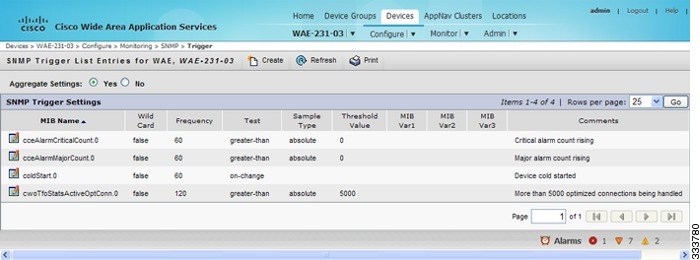
Step 2 Choose Configure > Monitoring > SNMP > Trigger. The SNMP Trigger List window appears. See Figure 3-2.
Figure 3-2 SNMP Trigger List Window
For more information about SNMP Triggers, see the "Configuring SNMP Monitoring" chapter in the Cisco Wide Area Application Services Configuration Guide.
Defining New Traps
To add a new SNMP trap on a WAAS device or device group, follow these steps:
Step 1 From the WAAS Central Manager menu, choose Devices > device-name (or Device Groups > device-group-name).
Step 2 Choose Configure > Monitoring > SNMP > Trigger. The SNMP Trigger List window appears. See Figure 3-2.
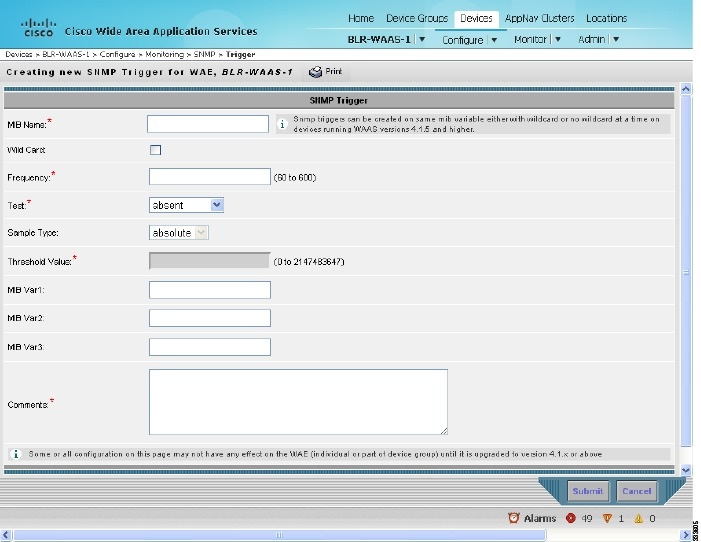
Step 3 In the Trigger list window, click Create. The SNMP Trigger window appears. See Figure 3-3.
Figure 3-3 SNMP Trigger Window
Step 4 Define the trigger settings.
Step 5 Click Submit.
Information About Common SNMP MIB OIDS
This section describes some of the common SNMP trap Object Identifiers (OIDs) that you might see:
•ciscoContentEngineDiskFailed OID
cceAlarmCriticalRaised OID
The cceAlarmCriticalRaisedOID trap signifies that a module raised a Critical alarm.
Object |
cceAlarmCriticalRaised |
OID |
1.3.6.1.4.1.9.9.178.2.0.7 |
Status |
current |
MIB |
|
Trap Components |
cceAlarmHistId cceAlarmHistModuleId cceAlarmHistCategory cceAlarmHistInfo cceAlarmHistTimeStamp |
coldStart OID
The coldStart trap signifies that the SNMP entity, supporting a notification originator application, is reinitializing itself and that its configuration may have been altered.
Object |
coldStart |
OID |
1.3.6.1.6.3.1.1.5.1 |
Status |
current |
MIB |
SNMPv2-MIB; View Supporting Images |
cceAlarmCriticalCleared OID
The cceAlarmCriticalRaisedOID trap signifies that a module cleared a Critical alarm.
Object |
cceAlarmCriticalCleared |
OID |
1.3.6.1.4.1.9.9.178.2.0.8 |
Status |
current |
MIB |
|
Trap Components |
cceAlarmHistId cceAlarmHistModuleId cceAlarmHistCategory cceAlarmHistInfo cceAlarmHistTimeStamp |
cceFailedDiskName OID
The cceFailedDiskNameOID trap signifies that a disk failure event occurred and includes the name of that disk.
Object |
cceFailedDiskName |
OID |
1.3.6.1.4.1.9.9.178.1.5.1 |
Type |
OCTET STRING |
Permission |
accessible-for-notify |
Status |
current |
MIB |
ciscoContentEngineDiskFailed OID
The ciscoContentEngineDiskFailed trap signifies that a Content Engine data drive failed. This object supersedes ciscoContentEngineDataDiskFailed. Additional information about the error is logged to syslog.
Object |
ciscoContentEngineDiskFailed |
OID |
1.3.6.1.4.1.9.9.178.2.0.6 |
Status |
current |
MIB |
|
Trap Components |
cceFailedDiskName |
 Feedback