Downloads |
 Feedback Feedback
|

Table Of Contents
Media Termination at Route Point
Cisco Unified CallManager Failure
Cisco Unified TAPI Application Failure
lineDevSpecific - Redirect Reset Original Called ID
lineDevSpecific - Redirect Set Original Called ID
lineDevSpecific - Redirect FAC CMC
lineDevSpecific - Blind Transfer FAC CMC
Directory Change Notification Handling
Monitoring Call Park Directory Numbers
Multiple Calls per Line Appearance
CiscoTSP 4.2(SR1), CiscoTSP 4.2, and CiscoTSP 4.1
Overview
This chapter outlines the key concepts that are involved in using Cisco Unified TAPI and lists all the functions that are available in the Cisco Unified TAPI implementation for Cisco Unified CallManager Release 4.2(3):
•
CTI Manager (Cluster Support)
•
•
•
•
•
Architecture
The Cisco Unified TAPI Service Provider (TSP) that is shipped with Cisco Unified CallManager 4.2(3) is TAPI version 2.1. Figure 1-1 shows how various Cisco components fit into the Microsoft Windows NT telephony and wave architectures.
Figure 1-1 High-Level View of the Windows NT Telephony and Wave Architectures with Cisco Components
Call Control
You can configure the Cisco Unified TAPI Service Provider (TSP) to provide either first- or third-party call control.
You can also configure CiscoTSP to provide both first- and third-party call control.
First-Party Call Control
In first-party call control, the application terminates the audio stream. Ordinarily, this occurs using the Cisco wave driver. However, if you want the application to control the audio stream instead of the wave driver, use the Cisco Device Specific extensions.
Third-Party Call Control
In third-party call control, the control of an audio stream terminating device is not "local" to the Cisco Unified CallManager. In such cases, the controller might be the physical IP phone on your desk or a group of IP phones for which your application is responsible.
Dynamic Port Registration
The purpose of the Dynamic Port Registration feature is to allow applications to specify the IP address and UDP port number on a call-by-call basis. Currently, the IP address and UDP port number are specified when a CTI Port registers and is static through the life of the registration of the CTI Port. When media is requested to be established to the CTI Port, the same static IP address and UDP port number is used for every call
This feature allows an application to be able to specify the IP address and UDP port number on a call-by-call basis.
An application that wishes to use Dynamic Port Registration must specify the IP address and UDP port number on a call before invoking any features on the call. If the feature is invoked before the IP address and UDP port number are set, the feature will fail and the call state will be set depending on when the media timeout occurs.
CTI Port
For first-party call control, a CTI port device must exist in the Cisco Unified CallManager. Because each port can only have one active audio stream at a time, most configurations only need one line per port.
A CTI port device does not actually exist in the system until you run a TAPI application and a line on the port device is opened requesting LINEMEDIAMODE_AUTOMATEDVOICE and LINEMEDIAMODE_INTERACTIVEVOICE. Until the port is opened, anyone calling the directory number that is associated with that CTI port device receives a busy or reorder tone.
CTI Route Point
You can use Cisco Unified TAPI to control CTI route points. CTI route points allow Cisco Unified TAPI applications to redirect incoming calls with an infinite queue depth. This allows incoming calls to avoid busy signals.
CTI route point devices have an address capability flag of LINEADDRCAPFLAGS_ROUTEPOINT. When your application opens a line of this type, it can handle any incoming call by disconnecting, accepting, or redirecting the call to some other directory number. Redirection decisions can be based on caller ID information, time of day, or other information available to the program.
Media Termination at Route Point
The purpose of the Media Termination at Route Point feature is to allow applications to terminate media at route points. This feature enables applications to pass the IP address and port number where they want the call at the route point to have media establish.
Following are the features supported at route points:
•
•
•
•
•
•
•
•
CTI Manager (Cluster Support)
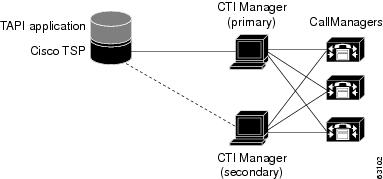
The CTI Manager, along with the CiscoTSP, provide an abstraction of the Cisco Unified CallManager cluster that allows TAPI applications to access Cisco Unified CallManager resources and functionality without being aware of any specific Cisco Unified CallManager. The Cisco Unified CallManager cluster abstraction also enhances the failover capability of CTI Manager resources. A failover condition occurs when a Cisco Unified CallManager node fails, a CTI Manager fails, or a TAPI application fails.
Figure 1-2 Cluster Support Architecture
Cisco Unified CallManager Failure
When a Cisco Unified CallManager node in a cluster fails, the CTI Manager recovers the affected CTI ports and route points by reopening these devices on another Cisco Unified CallManager node. When the failure is first detected, CiscoTSP sends a PHONE_STATE (PHONESTATE_SUSPEND) message to the TAPI application.
When the CTI port/route point is successfully reopened on another Cisco Unified CallManager, CiscoTSP sends a phone PHONE_STATE (PHONESTATE_RESUME) message to the TAPI application. If no Cisco Unified CallManager is available, the CTI Manager waits until an appropriate Cisco Unified CallManager comes back in service and tries to open the device again. The lines on the affected device also go out of service and in service with the corresponding LINE_LINEDEVSTATE (LINEDEVSTATE_OUTOFSERVICE) and LINE_LINEDEVSTATE (LINEDEVSTATE_INSERVICE) events sent by CiscoTSP to the TAPI application. If for some reason the device or lines cannot be opened, even when all the Cisco Unified CallManagers come back in service, the devices or lines are closed, and CiscoTSP will send PHONE_CLOSE or LINE_CLOSE message to TAPI application.
When a failed Cisco Unified CallManager node comes back in service, CTI Manager "re-homes" the affected CTI ports or route points back to their original Cisco Unified CallManager. The graceful re-homing process ensures that the re-homing only starts when calls are no longer being processed or are active on the affected device. For this reason, the re-homing process may not finish for a long time, especially for route points, which can handle many simultaneous calls.
When a Cisco Unified CallManager node fails, phones currently re-home to another Cisco Unified CallManager node in the same cluster. If a TAPI application has a phone device opened and the phone goes through the re-homing process, CTI Manager automatically recovers that device, and CiscoTSP sends a PHONE_STATE (PHONESTATE_SUSPEND) message to the TAPI application. When the phone successfully re-homes to another Cisco Unified CallManager node, CiscoTSP sends a PHONE_STATE (PHONESTATE_RESUME) message to the TAPI application.
The lines on the affected device also go out of service and in service and CiscoTSP sends LINE_LINEDEVSTATE (LINEDEVSTATE_OUTOFSERVICE) and LINE_LINEDEVSTATE (LINEDEVSTATE_INSERVICE) messages to the TAPI application.
Call Survivability
When a device or Cisco Unified CallManager failure occurs, no call survivability exists; however, media streams that are already connected between devices will survive. Calls in the process of being set up or modified (transfer, conference, redirect) simply get dropped.
CTI Manager Failure
When a primary CTI Manager fails, CiscoTSP sends a PHONE_STATE (PHONESTATE_SUSPEND) message and a LINE_LINEDEVSTATE (LINEDEVSTATE_OUTOFSERVICE) message for every phone and line device that the application opened. CiscoTSP then connects to a backup CTIManager. When a connection to a backup CTI Manager is established and the device or line successfully reopens, the CiscoTSP sends a PHONE_STATE (PHONESTATE_RESUME) or LINE_LINEDEVSTATE (LINEDEVSTATE_INSERVICE) message to the TAPI application. If the CiscoTSP is unsuccessful in opening the device or line for a CTI port or route point, the CiscoTSP closes the device or line by sending the appropriate PHONE_CLOSE or LINE_CLOSE message to the TAPI application.
If devices are added to or removed from the user while the CTI Manager is down, CiscoTSP generates PHONE_CREATE/LINE_CREATE or PHONE_REMOVE/LINE_REMOVE events, respectively, when connection to a backup CTI Manager is established.
Cisco Unified TAPI Application Failure
When a Cisco Unified TAPI application fails, that is, the CTI Manager closes the provider, calls at CTI ports and route points that have not yet been terminated get redirected to the Call Forward On Failure (CFF) number that has been configured for them.
Supported Device Types
CiscoTSP supports the following device types:
•
•
•
•
•
•
•
•
•
•
•
•
•
•
•
•
•
•
•
•
•
•
Forwarding
CiscoTSP now provides added support for the lineForward() request to set and clear ForwardAll information on a line. This will allow TAPI applications to set the Call Forward All setting for a particular line device. Activating this feature will allow users to set the call forwarding Unconditionally to a forward destination.
CiscoTSP sends LINE_ADDRESSSTATE messages when lineForward() requests successfully complete. These events also get sent when call forward indications are obtained from the CTI, indicating that a change in forward status has been received from a third party, such as the Cisco Unified CallManager Administration or another application setting call forward all.
Redirect and Blind Transfer
The CiscoTSP supports several different flavors of Redirect and Blind Transfer. This section will outline all of the different methods as well as the differences between each method:
lineRedirect
This is the standard TAPI lineRedirect function. It is used to redirect calls to a specified destination. The Calling Search Space and Original Called Party used by the TSP for this function are as follows:
•
•
lineDevSpecific - Redirect Reset Original Called ID
This function is used to redirect calls to a specified destination while resetting the Original Called Party to the party that is redirecting the call. The Calling Search Space and Original Called Party used by the TSP for this function are as follows:
•
•
lineDevSpecific - Redirect Set Original Called ID
This function is used to redirect calls to a specified destination while allowing the application to set the Original Called Party to any value. The Calling Search Space and Original Called Party used by the TSP for this function are as follows:
•
•
This request can be used to implement the Transfer to Voice Mail feature (TxToVM). Using this feature, the applications can transfer the call on a line directly to another line's voice mailbox. TxToVM can be achieved by specifying the following fields in the above request: voice mail pilot as the destination DN and the DN of the line to whose voice mail box the call needs to be transferred to as the preferredOriginalCalledID.
lineDevSpecific - Redirect FAC CMC
This function is used to redirect calls to a specified destination that requires either a FAC, CMC, or both. The Calling Search Space and Original Called Party used by the TSP for this function are as follows:
•
•
lineBlindTransfer
This is the standard TAPI lineBlindTransfer function. It is used to blind transfer calls to a specified destination. The Calling Search Space and Original Called Party used by the TSP for this function are as follows:
•
•
lineDevSpecific - Blind Transfer FAC CMC
This function is used to blind transfer calls to a specified destination that requires either a FAC, CMC, or both. The Calling Search Space and Original Called Party used by the TSP for this function are as follows:
•
•
Extension Mobility Support
Extension Mobility, a Cisco Unified CallManager feature, allows a user to log in and log out of a phone. Cisco Unified CallManager Extension Mobility loads a user Device Profile (including line, speed dial numbers, and so on) onto the phone when the user logs in. Using the Cisco Unified CallManager Administration pages, you can associate a list of controlled devices with a user.
CiscoTSP recognizes a user who is logged into a device as the TSPUser. When the TSP user logs into the device, the lines that are listed in the user's Extension Mobility profile are placed on the phone device, and lines previously on the phone are removed. If the device is not in the controlled device list for the TSPUser, the application receives a PHONE_CREATE or LINE_CREATE message. If the device is in the controlled list, the application receives a LINE_CREATE message for the added line and a LINE_REMOVE message for the removed line.
When the user logs out, the original lines get restored. For a non-controlled device, the application perceives a PHONE_REMOVE or LINE_REMOVE message. For a controlled device, it perceives a LINE_CREATE message for an added line and a LINE_REMOVE message for a removed line.
Directory Change Notification Handling
The CiscoTSP sends notification events when a device has been added to or removed from the user's controlled device list in the directory. CiscoTSP sends events when the user is deleted from the Cisco Unified CallManager Administration pages.
CiscoTSP sends a LINE_CREATE or PHONE_CREATE message when a device is added to a users' control list. It sends a LINE_REMOVE or PHONE_REMOVE message when a device is removed from the user's controlled list or the device is removed from database.
When the Cisco Unified CallManager system administrator deletes the current user, CiscoTSP generates a LINE_CLOSE and PHONE_CLOSE message for each open line and open phone. After doing this, it sends a LINE_REMOVE and PHONE_REMOVE message for all lines and phones.
Note
Note
Monitoring Call Park Directory Numbers
The CiscoTSP supports monitoring calls on lines that represent Cisco Unified CallManager Call Park Directory Numbers (Call Park DNs). The CiscoTSP uses a device-specific extension in the LINEDEVCAPS structure that allows TAPI applications to differentiate Call Park DN lines from other lines. If an application opens a Call Park DN line, all calls that are parked to the Call Park DN get reported to the application. The application cannot perform any call control functions on any calls at a Call Park DN.
To open Call Park DN lines, you must check the Monitor Call Park DNs check box in the Cisco Unified CallManager User Administration pages for the TSP user. Otherwise, the application will not perceive any of the Call Park DN lines upon initialization.
Multiple CiscoTSP
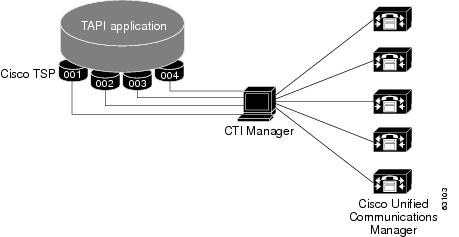
In the Cisco Unified TAPI solution, the TAPI application and the CiscoTSP get installed on the same machine. The Cisco Unified TAPI application and the CiscoTSP do not directly interface with each other. A layer written by Microsoft sits between the TAPI application and the CiscoTSP. This layer, known as TAPISRV, allows the installation of multiple TSPs on the same machine, and it hides that fact from the Cisco Unified TAPI application. The only difference to the TAPI application is that it is now informed that there are more lines that it can control.
Consider an example. Assume that CiscoTSP1 exposes 100 lines, and CiscoTSP2 exposes 100 lines. In the single CiscoTSP architecture where CiscoTSP1 is the only CiscoTSP that is installed, CiscoTSP1 would tell TAPISRV that it supports 100 lines, and TAPISRV would tell the application that it can control 100 lines. In the multiple CiscoTSP architecture, where both CiscoTSPs are installed, this means that CiscoTSP1 would tell TAPISRV that it supports 100 lines, and CiscoTSP2 would tell TAPISRV that it supports 100 lines. TAPISRV would add the lines and inform the application that it now supports 200 lines. The application communicates with TAPISRV, and TAPISRV takes care of communicating with the correct CiscoTSP.
Ensure that each CiscoTSP is configured with a different username and password that you administer in the Cisco Unified CallManager Directory. Configure each user in the Directory so devices that are associated with each user do not overlap.
Each CiscoTSP in the multiple CiscoTSP system creates a separate CTI connection to the CTI Manager and they do not communicate with each other.
Multiple CiscoTSP helps in scalability and higher performance.
Figure 1-3 shows how multiple CiscoTSPs connect to a CTI manager and use the functionality of multiple Cisco Unified CallManagers.
Figure 1-3 CTI Manager
Multiple Calls per Line Appearance
Maximum Number of Calls
The maximum number of calls per Line Appearance is database configurable. This means that the CiscoTSP supports more than 2 calls per line on MCD (Multiple Call Display) devices. An MCD device is a device that can display more than 2 call instances per DN at any given time. For non-MCD devices, the CiscoTSP supports a maximum of 2 calls per line. The absolute maximum number of calls per line appearance is 200.
Busy Trigger
In Cisco Unified CallManager, there is a setting, busy trigger, that indicates the limit on the number of calls per line appearance before CallManager will reject an incoming call. The busy trigger setting is database configurable, per line appearance, per cluster. The busy trigger setting replaces the call waiting flag per DN. The busy trigger setting cannot be modified using the CiscoTSP.
CFNA Timer
The Call Forward No Answer (CFNA) timer is also database configurable, per DN, per cluster. This timer is not configurable using the CiscoTSP.
Shared Line Appearance
The CiscoTSP supports opening two different lines that each shares the same DN. Each of these lines is known as a Shared Line Appearance. The CiscoTSP does not support shared lines on CTI Route Point devices.
The Cisco Unified CallManager allows multiple active calls to exist concurrently on each of the different devices that share the same line appearance. Each device is still limited to at most one active call and multiple hold or incoming calls at any given time. This functionality can be supported by applications that use the CiscoTSP to monitor and control shared line appearances.
If a call is active on a line that is a shared line appearance with another line, then the call appears on the other line with the dwCallState=CONNECTED and the dwCallStateMode=INACTIVE. Even though the call party information may not be displayed on the actual IP Phone for the call at the other line, the call party information is still reported by the TSP on the call at the other line. This gives the application the ability to decide if it wishes to block this information or not. Also, no call control functions are allowed on a call that is in the CONNECTED INACTIVE call state.
In the scenario where a line is calling a DN that contains multiple shared lines, the dwCalledIDName in the LINECALLINFO structure for the line with the outbound call may be empty or set randomly to the name of one of the shared DN's. The reason for this should be obvious as the Cisco TSP and the Cisco Unified CallManager cannot resolve which of the shared DN's you are calling until the call is answered.
Select Calls
There is a softkey "Select" on the IP Phones that allows a user the ability to select call instances to perform feature activation, such as transfer or conference, on those calls. The action of selecting a call on a line locks that call so that it cannot be selected by any of the shared line appearances. Pressing the "Select" key on a selected call will deselect the call.
The ability to select calls is not supported by the CiscoTSP. The reason for this is that all of the Transfer and Conference functions contain parameters indicating on which calls the operation should be invoked. Therefore, there is no reason to support "Select" through the CiscoTSP.
The CiscoTSP does support the events caused by a user selecting a call on a line that is being monitored by the application. When a call on a line is selected, all of the other lines that share the same line appearance will see the call state change to dwCallState=CONNECTED and dwCallStateMode=INACTIVE.
Direct Transfer
In Cisco Unified CallManager a softkey, "Direct Transfer," is provided to transfer the other end of an established call to the other end of another established call, while dropping the feature initiator from those two calls. Here, an established call refers to a call that is either in the on hold state or in the connected state. The "Direct Transfer" feature does not initiate a consultation call and does not put the active call on hold.
A TAPI application can invoke the "Direct Transfer" feature using the TAPI lineCompleteTransfer() function on two calls that are already in the established state. This also means that the two calls do not have to be initially set up using the lineSetupTransfer() function.
Join
In Cisco Unified CallManager a softkey, "Join," is provided to join all the parties of established calls, at least two, into one conference call. The "Join" feature does not initiate a consultation call and does not put the active call on hold. It can also include more than two calls, resulting in a call with more than three parties.
The CiscoTSP exposes the "Join" feature as a new device specific function which is known as lineDevSpecific() - Join. This function can be performed on two or more calls that are already in the established state. This also means that the two calls do not have to be initially set up using the lineSetupConference() or linePrepareAddToConference() functions.
The CiscoTSP also supports the lineCompleteTransfer() function with the dwTransferMode=Conference. This function allows a TAPI application to join all the parties of two, and only two, established calls into one conference call.
The CiscoTSP also supports the lineAddToConference() function to join a call to an existing conference call that is in the ONHOLD state.
There is a feature interaction issue involving Join, Shared Lines, and the Maximum Number of Calls. The issue occurs when you have two shared lines and the maximum number of calls on one line is less than the maximum number of calls on the other line. If a Join is performed on the line that has more maximum calls, then this issue will be encountered if the primary call of the Join is beyond the maximum number of calls for the other shared line.
For example, consider the scenario where one shared line, A, has a maximum number of calls set to 5 and another shared line, A', has a maximum number of calls set to 2.
The scenario involves the following steps:
1.
2.
At this point, line A has two calls in the ONHOLD state and line A' has two calls in the CONNECTED_INACTIVE state.
3.
At this point, the call will presented to A, but it will not be presented to A'. The reason for this is because the maximum calls for A' is set to 2.
4.
Because the call between A and D was used as the primary call of the Join, the ensuing conference call will not be presented to A'. Both calls on A' will go to the IDLE state. The end result is that A' will not see the conference call that exists on A.
Privacy Release
The Cisco Unified CallManager Privacy Release feature allows the user to dynamically alter its privacy setting. The privacy setting affects all existing and future calls on the device.
The CiscoTSP does not support the Privacy Release feature.
Barge and cBarge
The Barge and cBarge features are supported in Cisco Unified CallManager. The Barge feature uses the built-in conference bridge and the cBarge feature uses the shared conference resource in the CallManager.
The CiscoTSP supports the events caused by the invocation of the Barge and cBarge features. It does not support invoking either Barge or cBarge through an API of the CiscoTSP.
TSP Auto Update Functionality
CiscoTSP supports auto update functionality so that the latest plug-in can be downloaded and installed on client machines. The new plug-in will be QBE compatible with the connected CTIManager. When the Cisco Unified CallManager is upgraded to a later version, and CiscoTSP auto update functionality is enabled, and the user will receive the latest compatible CiscoTSP, which will work with the upgraded Cisco Unified CallManager. This makes sure that the applications work as expected with the new release of Cisco Unified CallManager (provided the new call manager interface is backward compatible with the TAPI interface). The CiscoTSP installed locally on the client machine allows application to set the auto update options as part of the CiscoTSP configuration. Users can opt for updating the CiscoTSP in following ways.
•
•
•
AutoInstall Behavior
As part of the CiscoTSP initialization, when an application does lineInitializeEx, CiscoTSP will query the current TSP plugin version information available on the Cisco Unified CallManager server. Once this information is available, CiscoTSP compares the installed CiscoTSP version with the plugin version. If the user has selected an option for Auto update, CiscoTSP triggers the update process. As part of Auto update, CiscoTSP will behave in following ways on different platforms:
On Windows 95, Windows 98, Windows ME
Since CiscoTSP is in use and locked when application does lineInitializeEx, the Auto update process will request the user close all running applications to install the new TSP version on the client setup. If the user closes all running applications, the CiscoTSP Auto update process will succeed and the user is informed of the success. If the user does not close all running applications and still continues with the installation, the new version of CiscoTSP will not be installed and the corresponding error will be reported to applications.
On Windows NT
Once CiscoTSP detects that an upgradeable version is available on the Cisco Unified CallManager server and the user has selected Auto update, CiscoTSP will report 0 lines to the application and will remove the CiscoTSP provider from the provider list. It will then try to stop the telephony service to avoid any locked files during Auto upgrade. If the telephony service can be stopped, CiscoTSP will be Auto updated silently and the service will be restarted. Applications must be reinitialized to start using the CiscoTSP. If the telephony service could not be stopped then CiscoTSP will install the new version and instruct the user to restart the system. The user has to restart the system to use the new CiscoTSP.
On Windows 2K/XP
Once CiscoTSP detects that an upgradeable version is available on the Cisco Unified CallManager server and the user has selected Auto update, CiscoTSP will report 0 lines to application and will remove the CiscoTSP provider from the provider list. If a new TSP version is detected during reconnect time, the running applications will receive LINE_REMOVE on all the lines that are already initialized and are in OutOfService state. Then CiscoTSP will silently upgrade itself to the new version downloaded from Cisco Unified CallManager and will add the provider back to the provider list. All the running applications will receive LINE_CREATE messages.
WinXP supports multiple user logon sessions (fast user switching), but in Cisco Unified CallManager Release 4.0, Auto update is only supported for the first logon user. If there are multiple active log on sessions, TSP will only support the auto update functionality for the first logged on user.
Note
User can change the location of Plugin to be a different machine than the CallManager server. It is a CTI service parameter which can be configured, the default is "//<CMServer>//ccmpluginsserver".
If Silent upgrade fails on any of the listed platforms due to any reason (e.g. locked files encountered during upgrade on Win95/98/ME), the old CiscoTSP provider/s will not be added back to provider list to avoid any looping of auto update process. User will have to clear the update options and will have to add back the providers to provider list manually. User can update the CiscoTSP manually or by fixing the problem/s encountered during auto update and reinitializing TAPI to trigger the auto update process.
Note
TSPAutoInstall.exe has UI screens and can proceed to display these screens only when the telephony service has enabled the LocalSystem logon option with "Allow Service to interact with user". If the logon option is not set as LocalSystem or logon option is LocalSystem but "Allow Service to interact with User" is disabled, then CiscoTSP will not be able to launch the AutoInstall UI screens and will not continue with AutoInstall. The user has to make sure that the following logon options are set for the telephony service.
Logon as : LocalSystem
Enable checkbox : "Allow Service to interact with user"
If these telephony service settings are changed, the user has to manually restart the service for the changes to take effect.
If, after changing the settings to the above values, the user does not restart the service, TSP checks for "Allow Service to interact with user" will be positive (as the configuration is updated for the service in the database), but AutoInstall UI can not be displayed. TSP will continue to put the entry for TSPAutoInstall.exe under Registry key RUNONCE. This will help autoinstall to run when the machine reboots next time.
QoS Support
The CiscoTSP supports the Cisco baseline for Quality of Service (QoS). The CiscoTSP marks the IP DSCP (Differentiated Services Code Point) for QBE control signals flowing from TSP to CTI with Class 3 DSCP marking as 0x18. The Cisco Unified TAPI Wave driver marks the RTP packets with EF DSCP marking as 0x2E. The CiscoTSP does not allow a user to configure these values, but instead defaults to the above values. There is no change in the TAPI interface to support QoS. If the underlying network is enabled for DSCP it will make use of the IP header DSCP bit marking and route the traffic accordingly.
Presentation Indication (PI)
There is a need to separate the presentability aspects of a number (calling, called, and so on) from the actual number itself. For example, when the number is not to be displayed on the IP phone, but the information is still needed by another system like Unity VM etc. Hence, each number/name of display name needs to be associated with a Presentation Indication (PI) flag, which will indicate whether the information should be displayed to the user or not.
This feature can be setup as follows:
On a Per Call Basis
Route Patterns and Translation Patterns can be used to set or reset PI flags for various partyDNs/Names on a per call basis. If the pattern matches the digits, then the PI settings associated with the pattern will be applied to the call information.
On a Permanent Basis
A trunk device can be configured with "Allow" or "Restrict" options for parties. This will set the PI flags for the corresponding party information for all calls from this trunk.
The CiscoTSP supports this feature. If calls are made via Translation patterns with all of the flags set to Restricted, then CallerID/Name, ConnectedID/Name, and RedirectionID/Name are sent to applications as Blank. The LINECALLPARTYID flags are set to Blocked, if both the Name and Party number are set to Restricted.
Compatibility
The Cisco Unified TAPI Service Provider serves as a TAPI 2.1 service provider. When developing an application, be sure to use only functions that the CiscoTSP supports. For example, transfer is supported, but fax detection is not. If an application requires a media or bearer mode that is not supported, it will not work as expected.
The CiscoTSP does not support TAPI 3.0 applications.
CiscoTSP 4.2.2
CiscoTSP will maintain backwards compatibility as long as the new conference enhancement feature is not used.
CiscoTSP 4.2(SR1), CiscoTSP 4.2, and CiscoTSP 4.1
There are no backward compatibility issues with the features added in the CiscoTSP 4.2 SR1, CiscoTSP 4.2, and CiscoTSP 4.1 releases.
Starting in 4.1(3), RTP events are generated as LINE_CALLDEVSPECIFIC events which contain the Call Handle of the call. However, in order to activate the feature, the application needs to negotiate extension version great than or equal to 0x00040001 when opening the line.
CiscoTSP 4.0
Removal of lineDevSpecific() - Swap Hold Setup Transfer
In CiscoTSP 4.0, the lineDevSpecific() - Swap Hold Setup Transfer function has been removed because of the changes made to the Transfer feature in the Cisco Unified CallManager and because of the addition of the Direct Transfer feature.
Call Reason Enhancements
In CiscoTSP 3.3, the TSP did not properly support the TAPI call reason model. For example, in a lineRedirect() function, both the party that was redirected and the party to which the call was redirected had the LINECALLREASON_REDIRECT set in the dwReason of LINECALLINFO. In TAPI, only the destination of the redirect should have LINECALLREASON_REDIRECT while the party that was redirected should maintain the same dwReason that it had before the redirect occurred. In CiscoTSP 4.0, the TSP has been fixed to properly support call reasons as defined in the TAPI specification.
Changes to phoneSetDisplay()
In releases prior to Cisco Unified CallManager 4.0, messages that were passed to the phone would automatically overwrite any messages sent to the phone using phoneSetDisplay(). In Cisco Unified CallManager 4.0, the message sent to the phone in the phoneSetDisplay() API will remain on the phone until the phone is rebooted. If the application wants to clear the text from the display and see the CallManager messages again, a NULL string, not spaces, should be passed in the phoneSetDisplay() API. In other words, the lpsDisplay parameter should be NULL and the dwSize should be set to 0.
XSI Object Pass Through
XSI-enabled IP phones allow applications to directly communicate with the phone and access XSI features, such as manipulate display, get user input, play tone, and so on. To allow TAPI applications access to the XSI capabilities without having to set up and maintain an independent connection directly to the phone, TAPI provides the ability to send the device data through the CTI interface. This feature is exposed as a CiscoTSP device-specific extension.
Only PhoneDevSpecificDataPassthrough request is supported for the IP phone devices. The application has to open a TAPI phone device with a minimum extension version 0x00030000 to make use of this feature.