-
Cisco VSG for Microsoft Hyper-V, Release 5.2(1)VSG2(1.1a) and Cisco Prime NSC, Release 3.2 Installation and Upgrade Guide
-
Preface
-
Overview
-
Installing the Cisco Prime NSC and Cisco VSG-Quick Start
-
Installing the Cisco Prime Network Services Controller
-
Installing the Cisco VSG
-
Registering Devices with the Cisco Prime NSC
-
Installing the Cisco VSG on a Cisco Cloud Service Platform Virtual Services Appliance
-
Upgrading the Cisco VSG and the Cisco Prime NSC
-
Index
-

 Feedback
Contents
- Overview
- Information About Installing the Cisco Prime NSC and the Cisco VSG
- Information About Cisco VSG
- Cisco Prime NSC and VSG Architecture
- Trusted Multitenant Access
- Dynamic Virtualization-Aware Operation
- Setting Up the Cisco VSG and VLAN
- Information About the Cisco Prime NSC
- Cisco Prime NSC Key Benefits
- Cisco Prime NSC Components
- Cisco Prime NSC Architecture
- Cisco Prime NSC Security
- Cisco Prime NSC API
- Cisco Prime NSC and VSG
- System Requirements
Overview
This chapter contains the following sections:
- Information About Installing the Cisco Prime NSC and the Cisco VSG
- Information About the Cisco Prime NSC
Information About Installing the Cisco Prime NSC and the Cisco VSG
You must install the Cisco Prime NSC and the Cisco VSG in a particular sequence on the Cisco Nexus 1000V switch in order to have a functioning virtual system. For the critical sequence information that you need for a successful installation on the Cisco Nexus 1000V switch, see Chapter 2, Installing the Cisco VSG and the Cisco Prime NSC-Quick Start. For installing the Cisco VSG on the Cisco Cloud Service Platform Virtual Services Appliance, see Chapter 6, Installing the Cisco VSG on a Cisco Cloud Service Platform Virtual Services Appliance.
Information About Cisco VSG
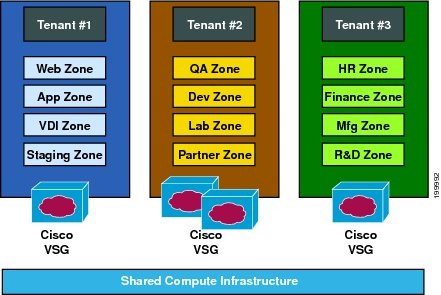
The Cisco VSG is a virtual firewall appliance that provides trusted access to virtual data center and cloud environments with dynamic policy-driven operation, mobility-transparent enforcement, and scale-out deployment for dense multitenancy. By associating one or more virtual machines (VMs) into distinct trust zones, the Cisco VSG ensures that access to trust zones is controlled and monitored through established security policies. The following figure shows the trusted zone-based access control that is used in per-tenant enforcement with the Cisco VSG.
- Cisco Prime NSC and VSG Architecture
- Trusted Multitenant Access
- Dynamic Virtualization-Aware Operation
- Setting Up the Cisco VSG and VLAN
Cisco Prime NSC and VSG Architecture
The Cisco VSG operates with the Cisco Nexus 1000V Series switch in the Microsoft Hyper-V or the Cisco Cloud Service Platform Virtual Services Appliance, and the Cisco VSG leverages the virtual network service data path (vPath). vPath steers traffic, whether external-to-VM or VM-to-VM, to the Cisco VSG of a tenant. Initial packet processing occurs in the Cisco VSG for policy evaluation and enforcement. After the policy decision is made, the Cisco VSG offloads policy enforcement of the remaining packets to vPath.
vPath supports the following features:
- Tenant-aware flow classification and subsequent redirection to a designated Cisco VSG tenant
- Per-tenant policy enforcement of flows offloaded by the Cisco VSG to vPath
The Cisco VSG and the VEM provide the following benefits:
- Each Cisco VSG can provide protection across multiple physical servers, which eliminates the need for you to deploy a virtual appliance per physical server.
- By offloading the fast-path to one or more vPath Virtual Ethernet Modules (VEMs), the Cisco VSG enhances security performance through distributed vPath-based enforcement.
- You can use the Cisco VSG without creating multiple switches or temporarily migrating VMs to different switches or servers. Zone scaling, which is based on security profiles, simplifies physical server upgrades without compromising security or incurring application outages.
- For each tenant, you can deploy the Cisco VSG in an active-standby mode to ensure that vPath redirects packets to the standby Cisco VSG when the primary Cisco VSG is unavailable.
- You can place the Cisco VSG on a dedicated server so that you can allocate the maximum compute capacity to application workloads. This feature enables capacity planning to occur independently and allows for operational segregation across security, network, and server groups.
Trusted Multitenant Access
You can transparently insert a Cisco VSG into the Microsoft Hyper-V environment where the Cisco Nexus 1000V is deployed. One or more instances of the Cisco VSG is deployed on a per-tenant basis, which allows a highly scale-out deployment across many tenants. Tenants are isolated from each other, so no traffic can cross tenant boundaries. You can deploy a Cisco VSG at the tenant level in Hyper-V and manage each tenant instance using System Center Virtual Machine Manager (SCVMM).
As you instantiate VMs for a given tenant, their association to security profiles (or zone membership) occurs immediately through binding with the Cisco Nexus 1000V port profile. Each VM is placed upon instantiation into a logical trust zone. Security profiles contain context-aware rule sets that specify access policies for traffic that enters and exits each zone. You can apply controls to zone-to-zone traffic and to external-to-zone (and zone-to-external) traffic. Zone-based enforcement occurs within a VLAN because a VLAN often identifies a tenant boundary. The Cisco VSG evaluates access control rules and then offloads enforcement to the Cisco Nexus 1000V VEM vPath module. Upon enforcement, the Cisco VSG can permit or deny access and can generate optional access logs. The Cisco VSG also provides policy-based traffic monitoring capability with access logs.
Dynamic Virtualization-Aware Operation
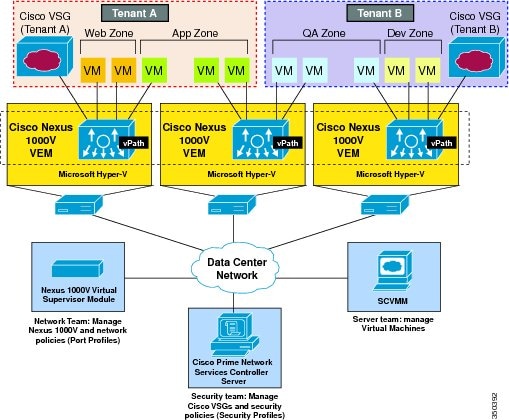
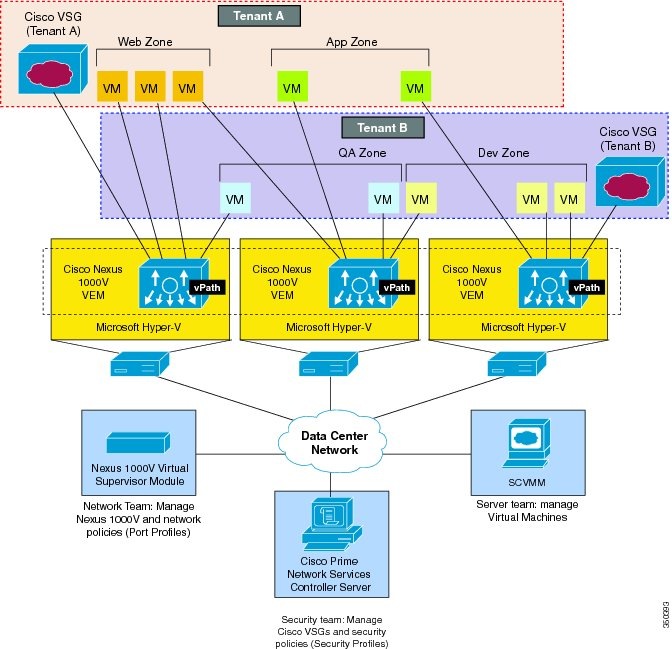
A virtualization environment is dynamic, where frequent additions, deletions, and changes occur across tenants and across VMs. The following figure shows how the structured environment can change over time due to dynamic VMs.
The Cisco VSG operating with the Cisco Nexus 1000V (and vPath) supports a dynamic VM environment. When you create a tenant with the Cisco VSG (standalone or active-standby pair) on the Cisco Prime NSC, associated security profiles are defined that include trust zone definitions and access control rules. Each security profile is bound to a Cisco Nexus 1000V port profile (authored on the Cisco Nexus 1000V Virtual Supervisor Module (VSM) and published to the Microsoft SCVMM.
When a new VM is instantiated, the server administrator assigns appropriate port profiles to the virtual Ethernet port of the VM. Because the port profile uniquely refers to a security profile and VM zone membership, the Cisco VSG immediately applies the security controls. You can re-purpose a VM by assigning it to a different port profile or security profile.
As VM migration events are triggered, VMs move across physical servers. Because the Cisco Nexus 1000V ensures that port profile policies follow the VMs, associated security profiles also follow these moving VMs, and security enforcement and monitoring remain transparent to the migration events.
Setting Up the Cisco VSG and VLAN
You can set up a Cisco VSG in an overlay fashion so that VMs can reach a Cisco VSG irrespective of its location. The vPath component in the Cisco Nexus 1000V VEM intercepts the packets from the VM and sends them to the Cisco VSG for further processing.
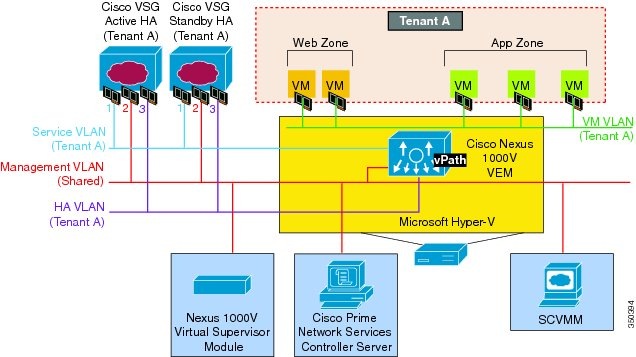
Figure 4. Cisco Virtual Security Gateway VLAN Usages. In the following figure, the Cisco VSG connects to three different VLANs (service VLAN, management VLAN, and HA VLAN). A Cisco VSG is configured with three vNICS—data vNIC (1), management vNIC (2), and HA vNIC (3)—with each of the vNICs connected to one of the VLANs through a port profile.The VLAN functions are as follows:
- The service VLAN provides communications between the Cisco Nexus 1000V VEM and Cisco VSG through a physical router. The Cisco VSG data interface and VEM interface are configured on different subnets. All the Cisco VSG data interfaces are part of the service VLAN and the VEM interacts with VSG using the router.
- The management VLAN connects the management platforms such as the Microsoft SCVMM, the Cisco Prime NSC, the Cisco Nexus 1000V VSM, and the managed Cisco VSGs. The Cisco VSG management vNIC is part of the management VLAN.
- The HA VLAN provides the heartbeat mechanism and identifies the active and standby relationship between the Cisco VSGs. The Cisco VSG vNICs are part of the HA VLAN.
You can allocate one or more VM data VLANs for VM-to-VM communications. In a typical multitenant environment, the management VLAN is shared among all the tenants and the service VLAN, HA VLAN, and the VM data. VLANs are allocated on a per-tenant basis. However, when VLAN resources become scarce, you might decide to use a single VLAN for service and HA functions.
Information About the Cisco Prime NSC
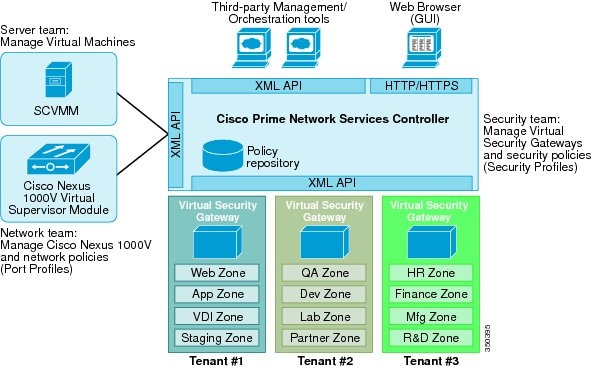
The Cisco Prime NSC virtual appliance is based on Red Hat Enterprise Linux (RHEL), which provides centralized device and security policy management of the Cisco VSG for the Cisco Nexus 1000V Series switch. Designed for multitenant operation, the Cisco Prime NSC provides seamless, scalable, and automation-centric management for virtual data center and cloud environments. With a web-based GUI, CLI, and XML APIs, the Cisco Prime NSC enables you to manage Cisco VSGs that are deployed throughout the data center from a centralized location.
Note
Multitenancy is when a single instance of the software runs on a Software-as-a-Service (SaaS) server, serving multiple client organizations or tenants. In contrast, multi-instance architecture has separate software instances set up for different client organizations. With a multitenant architecture, a software application can virtually partition data and configurations so that each tenant works with a customized virtual application instance.
The Cisco Prime NSC is built on an information model-driven architecture, where each managed device is represented by its subcomponents.
Cisco Prime NSC Key Benefits
The Cisco Prime NSC provides the following key benefits:
- Rapid and scalable deployment with dynamic, template-driven policy management based on security profiles.
- Seamless operational management through XML APIs that enable integration with third-party management tools.
- Greater collaboration across security and server administrators, while maintaining administrative separation and reducing administrative errors.
Cisco Prime NSC Components
The Cisco Prime NSC architecture includes the following components:
- A centralized repository for managing security policies (security templates) and object configurations that allow managed devices to be stateless.
- A centralized resource management function that manages pools of devices that are commissioned and pools of devices that are available for commissioning. This function simplifies large scale deployments as follows:
- Devices can be pre-instantiated and then configured on demand
- Devices can be allocated and deallocated dynamically across commissioned and noncommissioned pools
- A distributed management-plane function that uses an embedded management agent on each device that allows for a scalable management framework.
Cisco Prime NSC Security
The Cisco Cisco Prime NSC uses security profiles for tenant-centric template-based configuration of security policies. A security profile is a collection of security policies that are predefined and applied on an on-demand basis at the time of Virtual Machine (VM) instantiation. These profiles simplify authoring, deployment, and management of security policies in a dense multitenant environment, reduce administrative errors, and simplify audits.
Cisco Prime NSC and VSG
The Cisco Prime NSC operates with the Cisco Nexus 1000V Series VSM to achieve the following scenarios:
- Security administrators who author and manage security profiles as well as manage Cisco VSG instances. Security profiles are referenced in Cisco Nexus 1000V Series port profiles through the Cisco Prime NSC interface.
- Network administrators who author and manage port profiles as well as manage Cisco Nexus 1000V Series switches. Port profiles are referenced in the Microsoft SCVMM through the Cisco Nexus 1000V Series VSM interface.
- Server administrators who select the appropriate port profiles in the Microsoft SCVMM when instantiating a virtual machine.
System Requirements
System requirements for a Cisco Prime NSC are as follows:
- Microsoft Windows Server with SCVMM 2012 SP1 or SCVMM 2012 R2.
- Intel VT that is enabled in the BIOS.
- 4 GB RAM for Prime NSC ISO installation.
- 40 GB on shared NFS or SAN, and configured on two disks as follows:
- Adobe Flash Player plugin 11.2 or higher.
- Any of the following browsers: Access to Cisco Prime NSC application using a Web browser and the following ports (if the deployment uses a firewall, make sure to permit the following ports):
Note
If you are running Firefox or IE and do not have Flash, or you have a version of Flash that is older than 11.2, a message displays asking you to install Flash and provides a link to the Adobe website.