Feedback Feedback
|

Table Of Contents
1-Port OC-12 Packet over SONET Line Card Overview
Software and Hardware Compatibility
Line Card, Router, and Processor Compatibility
1-Port OC-12 Packet over SONET Line Card Overview
This chapter describes the Cisco 10000 series 1-port OC-12 Packet over SONET line card (referred to as the 1-port OC-12 Packet over SONET line card), and contains the following sections:
•
Software and Hardware Compatibility
•
•
Line Card Summary
Table 13-1 1-Port OC-12 Packet over SONET Line Card Summary
ESR-1OC-12/P-SMI =
1-port OC-12 Packet over SONET line card
Initial Cisco IOS releases for PRE-1:
12.0(22)S and later releases of Cisco IOS 12.0S
Initial Cisco IOS releases for PRE-2:
12.0(22)S and later releases of Cisco IOS 12. 0S
12.2(28)SB and later releases of Cisco IOS Release 12.2(28)SB
12.3(7)XI and later releases of Cisco IOS 12.3XIFor registered Cisco.com users, use Software Advisor to determine the software releases for this line card.
The 1-port OC-12 Packet over SONET line card provides a trunk uplink that supports up to 622 Mbps throughput over a standard SONET/ITU-T Synchronous Digital Hierarchy (SDH) interface using a single-mode fiber intermediate-reach SC connector.
The 1-port OC-12 Packet over SONET line card is a standard implementation of Packet over SONET switching, and supports the following features:
•
•
If you are a registered Cisco.com user, see Feature Navigator for supported features.
Software and Hardware Compatibility
To check the minimum software requirements of Cisco IOS software with the hardware installed on your router, Cisco maintains the Software Advisor tool on Cisco.com. This tool does not verify whether line cards within a system are compatible, but does provide the minimum Cisco IOS requirements for individual hardware line cards, modules, or options.
Note
To access Software Advisor, click Login at Cisco.com, type Software Advisor in the Search box, and click Go. Click the link for the Software Advisor tool.
Choose a product family or enter a specific product number to search for the minimum supported software release needed for your hardware.
Line Card, Router, and Processor Compatibility
Table 13-2 lists router model, line card, and processor compatibility.
Table 13-2 Line Card, Router, and Processor Compatibility
1-port OC-12 Packet over SONET line card
Yes
Yes
Yes
Yes
Yes
LEDs
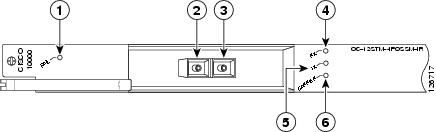
The 1-port OC-12 Packet over SONET LEDs are shown in Figure 13-1.
Figure 13-1 1-Port OC-12 Packet over SONET Line Card Faceplate Description
Table 13-3 provides a description of the 1-port OC-12 Packet over SONET LEDs.
Physical Specifications
The 1-port OC-12 Packet over SONET line card physical specifications are shown in Table 13-4.
Slot Locations
The line card slot designations are shown in this section. See Figure 13-2 for line card slot designations for the Cisco 10008 router and Figure 13-3 for line card slot designations for the Cisco 10005 router.
Figure 13-2 Line Card Slot and Subslot Designations for the Cisco 10008 Router
Blower module
PRE slot 0A
Primary PEM
PRE slot 0B
Redundant PEM
Line card slots 5 to 8
Line card slots 1 to 4
The 1-port OC-12 Packet over SONET line card can be installed in slot 1 through slot 8.
Figure 13-3 Line Card Slot Designations for the Cisco 10005 Router
The 1-port OC-12 Packet over SONET line card can be installed in slot 1 through slot 5.
Cables and Connectors
The 1-port OC-12 Packet over SONET line card uses an SC-type optical connector.
Table 13-5 and Table 13-6 provide optical cabling specifications for the 1-port OC-12 Packet over SONET line card.
Table 13-6 Optical Power Budget
12 dB
-15 to -8 dBm
-28 to -8 dBm
9.3 miles (1.5 km)
Go to Chapter 16, "Preparing for Installation" to begin the installation or replacement of the line card.
For troubleshooting information, see Chapter 18, "Troubleshooting the Installation."