Feedback Feedback
|

Table Of Contents
Cisco Administrative Policy Engine Operators' Guide
Overview: Cisco Administrative Policy Engine
About Role-Based Access Control
About the Cisco Administrative Policy Engine Operations Interface
Accessing a Resource by Browsing Locations
Accessing a Resource by Browsing Resource Types
Obtaining Technical Assistance
Quick Start Guide
Cisco Administrative Policy Engine Operators' Guide
1 Overview: Cisco Administrative Policy Engine
Cisco Administrative Policy Engine (Cisco APE) is a security system that provides the following features:
•
Authenticates and authorizes services for managing Cisco IOS devices and network elements attached to Cisco IOS devices.
•
•
•
•
With Cisco APE, administrators can centrally manage access to Cisco IOS devices. They can also control access to reverse Telnet to non-Cisco IOS devices that are serially connected to the Cisco IOS device. With Cisco APE, administrators can also authorize Cisco IOS commands within Cisco IOS devices.
The Cisco IOS device contacts Cisco APE to perform password authentication, authorization, and (optionally) accounting (AAA) through TACACS+. Cisco APE authenticates you; and then Cisco APE provides you with a hierarchy of devices that you are allowed to access. You can select a device and start a Telnet session to that device.
The web-based administrative interface authenticates system administrators and allows them to administer the local system in addition to managing users, devices, groups and policies within the system.
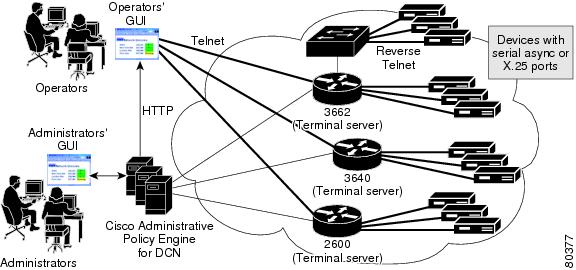
Figure 1 gives an overview of how you can use Cisco APE to access services and Cisco IOS devices through the operators' interface.
Figure 1 Overview of the Cisco Administrative Policy Engine Architecture
2 About Role-Based Access Control
RBAC determines if you can be granted a specific type of access to a resource. In an RBAC system, you are granted or denied access to a device or service based on the role that you have as part of an organization that you are assigned in an organizational structure. Privileges or access rights are then associated with these roles based on the tasks administrators assign to you.
With Role-Based Access Control (RBAC) administrators can:
•
•
•
Role Hierarchies
Role hierarchies define roles that have unique attributes and can contain other roles; that is, one role can include the tasks and permissions that are associated with another role. Tasks and roles depend on organizational policies. When tasks overlap, administrators can establish hierarchies of roles.
Role hierarchies help in organizing roles as parents or children to reflect authority and responsibility. Roles can have overlapping responsibilities and privileges. Users belonging to different roles may need to perform common tasks. In these cases, RBAC provides an efficient way to avoid specifying common tasks for the roles.
Users and Roles
In an RBAC system, administrators can grant users membership into roles based on their responsibilities in an organization. The tasks that the administrators can allow you to perform are based on your role. A properly administered RBAC system enables you to perform a broad range of authorized tasks once the administrators have established and defined roles, role hierarchies, relationships, and constraints.
3 Cisco APE Operator Flow
The Cisco APE authorization service separates the application level authorization logic from the business logic. The authorization service works with the authorization logic. The services provided by this authorization service can be used by multiple applications, thereby achieving a common authorization model across multiple applications.
A common global policy defines the authorization policies. Cisco APE allows administrators to define a global policy that applies to multiple applications within an administrative domain. The applications themselves act as enforcement points for the policy decisions. The application makes a request to the authorization service before allowing access to a client for a requested application. Access is then allowed or denied based on a decision returned by the authorization service.
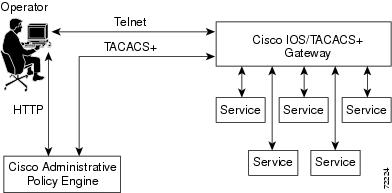
Figure 2 shows how the operator uses Cisco APE to access a device or service.
Figure 2 Cisco APE Operator Flow
1.
2.
3.
4.
5.
6.
4 About the Cisco Administrative Policy Engine Operations Interface
With the Cisco Administrative Policy Engine Operations interface, you can Telnet to a Cisco IOS or a non-Cisco IOS device or a service through the operators' interface. This section describes the following procedures:
•
•
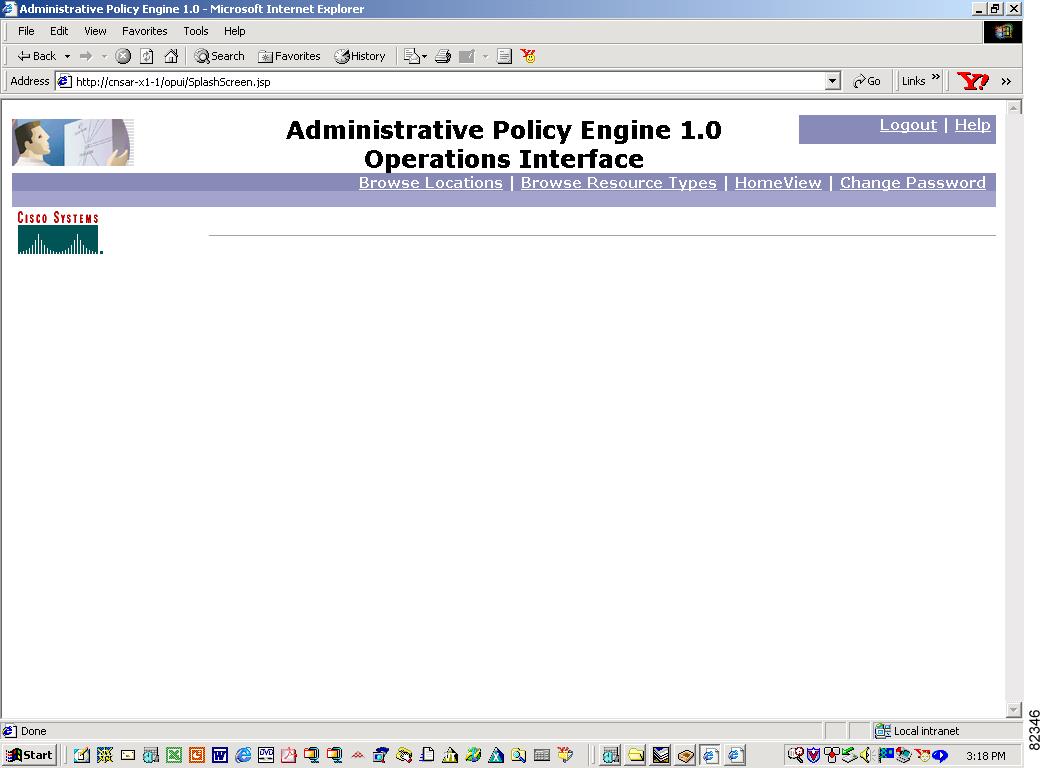
Figure 3 shows the operators' interface on Cisco APE.
Figure 3 Cisco Administrative Policy Engine Operations Interface
5 Changing Your Password
Note
All fields marked by an asterisk (*) are required fields.
Step 1
Step 2
Step 3
Step 4
Step 5
6 Accessing a Resource by Browsing Locations
Note
Step 1
Step 2
7 Accessing a Resource by Browsing Resource Types
Note
Step 1
Step 2
8 Selecting a Home View
You can select your home view to be one of the following pages:
•
•
To select your home view from the Browse Locations or Browse Resource Types page, click on Make this your HomeView.
9 Obtaining Documentation
These sections explain how to obtain documentation from Cisco Systems.
World Wide Web
You can access the most current Cisco documentation on the World Wide Web at this URL:
Translated documentation is available at this URL:
http://www.cisco.com/public/countries_languages.shtml
Documentation CD-ROM
Cisco documentation and additional literature are available in a Cisco Documentation CD-ROM package, which is shipped with your product. The Documentation CD-ROM is updated monthly and may be more current than printed documentation. The CD-ROM package is available as a single unit or through an annual subscription.
Ordering Documentation
You can order Cisco documentation in these ways:
•
http://www.cisco.com/cgi-bin/order/order_root.pl
•
http://www.cisco.com/go/subscription
•
Documentation Feedback
You can submit comments electronically on Cisco.com. In the Cisco Documentation home page, click the Fax or Email option in the "Leave Feedback" section at the bottom of the page.
You can e-mail your comments to bug-doc@cisco.com.
You can submit your comments by mail by using the response card behind the front cover of your document or by writing to the following address:
Cisco Systems
Attn: Document Resource Connection
170 West Tasman Drive
San Jose, CA 95134-9883We appreciate your comments.
10 Obtaining Technical Assistance
Cisco provides Cisco.com as a starting point for all technical assistance. Customers and partners can obtain online documentation, troubleshooting tips, and sample configurations from online tools by using the Cisco Technical Assistance Center (TAC) Web Site. Cisco.com registered users have complete access to the technical support resources on the Cisco TAC Web Site.
Cisco.com
Cisco.com is the foundation of a suite of interactive, networked services that provides immediate, open access to Cisco information, networking solutions, services, programs, and resources at any time, from anywhere in the world.
Cisco.com is a highly integrated Internet application and a powerful, easy-to-use tool that provides a broad range of features and services to help you with these tasks:
•
•
•
•
•
If you want to obtain customized information and service, you can self-register on Cisco.com. To access Cisco.com, go to this URL:
Technical Assistance Center
The Cisco Technical Assistance Center (TAC) is available to all customers who need technical assistance with a Cisco product, technology, or solution. Two levels of support are available: the Cisco TAC Web Site and the Cisco TAC Escalation Center.
Cisco TAC inquiries are categorized according to the urgency of the issue:
•
•
•
•
The Cisco TAC resource that you choose is based on the priority of the problem and the conditions of service contracts, when applicable.
Cisco TAC Web Site
You can use the Cisco TAC Web Site to resolve P3 and P4 issues yourself, saving both cost and time. The site provides around-the-clock access to online tools, knowledge bases, and software. To access the Cisco TAC Web Site, go to this URL:
All customers, partners, and resellers who have a valid Cisco service contract have complete access to the technical support resources on the Cisco TAC Web Site. The Cisco TAC Web Site requires a Cisco.com login ID and password. If you have a valid service contract but do not have a login ID or password, go to this URL to register:
http://www.cisco.com/register/
If you are a Cisco.com registered user, and you cannot resolve your technical issues by using the Cisco TAC Web Site, you can open a case online by using the TAC Case Open tool at this URL:
http://www.cisco.com/tac/caseopen
If you have Internet access, we recommend that you open P3 and P4 cases through the Cisco TAC Web Site.
Cisco TAC Escalation Center
The Cisco TAC Escalation Center addresses priority level 1 or priority level 2 issues. These classifications are assigned when severe network degradation significantly impacts business operations. When you contact the TAC Escalation Center with a P1 or P2 problem, a Cisco TAC engineer automatically opens a case.
To obtain a directory of toll-free Cisco TAC telephone numbers for your country, go to this URL:
http://www.cisco.com/warp/public/687/Directory/DirTAC.shtml
Before calling, please check with your network operations center to determine the level of Cisco support services to which your company is entitled: for example, SMARTnet, SMARTnet Onsite, or Network Supported Accounts (NSA). When you call the center, please have available your service agreement number and your product serial number.