Feedback Feedback
|

Table Of Contents
Overview: Cisco Administrative Policy Engine
About Role-Based Access Control
Overview: Cisco Administrative Policy Engine
This chapter describes the following topics:
•
About Role-Based Access Control
Overview
Cisco Administrative Policy Engine (Cisco APE) is a security system that provides the following features:
•
•
•
•
•
With Cisco APE, you can centrally manage access to Cisco IOS devices. You can also control access to reverse Telnet to non-Cisco IOS devices that are serially connected to Cisco IOS devices. With Cisco APE you can also authorize operators to enter Cisco IOS commands within Cisco IOS devices.
The Cisco IOS device contacts Cisco APE to perform password authentication, authorization, and (optionally) accounting (AAA) through TACACS+. Cisco APE authenticates the operators, and then provides the operators with a hierarchy of devices they are allowed to access. The operators can select a device and start a Telnet session to that device.
Through the web-based management interface, Cisco APE authenticates the system administrator and allows the administration of the local system in addition to managing users, devices, groups and policies within the system.
With Cisco APE you can:
•
•
•
•
•
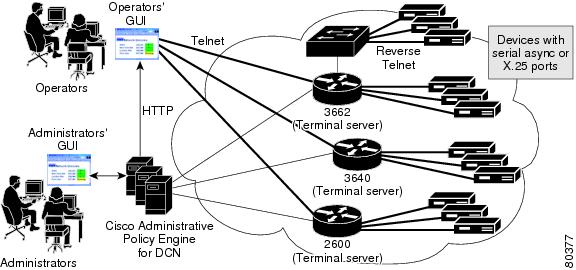
Figure 1-1 gives an overview of how you can use Cisco APE to access services and Cisco IOS devices through the administrators'and the operators' interfaces.
Figure 1-1 Overview of the Cisco Administrative Policy Engine Architecture
Additionally, Cisco APE provides the following features:
•
•
About Data Replication
Replication is the process of keeping a copy of data. Cisco APE allows you to replicate data among multiple instance of Cisco APE so that all Cisco APE services can provide the same AAA services.
About Accounting Log Files
The Cisco APE TACACS+ server records TACACS+ accounting messages to an accounting log file. The accounting log file uses the same format as the AcctExport CSU Utility.
Cisco APE also logs error messages to a log file. You can view the trace debug output by changing the logging level in the Device Access Management (DAM) server
About Role-Based Access Control
With Role-Based Access Control (RBAC) you can:
•
•
•
RBAC determines if you can be granted a specific type of access to a resource. In an RBAC system, you are granted or denied access to a device or service based on the role that you have as part of an organization. You can assign and are assigned roles and access rights that are defined in an organizational structure. Privileges or access rights are then associated with these roles based on the tasks that you assign to a user in that position.
Role Hierarchies
Role hierarchies define roles that have unique attributes and can contain other roles; that is, one role can include the tasks and permissions that are associated with another role. Tasks and roles depend on organizational policies. When tasks overlap, you can establish hierarchies of roles.
Role hierarchies help in organizing roles to reflect authority and responsibility. Roles can have overlapping responsibilities and privileges. Users belonging to different roles may need to perform common tasks. In these cases, RBAC provides an efficient way to avoid specifying common tasks for the roles.
Separation of Roles
Organizational policy determines how roles are separated. RBAC allows you to split administration of the role-user relationship from that of the role-permission relationship. Since many users in an organization typically perform similar functions and have similar access rights, user functions are separated by role.
For example, making a bank payment and authorizing the payment require separate transactions. Two roles are needed to perform the two transactions. You can separate roles both horizontally and vertically in a hierarchical distribution.
Users and Roles
In an RBAC system, an administrator can grant users membership into roles based on users' responsibilities in an organization. The tasks that you can allow a user to perform are based on the user's role. You can add or delete memberships within roles based on job requirements. In the same way, you can establish role mapping when you set up new tasks and delete old tasks as responsibilities change. This simplifies the administration and management of privileges; you can update roles without updating the privileges for every user on an individual basis.
A properly administered RBAC system enables users to:
•
•
•
Cisco APE Operator Flow
The Cisco APE authorization service separates the application level authorization logic from the business logic. The authorization service works with the authorization logic. The services provided by this authorization service can be used by multiple applications, thereby achieving a common authorization model across multiple applications.
A common global policy defines the authorization policies. Cisco APE allows you to define a global policy that applies to multiple applications within an administrative domain. The applications themselves act as enforcement points for the policy decisions. The application makes a request to the authorization service before allowing access to a client for a requested application. Access is then allowed or denied based on a decision returned by the authorization service.
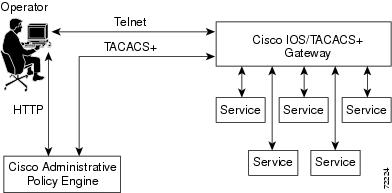
Figure 1-2 shows how the operator uses Cisco APE to access a device or service.
Figure 1-2 Cisco APE Operator Flow
1.
2.
3.
4.
5.
6.