Feedback
Table Of Contents
CNS Config Retrieve Enhancement with Retry and Interval
Configuring the CNS Event and EXEC Agents
Configuring the CNS Image Agent
Configuring CNS Security Features
Retrieving a CNS Image from a Server
Retrieving a CNS Configuration from a Server
Configuring Command Scheduler Policy Lists and Occurrences
Command Scheduler Policy Lists
Configuring Advanced CNS Features
Configuration Examples for CNS
Deploying the CNS Router: Example
Configuring a Partial Configuration: Example
Enabling and Configuring CNS Agents: Example
CNS Flow-Through Provisioning: Examples
Command Scheduler Policy Lists and Occurrences: Examples
Retrieving a CNS Image from a Server: Example
Retrieving a CNS Configuration from a Server: Examples
Using the CNS Zero Touch Solution: Examples
Cisco Networking Services
First Published: November 20, 2006Last Updated: June 29, 2007The Cisco Networking Services (CNS) feature is a collection of services that can provide remote event-driven configuring of Cisco IOS networking devices and remote execution of some command-line interface (CLI) commands.
Finding Feature Information in This Module
Your Cisco IOS software release may not support all of the features documented in this module. To reach links to specific feature documentation in this module and to see a list of the releases in which each feature is supported, use the "Feature Information for CNS" section.
Finding Support Information for Platforms and Cisco IOS and Catalyst OS Software Images
Use Cisco Feature Navigator to find information about platform support and Cisco IOS and Catalyst OS software image support. To access Cisco Feature Navigator, go to http://www.cisco.com/go/cfn. An account on Cisco.com is not required.
Contents
•
Configuration Examples for CNS
Prerequisites for CNS
•
•
•
Table 1 Router Interface and Transport Protocols Required by CNS Services
T1
Yes
Yes
Yes
ADSL
No
Yes
Yes
Serial
Yes
No
Yes
CNS Image Agent
•
•
•
Restrictions for CNS
CNS Configuration Engine
•
•
•
•
CNS Image Agent
During automated image loading operations you must try to prevent the Cisco IOS device from losing connectivity with the file server that is providing the image. Image reloading is subject to memory issues and connection issues. Boot options must also be configured to allow the Cisco IOS device to boot another image if the first image reload fails. For more details see the "Managing Configuration Files" module of the Cisco IOS Configuration Fundamentals Configuration Guide, Release 12.4.
CNS Frame Relay Zero Touch
The CNS Frame Relay Zero Touch solution does not support switched virtual circuits (SVCs).
The Frame Relay zero touch solution does not support IP over PPP over Frame Relay because routing to an interface (or subinterface) that supports IP over PPP over Frame Relay is not possible.
Command Scheduler
The EXEC CLI specified in a Command Scheduler policy list must neither generate a prompt nor can it be terminated using keystrokes. Command Scheduler is designed as a fully automated facility, and no manual intervention is permitted.
Remote Router
•
•
•
Information About CNS
To configure CNS, you should understand the following concepts:
•
•
•
•
CNS
CNS is a foundation technology for linking users to networking services and provides the infrastructure for the automated configuration of large numbers of network devices. Many IP networks are complex with many devices, and each device must currently be configured individually. When standard configurations do not exist or have been modified, the time involved in initial installation and subsequent upgrading is considerable. The volume of smaller, more standardized, customer networks is also growing faster than the number of available network engineers. Internet service providers (ISPs) now need a method for sending out partial configurations to introduce new services. To address all these issues, CNS has been designed to provide "plug-and-play" network services using a central directory service and distributed agents. CNS features include CNS configuration and event agents and a Flow-Through Provisioning structure. The configuration and event agents use a CNS configuration engine to provide methods for automating initial Cisco IOS device configurations, incremental configurations, and synchronized configuration updates, and the configuration engine reports the status of the configuration load as an event to which a network monitoring or workflow application can subscribe. The CNS Flow-Through Provisioning uses the CNS configuration and event agents to provide an automated workflow, eliminating the need for an on-site technician.
CNS Configuration Agent
The CNS configuration agent is involved in the initial configuration and subsequent partial configurations on a Cisco IOS device. To activate the CNS configuration agent, enter any of the cns config CLI commands.
Initial CNS Configuration
When a routing device first comes up, it connects to the configuration server component of the CNS configuration agent by establishing a TCP connection through the use of the cns config initial command, a standard CLI command. The device issues a request and identifies itself by providing a unique configuration ID to the configuration server.
When the CNS web server receives a request for a configuration file, it invokes the Java servlet and executes the corresponding embedded code. The embedded code directs the CNS web server to access the directory server and file system to read the configuration reference for this device (configuration ID) and template. The Configuration Agent prepares an instantiated configuration file by substituting all the parameter values specified in the template with valid values for this device. The configuration server forwards the configuration file to the CNS web server for transmission to the routing device.
The CNS configuration agent accepts the configuration file from the CNS web server, performs XML parsing, checks syntax (optional), and loads the configuration file. The routing device reports the status of the configuration load as an event to which a network monitoring or workflow application can subscribe.
For more details on using the Cisco CNS configuration engine to automatically install the initial CNS configuration, see the Cisco CNS Configuration Engine Administrator's Guide at http://www.cisco.com/univercd/cc/td/doc/product/rtrmgmt/cns/ce/rel13/ag13/index.htm.
Incremental CNS Configuration
Once the network is up and running, new services can be added using the CNS configuration agent. Incremental (partial) configurations can be sent to routing devices. The actual configuration can be sent as an event payload by way of the event gateway (push operation) or as a signal event that triggers the device to initiate a pull operation.
The routing device can check the syntax of the configuration before applying it. If the syntax is correct, the routing device applies the incremental configuration and publishes an event that signals success to the configuration server. If the device fails to apply the incremental configuration, it publishes an event that indicates an error.
Once the routing device has applied the incremental configuration, it can write the configuration to NVRAM or wait until signaled to do so.
Synchronized Configuration
When a routing device receives a configuration, the device has the option to defer application of the configuration upon receipt of a write-signal event. The CNS Configuration Agent feature allows the device configuration to be synchronized with other dependent network activities.
CNS Config Retrieve Enhancement with Retry and Interval
The Cisco Networking Services (CNS) Config Retrieve Enhancement with Retry and Interval feature adds new functionality to the cns config retrieve command enabling you to specify the retry interval and an amount of time in seconds to wait before attempting to retrieve a configuration from a trusted server.
CNS EXEC Agent
The CNS EXEC agent allows a remote application to execute an EXEC mode CLI command on a Cisco IOS device by sending an event message that contains the command. A restricted set of EXEC show commands is supported.
CNS Event Agent
Although other CNS agents may be configured, no other CNS agents are operational until the cns event command is entered because the CNS event agent provides a transport connection to the CNS event bus for all other CNS agents. The other CNS agents use the connection to the CNS event bus to send and receive messages. The CNS event agent does not read or modify the messages.
CNS Image Agent
Administrators maintaining large networks of Cisco IOS devices need an automated mechanism to load image files onto large numbers of remote devices. Existing network management applications are useful to determine which images to run and how to manage images received from the Cisco online software center. Other image distribution solutions do not scale to cover thousands of devices and cannot distribute images to devices behind a firewall or using Network Address Translation (NAT). The CNS image agent enables the managed device to initiate a network connection and request an image download allowing devices using NAT, or behind firewalls, to access the image server.
The CNS image agent can be configured to use the CNS Event Bus. To use the CNS Event Bus, the CNS event agent must be enabled and connected to the CNS event gateway in the CNS Configuration Engine. The CNS image agent can also use an HTTP server that understands the CNS image agent protocol. Deployment of CNS image agent operations can use both the CNS Event Bus and an HTTP server.
CNS Results Messages
When a partial configuration has been received by the router, each line of the configuration will be applied in the same order as it was received. If the Cisco IOS parser has an error with one of the lines of the configuration, then all the configuration up to this point will be applied to the router, but none of the configuration beyond the error will be applied. If an error occurs, the cns config partial command will retry until the configuration successfully completes. In the pull mode, the command will not retry after an error. By default, NVRAM will be updated except when the no-persist keyword is configured.
A message will be published on the CNS event bus after the partial configuration is complete. The CNS event bus will display one of the following status messages:
•
•
•
•
In Cisco IOS Releases 12.4(4)T, 12.2 (33)SRA, and later releases, a second message is sent to the subject "cisco.cns.config.results" in addition to the appropriate message above. The second message contains both overall and line-by-line information about the configuration that was sent and the result of the action requested in the original message. If the action requested was to apply the configuration, then the information in the results message is semantic in nature. If the action requested was to check syntax only, then the information in the results message is syntactical in nature.
CNS Message Formats
SOAP Message Format
Using the Service-Oriented Access Protocol (SOAP) protocol provides a way to format the layout of CNS messages in a consistent manner. SOAP is a lightweight protocol intended for exchanging structured information in a decentralized, distributed environment. SOAP uses extensible markup language (XML) technologies to define an extensible messaging framework that provides a message format that can be exchanged over a variety of underlying protocols.
Within the SOAP message structure, there is a security header that enables CNS notification messages to authenticate user credentials.
CNS messages are classified into three message types: request, response and notification. The formats of these three message types are defined below.
Request Message
The following is the format of a CNS request message to the Cisco IOS device:
?xml version="1.0" encoding="UTF-8"?SOAP:Envelope xmlns:SOAP="http://www.w3.org/2003/05/soap-envelope"SOAP:Headerwsse:Security xmlns:wsse="http://schemas.xmlsoap.org/ws/2002/04/secext"wsse:usernameToken SOAP:mustUnderstand="0"wsse:Username john /wsse:Usernamewsse:Password cisco /wsse:Password/wsse:usernameToken/wsse:Securitycns:cnsHeader version="1.0" xmlns:cns="http://www.cisco.com/management/cns/envelope"cns:AgentCNS_CONFIG/cns:Agentcns:Requestcns:correlationID IDENTIFIER /cns:correlationIDcns:ReplyTocns:URL http://10.1.36.9:80/cns/ResToServer/cns:URL/cns:ReplyTo/cns:Requestcns:Time 2003-04-23T20:27:19.847Z /cns:Time/cns:cnsHeader/SOAP:HeaderSOAP:Body xmlns="http://www.cisco.com/management/cns/config"config-event config-action="read" no-syntax-check="TRUE"config-dataconfig-id AAA /config-idcli access-list 1 permit any /cli/config-data/config-event/SOAP:Body/SOAP:Envelope
Note
Response Message
The following is the format of a CNS response message from the Cisco IOS device as a response to a request:
?xml version="1.0" encoding="UTF-8"?SOAP:Envelope xmlns:SOAP="http://www.w3.org/2003/05/soap-envelope"SOAP:Headerwsse:Security xmlns:wsse="http://schemas.xmlsoap.org/ws/2002/04/secext" SOAP:mustUnderstand="true"wsse:UsernameTokenwsse:Username infysj-7204-8 /wsse:Usernamewsse:Password NTM3NTg2NzIzOTg2MTk2MjgzNQ==/wsse:Password/wsse:UsernameToken /wsse:SecurityCNS:cnsHeader Version="2.0" xmlns:CNS="http://www.cisco.com/management/cns/envelope"CNS:Agent CNS_CONFIG /CNS:AgentCNS:ResponseCNS:correlationID IDENTIFIER /CNS:correlationID/CNS:ResponseCNS:Time 2005-06-23T16:27:36.185Z /CNS:Time/CNS:cnsHeader/SOAP:HeaderSOAP:Body xmlns="http://www.cisco.com/management/cns/config"config-success config-id AAA /config-id /config-success/SOAP:Body/SOAP:Envelope
Note
The body portion of this message contains the response from the Cisco IOS device to a request. If the request is successfully processed, the body portion contains the value of the response put in by the agent that processed the request. If the request cannot be successfully processed, then the body portion will contain an error response.
Notification Message
The following is the format of a CNS notification message sent from the Cisco IOS device:
?xml version="1.0" encoding="UTF-8"?SOAP:Envelope xmlns:SOAP="http://www.w3.org/2003/05/soap-envelope"SOAP:Headerwsse:Security xmlns:wsse="http://schemas.xmlsoap.org/ws/2002/04/secext" SOAP:mustUnderstand="true"wsse:UsernameTokenwsse:Username dvlpr-7200-2 /wsse:Usernamewsse:Password /wsse:Password/wsse:UsernameToken/wsse:SecurityCNS:cnsHeader version="2.0" xmlns:CNS="http://www.cisco.com/management/cns/envelope"CNS:Agent CNS_CONFIG_CHANGE/CNS:AgentCNS:Notify /CNS:NotifyCNS:Time 2006-01-09T18:57:08.441Z/CNS:Time/CNS:cnsHeader/SOAP:HeaderSOAP:Body xmlns="http://www.cisco.com/management/cns/config-change"configChanged version="1.1" sessionData="complete"sequence lastReset="2005-12-11T20:18:39.673Z" 7 /sequencechangeInfouser/userasync port con_0 /port /asyncwhenabsoluteTime 2006-01-09T18:57:07.973Z /absoluteTime/when/changeInfochangeDatachangeItemcontext /contextenteredCommandcli access-list 2 permit any /cli/enteredCommandoldConfigStatecli access-list 1 permit any /cli/oldConfigStatenewConfigStatecli access-list 1 permit any /clicli access-list 2 permit any /cli/newConfigState/changeItem/changeData/configChanged/SOAP:Body/SOAP:Envelope
A notification message is sent from the Cisco IOS device without a corresponding request message when a configuration change is made. The body of the message contains the payload of the notification and it may also contain error information. If the request message sent to the Cisco IOS device fails in XML parsing and the CorrelationId field cannot be parsed, then an error notification message will be sent instead of an error response.
Error Reporting
Error is reported in the body of the response or a notification message in the SOAP Fault element. The following is the format for reporting errors.
?xml version="1.0" encoding="UTF-8"?SOAP:Envelope xmlns:SOAP="http://www.w3.org/2003/05/soap-envelope"SOAP:Headerwsse:Security xmlns:wsse="http://schemas.xmlsoap.org/ws/2002/04/secext" SOAP:mustUnderstand="true"wsse:UsernameTokenwsse:Username dvlpr-7200-2 /wsse:Usernamewsse:Password /wsse:Password/wsse:UsernameToken/wsse:SecurityCNS:cnsHeader version="2.0" xmlns:CNS="http://www.cisco.com/management/cns/envelope"CNS:Agent CNS_CONFIG /CNS:AgentCNS:ResponseCNS:correlationID SOAP_IDENTIFIER /CNS:correlationID/CNS:ResponseCNS:Time 2006-01-09T19:10:10.009Z /CNS:Time/CNS:cnsHeader/SOAP:HeaderSOAP:Body xmlns="http://www.cisco.com/management/cns/config"SOAP:Detailconfig-failureconfig-id AAA /config-iderror-infoline-number 1 /line-numbererror-message CNS_INVALID_CLI_CMD /error-message/error-info/config-failure/SOAP:Detail/SOAP:Fault/SOAP:Body/SOAP:EnvelopeCNS Security Enhancement
Before the introduction of the CNS Security Enhancement feature, the CNS message format did not support security. Using the new CNS SOAP message structure, the username and password are authenticated.
If authentication, authorization, and accounting (AAA) is configured, then CNS SOAP messages will be authenticated with AAA. If AAA is not configured, there will be no authentication. For backward compatibility, CNS will support the existing non-SOAP message format and will respond accordingly without security.
The cns aaa authentication command is required to turn on CNS Security Enhancement. This command determines whether the CNS messages are using AAA security or not. If the cns aaa authentication command is configured, then all incoming SOAP messages into the device are authenticated by AAA.
CNS Interactive CLI
The CNS Interactive CLI feature introduces a new XML interface that allows you to send interactive commands to a router, such as commands that generate prompts for user input. A benefit of this feature is that interactive commands can be aborted before they have been fully processed. For example, for commands that generate a significant amount of output, the XML interface can be customized to limit the size of the output or the length of time allowed for the output to accumulate. The capability to use a programmable interface to abort a command before its normal termination (similar to manually aborting a command) can greatly increase the efficiency of diagnostic applications that might use this functionality. The new XML interface also allows for multiple commands to be processed in a single session. The response for each command is packaged together and sent in a single response event.
CNS IDs
The CNS ID is a text string that is used exclusively with a particular CNS agent. The CNS ID is used by the CNS agent to identify itself to the server application with which it communicates. For example, the CNS configuration agent will include the configuration ID when communicating between the networking device and the configuration server. The configuration server uses the CNS configuration ID as a key to locate the attribute containing the Cisco IOS CLI configuration intended for the device that originated the configuration pull.
The network administrator must ensure a match between the CNS agent ID as defined on the routing device and the CNS agent ID contained in the directory attribute that corresponds to the configuration intended for the routing device. Within the routing device, the default value of the CNS agent ID is always set to the hostname. If the hostname changes, the CNS agent ID also changes. If the CNS agent ID is set using the CLI, any change will be followed by a message sent to syslog or an event message will be sent.
The CNS agent ID does not address security issues.
Command Scheduler
The Command Scheduler (KRON) Policy for System Startup feature enables support for the Command Scheduler upon system startup.
The Command Scheduler allows customers to schedule fully-qualified EXEC mode CLI commands to run once, at specified intervals, at specified calendar dates and times, or upon system startup. Originally designed to work with CNS commands, Command Scheduler now has a broader application. Using the CNS image agent feature, remote routers residing outside a firewall or using Network Address Translation (NAT) addresses can use Command Scheduler to launch CLI at intervals, to update the image running in the router.
Command Scheduler has two basic processes. A policy list is configured containing lines of fully-qualified EXEC CLI commands to be run at the same time or same interval. One or more policy lists are then scheduled to run after a specified interval of time, at a specified calendar date and time, or upon system startup. Each scheduled occurrence can be set to run either once only or on a recurring basis.
CNS Flow-Through Provisioning
Cisco Networking Services (CNS) Flow-Through Provisioning provides the infrastructure for automated configuration of large numbers of network devices. Based on CNS event and configuration agents, it eliminates the need for an onsite technician to initialize the device. The result is an automated workflow from initial subscriber-order entry through Cisco manufacturing and shipping to final device provisioning and subscriber billing. This functionality focuses on a root problem of today's service-provider and other similar business models: use of human labor in activating service.
To achieve such automation, CNS Flow-Through Provisioning relies on standardized configuration templates that you create. However, the use of such templates requires a known fixed hardware configuration, uniform for all subscribers. There is no way to achieve this without manually prestaging each line card or module within each chassis. While the inventory within a chassis is known at time of manufacture, controlling which line cards or modules are in which slots thereafter is labor-intensive and error-prone.
To overcome these difficulties, CNS Flow-Through Provisioning defines a new set of Cisco IOS commands—the cns commands. When a remote router is first powered on, these commands do the following:
1.
2.
3.
In turn, the configuration engine does the following:
1.
2.
3.
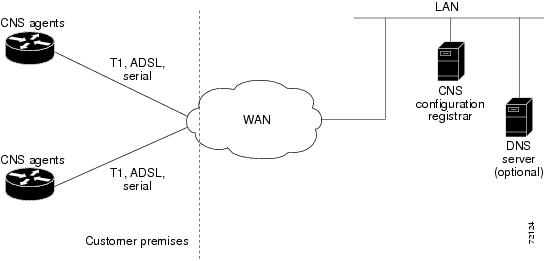
Figure 1 shows the CNS Flow-Through Provisioning architecture.
Figure 1 CNS Flow-Through Provisioning Architecture
Configurations
CNS Flow-Through Provisioning involves three different types of configuration on the remote router:
•
You specify the preset bootstrap configuration on which this solution depends as part of your order from Cisco using Cisco Configuration Express, an existing service integrated with the Cisco.com order-entry tool. You specify a general-subscriber nonspecific bootstrap configuration that provides connectivity to the CNS configuration engine. Cisco then applies this configuration to all the devices of that order in a totally automated manufacturing step. This configuration runs automatically on power-on.
•
The CNS configuration engine downloads an initial configuration, once only, to replace the temporary bootstrap configuration. You can either save or not save it in the router's nonvolatile NVRAM memory:
–
–
•
On subsequent reboot, incremental or partial configurations are performed to update the configuration without the network having to shut down. Such configurations can be delivered either in a push operation that you initiate or a pull operation on request from the router.
Unique IDs
Key to this solution is the capability to associate, with each device, a simple, manageable, and unique ID that is compatible with your systems for order entry, billing, provisioning, and shipping and can also link your order-entry system to the Cisco order-fulfillment system. Such an ID must have the following characteristics:
•
•
•
•
•
To define such an ID, CNS Flow-Through Provisioning equips the CNS agent with a new set of commands—the cns commands—with which you specify how configurations should be done and, in particular, how the system defines unique IDs. You enable the Cisco IOS software to auto-discover the unique ID according to directions that you specify and information that you provide, such as chassis serial number, MAC address, IP address, and several other possibilities. The cns commands are part of the bootstrap configuration of the manufactured device, specified to Cisco Configuration Express at time of order.
Within this scope, Configuration Express and the cns commands also allow you to define custom asset tags to your own specifications, which are serialized during manufacture and automatically substituted into the unit's bootstrap configuration.
Cisco appends tags to the carton for all the various types of IDs supported by the cns commands, so that these values can be bar-code read at shipping time and fed back into your systems. Alternatively, these IDs are also available through a direct XML-software interface between your system and the Cisco order-status engine, eliminating the need for bar-code reading. The CNS agent also provides a feedback mechanism whereby the remote device can receive XML events or commands to modify the device's ID, in turn causing that same device to broadcast an event indicating the old/new IDs.
Management Point
On most networks, a small percentage of individual remote routers get configured locally. This can potentially be a serious problem, not only causing loss of synchronization across your network but also opening your system to the possibility that an automatic reconfiguration might conflict with an existing configuration and cause a router to become unusable or even to lose contact with the network.
To address this problem, you can designate a management point in your network, typically on the Cisco IE2100 CNS configuration engine, and configure it to keep track of the configurations on all remote routers.
To enable this solution, configure the CNS agent to publish an event on the CNS event bus whenever any change occurs to the running configuration. This event indicates exactly what has changed (old/new), eliminating the need for the management point to perform a highly unscalable set of operations such as telnetting into the device, applying a script, reading back the entire running configuration, and determining the difference between old and new configurations. Additionally, you can arrange for Simple Network Management Protocol (SNMP) notification traps of configuration changes occurring through the SNMP MIB set.
Point-to-Point Event Bus
Today's business environment requires that you be able to ensure your customers a level of service not less than what they are actually paying for. Toward this end, you activate service-assurance applications that broadcast small poll/queries to the entire network while expecting large responses from a typically small subset of devices according to the criteria of the query.
For these queries to be scalable, it is necessary for the replying device to bypass the normal broadcast properties of the event bus and instead reply on a direct point-to-point channel. While all devices need the benefit of the broadcasted poll so that they can all be aware of the query to which they may need to reply, the devices do not have to be aware of each others' replies. Massive copying and retransmission of device query replies, as part of the unnecessary reply broadcast, is a serious scalability restriction.
To address this scalability problem, the CNS event bus has a point-to-point connection feature that communicates directly back to the poller station.
CNS Flow-Through Provisioning provides the following benefits.
Automated Configuration
CNS Flow-Through Provisioning simplifies installation by moving configuration requirements to the CNS configuration engine and allowing the Cisco IOS configuration to update automatically. The registrar uses popular industry standards and technologies such as XML, Active Directory Services
Interface (ADSI)/Active Directory, HTTP/Web Server, ATM Switch Processor (ASP), and Publish-Subscribe Event Bus. The CNS configuration agent enables the CNS configuration engine to configure remote routers in a plug-and-play manner.Unique IP Addresses and Hostname
CNS Flow-Through Provisioning uses DNS reverse lookup to retrieve the hostname by passing the IP address, then assigns the IP address and optionally the hostname to the remote router. Both IP address and hostname are thus guaranteed to be unique.
Reduced Technical Personnel Requirements
CNS Flow-Through Provisioning permits remote routers to be installed by a person with limited or no technical experience. Because configuration occurs automatically on connection to the network, a network engineer or technician is not required for installation.
Rapid Deployment
Because a person with limited or no technical experience can install a remote router immediately without any knowledge or use of Cisco IOS software, the router can be sent directly to its final premises and be brought up without technician deployment.
Direct Shipping
Routers can be shipped directly to the remote end-user site, eliminating warehousing and manual handling. Configuration occurs automatically on connection to the network.
Remote Updates
CNS Flow-Through Provisioning automatically handles configuration updates, service additions, and deletions. The CNS configuration engine performs a push operation to send the information to the remote router.
Security
Event traffic to and from the remote router is opaque to unauthorized listeners or intruders to your network. CNS agents leverage the latest security features in Cisco IOS software.
CNS Zero Touch
The CNS Zero Touch feature provides a zero touch deployment solution where the router contacts a CNS configuration engine to retrieve its full configuration automatically. This capability is made possible through a single generic bootstrap configuration file common across all service provider end customers subscribing to the services. Within the CNS framework, customers can create this generic bootstrap configuration without device-specific or network-specific information such as interface type, line type, or controller type (if applicable).
The CNS connect functionality is configured with a set of CNS connect templates. A CNS connect profile is created for connecting to the CNS configuration engine and to implement the CNS connect templates on a Customer Premise Equipment (CPE) router. CNS connect variables can be used as placeholders within a CNS connect template configuration. These variables, such as the active DLCI, are substituted with real values before the CNS connect templates are sent to the router's parser.
To use the zero touch functionality, the router that is to be initialized must have a generic bootstrap configuration. This configuration includes CNS connect templates, CNS connect profiles, and the cns config initial command. This command initiates the CNS connect function.
The CNS connect functionality performs multiple ping iterations through the router's interfaces and lines, as well as any available controllers. For each iteration, the CNS connect function attempts to ping the CNS configuration engine. If the ping is successful, the pertinent configuration information can be downloaded from the CNS configuration engine. If connectivity to the CNS configuration engine is unsuccessful, the CNS connect function removes the configuration applied to the selected interface, and the CNS connect process restarts with the next available interface specified by the CNS connect profile.
The CNS Zero Touch feature provides the following benefits:
•
•
CNS Frame Relay Zero Touch
The CNS Frame Relay Zero Touch feature provides a CNS zero touch deployment solution over Frame Relay where the CPE router discovers its data-link connection identifier (DLCI) and IP address dynamically, and then contacts a CNS engine to retrieve its full configuration automatically. This capability is made possible through a single generic bootstrap configuration file common across all service provider end customers subscribing to the services. Within the CNS framework, customers who deploy Frame Relay can create this generic bootstrap configuration without device-specific or network-specific information such as the DLCI, IP address, interface type, controller type (if applicable), or the next hop interface used for the static default route.
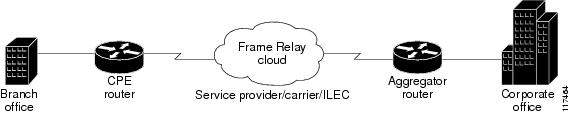
Figure 2 illustrates a typical customer network architecture using Frame Relay.
Figure 2 Connectivity in a Frame Relay Customer Network
The CPE router is deployed at multiple sites. Each site connects to a Frame Relay cloud through a point-to-point permanent virtual circuit (PVC). Connectivity from the Frame Relay cloud to the corporate office is through a PVC that terminates at the corporate office. IP traffic sent to the CNS configuration engine is routed through the corporate office. The PVC is identified by its DLCI. The DLCI can vary between branch offices. In order to support zero touch deployment, the CPE router must be able to learn which DLCI to use to connect to the CNS configuration engine.
To support the zero touch capability, the Frame Relay functionality has been modified in the following two ways:
•
•
The CNS connect functionality is configured with a set of CNS connect templates. A CNS connect profile is created for connecting to the CNS configuration engine and to implement the CNS connect templates on a CPE router. CNS connect variables can be used as placeholders within a CNS connect template configuration. These variables, such as the active DLCI, are substituted with real values before the CNS connect templates are sent to the router's parser.
When a CPE router is placed in a Frame Relay network, it contains a generic bootstrap configuration. This configuration includes customer-specific Frame Relay configuration (including the LMI type), CNS connect templates, CNS connect profiles, and the cns config initial command. This command initiates the CNS connect function.
The CNS connect functionality begins by selecting the first available controller or interface specified by the CNS connect profile and then performs multiple ping iterations through all the associated active DLCIs. For each iteration, the CNS connect function attempts to ping the CNS configuration engine. If the ping is successful, the pertinent configuration information can be downloaded from the CNS configuration engine.
When iterating over the active DLCIs on a Frame Relay interface, the router must be able to automatically go through a list of active DLCIs returned by the LMI messages for that interface and select an active DLCI to use. When more than one of the active DLCIs allow IP connectivity to the CNS configuration engine, the DLCI used will be the first one tried by the CNS connect functionality. If the ping attempt is unsuccessful, the next active DLCI is tried and so on. If connectivity to the CNS configuration engine is unsuccessful for all active DLCIs, the CNS connect function removes the configuration applied to the selected controller or interface, and the CNS connect process restarts with the next available controller or interface specified by the CNS connect profile.
The CNS Frame Relay Zero Touch feature provides the following benefits:
•
•
•
•
•
How to Configure CNS
This section contains the following tasks:
•
•
•
•
•
•
•
Deploying the CNS Router
Perform this task to manually install an initial CNS configuration.
Your remote router arrives from the factory with a bootstrap configuration. Upon initial power-on, the router automatically pulls a full initial configuration from the CNS configuration engine, although you can optionally arrange for this manually as well. After initial configuration, you can optionally arrange for periodic incremental (partial) configurations for synchronization purposes.
For more details on using the Cisco CNS configuration engine to automatically install the initial CNS configuration, see the Cisco CNS Configuration Engine Administrator's Guide at http://www.cisco.com/univercd/cc/td/doc/product/rtrmgmt/cns/ce/rel13/ag13/index.htm.
Initial CNS Configuration
Initial configuration of the remote router occurs automatically when the router is initialized on the network. Optionally, you can perform this configuration manually.
CNS assigns the remote router a unique IP address or hostname. After resolving the IP address (using Serial Line Address Resolution Protocol (SLARP), ATM Inverse ARP (ATM InARP), or PPP protocols), the system optionally uses Domain Name System (DNS) reverse lookup to assign a hostname to the router and invokes the CNS agent to download the initial configuration from the CNS configuration engine.
Incremental Configuration
Incremental or partial configuration allows the remote router to be incrementally configured after its initial configuration. You must perform these configurations manually through the CNS configuration engine. The registrar allows you to change the configuration templates, edit parameters, and submit the new configuration to the router without a software or hardware restart.
Prerequisites
Before you can configure an incremental configuration, CNS must be operational and the required CNS agents configured.
SUMMARY STEPS
1.
2.
3.
4.
5.
6.
7.
8.
or
template name9.
10.
11.
DETAILED STEPS
Configuring the CNS Event and EXEC Agents
Perform this task to enable and configure the CNS Event and EXEC agents.
CNS Event Agent Parameters
The CNS event agent command—cns event—has several parameters that can be configured. The failover-time keyword is useful if you have a backup CNS event gateway configured. If the CNS event agent is trying to connect to the gateway and it discovers that the route to the backup gateway is available before the route to the primary gateway, the seconds argument specifies how long the CNS event agent will continue to search for a route to the primary gateway before attempting to link to the backup gateway.
Unless you are using a bandwidth-constrained link, you should set a keepalive timeout and retry count. Doing so allows the management network to recover gracefully should a Cisco IE2100 configuration engine ever fail. Without the keepalive data, such a failure requires manual intervention on every device. The seconds value multiplied by the retry-count value determines the length of idle time before the CNS event agent will disconnect and attempt to reconnect to the gateway. We recommend a minimum retry-count value of 2.
If the optional source keyword is used, the source IP address might be a secondary IP address of a specific interface to allow a management network to run on top of a production network.
Note
SUMMARY STEPS
1.
2.
3.
4.
5.
6.
7.
DETAILED STEPS
Troubleshooting Tips
•
•
Configuring the CNS Image Agent
Perform this task to configure CNS image agent parameters using CLI commands.
CNS Image Agent ID
CNS uses a unique identifier to identify an image agent associated with that Cisco IOS device. Using the same process as CNS event and configuration agents, the configuration of the cns id command determines whether an IP address or MAC address of a specified interface, the hardware serial hardware number of the device, an arbitrary text string, or the hostname of the device is used as the image ID. By default, the system uses the hostname of the device.
The CNS image ID is sent in the content of the messages sent by the image agent and allows an application to know the unique image ID of the Cisco IOS device that generated the message. A password can be configured and associated with the image ID in the image agent messages.
Prerequisites
•
•
SUMMARY STEPS
1.
2.
3.
or
cns id {hardware-serial | hostname | string text} [event] [image]4.
5.
6.
7.
DETAILED STEPS
What to Do Next
Proceed to the "Retrieving a CNS Image from a Server" section to connect to the web server and download an image.
If any of the commands in the task fail, proceed to the "Troubleshooting CNS Agents" section to try to determine the problem.
Configuring CNS Security Features
Perform this task to configure CNS security features.
CNS Trusted Servers
Use the cns trusted-server command to specify a trusted server for an individual CNS agent or for all the CNS agents. To avoid security violations, you can build a list of trusted servers from which CNS agents can receive messages. An attempt to connect to a server not on the list will result in an error message being displayed.
Configure a CNS trusted server when a CNS agent will redirect its response to a server address that is not explicitly configured on the command line for the specific CNS agent. For example, the CNS exec agent may have one server configured but receive a message from the CNS event bus that overrides the configured server. The new server address has not been explicitly configured, so the new server address is not a trusted server. An error will be generated when the CNS exec agent tries to respond to this new server address unless the cns trusted-server command has been configured for the new server address.
CNS Security Enhancement
CNS messages can be configured to use the CNS SOAP message structure, in which the username and password are authenticated. If AAA is configured, then CNS SOAP messages will be authenticated with AAA. If AAA is not configured, there will be no authentication.
Use the cns aaa authentication command to determine whether the CNS messages are using AAA security or not. If the cns aaa authentication command is configured, then all incoming SOAP messages into the device are authenticated by AAA.
SUMMARY STEPS
1.
2.
3.
4.
5.
DETAILED STEPS
Retrieving a CNS Image from a Server
Perform this task to poll the image distribution server using HTTP or HTTPS.
Prerequisites
This task assumes that you have already configured the CNS image agent using the tasks in the "Configuring the CNS Image Agent" section.
SUMMARY STEPS
1.
2.
3.
DETAILED STEPS
Troubleshooting Tips
•
•
Retrieving a CNS Configuration from a Server
Use this task to request the configuration of a device from a configuration server. Use the cns trusted-server command to specify which configuration server can be used (trusted).
Prerequisites
This task assumes that you have specified a trusted server using tasks in the "CNS Security Enhancement" section.
SUMMARY STEPS
1.
2.
3.
DETAILED STEPS
Troubleshooting Tips
If you need to stop the retrieval process, enter the Ctrl+Shift+6 key sequence.
Configuring Command Scheduler Policy Lists and Occurrences
Perform this task to set up Command Scheduler policy lists of EXEC CNS commands and configure a Command Scheduler occurrence to specify the time or interval after which the CNS commands will run.
Command Scheduler Policy Lists
Policy lists consist of one or more lines of fully-qualified EXEC CLI commands. All commands in a policy list are executed when the policy list is run by Command Scheduler using the kron occurrence command. Use separate policy lists for CLI commands that are run at different times. No editor function is available, and the policy list is run in the order in which it was configured. To delete an entry, use the no form of the cli command followed by the appropriate EXEC command. If an existing policy list name is used, new entries are added to the end of the policy list. To view entries in a policy list, use the show running-config command. If a policy list is scheduled to run only once, it will not be displayed by the show running-config command after it has run.
Policy lists can be configured after the policy list has been scheduled, but each policy list must be configured before it is scheduled to run.
Command Scheduler Occurrences
An occurrence for Command Scheduler is defined as a scheduled event. Policy lists are configured to run after a specified interval of time, at a specified calendar date and time, or upon system startup. Policy lists can be run once, as a one-time event, or as recurring events over time.
Command Scheduler occurrences can be scheduled before the associated policy list has been configured, but a warning will advise you to configure the policy list before it is scheduled to run.
Prerequisites
The clock time must be set on the routing device before a Command Scheduler occurrence is scheduled to run. If the clock time is not set, a warning message will appear on the console screen after the kron occurrence command has been entered. Use the clock command or Network Time Protocol (NTP) to set the clock time.
The EXEC CLI to be run by Command Scheduler must be tested on the routing device to determine if it will run without generating a prompt or allowing execution interruption by keystrokes. Initial testing is important because Command Scheduler will delete the entire policy list if any CLI syntax fails. Removing the policy list ensures that any CLI dependencies will not generate more errors.
If you use the conditional keyword with the kron policy-list command, execution of the commands will stop when an error is encountered. Else (use above text?)
Restrictions
•
•
SUMMARY STEPS
1.
2.
3.
4.
5.
6.
7.
8.
9.
DETAILED STEPS
Examples
In the following example, output information is displayed about the status and schedule of all configured Command Scheduler occurrences:
Router# show kron scheduleKron Occurrence Schedulecns-weekly inactive, will run again in 7 days 01:02:33may inactive, will run once in 32 days 20:43:31 at 6:30 on May 20Troubleshooting Tips
Use the debug kron command in privileged EXEC mode to troubleshoot Command Scheduler command operations. Use any debugging command with caution because the volume of output generated can slow or stop the router operations.
Configuring Advanced CNS Features
Perform this task to configure more advanced CNS features. After the CNS agents are operational, you can configure some other features. You can enable the CNS inventory agent—that is, send an inventory of the router's line cards and modules to the CNS configuration engine—and enter CNS inventory mode.
Some other advanced features allow you to use the Software Developer's Toolkit (SDK) to specify how CNS notifications should be sent or how to access MIB information. Two encapsulation methods can be used: either nongranular (SNMP) encapsulation or granular (XML) encapsulation.
SUMMARY STEPS
1.
2.
3.
4.
5.
6.
7.
DETAILED STEPS
Troubleshooting CNS Agents
This section explains how to troubleshoot CNS agent issues.
The show commands created for the CNS image agent display information that is reset to zero after a successful reload of the device. Depending on the configuration of the image distribution process, the new image may not reload immediately. When a reload is not immediate or has failed, use the CNS image agent show commands to determine whether the image agent has connected to the image distribution server over HTTP or whether the image agent is receiving events from an application over the CNS Event Bus.
SUMMARY STEPS
1.
2.
3.
4.
5.
6.
7.
8.
DETAILED STEPS
Examples
This section provides the following output examples:
•
•
•
•
Sample Output for the show cns image status Command
In the following example, status information about the CNS image agent is displayed using the show cns image status privileged EXEC command:
Router# show cns image statusLast upgrade started at 11:45:02.000 UTC Mon May 6 2003Last upgrade ended at 11:56:04.000 UTC Mon May 6 2003 status SUCCESSLast successful upgrade ended at 11:56:04.000 UTC Mon May 6 2003Last failed upgrade ended at 06:32:15.000 UTC Wed Apr 16 2003Number of failed upgrades: 2Number of successful upgrades: 6messages received: 12receive errors: 5Transmit StatusTX Attempts:4Successes:3 Failures 2Sample Output for the show cns image connections Command
In the following example, information about the status of the CNS image management HTTP connections is displayed using the show cns image connections privileged EXEC command:
show cns image connectionsCNS Image Agent: HTTP connectionsConnection attempts 1never connected:0 Abrupt disconnect:0Last successful connection at 11:45:02.000 UTC Mon May 6 2003Sample Output for the show cns image inventory Command
In the following example, information about the CNS image agent inventory is displayed using the show cns image inventory privileged EXEC command:
show cns image inventoryInventory ReportimageInventoryReport deviceName imageID Router /imageID hostName Router /hoIOS (tm) C2600 Software (C2600-I-M), Experimental Version 12.3(20030414:081500)]Copyright (c) 1986-2003 by cisco Systems, Inc.Compiled Mon 14-Apr-03 02:03 by engineer /versionString imageFile tftp://10.25.Sample Output for the debug cns image Command
In the following example, debugging messages for all CNS image agent services are displayed using the debug cns image privileged EXEC command. The CNS image agent in this example is connecting to an image server over HTTP. After connecting, the image server asks for an inventory of the Cisco IOS device.
debug cns image allAll cns image debug flags are oncns image retrieveMay 7 06:11:42.175: CNS Image Agent: set EXEC lockMay 7 06:11:42.175: CNS Image Agent: received message from EXECMay 7 06:11:42.175: CNS Image Agent: set session lock 1May 7 06:11:42.175: CNS Image Agent: attempting to send to destination(http://10.1.36.8:8080/imgsrv/xgate):?xml version="1.0" encoding="UTF-8"? cnsMessageversion="1.0" senderCredentials userName dvlpr-7200-6 /userName /senderCredentialsmessageID dvlpr-7200-6_2 /messageID sessionControl imageSessionStart version="1.0"initiatorInfotrigger EXEC/trigger initiatorCredentials userName dvlpr-7200-6/userName/initiatorCredentials /initiatorInfo /imageSessionStart /sessionControl /cnsMessageMay 7 06:11:42.175: CNS Image Agent: clear EXEC lockMay 7 06:11:42.175: CNS Image Agent: HTTP message sent url:http://10.1.36.8:8080/imgsrv/xgateMay 7 06:11:42.191: CNS Image Agent: response data alloc 4096 bytesMay 7 06:11:42.191: CNS Image Agent: HTTP req data freeMay 7 06:11:42.191: CNS Image Agent: response data freedMay 7 06:11:42.191: CNS Image Agent: receive message?xml version="1.0" encoding="UTF-8"?cnsMessage version="1.0"senderCredentialsuserName myImageServer.cisco.com/userNamepassWord R0lGODlhcgGSALMAAAQCAEMmCZtuMFQxDS8b/passWord/senderCredentialsmessageID dvlpr-c2600-2-476456/messageIDrequestreplyToserverReply http://10.1.36.8:8080/imgsrv/xgate /serverReply/replyToimageInventoryinventoryItemListall//inventoryItemList/imageInventory/request/cnsMessageSample Output for the show cns event Commands
The following example displays the IP address and port number of the primary and backup gateways:
show cns event connectionsThe currently configured primary event gateway:hostname is 10.1.1.1.port number is 11011.Event-Id is Internal test1Keepalive setting:none.Connection status:Connection Established.The currently configured backup event gateway:none.The currently connected event gateway:hostname is 10.1.1.1.port number is 11011.The following sample displays a list of subjects of the CNS event agent that are subscribed to by applications:
show cns event subjectThe list of subjects subscribed by applications.cisco.cns.mibaccess:requestcisco.cns.config.loadcisco.cns.config.rebootcisco.cns.exec.cmdConfiguration Examples for CNS
This section provides the following configuration examples:
•
•
•
•
•
•
•
•
Deploying the CNS Router: Example
The following example shows an initial configuration on a remote router. The hostname of the remote router is the unique ID. The CNS configuration engine IP address is 172.28.129.22.
cns template connect template1cli ip address negotiatedcli encapsulation pppcli ip directed-broadcastcli no keepalivecli no shutdownexitcns connect host1 retry-interval 30 retries 3exithostname RemoteRouterip route 172.28.129.22 255.255.255.0 10.11.11.1cns id Ethernet 0 ipaddresscns config initial 10.1.1.1 no-persistexitConfiguring a Partial Configuration: Example
Incremental or partial configuration allows the remote router to be incrementally configured after its initial configuration. You must perform these configurations manually through the CNS configuration engine. The registrar allows you to change the configuration templates, edit parameters, and submit the new configuration to the router without a software or hardware restart.
The following example shows incremental (partial) configuration on a remote router. The CNS configuration engine IP address is 172.28.129.22, and the port number is 80.
cns config partial 172.28.129.22 80Enabling and Configuring CNS Agents: Example
The following example shows various CNS agents being enabled and configured starting with the configuration agent being enabled with the cns config partial command to configure an incremental (partial) configuration on a remote router. The CNS configuration engine IP address is 172.28.129.22, and the port number is 80. The CNS exec agent is enabled with an IP address of 172.28.129.23, and the CNS event agent is enabled with an IP address of 172.28.129.24. Until the CNS event agent is enabled, no other CNS agents are operational.
cns config partial 172.28.129.22 80cns exec 172.28.129.23 source 172.22.2.2cns event 172.28.129.24 source 172.22.2.1exitIn the following example, the CNS image agent parameters are configured using the CLI. An image ID is specified to use the IP address of the FastEthernet interface 0/1, a password is configured for the CNS image agent services, the CNS image upgrade retry interval is set to four minutes, and image management and status servers are configured.
cns id FastEthernet0/1 ipaddress imagecns image retry 240cns image password abctextcns image server https://10.21.2.3/cns/imgsvr status https://10.21.2.3/cns/status/In the following example, the CNS image agent is configured to use the CNS Event Bus. An image ID is specified as the hardware serial number of the networking device, the CNS event agent is enabled with a number of parameters, and the CNS image agent is enabled without any keywords or options. The CNS image agent will listen for events on the CNS Event Bus.
cns id hardware-serial imagecns event 10.21.9.7 11011 keepalive 240 120 failover-time 5cns imagecns image password abctextCNS Flow-Through Provisioning: Examples
Cisco Configuration Express File Using T1 over HDLC Protocol Example
The following example shows use of the Cisco Configuration Express file to configure the remote router before delivery to its final premises. In the example, 172.28.129.22 is the IP address of the CNS configuration engine.
cns config initial 172.28.129.22 no-persist!cns configure and event agentscns event 172.28.129.22controller t1 0!T1 configurationframing esflinecode b8zschannel-group 0 timeslots 1-24 speed 64exitcns id s0:0 ipaddressinterface s0:0!Assigns IP address to s0:0ip address slarp retry 2exitip route 10.0.0.0 0.0.0.0 s0:0!IP static routeendT1 Configuration Template Example
The following example shows use of the T1 configuration template to build the configuration for use on T1:
hostname ${LDAP://this:attrName=IOShostname}enable password ${LDAP://this:attrName=IOSpassword}controller T1 0clock source ${LDAP://this:attrName=IOST1-clocksource}linecode ${LDAP://this:attrName=IOST1-line}framing ${LDAP://this:attrName=IOST1-framing}channel-group ${LDAP://this:attrName=IOST1-channel-group}timeslots ${LDAP://this:attrName=IOST1-timeslots}speed ${LDAP://this:attrName=IOST1-speed}Voice Configuration Template Example
The following example shows use of the voice configuration template to build the configuration for using voice:
voice-port 1/1codec ${LDAP://this:attrName=IOSvoice-port1}exitdial-peer voice 1 potsapplication ${LDAP://this:attrName=IOSdial-peer1}port 1/1Remote Router Example
The following example shows a remote router configuration:
show running-configCurrent configuration: 1659 bytes!version 12.2no service padservice timestamps debug uptimeservice timestamps log uptimeno service password-encryption!hostname tira-24V!!network-clock base-rate 64kip subnet-zeroip cef!ip audit notify logip audit po max-events 100!class-map match-any voicematch access-group 100!!policy-map qosclass voicepriority percent 70voice service voiph323!no voice confirmation-tonevoice-card 0!!controller T1 0framing sflinecode ami!controller T1 1mode casframing esflinecode b8zsds0-group 0 timeslots 1 type e&m-immediate-startds0-group 1 timeslots 2 type e&m-immediate-start!!interface Ethernet0ip address 10.1.1.2 255.255.0.0!interface Serial0bandwidth 1536ip address 10.11.11.1 255.255.255.0no ip mroute-cacheload-interval 30clockrate 148000!ip classlessip route 223.255.254.254 255.255.255.0 10.3.0.1!no ip http serverip pim bidir-enable!access-list 100 permit udp any range 16384 32767 anyaccess-list 100 permit tcp any any eq 1720call rsvp-sync!voice-port 1:0timeouts wait-release 3!voice-port 1:1timeouts wait-release 3!!mgcp profile default!dial-peer cor custom!dial-peer voice 1000 potsdestination-pattern 1000port 1:0forward-digits 0!dial-peer voice 1001 potsdestination-pattern 1001no digit-stripport 1:1forward-digits 0!dial-peer voice 2000 voipdestination-pattern 2000session target ipv4:10.11.11.2codec g711ulaw!dial-peer voice 2001 voipdestination-pattern 2001session target ipv4:10.11.11.2signal-type ext-signalcodec g711ulaw!!line con 0line aux 0line 2 3line vty 0 4The following example shows configuration of a serial interface to connect to and download a configuration from a Cisco IE2100 CNS configuration engine. The IE2100 IP address is 10.1.1.1. The gateway IP address to reach the 10.1.1.0 network is 10.11.11.1. The CNS default ID is the hostname, so that cns id command is not needed. However, the hostname command is key to retrieving the configuration file on the CNS configuration engine.
This configuration auto-tries ever serial interface on the remote router in turn, applies the config-cli commands to that interface, and tries to ping the address in the cns config initial command. When it succeeds, it performs a normal initial configuration.
! Initial basic configuration (serial interface) PPPcns connect serial retry-interval 1 retries 1config-cli ip address negotiatedconfig-cli encapsulation pppconfig-cli ip directed-broadcastconfig-cli no keepaliveconfig-cli no shutdownexithostname 26MLip route 10.1.1.1 255.255.255.0 10.11.11.1cns config initial 10.1.1.1 no-persistcns inventory config! Initial basic configuration (serial interface) HDLCcns config connect serial retry-interval 1 retries 1config-cli ip address slarp retry 1config-cli no shutdownexithostname tira-36Vip route 10.1.1.1 255.255.255.0 10.11.11.1cns config initial 10.1.1.1 no-persistcns inventory configIncremental configuration (serial interface)cns config partial 10.1.1.1cns event 10.1.1.1Command Scheduler Policy Lists and Occurrences: Examples
In the following example, a Command Scheduler policy named cns-weekly is configured to run two sets of EXEC CLI involving CNS commands. The policy is then scheduled with two other policies to run every seven days, one hour and thirty minutes.
kron policy-list cns-weeklycli cns image retrieve server http://10.19.2.3/week/ status http://10.19.2.5/status/week/cli cns config retrieve page /testconfig/config.asp no-persistexitkron occurrence week in 7:1:30 recurringpolicy-list cns-weeklypolicy-list itd-weeklypolicy-list mkt-weeklyIn the following example, a Command Scheduler policy named sales-may is configured to run a CNS command to retrieve a specified image from a remote server. The policy is then scheduled to run only once on May 20, at 6:30 a.m.
kron policy-list sales-maycli cns image retrieve server 10.19.2.3 status 10.19.2.3exitkron occurrence may at 6:30 May 20 oneshotpolicy-list sales-mayIn the following example, a Command Scheduler policy named image-sunday is configured to run a CNS command to retrieve a specified image from a remote server. The policy is then scheduled to run every Sunday at 7:30 a.m.
kron policy-list image-sundaycli cns image retrieve server 10.19.2.3 status 10.19.2.3exitkron occurrence sunday user sales at 7:30 sunday recurringpolicy-list image-sundayIn the following example, a Command Scheduler policy named file-retrieval is configured to run a CNS command to retrieve a specific file from a remote server. The policy is then scheduled to run on system startup.
kron policy-list file-retrievalcli cns image retrieve server 10.19.2.3 status 10.19.2.3exitkron occurrence system-startuppolicy-list file-retrievalRetrieving a CNS Image from a Server: Example
In the following example, the CNS image agent polls a file server using the cns image retrieve command. Assuming that the CNS image agent is already enabled, the file server and status server paths specified here will overwrite any existing image agent server and status configuration. The new file server will be polled and a new image, if it exists, will be downloaded to the networking device.
cns image retrieve server https://10.19.2.3/cns/ status https://10.19.2.3/cnsstatus/Retrieving a CNS Configuration from a Server: Examples
Retrieving Configuration Data from the CNS Trusted Server
The following example shows how to request a configuration from a trusted server at 10.1.1.1:
cns trusted-server all 10.1.1.1exitcns config retrieve 10.1.1.1The following example shows how to request a configuration from a trusted server at 10.1.1.1 and to configure a CNS configuration retrieve interval using the cns config retrieve command:
cns trusted-server all 10.1.1.1exitcns config retrieve 10.1.1.1 retry 50 interval 1500CNS Config Retrieve Attempt 1 out of 50 is in progressNext cns config retrieve retry is in 1499 seconds (Ctrl-Shft-6 to abort this command)...00:26:40: %CNS-3-TRANSPORT: CNS_HTTP_CONNECTION_FAILED:10.1.1.1 -Process= "CNS config retv", ipl= 0, pid= 4300:26:40: %CNS-3-TRANSPORT: CNS_HTTP_CONNECTION_FAILED -Process= "CNS config retv", ipl= 0, pid= 43......
cns config retrieve 10.1.1.1Applying the Retrieved Data to the Running Configuration File
The following example shows how to check and apply configuration data retrieved from the server to running configuration file only. The CNS Configuration Agent will attempt to retrieve configuration data at 30-second intervals until the attempt is successful, or is unsuccessful five times in these attempts.
cns config retrieve 10.1.1.1 syntax-check no-persist retry 5 interval 30Overwriting the Startup Configuration File with the Retrieved Data
The following example shows how to overwrite the startup configuration file with the configuration data retrieved from the server. The configuration data will not be applied to the running configuration.
cns config retrieve 10.1.1.1 syntax-check no-persist retry 5 interval 30cns config retrieve 10.1.1.1 overwrite-startupUsing the CNS Zero Touch Solution: Examples
Configuring PPP on a Serial Interface
The following example shows the bootstrap configuration for configuring PPP on a serial interface:
cns template connect ppp-serialcli ip address negotiatedcli encapsulation pppcli ip directed-broadcastcli no keepaliveexitcns template connect ip-routecli ip route 10.0.0.0 0.0.0.0 ${next-hop}exitcns connect serial-ppp ping-interval 1 retries 1discover interface serialtemplate ppp-serialtemplate ip-routeexithostname 26MLcns config initial 10.1.1.1 no-persist inventoryConfiguring PPP on an Asynchronous Interface
The following example shows the bootstrap configuration for configuring PPP on an asynchronous interface:
cns template connect asynccli modem InOut...exitcns template connect async-interfacecli encapsulation pppcli ip unnumbered FastEthernet0/0cli dialer rotary-group 0exitcns template connect ip-routecli ip route 10.0.0.0 0.0.0.0 ${next-hop}exitcns connect asyncdiscover line Asynctemplate asyncdiscover interfacetemplate async-interfacetemplate ip-routeexithostname async-examplecns config initial 10.1.1.1 no-persist inventoryConfiguring HDLC on a Serial Interface
The following example shows the bootstrap configuration for configuring High-Level Data Link Control (HDLC) on a serial interface:
cns template connect hdlc-serialcli ip address slarp retry 1exitcns template connect ip-routecli ip route 0.0.0.0 0.0.0.0 ${next-hop}exitcns connect hdlc-serial ping-interval 1 retries 1discover interface serialtemplate hdlc-serialtemplate ip-routeexithostname host1cns config initial 10.1.1.1 no-persist inventoryConfiguring Aggregator Router Interfaces
The following examples show how to configure a standard serial interface and a serial interface bound to a controller on an aggregator router (also known as the DCE). In order for connectivity to be established, the aggregator router must have a point-to-point subinterface configured.
Standard Serial Interface
interface Serial0/1no ip addressencapsulation frame-relayframe-relay intf-type dceexitinterface Serial0/1.1 point-to-point10.0.0.0 255.255.255.0frame-relay interface-dlci 8Serial Interface Bound to a Controller
controller T1 0framing sflinecode amichannel-group 0 timeslots 1-24exitinterface Serial0:0no ip addressencapsulation frame-relayframe-relay intf-type dceexitinterface Serial0:0.1 point-to-pointip address ip-address maskframe-relay interface-dlci dlciConfiguring IP over Frame Relay
The following example shows the bootstrap configuration for configuring IP over Frame Relay on a CPE router:
cns template connect setup-framecli encapsulation frame-relayexitcns template connect ip-over-framecli frame-relay interface-dlci ${dlci}cli ip address dynamicexitcns template connect ip-routecli ip route 10.0.0.0 0.0.0.0 ${next-hop}exitcns connect ip-over-framediscover interface Serialtemplate setup-framediscover dlcitemplate ip-over-frametemplate ip-routeexitcns config initial 10.1.1.1Configuring IP over Frame Relay over T1
The following example shows the bootstrap configuration for configuring IP over Frame Relay over T1 on a CPE router:
cns template connect setup-framecli encapsulation frame-relayexitcns template connect ip-over-framecli frame-relay interface-dlci ${dlci}cli ip address dynamicexitcns template connect ip-routecli ip route 0.0.0.0 0.0.0.0 ${next-hop}exitcns template connect t1-controllercli framing esfcli linecode b8zscli channel-group 0 timeslots 1-24 speed 56exitcns connect ip-over-frame-over-t1discover controller T1template t1-controllerdiscover interfacetemplate setup-framediscover dlcitemplate ip-over-frametemplate ip-routeexitcns config initial 10.1.1.1Additional References
The following sections provide references related to CNS.
Related Documents
CNS commands: complete command syntax, command mode, command history, defaults, usage guidelines, and examples
Cisco IOS Network Management Command Reference, Release 12.4T
CNS Configuration Engine
Cisco Intelligence Engine 2100 Configuration Registrar Manual, Release 1.1 or later
IAD and Router Hardware and Software
Cisco IAD2420 series hardware and software documents, available online at
http://www.cisco.com/univercd/cc/td/doc/product/access/iad/iad2420/index.htmCisco 2600 series hardware and software documents, available online at
http://www.cisco.com/univercd/cc/td/doc/product/access/acs_mod/cis2600/hw_inst/index.htmCisco 3600 series hardware and software documents, available online at
http://www.cisco.com/univercd/cc/td/doc/product/access/acs_mod/cis3600/hw_inst/index.htm
Standards
No new or modified standards are supported by this feature, and support for existing standards has not been modified by this feature.
—
MIBs
RFCs
No new or modified RFCs are supported by this feature, and support for existing RFCs has not been modified by this feature.
—
Technical Assistance
Feature Information for CNS
Table 2 lists the features in this module and provides links to specific configuration information. Only features that were introduced or modified in Cisco IOS Release 12.2(1), 12.0(3)S or a later release appear in the table.
Not all commands may be available in your Cisco IOS software release. For release information about a specific command, see the command reference documentation.
Use Cisco Feature Navigator to find information about platform support and software image support. Cisco Feature Navigator enables you to determine which Cisco IOS and Catalyst OS software images support a specific software release, feature set, or platform. To access Cisco Feature Navigator, go to http://www.cisco.com/go/cfn. An account on Cisco.com is not required.
Note
Table 2 Feature Information for CNS
CNS
12.2(25)S 12.2(33) SRA
The CNS feature is a collection of services that can provide remote event-driven configuring of Cisco IOS networking devices and remote execution of some command-line interface (CLI) commands.
The following sections provide information about this feature:
•
•
The following commands were introduced or modified by this feature: clear cns config stats, clear cns counters, clear cns event stats, cli (cns), cns config cancel, cns config initial, cns config notify, cns config partial, cns config retrieve, cns connect, cns event, cns exec, cns id, cns template connect, cns trusted-server, debug cns config, debug cns exec, debug cns xml-parser, logging cns-events, show cns config stats, show cns event connections, show cns event stats, show cns event subject.
CNS Configuration Agent
12.0(18)ST 12.0(22)S 12.2(2)T 12.2(33)SRA
The CNS Configuration Agent feature supports routing devices by providing the following:
•
•
•
The following sections provide information about this feature:
•
•
The following commands were introduced or modified by this feature: cns config cancel, cns config initial, cns config partial, cns config retrieve, debug cns config, debug cns xml-parser, show cns config outstanding, show cns config stats, show cns config status.
CNS Config Retrieve Enhancement with Retry and Interval
12.4(15)T
The Cisco Networking Services (CNS) Config Retrieve Enhancement with Retry and Interval feature add two options to the cns config retrieve command enabling you to specify an amount of time in seconds to wait before attempting to retrieve a configuration from a trusted server. The number of retries is restricted to 100 to prevent the configuration agent from indefinitely attempting to reach an unreachable server. Use the keyboard combination Ctrl-Shift-6 to abort the cns config retrieve command.
The following sections provide information about this feature:
•
•
•
The following command was modified by this feature: cns config retrieve
CNS Enhanced Results Message
12.2(33)SRA
12.4(4)TThe CNS Enhanced Results Message feature sends a second CNS result message to the subject "cisco.cns.config.results" in addition to the CNS results messages sent to the CNS Event bus after a partial configuration is complete.
The following sections provide information about this feature:
•
•
The following command was modified by this feature: cns config partial.
CNS Event Agent
12.0(18)ST 12.0(22)S 12.2(2)T 12.2(33)SRA
The CNS Event Agent is part of the Cisco IOS infrastructure that allows Cisco IOS applications to publish and subscribe to events on a CNS Event Bus. CNS Event Agent works in conjunction with the CNS Configuration Agent feature.
The following sections provide information about this feature:
•
The following commands were introduced or modified by this feature: cns event, show cns event connections, show cns event stats, show cnsevent subject.
CNS Flow-Through Provisioning
12.2(2)T 12.2(2)XB 12.2(11)YT 12.2(11)YV
Cisco Networking Services (CNS) Flow-Through Provisioning provides the infrastructure for automated configuration of large numbers of network devices. Based on CNS event and config agents, it eliminates the need for an onsite technician to initialize the device. The result is an automated workflow from initial subscriber-order entry through Cisco manufacturing and shipping to final device provisioning and subscriber billing. This focuses on a root problem of today's service-provider and other similar business models: use of human labor in activating service.
The following sections provide information about this feature:
•
•
•
The following commands were introduced or modified by this feature: cns config cancel, cns config connect-intf, cns config initial, cns config partial, cns config notify, cns event, cns id, cns inventory, cns mib-access encapsulation, cns notifications encapsulation, config-cli, debug cns config, debug cns event, debug cns management, debug cns xml-parser, line-cli, show cns config connections, show cns config outstanding, show cns event stats, show cns event subject.
Note
Note
CNS Frame-Relay Zero Touch
12.3(2)XF 12.3(8)T
The CNS Frame Relay Zero Touch feature provides a CNS zero touch deployment solution over Frame Relay where the CPE router discovers its DLCI and IP address dynamically and then contacts a CNS engine to retrieve its full configuration automatically.
The following sections provide information about this feature:
•
The following commands were introduced or modified by this feature: cli (cns), cns config connect-intf, cns connect, cns template connect, config-cli, discover (cns), line-cli, template (cns).
Note
Note
CNS Image Agent
12.2(33)SEE
12.3(1)
12.2(31)SB2
12.2(33)SRBThe CNS Image Agent feature is an infrastructure in Cisco IOS software to enable automated installation and activation of Cisco IOS images on Cisco IOS networking devices.
The following sections provide information about this feature:
•
•
•
•
The following commands were introduced or modified by this feature: clear cns image connections, clear cns image status, cns id, cns image, cns image password, cns image retrieve, cns image retry, debug cns image, show cns image connections, show cns image inventory, show cns image status.
CNS Interactive CLI
12.0(28)S 12.2(18)SXE 12.2(18)SXF2
The CNS Interactive CLI feature introduces a new XML interface that allows you to send interactive commands to a router, such as commands that generate prompts for user input.
The following section provides information about this feature:
CNS Security Enhancement
12.4(9)T
12.2(33)SRAThe CNS Security Enhancement feature improves the security of Cisco Networking Services (CNS) messages by authenticating sender credentials through the use of the Service-Oriented Access Protocol (SOAP) message format.
The following sections provide information about this feature:
•
The following commands were introduced or modified by this feature: cns aaa authentication, cns message format notification.
CNS Zero Touch
12.3(9)
The CNS Zero Touch feature provides a zero touch deployment solution where the router contacts a CNS configuration engine to retrieve its full configuration automatically.
The following sections provide information about this feature:
•
The following commands were introduced or modified by this feature: cli (cns), cns config connect-intf, cns connect, cns template connect, config-cli, discover (cns), line-cli, template (cns).
Note
Note
Command Scheduler
12.3(1) 12.2(33)SRA
The Command Scheduler feature provides the ability to schedule some EXEC command-line interface (CLI) commands to run at specific times or at specified intervals.
The following sections provide information about this feature:
•
•
The following commands were introduced or modified by this feature: cli, debug kron, kron occurrence, kron policy-list, policy-list, show kron schedule.
Any Internet Protocol (IP) addresses used in this document are not intended to be actual addresses. Any examples, command display output, and figures included in the document are shown for illustrative purposes only. Any use of actual IP addresses in illustrative content is unintentional and coincidental.
©2006-2007 Cisco Systems, Inc. All rights reserved.