配置AP電源配置檔案並排除故障

簡介
本檔案介紹如何在Cisco Catalyst 9800無線LAN控制器(WLC)上設定和疑難排解AP電源設定檔。
採用元件
本文中的資訊係根據以下軟體和硬體版本:
- Cisco Catalyst 9800系列無線LAN控制器
- 軟體版本17.15.4d和26.1.1
- C9130AXI-D
- CW9178I
- C9300-48UXM
本文中的資訊是根據特定實驗室環境內的裝置所建立。文中使用到的所有裝置皆從已清除(預設)的組態來啟動。如果您的網路運作中,請確保您瞭解任何指令可能造成的影響。
概觀
接入點節能是一項電源管理功能,能夠:
- 減少非活動期間的能耗
- 支援靈活的排程和策略驅動的低功耗操作
- 在不影響效能的情況下最佳化網路效率
電源配置檔案的型別
- 固定電源策略
固定電源策略為AP定義預定義的操作狀態。對於每個AP型別,在這些條件下預配置介面狀態(如無線電、USB、乙太網等)。在考慮日曆配置檔案中定義的任何配置之前,AP首先應用基於固定電源策略的介面狀態。
- AP電源配置檔案
AP電源配置檔案允許使用者定義按優先順序排序的規則清單,這些規則控制活動日曆期間的電源降級和行為。
- 按順序應用規則,直到滿足AP的電源要求
- 該配置是通用的,並在AP配置檔案級別應用
- AP配置檔案與站點標籤關聯
此配置檔案確定交換機乙太網供電(PoE)預算不足時AP如何運行。
它還支援綠色AP功能,其中AP根據關聯的日曆計畫(例如,在工作時間之後)轉換為低功耗模式。
- 日曆配置檔案
日曆配置檔案啟用對AP介面活動的基於時間的控制。
- 允許配置哪些介面保持活動或不活動
- 根據已定義的時間表應用設定
這有助於自動執行節能操作,無需手動干預。

使用案例
- 節能模式 — 常規電源配置檔案
隨著三無線電和四無線電接入點的引入,完整功能所需的功率通常超過802.3at所能提供的功率。但是,許多部署仍然缺少802.3bt支援。
目前,AP行為(如發射功率、無線電鏈、USB埠、SFP使用率等……)是在較低功率水準(非802.3bt)下操作時靜態定義的,使用者對這些引數的控制有限。
常規功率配置檔案通過允許根據可用功率進行受控功率遞減來解決這一問題。

附註:17.10或更高版本支援AP節能功能的常規電源配置檔案。
- 綠色/環保模式AP — 節能模式(日曆配置檔案)
綠色AP功能提供節能模式,當沒有連線的客戶端時,AP會自動進入低功耗操作。
- 啟用後,AP可以在使用率較低的時期(例如,在辦公時間之後)轉換到睡眠或降低功率狀態
- 如果客戶端嘗試連線(根據配置的閾值),AP將自動退出節能模式並切換到相應的固定策略
- 一旦所有客戶端斷開連線,AP將返回到節能模式
- 只有處理客戶端連線的AP退出低功耗模式;其他AP仍不受影響
電源策略的總體目標是允許使用者跨不同電源(例如:802.3af、802.3at和802.3bt(多個級別))有效地分配和管理可用電源預算。
組態

注意:要將AP電源配置檔案應用於AP,WLC和AP時鐘必須同步。
使用案例1:常規電源配置檔案
- 常規電源配置檔案獨立於日曆配置檔案運行
- 交換機埠必須提供降低的電源,以便在AP上應用配置檔案
附註:一次只能應用一個常規電源配置檔案。
在以下示例中,9130AXI接入點在24,000 mW的降級電源狀態下運行。由於AP正在接收降級的電源,因此系統會自動應用標準電源配置檔案,而無需任何日曆配置檔案。
在AP上
xo9130#show cdp inline_power

Power_Requested(mW) Power_Available(mW) Power_request-ID Power_management-ID

              30000               24000             7114                   5
常規配置檔案對映(CLI)
- 根據要求配置電源配置檔案,並將其作為常規配置檔案應用。
 (config)# wireless profile power simran-regular-profile-1

 (config-wireless-power-profile)# 10 ethernet GigabitEthernet0 speed 2500Mbps

 (config-wireless-power-profile)# 20 radio 24ghz state shutdown

 (config-wireless-power-profile)# 30 radio 5ghz spatial-stream 4

 (config-wireless-power-profile)# 40 radio 5ghz state shutdown

 (config-wireless-power-profile)# exit

 (config)# ap profile powermode

(config-ap-profile)# power-profile simran-regular-profile-1

 (config-ap-profile)# end
- 顯示常規配置檔案
#show ap profile name powermode detailed | sec Power profile

           Power profile name            : simran-regular-profile-1
常規配置檔案對映(GUI)
- Configuration > Tags & profiles > Power Profile
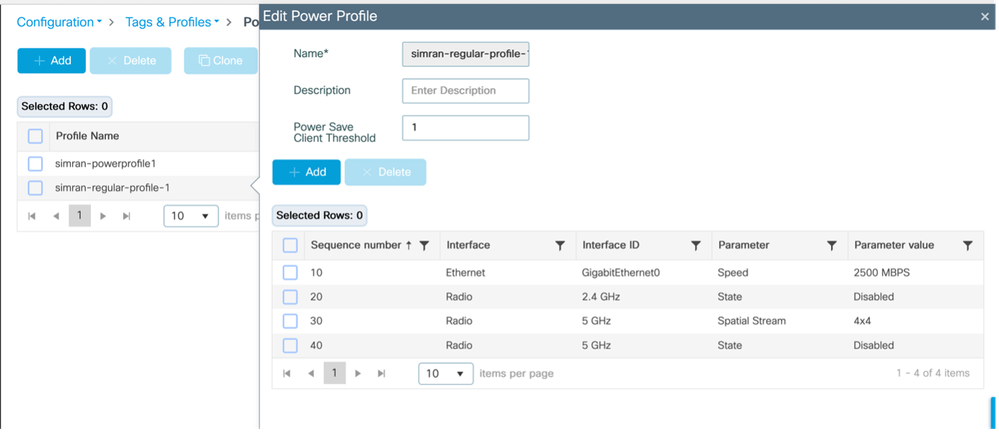
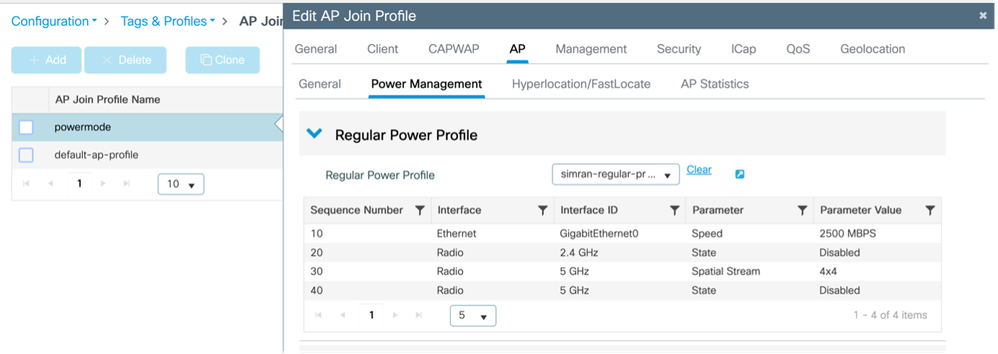
- 應用並顯示常規配置檔案
Configuration > Tags & Profiles > AP JOIN > AP >電源管理
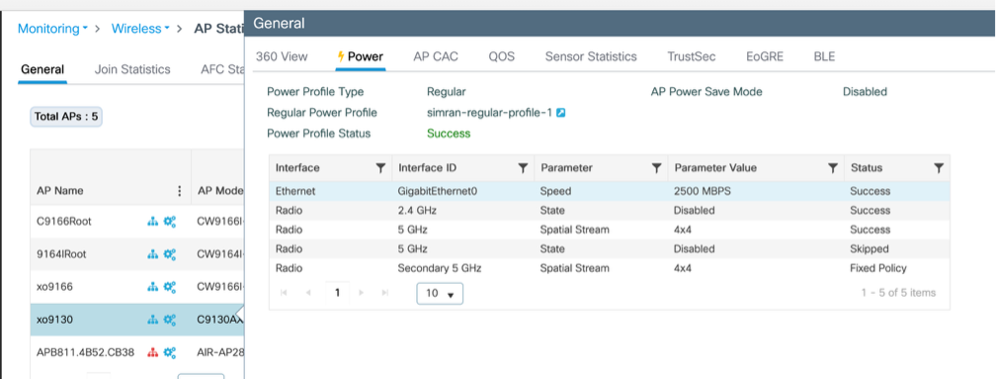
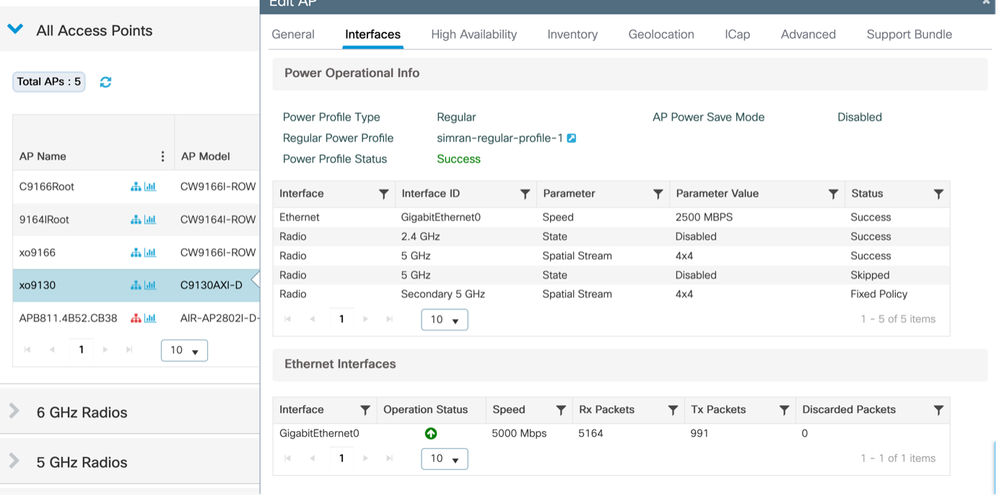
- 驗證在AP上應用的配置檔案
監控>無線> AP統計資訊
配置>無線>接入點>選擇AP >介面
使用案例2:綠色/環保模式(日曆配置檔案)
- 可以應用多個/不同的重複日曆功率曲線。
- 當日曆計畫處於活動狀態時,AP進入節能模式。如果客戶端連線(基於配置的閾值),AP將退出節能模式並應用固定策略。一旦客戶端斷開連線,AP將返回到節能模式
- 只有為客戶端提供服務的AP會轉換到節能模式。
範例 1:
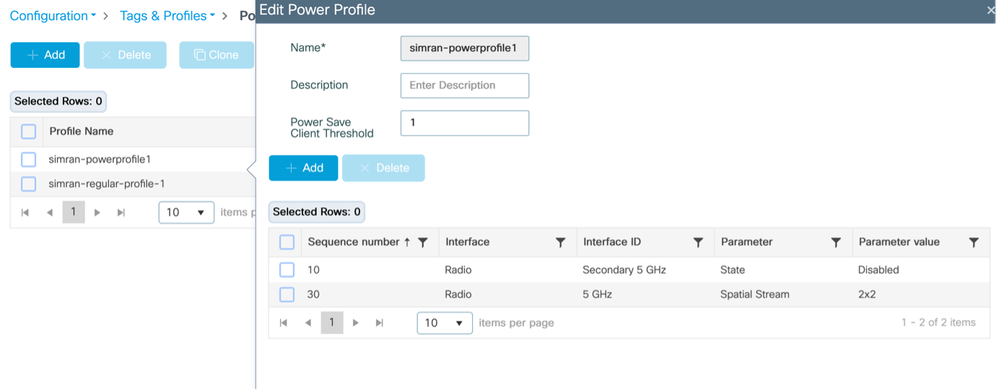
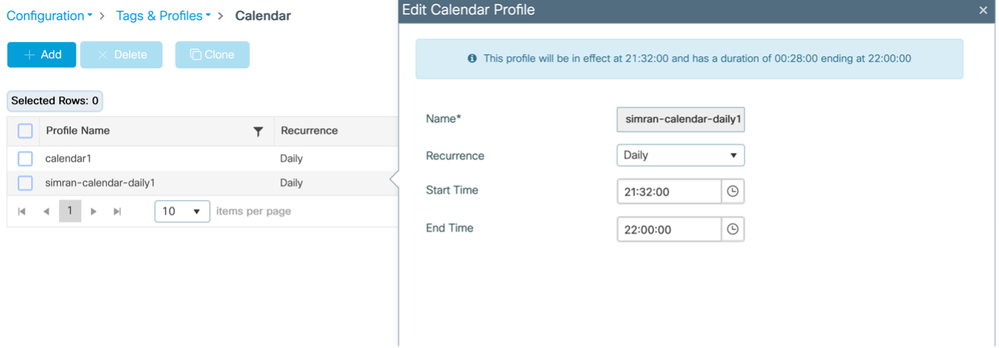
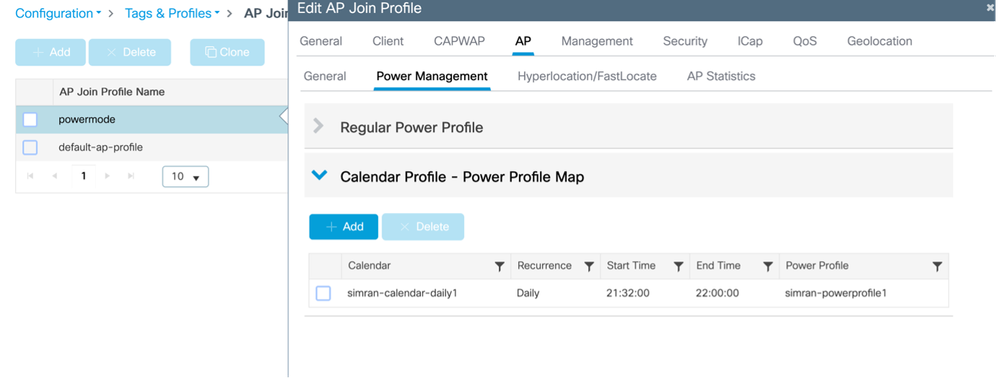
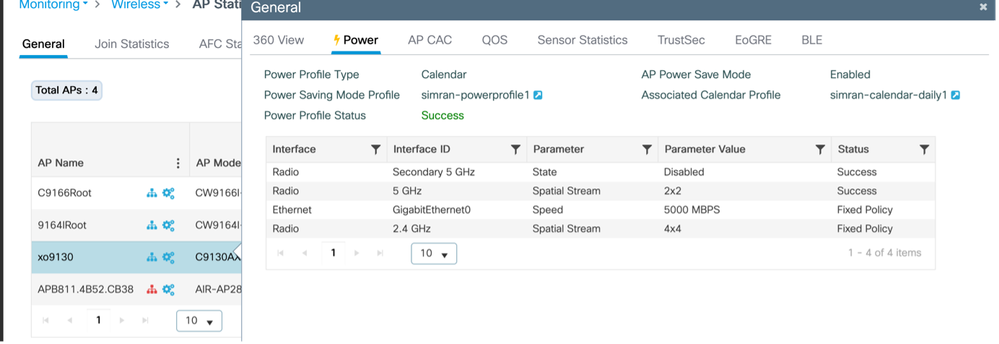
此示例說明禁用輔助5GHz無線電並在2x2模式下運行主5GHz無線電的電源配置檔案配置。此配置與從21:32:00到22:00:00的每日計畫繫結。可以根據需要修改類似的配置檔案以適應不同的網路方案。
日曆設定檔對應(CLI)
配置並對映電源和日曆配置檔案
 (config)# wireless profile power simran-powerprofile1

 (config-wireless-power-profile)# 10 radio secondary-5ghz state shutdown

 (config-wireless-power-profile)# 30 radio 5ghz spatial-stream 2

 (config-wireless-power-profile)# exit

 (config)# wireless profile calender-profile name simran-calendar-daily1

 (config-calendar-profile)# recurrance daily

 (config-calendar-profile)# start 21:32:00 end 22:00:00

 (config-calendar-profile)# exit

 (config)# ap profile powermode

 (config-ap-profile)# calendar-profile simran-calendar-daily1

 (config-ap-profile-calendar)# action power-saving-mode po

 (config-ap-profile-calendar)# action power-saving-mode power-profile simran-powerprofile1

(config-ap-profile-calendar)# end
日曆設定檔對應(GUI)
配置電源配置檔案
Configuration > Tags & profiles > Power Profile
配置日曆配置檔案
Configuration > Tags & profiles > Calendar
將電源配置檔案和日曆配置檔案對映到AP加入配置檔案
Configuration > Tags & profiles > AP Join > Select the AP join profile > AP > Power Management
驗證在AP上應用的配置檔案
監控>無線> AP統計資訊> AP >電源
日曆啟動時,控制檯從AP登入
xo9130#[*04/13/2026 21:35:31.1536] DOT11_CFG[1]: poe_power_mode: low_pwr_mode=5, allowed_tx_ant=3, allowed_rx_ant=3

[*04/13/2026 21:35:31.1615] DOT11_DRV[1]: Stop Radio1 - Begin

[*04/13/2026 21:35:31.1634] wlan: [0:I:CMN_MLME] mlme_ext_vap_down: VAP (mon1) is down

[*04/13/2026 21:35:31.1647] DOT11_DRV[1]: Stop Radio1 - End

[*04/13/2026 21:35:31.1792] wlan: [0:I:CMN_MLME] mlme_ext_vap_down: VAP (apr1v0) is down

[*04/13/2026 21:35:31.1840] DOT11_DRV[1]: Start Radio1 - Begin

[*04/13/2026 21:35:31.1852] wlan: [7277:I:ANY] ol_ath_set_config_param: OL_ATH_PARAM_RTT_SKIP_VDEV_RESTART: value: 1

[*04/13/2026 21:35:31.1870] wlan: [0:I:ANY] ol_ath_pdev_is_multi_band_supported: 2 GHz modes: 0, 5GHz/6GHz modes: 391f9001

[*04/13/2026 21:35:31.1876] wlan: [7277:I:ANY] ieee80211_ucfg_setparam_util: rtt_enable = 0 already configured, skip configuration

[*04/13/2026 21:35:31.1880] wlan: [7277:I:ANY] ieee80211_ucfg_setparam_util: KERN_DEBUG

[*04/13/2026 21:35:31.1880]  setting the lci enble flag

[*04/13/2026 21:35:31.1896] DOT11_DRV[1]: Start Radio1 - End

[*04/13/2026 21:35:31.2121] DOT11_DRV[2]: Stop Radio2 - Begin

[*04/13/2026 21:35:31.2137] wlan: [0:I:CMN_MLME] mlme_ext_vap_down: VAP (mon2) is down

[*04/13/2026 21:35:31.2152] DOT11_DRV[2]: Stop Radio2 - End

[*04/13/2026 21:35:31.2167] wlan: [0:E:ANY] mlme_ext_vap_up: VAP (mon1) is up, vdev_id:33 pdev_id:0 psoc_id:0

[*04/13/2026 21:35:31.2200] wlan: [0:I:CMN_MLME] mlme_ext_vap_down: VAP (apr1v0) is down

[*04/13/2026 21:35:31.2202] wlan: [0:I:ANY] ol_ath_pdev_is_multi_band_supported: 2 GHz modes: 0, 5GHz/6GHz modes: 391f9001

[*04/13/2026 21:35:31.2290] wlan: [0:I:CMN_MLME] mlme_ext_vap_down: VAP (apr2v0) is down
在交換機上
#####應用電源配置檔案之前
Switch#show power inline tenGigabitEthernet 3/0/23 detail | i Meas

 Measured at the port: 11.8
#####應用電源配置檔案後
Switch#show power inline tenGigabitEthernet 3/0/23 detail | in Meas

 Measured at the port: 10.8
#連線AP上的客戶端;AP自動切換回固定策略
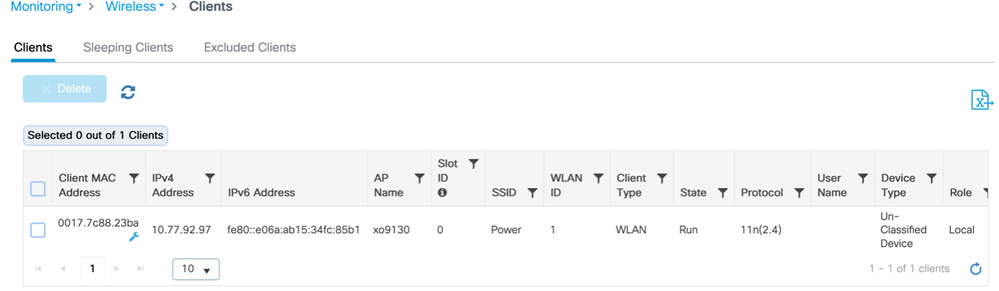
來自AP的日誌
[*04/13/2026 21:42:27.8792] DOT11_DRV[2]: Start Radio2 - Begin

[*04/13/2026 21:42:27.8802] wlan: [7277:I:ANY] ol_ath_set_config_param: OL_ATH_PARAM_RTT_SKIP_VDEV_RESTART: value: 1

[*04/13/2026 21:42:27.8820] wlan: [0:I:ANY] ol_ath_pdev_is_multi_band_supported: 2 GHz modes: 0, 5GHz/6GHz modes: 391f9001

[*04/13/2026 21:42:27.8827] wlan: [7277:I:ANY] ieee80211_ucfg_setparam_util: rtt_enable = 0 already configured, skip configuration

[*04/13/2026 21:42:27.8828] wlan: [7277:I:ANY] ieee80211_ucfg_setparam_util: KERN_DEBUG

[*04/13/2026 21:42:27.8828]  setting the lci enble flag

[*04/13/2026 21:42:27.8841] DOT11_DRV[2]: Start Radio2 - End

[*04/13/2026 21:42:27.8854] DOT11_CFG[2]: poe_power_mode: low_pwr_mode=5, allowed_tx_ant=15, allowed_rx_ant=15

[*04/13/2026 21:42:27.8974] wlan: [0:E:ANY] mlme_ext_vap_up: VAP (mon2) is up, vdev_id:50 pdev_id:2 psoc_id:0
在交換機上
客戶端連線後消耗的電量:
Switch#show power inline tenGigabitEthernet 3/0/23 detail | in Measu

 Measured at the port: 11.8
在WLC上
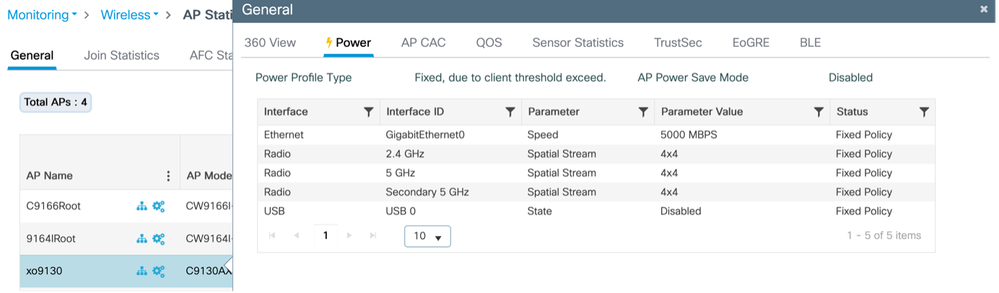
斷開客戶端連線,Ap自動切換至節能模式:
來自AP
 xo9130#[*04/13/2026 21:46:47.2003] DOT11_CFG[1]: poe_power_mode: low_pwr_mode=5, allowed_tx_ant=3, allowed_rx_ant=3

[*04/13/2026 21:46:47.2088] DOT11_DRV[1]: Stop Radio1 - Begin

[*04/13/2026 21:46:47.2106] wlan: [0:I:CMN_MLME] mlme_ext_vap_down: VAP (mon1) is down

[*04/13/2026 21:46:47.2120] DOT11_DRV[1]: Stop Radio1 - End

[*04/13/2026 21:46:47.2264] wlan: [0:I:CMN_MLME] mlme_ext_vap_down: VAP (apr1v0) is down

[*04/13/2026 21:46:47.2452] DOT11_DRV[1]: Start Radio1 - Begin

[*04/13/2026 21:46:47.2464] wlan: [7277:I:ANY] ol_ath_set_config_param: OL_ATH_PARAM_RTT_SKIP_VDEV_RESTART: value: 1

[*04/13/2026 21:46:47.2494] wlan: [0:I:ANY] ol_ath_pdev_is_multi_band_supported: 2 GHz modes: 0, 5GHz/6GHz modes: 391f9001

[*04/13/2026 21:46:47.2504] wlan: [7277:I:ANY] ieee80211_ucfg_setparam_util: rtt_enable = 0 already configured, skip configuration

[*04/13/2026 21:46:47.2506] wlan: [7277:I:ANY] ieee80211_ucfg_setparam_util: KERN_DEBUG

[*04/13/2026 21:46:47.2506]  setting the lci enble flag

[*04/13/2026 21:46:47.2522] DOT11_DRV[1]: Start Radio1 - End

[*04/13/2026 21:46:47.2637] wlan: [0:E:ANY] mlme_ext_vap_up: VAP (mon1) is up, vdev_id:33 pdev_id:0 psoc_id:0

[*04/13/2026 21:46:47.2676] wlan: [0:I:CMN_MLME] mlme_ext_vap_down: VAP (apr1v0) is down

[*04/13/2026 21:46:47.2678] wlan: [0:I:ANY] ol_ath_pdev_is_multi_band_supported: 2 GHz modes: 0, 5GHz/6GHz modes: 391f9001

[*04/13/2026 21:46:47.2729] DOT11_DRV[2]: Stop Radio2 - Begin

[*04/13/2026 21:46:47.2744] wlan: [0:I:CMN_MLME] mlme_ext_vap_down: VAP (mon2) is down

[*04/13/2026 21:46:47.2760] DOT11_DRV[2]: Stop Radio2 - End

[*04/13/2026 21:46:47.2895] wlan: [0:I:CMN_MLME] mlme_ext_vap_down: VAP (apr2v0) is down
在WLC上
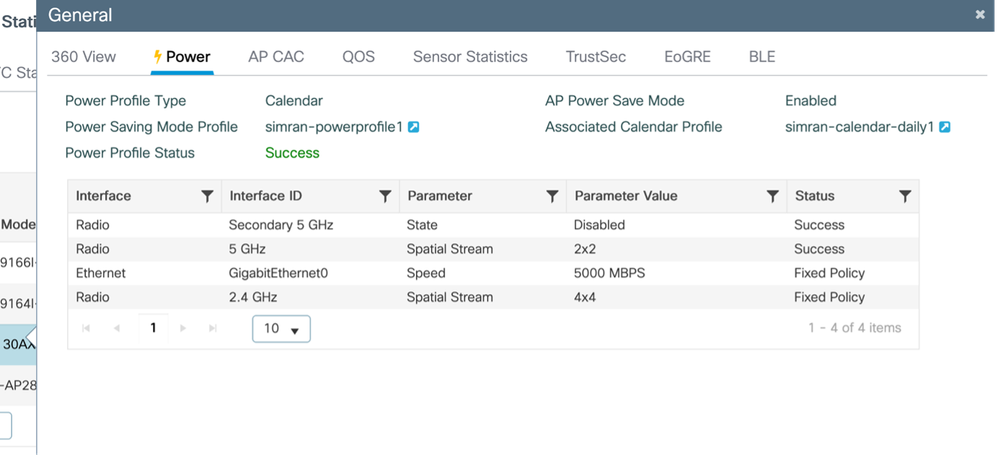
範例 2:
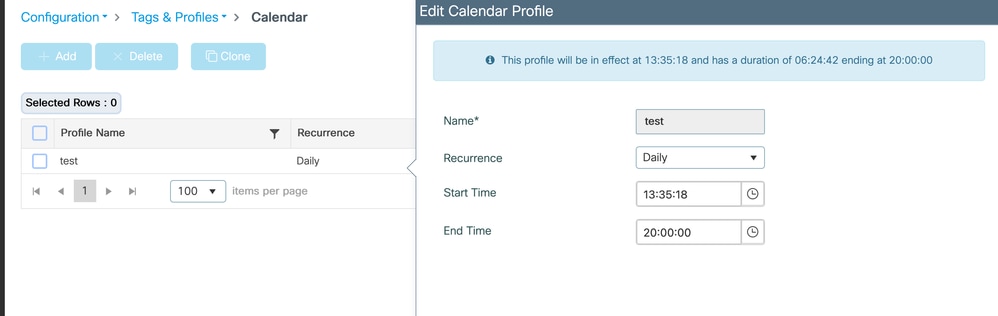
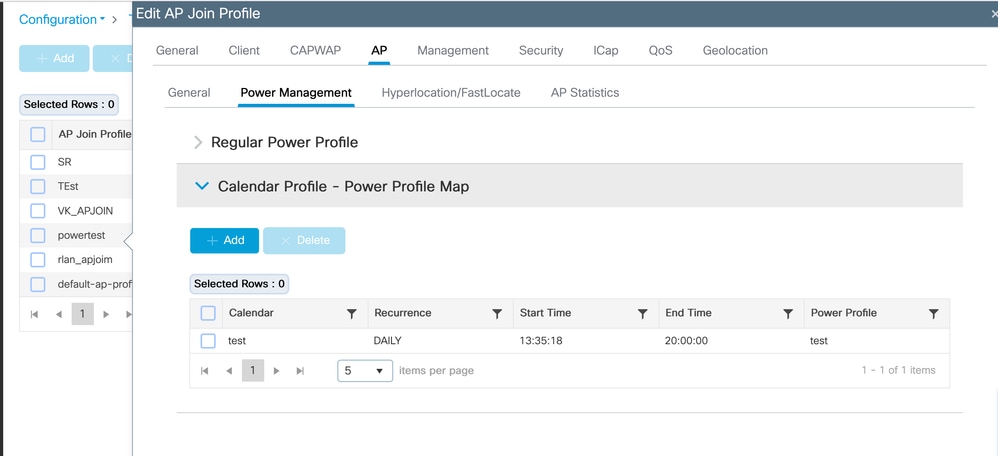
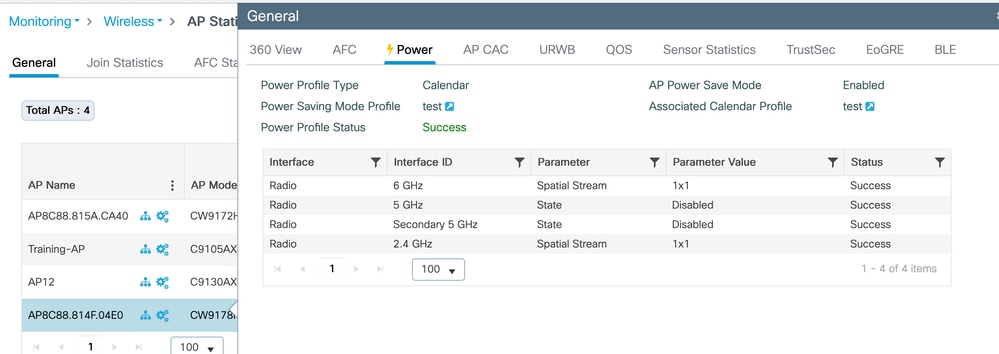
此測試驗證CW9178I接入點的AP電源和日曆配置檔案。電源配置檔案配置為在1x1空間流(SS)模式下啟用2.4GHz和6GHz無線電時,禁用兩個5GHz射頻。此配置受從13:35:18到20:00:00的每日活動計畫管理。可以根據需要對這些配置檔案進行調整以適應各種網路要求。
日曆設定檔對應(CLI)
配置並對映電源和日曆配置檔案
(config)#wireless profile power test
(config-wireless-power-profile)#0 radio 6ghz spatial-stream 1
(config-wireless-power-profile)#10 radio 5ghz state shutdown
(config-wireless-power-profile)#20 radio secondary-5ghz state shutdown
(config-wireless-power-profile)#30 radio 24ghz spatial-stream 1
(config-wireless-power-profile)# exit
(config)# wireless profile calender-profile name test
(config-calendar-profile)# recurrance daily
(config-calendar-profile)# start 13:35:18 end 20:00:00
(config-calendar-profile)# exit
(config)# ap profile powertest
(config-ap-profile)# calendar-profile test
(config-ap-profile-calendar)# action power-saving-mode power-profile test
(config-ap-profile-calendar)# end
日曆設定檔對應(GUI)
配置電源配置檔案
Configuration > Tags & profiles > Power Profile
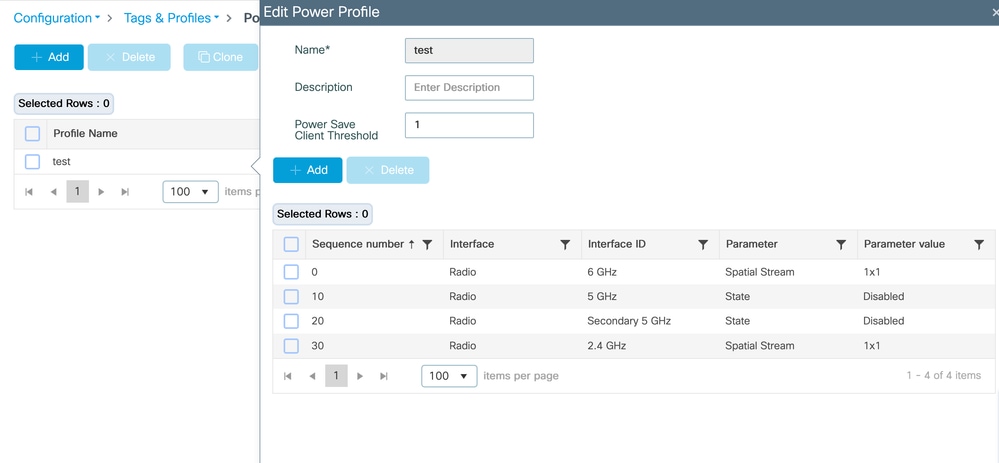
配置日曆配置檔案
Configuration > Tags & profiles > Calendar
將電源配置檔案和日曆配置檔案對映到AP加入配置檔案
Configuration > Tags & profiles > AP Join > Select the AP join profile > AP > Power Management
驗證在AP上應用的配置檔案
監控>無線> AP統計資訊> AP >電源
在交換機上
#####應用電源配置檔案之前
Switch#show power inline twoGigabitEthernet 1/0/2 detail | i Mea
Measured at the port(watts) (Alt-A,B): 16.5
#####應用電源配置檔案後
Switch#show power inline twoGigabitEthernet 1/0/2 detail | in Mea
Measured at the port(watts) (Alt-A,B): 14.8
PoE分配的電源與實際消耗
在Catalyst交換器上,PoE電源的追蹤方式有兩種:已分配功率和實際消耗。
Allocated power是交換器根據IEEE類別和CDP/LLDP電源交涉為裝置保留的功率量。此值用於PoE預算計算,顯示為「用於」
show power inline module。
範例:
模組可用剩餘數量
1 525.0 315.9 209.1
這裡的315.9 W是為相連裝置預留的總PoE預算。
例如,介面Tw1/0/2上的CW9178I AP分配了60 W:
已分配的電源
管理員值:60.0
已分配功率:60.0
但是,AP的實際功耗可能低得多:
實際消耗量
在埠上測量:16.9 W
自開機後的最大值:18.6 W
使用下列各項可看到交換機範圍的即時消耗檢視:
show power inline police
範例:
合計:103.8 W
這意味著雖然保留了315.9 W,但裝置當前僅佔用103.8 W。
這種行為是預期的,因為PoE交換機根據最大協商功率要求而不是瞬時消耗功率來預留功率。
這可確保諸如接入點之類的裝置能夠立即增加功率使用(例如在無線電活動高峰期間),而不會斷電。
應用AP節能配置檔案時,只有實際功耗會降低,因為某些AP元件在降低狀態下運行。
分配的功率保持不變,因為AP和交換機之間的協商最大功率包絡沒有改變。
PoE預算計算使用已分配(保留)的功率,而不是即時消耗。因此,通常可見已用功率和已測功耗之間存在巨大差異。
驗證
在無線LAN控制器(WLC)上
- show ap profile name default-ap-profile detailed
- show ap name <ap-name> power-profile summary
- show wireless profile power summary
- show wireless profile power detailed <power-profile-name>
- show wireless profile calendar-profile summary
在接入點上
- show ap power policy config
- show ap power policy status
- show ap power calendar config
在交換機上
驗證實際功耗:
- show power inline gig <interface> detail |包括測量值
疑難排解
在AP上
#Console logs
#debug capwap客戶端負載
#debug powerpolicy logging level trace
#debug powerpolicy日誌記錄級別資訊
#debug powerpolicy logging console enable
#terminal monitor
在WLC上
#RA蹤跡(AP無線電MAC)
調試級別的WNCD日誌數:
 #set platform software trace wncd <0/1/2/3> chassis active/Standby R0 ap-pwr-prof-main debug`
`#set platform software trace wncd <0/1/2/3> chassis active/Standby R0 ap-pwr-prof-db debug`
`#set platform software trace wncd <0/1/2/3> chassis active/Standby R0 ap-pwr-prof-wcnm debug`
`#set platform software trace wncd <0/1/2/3> chassis active/Standby R0 apcfg-profile-db debug`
`#set platform software trace wncd <0/1/2/3> chassis active/Standby R0 apmgr-db debug`
附註:重現問題後,將軟體跟蹤級別恢復為「notice」。
已知的問題
- AP電源配置檔案狀態出現意外的「Insufficient De-rating」:思科錯誤 ID CSCwf92519
- GUI上顯示「Regular Power Profile」(常規電源配置檔案)功能尚不支援17.9,但「Regular Power Profile」(常規電源配置檔案):Cisco Bug ID CSCwi51691

修訂記錄
| 修訂 | 發佈日期 | 意見 |
|---|---|---|
2.0 |
09-Jun-2026
|
對電源預算預留與實際功耗之間的比較進行了補充說明 |
1.0 |
22-May-2026
|
初始版本 |
 意見
意見