簡介
本檔案介紹如何透過NK9上的CLI為TACACS設定自訂Nexus角色。
必要條件
需求
思科建議您瞭解以下主題:
採用元件
本文中的資訊係根據以下軟體和硬體版本:
- Cisco Nexus9000、NXOS映像檔案為:bootflash:///nxos.9.3.5.bin
- 身分識別服務引擎版本3.2
本文中的資訊是根據特定實驗室環境內的裝置所建立。文中使用到的所有裝置皆從已清除(預設)的組態來啟動。如果您的網路運作中,請確保您瞭解任何指令可能造成的影響。
背景資訊
許可要求
Cisco NX-OS - TACACS+無需許可證。
思科身分識別服務引擎
對於新的ISE安裝,您擁有90天評估期許可證,該許可證可以訪問所有ISE功能,如果您沒有評估許可證,為了使用ISE TACACS功能,您需要裝置管理員許可證用於執行身份驗證的策略伺服器節點。
管理員/幫助台使用者在Nexus裝置上進行身份驗證後,ISE返回所需的Nexus shell角色。
分配了此角色的使用者可以執行基本故障排除並退回某些埠。
獲得Nexus角色的TACACS會話必須能夠僅使用和運行以下命令和操作:
- 訪問以將終端配置為僅執行從1/1-1/21到1/25-1/30的關閉和不關閉介面
- ssh
- ssh6
- telnet
- Telnet6
- Traceroute
- Traceroute6
- Ping
- Ping6
- 啟用
設定
網路圖表
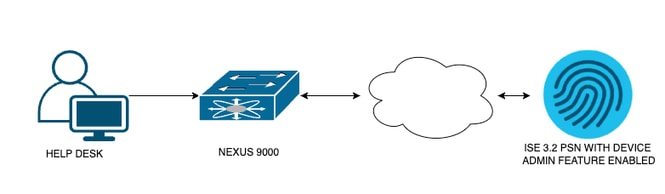 流元件圖
流元件圖
步驟 1:配置Nexus 9000
1.配置AAA。

警告:啟用TACACS身份驗證後,Nexus裝置停止使用本地身份驗證,並開始使用基於AAA伺服器的身份驗證。
Nexus9000(config)# feature tacacs+
Nexus9000(config)# tacacs-server host <Your ISE IP> key 0 Nexus3xample
Nexus9000(config)# tacacs-server key 0 "Nexus3xample"
Nexus9000(config)# aaa group server tacacs+ IsePsnServers
Nexus9000(config-tacacs+)# server <Your ISE IP>
Nexus9000(config)# aaa authentication login default group IsePsnServers local
2.根據指定的要求配置自定義角色。
Nexus9000(config)# role name helpdesk
Nexus9000(config-role)#   description Can perform basic Toubleshooting and bounce certain  ports
Nexus9000(config-role)# rule 1 permit read
Nexus9000(config-role)# rule 2 permit command enable *
Nexus9000(config-role)# rule 3 permit command ssh *
Nexus9000(config-role)# rule 4 permit command ssh6 *
Nexus9000(config-role)# rule 5 permit command ping *
Nexus9000(config-role)# rule 6 permit command ping6 *
Nexus9000(config-role)# rule 7 permit command telnet *
Nexus9000(config-role)# rule 8 permit command traceroute *
Nexus9000(config-role)# rule 9 permit command traceroute6 *
Nexus9000(config-role)# rule 10 permit command telnet6 *
Nexus9000(config-role)# rule 11 permit command config t ; interface * ; shutdown
Nexus9000(config-role)# rule 12 permit command config t ; interface * ; no shutdown

vlan policy deny
interface policy deny

Nexus9000(config-role-interface)#     permit interface Ethernet1/1
Nexus9000(config-role-interface)#     permit interface Ethernet1/2
Nexus9000(config-role-interface)#     permit interface Ethernet1/3
Nexus9000(config-role-interface)#     permit interface Ethernet1/4
Nexus9000(config-role-interface)#     permit interface Ethernet1/5
Nexus9000(config-role-interface)#     permit interface Ethernet1/6
Nexus9000(config-role-interface)#     permit interface Ethernet1/7
Nexus9000(config-role-interface)#     permit interface Ethernet1/8
Nexus9000(config-role-interface)#     permit interface Ethernet1/8
Nexus9000(config-role-interface)#     permit interface Ethernet1/9
Nexus9000(config-role-interface)#     permit interface Ethernet1/10
Nexus9000(config-role-interface)#     permit interface Ethernet1/11
Nexus9000(config-role-interface)#     permit interface Ethernet1/12
Nexus9000(config-role-interface)#     permit interface Ethernet1/13
Nexus9000(config-role-interface)#     permit interface Ethernet1/14
Nexus9000(config-role-interface)#     permit interface Ethernet1/15
Nexus9000(config-role-interface)#     permit interface Ethernet1/16
Nexus9000(config-role-interface)#     permit interface Ethernet1/17
Nexus9000(config-role-interface)#     permit interface Ethernet1/18
Nexus9000(config-role-interface)#     permit interface Ethernet1/19
Nexus9000(config-role-interface)#     permit interface Ethernet1/20
Nexus9000(config-role-interface)#     permit interface Ethernet1/21
Nexus9000(config-role-interface)#     permit interface Ethernet1/22
Nexus9000(config-role-interface)#     permit interface Ethernet1/25
Nexus9000(config-role-interface)#     permit interface Ethernet1/26
Nexus9000(config-role-interface)#     permit interface Ethernet1/27
Nexus9000(config-role-interface)#     permit interface Ethernet1/28
Nexus9000(config-role-interface)#     permit interface Ethernet1/29
Nexus9000(config-role-interface)#     permit interface Ethernet1/30

Nexus9000# copy running-config startup-config
[########################################] 100%
Copy complete, now saving to disk (please wait)...

Copy complete.
步驟2.配置身份服務引擎3.2
1.配置Nexus TACACS會話期間使用的標識。
使用ISE本地身份驗證。
導航到Administration > Identity Management > Groups頁籤並建立使用者需要加入的組,為此演示建立的身份組為iseUsers。
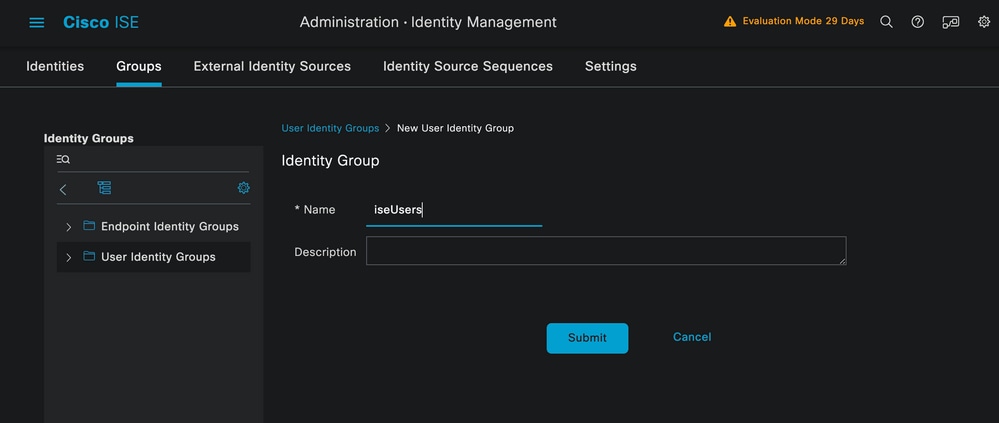 建立使用者組
按一下Submit按鈕。
接下來導航到Administration > Identity Management > Identity頁籤。
按一下Add按鈕。
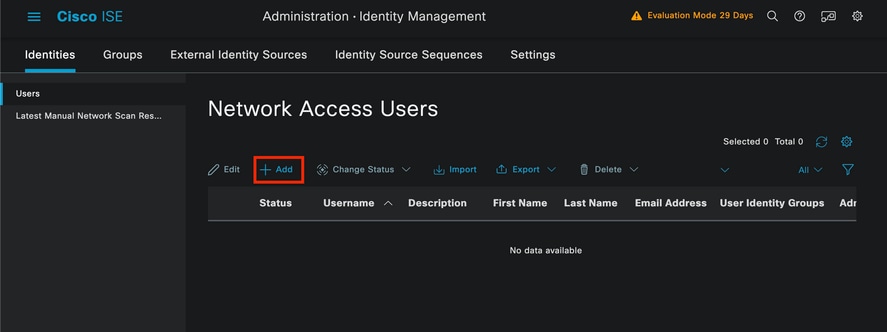 使用者建立
使用者建立
作為必填欄位的一部分,以使用者的名稱開頭,本示例中使用了使用者名稱iseiscool。
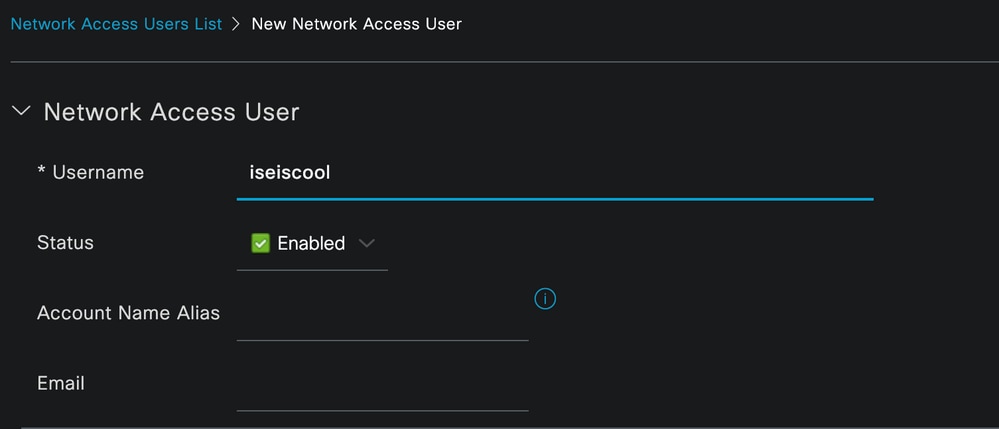 命名使用者並建立使用者
下一步是為建立的使用者名稱分配密碼。VainillaISE97是本演示中使用的密碼。
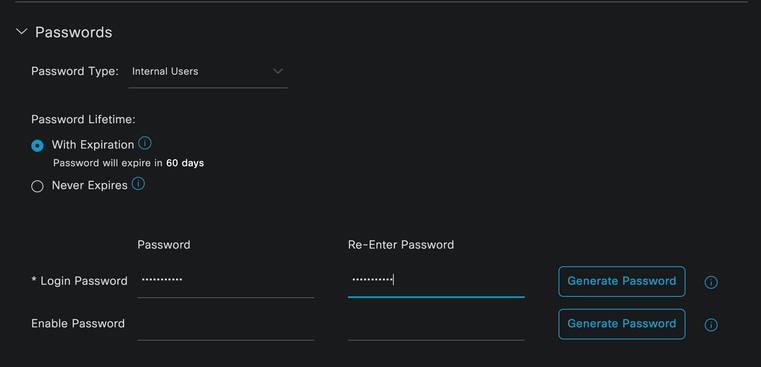 密碼分配
密碼分配
最後,將使用者分配到先前建立的組,在本例中為iseUsers。
 組分配
組分配
2.配置並新增網路裝置。
將NEXUS 9000裝置新增到ISE管理>網路資源>網路裝置
按一下「Add」按鈕開始。
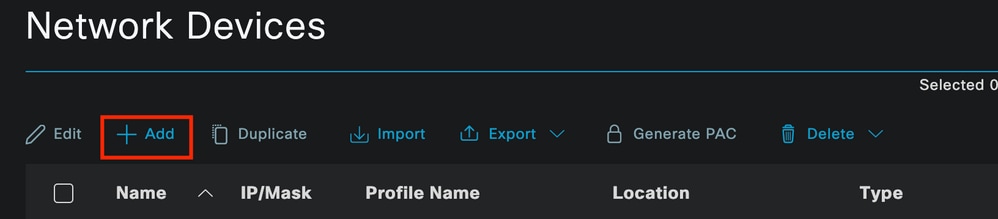 「網路訪問裝置」頁
在表單中輸入值,為正在建立的NAD分配名稱,並為TACACS對話從NAD聯絡ISE的IP。
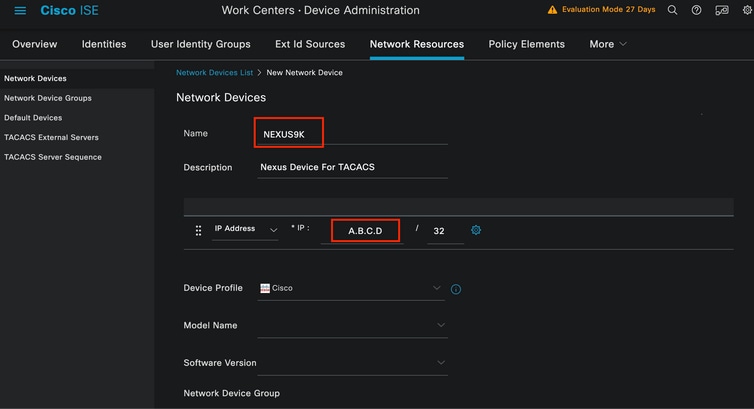 配置網路裝置
下拉選項可以保留為空並可省略,這些選項旨在按位置、裝置型別和版本對您的NAD進行分類,然後根據這些過濾器更改身份驗證流程。
在Administration > Network Resources > Network Devices > Your NAD > TACACS Authentication Settings上,新增在NAD配置下使用的共用金鑰。本演示使用Nexus3example。
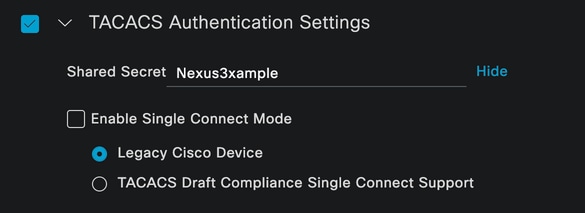 TACACS配置部分
按一下Submit按鈕儲存更改。
3.在ISE上配置TACACS。
再次檢查您在Nexus 9k中配置的PSN是否啟用了Device Admin選項。
 PSN裝置管理功能檢查
可以在ISE選單下的Administration > System > Deployment > Your PSN > Policy Server section > Enable Device Admin Services中進行檢查。
- 建立TACACS配置檔案,如果身份驗證成功,它將角色幫助台返回到Nexus裝置。
在ISE菜單中,導航到Workcenters > Device Administration > Policy Elements > Results > TACACS Profiles並點選Add按鈕。
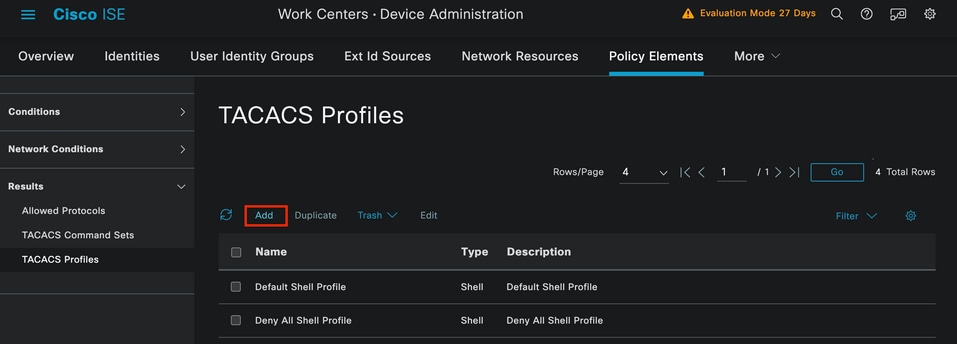 TACACS設定檔
指定名稱和(可選)說明。
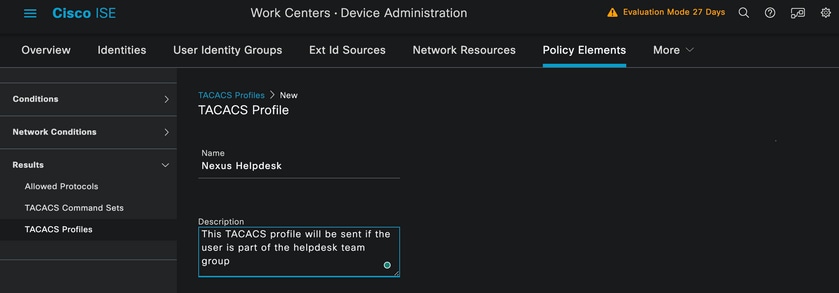 命名Tacacs配置檔案
忽略「任務屬性檢視」部分並導航到「原始檢視」部分。
並輸入shell:roles="helpdesk"值。
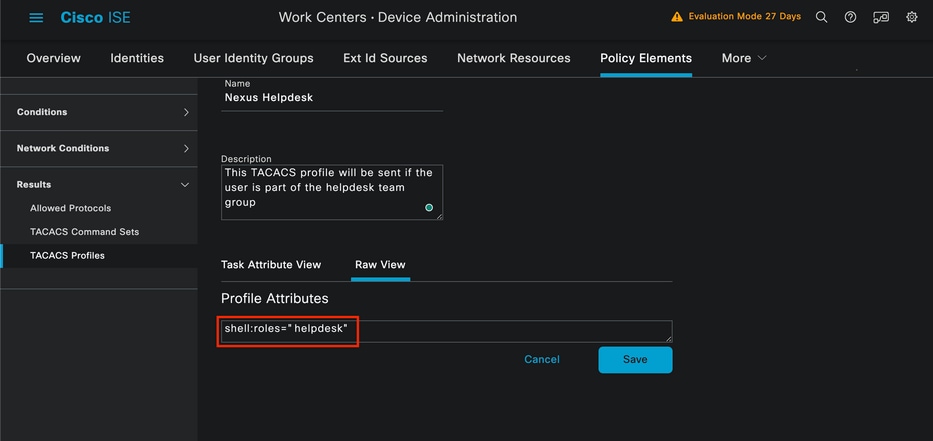 新增配置檔案屬性
配置包含身份驗證策略和授權策略的策略集。
在ISE選單上,訪問工作中心(Work Centers)>裝置管理(Device Administration)>裝置管理策略集(Device Admin Policy Sets)。
出於演示目的,使用預設策略集。但是,可以建立另一個策略集,其條件與特定方案匹配。
按一下行尾的箭頭。
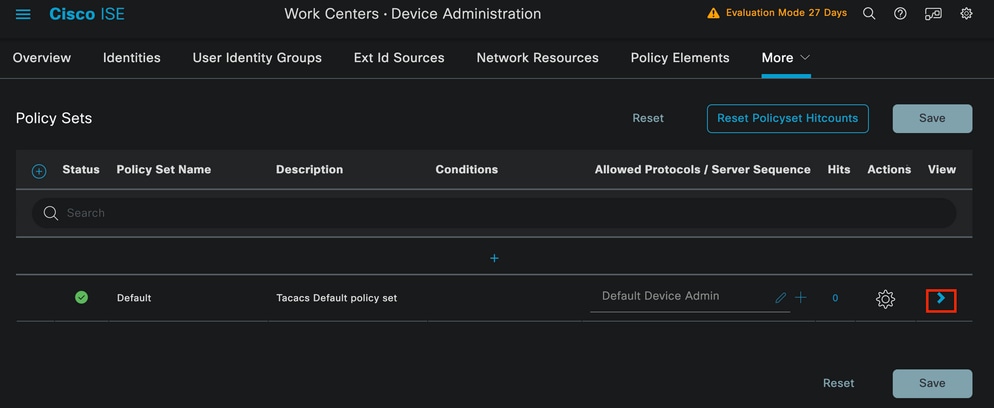 「裝置管理策略集」頁
進入策略集配置後,向下滾動並展開Authentication Policy部分。
按一下Add圖示。
在本配置示例中,Name值為Internal Authentication,選擇的條件為網路裝置(Nexus)IP(替換A.B.C.D.)。 此身份驗證策略使用內部使用者身份庫。
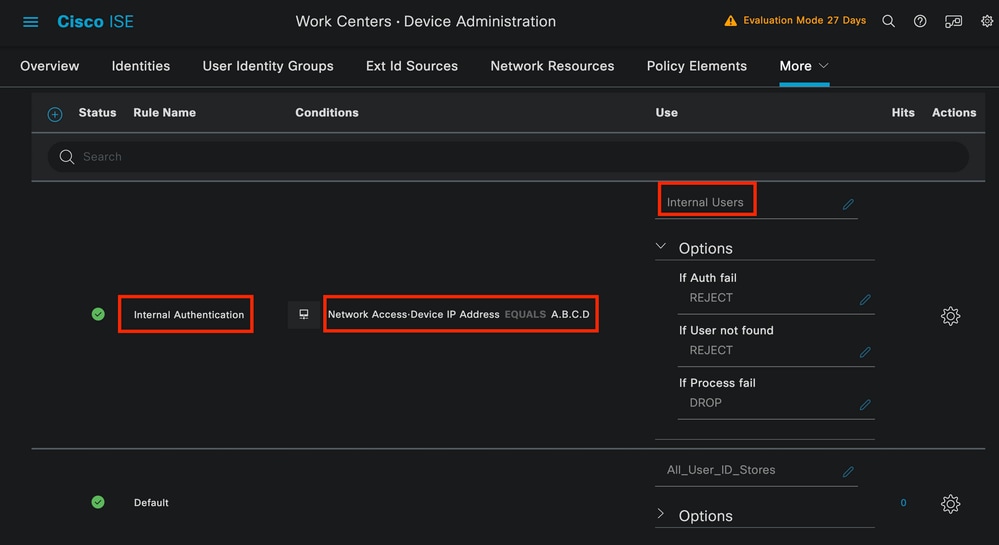 身份驗證策略
以下是條件是如何設定的。
選擇Network Access > Device IP address Dictionary Attribute。
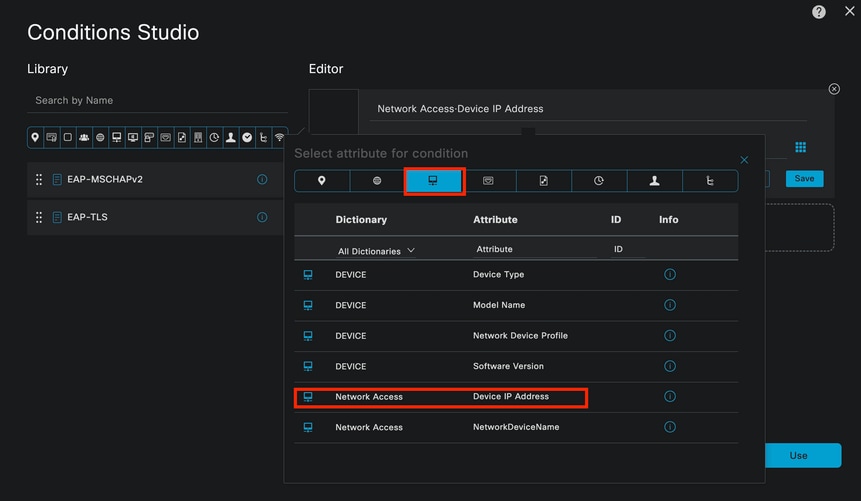 用於身份驗證策略的Condition studio
將<Nexus IP address>註釋更換為正確的IP。
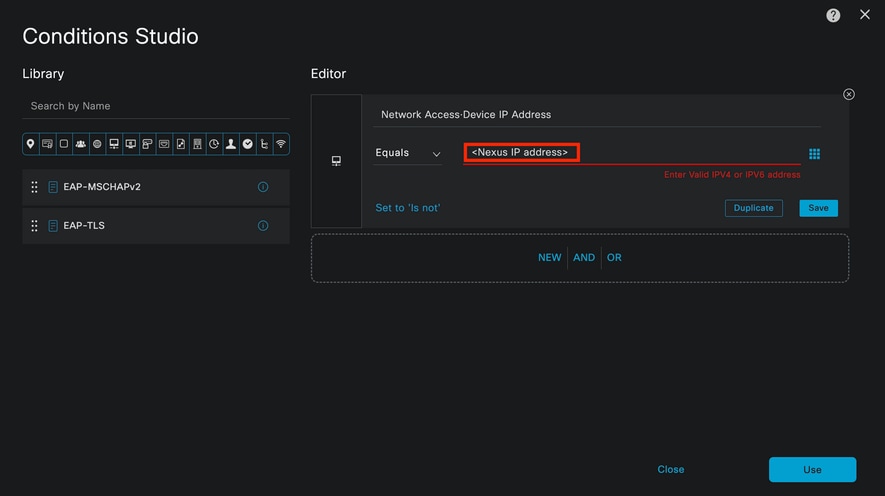 新增IP過濾器
按一下Use按鈕。
此條件僅由您配置的Nexus裝置滿足。但是,如果目的是為大量裝置啟用此條件,請考慮其他條件。
然後導航到Authorization Policy部分並展開它。
按一下+(plus)圖示。
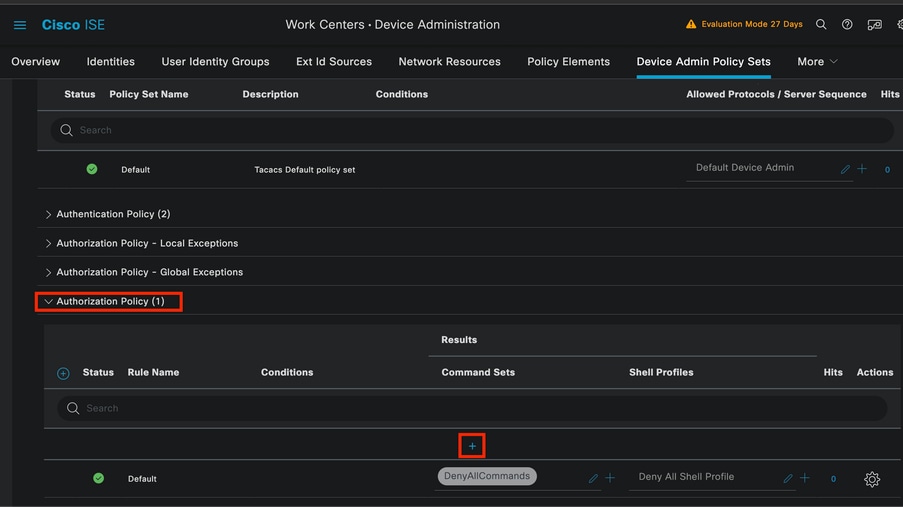 Authorization policy部分
在本示例中,使用NEXUS HELP DESK作為授權策略的名稱。
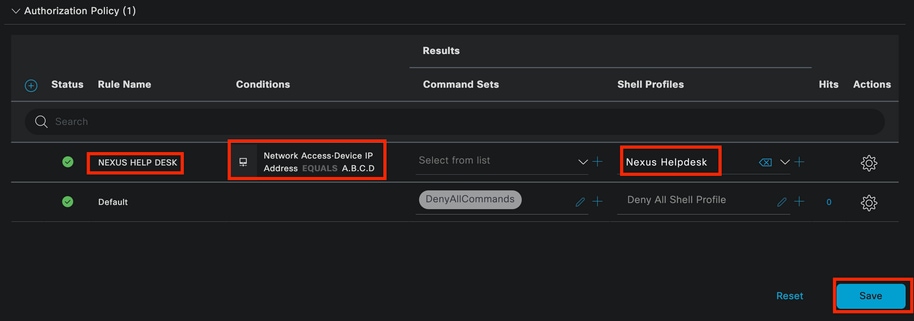 用於授權策略的Condition studio
在身份驗證策略中配置的相同條件用於授權策略。
在Shell Profiles列中,選擇Nexus Helpdesk之前配置的配置檔案。
最後,按一下Save按鈕。
驗證
使用本節內容,確認您的組態是否正常運作。
從ISE GUI導航到Operations > TACACS > Live Logs。確定與所用使用者名稱匹配的記錄,然後點選授權事件的Live Log Detail命令。
 TACACS即時日誌
作為此報告所包括詳細資訊的一部分,可以找到響應部分,從中可以看到ISE如何返回值shell:roles="helpdesk"
 即時日誌詳細資訊響應
在Nexus裝置上:
Nexus9000 login: iseiscool
Password: VainillaISE97

Nexus9000# conf t
Enter configuration commands, one per line. End with CNTL/Z.
Nexus9000(config)# interface ethernet 1/23
% Interface permission denied

Nexus9000(config)# ?
  interface  Configure interfaces
  show       Show running system information
  end        Go to exec mode
  exit       Exit from command interpreter

Nexus9000(config)# role name test
% Permission denied for the role

Nexus9000(config)#

Nexus9000(config)# interface loopback 0
% Interface permission denied

Nexus9000(config)#
Nexus9000# conf t

Nexus9000(config)# interface ethernet 1/5
Notice that only the commands allowed are listed.
Nexus9000(config-if)# ?

  no        Negate a command or set its defaults
  show      Show running system information
  shutdown  Enable/disable an interface
  end       Go to exec mode
  exit      Exit from command interpreter

Nexus9000(config-if)# cdp
Nexus9000(config-if)# cdp enable
% Permission denied for the role
Nexus9000(config-if)#
疑難排解
Nexus9000# ping <您的ISE IP>
PING <您的ISE IP>(<您的ISE IP> 😞 56資料位元組
從<Your ISE IP>的64位元組:icmp_seq=0 ttl=59 time=1.22 ms
從<Your ISE IP>的64位元組:icmp_seq=1 ttl=59 time=0.739毫秒
從<Your ISE IP>的64位元組:icmp_seq=2 ttl=59 time=0.686 ms
從<Your ISE IP>的64位元組:icmp_seq=3 ttl=59 time=0.71 ms
從<Your ISE IP>的64位元組:icmp_seq=4 ttl=59 time=0.72 ms
- 驗證ISE和Nexus裝置之間的埠49是否已開啟:
Nexus9000# telnet <您的ISE IP> 49
正在嘗試<您的ISE IP> ...
已連線到<您的ISE IP>。
跳脫字元為「^]」。
- 使用以下調試:
debug tacacs+ all
Nexus9000#
Nexus9000# 2024 Apr 19 22:50:44.199329 tacacs:event_loop():呼叫process_rd_fd_set
2024年4月19日22:50:44.199355 tacacs:process_rd_fd_set:為fd 6呼叫回撥
2024年4月19日22:50:44.199392 tacacs:fsrv didnt consume 8421操作碼
2024年4月19日22:50:44.199406 tacacs:process_implicit_cfs_session_start:正在進入……
2024年4月19日22:50:44.199414 tacacs:process_implicit_cfs_session_start:退出;我們處於分發禁用狀態
2024年4月19日22:50:44.199424 tacacs:process_aaa_tplus_request:輸入aaa會話id 0
2024年4月19日22:50:44.199438 tacacs:process_aaa_tplus_request:使用伺服器組IsePsnServers檢查mgmt0埠的狀態
2024年4月19日22:50:44.199451 tacacs:tacacs_global_config(4220):正在輸入……
2024年4月19日22:50:44.199466 tacacs:tacacs_global_config(4577):獲取_請求……
2024年4月19日22:50:44.208027 tacacs:tacacs_global_config(4701):已取回全域性協定配置操作的返回值:SUCCESS
2024年4月19日22:50:44.208045 tacacs:tacacs_global_config(4716):請求:num伺服器0
2024年4月19日22:50:44.208054 tacacs:tacacs_global_config:REQ:num group 1
2024年4月19日22:50:44.208062 tacacs:tacacs_global_config:請求:num timeout 5
2024年4月19日22:50:44.208070 tacacs:tacacs_global_config:REQ:num deadtime 0
2024年4月19日22:50:44.208078 tacacs:tacacs_global_config:請求:num encryption_type 7
2024年4月19日22:50:44.208086 tacacs:tacacs_global_config:返回retval 0
2024年4月19日22:50:44.208098 tacacs:process_aaa_tplus_request:group_info填充在aaa_req中,因此使用伺服器組IsePsnServers
2024年4月19日22:50:44.208108 tacacs:tacacs_servergroup_config:正在進入伺服器組,索引0
2024年4月19日22:50:44.208117 tacacs:tacacs_servergroup_config:GETNEXT_REQ for Protocol server group index:0名稱:
2024年4月19日22:50:44.208148 tacacs:tacacs_pss2_move2key:rcode = 40480003 syserr2str =無此類pss金鑰
2024年4月19日22:50:44.208160 tacacs:tacacs_pss2_move2key:呼叫pss2_getkey
2024年4月19日22:50:44.208171 tacacs:tacacs_servergroup_config:GETNEXT_REQ獲取協定伺服器組索引:2名稱:IsePsnServers
2024年4月19日22:50:44.208184 tacacs:tacacs_servergroup_config:已取回協定組操作的返回值:SUCCESS
2024年4月19日22:50:44.208194 tacacs:tacacs_servergroup_config:返回協定伺服器組的返回值0:IsePsnServers
2024年4月19日22:50:44.208210 tacacs:process_aaa_tplus_request:找到組IsePsnServers。對應的vrf為預設值,source-intf為0
2024年4月19日22:50:44.208224 tacacs:process_aaa_tplus_request:檢查mgmt0 vrf:針對vrf的管理:請求的組的預設
2024年4月19日22:50:44.208256 tacacs:process_aaa_tplus_request:mgmt_if 83886080
2024年4月19日22:50:44.208272 tacacs:process_aaa_tplus_request:global_src_intf :0,本地src_intf為0,vrf_name為預設值
2024年4月19日22:50:44.208286 tacacs:create_tplus_req_state_machine(902):輸入aaa會話id 0
2024年4月19日22:50:44.208295 tacacs:狀態機計數0
2024年4月19日22:50:44.208307 tacacs:init_tplus_req_state_machine:輸入aaa會話id 0
2024年4月19日22:50:44.208317 tacacs:init_tplus_req_state_machine(1298):tplus_ctx為NULL,如果author和test,它應該為
2024年4月19日22:50:44.208327 tacacs:tacacs_servergroup_config:正在進入伺服器組IsePsnServers,索引0
2024年4月19日22:50:44.208339 tacacs:tacacs_servergroup_config:協定伺服器組索引的GET_REQ:0名稱:IsePsnServers
2024年4月19日22:50:44.208357 tacacs:find_tacacs_servergroup:輸入伺服器組IsePsnServers
2024年4月19日22:50:44.208372 tacacs:tacacs_pss2_move2key:rcode = 0 syserr2str = SUCCESS
2024年4月19日22:50:44.208382 tacacs:find_tacacs_servergroup:正在退出伺服器組IsePsnServers索引為2
2024年4月19日22:50:44.208401 tacacs:tacacs_servergroup_config:GET_REQUEST:find_tacacs_servergroup錯誤0(針對協定伺服器組IsePsnServers)
2024年4月19日22:50:44.208420 tacacs:tacacs_pss2_move2key:rcode = 0 syserr2str = SUCCESS
2024年4月19日22:50:44.208433 tacacs:tacacs_servergroup_config:GET_REQ獲取協定伺服器組索引:2名稱:IsePsnServers
2024 A2024 4月19日22:52024 4月19日22:52024 4月19日22:5
Nexus9000#
- 執行資料包捕獲。(要檢視資料包詳細資訊,您必須更改Wireshark TACACS+首選項,並更新Nexus和ISE使用的共用金鑰。)
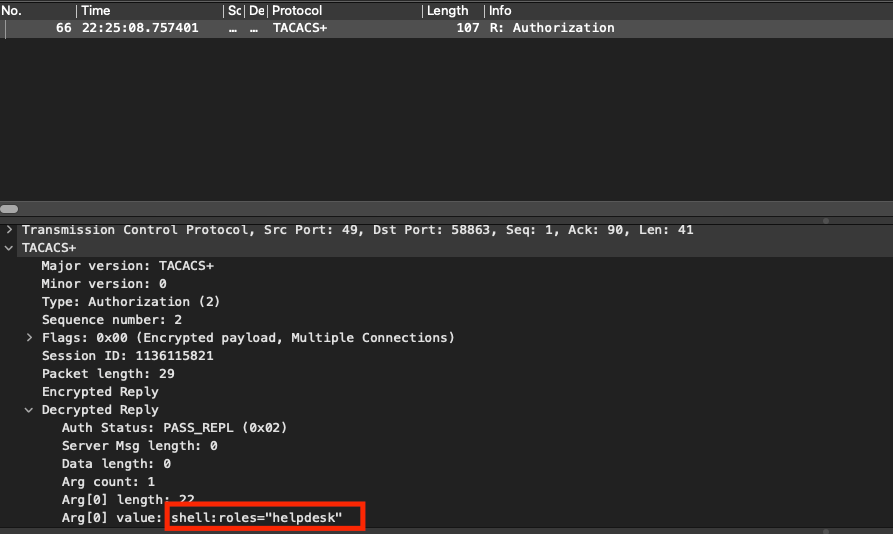 TACACS授權封包
- 驗證ISE和Nexus端上的共用金鑰是否相同。這也可以在Wireshark中檢查。
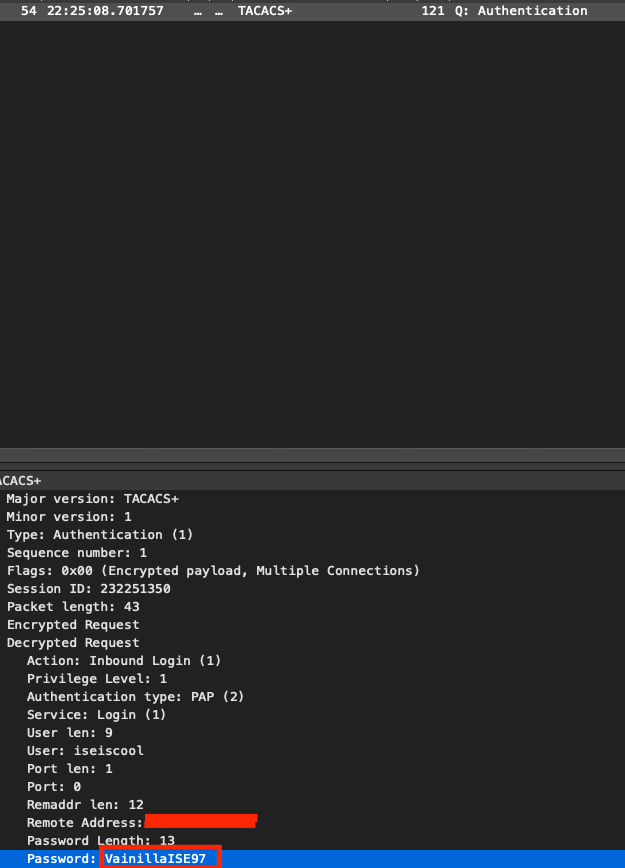 驗證封包
驗證封包


 意見
意見