在採用NX-OS的vPC中的Nexus交換機上安裝升級

簡介
本文檔介紹在使用Cisco NX-OS的vPC中Cisco Nexus 9000交換機的升級過程。
必要條件
需求
思科建議瞭解以下主題:
- Nexus NX-OS軟體。
- 虛擬連線埠通道(vPC)。
- 使用Cisco Nexus交換機上的裝置檔案系統、目錄和檔案。
- 登入軟體下載。
- 思科建議安排維護時段,因為此過程具有中斷性。
採用元件
本文中的資訊係根據以下軟體和硬體版本:
- Cisco Nexus 9000和Cisco NX-OS。

附註:Cisco Nexus 7000交換機的升級過程可以基於本文檔進行,但命令和輸出可能會有所不同。如需詳細資訊,請參閱特定於Cisco Nexus交換器的官方Cisco指南。
本文中的資訊是根據特定實驗室環境內的裝置所建立。文中使用到的所有裝置皆從已清除(預設)的組態來啟動。如果您的網路運作中,請確保您瞭解任何指令可能造成的影響。
設定
網路圖表
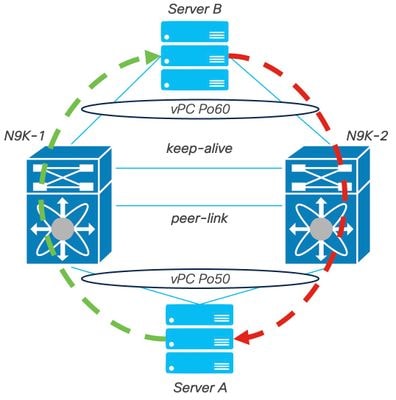 網路圖表
網路圖表
背景資訊
- 假設您是資料中心的網路管理員,該資料中心中有兩個N9K-C93180YC-FX-24:N9K-1和N9K-2具有NX-OS 9.3(11)。
- 伺服器A和B正在傳送生產流量。
- 目標是將兩台Nexus交換機升級到NX-OS 10.2(5)。
附註:從主交換機開始升級,或者輔助交換機不會產生任何功能區別。但是,啟動主交換機可以確保兩個裝置都恢復其初始配置的主角色和輔助角色。儘管瞭解Nexus的一些功能在vPC中作為操作上的主角色非常重要。
vPC運行的主要任務
- 無論FHRP配置如何,都維護ARP響應功能。
- 處理和解釋傳入的BPDU資料包,以確保網路穩定性。
- 促進跨網路基礎設施傳輸PIM組播流量。
- 管理和處理IGMP控制平面信令。
- 防止在對等鏈路故障期間vPC成員埠轉換到關閉狀態。
升級方法
步驟1.開啟Cisco Nexus 9000和3000 ISSU支援清單
- 選擇Current release。
- 選擇目標版本。
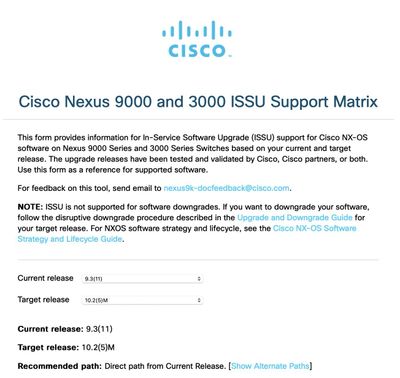 Cisco Nexus 9000和3000 ISSU支援清單
附註:Cisco TAC建議您始終將中斷(重新載入)升級選項與建議的路徑搭配使用。
附註:建議的路徑可以顯示多個跳躍。對於每一跳,必須重複步驟2至11,直到兩台Cisco Nexus交換機都擁有目標NX-OS版本。
步驟2.根據您的Cisco Nexus交換機線路卡,下載推薦路徑中說明的所有Cisco NX-OS檔案。
- 登入軟體下載
- 導覽至Download and Upgrade一節,然後開啟Access Downloads。
- 按一下Browse all > Cisco IOS and NX-OS Software > NX-OS - NX-OS Software >交換機>資料中心交換機>選擇您的Nexus系列>選擇您的線卡> NX-OS System Software >選擇要下載的NX-OS版本。
- 將游標移動到檔名上方以顯示檔案詳細資訊,複製MD5 總和檢查碼值並下載NX-OS檔案。
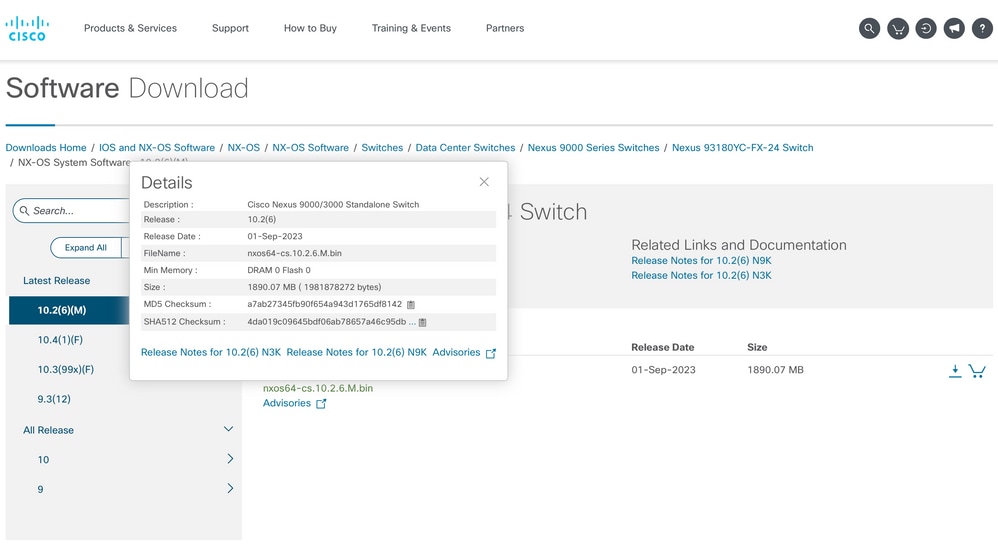 軟體下載
軟體下載 - 通過SCP、SFTP、TFTP或USB將NX-OS檔案傳輸到vPC中的兩台Cisco Nexus交換機上的bootflash。 如果選擇了前三個選項之一,請通過指定預期的VRF來檢驗是否對伺服器執行ping。在本例中,SFTP伺服器的IP位址為192.168.9.9,可通過虛擬路由轉送(VRF)管理到達。
N9K-1(config)# ping 192.168.9.9 vrf management N9K-1(config)# copy sftp: bootflash: Enter source filename: nxos64-cs.10.2.5.M.bin Enter vrf (If no input, current vrf 'default' is considered): management Enter hostname for the sftp server: 192.168.9.9 Enter username: admin The authenticity of host ‘192.168.9.9 (192.168.9.9)' can't be established. RSA key fingerprint is SHA256:ABCDEFGHIJK. Are you sure you want to continue connecting (yes/no/[fingerprint])? yes Warning: Permanently added ‘192.168.9.9' (RSA) to the list of known hosts. Inbound-ReKey for 192.168.9.9 User Access Verification Password: cisco - 完成檔案傳輸後,使用命令dir驗證NX-OS檔案是否位於bootflash中。
- 使用show file bootflash命令從NX-OS檔案獲取MD5校驗和。
- 將此值與從軟體下載中複製的值進行比較。兩個值必須匹配,否則NX-OS檔案已損壞或無效。
N9K-1(config)# dir | include nxos
 1978203648    Mar 31 01:36:06 2023  nxos.9.3.11.bin
 1943380992    Mar 17 09:54:16 2023  nxos64-cs.10.2.5.M.bin
Usage for bootflash://
20548902912 bytes used
96040308736 bytes free
116589211648 bytes total

N9K-1(config)# show file bootflash:nxos64-cs.10.2.5.M.bin md5sum
2f60a186cb9c2d55c90086302e51f655
步驟3.確定每個Cisco Nexus交換機在vPC中的操作角色。
- 使用命令show vpc role。
N9K-1(config)# show vpc role

vPC Role status
-----------------------------------------
vPC role                        : primary
Dual Active Detection Status    : 0
vPC system-mac                  : 00:23:04:ee:be:01
vPC system-priority             : 32667
vPC local system-mac            : 44:b6:be:11:17:67
vPC local role-priority         : 32667
vPC local config role-priority  : 32667
vPC peer system-mac             : f8:a7:3a:4e:40:07
vPC peer role-priority          : 32667
vPC peer config role-priority   : 32667
N9K-2(config)# show vpc role
vPC Role status
-----------------------------------------
vPC role : secondary
Dual Active Detection Status : 0
vPC system-mac : 00:23:04:ee:be:01
vPC system-priority : 32667
vPC local system-mac : f8:a7:3a:4e:40:07
vPC local role-priority : 32667
vPC local config role-priority : 32667
vPC peer system-mac : 44:b6:be:11:17:67
vPC peer role-priority : 32667
vPC peer config role-priority : 32667步驟4.驗證vPC中兩台Cisco Nexus交換機上的Cisco NX-OS不相容。
- 使用命令show incompatibility-all nxos bootflash。
N9K-1(config)# show incompatibility-all nxos bootflash:nxos64-cs.10.2.5.M.bin
Checking incompatible configuration(s) for vdc 'N9K-1':
-------------------------------------------------------
No incompatible configurations

Checking dynamic incompatibilities:
-----------------------------------
No incompatible configurations
步驟5.驗證Cisco NX-OS對vPC中的兩台Cisco Nexus交換機的影響。
- 使用命令show install all impact nxos bootflash。這將執行初步診斷,以驗證Cisco NX-OS版本是否相容且安裝是否完成。
N9K-1(config)# show install all impact nxos bootflash:nxos64-cs.10.2.5.M.bin
Installer will perform impact only check. Please wait.

Verifying image bootflash:/nxos64-cs.10.2.5.M.bin for boot variable "nxos".
[####################] 100% -- SUCCESS

Verifying image type.
[####################] 100% -- SUCCESS

Preparing "nxos" version info using image bootflash:/nxos64-cs.10.2.5.M.bin.
[####################] 100% -- SUCCESS

Preparing "bios" version info using image bootflash:/nxos64-cs.10.2.5.M.bin.
[####################] 100% -- SUCCESS

Performing module support checks.
[####################] 100% -- SUCCESS

Notifying services about system upgrade.
[####################] 100% -- SUCCESS

Compatibility check is done:
Module  bootable          Impact  Install-type  Reason
------  --------  --------------  ------------  ------
     1       yes      disruptive         reset  default upgrade is not hitless

Images will be upgraded according to following table:
Module       Image                  Running-Version(pri:alt)           New-Version  Upg-Required
------  ----------  ----------------------------------------  --------------------
     1        nxos                                   9.3(11)                                10.2(5)           yes
     1        bios     v05.47(04/28/2022):v05.43(11/22/2020)    v05.47(04/28/2022)            no

Additional info for this installation:
--------------------------------------

Service "vpc" in vdc 1: Vpc is enabled, Please make sure both Vpc peer switches have same boot mode using 'show boot mode' and proceed
第6步(可選)。 從vPC中的兩台Cisco Nexus交換機匯出運行配置的備份。
N9K-1(config)# copy running-config sftp:running-config-backup
Enter vrf (If no input, current vrf 'default' is considered): default
Enter hostname for the sftp server: 192.168.9.9
Enter username: admin

The authenticity of host '192.168.9.9 (192.168.9.9)' can't be established.
RSA key fingerprint is SHA256:ABDCEFGHI.
Are you sure you want to continue connecting (yes/no/[fingerprint])? yes
Warning: Permanently added '192.168.9.9' (RSA) to the list of known hosts.
Inbound-ReKey for 192.168.9.9:22
User Access Verification
Password:
Connected to 192.168.9.9.
步驟7.在具有vPC Primary角色的Nexus交換機上安裝NX-OS。
- 使用命令install all nxos bootflash。
N9K-1(config)# install all nxos bootflash:nxos64-cs.10.2.5.M.bin
Installer will perform compatibility check first. Please wait.
Installer is forced disruptive

Verifying image bootflash:/nxos64-cs.10.2.5.M.bin for boot variable "nxos".
[####################] 100% -- SUCCESS

Verifying image type.
[####################] 100% -- SUCCESS

Preparing "nxos" version info using image bootflash:/nxos64-cs.10.2.5.M.bin.
[####################] 100% -- SUCCESS

Preparing "bios" version info using image bootflash:/nxos64-cs.10.2.5.M.bin.
[####################] 100% -- SUCCESS

Performing module support checks.
[####################] 100% -- SUCCESS

Notifying services about system upgrade.
[####################] 100% -- SUCCESS


Compatibility check is done:
Module  bootable          Impact  Install-type  Reason
------  --------  --------------  ------------  ------
     1       yes      disruptive         reset  default upgrade is not hitless


Images will be upgraded according to following table:
Module       Image                  Running-Version(pri:alt)           New-Version  Upg-Required
------  ----------  -------------------------------------------------------------
     1        nxos                                   9.3(11)                                10.2(5)           yes
     1        bios     v05.47(04/28/2022):v05.43(11/22/2020)    v05.47(04/28/2022)            no


Additional info for this installation:
--------------------------------------

Service "vpc" in vdc 1: Vpc is enabled, Please make sure both Vpc peer switches have same boot mode using 'show boot mode' and proceed


Switch will be reloaded for disruptive upgrade.
Do you want to continue with the installation (y/n)? [n] y附註:必須讀取成功而無任何錯誤。之後,Cisco Nexus交換機將重新啟動,安裝過程可能需要幾分鐘。這在每台Cisco Nexus交換機上可能有所不同。
步驟8.等待Cisco Nexus交換機上的狀態變為活動狀態。
- 使用命令show module。
N9K-1(config)# show module
Mod Ports             Module-Type                      Model           Status
--- ----- ------------------------------------- ------------------------------
1    54   24x10/25G/32G + 6x40/100G Ethernet/FC N9K-C93180YC-FX-24    active *

Mod  Sw                       Hw    Slot
---  ----------------------- ------ ----
1    9.3(11)                  1.0    NA


Mod  MAC-Address(es)                         Serial-Num
---  --------------------------------------  ----------
1    44-b6-aa-aa-aa-aa to 44-b6-be-bb-bb-bb  ABCDEFGHIJK

Mod  Online Diag Status
---  ------------------
1    Pass

* this terminal session附註:請注意,vPC keep-alive和/或對等鏈路可能不能處於UP狀態。這是預期的,因為vPC中的Cisco Nexus交換機具有不受支援的Cisco NX-OS的不同版本。
步驟9.在vPC對等Cisco Nexus交換機上安裝Cisco NX-OS。
N9K-2(config)# install all nxos bootflash:nxos64-cs.10.2.5.M.bin
Installer will perform compatibility check first. Please wait.
Installer is forced disruptive

Verifying image bootflash:/nxos64-cs.10.2.5.M.bin for boot variable "nxos".
[####################] 100% -- SUCCESS

Verifying image type.
[####################] 100% -- SUCCESS

Preparing "nxos" version info using image bootflash:/nxos64-cs.10.2.5.M.bin.
[####################] 100% -- SUCCESS

Preparing "bios" version info using image bootflash:/nxos64-cs.10.2.5.M.bin.
[####################] 100% -- SUCCESS

Performing module support checks.
[####################] 100% -- SUCCESS

Notifying services about system upgrade.
[####################] 100% -- SUCCESS


Compatibility check is done:
Module  bootable          Impact  Install-type  Reason
------  --------  --------------  ------------  ------
     1       yes      disruptive         reset  default upgrade is not hitless


Images will be upgraded according to following table:
Module       Image                  Running-Version(pri:alt)           New-Version  Upg-Required
------  ----------  -------------------------------------------------------------
     1        nxos                                   9.3(11)                              10.2(5)           yes
     1        bios     v05.47(04/28/2022):v05.42(06/14/2020)    v05.47(04/28/2022)            no


Additional info for this installation:
--------------------------------------

Service "vpc" in vdc 1: Vpc is enabled, Please make sure both Vpc peer switches have same boot mode using 'show boot mode' and proceed


Switch will be reloaded for disruptive upgrade.
Do you want to continue with the installation (y/n)?  [n] y
步驟10.等待Cisco Nexus交換機上的狀態變為活動狀態。
- 使用命令show module。
N9K-2(config)# show module
Mod Ports             Module-Type                      Model           Status
--- ----- ------------------------------------- --------------------- ---------
1    54   24x10/25G/32G + 6x40/100G Ethernet/FC N9K-C93180YC-FX-24    active *

Mod  Sw                       Hw    Slot
---  ----------------------- ------ ----
1    9.3(11)                  1.0    NA


Mod  MAC-Address(es)                         Serial-Num
---  --------------------------------------  ----------
1    f8-a7-3a-nn-nn-nn to f8-a7-3a-n1-n1-n1  98765432109

Mod  Online Diag Status
---  ------------------
1    Pass

* this terminal session
步驟11.檢驗keep-alive、peer-link和vPC埠通道是否處於UP狀態。
- 使用命令show vpc。
N9K-1(config)# show vpc
Legend:
                (*) - local vPC is down, forwarding via vPC peer-link

vPC domain id                     : 1
Peer status                       : peer adjacency formed ok
vPC keep-alive status             : peer is alive
Configuration consistency status  : success
Per-vlan consistency status       : success
Type-2 consistency status         : success
vPC role                          : primary
Number of vPCs configured         : 2
Peer Gateway                      : Enabled
Dual-active excluded VLANs        : -
Graceful Consistency Check        : Enabled
Auto-recovery status              : Disabled
Delay-restore status              : Timer is off.(timeout = 30s)
Delay-restore SVI status          : Timer is off.(timeout = 10s)
Operational Layer3 Peer-router    : Enabled
Virtual-peerlink mode             : Disabled

vPC Peer-link status
-----------------------------------------------------------------
id    Port   Status Active vlans
--    ----   ------ -------------------------------------------------
1     Po1    up     1

vPC status
-----------------------------------------------------------------
Id    Port          Status Consistency Reason                Active vlans
--    ------------  ------ ----------- ------  ---------------
50    Po50          up     success     success               1

60    Po60          up     success     success               1
N9K-2(config)# show vpc
Legend:
(*) - local vPC is down, forwarding via vPC peer-link
vPC domain id : 1
Peer status : peer adjacency formed ok
vPC keep-alive status : peer is alive
Configuration consistency status : success
Per-vlan consistency status : success
Type-2 consistency status : success
vPC role : secondary
Number of vPCs configured : 2
Peer Gateway : Enabled
Dual-active excluded VLANs : -
Graceful Consistency Check : Enabled
Auto-recovery status : Disabled
Delay-restore status : Timer is off.(timeout = 30s)
Delay-restore SVI status : Timer is off.(timeout = 10s)
Operational Layer3 Peer-router : Enabled
Virtual-peerlink mode : Disabled
vPC Peer-link status
---------------------------------------------------------------------
id Port Status Active vlans
-- ---- ------ -------------------------------------------------
1 Po1 up 1
vPC status
----------------------------------------------------------------------------
Id Port Status Consistency Reason Active vlans
-- ------------ ------ ----------- ------ ---------------
50 Po50 up success success 1
60 Po60 up success success 1
相關資訊
修訂記錄
| 修訂 | 發佈日期 | 意見 |
|---|---|---|
3.0 |
12-Jun-2026
|
重新認證和更新格式。 |
1.0 |
05-Oct-2023
|
初始版本 |
 意見
意見