執行MDS 9000系列交換機無中斷NX-OS升級

簡介
本文檔介紹在Cisco MDS 9000系列多層導向器交換機(MDS)上無中斷升級NX-OS軟體的說明。
背景資訊
無中斷升級概述
此過程適用於開放系統和FICON MDS交換機。
所有MDS交換機均支援無中斷升級和降級,這受Cisco MDS 9000 NX-OS和SAN-OS軟體安裝和升級指南中列出的限制所限制。請參閱MDS文檔,包括版本說明:Cisco MDS 9000 - 9.x版文檔套件。
目標版本是在安裝全部步驟中升級或降級到MDS的NX-OS版本。最終目標版本是所需的最終版本NX-OS版本。可能需要安裝兩個或多個這些中間目標版本,才能達到最終目標版本。可以找到開放系統和FICON的無中斷升級表:Cisco MDS 9000 NX-OS軟體和韌體升級和降級指南9.x版。
這些版本已經過修改,需要從9.4(1a)之前的NX-OS版本升級到9.4(1a)之後的最終目標NX-OS版本,首次升級到NX-OS 9.4(1a)。 必須參閱Cisco MDS 9000 NX-OS軟體和韌體升級和降級指南瞭解詳細資訊。
在具有雙管理引擎的97xx系列MDS上,在NX-OS安裝期間,新映像載入到備用管理引擎上。然後進行切換,以使運行新代碼的備用Supervisor處於活動狀態。代碼載入到以前處於活動狀態的Supervisor上,並成為新的備用Supervisor。資料平面繼續通過光纖通道流量。然後,這些模組以無中斷方式從編號最低的模組開始升級過程,並繼續執行最高過程。
MDS 91xx、92xx或93xx系列交換矩陣交換機只有一個管理引擎。升級完成後,將以無中斷方式重新載入Supervisor(控制平面)。資料平面繼續無中斷地通過光纖通道流量。
如果您打算通過Telnet、安全殼層(SSH)或簡單網路管理協定(SNMP)(交換矩陣管理器/裝置管理器)進行升級,請確保您已通過乙太網連線到兩個管理引擎。當Supervisor以無中斷方式重新啟動時,您的終端會話將丟失。您必須重新連線到交換機,並且必須連線到上一個備用Supervisor。
同一交換矩陣中的多台交換機可以同時升級。升級交換矩陣中的所有交換機後,可以在大約七天的時間週期內評估所有裝置的功能。如果未發現任何問題,則可以更新冗餘交換矩陣中的交換機。
更新的MDS升級說明 — 適用於所有MDS平台
升級MDS 9000系列交換機的最佳實踐已經更新,以確保順利使用ISSU。在運行install all kickstart之前…… 系統……指令,請嚴格遵循此步驟。

附註:目標版本是在安裝全部步驟中升級或降級到MDS的NX-OS版本。最終目標版本是期望的最終版本NX-OS版本。可能需要安裝兩個或多個這些中間目標版本,才能達到最終目標版本。此過程可以重複用於每個中間目標版本和最終目標版本。
附註:驗證到最終目標版本的支援無中斷升級或降級路徑。可以在Cisco MDS 9000 NX-OS軟體和韌體升級和降級指南9.x版中「支援的Cisco MDS NX-OS軟體無中斷降級路徑」一章中找到。
1.將Show Tech-Support Detail的副本另存為Gzip檔案。
其中包含當前交換機配置、日誌檔案和所有介面的狀態。如果在升級期間或升級後出現異常,則使用升級前交換機的狀態有助於進行故障排除,並減少診斷任何問題的時間。在NX-OS版本8.4(2b)和更新版本中,可以使用tac-pac命令。在之前的版本中,可以使用show tech-support details命令:
mds9124V# tac-pac
Collecting show tech-support details...
Show tech details will take 4-8 minutes to complete. Please Wait ...
Collecting show logging onboard...
tacpac file volatile:mds9124V_tacpac_2025-08-22.gz created.
mds9124V#
2.將tac-pac/techsupport檔案儲存到交換機外部。
將您儲存的tac-pac/techsupport複製到TFTP伺服器,並將其重新命名為「before_install」。 這實現了三個目標:
- 它驗證您的TFTP伺服器是否工作正常。
- 它驗證您是否可以通過IP網路訪問伺服器。
- 它將配置的副本放在交換機外部的位置,這樣您就可以在交換機出現故障時進行備份。
MDS9124V# move volatile:F241-16-10-9124V-3_tacpac_2025-08-22.gz volatile:F241-16-10-9124V-3_tacpac_2025-08-22_before_install.gz
MDS9124V# copy volatile: tftp:
<prompts for file name> mds9124V_tacpac_2025-08-22_before_install.gz
<prompts for tftp server name or ip address> 192.168.1.1
附註:在上一個使用TFTP的範例中,MDS也支援FTP、SCP和SFTP。
3.(可選)儲存交換機外部正在使用的當前映像。
確認您的TFTP伺服器上存在目前映像的副本,以便如果您必須回復到原始版本,您就有備份。如果不這樣做,請立即將其從交換器複製到TFTP伺服器。要確定當前映像,請運行show version命令。請參見以下示例:
MDS9124V# copy bootflash: tftp:
<prompts for file name> m9124v-s8ek9-kickstart-mz.9.3.2a.bin
<prompt for tftp server name or ip address> 192.168.1.1

MDS9148V# copy bootflash: tftp:
<prompts for file name> m9124v-s8ek9-mz.9.3.2a.bin
<prompt for tftp server name or ip address> 192.168.1.1
附註:對於提示檔名條目,請使用當前版本。
在上一個範例中,使用TFTP。MDS還支援FTP、SCP和SFTP。
4.下載目標系統和kickstart映像。
從思科軟體下載下載新的NX-OS映像。您既需要啟動映像,也需要系統映像。將其放在TFTP伺服器上的預設TFTP目錄中。
思科提供兩種型別的NX-OS軟體。Payload Non-Crypto,也稱為Non-Payload Encryption(NPE),版本面向美國商務部列為包含加密的非出口軟體清單的國家或政府。NPE版本不包括某些高級故障排除功能。NPE版本還會限制思科提供變通方法或熱修復的能力。只有符合匯出限制的客戶才能運行NPE版本。
下表可用於選擇您的交換器系列和交換器軟體映像:
| Cisco MDS系列交換器型別 | IBM MDS系列交換器型別 |
命名規則 |
| SAN24C-7 |
檔名以m9124v-s8ek9開頭 |
|
| SAN32C-6 |
檔名以m9100-s6ek9開頭 |
|
| 無 |
檔名以m9100-s5ek9開頭 |
|
| SAN48C-6 |
檔名以m9148-s6ek9開頭 |
|
| SAN48C-7 |
檔名以m9148v-s8ek9開頭 |
|
| SAN16C-R |
檔名以m9220-s7ek9開頭 |
|
| SAN50C-R |
檔名以m9250-s5ek9開頭 |
|
| 無 |
檔名以m9300-s1ek9開頭 |
|
| SAN96C-6 |
檔名以m9300-s2ek9開頭 |
|
| SAN96C-7 |
檔名以m9396v-s3ek9開頭 |
|
| MDS 9710、9706和9718系列,Supervisor模組3 |
01FT600 SF1和01FT601 SF1E |
檔名以m9700-sf3ek9開頭 |
| MDS 9710、9706和9718系列,管理模組4 |
02JD753 SF4 |
檔名以m9700-sf4ek9開頭 |
附註:在思科下載頁面上,將滑鼠懸停在檔名上以檢索消息摘要5(MD5)。
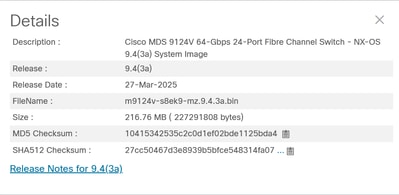
5.驗證bootflash上是否有足夠的可用空間用於新增新映像。
如果bootflash上的空間不足,無法容納目標系統和啟動映像,則必須至少擦除系統映像檔案。保留kickstart映像,如果發生故障,您可以將交換機轉到可載入(TFTP)新映像的位置。升級後,您可以刪除舊版本。
附註:無法刪除當前映像。
運行dir命令檢查可用的bootflash可用空間:
MDS9124V# dir bootflash:
如果運行雙Supervisor MDS 9700交換機,請運行以下命令檢查備用Supervisor上是否有足夠的可用空間:
MDS9700# dir bootflash://sup-standby/
6.從TFTP伺服器將新映像下載到交換機上的bootflash。
MDS9124V# copy tftp: bootflash:
<prompts for file name> m9124v-s8ek9-kickstart-mz.9.4.3a.bin
<prompt for tftp server name or ip address> 192.168.1.1

MDS9124V# copy tftp: bootflash:
<prompts for file name> m9124v-s8ek9-mz.9.4.3a.bin
<prompt for tftp server name or ip address> 192.168.1.1
附註:在上一個範例中,使用TFTP。MDS還支援FTP、SCP和SFTP。
驗證校驗和,以及MD5校驗和:
有效的MD5校驗和示例:
MDS9124V# show version image m9124v-s8ek9-mz.9.4.3a.bin
MD5 Verification Passed
image name: m9124v-s8ek9-mz.9.4.3a.bin
bios: v1.11.0(11/27/2024)
system: version 9.4(3a)
compiled: 3/1/2025 12:00:00 [03/25/2025 00:13:28]
MDS9124V#
無效的MD5校驗和示例,必須重新下載。
MDS9124V# show version image m9124v-s8ek9-mz.9.4.3a.bin
MD5 Verification Failed
Image integrity check failed
如果要升級的MDS是9700系列,請將kickstart和系統映像複製到備用supervisor上的bootflash:
mds-9706# copy bootflash:m9700-sf4ek9-kickstart-mz.9.4.4.bin bootflash://sup-standby/
Copy progress 100% 80165KB
Copy complete, now saving to disk (please wait)...
mds-9706# copy bootflash:m9700-sf4ek9-mz.9.4.4.bin bootflash://sup-standby/
Copy progress 100% 542544KB
Copy complete, now saving to disk (please wait)...
mds-9706#
7.儲存SAN分析配置並暫時禁用SAN分析功能。
如果a和b均為true,則必須完成此步驟:
- 已啟用SAN分析。
- 交換機型號為以下之一:
- MDS 9700交換機,包含一個或多個32 Gbps模組「4/8/16/32 Gbps高級FC模組DS-X9648-1536K9」或
- 交換機型號為MDS 9132T、MDS 9148T或MDS 9396T。
注意:對於IBM品牌9700交換機,「4/8/16/32 Gbps高級FC模組」的IBM機型為01FT644。
當無中斷升級路徑包括到最終目標版本的多個升級時,此步驟只能在第一個NX-OS升級中完成。
這是因為啟用分析並完成NX-OS升級時,可能會導致TCAM損壞的問題。升級完成後,第15步重新啟用分析。如果show feature命令顯示分析功能已禁用,則可以跳過此步驟和步驟14。此問題已記錄在Cisco錯誤ID CSCwo03706.
此命令顯示插槽12中的32 Gbps模組是MDS 9718:
MDS9718# show module
Mod  Ports  Module-Type                         Model              Status
---  -----  ----------------------------------- ------------------ ----------
1    48     2/4/8/10/16 Gbps Advanced FC Module DS-X9448-768K9     ok
4    48     2/4/8/10/16 Gbps Advanced FC Module DS-X9448-768K9     ok
9    0      Supervisor Module-4                 DS-X97-SF4-K9      ha-standby
10   0      Supervisor Module-4                 DS-X97-SF4-K9      active *
11   34     1/10/40G IPS,2/4/8/10/16G FC Module DS-X9334-K9        ok
12   48     4/8/16/32 Gbps Advanced FC Module   DS-X9648-1536K9    ok
13   48     8/16/32/64 Gbps Advanced FC Module  DS-X9748-3072K9    ok
此命令顯示IBM品牌SAN192C(9706)的插槽12中的32 Gbps模組:
 SAN192C# show module
Mod  Ports  Module-Type                         Model              Status
---  -----  ----------------------------------- ------------------ ----------
1    48     4/8/16/32 Gbps Advanced FC Module   01FT644 48x32 FC   ok
2    48     8/16/32/64 Gbps Advanced FC Module  03FR076 48x64 FC   ok
3    0      Supervisor Module-4                 02JD753 SF4        active *
4    0      Supervisor Module-4                 02JD753 SF4        ha-standby
5    34     1/10/40G IPS,2/4/8/10/16G FC Module 01FT645 24/10 EX   ok
6    48     8/16/32/64 Gbps Advanced FC Module  03FR076 48x64 FC   ok
此命令顯示交換器型別為9148T:
MDS9148T# show version
Cisco Nexus Operating System (NX-OS) Software
TAC support: http://www.cisco.com/tac
Documents: http://www.cisco.com/en/US/products/ps9372/tsd_products_support_serie
s_home.html
Copyright (c) 2002-2025, Cisco Systems, Inc. All rights reserved.
The copyrights to certain works contained herein are owned by
other third parties and are used and distributed under license.
Some parts of this software are covered under the GNU Public
License. A copy of the license is available at
http://www.gnu.org/licenses/gpl.html.

Software
  BIOS:      version 1.11.0
  loader:    version N/A
  kickstart: version 9.4(3b)
  system:    version 9.4(3b)
  BIOS compile time:       11/27/2024
  kickstart image file is: bootflash:///m9148-s6ek9-kickstart-mz.9.4.3b.bin
  kickstart compile time:  5/24/2025 12:00:00 [05/28/2025 12:25:54]
  system image file is:    bootflash:///m9148-s6ek9-mz.9.4.3b.bin
  system compile time:     5/24/2025 12:00:00 [05/28/2025 13:58:43]


Hardware
  cisco MDS 9148T 48X32G FC (1 RU) Chassis ("4/8/16/32 Gbps FC/Sup-4")
  Intel(R) Xeon(R) CPU D-1530 @ 2.40GHz with 5735444 kB of memory.
  Processor Board ID JAE22500MUN

  Device name: F241-14-08-9148T-2
  bootflash:    3735552 kB

Kernel uptime is 8 day(s), 1 hour(s), 27 minute(s), 47 second(s)

Last reset at 462831 usecs after Thu Aug 14 19:44:56 2025
  Reason: Reset due to upgrade
  System version: 8.4(2d)
  Service:

plugin
  Core Plugin
MDS9148T#
此命令顯示已啟用功能分析:
MDS9718# show feature | i analytics
analytics 1 enabled 如果啟用SAN Analytics,請將SAN Analytics配置的副本儲存到兩個主管:
MDS9718# echo "configure terminal" > before_issu_analytics.cfg
MDS9718# show running-config analytics >> before_issu_analytics.cfg
如果這是MDS 9700或IBM品牌9700,請將分析配置複製到備用管理引擎:
MDS9718# copy before_issu_analytics.cfg bootflash://sup-standby/暫時禁用SAN分析功能:
MDS9718# configure terminal
MDS9718(config)# no feature analytics
MDS9718(config)# end
MDS9718# copy running-config startup-config
8.執行系統切換(僅限MDS 9700)。
如果交換機型號是MDS 9700交換機,則必須完成此步驟。
從活動Supervisor運行系統switchover命令。系統切換完成後,重新連線新啟用的Supervisor,並等待待命Supervisor達到「ha-standby」狀態。
以下是從作用中Supervisor上的主控台連線執行system switchover指令的範例:
MDS9710# system switchover
MDS9710#
User Access Verification
MDS9710 login: [703536.990233]  writing reset reason 7,

ME Firmware Status #1: 0x000F0345
ME Firmware Status #2: 0x38000000
ME Current State: Operational
ME Error Code: No Error
ME Operational Firmware Version: 06:3.0.3.214

  CPU Signature - 0x00050663: Version - 0x00050660
  CPU - 1 : Cores - 8 : HTEn - 1 : HT - 2 : Features - 0xBFEBFBFF
  MicroCode Version : 0x0700001E

...etc...
重新連線到新啟用的Supervisor並運行show module命令。Supervisor進入「ha-standby」狀態後,此步驟即完成:
MDS9710# show module
Mod  Ports  Module-Type                         Model              Status
---  -----  ----------------------------------- ------------------ ----------
1    48     2/4/8/10/16 Gbps Advanced FC Module DS-X9448-768K9     ok
4    48     2/4/8/10/16 Gbps Advanced FC Module DS-X9448-768K9     ok
5    0      Supervisor Module-4                                    powered-up
6    0      Supervisor Module-4                 DS-X97-SF4-K9      active *
8    34     1/10/40G IPS,2/4/8/10/16G FC Module DS-X9334-K9        ok
9    48     4/8/16/32 Gbps Advanced FC Module   DS-X9648-1536K9    ok
10   48     8/16/32/64 Gbps Advanced FC Module  DS-X9748-3072K9    ok
...

MDS9710# show module
Mod  Ports  Module-Type                         Model              Status
---  -----  ----------------------------------- ------------------ ----------
1    48     2/4/8/10/16 Gbps Advanced FC Module DS-X9448-768K9     ok
4    48     2/4/8/10/16 Gbps Advanced FC Module DS-X9448-768K9     ok
5    0      Supervisor Module-4                 DS-X97-SF4-K9      ha-standby
6    0      Supervisor Module-4                 DS-X97-SF4-K9      active *
8    34     1/10/40G IPS,2/4/8/10/16G FC Module DS-X9334-K9        ok
9    48     4/8/16/32 Gbps Advanced FC Module   DS-X9648-1536K9    ok
10   48     8/16/32/64 Gbps Advanced FC Module  DS-X9748-3072K9    ok
...
9.檢查NX-OS版本之間的不相容性。
運行show incompatibility system <target system image name>命令,檢查NX-OS版本之間的不相容性以及可能阻止升級的任何交換機事件。這還可以確保/var/volatile/tmp檔案系統有足夠的空間繼續運行。範例如下:
MDS9124V# show incompatibility system m9124v-s8ek9-mz.9.4.3a.bin
Checking incompatible configuration(s):
No incompatible configurations

Checking dynamic incompatibilities:
No incompatible configurations
MDS9124V#
10.確定對安裝的任何影響。
這將檢查映像並確保它們與交換機相容。它還指示映像中是否包含BIOS升級。這可透過show install all impact命令完成:
MDS9124V# show install all impact system m9124v-s8ek9-mz.9.4.3a.bin kickstart m9124v-s8ek9-kickstart-mz.9.4.3a.bin
Installer will perform impact only check. Please wait.

Verifying image bootflash:/m9124v-s8ek9-kickstart-mz.9.4.3a.bin for boot variable "kickstart".
[####################] 100% -- SUCCESS

Verifying image bootflash:/m9124v-s8ek9-mz.9.4.3a.bin for boot variable "system".
[####################] 100% -- SUCCESS

Performing module support checks.                                                 [####################] 100% -- SUCCESS

Verifying image type.
[####################] 100% -- SUCCESS

Extracting "system" version from image bootflash:/m9124v-s8ek9-mz.9.4.3a.bin.
[####################] 100% -- SUCCESS

Extracting "kickstart" version from image bootflash:/m9124v-s8ek9-kickstart-mz.9.4.3a.bin.
[####################] 100% -- SUCCESS

Extracting "bios" version from image bootflash:/m9124v-s8ek9-mz.9.4.3a.bin.
[####################] 100% -- SUCCESS

Performing Compact Flash and TCAM sanity test.
[####################] 100% -- SUCCESS

Notifying services about system upgrade.                                          [####################] 100% -- SUCCESS


Compatibility check is done:
Module  bootable          Impact  Install-type  Reason
------  --------  --------------  ------------  ------
     1       yes  non-disruptive         reset


Images will be upgraded according to following table:
Module       Image                  Running-Version(pri:alt)           New-Version  Upg-Required
------  ----------  ----------------------------------------  --------------------  ------------
     1      system                                   9.3(2a)               9.4(3a)           yes
     1   kickstart                                   9.3(2a)               9.4(3a)           yes
     1        bios   v1.11.0(11/27/2024):v1.11.0(11/27/2024)   v1.11.0(11/27/2024)            no


MDS9124V#
附註:此命令必須輸入為一行,而不是兩行單獨輸入。此命令不用於安裝,但是它可用於驗證安裝過程並提供顯示來往版本的報告。在執行升級時,此命令還會顯示升級是中斷性還是非中斷性。
附註:開始升級/降級過程之前,必須關閉到交換機的所有檔案傳輸會話(如SFTP/SCP)。任何開啟的檔案傳輸會話都可能導致交換機在ISSU/D時中斷地重新載入。
如需詳細資訊,請參閱Cisco錯誤ID CSCvo2269和Cisco錯誤ID CSCvu52058。客戶端抱怨MobaXterm在開啟SSH會話時開啟SFTP會話,從而阻止進行升級。
附註:32 Gbps交換矩陣交換機的具體准則:
- 從NX-OS 9.4(5)開始,升級到任何更高版本的NX-OS時,在32 Gbps交換矩陣交換機上啟用Supervisor CPU BIOS更新的機制已改變。預設情況下,BIOS更新是安裝的,但除非交換機被中斷地重新載入,否則CPU不會載入更新。ISSU install all命令已通過disrsible選項進行了增強,以允許在ISSU結束時自動執行中斷性重新載入。或者,中斷性重新載入可以在ISSU之後完成,作為以後使用reload命令進行的單獨操作。請勿使用reload system non-disruptive命令。要確定升級是否也包含BIOS升級,請檢查show install all impact命令的輸出。
- 對於運行低於NX-OS 9.4(5)版本的NX-OS的32 Gbps交換矩陣交換機,在ISSU期間啟用Supervisor CPU BIOS的機制不可靠。只有在新NX-OS版本包含BIOS更新時,才可以在升級之前使用hidden install module 1 bios system newNxosSystemImage 命令安裝新NX-OS中的BIOS。然後,可以使用reload CLI命令以中斷方式重新載入交換機。不要使用reload system non-disruptive命令。隨後,NX-OS的ISSU可以無中斷地執行,因為ISSU可以檢測到BIOS已經升級。
- 如需詳細資訊,請參閱步驟12和14。
附註:針對64 Gbps交換矩陣交換機的具體指南:
在64 Gbps交換矩陣交換機上啟用BIOS更新的機制已更改。首次升級到NX-OS 9.4(5)或更高版本後,建議同時升級交換機EPLD。此EPLD包含新功能,允許交換機的CPU獨立重新通電,同時仍保持無中斷流量轉發。由於交換機作為EPLD升級的一部分重新載入,因此所有EPLD升級都會中斷。第一次升級到NX-OS 9.4(5)或更高版本後,必須完成一次。
如需詳細資訊,請參閱步驟14。
11.驗證tmp檔案目錄的使用率是否不超過9%。
有些MDS交換機使用/var/volatile/tmp目錄,而另一些交換機則使用/var/tmp目錄。運行show system internal flash | inc "/var/tmp|/var/volatile/tmp" 命令檢查以下兩個對象上的可用空間:
MDS9124V# show  system internal flash | inc "/var/tmp|/var/volatile/tmp"
Mount-on                  1K-blocks      Used   Available   Use%  Filesystem
/var/volatile/tmp            614400       104      614296      1   none

MDS9124V#
附註:上一個示例顯示檔案系統已使用1%,因此可以安全地繼續執行下一步。如果/var/volatile/tmp目錄或/var/tmp目錄的使用率超過9%,請不要繼續安裝,並與Cisco TAC聯絡。
12.從新系統映像升級主管BIOS。
每種特定型別的硬體都有自己的BIOS版本。編號會因特定硬體型別(如管理引擎、交換模組等)而大不相同。如果步驟10中show install all impact命令的輸出表明目標版本中存在BIOS升級,請繼續執行以下步驟。
附註:在NX-OS 9.4(2)中引入了一個新的管理引擎BIOS,用於CVE-2024-20397。
當當前交換機NX-OS版本介於8.4(2)和9.3(2a)之間,而目標NX-OS版本為9.4(2)或更高時,此過程適用於所有交換機型號。它還適用於運行低於NX-OS 9.4(5)的NX-OS版本的32 Gbps交換矩陣交換機。 繼續這些步驟之前,請確保已將NX-OS映像複製到Supervisor。
- 在運行hidden命令的每個supervisor上手動安裝最新的supervisor BIOS:安裝模塊module_number bios system newNxosSystemImage。在具有雙管理引擎的MDS 9700上,必須在每個管理引擎上執行此操作。對於MDS交換矩陣交換機,模組編號始終為1。在交換矩陣交換機上,可以在BIOS升級完成後重新載入交換機。這可透過reload指令完成。在本示例中,從MDS 9124V交換矩陣交換機上的9.4(3a)系統映像升級BIOS:
MDS9124V# install module 1 bios system m9124v-s8ek9-mz.9.4.3a.bin
Collecting bios version from module 1 and system image. This may take a while.
Warning: Please do not remove or power off the module at this time
Upgrading primary bios
Started bios programming .... please wait
[############################100%############################]
BIOS install succeeded for module 1
Upgrading alternate bios
Started bios programming .... please wait
[############################100%############################]
BIOS install succeeded for module 1
MDS9124V#
MDS9124V# reload
This command will reboot the system. (y/n)?  [n] y
2026 May 14 18:20:00 MDS9124V %PLATFORM-2-PFM_SYSTEM_RESET: Manual system restart from Command Line Interface
...
在本示例中,插槽9和10中具有管理引擎的MDS 9718中的BIOS正在升級到9.4(2a):
MDS9718# show module | include Supervisor
9    0      Supervisor Module-4                 DS-X97-SF4-K9     active *
10   0      Supervisor Module-4                 DS-X97-SF4-K9     ha-standby
MDS9718#
MDS9718# install module 9 bios system m9700-sf4ek9-mz.9.4.2a.bin
Collecting bios version from module 1 and system image. This may take a while.
Warning: Please do not remove or power off the module at this time
Upgrading primary bios
Started bios programming .... please wait
[############################100%############################]
BIOS install succeeded for module 9
Upgrading alternate bios
Started bios programming .... please wait
[############################100%############################]
BIOS install succeeded for module 9
MDS9718#
MDS9718# install module 10 bios system m9700-sf4ek9-mz.9.4.2a.bin
Collecting bios version from module 1 and system image. This may take a while.
Warning: Please do not remove or power off the module at this time
Upgrading primary bios
Started bios programming .... please wait
[############################100%############################]
BIOS install succeeded for module 10
Upgrading alternate bios
Started bios programming .... please wait
[############################100%############################]
BIOS install succeeded for module 10
MDS9718#
13.升級交換機上的NX-OS。
繼續升級到運行「全部安裝」命令的新版NX-OS:
以下是MDS 9124V升級到NX-OS 9.4(4)的示例:
MDS9124V# install all kickstart m9124v-s8ek9-kickstart-mz.9.4.4.bin system m9124v-s8ek9-mz.9.4.4.bin
Installer will perform compatibility check first. Please wait.

Verifying image bootflash:/m9124v-s8ek9-kickstart-mz.9.4.4.bin for boot variable "kickstart".
[####################] 100% -- SUCCESS

Verifying image bootflash:/m9124v-s8ek9-mz.9.4.4.bin for boot variable "system".
[####################] 100% -- SUCCESS

Performing module support checks.                                                                          [####################] 100% -- SUCCESS

Verifying image type.
[####################] 100% -- SUCCESS

Extracting "system" version from image bootflash:/m9124v-s8ek9-mz.9.4.4.bin.
[####################] 100% -- SUCCESS

Extracting "kickstart" version from image bootflash:/m9124v-s8ek9-kickstart-mz.9.4.4.bin.
[####################] 100% -- SUCCESS

Extracting "bios" version from image bootflash:/m9124v-s8ek9-mz.9.4.4.bin.
[####################] 100% -- SUCCESS

Performing Compact Flash and TCAM sanity test.
[####################] 100% -- SUCCESS

Notifying services about system upgrade.                                                                   [####################] 100% -- SUCCESS


Compatibility check is done:
Module  bootable          Impact  Install-type  Reason
------  --------  --------------  ------------  ------
     1       yes  non-disruptive         reset


Images will be upgraded according to following table:
Module       Image                  Running-Version(pri:alt)           New-Version  Upg-Required
------  ----------  ----------------------------------------  --------------------  ------------
     1      system                                   9.4(1a)                9.4(4)           yes
     1   kickstart                                   9.4(1a)                9.4(4)           yes
     1        bios   v1.11.0(11/27/2024):v1.11.0(11/27/2024)   v1.11.0(11/27/2024)            no


Do you want to continue with the installation (y/n)?  [n] y

Install is in progress, please wait.

Performing runtime checks.                                                                                 [####################] 100% -- SUCCESS

Notifying services about the upgrade.                                                                      [####################] 100% -- SUCCESS

Setting boot variables.
[####################] 100% -- SUCCESS

Performing configuration copy.
[####################] 100% -- SUCCESS

Module 1: Refreshing compact flash and Upgrading bios/loader/bootrom/power-seq.
Warning: please do not remove or power off the module at this time.
[####################] 100% -- SUCCESS

Upgrade can no longer be aborted, any failure will result in a disruptive upgrade.

Freeing memory in the file system.                                                                         [####################] 100% -- SUCCESS

Loading images into memory.                                                                                [####################] 100% -- SUCCESS

Saving linecard runtime state.                                                                             [####################] 100% -- SUCCESS

Saving supervisor runtime state.                                                                           [####################] 100% -- SUCCESS

Saving mts state.                                                                                          [####################] 100% -- SUCCESS

Reloading the kernel to proceed with the upgrade.
All telnet and ssh connections will now be temporarily terminated.
F241-16-11-9124V-1#

MDS BIOS: v1.11.0 Date: 11/27/2024 15:45:42
System Date: 08/27/2025  Time: 18:43:44.0
Booting bootflash:/m9124v-s8ek9-kickstart-mz.9.4.4.bin
Trying diskboot
 Filesystem type is ext2fs, partition type msdos.
Image SWID valid
Image MD5Sum match
OS Image Key Type: Development KEY


Image Signature verification was Successful.

Boot Time: 8/27/2025  18:43:51
INIT: version 2.88 booting
USB device found..

boot device node /dev/sda
obfl flash device node /dev/sdb
Checking obfl filesystem. done.
Checking all filesystems.... done.
ACT2: ACT2 AUTHENTICATION TEST STATUS : SUCCESS
/etc/rc.d/rcS.d/S81mcelog-init: line 33: boot_debug: command not found
Starting mcelog daemon
Loading system software
isanimg_passed_by_sycli::
System image digital signature verification successful.
Uncompressing system image: bootflash:/m9124v-s8ek9-mz.9.4.4.bin Wed Aug 27 18:44:37 UTC 2025
blogger: nothing to do.
CCCCCCCCCCCCCCCCCCCCCCCCCCCCCCCCCCCCCCCCCCCCCCCCCCCCCCCCC
..done Wed Aug 27 18:44:39 UTC 2025
INIT: Entering runlevel: 3
starting statd: done
2025 Aug 27 18:44:50 F241-16-11-9124V-1 %SYSLOG-2-SYSTEM_MSG : Syslogs wont be logged into logflash until logflash is online
2025 Aug 27 18:44:53 F241-16-11-9124V-1 %KERN-2-SYSTEM_MSG: [   14.911303] igb_probe: Could not do igb_proc_init - kernel
2025 Aug 27 18:45:10 F241-16-11-9124V-1 %CARDCLIENT-2-REG: OK
2025 Aug 27 18:45:17 F241-16-11-9124V-1 %PMON-SLOT1-2-PMON_CRIT_INFO: Port Monitor Critical Information: Config download success .
2025 Aug 27 18:45:19 F241-16-11-9124V-1 %PLATFORM-2-PS_DETECT: Power supply 1 detected but shutdown (Serial number LIT24512HRP)
2025 Aug 27 18:45:19 F241-16-11-9124V-1 %PLATFORM-2-PS_OK: Power supply 2 ok(Serial number LIT24512HSG)
2025 Aug 27 18:45:19 F241-16-11-9124V-1 %PLATFORM-2-PS_FANOK: Fan in Power supply 2 ok

User Access Verification

Continuing with installation process, please wait.
The login will be disabled until the installation is completed.

Status for linecard upgrade.                                                                               [####################] 100% -- SUCCESS

Performing supervisor state verification.                                                                  [####################] 100% -- SUCCESS

Supervisor non-disruptive upgrade successful.

Install has been successful.
以下是MDS 9710升級到NX-OS 9.4(3a)的示例:
MDS9710# install all kickstart m9700-sf4ek9-kickstart-mz.9.4.3a.bin system m9700-sf4ek9-mz.9.4.3a.bin
Installer will perform compatibility check first. Please wait.

Verifying image bootflash:/m9700-sf4ek9-kickstart-mz.9.4.3a.bin for boot variable "kickstart".
[####################] 100% -- SUCCESS

Verifying image bootflash:/m9700-sf4ek9-mz.9.4.3a.bin for boot variable "system".
[####################] 100% -- SUCCESS

Performing module support checks. [####################] 100% -- SUCCESS

Verifying image type.
[####################] 100% -- SUCCESS

Extracting "slc4xb" version from image bootflash:/m9700-sf4ek9-mz.9.4.3a.bin.
[####################] 100% -- SUCCESS

Extracting "bios" version from image bootflash:/m9700-sf4ek9-mz.9.4.3a.bin.
[####################] 100% -- SUCCESS

Extracting "system" version from image bootflash:/m9700-sf4ek9-mz.9.4.3a.bin.
[####################] 100% -- SUCCESS

Extracting "kickstart" version from image bootflash:/m9700-sf4ek9-kickstart-mz.9.4.3a.bin.
[####################] 100% -- SUCCESS

Extracting "lctsh" version from image bootflash:/m9700-sf4ek9-mz.9.4.3a.bin.
[####################] 100% -- SUCCESS

Extracting "slcf32" version from image bootflash:/m9700-sf4ek9-mz.9.4.3a.bin.
[####################] 100% -- SUCCESS

Extracting "slc-hindon" version from image bootflash:/m9700-sf4ek9-mz.9.4.3a.bin.
[####################] 100% -- SUCCESS

Notifying services about system upgrade. [####################] 100% -- SUCCESS


Compatibility check is done:
Module bootable Impact Install-type Reason
------ -------- -------------- ------------ ------
1 yes non-disruptive rolling
4 yes non-disruptive rolling
5 yes non-disruptive reset
6 yes non-disruptive reset
8 yes non-disruptive rolling
9 yes non-disruptive rolling
10 yes non-disruptive rolling


Other miscellaneous information for installation:
Module info
------ ----------------------------------
8 FC ports 1-24 are hitless, IPS 1-8 are hitful, and Intelligent Applications running are hitful


Images will be upgraded according to following table:
Module Image Running-Version(pri:alt) New-Version Upg-Required
------ ---------- ---------------------------------------- -------------------- ------------
1 slc4xb 9.4(2a) 9.4(3a) yes
1 bios v1.10.23(04/07/20):v1.10.23(04/07/20) v1.10.23(04/07/20) no
4 slc4xb 9.4(2a) 9.4(3a) yes
4 bios v1.10.23(04/07/20):v1.10.23(04/07/20) v1.10.23(04/07/20) no
5 system 9.4(2a) 9.4(3a) yes
5 kickstart 9.4(2a) 9.4(3a) yes
5 bios v2.21.0(11/27/2024):v2.21.0(11/27/2024) v2.21.0(11/27/2024) no
6 system 9.4(2a) 9.4(3a) yes
6 kickstart 9.4(2a) 9.4(3a) yes
6 bios v2.21.0(11/27/2024):v2.21.0(11/27/2024) v2.21.0(11/27/2024) no
8 lctsh 9.4(2a) 9.4(3a) yes
8 bios v4.2.19(05/16/2023):v4.2.19(05/16/2023) v4.2.19(05/16/2023) no
9 slcf32 9.4(2a) 9.4(3a) yes
9 bios v4.1.56(05/16/2023):v4.1.56(05/16/2023) v4.1.56(05/16/2023) no
10 slc-hindon 9.4(2a) 9.4(3a) yes
10 bios v1.11.0(11/27/2024):v1.11.0(11/27/2024) v1.11.0(11/27/2024) no


Do you want to continue with the installation (y/n)? [n] y

Install is in progress, please wait.

Performing runtime checks. [####################] 100% -- SUCCESS

Syncing image bootflash:/m9700-sf4ek9-kickstart-mz.9.4.3a.bin to standby.
[####################] 100% -- SUCCESS

Syncing image bootflash:/m9700-sf4ek9-mz.9.4.3a.bin to standby.
[####################] 100% -- SUCCESS

Setting boot variables.
[####################] 100% -- SUCCESS

Performing configuration copy.
[####################] 100% -- SUCCESS

Module 1: Upgrading bios/loader/bootrom/power-seq.
Warning: please do not remove or power off the module at this time.
[####################] 100% -- SUCCESS

Module 4: Upgrading bios/loader/bootrom/power-seq.
Warning: please do not remove or power off the module at this time.
[####################] 100% -- SUCCESS

Module 5: Upgrading bios/loader/bootrom/power-seq.
Warning: please do not remove or power off the module at this time.
[####################] 100% -- SUCCESS

Module 6: Upgrading bios/loader/bootrom/power-seq.
Warning: please do not remove or power off the module at this time.
[####################] 100% -- SUCCESS

Module 8: Upgrading bios/loader/bootrom/power-seq.
Warning: please do not remove or power off the module at this time.
[####################] 100% -- SUCCESS

Module 9: Upgrading bios/loader/bootrom/power-seq.
Warning: please do not remove or power off the module at this time.
[####################] 100% -- SUCCESS

Module 10: Upgrading bios/loader/bootrom/power-seq.
Warning: please do not remove or power off the module at this time.
[####################] 100% -- SUCCESS

ME Firmware Status #1: 0x000F0345
ME Firmware Status #2: 0x3800E000
ME Current State: Operational
ME Error Code: No Error
ME Operational Firmware Version: 06:3.0.3.214

CPU Signature - 0x00050663: Version - 0x00050660
CPU - 1 : Cores - 8 : HTEn - 1 : HT - 2 : Features - 0xBFEBFBFF
MicroCode Version : 0x0700001E

Banzai FPGA Information:
BANZAI BusNum 3B Tornado VenID = 0x1137 DevId = 0x141 PCI address 0xF800000C
BANZAI FPGA BusNum 3C VenID = 0x10EE DevId = 0x7 PCI address 0xBC000000
BANZAI LPC VenID = 0x8086 DevId = 0x8C54
Revison Number = 0x14
BIOS = Primary 0x200

Primary SB_Result: 0x18C3140
SB_Address: 0xFFDE008C
SB_Error: 0x0

Secondary SB_Result: 0x0
SB_Address: 0x0
SB_Error: 0x0

Enable OS Watchdog timer. Value 0x7FC00
Punch SPI boot timer Stop. Value 0x300
IOFPGA MISC RESET REG 0x18. Default Value 0x0
IOFPGA MISC RESET REG 0x18. Value 0x400
Config S2S Command register 0x704. Value 0x4
Config S2S Config register 0x700. Value 0x800000F
IDROM MAC Address = 10:B3:D6:8E:19:04

Disable GBE ASPM

SATA Port 0: Micron_5100_MT - 240.0 GB

NEXUS OS Boot Mode = 0x0

Selected Boot Option:
NEXUS OS: GRUB Boot

CISCO SUP3DC3X BIOS: v2.21.0 Date: 11/27/2024 12:29:13

Pre OS Boot Entry:

IO-FPGA: Disabled OS Watch Dog Timer!

PMB2_REG(0x8)=0xaa

S2S_REG(0x24)=0x1
Booting bootflash:/m9700-sf4ek9-kickstart-mz.9.4.3a.bin
Trying diskboot
Filesystem type is ext2fs, partition type 0x83
Image SWID valid


Image Signature verification was Successful.

Boot Time: 8/27/2025 12:41:37

Cisco OS Boot Entry:

IO-FPGA: Enabled the OS Watch Dog Timer!
INIT: version 2.88 booting
Checking Bootflash
Bootflash firmware upgrade not required
Checking SSD
Checking firmware version for SSD
Firmware is already at latest version


OBFL device found as /dev/sda
usb device (2-1:1.0) /dev/sdb found after 0 iterations
boot device node /dev/sdb
cat: /sys/bus/usb/devices/1-1.1/dev: No such file or directory
mknod: invalid minor device number ''
Checking obfl filesystems...[ 35.469121] OBFL Error: (line 1265):obfl_global_header_check: number of blocks 5 not valid, expected 6

Checking all filesystems..r.r.r.R.r done.
[ 59.398556] SUP booted with primary IO-FPGA
[ 59.448706] in cctrl2 module
[ 59.483190] registering callback
Starting mcelog daemon
Starting rpcbind daemon...done.
creating NFS state directory: done
starting 8 nfsd kernel threads: done
starting mountd: done
starting statd: done
Loading system software
/bootflash//m9700-sf4ek9-mz.9.4.3a.bin read done
System image digital signature verification successful.
Uncompressing system image: bootflash:/m9700-sf4ek9-mz.9.4.3a.bin Wed Aug 27 12:43:13 UTC 2025
blogger: nothing to do.
C
..done Wed Aug 27 12:43:19 UTC 2025
INIT: Entering runlevel: 3
System is coming up ... Please wait ...
System is coming up ... Please wait ...
System is coming up ... Please wait ...
System is coming up ... Please wait ...
System is coming up ... Please wait ...
System is coming up ... Please wait ...
System is coming up ... Please wait ...
System is coming up ... Please wait ...
System is coming up ... Please wait ...
System is coming up ... Please wait ...

User Access Verification

Continuing with installation, please wait
2025 Aug 27 12:45:31 MDS9710 %USBHSD-2-MOUNT: logflash: online

Module 5: Waiting for module online.
-- SUCCESS
2025 Aug 27 12:50:50 MDS9710 %KERN-2-SYSTEM_MSG: [ 523.196775] Switchover started by redundancy driver - kernel
2025 Aug 27 12:50:50 MDS9710 %SYSMGR-2-HASWITCHOVER_PRE_START: This supervisor is becoming active (pre-start phase).
2025 Aug 27 12:50:50 MDS9710 %SYSMGR-2-HASWITCHOVER_START: Supervisor 5 is becoming active.
2025 Aug 27 12:50:51 MDS9710 %SYSMGR-2-SWITCHOVER_OVER: Switchover completed.
2025 Aug 27 12:50:54 MDS9710 %PLATFORM-1-PFM_ALERT: Disabling ejector based shutdown on sup in slot 5
2025 Aug 27 12:50:55 MDS9710 %IVR-2-IVR_NAT_INFO: Only IVR NAT is supported on this platform in this NX-OS release. IVR NAT is not enabled by default - it must be explicitly enabled.
2025 Aug 27 12:55:17 MDS9710 %USBHSD-STANDBY-2-MOUNT: logflash: online
2025 Aug 27 12:55:17 MDS9710 %USBHSD-STANDBY-2-MOUNT: slot0: online
2025 Aug 27 12:58:49 MDS9710 %PLATFORM-1-PFM_ALERT: Enabling ejector based shutdown on sup in slot 6


Module 1: Non-disruptive upgrading.
[# ] 0%2025 Aug 27 12:59:45 MDS9710 %PLATFORM-1-PFM_ALERT: Enabling ejector based shutdown on sup in slot 5
2025 Aug 27 13:00:33 MDS9710 %MODULE-2-MOD_EOL_WARN: module 1 (DS-X9448-768K9) is approaching End of Life date. Refer to https://www.cisco.com/c/en/us/products/collateral/storage-networking/mds-9700-series-multilayer-directors/eos-eol-notice-c51-742195.html for EOL notice
2025 Aug 27 13:00:43 MDS9710 %PMON-SLOT1-2-PMON_CRIT_INFO: Port Monitor Critical Information: Con[####################] 100% -- SUCCESS


Module 4: Non-disruptive upgrading.
[# ] 0%2025 Aug 27 13:01:59 MDS9710 %MODULE-2-MOD_EOL_WARN: module 4 (DS-X9448-768K9) is approaching End of Life date. Refer to https://www.cisco.com/c/en/us/products/collateral/storage-networking/mds-9700-series-multilayer-directors/eos-eol-notice-c51-742195.html for EOL notice
2025 Aug 27 13:02:08 MDS9710 %PMON-SLOT4-2-PMON_CRIT_INFO: Port Monitor Critical Information: Con[####################] 100% -- SUCCESS


Module 8: Non-disruptive upgrading.
[# ] 0%2025 Aug 27 13:05:32 MDS9710 %PMON-SLOT8-2-PMON_CRIT_INFO: Port Monitor Critical Information: Config download success .


Module 9: Non-disruptive upgrading.
[# ] 0%2025 Aug 27 13:10:19 MDS9710 %PMON-SLOT9-2-PMON_CRIT_INFO: Port Monitor Critical Information: Config download success . [####################] 100% -- SUCCESS


Module 10: Non-disruptive upgrading.
[# ] 0%2025 Aug 27 13:12:31 MDS9710 %PMON-SLOT10-2-PMON_CRIT_INFO: Port Monitor Critical Information: Config download success . [####################] 100% -- SUCCESS

Install has been successful.
14.重新載入或安裝EPLD for Fabric交換機。
- 針對32 Gbps交換矩陣交換機的具體指南:如果升級是在NX-OS 9.4(5)或更高版本之後且包含BIOS升級,則重新載入運行reload CLI命令的交換機。請勿運行reload system non-disruptive命令。
- 針對64 Gbps交換矩陣交換機的特定准則:在64 Gbps交換矩陣交換機上啟用BIOS更新的機制已更改。新機制要求一次性中斷交換機EPLD升級到IO FPGA版本或更高版本:
用於無中斷BIOS更新的表IO FPGA版本:
| 交換器 | 最低IO FPGA版本(IO SPI 2) |
| MDS 9124V | 0.018 |
| MDS 9148V | 0.018 |
| MDS 9396V | 0.016 |
這些版本作為NX-OS 9.4(5)的一部分發佈,可以在交換機運行NX-OS 9.4(5)(或更高版本)後安裝。 運行install module 1 epld CLI命令升級了EPLD。這包括自動中斷地重新載入交換機以啟用EPLD更新。如果EPLD未升級,則使用舊重新載入機制,這可能導致交換機在ISSU期間掛起,這包括BIOS更新。16 Gbps和32 Gbps交換矩陣交換機上不存在此功能。
更新EPLD後,後續的ISSU可以啟用映像中包含的任何新BIOS版本,而不會中斷重新載入。要確定當前EPLD版本,請運行show version module 1 epld命令。EPLD裝置「IO SPI 2」是必須與上表匹配的版本。
以下來自MDS 9148V交換機的示例,顯示「IO SPI 2」版本為0.013,低於所需的0.018版本:
MDS9148V# show version module 1 epld

EPLD Device                     Version
---------------------------------------
MI IO SPI                         0.011
IO SPI 2                          0.013
有關EPLD安裝和更新的詳細資訊,請參閱MDS 9000系列EPLD韌體版本9.4(5)的發行說明,其中包含所有MDS文檔。
15.驗證安裝。
通過運行show version命令並注意系統和kickstart版本是預期版本,驗證安裝是否成功和完成:
MDS9124V# show version
Cisco Nexus Operating System (NX-OS) Software
TAC support: http://www.cisco.com/tac
Documents: http://www.cisco.com/en/US/products/ps9372/tsd_products_support_serie
s_home.html
Copyright (c) 2002-2025, Cisco Systems, Inc. All rights reserved.
The copyrights to certain works contained herein are owned by
other third parties and are used and distributed under license.
Some parts of this software are covered under the GNU Public
License. A copy of the license is available at
http://www.gnu.org/licenses/gpl.html.

Software
  BIOS:      version 1.11.0
  loader:    version N/A
  kickstart: version 9.4(3a)
  system:    version 9.4(3a)
  BIOS compile time:       11/27/2024
  kickstart image file is: bootflash:///m9124v-s8ek9-kickstart-mz.9.4.3a.bin
  kickstart compile time:  3/1/2025 12:00:00 [03/24/2025 22:26:25]
  system image file is:    bootflash:///m9124v-s8ek9-mz.9.4.3a.bin
  system compile time:     3/1/2025 12:00:00 [03/25/2025 00:13:28]


Hardware
  cisco MDS 9124V 24X64G FC (1 RU) Chassis ("24X8/16/32/64 Gbps FC/Sup-4")
  Intel(R) Xeon(R) CPU D-1633N @ 2.50GHz with 8053200 kB of memory.
  Processor Board ID JAE26220SYR

  Device name: F241-16-10-9124V-3
  bootflash:    7364608 kB

Kernel uptime is 0 day(s), 0 hour(s), 2 minute(s), 53 second(s)

Last reset at 356414 usecs after Fri Aug 22 20:22:16 2025
  Reason: Reset due to upgrade
  System version: 9.3(2a)
  Service:

plugin
  Core Plugin
MDS9124V#
在MDS 9700上,通過show module命令檢驗所有模組是否處於正確的NX-OS級別:
MDS9710# show module
Mod  Ports  Module-Type                         Model              Status
---  -----  ----------------------------------- ------------------ ----------
1    48     2/4/8/10/16 Gbps Advanced FC Module DS-X9448-768K9     ok
4    48     2/4/8/10/16 Gbps Advanced FC Module DS-X9448-768K9     ok
5    0      Supervisor Module-4                 DS-X97-SF4-K9      active *
6    0      Supervisor Module-4                 DS-X97-SF4-K9      ha-standby
8    34     1/10/40G IPS,2/4/8/10/16G FC Module DS-X9334-K9        ok
9    48     4/8/16/32 Gbps Advanced FC Module   DS-X9648-1536K9    ok
10   48     8/16/32/64 Gbps Advanced FC Module  DS-X9748-3072K9    ok

Mod  Power-Status  Reason
---  ------------  ---------------------------
2    powered-dn     Configured Power down
3    powered-dn     Configured Power down

Mod  Sw               Hw
---  ---------------  ------
1    9.4(3a)          1.1
4    9.4(3a)          1.3
5    9.4(3a)          1.0
6    9.4(3a)          1.0
8    9.4(3a)          1.0
9    9.4(3a)          1.0
10   9.4(3a)          1.0
...
16.重新啟用分析。
當無中斷升級路徑包括到最終目標版本的多次升級時,此步驟只能在上次NX-OS升級時完成。即升級到最終目標版本。至最終目標版本的升級完成後,如果步驟7中禁用了分析功能,現在即可重新啟用該功能:
MDS9718# run before_issu_analytics.cfg17.升級完成後,儲存Show Tech-Support Details的副本。
mds9124V# tac-pac
Collecting show tech-support details...
Show tech details will take 4-8 minutes to complete. Please Wait ...
Collecting show logging onboard...
tacpac file volatile:mds9124V_tacpac_2025-08-22.gz created.
mds9124V#18.將剛儲存的tac-pac/techsupport複製到TFTP伺服器。
有關在安裝之前安裝到tac-pac的問題,您可以在安裝之後與tac-pac進行比較。檢視「move」命令,該命令將重新命名檔案:
MDS9124V# move volatile:F241-16-10-9124V-3_tacpac_2025-08-22.gz volatile:F241-16-10-9124V-3_tacpac_2025-08-22_after_install.gz
MDS9124V#
MDS9124V# copy volatile:F241-16-10-9124V-3_tacpac_2025-08-22_after_install.gz tftp://192.168.1.1
Trying to connect to tftp server......
Connection to server Established. Copying Started.....
-
TFTP put operation was successful
Copy complete.
MDS9124V#
修訂記錄
| 修訂 | 發佈日期 | 意見 |
|---|---|---|
7.0 |
01-Jul-2026
|
更新的簡介(簡稱)、拼寫、間距、語法、句子結構和CCW警報。 |
6.0 |
15-Apr-2026
|
新增了從NX-OS 9.4(5)開始的32G和64G交換矩陣交換機的特定說明。 |
5.0 |
04-Sep-2025
|
增加了「系統切換」並顛倒了檢查不相容性和影響的順序。 |
4.0 |
28-Aug-2025
|
更新的Cisco MDS 9700系列控制器的特殊說明 |
2.0 |
26-Nov-2024
|
重新認證,重新寫入以包含所有發貨MDS硬體,更新為當前最佳實踐,包括日誌捕獲和MD5校驗和。 |
1.0 |
01-Sep-2021
|
初始版本 |
 意見
意見