排除地址ACI故障代碼F0467故障

目錄
簡介
本文檔介紹補救ACI故障F0467的後續步驟:invalid-vlan、invalid-path或encap-already-in-use。
背景資訊
ACI故障F0467會在不同的場景中標籤,但顯示每個故障的不同原因。
最常見的原因是出現ACI故障F0467的值:
- invalid-vlan
- invalid-path
- encap-already-in-use
ACI故障F0467的所有原因都可能影響交換機節點介面上的vlan部署。
Intersight連線ACI交換矩陣
作為主動ACI服務的一部分,此故障會受到主動監控。
如果您具有Intersight連線的ACI交換矩陣,則代表您生成了服務請求,以指示在Insight連線的ACI交換矩陣中找到了此故障的例項。
ACI故障F0467場景
無效VLAN配置無效VLAN
案例
- 配置了封裝VLAN 421的新EPG
- 分配給EPG的物理域
- EPG上VLAN 421的靜態埠繫結
- 故障F0467 — 使用指向EPG的指標針對交換機節點進行標籤
- 故障調試消息包含invalid-vlan: vlan-x -EpG未與域關聯,或者該域未分配此vlan。
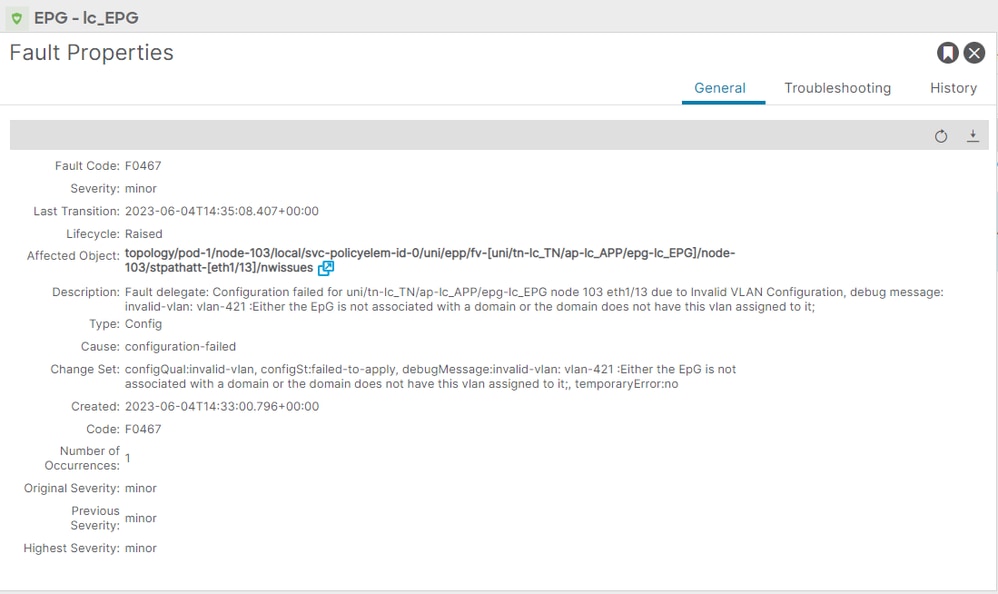
故障描述明確表明「EpG未與域關聯,或者域未分配此VLAN」。
APIC# moquery -c faultInst -f 'fault.Inst.code=="F0467"' | grep lc_EPG
descr : Configuration failed for uni/tn-lc_TN/ap-lc_APP/epg-lc_EPG node 103 eth1/13 due to Invalid VLAN Configuration, debug message: invalid-vlan: vlan-421 :Either the EpG is not associated with a domain or the domain does not have this vlan assigned to it;
dn : topology/pod-1/node-103/local/svc-policyelem-id-0/uni/epp/fv-[uni/tn-lc_TN/ap-lc_APP/epg-lc_EPG]/node-103/stpathatt-[eth1/13]/nwissues/fault-F0467
潛在原因:關聯的VLAN池不包含所需的VLAN
枝葉節點上未部署訪問封裝VLAN 421:
Node-103# show vlan encap-id 421 extended
<<< Empty >>>
未建立EPG關聯的靜態路徑:
APIC# moquery -c l2RtDomIfConn | grep lc_EPG | grep dn
<<< Empty >>>
域lc_phys_dom將其與lc_EPG EPG關聯:
APIC# moquery -c fvRsDomAtt | grep -A 25 lc_EPG | grep rn
rn : rsdomAtt-[uni/phys-lc_phys_dom]
存在域與VLAN池的關聯:
APIC# moquery -c infraRsVlanNs | grep -A 15 lc_phys_dom | grep tDn
tDn : uni/infra/vlanns-[lc_vlan_pool]-static
Vlan池lc_vlan_pool的範圍僅包括VLAN 420:
APIC# moquery -c fvnsEncapBlk | grep lc_vlan_pool
dn : uni/infra/vlanns-[lc_vlan_pool]-static/from-[vlan-420]-to-[vlan-420]
Vlan 421不在之前的池中,因此發生錯誤「invalid-vlan:vlan-421 :EpG未與域關聯,或者該域未分配此VLAN。」
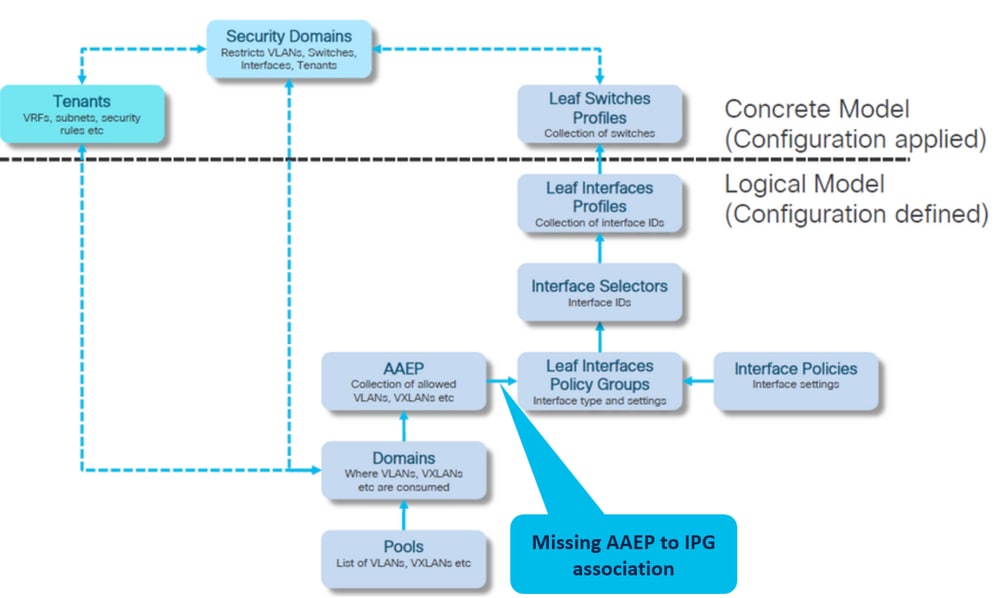
在前面提到的方框圖中,此特定VLAN池引用被突出顯示:
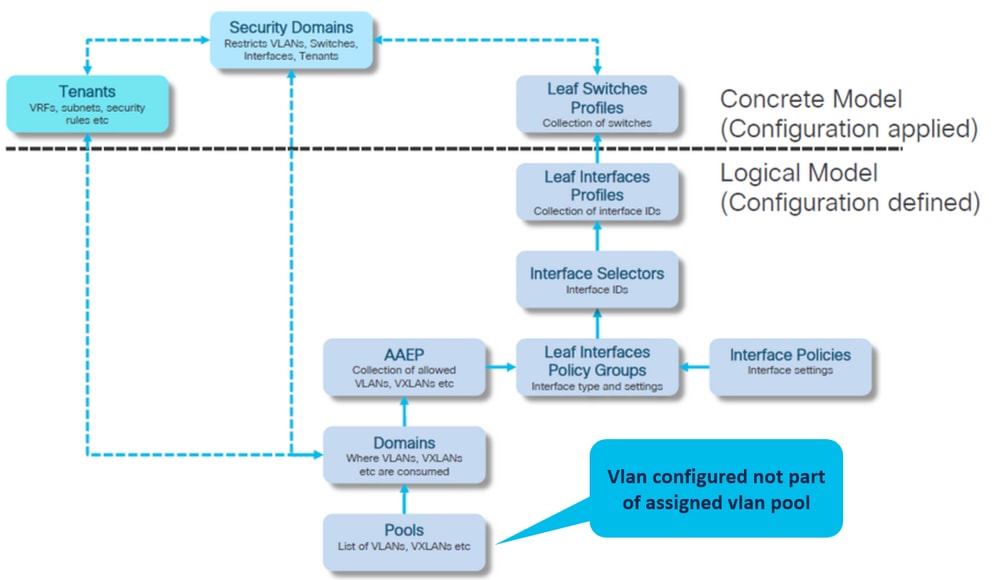
1.將缺少的vlan 421新增到特定vlan範圍。
2.要封裝和域關聯的VLAN池(Fabric > Access Policies > Pool > VLAN > lc_vlan_pool):
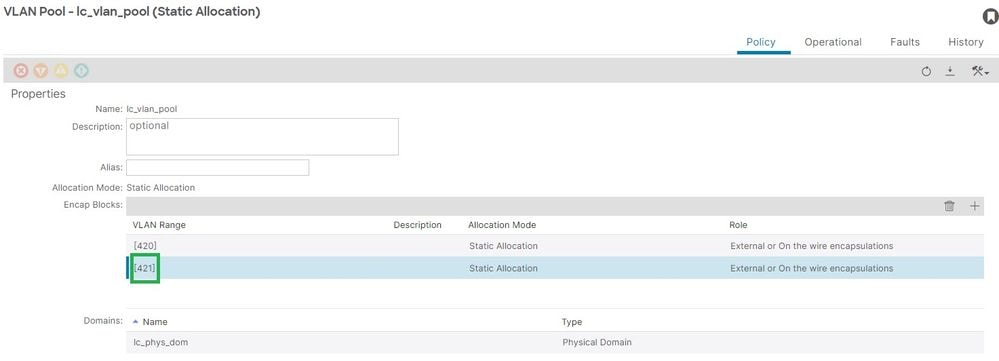
新增vlan 421後的vlan池範圍驗證:
APIC# moquery -c fvnsEncapBlk | grep lc_vlan_pool
dn : uni/infra/vlanns-[lc_vlan_pool]-static/from-[vlan-420]-to-[vlan-420]
dn : uni/infra/vlanns-[lc_vlan_pool]-static/from-[vlan-421]-to-[vlan-421]
潛在原因:具有未與域關聯的所需VLAN的VLAN池
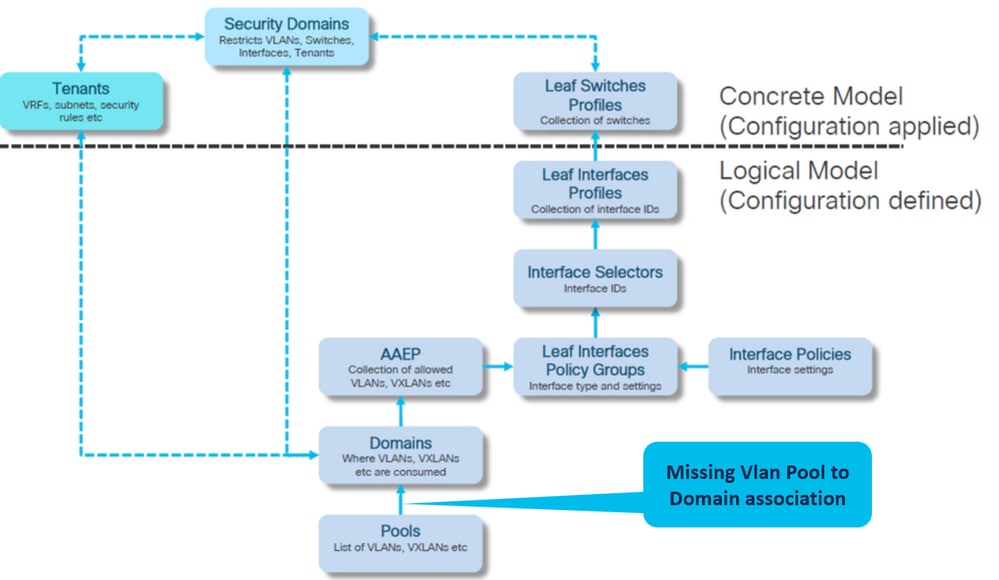
1. Fabric > Access Policies > Physical and External Domains > Physical Domains > lc_phys_dom:
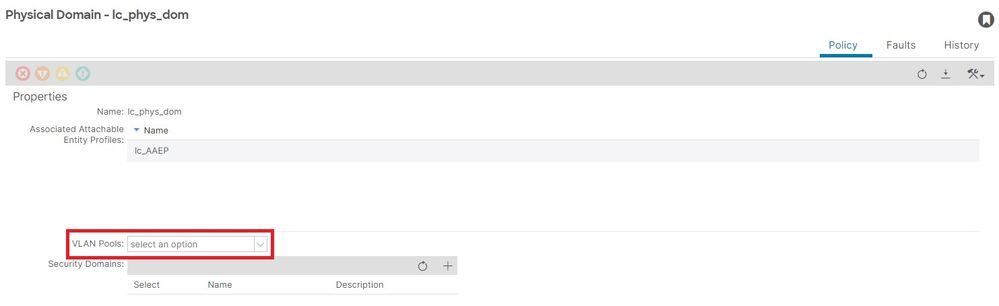
[+]域與VLAN池的關聯:
APIC# moquery -c infraRsVlanNs | grep -A 15 lc_phys_dom | grep tDn
<< EMPTY >>
2.修復:包括缺少的VLAN關聯:
- Fabric > Access Policies > Physical and External Domains> Physical Domains > lc_phys_dom:
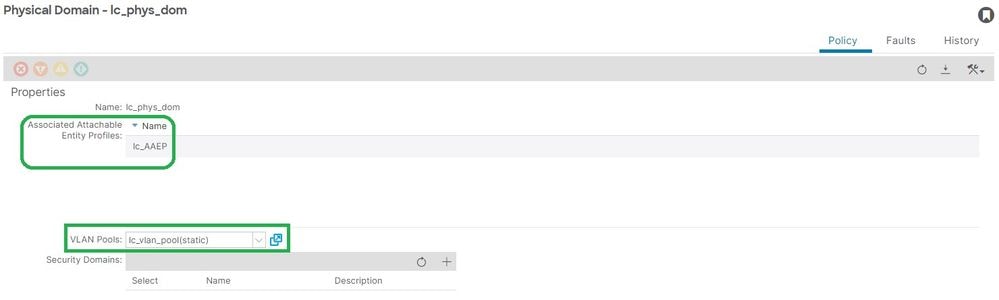
無效路徑配置無效路徑
案例
- 已配置EPG
- 分配給EPG的域
- 在EPG上為VLAN 420建立靜態埠繫結,節點103 eth 1/13
- 故障F0467 — 使用指向EPG的指標針對交換機節點進行標籤
- 錯誤調試消息包含invalid-path: EpG/L3Out未與域關聯,或者域未分配此介面。
在沒有相應的訪問策略來允許正確應用配置的情況下進行交換機/埠/VLAN宣告時,會出現此故障問題。根據此故障的描述,訪問策略關係的另一個元素可能丟失。
EPG - lc_EPG到租戶的故障關聯> lc_TN > lc_AP > lc_EPG >故障>故障:
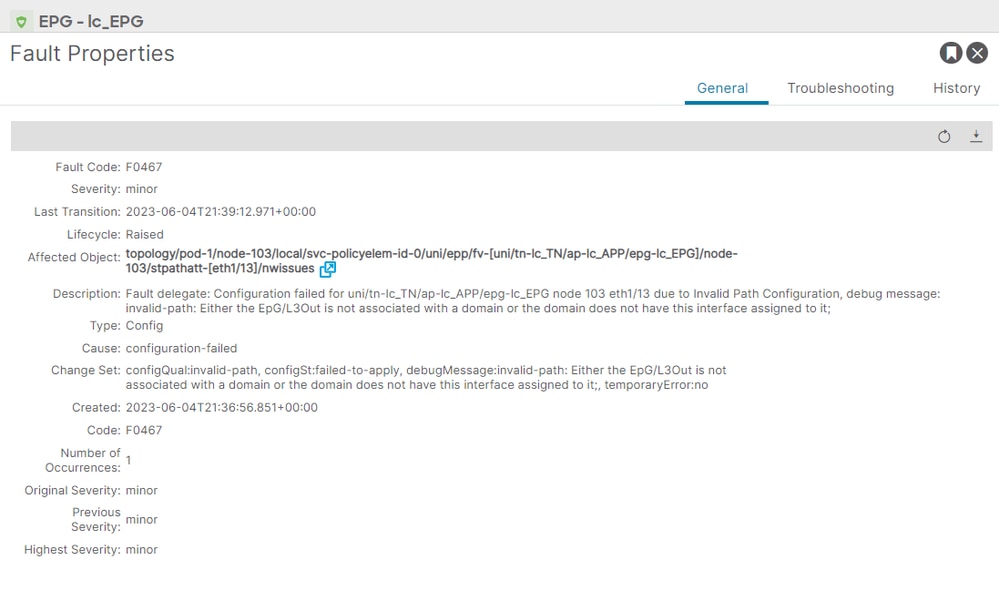
受影響的EPG、交換機節點ID和埠號在故障描述和dn中:
APIC# moquery -c faultInst -f 'fault.Inst.code=="F0467"' | grep lc_EPG
descr            : Configuration failed for uni/tn-lc_TN/ap-lc_APP/epg-lc_EPG node 103 eth1/13 due to Invalid Path Configuration, debug message: invalid-path: Either the EpG/L3Out is not associated with a domain or the domain does not have this interface assigned to it;
dn               : topology/pod-1/node-103/local/svc-policyelem-id-0/uni/epp/fv-[uni/tn-lc_TN/ap-lc_APP/epg-lc_EPG]/node-103/stpathatt-[eth1/13]/nwissues/fault-F0467
快速啟動隔離
確認是否已部署VLAN。如果沒有,可以運行這些命令來隔離配置錯誤。在這些命令中,lc_EPG是用於輸出過濾的EPG名稱。
枝葉節點上未部署Encap-vlan:
Node-103# show vlan encap-id 420 extended
<<< Empty >>>
[1] EPG關聯策略的靜態路徑為空:
APIC# moquery -c l2RtDomIfConn | grep lc_EPG | grep dn
<<<空>>>
[2]域與EPG的關聯:
APIC# moquery -c fvRsDomAtt | grep -A 25 lc_EPG | grep rn
rn : rsdomAtt-[uni/phys-lc_phys_dom]
[3]域與VLAN池的關聯:
APIC# moquery -c infraRsVlanNs | grep -A 15 lc_phys_dom | grep tDn
tDn : uni/infra/vlanns-[lc_vlan_pool]-static
[4] Vlan池範圍驗證:
APIC# moquery -c fvnsEncapBlk | grep lc_vlan_pool
dn : uni/infra/vlanns-[lc_vlan_pool]-static/from-[vlan-420]-to-[vlan-420]
[5]域與AAEP的關聯:
APIC# moquery -c infraRtDomP | grep lc_phys_dom
dn : uni/phys-lc_phys_dom/rtdomP-[uni/infra/attentp-lc_AAEP]
[6] AAEP到介面策略組關聯(IPG):
rtp-aci08-apic1# moquery -c infraRtAttEntP | grep lc_AAEP
dn           : uni/infra/attentp-lc_AAEP/rtattEntP-[uni/infra/funcprof/accportgrp-lc_IPG]
[7] IPG與介面選擇器關聯:
APIC# moquery -c infraRsAccBaseGrp | grep -B 15 lc_IPG | grep dn
dn : uni/infra/accportprof-lead103_IP/hports-lc_Interface_Selector-typ-range/rsaccBaseGrp
[8]介面配置檔案與交換機配置檔案關聯:
APIC# moquery -c infraRsAccPortP | grep leaf103_IP | grep dn
dn : uni/infra/nprof-leaf103_SP/rsaccPortP-[uni/infra/accportprof-leaf103_IP]
如果給定靜態路徑配置,缺少任何相關的必需訪問策略,則會出現無效路徑原因。逐一檢查可能的原因以驗證訪問策略:
- 缺少域與AAEP的關聯
- 缺少AAEP到IPG的關聯
- 缺少IPG與介面選擇器關聯
- 缺少介面選擇器與介面配置檔案關聯
- 缺少介面配置檔案與交換機配置檔案關聯
潛在原因:缺少域與AAEP的關聯
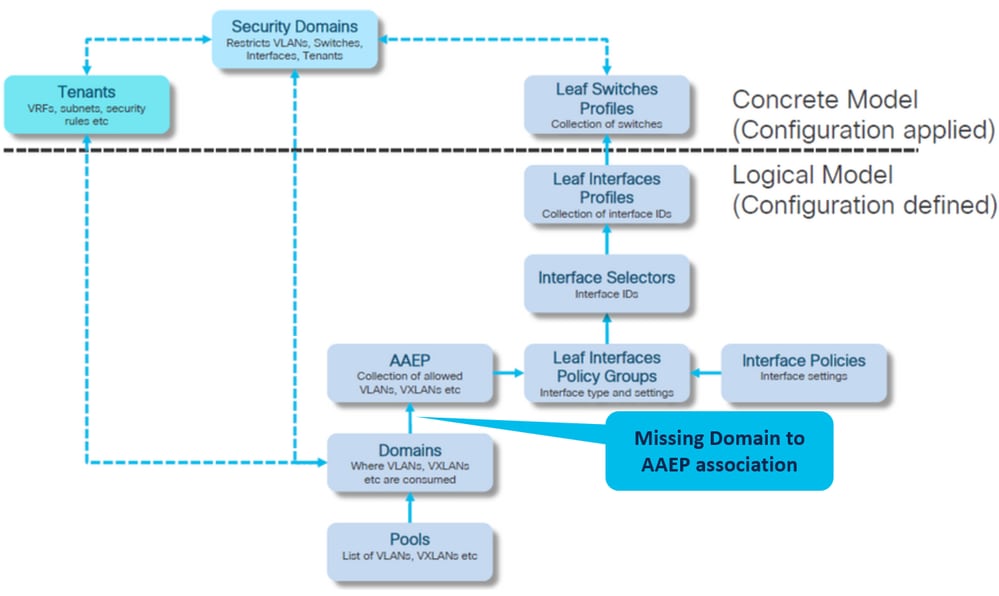
1. Fabric > Access Policies > Policies > Global > AAEP > lc_AAEP:
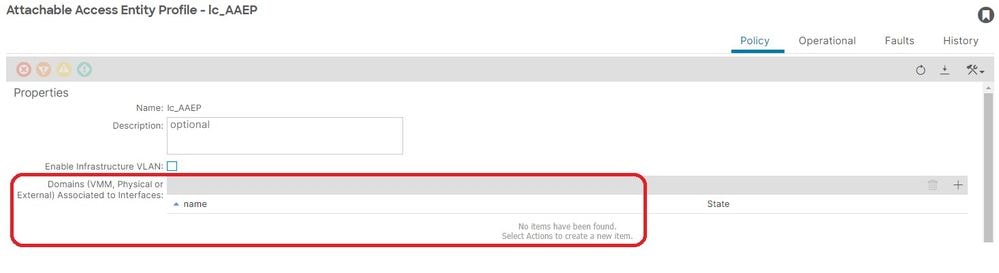
[+] EPG關聯策略的靜態路徑為空:
APIC# moquery -c l2RtDomIfConn | grep lc_EPG | grep dn
<< EMPTY >>
[+]域與AAEP的關聯:
APIC# moquery -c infraRtDomP | grep lc_phys_dom
<< EMPTY >>
2. Fix:要封裝和域的VLAN池關聯(Fabric > Access Policies > Pool > VLAN > lc_vlan_pool)
- Fabric > Access Policies > Physical and External Domains> Physical Domains > lc_phys_dom:
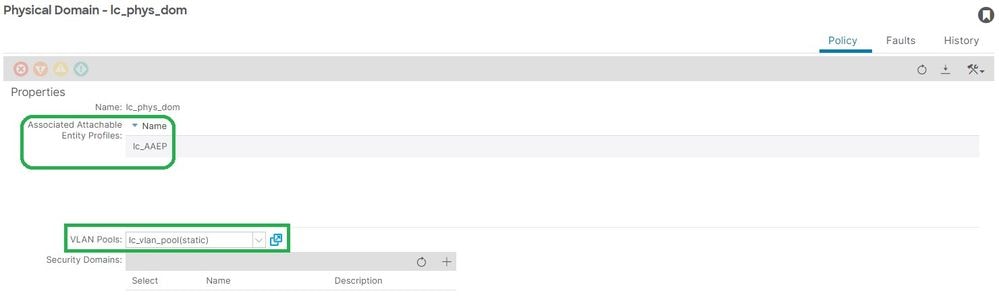
潛在原因:缺少AAEP到IPG的關聯
IPG到AAEP的關聯
1. Fabric > Access Policies > Interfaces > Leaf Interfaces > Policy Groups > Leaf Access Port > lc_IPG:
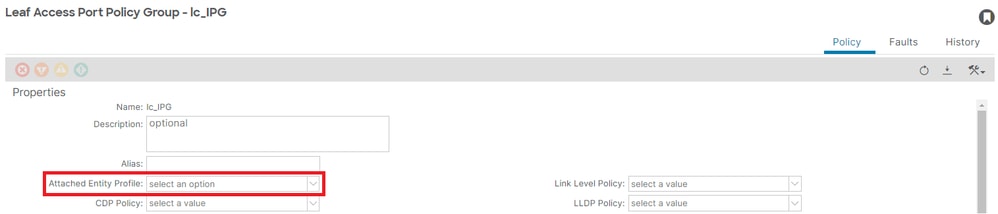
[+] EPG關聯策略的靜態路徑為空:
APIC# moquery -c l2RtDomIfConn | grep lc_EPG | grep dn
<< EMPTY >>
[+] IPG到AAEP的關聯為空:
APIC# moquery -c infraRsAttEntP | grep -A 15 lc_IPG | grep tDn
<< EMPTY >>
2.修復:缺少AAEP到IPG的關聯
- Fabric > Access Policies > Interfaces > Leaf Interfaces > Policy Groups > Leaf Access Port > lc_IPG:
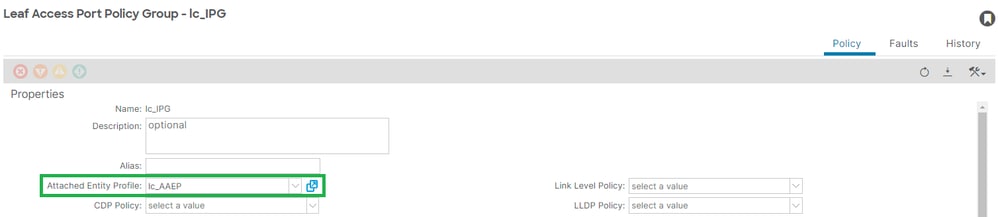
[+] IPG與AAEP關聯
APIC# moquery -c infraRsAttEntP | grep -A 15 lc_IPG | grep tDn
tDn : uni/infra/attentp-lc_AAEP
潛在原因:缺少IPG與介面選擇器關聯
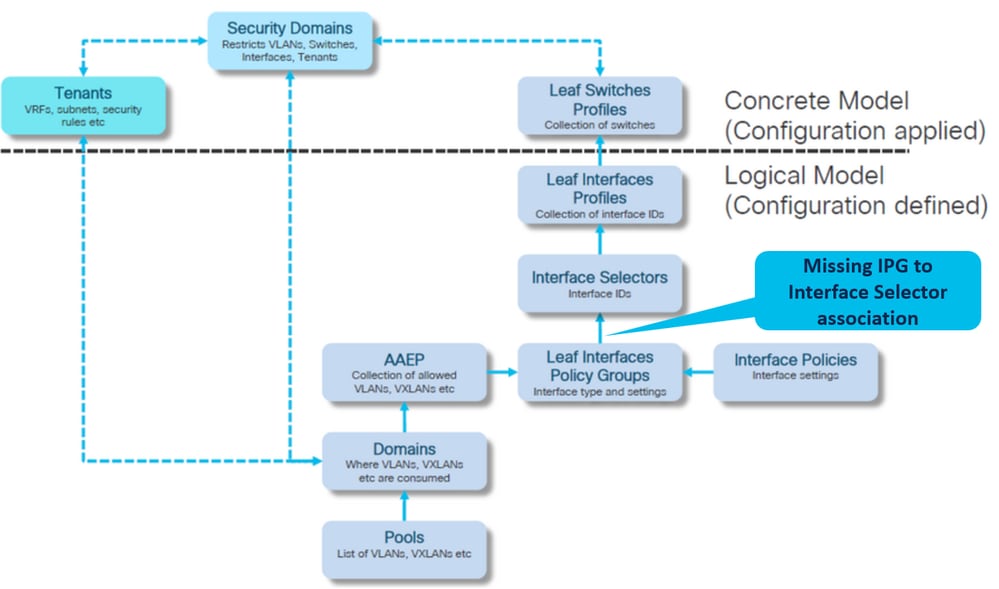
介面選擇器與介面策略組關聯
1. Fabric > Access Policies > Interfaces > Leaf Interfaces > Profiles > leaf103_IP > lc_Interface_Selector:
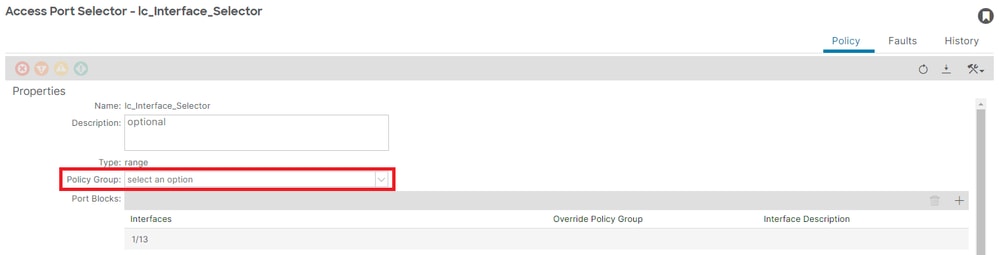
[+] IPG與介面選擇器關聯
APIC# moquery -c infraRsAccBaseGrp | grep -B 15 lc_IPG | grep dn
<< EMPTY >>
2.修復:介面選擇器與介面策略組關聯
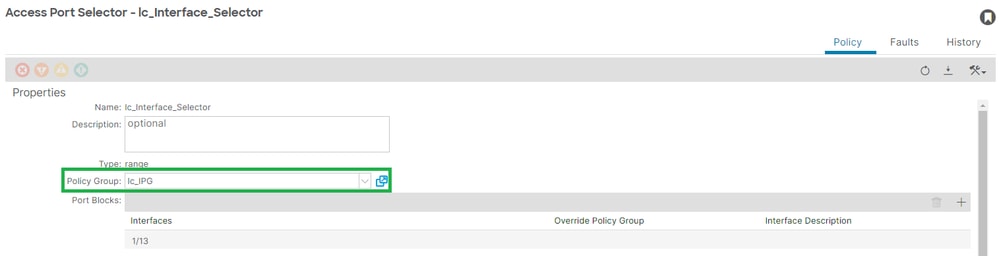
[+] IPG與介面選擇器關聯:
APIC# moquery -c infraRsAccBaseGrp | grep -B 15 lc_IPG | grep dn
dn : uni/infra/accportprof-lead103_IP/hports-lc_Interface_Selector-typ-range/rsaccBaseGrp
潛在原因:缺少介面選擇器到介面配置檔案關聯
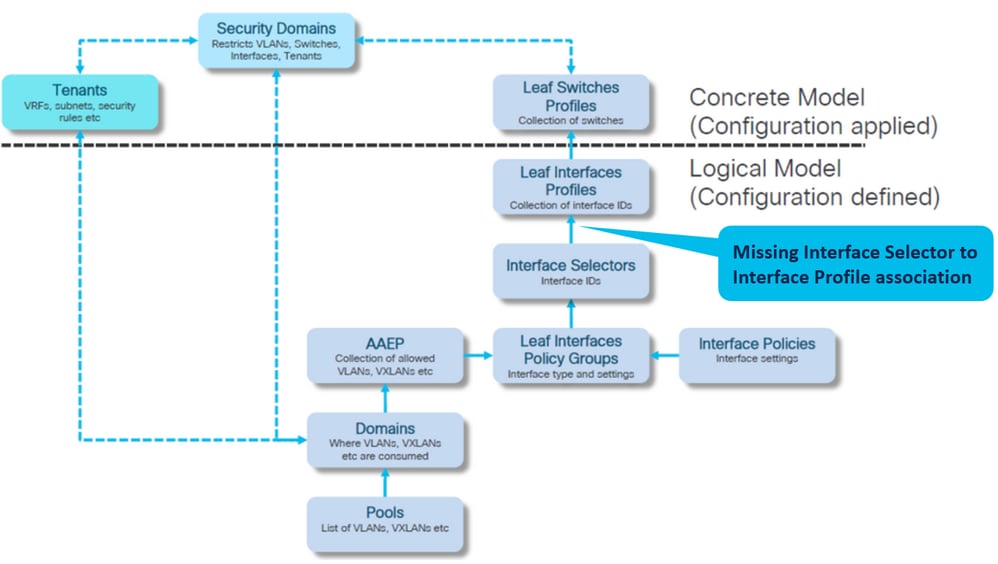
介面配置檔案與介面選擇器關聯
1. Fabric > Access Policies > Interfaces > Leaf Interfaces > Profiles > leaf103_IP:
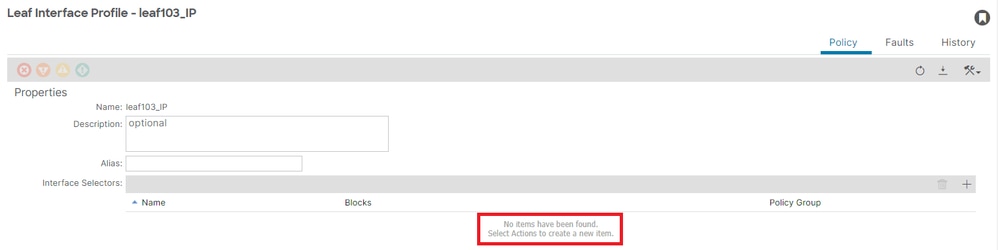
疑難排解:
APIC# moquery -c infraHPortS | grep leaf103_IP
<< EMPTY >>
2.修復:介面配置檔案與介面選擇器關聯:
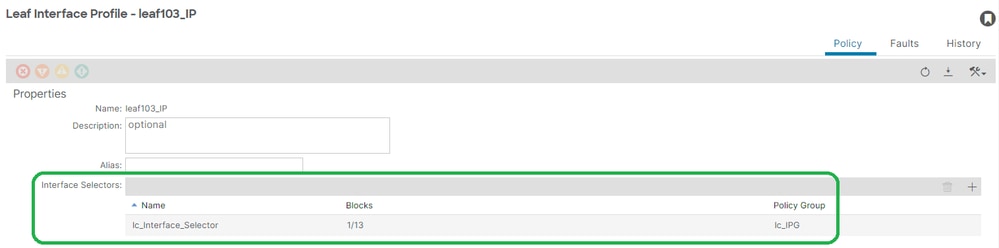
APIC# moquery -c infraHPortS | grep leaf103_IP
dn : uni/infra/accportprof-leaf103_IP/hports-lc_Interface_Selector-typ-range
潛在原因:缺少與交換機配置檔案關聯的介面配置檔案
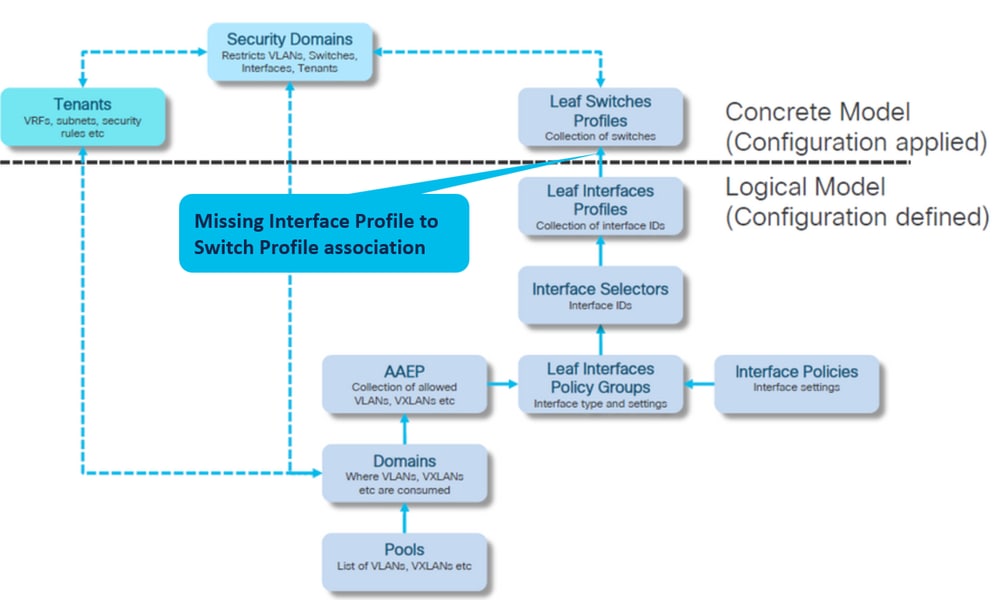
介面設定檔與交換器設定檔關聯
1. Fabric > Access Policies > Switches > Leaf Switches > Profiles > leaf103_SP
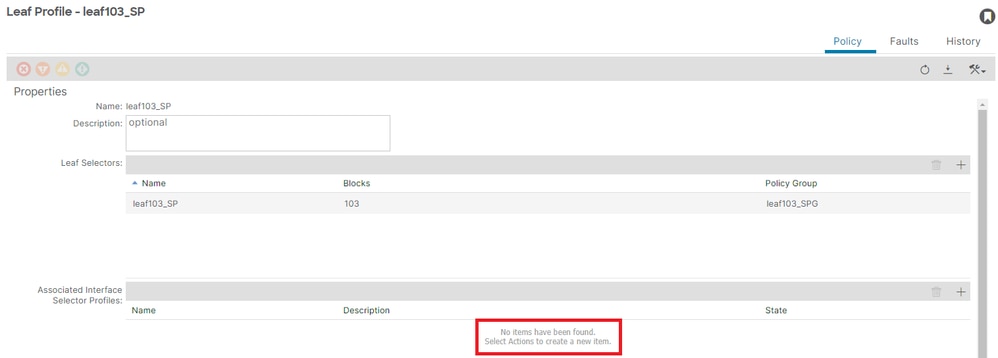
APIC# moquery -c infraRsAccPortP | grep leaf103_IP | grep dn
<< EMPTY >>
2.修復:枝葉配置檔案與介面選擇器配置檔案關聯:
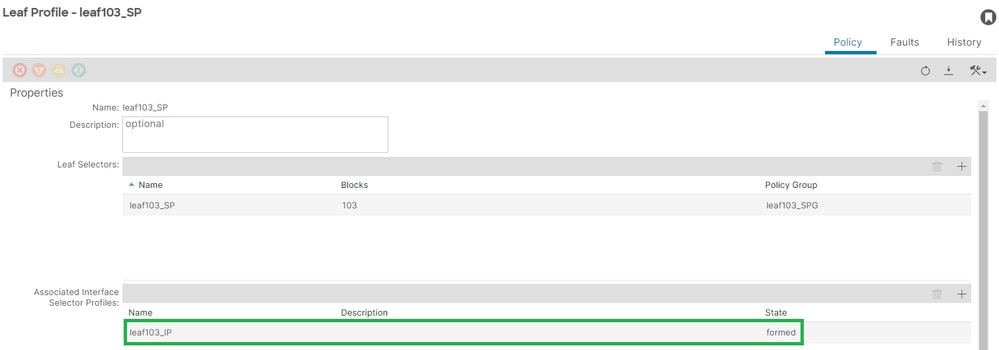
[+]介面配置檔案與交換機配置檔案關聯:
APIC# moquery -c infraRsAccPortP | grep leaf103_IP | grep dn
dn : uni/infra/nprof-leaf103_SP/rsaccPortP-[uni/infra/accportprof-leaf103_IP]
封裝已在另一個EPG中使用:encap-already-in-use
案例
預設情況下,VLAN具有全域性範圍。給定的VLAN ID只能用於枝葉交換機上的單個EPG。在給定枝葉交換機內的多個EPG上重複使用同一VLAN的任何嘗試都會導致封裝已在使用的F0467故障。
Tenants > lc_TN > lc_AP > lc_EPG > Faults > Fault:
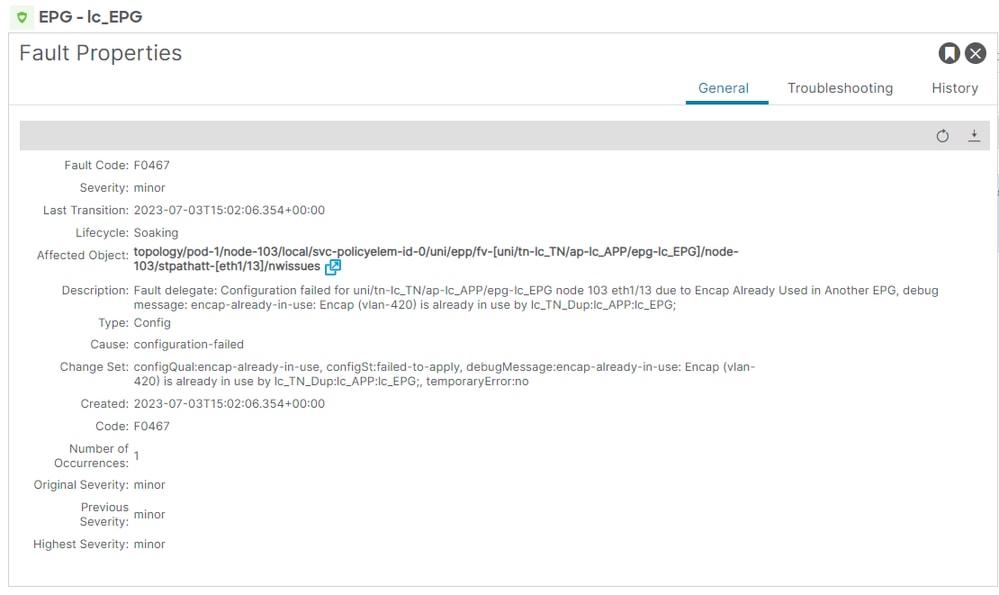
APIC# moquery -c faultInst -f 'fault.Inst.code=="F0467"' | grep lc_EPG
changeSet : configQual:encap-already-in-use, configSt:failed-to-apply, debugMessage:encap-already-in-use: Encap (vlan-420) is already in use by lc_TN_Dup:lc_APP:lc_EPG;, temporaryError:no
descr : Configuration failed for uni/tn-lc_TN/ap-lc_APP/epg-lc_EPG node 103 eth1/13 due to Encap Already Used in Another EPG, debug message: encap-already-in-use: Encap (vlan-420) is already in use by lc_TN_Dup:lc_APP:lc_EPG;
dn : topology/pod-1/node-103/local/svc-policyelem-id-0/uni/epp/fv-[uni/tn-lc_TN/ap-lc_APP/epg-lc_EPG]/node-103/stpathatt-[eth1/13]/nwissues/fault-F0467
快速啟動隔離
[+]您可以確認已在其他租戶lc_TN_Dup上使用的封裝:
Node-103# show vlan extended | egrep "Encap|----|vlan-420"
 VLAN Name                             Encap            Ports
 ---- -------------------------------- ---------------- ------------------------
 3    lc_TN_Dup:lc_APP:lc_EPG          vlan-420         Eth1/13
修正選項
- 選項 1:使用枝葉或VPC對上未使用的其他VLAN編號。
- 選項 2:在沒有嘗試部署的VLAN的不同枝葉或VPC對上使用相同的VLAN。
- 選項 3:刪除重複的EPG上的靜態埠關聯,這樣便可以進行新部署。
- 選項 4:在v1.1版本之前的ACI版本中,給定的VLAN封裝只對映到枝葉交換機上的單個EPG。如果同一枝葉交換機上有第二個具有相同VLAN封裝的EPG,則ACI會引發此故障。
從v1.1版本開始,您可以在Per Port VLAN配置指南中的給定枝葉交換機(或FEX)上部署具有相同VLAN封裝的多個EPG:
其他詳細資訊
成功的配置參考
本節可作為功能設定的完整配置的參考指南。
EPG到靜態路徑關聯
租戶> lc_TN > lc_AP > lc_EPG >靜態埠:
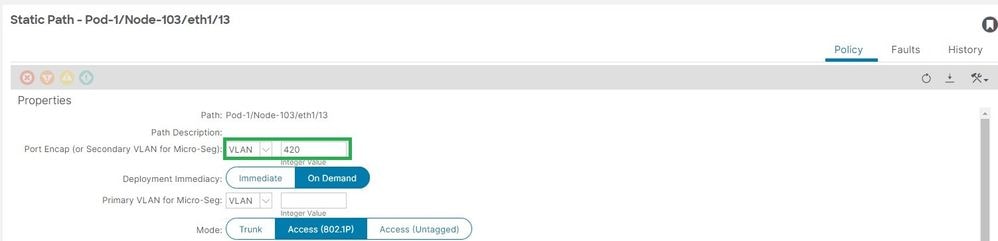
[+]靜態埠到EPG的關聯策略:
APIC# moquery -c l2RtDomIfConn | grep lc_EPG | grep dn
dn : topology/pod-1/node-103/sys/ctx-[vxlan-2195458]/bd-[vxlan-16416666]/vlan-[vlan-420]/rtfvDomIfConn-[uni/epp/fv-[uni/tn-lc_TN/ap-lc_APP/epg-lc_EPG]/node-103/stpathatt-[eth1/13]/conndef/conn-[vlan-420]-[0.0.0.0]]
EPG與AAEP關聯
1. Fabric > Access Policies > Policies > Global > AAEP > lc_AAEP:
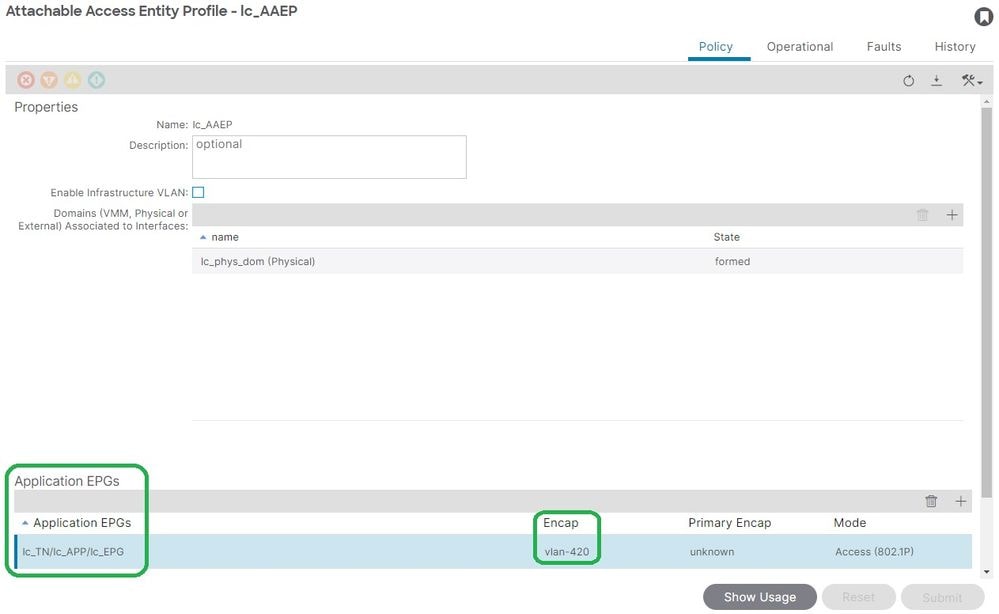
APIC# moquery -c fvIfConn -f 'fv.IfConn.encap=="vlan-420"' | grep dn
dn : uni/epp/fv-[uni/tn-lc_TN/ap-lc_APP/epg-lc_EPG]/node-103/attEntitypathatt-[lc_AAEP]/conndef/conn-[vlan-420]-[0.0.0.0]
EPG到域的關聯
租戶> lc_TN > lc_AP > lc_EPG >域:

[+]域lc_phys_dom已將其與EPG關聯。
APIC# moquery -c fvRsDomAtt | grep -A 25 lc_EPG | grep rn
rn : rsdomAtt-[uni/phys-lc_phys_dom]
域到AAEP和Vlan池關聯
1. Fabric > Access Policies > Physical and External Domains> Physical Domains > lc_phys_dom:
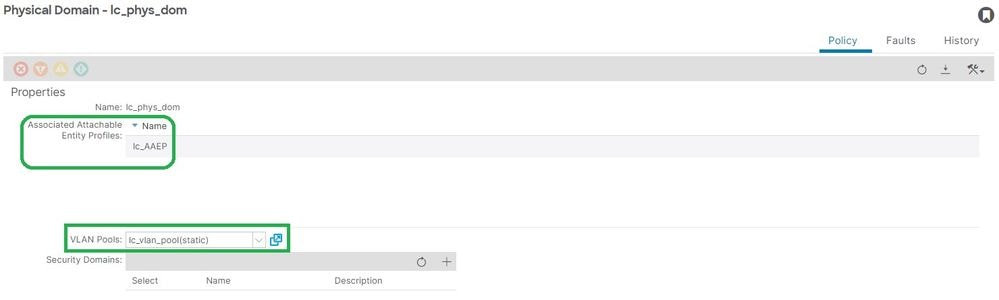
[+]域與AAEP的關聯:
APIC# moquery -c infraRtDomP | grep lc_phys_dom
dn : uni/phys-lc_phys_dom/rtdomP-[uni/infra/attentp-lc_AAEP]
[+]域與VLAN池的關聯
APIC# moquery -c infraRsVlanNs | grep -A 15 lc_phys_dom | grep tDn
tDn : uni/infra/vlanns-[lc_vlan_pool]-static
用於封裝塊和域關聯的VLAN池
1. Fabric > Access Policies > Pool > VLAN > lc_vlan_pool:
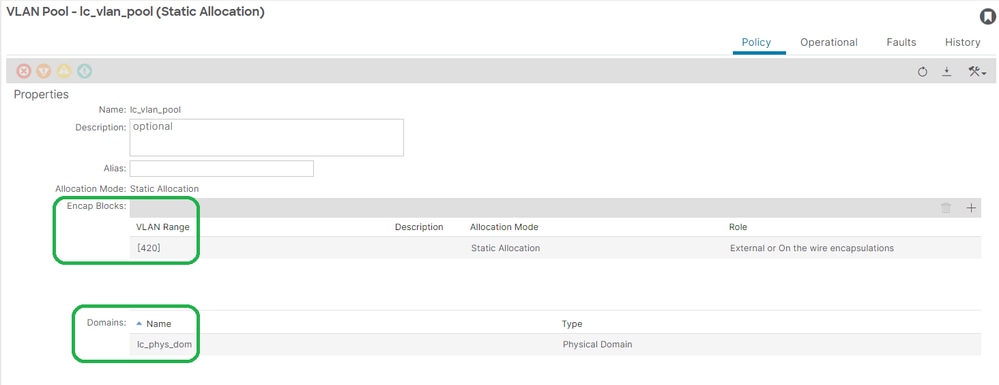
[+] Vlan池範圍驗證:
APIC# moquery -c fvnsEncapBlk | grep lc_vlan_pool
dn : uni/infra/vlanns-[lc_vlan_pool]-static/from-[vlan-420]-to-[vlan-420]
[+]已使用lc_vlan_pool的域:
APIC# moquery -c fvnsRtVlanNs | grep lc_vlan_pool
dn           : uni/infra/vlanns-[lc_pool]-dynamic/rtinfraVlanNs-[uni/phys-lc_phys_dom]
AAEP到域的關聯
1. Fabric > Access Policies > Policies > Global > AAEP > lc_AAEP:
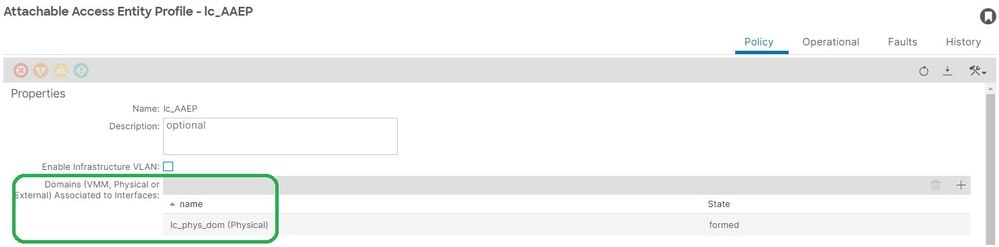
APIC# moquery -c infraRsDomP | grep lc_AAEP
dn : uni/infra/attentp-lc_AAEP/rsdomP-[uni/phys-lc_phys_dom]
IPG到AAEP的關聯
1. Fabric > Access Policies > Interfaces > Leaf Interfaces > Policy Groups > Leaf Access Port > lc_IPG:
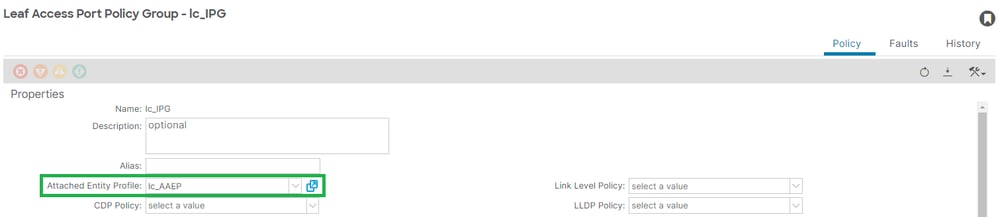
[+] IPG與AAEP的關聯:
APIC# moquery -c infraRsAttEntP | grep -A 15 lc_IPG | grep tDn
tDn : uni/infra/attentp-lc_AAEP
枝葉配置檔案與介面選擇器關聯
1. Fabric > Access Policies > Interfaces > Leaf Interfaces > Profiles > leaf103_IP:
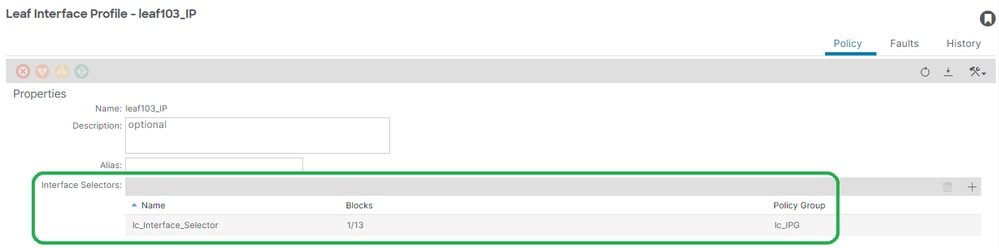
APIC# moquery -c infraHPortS | grep leaf103_IP
dn : uni/infra/accportprof-leaf103_IP/hports-lc_Interface_Selector-typ-range
介面選擇器與介面策略組關聯
1. Fabric > Access Policies > Interfaces > Leaf Interfaces > Profiles > leaf103_IP > lc_Interface_Selector:
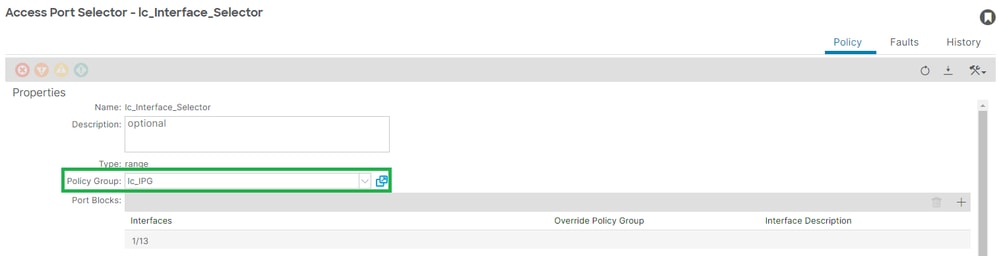
[+] IPG與介面選擇器關聯:
APIC# moquery -c infraRsAccBaseGrp | grep -B 15 lc_IPG | grep dn
dn : uni/infra/accportprof-lead103_IP/hports-lc_Interface_Selector-typ-range/rsaccBaseGrp
枝葉介面配置檔案與介面選擇器和枝葉交換機配置檔案關聯
1. Fabric > Access Policies > Switches > Leaf Switches > Profiles > leaf103_SP:
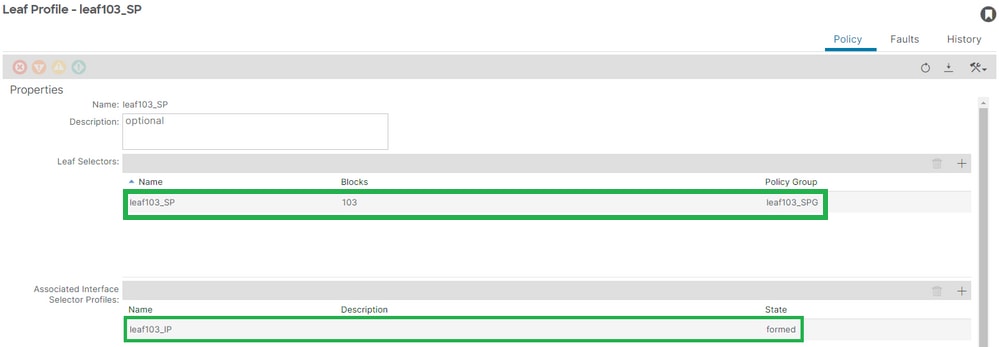
[+]枝葉介面配置檔案與交換機配置檔案關聯:
APIC# moquery -c infraRsAccPortP | grep leaf103_IP | grep dn
dn : uni/infra/nprof-leaf103_SP/rsaccPortP-[uni/infra/accportprof-leaf103_IP]
[+]交換機配置檔案與交換機策略組關聯:
APIC# moquery -c infraRsAccNodePGrp | grep -A 8 leaf103_SP | grep tDn
tDn : uni/infra/funcprof/accnodepgrp-leaf103_SPG
Vlan部署驗證
案例
- 接入封裝VLAN 420部署在節點103 - E1/13上
- 部署所有相關訪問策略和EPG配置
通過APIC檢查ACI交換矩陣VLAN部署
可以根據所關心的VLAN封裝過濾對fvIcConn類的查詢,以顯示已部署VLAN的每個EPG/交換機/介面組合:
APIC# moquery -c fvIfConn -f 'fv.IfConn.encap=="vlan-420"' | grep dn
dn               : uni/epp/fv-[uni/tn-lc_TN/ap-lc_APP/epg-lc_EPG]/node-103/stpathatt-[eth1/13]/conndef/conn-[vlan-420]-[0.0.0.0]
通過交換機CLI檢查VLAN部署
在任意一台交換機上運行show vlan extended命令,以檢查交換機上當前部署的VLAN,以及VLAN所繫結的EPG和介面。
encap-id xx過濾器在ACI 4.2版及更高版本中可用:
Node-103# show vlan encap-id 420 extended

 VLAN Name                             Encap            Ports
 ---- -------------------------------- ---------------- ------------------------
 2    lc_TN:lc_APP:lc_EPG              vlan-420         Eth1/13
通過交換機CLI檢查平台無關的VLAN部署
ACI交換器節點中的每個VLAN都會對映到某個平台獨立(PI)VLAN,這是每個交換器節點的本地值。
訪問封裝對映到名為「FD VLAN」的PI VLAN,而網橋域對映到名為「BD VLAN」的PI Vlan。在交換機上運行show system internal epm vlan all命令,顯示枝葉上部署的VLAN清單。
Node-103# show vlan extended | egrep "Encap|----|1/13"
 VLAN Name                             Encap            Ports
 ---- -------------------------------- ---------------- ------------------------
 2    lc_TN:lc_APP:lc_EPG              vlan-420         Eth1/13                   --> FD vlan 2
 18   lc_TN:lc_BD                      vxlan-16416666   Eth1/13                   --> BD vlan 18
可以使用show interface命令驗證FD vlan和BD vlan to interface程式設計:
Node-103# show interface eth 1/13 trunk | grep -A 2 Allowed
 Port           Vlans Allowed on Trunk
-----------------------------------------------------------------------------------
 Eth1/13        2,18
檢查SVI VLAN部署
如果使用BD SVI驗證第3層VLAN,則使用moquery class fvSubnet獲取子網的IP地址:
APIC# moquery -c fvSubnet | grep lc_BD
dn : uni/tn-lc_TN/BD-lc_BD/subnet-[10.10.10.254/24]
然後再次檢查show ip interface brief ,檢查匹配的IP地址以驗證VLAN和預期的VRF。在本示例中,驗證來自上一個CLI輸出示例的「BD VLan 18」:
Node-103# show ip interface brief
...

IP Interface Status for VRF "lc_TN:lc_VRF"(16)
Interface            Address              Interface Status
vlan18               10.10.10.254/24   protocol-up/link-up/admin-up
參考圖
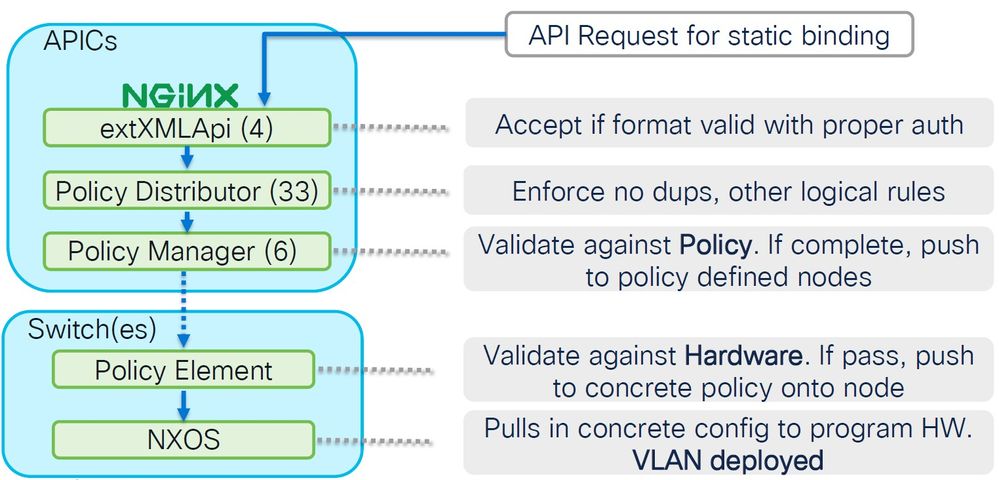
靜態路徑繫結的高級編程式列
此高級序列彙總了從VLAN靜態路徑API呼叫到交換機節點VLAN部署所涉及的步驟。
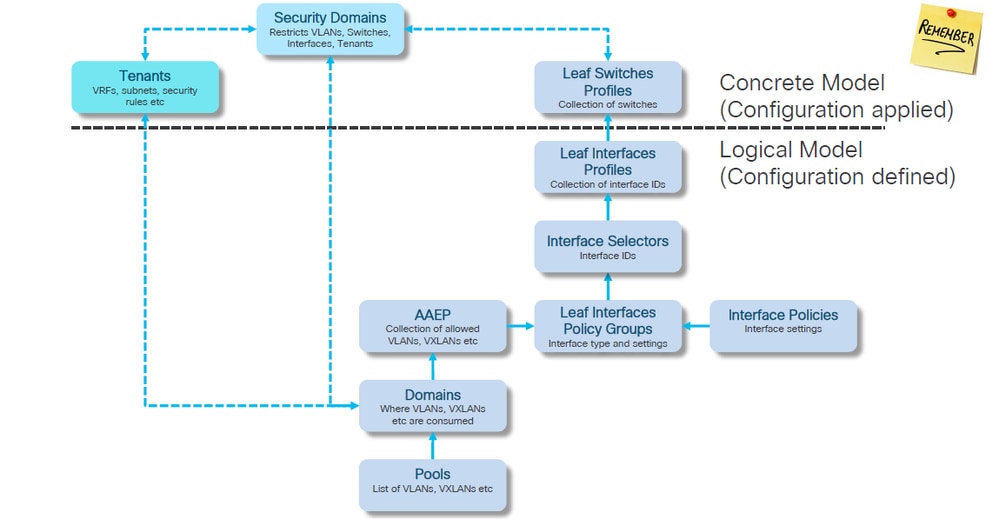
訪問策略關係框圖
此方框圖顯示了訪問策略之間的關係,以確保成功部署交換機節點VLAN。
對映到訪問策略的獨立NXOS命令
實際上,每個網路工程師都一直在研究訪問策略的想法;只有它們通過獨立裝置的CLI介面被定義為檔案中的文本。
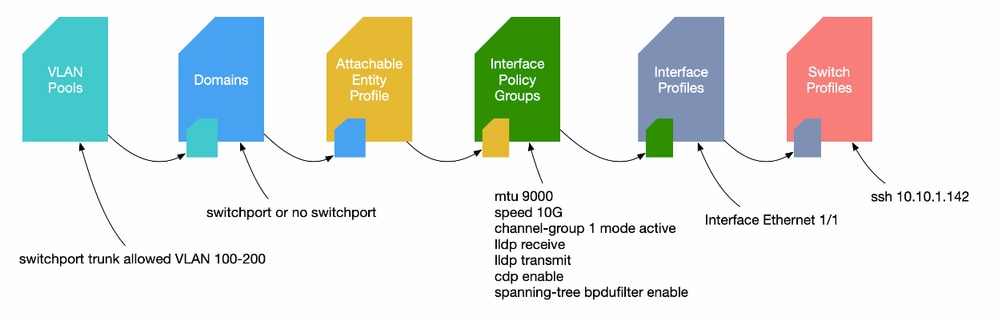
當出現故障F0467時,首先瞭解訪問策略並確保正確配置這些策略非常重要。
VLAN驗證命令備忘單
每個命令輸出都提供一個變數,用於清單中的下一個命令。本文檔中引用了這些命令來排除不同方案的故障。
| 節點 |
命令 |
目的 |
| APIC |
moquery -c faultInst -f 'fault.Inst.code=="F0467"' |
列出交換矩陣中當前處於活動狀態的所有F0467故障 |
| moquery -c l2RtDomIfConn | grep <epg_name> | grep dn |
顯示與特定epg關聯的靜態/動態路徑。 |
|
| moquery -c fvRsDomAtt | grep -A 25<epg_name> | grep rn |
顯示與EPG關聯的域 |
|
| moquery -c infraRsVlanNs | grep -A 15 <dom_name> | grep tDn |
顯示與域關聯的vlan池名稱。域名是從上一個命令提取的 |
|
| moquery -c fvnsEncapBlk | grep <vlan_pool_name> |
顯示與特定vlan池關聯的vlan編號 |
|
| moquery -c infraRtDomP | grep <dom_name> |
顯示與域關聯的AEP |
|
| moquery -c infraRtAttEntP | grep <AEP_name> |
顯示與域關聯的介面配置檔案組(IPG) |
|
| moquery -c infraRsAccBaseGrp | grep -B 15 <IPG名稱> | grep dn |
顯示介面配置檔案組(IPG)與介面選擇器的關聯 |
|
| moquery -c infraRsAccPortP | grep <Interface_Sector> | grep dn |
顯示介面配置檔案與交換機配置檔案的關聯 |
|
| moquery -c fvIfConn -f 'fv.IfConn.encap=="<encap_vlan>"' | grep dn |
顯示交換矩陣上部署特定封裝VLAN的所有介面 |
|
| moquery -c fvnsRtVlanNs | grep <vlan_pool_name> | | grep dn |
顯示與VLAN池關聯的域 |
|
| moquery -c fv子網 | grep <BD_name> |
顯示與域關聯的svi IP |
|
| 交換器 |
show vlan encap-id <encap_vlan> extended |
顯示PI VLAN和租戶、應用配置檔案和EPG名稱的詳細資訊 |
| show vlan extended | egrep "Encap|----|<埠:示例1/13>" |
顯示特定埠上VLAN的詳細資訊。 |
|
| show int eth <port> trunk | grep -A 2允許 |
顯示在特定埠上轉發的vlan。請注意,VLAN編號是內部VLAN編號。 |
|
| show ip int bri vrf <vrf> |
顯示為特定vrf部署的第3層介面 |
|
| show vpc brief |
顯示此交換機是VPC對的一部分時的vpc相關資訊。 |
相關資訊
修訂記錄
| 修訂 | 發佈日期 | 意見 |
|---|---|---|
4.0 |
03-Sep-2026
|
更新的拼寫/語法、插入水平線以分隔各個部分的可讀性、更新的替代文字和固定的CCW警報。 |
3.0 |
30-Nov-2024
|
已更正標題。 |
2.0 |
21-Nov-2024
|
替代文字、格式設定、一些拼寫錯誤、標題錯誤、縮短標題 |
1.0 |
14-Sep-2023
|
初始版本 |
 意見
意見