簡介:
本文檔介紹如何對UCS中心2.0版及更高版本中由SSH主機金鑰不匹配導致的UCS中心備份故障進行故障排除。
必要條件
要求:
本檔案假設您已瞭解以下主題:
- Cisco UCS Central
- 基本Linux命令理解。
採用元件
本文中的資訊是根據特定實驗室環境內的裝置所建立。文中使用到的所有裝置皆從已清除(預設)的組態來啟動。如果您的網路運作中,請確保您瞭解任何指令可能造成的影響。
問題陳述:
UCS中心備份操作失敗,並且「狀態」頁籤顯示以下錯誤消息:
“Host key has changed for the remote server. Clear the cached host key and retry.”
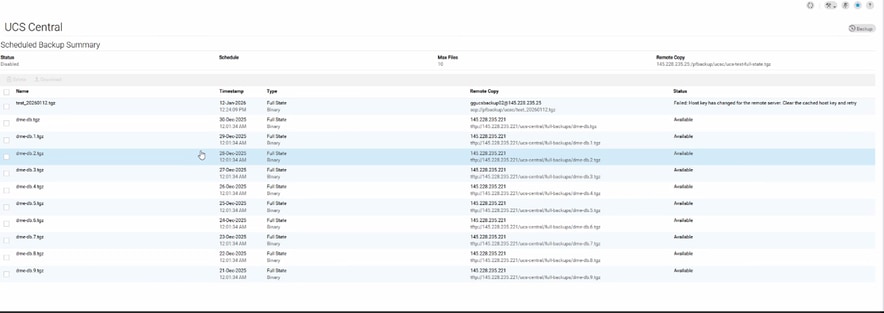
日誌證據:
# From svc_ops_dme.log:

Jan 6 11:36:47 degtlue2100 svc_ops_dme[1597]: [EVENT][E14194351][79965][transition][internal][] [FSM:STAGE:ASYNC]: uploading data to backup server(FSM-STAGE:sam:dme:MgmtDataExporterExportData:upload)
Jan 6 11:36:47 degtlue2100 svc_ops_dme[1597]: [EVENT][E14194351][79966][transition][internal][] [FSM:STAGE:STALE-FAIL]: uploading data to backup server(FSM-STAGE:sam:dme:MgmtDataExporterExportData:upload)
Jan 6 11:36:47 degtlue2100 svc_ops_dme[1597]: [EVENT][E14194351][79968][transition][internal][] [FSM:STAGE:REMOTE-ERROR]: Result: end-point-failed Code: unspecified Message: Host key has changed for the remote server. Clear the cached host key and retry (sam:dme:MgmtDataExporterExportData:upload)     <<<<<<<
Jan 6 11:36:47 degtlue2100 svc_ops_dme[1597]: [EVENT][E14194351][79970][transition][internal][] [FSM:STAGE:FAILED]: uploading data to backup server(FSM-STAGE:sam:dme:MgmtDataExporterExportData:upload)
解決方案:
- 建立到UCS Central系統的SSH會話。
2.驗證已安裝的UCS Central軟體包版本。
Central-HTTS1# connect local-mgmt
Cisco UCS Central
TAC support: http://www.cisco.com/tac
Copyright (c) 2011-2025, Cisco Systems, Inc. All rights reserved.
The copyrights to certain works contained in this software are
owned by other third parties and used and distributed under
license. Certain components of this software are licensed under
the GNU General Public License (GPL) version 2.0 or the GNU
Lesser General Public License (LGPL) Version 2.1 or later version. A copy of each
such license is available at
https://opensource.org/license/gpl-2-0 and
https://opensource.org/license/lgpl-2-1
Central-HTTS1(local-mgmt)# show version

Name                Package             Version        GUI
----                -------             -------        ----
core                Base System         2.1(1a)        2.1(1a)
central-mgr         Central Manager     2.1(1a)        2.1(1a)
service-reg         Service Registry    2.1(1a)        2.1(1a)
identifier-mgr      Identifier Manager  2.1(1a)        2.1(1a)
operation-mgr       Operations Manager  2.1(1a)        2.1(1a)
resource-mgr        Resource Manager    2.1(1a)        2.1(1a)
policy-mgr          Policy Manager      2.1(1a)        2.1(1a)
stats-mgr           Statistics Manager  2.1(1a)        2.1(1a)
server-mgr          Server Manager      2.1(1a)        2.1(1a)
gch                 Generic Call Home   2.1(1a)        none
rel-key             Release Key         2.1(1a)        none

Central-HTTS1(local-mgmt)#
3.從中央伺服器獲取令牌。
Central-HTTS1(local-mgmt)# show token

0HPPCXXYGVR
*使用響應金鑰生成器上的令牌:https://cspg-releng.cisco.com/UCSPassGen.php

附註:首先選擇您的UCSC版本。(2.0或2.1)。 否則,密碼對於root使用者無效。在貼上從UCS Central獲取的令牌之前,請確保從密碼生成網站上的Debug-Token欄位中刪除「token」一詞。 文本將保留其他內容,並生成無效密碼。
4.使用根憑證和響應金鑰作為密碼,啟動到UCS中心的新SSH會話。
login as: root
root@ <IP Address> password:
Last login: Tue Jan 13 17:57:20 2026 from <IP Address>
5.導航到此路徑,然後檢查「known_hosts」檔案,檢視受影響伺服器的IP地址:
[root@Central-HTTS1 ~]# cd /root/.ssh
[root@Central-HTTS1 .ssh]# cat known_hosts

[root@Central-HTTS1 ~]# cd /root/
anaconda-ks.cfg  .bash_profile    .cshrc           ks-pre.log       .ssh/
.bash_history    .bashrc          ks-post1.log     opt/             .tcshrc
.bash_logout     .config/         ks-post.log      original-ks.cfg  .viminfo

[root@Central-HTTS1 ~]# cd /root/.ssh/
[root@Central-HTTS1 .ssh]# ls
id_rsa  id_rsa.pub  known_hosts

[root@Central-HTTS1 .ssh]# cat known_hosts
如果檔案中存在受影響伺服器的IP地址,請使用「vim」編輯器手動刪除相應的條目。
導航到特定行,然後鍵入「dd」將其刪除。
[root@Central-HTTS1 .ssh]# vi known_hosts
[root@Central-HTTS1 .ssh]# vi known_hosts
....
....
....
!wq     (Write and Quit  >> Saving changes and exiting)
刪除受影響的IP地址後,使用:wq儲存檔案並退出編輯器。
更新known_hosts檔案後,請再次從UCS中心重試備份操作。
然後這次備份成功完成。

 意見
意見