在Cisco UCS Manager中配置不相交的第2層

簡介
本檔案介紹如何在Cisco Unified Computing System Manager(UCS Manager)中設定不相交第2層(DL2),以及如何驗證VLAN流量是否使用預期的上行鏈路。
環境
- 每個交換矩陣互聯上至少有一個可用鏈路,上游交換機上有兩個可用鏈路
- 交換矩陣互聯和上游交換機之間的鏈路必須開啟並配置為上行鏈路。如果沒有,請參閱Cisco UCS Manager GUI配置指南:使用LAN上行鏈路管理器。
- UCS Manager中必須已經存在要使用的VLAN。如果沒有,請參閱Cisco UCS Manager GUI配置指南:使用LAN上行鏈路管理器建立命名VLAN。
- 必須在上游交換機上建立要使用的VLAN。
- 要使用的VLAN不能存在於服務配置檔案上的任何其他虛擬網路介面卡(vNIC)上。
需求
瞭解以下主題很有幫助:
- 思科整合運算系統管理員(UCS管理員)。
- 對不相交的第2層網路有基礎認識。
- 網路配置。
- vNIC配置。
採用元件
| 產品 |
角色 |
版本/型號 |
|---|---|---|
| Cisco UCS管理器 |
管理平台 |
4.2(3e) |
| 光纖互連 |
UCS交換矩陣連線 |
6454 |
| Cisco UCS B系列伺服器 |
正在測試的伺服器 |
B200 M5 |
| Cisco Nexus交換器 |
上游交換機 |
Nexus 5672UP 16G-FC機箱 |
| Cisco Catalyst交換器 |
接入/上游交換機 |
WS-C3650-12X48UR-E |
問題
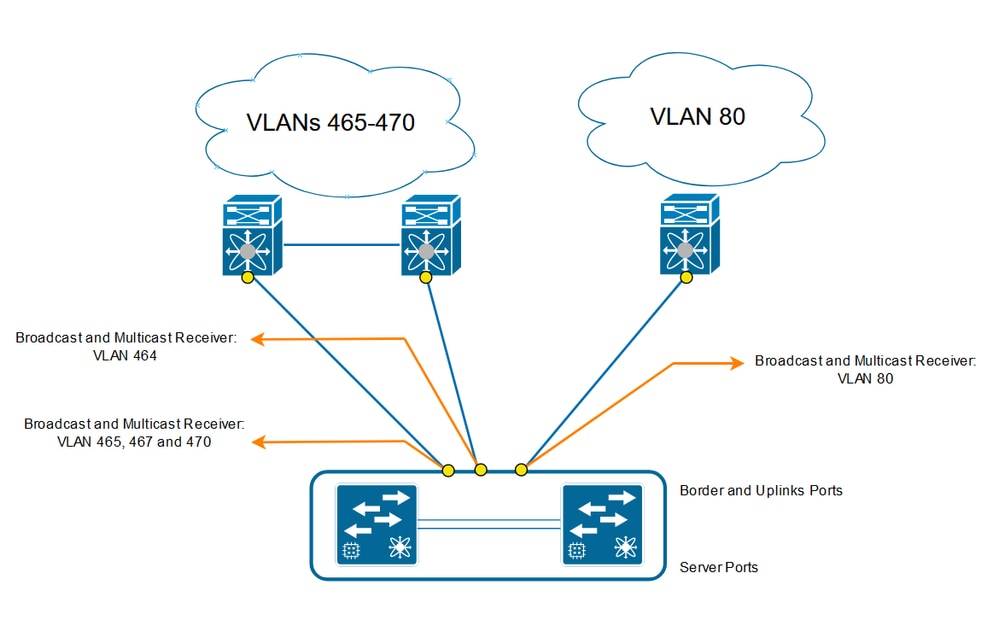
分離第2層(DL2)
當兩個或多個乙太網路不相互連線,但必須由同一Cisco UCS域中的伺服器或虛擬機器訪問時,使用分離的第2層(DL2)。
預期的結果是,每個VLAN將保持固定至正確的上行鏈路,同時保持關聯伺服器或虛擬機器所需的第2層連線。
網路圖表
解析
以管理使用者身份登入到Cisco UCS Manager GUI。
在交換矩陣互聯上建立上行鏈路
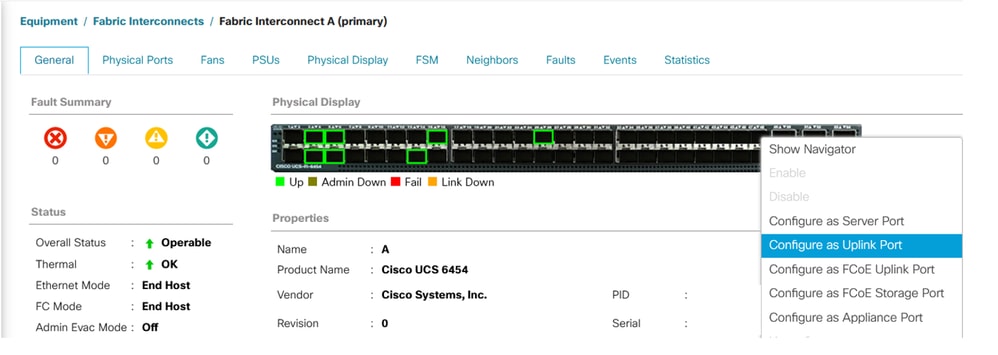
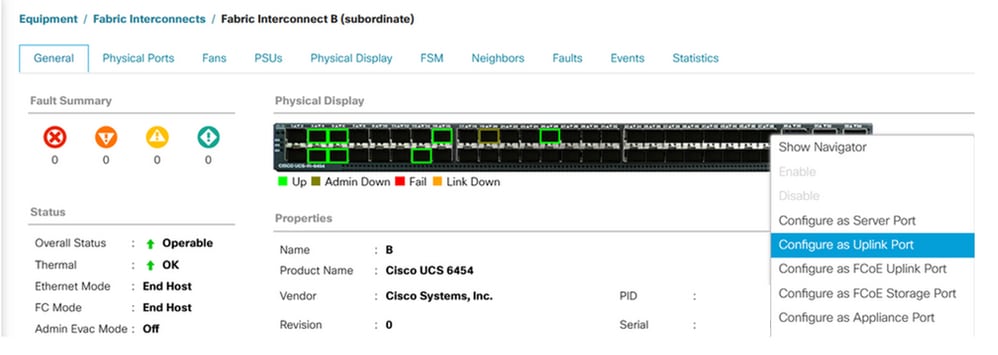
步驟1.導覽至Equipment > Fabric Interconnects > Fabric Interconnect A或Fabric Interconnect B。
步驟2.右鍵點選所需的埠,然後點擊Configure as Uplink Port。此上行鏈路埠連線到不相接的第2層(DL2)網路。本範例中使用的是VLAN 80。
分配VLAN
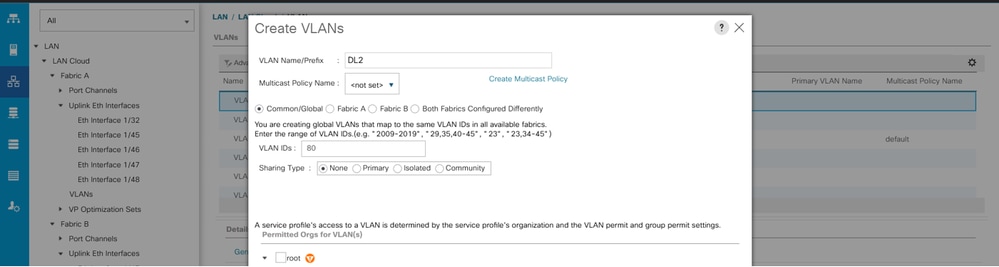
在本例中,建立了VLAN 80。
步驟1.導覽至LAN > LAN Cloud > VLANs,按一下Add,然後填寫欄位以建立VLAN 80。
建立vNIC模板
步驟1.導覽至LAN > Policies > root > vNIC Templates,然後按一下Add。
選擇vNIC模板,輸入名稱,然後選擇適當的交換矩陣ID。
可以使用冗餘vNIC配置。
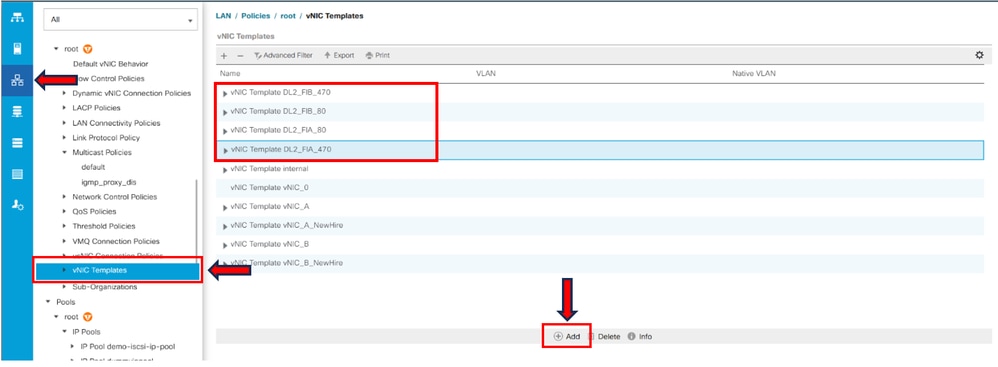
相應地選擇要配置的VLAN。在本例中,基本VLAN是VLAN 470,不連續VLAN是VLAN 80。
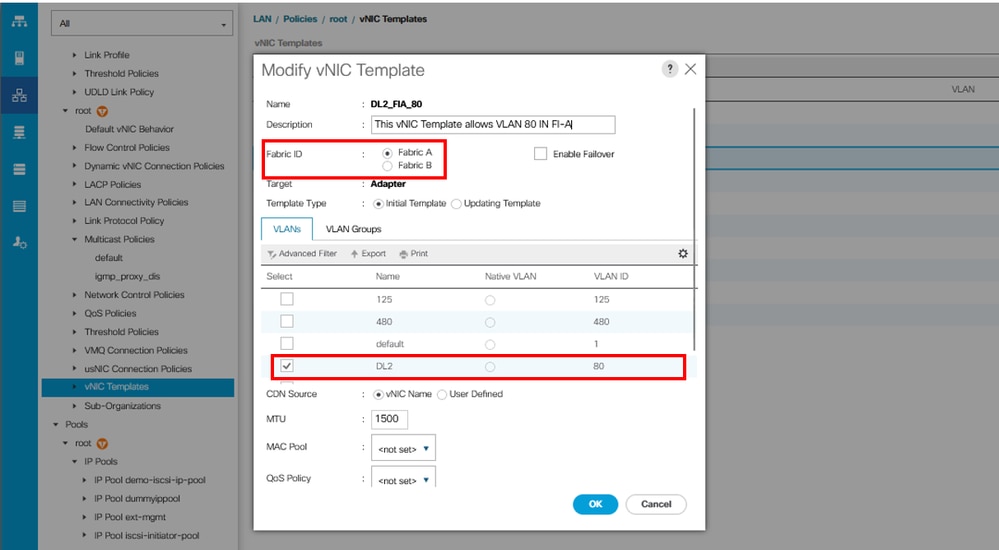
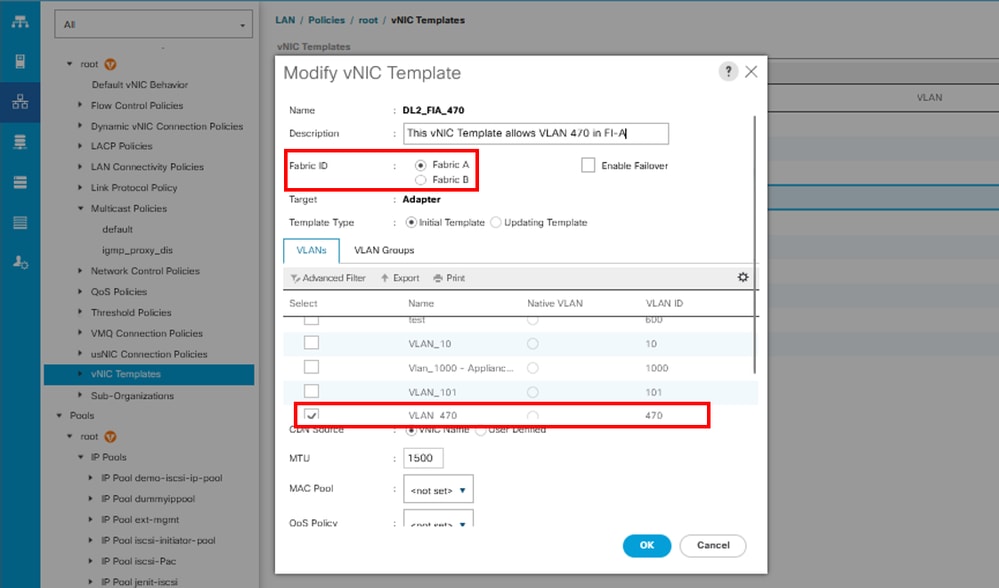
對交換矩陣B重複相同步驟。
步驟2.導覽至LAN > Policies > root > LAN Connectivity Policies,建立新策略,單擊Add,然後建立vNIC。
輸入vNIC的名稱,選擇MAC池,然後選擇使用vNIC模板覈取方塊。
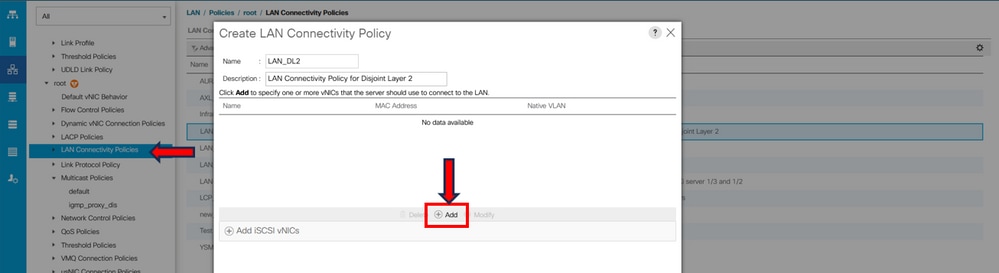
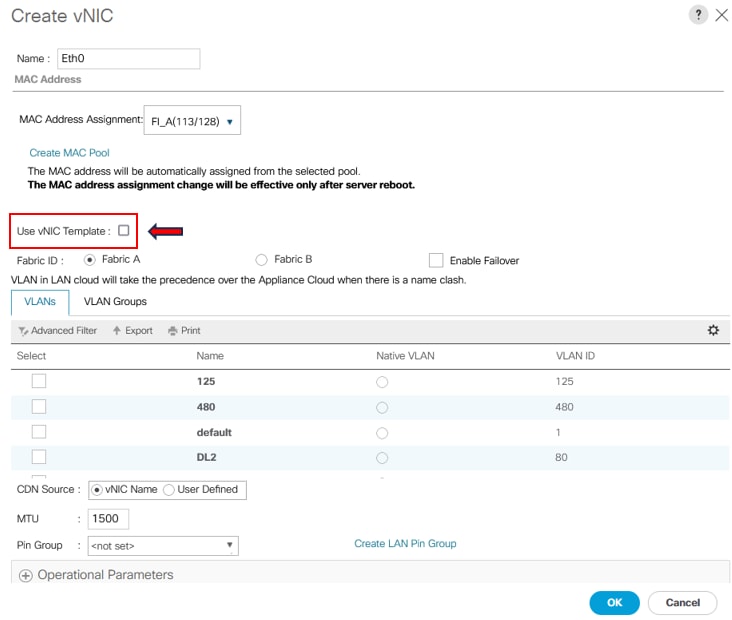
步驟3.使用先前配置的vNIC模板,選擇所需的介面卡策略,然後單擊OK。對交換矩陣互聯B重複此過程。
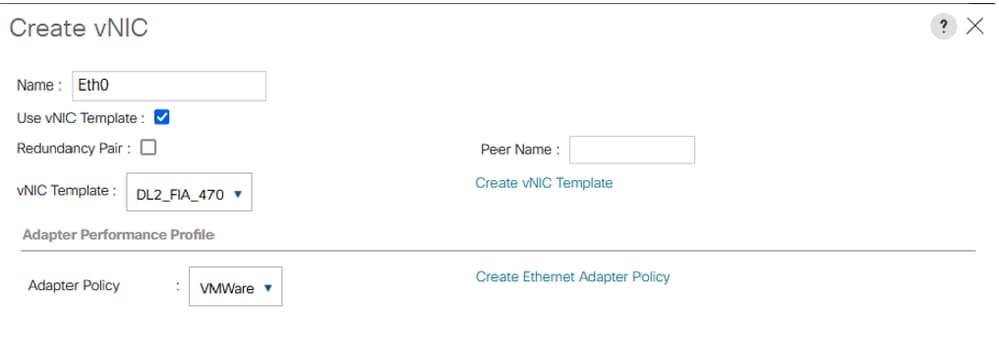
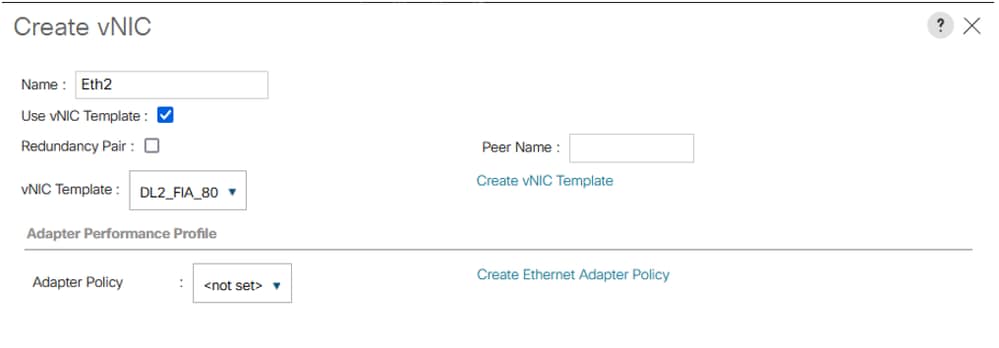
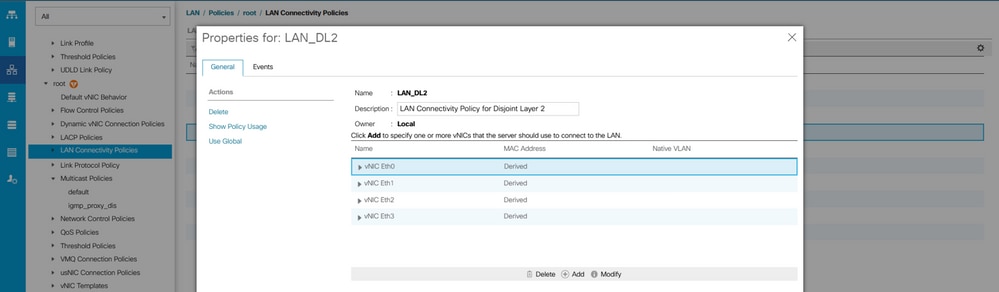
步驟4.導覽至Service Profile,然後選擇LAN Connectivity Policy。
重新啟動伺服器
步驟1.重新啟動伺服器以應用配置更改。

附註:在vCenter中,確保節點處於維護模式。
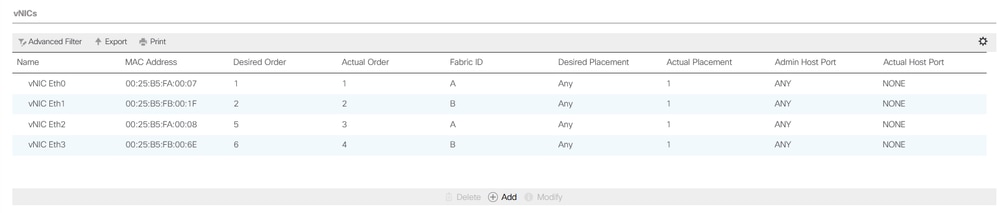
步驟2.伺服器完成引導後,驗證vNIC是否存在。導航到Servers > Service Profiles > root > service-profile-name > Network。
建立VLAN組
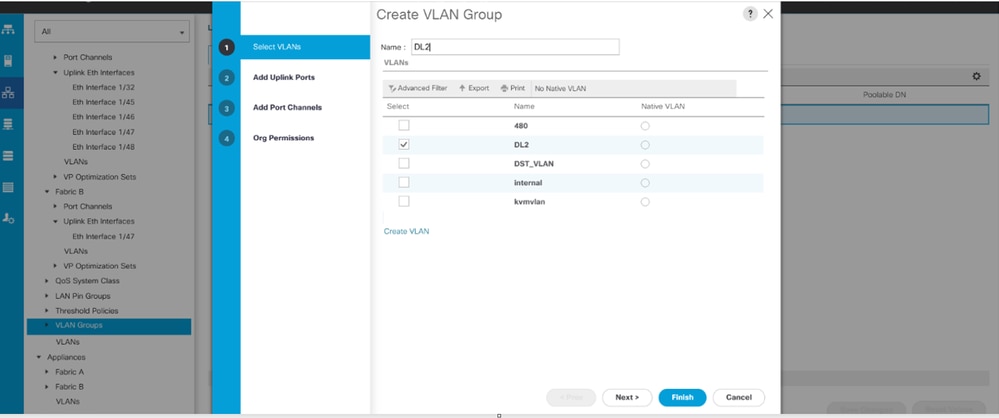
步驟1.導覽至LAN > LAN Cloud > VLAN Groups > Create VLAN Groups。
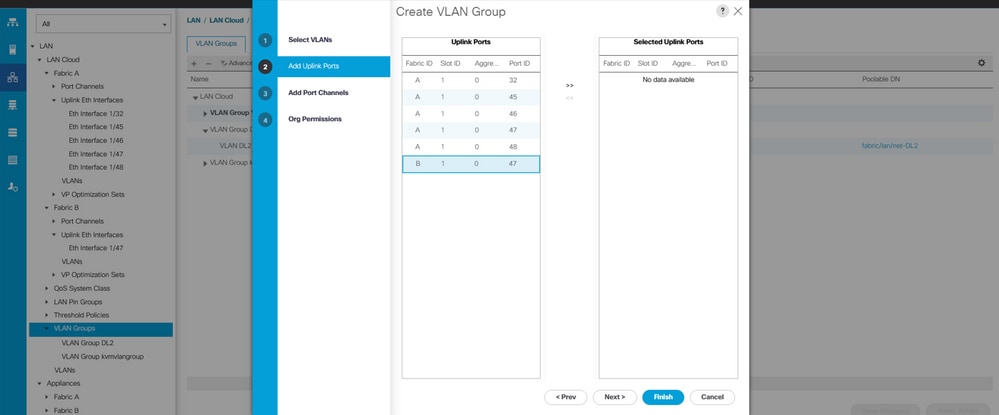
步驟2.輸入VLAN組的名稱,選擇所需的VLAN,然後在嚮導的步驟2中新增單個上行鏈路。
步驟3.(可選)移至VLAN組嚮導的步驟3以新增埠通道。
ESXi配置
步驟1.登錄ESXi主機並導航到Networking頁籤> Virtual Switches ,然後點選Add standard virtual Switch,命名虛擬交換機,並選擇上行鏈路。
步驟2.導覽至Networking > Port Group > Add Port Group。為埠組命名,選擇所需的VLAN,並使用之前配置的虛擬交換機。
步驟3.導覽至Networking,選擇先前配置的vSwitch,然後點選Add Uplink。為了獲得冗餘,請新增一條新的上行鏈路,該上行鏈路包括用於分離第2層(DL2)的VLAN。
在本示例中,vNIC Eth2(交換矩陣互聯A)和vNIC Eth3(交換矩陣互聯B)上允許VLAN 80。
在UCSM中驗證
在CLI中驗證VLAN
開啟到交換矩陣互聯的SSH會話並運行show vlan brief。
FI-A(nx-os)# show vlan brief此命令顯示已配置的VLAN並確認為不連續第2層(DL2)建立的VLAN。
VLAN Name                             Status    Ports
---- -------------------------------- --------- -------------------------------
1    default                          active    Po1, Eth1/5, Eth1/6, Eth1/8
                                                Eth1/9, Eth1/10, Eth1/11
                                                Eth1/12, Eth1/13, Eth1/16
                                                Eth1/17, Eth1/18, Eth1/19
                                                Eth1/20, Eth1/21, Eth1/22
                                                Eth1/23, Eth1/24, Eth1/26
                                                Eth1/27, Eth1/28, Eth1/29
                                                Eth1/30, Eth1/31, Eth1/32
                                                Eth1/33, Eth1/34, Eth1/35
                                                Eth1/36, Eth1/37, Eth1/38
                                                Eth1/39, Eth1/40, Eth1/41
                                                Eth1/42, Eth1/43, Eth1/44
                                                Eth1/45, Eth1/46, Eth1/47
                                                Eth1/48, Eth1/49, Eth1/50
                                                Veth876, Veth877, Veth1084
                                                Veth1119, Veth1120, Veth1122
                                                Eth1/1/10, Eth1/1/12, Eth1/1/13
                                                Eth1/1/15, Eth1/1/18, Eth1/1/20
                                                Eth1/1/22, Eth1/1/24, Eth1/1/26
                                                Eth1/1/28, Eth1/1/29, Eth1/1/30
                                                Eth1/1/31, Eth1/1/32
80   VLAN0080                         active    Eth1/47
470  VLAN0470                         active    Po1, Eth1/5, Eth1/6, Eth1/32
                                                Eth1/45, Eth1/46, Eth1/48
                                                Veth1084, Veth1090, Veth1092
                                                Veth1094, Veth1108, Veth1119
                                                Veth1120, Veth1122, Veth1131
                                                Veth1133
驗證虛擬介面(VIF)路徑
在SSH會話中,運行show service-profile circuit <server number>:
FI-A# show service-profile circuit
Server: 1/6
    Fabric ID: A
        Path ID: 1
        VIF        vNIC            Link State  Oper State Prot State    Prot Role   Admin Pin  Oper Pin   Transport
        ---------- --------------- ----------- ---------- ------------- ----------- ---------- ---------- ---------
              1131 Eth0            Up          Active     No Protection Unprotected 0/0/0      0/0/1      Ether
              1133 Eth2            Up          Active     No Protection Unprotected 0/0/0      1/0/47     Ether
              1135 fc0             Up          Active     No Protection Unprotected 0/0/0      1/0/3      Fc
              9327                 Up          Active     No Protection Unprotected 0/0/0      0/0/0      Ether
    Fabric ID: B
        Path ID: 1
        VIF        vNIC            Link State  Oper State Prot State    Prot Role   Admin Pin  Oper Pin   Transport
        ---------- --------------- ----------- ---------- ------------- ----------- ---------- ---------- ---------
              1132 Eth1            Up          Active     No Protection Unprotected 0/0/0      0/0/2      Ether
              1134 Eth3            Up          Active     No Protection Unprotected 0/0/0      1/0/47     Ether
              1136 fc1             Up          Active     No Protection Unprotected 0/0/0      1/0/3      Fc
              9328                 Up          Active     No Protection Unprotected 0/0/0      0/0/0      Ether
此命令顯示虛擬介面(VIF)路徑、固定介面和相應的vNIC。
在此輸出中,VIF 1134對應於vNIC Eth3,並被固定至交換矩陣互聯B中的介面1/0/47。
此外,VIF 1133對應於vNIC Eth2,並在交換矩陣互聯A中固定到1/0/47。
檢驗固定邊界介面。
運行命令以檢驗是否固定至上行鏈路埠。
FI-A(nx-os)# show pinning border-interfaces

--------------------+---------+----------------------------------------
Border Interface     Status    SIFs
--------------------+---------+----------------------------------------
Po1                  Active    Veth1084 Veth1090 Veth1092 Veth1094
                               Veth1108 Veth1119 Veth1120 Veth1131
Eth1/32              Down
Eth1/45              Down
Eth1/46              Down
Eth1/47              Active    sup-eth1 Veth1133
Eth1/48              Down
Eth1/51              Down
Eth1/52              Down
Eth1/53              Down
Eth1/54              Down
驗證指定的接收器
運行此命令以驗證接收VLAN的組播流量的埠。
FI-A(nx-os)# show platform software enm internal info vlandb id
vlan_id 80
-------------
Designated receiver: Eth1/47
Membership:
Eth1/47
此輸出顯示了正確的上行鏈路。
驗證上游交換機
開啟到上游交換機的SSH會話並運行show vlan brief。
NEXUS-01# show vlan brief
VLAN Name                             Status    Ports
---- -------------------------------- --------- -------------------------------
1    default                          active    Po1, Po2, Po4, Po5, Po6, Po7
                                                Po8, Po9, Po50, Po100, Eth1/1
                                                Eth1/2, Eth1/3, Eth1/4, Eth1/5
                                                Eth1/6, Eth1/8, Eth1/9, Eth1/10
                                                Eth1/12, Eth1/13, Eth1/14
                                                Eth1/15, Eth1/18, Eth1/19
                                                Eth1/20, Eth1/21, Eth1/22
                                                Eth1/23, Eth1/24, Eth2/1, Eth2/2
                                                Eth2/3, Eth2/4, Eth2/5, Eth2/6
                                                Eth2/7, Eth2/8, Eth2/10, Eth2/11
                                                Eth2/12, Eth2/13, Eth2/14
                                                Eth2/15, Eth2/16, Eth2/17
                                                Eth2/18, Eth2/19, Eth2/20
                                                Eth2/21, Eth2/22, Eth2/23
                                                Eth3/1, Eth3/2, Eth3/3, Eth3/4
                                                Eth3/5, Eth3/6
                                                Eth2/18
80   DL2                              active    Po1, Po2, Po6, Po7, Po8, Po9
                                                Po50, Po100, Eth1/1, Eth1/3
                                                Eth1/4, Eth1/5, Eth1/6, Eth1/17
                                                Eth1/19, Eth1/20, Eth1/21
                                                Eth1/22, Eth1/23, Eth1/24
                                                Eth2/1, Eth2/2, Eth2/3, Eth2/4
                                                Eth2/5, Eth2/17, Eth2/18
470  VLAN_470                         active    Po1, Po2, Po3, Po4, Po5, Po6
                                                Po7, Po8, Po9, Po50, Po100
                                                Eth1/1, Eth1/3, Eth1/4, Eth1/5
                                                Eth1/6, Eth1/7, Eth1/9, Eth1/10
                                                Eth1/16, Eth1/19, Eth1/20
                                                Eth1/21, Eth1/22, Eth1/23
                                                Eth1/24, Eth2/1, Eth2/2, Eth2/3
                                                Eth2/4, Eth2/5, Eth2/9, Eth2/17
Eth2/18, Eth2/24此輸出顯示與VLAN 80相關聯的連線埠。在本範例中,相關連線埠是Ethernet 1/17,它與上行鏈路1/47相關聯。
也可以驗證MAC地址表以確認虛擬機器(VM)條目。
NEXUS-01(config)# show mac address-table vlan 80
Legend:
        * - primary entry, G - Gateway MAC, (R) - Routed MAC, O - Overlay MAC
        age - seconds since last seen,+ - primary entry using vPC Peer-Link
   VLAN     MAC Address      Type      age     Secure NTFY   Ports/SWID.SSID.LID
---------+-----------------+--------+---------+------+----+------------------
* 80       000c.2937.2cc7    dynamic   150        F    F  Eth1/17
在ESXi中驗證與VLAN網路的連線
在虛擬機器中開啟終端,然後對VLAN網路的預設網關執行ping操作。成功的ping操作可確認連線。
相關內容
Cisco UCS Manager GUI配置指南:使用LAN上行鏈路管理器
修訂記錄
| 修訂 | 發佈日期 | 意見 |
|---|---|---|
1.0 |
21-Jul-2023
|
初始版本 |
 意見
意見