排除eBGP鄰接建立故障

目錄
問題
防火牆和對等裝置之間的外部邊界網關協定(eBGP)鄰接失敗。觀察到以下症狀:
1.防火牆上的對等體狀態為空閒:
fw# show bgp summary
BGP router identifier 192.0.2.2, local AS number 65001
BGP table version is 1, main routing table version 1

Neighbor        V           AS MsgRcvd MsgSent   TblVer  InQ OutQ Up/Down  State/PfxRcd
198.51.100.2    4        65002 0       0              1    0    0 never  Idle
2.在介面擷取中只能看到來自對等裝置的TCP SYN封包:
fw# cap capo interface WAN-Telekom
fw# show cap capo

26 packets captured

   1: 06:22:44.990595       198.51.100.2.31242 > 192.0.2.2.179: S 2838607371:2838607371(0) win 16384 <mss 1460>
   2: 06:22:46.990152       198.51.100.2.31242 > 192.0.2.2.179: S 2838607371:2838607371(0) win 16384 <mss 1460>
   3: 06:22:50.991007       198.51.100.2.31242 > 192.0.2.2.179: S 2838607371:2838607371(0) win 16384 <mss 1460>
   4: 06:22:58.991281       198.51.100.2.31242 > 192.0.2.2.179: S 2838607371:2838607371(0) win 16384 <mss 1460>
3.成功建立到對等裝置的IP地址的ICMP連線:
fw# ping 198.51.100.2
Type escape sequence to abort.
Sending 5, 100-byte ICMP Echos to 198.51.100.2, timeout is 2 seconds:
!!!!!
Success rate is 100 percent (5/5), round-trip min/avg/max = 1/2/10 ms
這可以確認防火牆和對等裝置之間的IP網路級別可達性。
4.調試級別的系統日誌消息表示從對等裝置丟棄的TCP請求:
fw# show logging
…
May 20 2026 06:32:58: %FTD-7-710005: TCP request discarded from 198.51.100.2/20217 to WAN-Telekom:192.0.2.2/179
May 20 2026 06:33:00: %FTD-7-710005: TCP request discarded from 198.51.100.2/20217 to WAN-Telekom:192.0.2.2/179
May 20 2026 06:33:04: %FTD-7-710005: TCP request discarded from 198.51.100.2/20217 to WAN-Telekom:192.0.2.2/179
May 20 2026 06:33:12: %FTD-7-710005: TCP request discarded from 198.51.100.2/20217 to WAN-Telekom:192.0.2.2/179
5. BGP偵錯顯示「no route to peer」訊息:
fw# debug ip bgp
BGP debugging is on
    for address family: IPv4 Unicast
Successfully set for module BGP at level 1

BGP: 198.51.100.2 Active open failed - no route to peer, open active delayed 21504ms (35000ms max, 60% jitter)
環境
拓撲
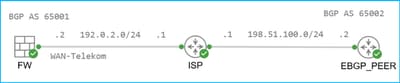
執行FTD 7.4.4且由安全防火牆管理中心(FMC)管理的Firepower 2110。 其他硬體平台和軟體版本也可能受到影響。
防火牆具有通過連線到網際網路服務提供商(ISP)的WAN-Telekom介面到達對等地址的靜態路由:
fw# show route 198.51.100.2

Routing entry for 198.51.100.2 255.255.255.255
  Known via "static", distance 1, metric 0
  Routing Descriptor Blocks:
  * 192.0.2.1, via WAN-Telekom
Route metric is 0, traffic share count is 1
防火牆具有BGP配置。對等體198.51.100.2具有不同的自治系統編號,因此是外部的:
fw# show run router
router bgp 65001
 bgp log-neighbor-changes
 bgp graceful-restart
 address-family ipv4 unicast
  neighbor 198.51.100.2 remote-as 65002
  neighbor 198.51.100.2 transport path-mtu-discovery disable
  neighbor 198.51.100.2 update-source WAN-Telekom
  neighbor 198.51.100.2 activate
解析
啟用BGP鄰居配置的Advanced部分中的Allow connections with neighbor that is not directly connected選項,並將TTL Hops設定為255後,鄰接關係即建立:
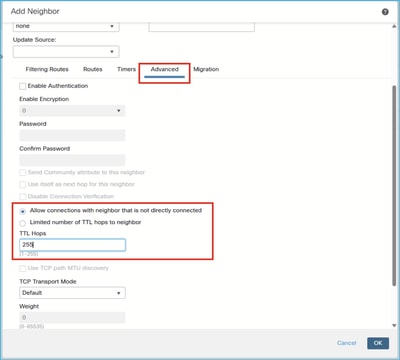
原因
預設情況下,防火牆允許直接連線的對等體(即同一子網中的對等體)之間的eBGP鄰接關係。為了允許非直接連線的對等體之間的鄰接,必須啟用Allow connections with neighbor that not directly connected選項。此外,使用者可以限制對等路由器的TTL跳數,並在從對等路由器收到的TCP資料包的IP報頭中設定最小預期生存時間值。預設值為 1。
驗證
1.未配置Allow connections with neighbor that is not directly connected選項:
fw# show bgp neighbors 198.51.100.2 | i External
  External BGP neighbor not directly connected.
2.已配置「允許與未直接連線的鄰居連接」選項,並且「TTL跳」設定為1:
fw# show run router bgp | i 198.51.100.2
  neighbor 198.51.100.2 remote-as 65002
  neighbor 198.51.100.2 ebgp-multihop 1
  neighbor 198.51.100.2 transport path-mtu-discovery disable
  neighbor 198.51.100.2 update-source WAN-Telekom
  neighbor 198.51.100.2 activate


fw# show bgp neighbors 198.51.100.2 | i External
  External BGP neighbor not directly connected.
3.已配置「允許與未直接連線的鄰居連接」選項,並且TTL跳數設定為255:
fw# show run router bgp | i 198.51.100.2
  neighbor 198.51.100.2 remote-as 65002
  neighbor 198.51.100.2 ebgp-multihop 255
  neighbor 198.51.100.2 transport path-mtu-discovery disable
  neighbor 198.51.100.2 update-source WAN-Telekom
  neighbor 198.51.100.2 activate


fw# show bgp neighbors 198.51.100.2 | i External
  External BGP neighbor may be up to 255 hops away.
相關內容
修訂記錄
| 修訂 | 發佈日期 | 意見 |
|---|---|---|
1.0 |
20-May-2026
|
初始版本 |
 意見
意見