使用Bidir PIM配置對不通過FTD防火牆的組播流量進行故障排除
目錄
問題
可以看到以下所有症狀:
組播流量停止了特定組播組的防火牆威脅防禦(FTD)工作。
FTD上沒有群組(此範例中為224.2.2)的多點傳送路由(mroute)。
device# show mroute 224.2.2.2
No mroute entries found.
device#
環境
在FTD 7.4版中首次出現。包括自適應安全裝置(ASA)在內的其他軟體版本也可能受到影響。
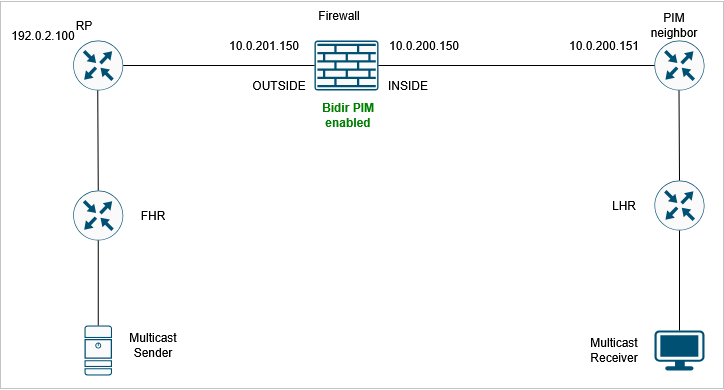
防火牆上啟用雙向通訊協定無關多點傳送(PIM)。
拓撲
 inline_image_0.png
解析
步驟 1:檢視當前組播配置。
檢查網路路徑中所有裝置的現有組播路由配置,確定可能阻止組播流量通過防火牆的任何配置錯誤或缺少設定。
防火牆上有雙向PIM配置:
device# show run pim
pim rp-address 192.0.2.100 bidir
步驟 2:檢驗PIM鄰居。
確認防火牆上正確顯示了組播鄰居:
device# show pim neighbor
Neighbor Address  Interface          Uptime    Expires DR pri Bidir
10.0.200.151      INSIDE             19:13:30  00:01:24 1 (DR)
10.0.201.200      OUTSIDE            00:01:31  00:01:42 1 (DR) B
在輸出中,鄰居10.0.201.200具有Bidir B標誌,而10.0.200.151鄰居沒有。
步驟 3:為組播組224.2.2.2啟用PIM調試:
FPR3100-14# debug pim group 224.2.2.2
IPv4 PIM group debugging is on
 for group 224.2.2.2
調試顯示,存在因「no bidir df selection」而丟棄的PIM加入/修整資料包:
IPv4 PIM: J/P entry: Join root: 192.0.2.100 group: 224.2.2.2 flags:  RPT WC S
IPv4 PIM: (*,224.2.2.2) J/P with RP 192.0.2.100 on INSIDE discarded, no bidir df election-state on this intf
步驟 4:對10.0.200.151 PIM鄰居啟用PIM捕獲。目標是提高對資料包內容的可視性:
device# capture CAPI interface INSIDE trace match pim host 10.0.200.151 any
步驟 5:從FTD裝置收集防火牆擷取:
device# copy /pcap capture:CAPI CAPI.pcap
Source capture name [CAPI]?
Destination filename [CAPI.pcap]?
%Warning:There is a file already existing with this name
Do you want to over write? [confirm]
!
28 packets copied in 0.0 secs
使用https://www.cisco.com/c/en/us/support/docs/security/firepower-ngfw/212474-working-with-firepower-threat-defense-f.html中所述的步驟從FMC收集pcap檔案
步驟 6:捕獲分析。
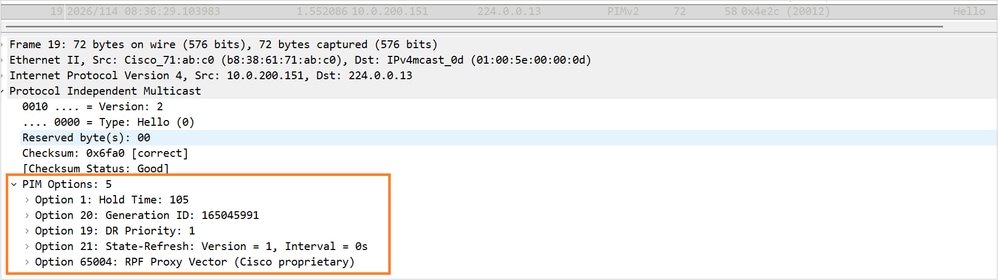
PIM Hello資料包包含以下選項:
 PIM_Hello_Options_no-bidir-capable.png
請注意沒有支援Bidir的標誌。
步驟 7:在10.0.200.151鄰居上啟用雙向PIM。
現在,將為兩個鄰居顯示PIM Bidir B標誌:
device# show pim neighbor
Neighbor Address  Interface          Uptime    Expires DR pri Bidir
10.0.200.151      INSIDE             19:34:26  00:01:38 1 (DR) B
10.0.201.200      OUTSIDE            00:22:27  00:01:23 1 (DR) B
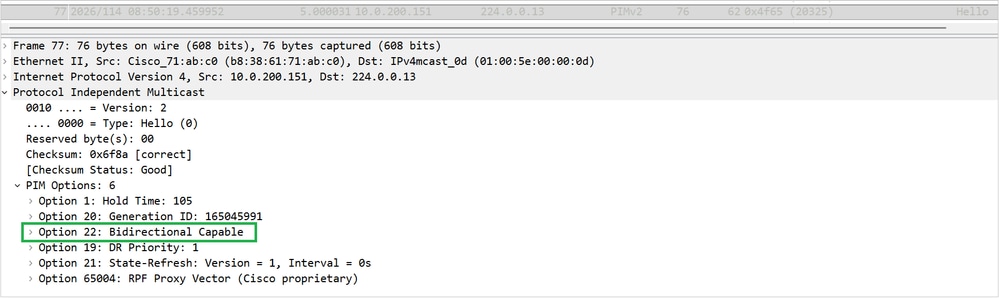
步驟 8:收集新捕獲並檢查鄰居10.0.200.151的PIM Hello選項。顯示PIM選項22(雙向支援):
 PIM_Hello_Options_option22.png
步驟 9:驗證組播組224.2.2.2的mroute現在是否顯示:
device# show mroute
Multicast Routing Table
Flags: D - Dense, S - Sparse, B - Bidir Group, s - SSM Group,
       C - Connected, L - Local, I - Received Source Specific Host Report,
       P - Pruned, R - RP-bit set, F - Register flag, T - SPT-bit set,
       J - Join SPT
Timers: Uptime/Expires
Interface state: Interface, State
(*, 224.0.1.40), 19:41:44/never, RP 0.0.0.0, flags: DPC
  Incoming interface: Null
  RPF nbr: 0.0.0.0
  Immediate Outgoing interface list:
    INSIDE, Null, 19:41:44/never
(*, 224.2.2.2), 00:06:29/00:02:53, RP 192.0.2.100, flags: B
  Bidir-Upstream: OUTSIDE
  RPF nbr: 10.0.201.200
  Immediate Outgoing interface list:
    INSIDE, Forward, 00:06:29/00:02:53
原因
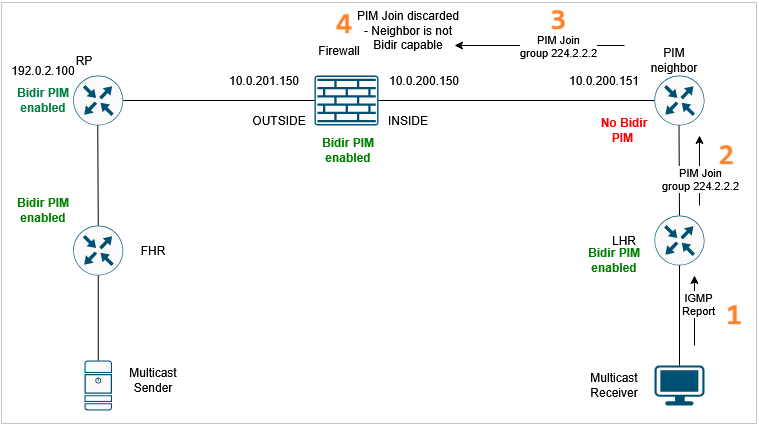
組播流量故障是由相鄰網路裝置上的不正確或不完整組播和雙向PIM配置引起的。特定組態問題導致FTD放棄特定多點傳送群組的PIM加入/修整訊息。因此,防火牆無法為組播流量建立mroute。對於要通過防火牆資料平面的組播資料流量,控制平面(PIM)必須建立正確的路由。
 原因.png
相關內容
修訂記錄
| 修訂 | 發佈日期 | 意見 |
|---|---|---|
1.0 |
27-Apr-2026
|
初始版本 |

 意見
意見