使用SMA API在PVO隔離區中自動發佈消息

簡介
本文檔介紹如何通過REST API在Cisco SMA上自動進行報文管理和發佈,以便處理大量報文。
必要條件
需求
思科建議您瞭解以下主題:
- Cisco SMA產品知識
- 熟悉REST API基礎知識、Postman、curl和JQ for JSON處理
- SMA API訪問的有效憑據
- 命令列
- 對SMA的網路訪問
- 已安裝的工具:curl(針對請求)、JQ(針對JSON操作)和客戶端如Postman進行初始測試
- 在SMA上執行消息釋放操作的適當使用者角色
採用元件
本文件所述內容不限於特定軟體和硬體版本。
本文中的資訊是根據特定實驗室環境內的裝置所建立。文中使用到的所有裝置皆從已清除(預設)的組態來啟動。如果您的網路運作中,請確保您瞭解任何指令可能造成的影響。
背景資訊
自動發佈郵件對於電子郵件量高的環境來說至關重要。通過使用API,管理員可以過濾特定郵件(例如,按發件人)並以程式設計方式釋放這些郵件,與GUI中的手動管理相比,這減少了操作時間以及人為錯誤的風險。
初步測試
要管理隔離區,首先要執行初始查詢以驗證連線並確認資料結構。
https://dhxyz-sma2.iphmx.com/sma/api/v2.0/quarantine/messages?quarantineType=pvo&quarantines=TEST_QUARANTINE&limit=25&offset=0&orderBy=received&orderDir=desc&startDate=2026-03-15T00:00:00.000Z&endDate=2026-03-16T00:00:00.000Z資料結構
- API終結點:SMA API的基本URL(例如https://dhxyz-sma2.iphmx.com/sma/api/v2.0/quarantine/messages)。
- 隔離區名稱:您要從中檢索郵件的特定PVO隔離識別符號(例如TEST_QUARANTINE)。
- 日期範圍:用於定義搜尋的特定時間範圍的開始日期和結束日期。
- 限制:單個API響應中返回的最大記錄數。這有助於管理負載大小,並防止在處理大型隊列時超時。
- Offset:結果集的開始索引。用於分頁;例如,如果將偏移量設定為25,則會跳過前25條消息,從而允許您檢索下一批結果。
使用GUI和API驗證結果
檢索資訊時,您可以在API呼叫和GUI中看到相同數量的消息。
 postman GET請求
 TEST_QUARANTINE消息
使用CURL進行初始測試
為授權標頭生成Base64身份驗證令牌:
echo -n 'username:password' | base64檢索所有郵件
執行curl請求以將消息提取到本地檔案中:
curl -X GET "https://dhxyz-sma2.iphmx.com/sma/api/v2.0/quarantine/messages?quarantineType=pvo&quarantines=TEST_QUARANTINE&limit=25&offset=0&orderBy=received&orderDir=desc&startDate=2026-03-15T00:00:00.000Z&endDate=2026-03-16T00:00:00.000Z" \
    -H "Authorization: Basic token-generated-in-base64" \
    -H "Accept: application/json" \
    -o response.json
驗證總計數
檢查收到的消息總數:
$ grep "totalCount" response.json | awk '{ print $2, $3}'
{"totalCount": 24},
按域過濾MID
使用JQ過濾要釋放的郵件的MID(例如,按域過濾)。
$ jq '[.data[] | select(.attributes.sender | endswith("@labcisco.com")) | .mid]' response.json > mids-labcisco-domain.json
$ cat mids-labcisco-domain.json
[
  440,
  439,
  438,
  437,
  436,
  435,
  434,
  433,
  425,
  414
]
如果您在SMA GUI的TEST_QUARANTINE中搜尋,MID的數量可以匹配。
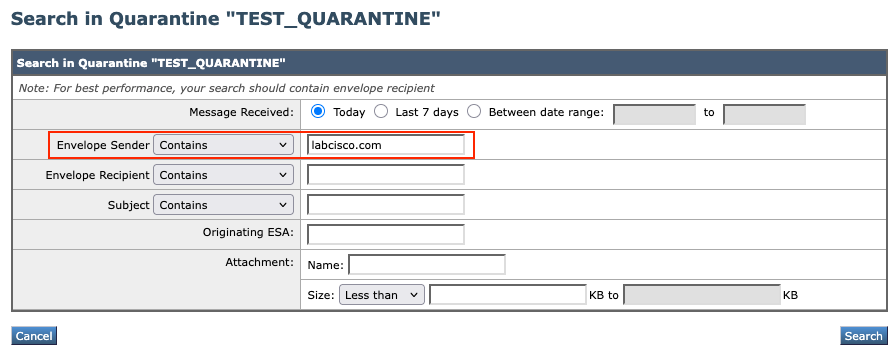 隔離區搜尋
隔離區搜尋
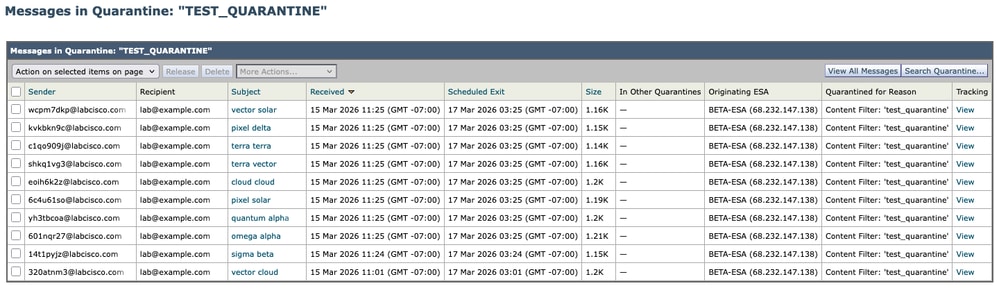 隔離結果
隔離結果
過濾MID和建立負載
過濾MID並生成負載檔案。
$ jq '{action:"release", quarantineType:"pvo", quarantineName:"TEST_QUARANTINE", mids:[.data[] | select(.attributes.sender | endswith("@labcisco.com")) | .mid]}' response.json > payload.json
$ cat payload.json
{
  "action": "release",
  "quarantineType": "pvo",
  "quarantineName": "TEST_QUARANTINE",
  "mids": [
    440,
    439,
    438,
    437,
    436,
    435,
    434,
    433,
    425,
    414
  ]
}
執行版本(POST)
向SMA傳送發佈請求:
$ curl -X POST "https://dhxyz-sma2.iphmx.com/sma/api/v2.0/quarantine/messages" \
        -H "Authorization: Basic token-generated-in-base64" \
        -H "Content-Type: application/json" \
        -d @payload.json
{"data": {"action": "release", "totalCount": 10}}
驗證結果
正在檢查mail_logs
在檢查mail_logs中已釋放的郵件時,可以按grep "release" mail_logs和上面過濾的相同MID(與已釋放的MID相同)進行過濾。
Sun Mar 15 11:48:21 2026 Info: MID 436 released from quarantine "TEST_QUARANTINE" (manual) t=1393
Sun Mar 15 11:48:21 2026 Info: MID 425 released from quarantine "TEST_QUARANTINE" (manual) t=1411
Sun Mar 15 11:48:21 2026 Info: MID 414 released from quarantine "TEST_QUARANTINE" (manual) t=2787
Sun Mar 15 11:48:21 2026 Info: MID 433 released from quarantine "TEST_QUARANTINE" (manual) t=1397
Sun Mar 15 11:48:21 2026 Info: MID 440 released from quarantine "TEST_QUARANTINE" (manual) t=1387
Sun Mar 15 11:48:21 2026 Info: MID 439 released from quarantine "TEST_QUARANTINE" (manual) t=1388
Sun Mar 15 11:48:21 2026 Info: MID 434 released from quarantine "TEST_QUARANTINE" (manual) t=1396
Sun Mar 15 11:48:21 2026 Info: MID 437 released from quarantine "TEST_QUARANTINE" (manual) t=1391
Sun Mar 15 11:48:21 2026 Info: MID 435 released from quarantine "TEST_QUARANTINE" (manual) t=1395
Sun Mar 15 11:48:21 2026 Info: MID 438 released from quarantine "TEST_QUARANTINE" (manual) t=1390
在GUI中直接檢查
如果您對已發佈消息的域進行相同的搜尋,則您會發現搜尋沒有結果,因為所有消息都已發佈。
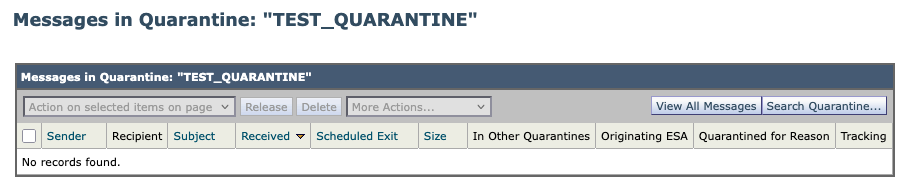 隔離新結果
隔離新結果
使用API檢查
郵遞員
從Retrieve All Messages中重新運行GET命令,以確認totalCount已減少或特定MID不再存在。
 postman GET查詢
捲曲
$ curl -X GET "https://dhxyz-sma2.iphmx.com/sma/api/v2.0/quarantine/messages?quarantineType=pvo&quarantines=TEST_QUARANTINE&limit=25&offset=0&orderBy=received&orderDir=desc&startDate=2026-03-12T00:00:00.000Z&endDate=2026-03-14T00:00:00.000Z" \
          -H "Authorization: Basic token-generated-in-base64" \
          -H "Accept: application/json" \
          -o response.json
$ jq '[.data[] | select(.attributes.sender | endswith("@labcisco.com")) | .mid]' response.json > mids-labcisco-domain.json
$ cat mids-labcisco-domain.json
[]
批次報文發佈(500條報文)
為了有效地處理批次操作,您必須瞭解如何使用分頁管理大型資料集。當需要處理大量消息時,必須計算限制和偏移引數以確保檢索完整的資料集,而不會超過API響應限制。
調整批次操作的API引數
檢索大量郵件時,使用以下邏輯配置請求:
- 限制:定義每個請求返回的記錄數。雖然可以將此值設定為一個較高的值(例如500或1000)來同時捕獲更多資料,但請注意系統效能和可能的超時。
- Offset:這將定義結果集的起點。如果消息總數超過限制,則必須執行多個請求,在隨後的每個呼叫中用限制值遞增偏移量(例如,offset=0,offset=500,offset=1000)。
擴展您的工作流程
前面的10條消息示例中使用的流程是所有批次操作的基礎。要縮放您的工作流,只需通過系統性地增加偏移引數在隊列中迭代。通過「播放」這些值(調整限制以定義批處理大小和偏移量以瀏覽頁面),您可以有效地檢索和處理整個隔離隊列,而不管郵件總數是多少。
相關資訊
修訂記錄
| 修訂 | 發佈日期 | 意見 |
|---|---|---|
1.0 |
07-Apr-2026
|
初始版本 |
 意見
意見