簡介
本檔案介紹設定思科安全感知(CSA)與思科安全電子郵件閘道整合所需的步驟。
必要條件
需求
思科建議您瞭解以下主題:
採用元件
本文檔中的資訊基於AsyncOS for SEG 14.0及更高版本。
本文中的資訊是根據特定實驗室環境內的裝置所建立。文中使用到的所有裝置皆從已清除(預設)的組態來啟動。如果您的網路運作中,請確保您瞭解任何指令可能造成的影響。
從CSA雲服務建立和傳送網路釣魚模擬
步驟1.登入CSA雲服務
請參閱:
1. https://secat.cisco.com/(美洲地區)
2.https://secat-eu.cisco.com/歐洲地區
步驟2.建立網路釣魚郵件收件人
導覽至Environment > Users > Add New User並填寫「Email」、「First Name」、「Last Name」和「Language」欄位,然後按一Save Changes下圖中所示的按鈕。
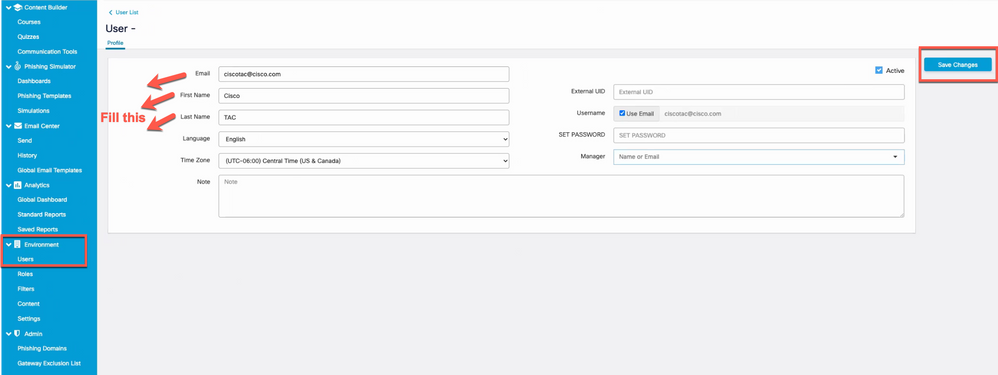 用於新增新使用者的使用者介面頁面的螢幕截圖

附註:只需要為有權建立和啟動模擬的CSA管理員使用者設定密碼。
建立使用者後,即可選擇使用者的角色。您可以從下拉選單中選擇角色,如下圖所示:
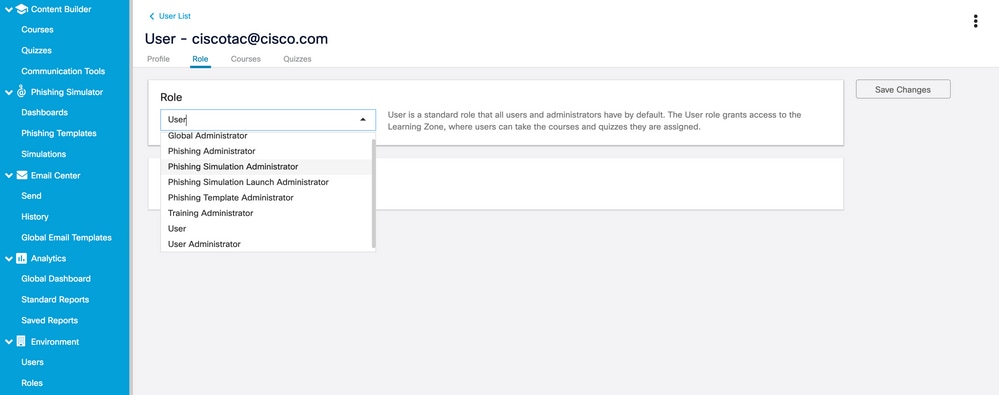 使用者角色下拉選項檢視
選擇復User is Phishing Recipient > Save Changes選框,如下圖所示。
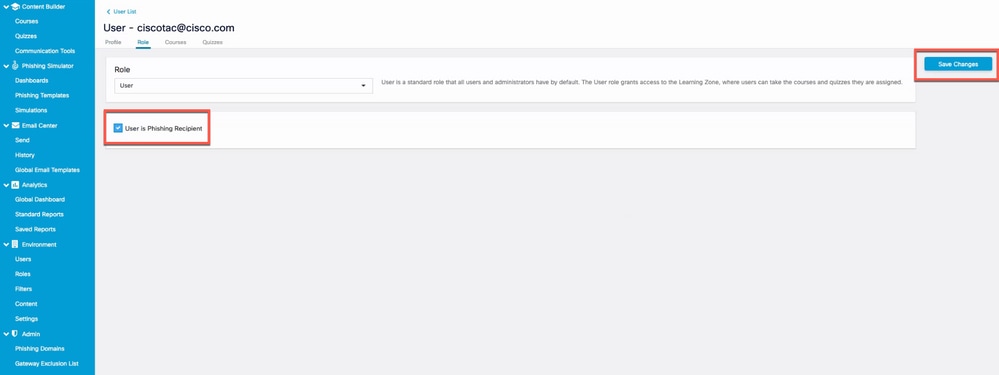 螢幕截圖顯示「使用者是網路釣魚收件人」覈取方塊已啟用
驗證是否已成功新增使用者,並在根據過濾器中的電子郵件地址進行搜尋時列出該使用者,如下圖所示。
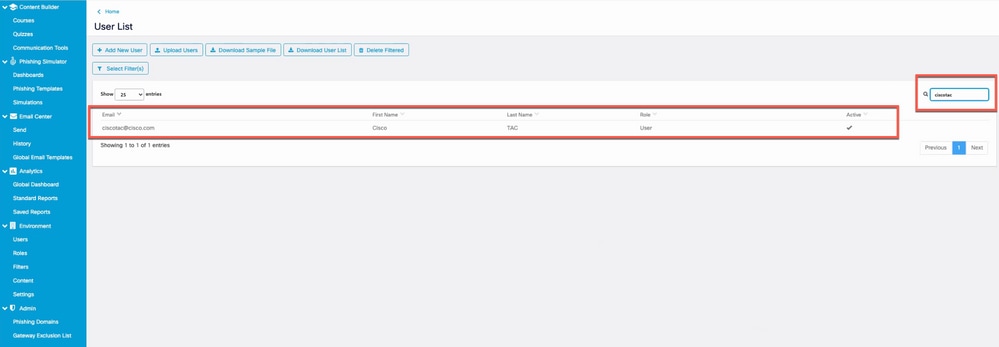 使用者清單中新使用者的螢幕截圖
步驟3.啟用報告API
導覽至選Environments > Settings > Report API 項卡並勾選Enable Report API > Save Changes 。
附註:記下持有者令牌。您需要此過程才能將SEG與CSA整合。
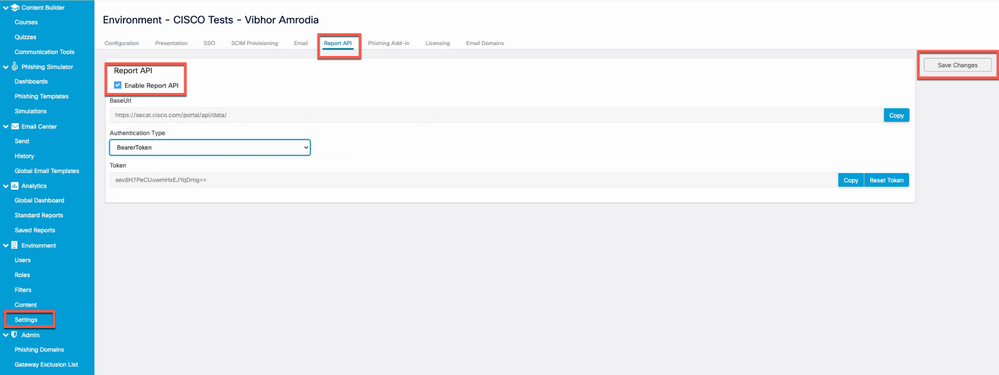 螢幕截圖顯示「啟用報告API」覈取方塊已啟用。
步驟4.建立網路釣魚模擬
a.導覽至Phishing Simulator > Simulations > Create New Simulation 並從可用清單中選擇一個Template,如下圖所示。
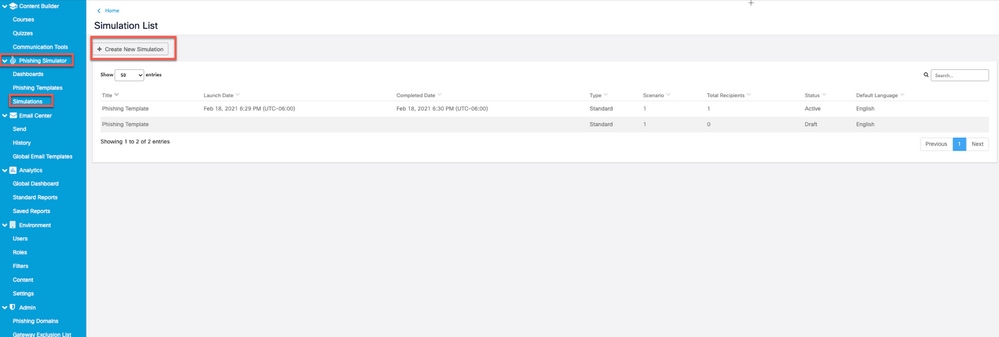 螢幕截圖突出顯示「建立新模擬」按鈕
b.填寫以下資訊:
- 選擇模板的名稱。
- 描述模板。
- 傳送網路釣魚電子郵件的域名。
- 網路釣魚電子郵件的顯示名稱。
- 電子郵件發件人地址(從下拉選單中選擇)。
- 回覆地址(從下拉選單中選擇)。
- 選擇語言。
- 儲存更改。
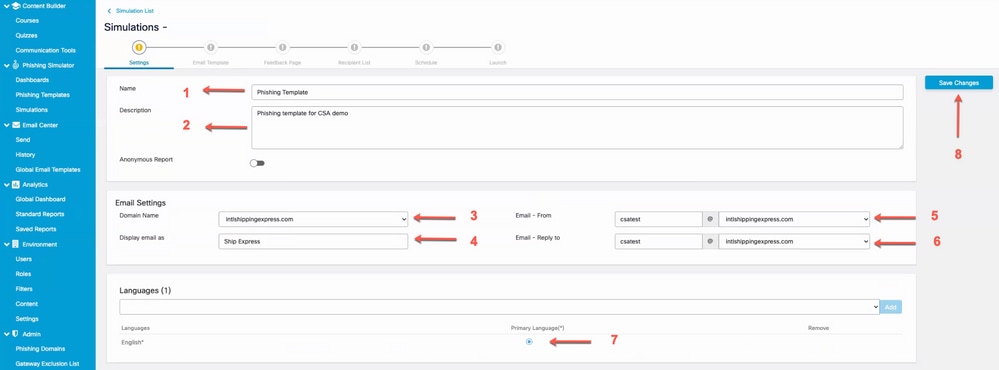 螢幕截圖突出顯示需要填充到配置新模擬中的欄位
c.按一下並Import from Filters 將網路釣魚電子郵件收件人Recipient List新增到中,如下圖所示。
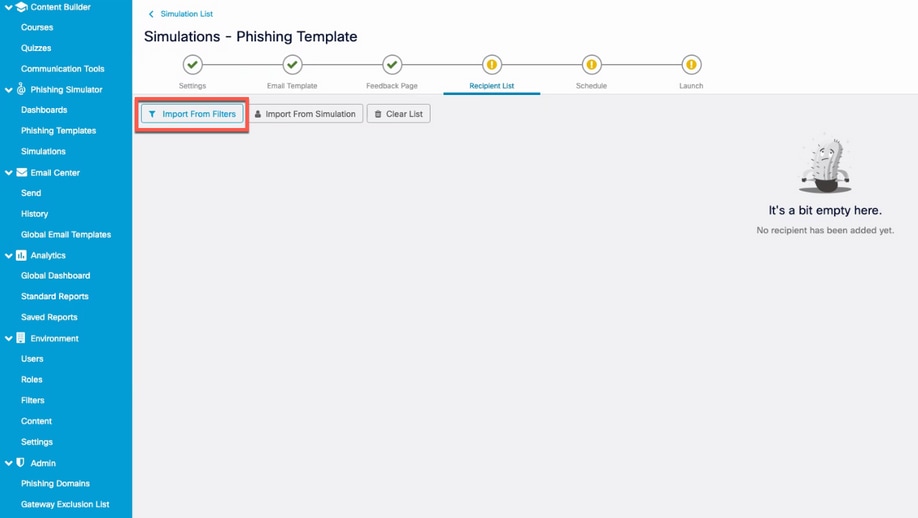 突出顯示「從篩選器匯入」按鈕的螢幕截圖
您可以按語言或管理員過濾使用者。按一Add 下,如下圖所示。
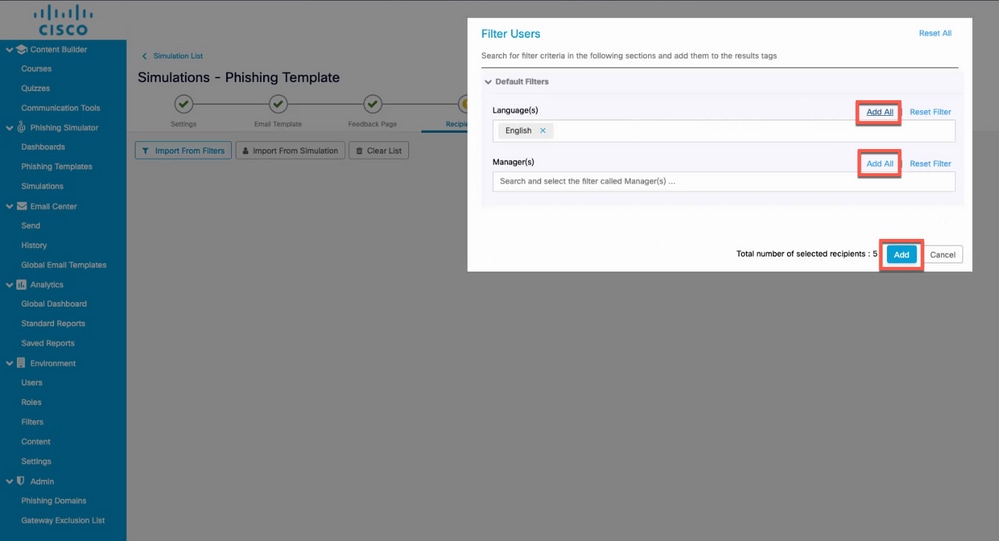 用於按語言或管理器過濾的「過濾使用者」對話方塊的螢幕快照
以下是在步驟2中建立的使用者,現新增到接收者清單中的範例,如下圖所示。
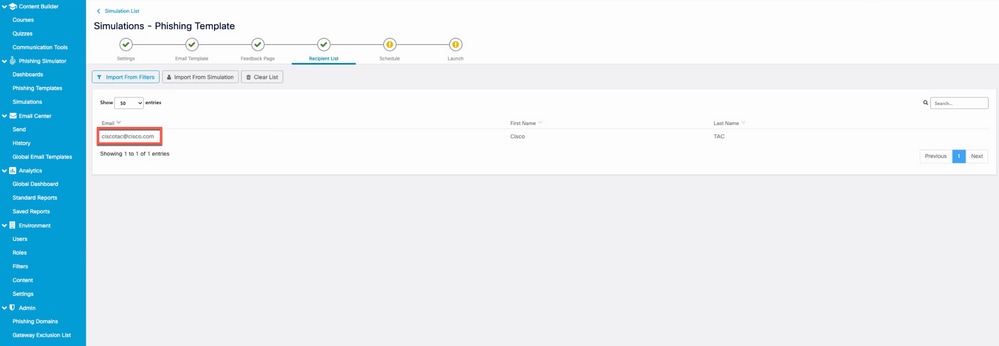 之前建立的使用者的螢幕截圖列為網路釣魚模擬的收件人
d.設定Delivery Start日期和Save 更改以計畫市場活動,如下圖所示。
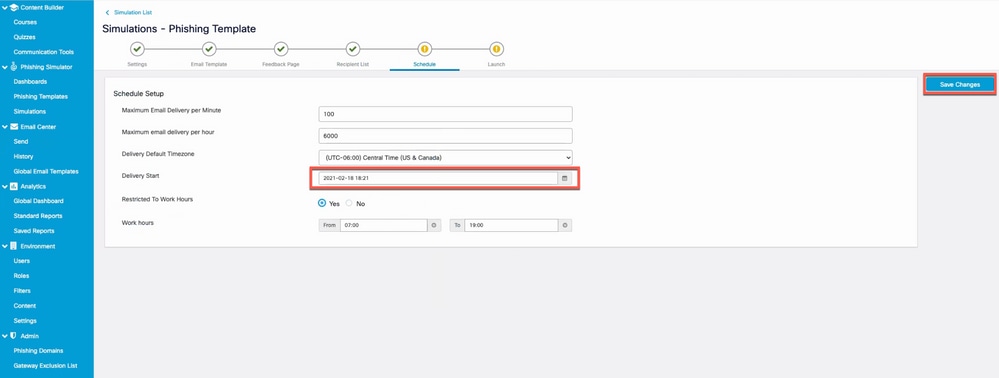 突出顯示「傳送開始」欄位的螢幕截圖
選擇開始日期後,系統將啟用為end date 市場活動選擇日期的選項,如下圖所示。
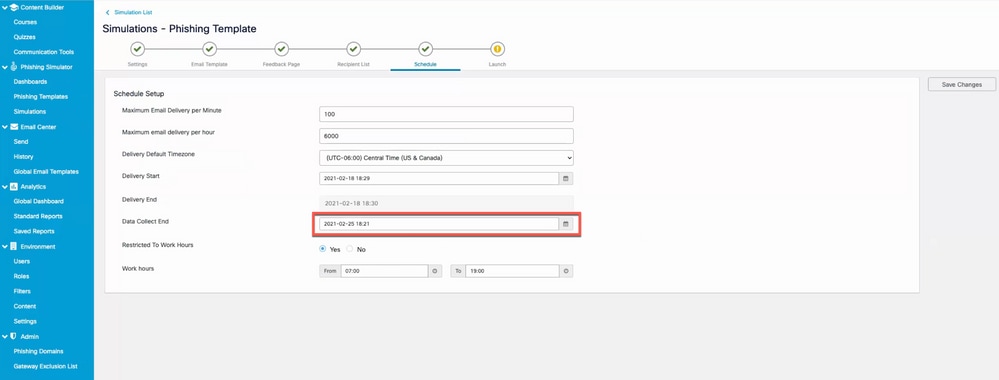 突出顯示指定模擬何時結束的「資料收集結束」欄位的螢幕快照
e.按一下Launch 以啟動市場活動,如下圖所示。
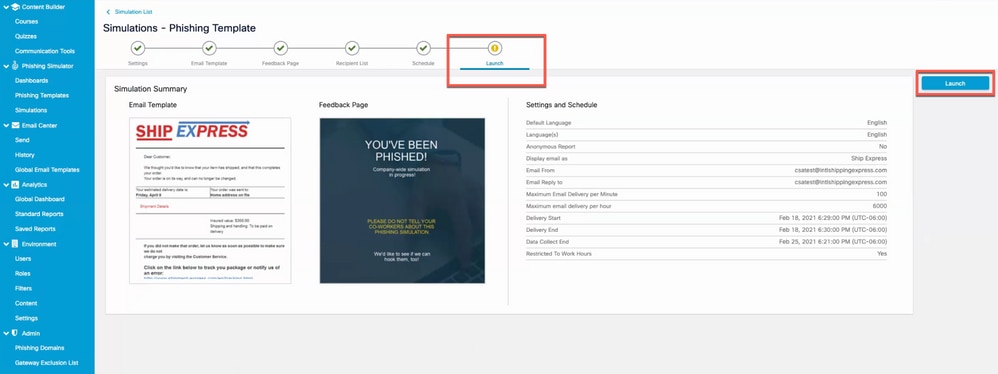 模擬建立嚮導中可啟動市場活動的最後一個頁籤的螢幕截圖
按一下啟動按鈕後,可以請求雙因素身份驗證代碼。輸入代碼並按一下Launch如下圖所示。
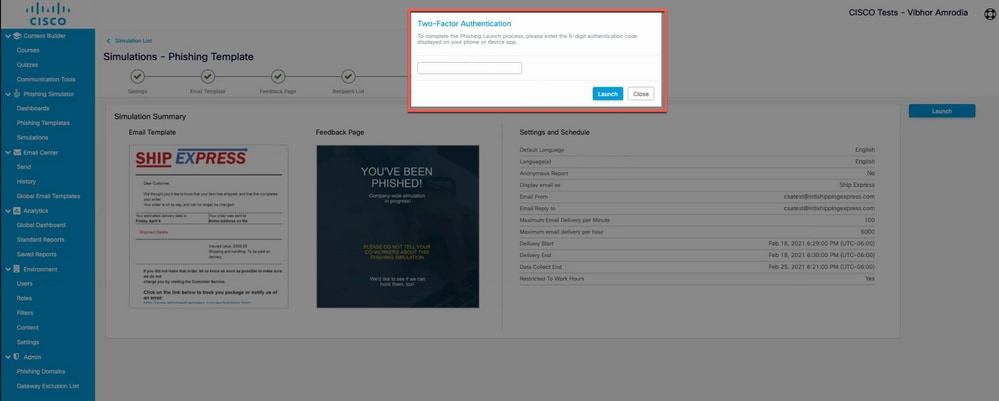 請求雙因素身份驗證代碼的彈出視窗截圖
步驟5.主動模擬驗證
前往 。Phishing Simulator > Dashboards當前活動模擬清單提供活動模擬。您也可以按一下 Export as PDF,獲取如圖所示的相同報告。
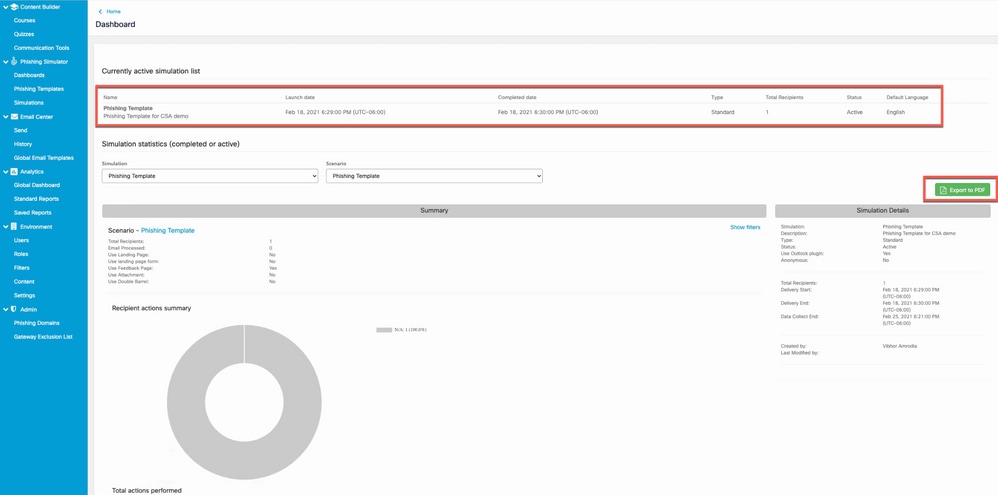 網路釣魚模擬控制面板的截圖
在接收方一側看到什麼?
收件人收件箱中的仿冒郵件示例。
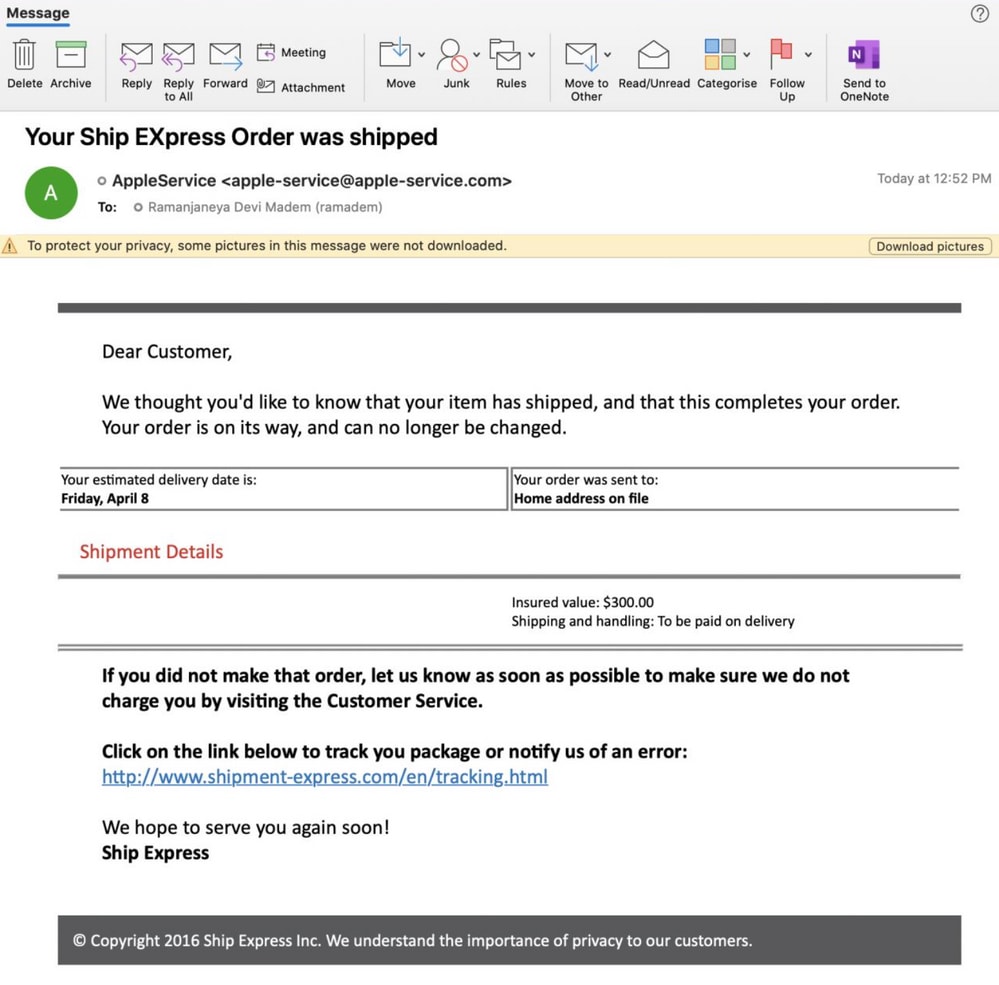 使用者郵箱中的模擬網路釣魚電子郵件的示例
當收件人點選該URL時,該反饋頁面會向使用者顯示,並且此使用者會顯示為CSA中「重複點選者」清單(自由點選該網路釣魚網站URL)的一部分。
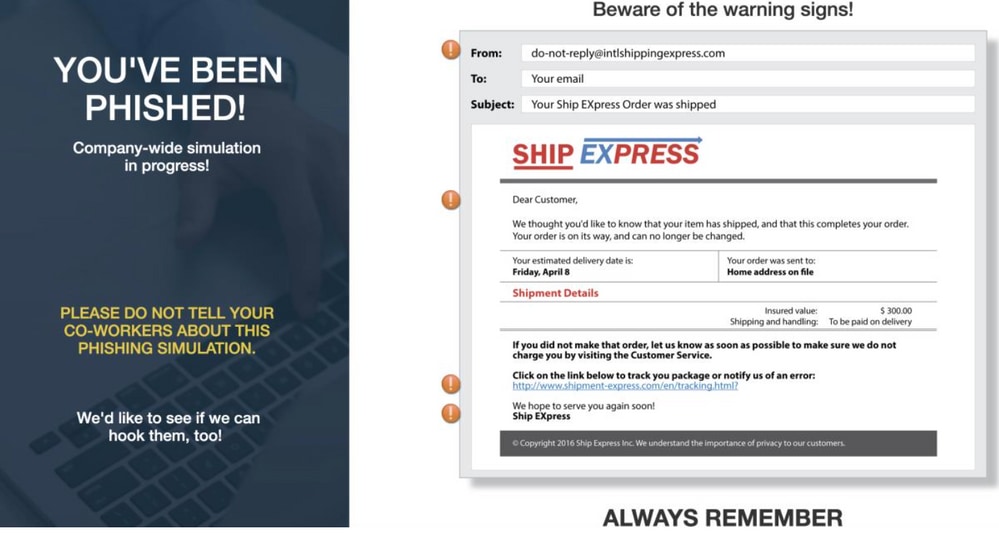 使用者點選網路釣魚郵件中的URL後看到的反饋頁面示例
在CSA上驗證
「重複按一下次數」清單顯示在Analytics > Standard Reports > Phishing Simulations > Repeat Clickersas shown in the image.
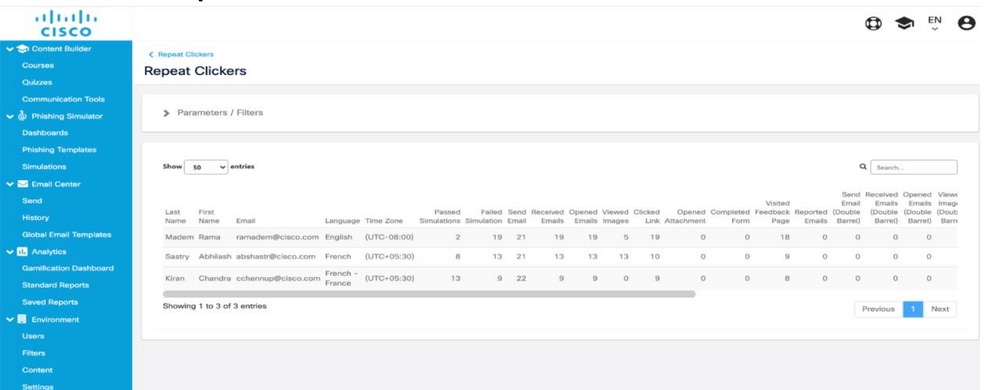 「重複按一下次數」頁面的螢幕截圖
配置安全電子郵件網關
附註:在CSA Cloud Service Step 3的Create and Send Phishing Simulations一節下。當您啟用Report API時,您已經記下了承載令牌。保持這個方便。
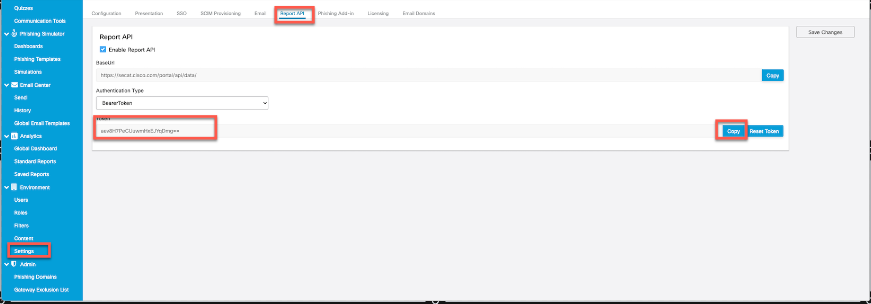 報告API下的頁面截圖,管理員可以在其中找到持有者令牌
步驟1.在安全電子郵件網關中啟用思科安全感知功能
在安全電子郵件網關GUI上,導航至Security Services > Cisco Security Awareness > Enable .「輸入區域」和CSA令牌(從CSA雲服務獲取的承載令牌,如上述註釋所示),然後提交和提交更改。
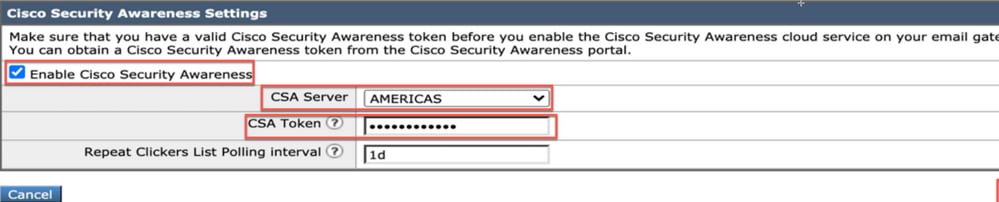 思科安全郵件網關上的思科安全感知設定頁面的螢幕截圖
CLI組態
鍵入csaconfig ,通過CLI配置CSA。
ESA (SERVICE)> csaconfig


Choose the operation you want to perform:
- EDIT - To edit CSA settings
- DISABLE - To disable CSA service
- UPDATE_LIST - To update the Repeat Clickers list
- SHOW_LIST - To view details of the Repeat Clickers list
[]> edit

Currently used CSA Server is: https://secat.cisco.com
Available list of Servers:
1. AMERICAS
2. EUROPE
Select the CSA region to connect
[1]>

Do you want to set the token? [Y]>

Please enter the CSA token for the region selected :
The CSA token should not:
- Be blank
- Have spaces between characters
- Exceed 256 characters.

Please enter the CSA token for the region selected :

Please specify the Poll Interval
[1d]>
步驟2.允許來自CSA雲服務的模擬網路釣魚郵件
附註:預設情況下CYBERSEC_AWARENESS_ALLOWED,Mailflow策略是在所有掃描引擎都設定為Off的情況下建立的,如下所示。
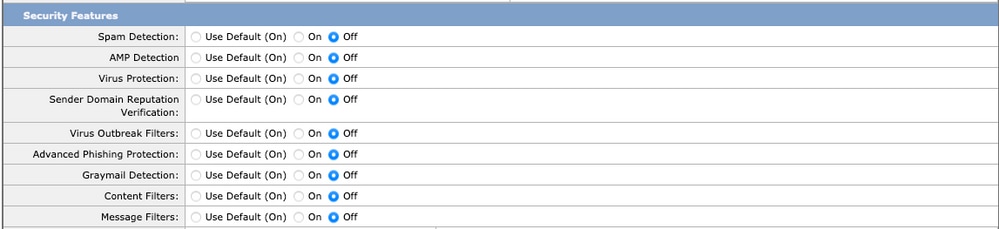 禁用了安全功能的「CYBERSEC_AWARENESS_ALLOWED」郵件流策略的螢幕截圖
要允許來自CSA雲服務的模擬網路釣魚活動電子郵件繞過安全電子郵件網關上的所有掃描引擎,請執行以下操作:
a.建立新的發件人組並分配郵件流策略CYBERSEC_AWARENESS_ALLOWED。導航到Mail Policies > HAT Overview > Add Sender Group,選擇策略CYBERSEC_AWARENESS_ALLOWED,並將順序設定為1,然後 Submit and Add Senders.
b.新增發件人IP/domain或Geo Location發起網路釣魚活動電子郵件的位置。
導覽至Mail Polices > HAT Overview > Add Sender Group > Submit and Add Senders > Add the sender IP > Submit並Commit變更,如下圖所示。
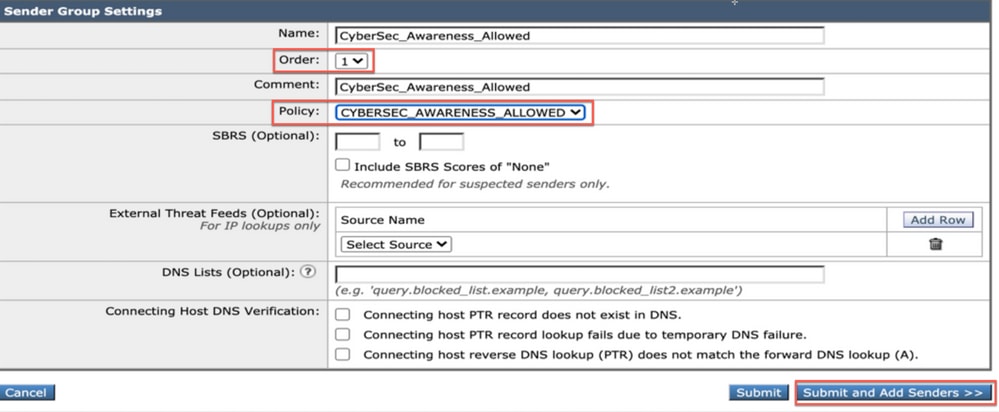 選中「CYBERSEC_AWARENESS_ALLOWED」郵件流策略的CyberSec_Awareness_Allowed發件人組的螢幕快照。
 思科安全郵件網關上的思科安全感知設定頁面的螢幕截圖
CLI配置:
1.導航至 listenerconfig > Edit > Inbound (PublicInterface) > HOSTACCESS > NEW > New Sender Group .
2.使用郵件策略建立一個新CYBERSEC_AWARENESS_ALLOWED的發件人組,並新增從中發起網路釣魚活動電子郵件的發件人IP/域。
3.將新發件人組的順序設定為1,並使用下面的Move選項 listenerconfig > EDIT > Inbound (PublicInterface) > HOSTACCESS > MOVE .
4.提交。
附註:傳送方IP是CSA的IP地址,基於您選擇的區域。請參考表,瞭解要使用的正確IP地址。允許防火牆中埠號為443的SEG 14.0.0-xxx的這些IP地址/主機名連線到CSA雲服務。
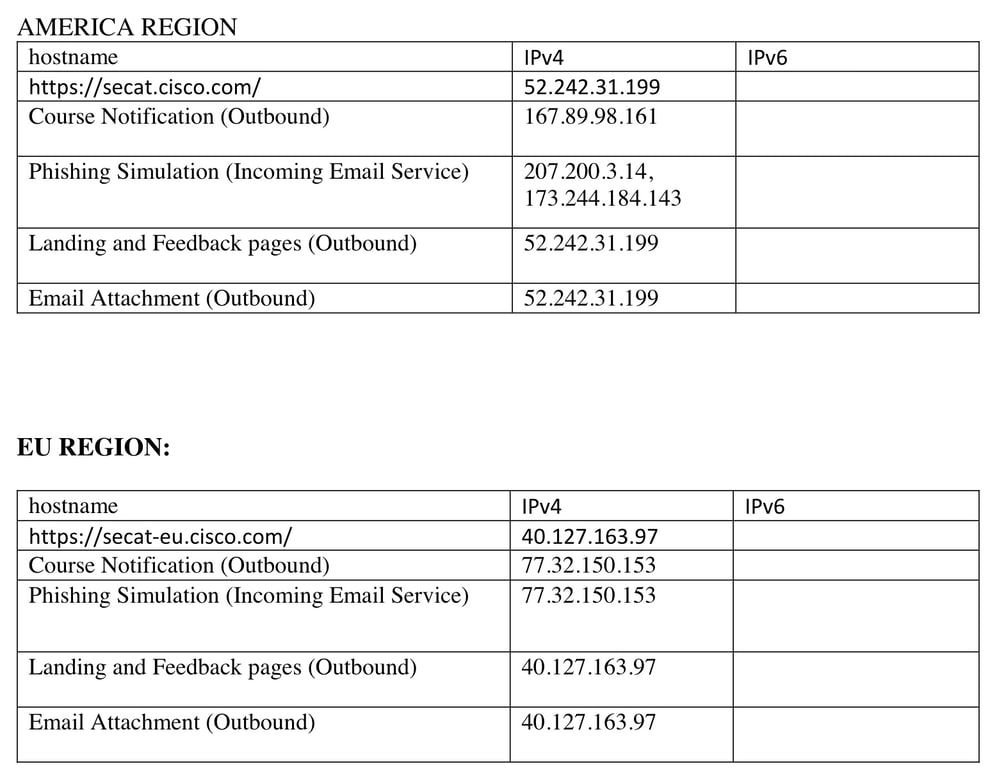 CSA美洲和歐盟地區IP地址和主機名的螢幕截圖
步驟3.對SEG的重複點選執行操作
一旦傳送了網路釣魚郵件,並且在SEG中填充了重複點選者清單,就可以建立積極的傳入郵件策略,以對傳送給這些特定使用者的郵件執行操作。
建立新的積極傳入自定義郵件策略Include Repeat Clickers List,並在收件人部分啟用覈取方塊。
在GUI中,導航到Mail Policies > Incoming Mail Policies > Add Policy > Add User > Include Repeat Clickers List > Submit並更改Commit。
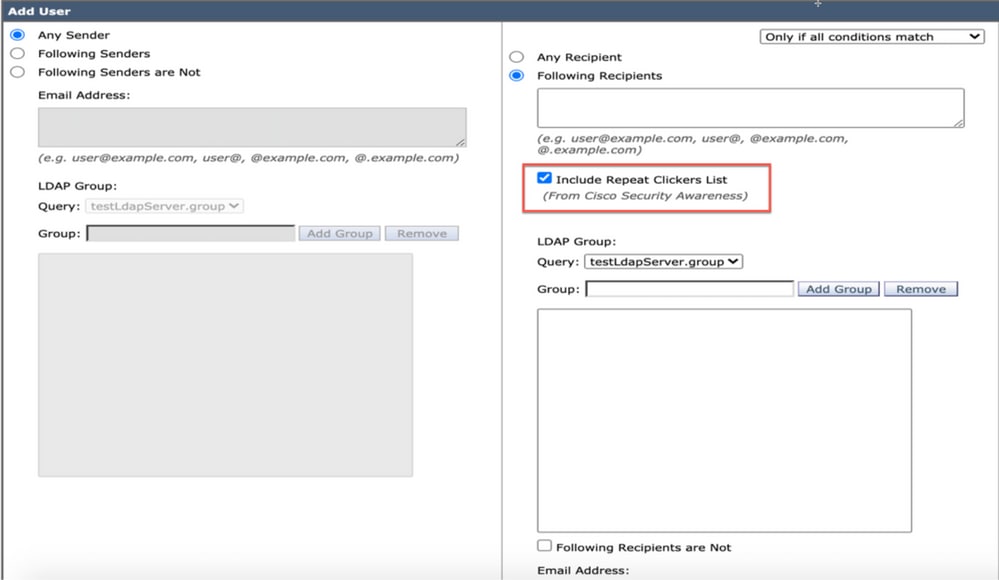 自定義傳入郵件策略的螢幕截圖,該策略配置為處理髮往重複點選的郵件
疑難排解指南
1.定位至csaconfig > SHOW_LIST以檢視重複按一下者清單的詳細資訊。
ESA (SERVICE)> csaconfig


Choose the operation you want to perform:
- EDIT - To edit CSA settings
- DISABLE - To disable CSA service
- UPDATE_LIST - To update the Repeat Clickers list
- SHOW_LIST - To view details of the Repeat Clickers list
[]> show_list

List Name       : Repeat Clickers
Report ID       : 2020
Last Updated    : 2021-02-22 22:19:08
List Status     : Active
Repeat Clickers : 4
2.如果要強制更新csaconfig > UPDATE_LIST 「重複按一下者」清單,請導航至。
ESA (SERVICE)> csaconfig


Choose the operation you want to perform:
- EDIT - To edit CSA settings
- DISABLE - To disable CSA service
- UPDATE_LIST - To update the Repeat Clickers list
- SHOW_LIST - To view details of the Repeat Clickers list
[]> update_list

Machine: ESA An update for the Repeat Clickers list was initiated successfully.
3.跟蹤csa日誌,檢視是否已下載重複按一下程式清單或是否存在錯誤。以下是 working setup:
tail csa
Tue Jan  5 13:20:31 2021 Info: CSA: Connecting to the Cisco Security Awareness cloud service [https://secat.cisco.com/portal/api/license/info]
Tue Jan  5 13:20:31 2021 Info: CSA: Polling the Cisco Security Awareness cloud service to download the latest Repeat Clickers list.
Tue Jan  5 13:20:31 2021 Info: CSA: Trying to get the license expiry date: loop count 0
Tue Jan  5 13:20:31 2021 Info: CSA: Connecting to the Cisco Security Awareness cloud service [https://secat.cisco.com/portal/api/data/report/2020]
Tue Jan  5 13:20:31 2021 Info: CSA: Trying to download Repeat clickers list: loop count 0
Tue Jan  5 13:20:31 2021 Info: CSA: The update of the Repeat Clickers list was completed at [Tue Jan  5 13:20:29 2021]. Version: 1
Wed Jan  6 13:20:32 2021 Info: CSA: Polling the Cisco Security Awareness cloud service to download the latest Repeat Clickers list.
Here is an output when you have entered the incorrect token:
tail csa
Fri Feb 19 12:28:39 2021 Info: CSA: Connecting to the Cisco Security Awareness cloud service [https://secat.cisco.com/portal/api/license/info]
Fri Feb 19 12:28:39 2021 Info: CSA: Trying to get the license expiry date: loop count 0
Fri Feb 19 12:28:39 2021 Info: CSA: Polling the Cisco Security Awareness cloud service to download the latest Repeat Clickers list.
Fri Feb 19 12:28:43 2021 Info: CSA: Connecting to the Cisco Security Awareness cloud service [https://secat.cisco.com/portal/api/data/report/2020]
Fri Feb 19 12:28:43 2021 Info: CSA: Trying to download Repeat clickers list: loop count 0
Fri Feb 19 12:28:44 2021 Warning: CSA: The download of the Repeat Clickers list from the Cisco Security Awareness cloud service failed because of an invalid token.
4.從GUI也可以看到重複點選數清單的計數。導覽至Security Services > Cisco Security Awareness如下圖所示。
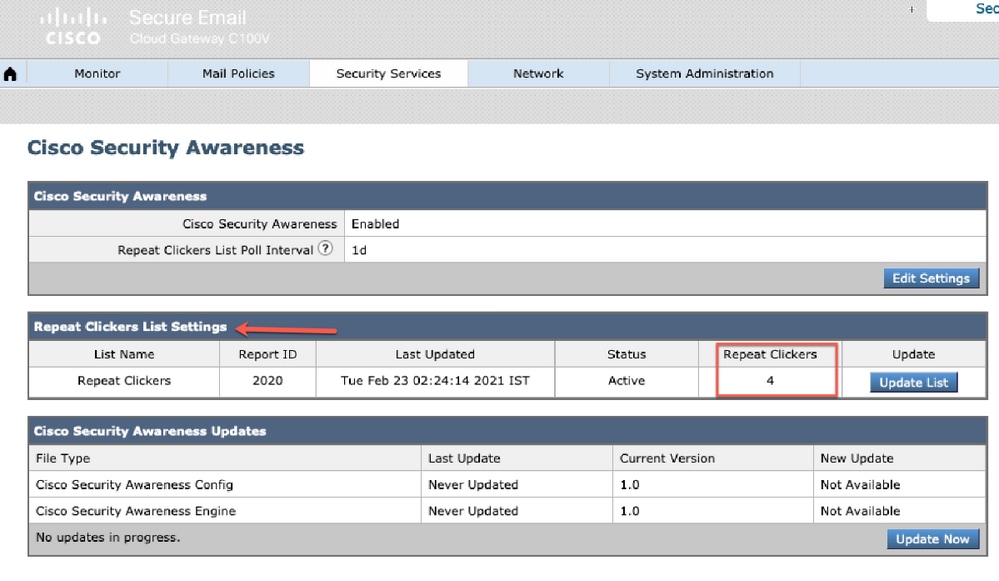 「安全服務」>「思科安全感知」頁面的螢幕截圖,突出顯示重複點選的數量
相關資訊

 意見
意見