排除ESA上的自定義CA清單證書過期警報故障

簡介
本檔案介紹升級到AsyncOS 14.x後,安全電子郵件閘道(ESA)上的自訂CA憑證到期警示。
概觀
症狀是在升級期間附加到自定義證書頒發機構(CA)清單的證書過期警報。此影響限於資訊警報,因為自定義清單中的證書到期不會影響系統清單中的證書。解決方法是驗證憑證來源,並替換所需的自訂CA憑證,或從自訂清單中移除到期的憑證。
採用元件
本文檔基於運行AsyncOS 14.0或更高版本的思科安全電子郵件網關。
本文中的資訊是根據特定實驗室環境內的裝置所建立。文中使用到的所有裝置皆從已清除(預設)的組態來啟動。如果您的網路運作中,請確保您瞭解任何指令可能造成的影響。
背景資訊
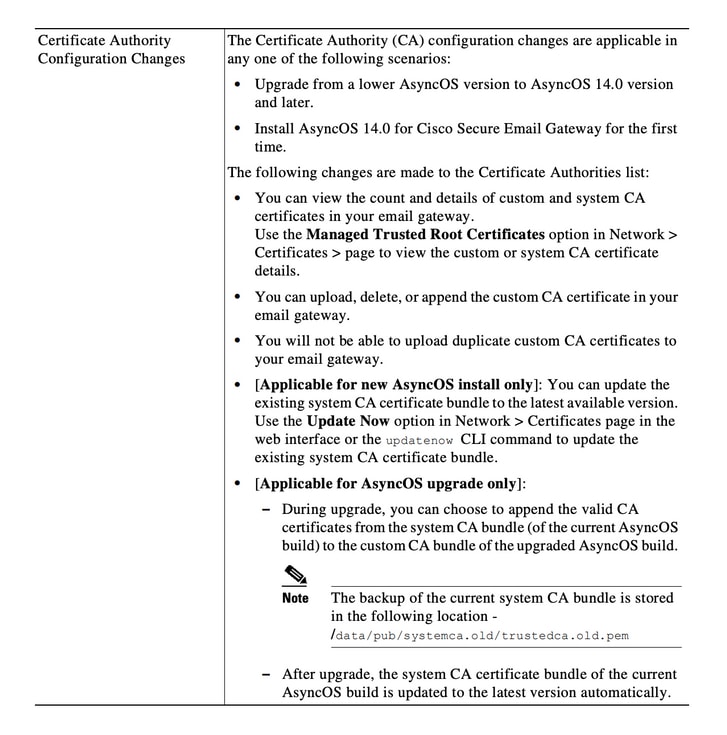
在升級到AsyncOS 14.x的過程中,系統會提示客戶確認是否要將舊系統證書附加到自定義CA清單。此行為也記錄在AsyncOS 14.0版本說明中,如圖1所示。請參閱Cisco Secure Email Gateway Release Notes for AsyncOS 14.0。
圖1.發行說明摘錄顯示了用於將舊系統證書附加到自定義CA清單的升級提示。
問題
升級到AsyncOS 14.x後,附加到自定義清單的舊系統證書可能會隨時間過期並生成警報(如本示例)。
2021年6月26日11:27:29 -0400您的證書CA:Root CA Generalitat Valenciana將在5天後過期。
這些警報表示升級時附加到自定義清單的舊系統證書即將過期,或者表示先前使用的自定義證書即將過期。
解決方案
自定義清單中較舊系統證書的警報只是提供資訊,您可以選擇將其從自定義清單中刪除或允許其過期。
這種情況不影響服務,但可能不需要報警。
如果您看到您的組織所需的自定義CA證書的警報,且當前未包含在系統清單中,請與CA聯絡以獲取更新的證書,並按照Cisco Secure Email Gateway管理指南證書管理步驟中所述進行替換。
系統CA證書捆綁在升級後自動更新,之後定期更新。自定義清單中的證書到期不會影響系統清單中的證書。
要驗證系統清單和自定義清單是否已啟用,請導航到網路>證書>證書頒發機構>編輯設定。
您也可以從同一選單匯出系統和自定義清單,或使用CLI命令certconfig和certauthority根據需要檢視兩個清單中的證書。
如果要刪除在自定義CA清單中生成警報的證書,請以管理員身份通過SSH完成這些步驟。
- 執行certconfig。
- 輸入certauthority,然後輸入custom。
- 輸入delete並選擇與警報匹配的證書。
- 確認刪除,然後運行commit以儲存更改。
此CLI範例顯示工作流程。
example.com> certconfig

Choose the operation you want to perform:
- CERTIFICATE - Import, Create a request, Edit or Remove Certificate Profiles
- CERTAUTHORITY - Manage System and Customized Authorities
- CRL - Manage Certificate Revocation Lists
[]> certauthority

Certificate Authority Summary
Custom List: Enabled
System List: Enabled

Choose the operation you want to perform:
- CUSTOM - Manage Custom Certificate Authorities
- SYSTEM - Manage System Certificate Authorities
[]> custom

Choose the operation you want to perform:
- DISABLE - Disable the custom certificate authorities list
- IMPORT - Import the list of custom certificate authorties
- EXPORT - Export the list of custom certificate authorties
- DELETE - Remove a certificate from the custom certificate authorty list
- PRINT - Print the list of custom certificate authorties
- CHECK_CA_FLAG - Check CA flag in uploaded custom CA certs
[]> delete

You must enter a value from 1 to 104.
...
59. [Root CA Generalitat Valenciana] <<< Select this certificate based on the sample alert in this example
...
93. [thawte Primary Root CA]

Select the custom CA certificate you want to delete
[]> 59

Are you sure you want to delete "Root CA Generalitat Valenciana"? [N]> Y
Custom CA certificate "Root CA Generalitat Valenciana" removed

Choose the operation you want to perform:
- DISABLE - Disable the custom certificate authorities list
- IMPORT - Import the list of custom certificate authorties
- EXPORT - Export the list of custom certificate authorties
- DELETE - Remove a certificate from the custom certificate authorty list
- PRINT - Print the list of custom certificate authorties
- CHECK_CA_FLAG - Check CA flag in uploaded custom CA certs
[]> [ENTER]

Certificate Authority Summary
Custom List: Enabled
System List: Enabled
Choose the operation you want to perform:
- CUSTOM - Manage Custom Certificate Authorities
- SYSTEM - Manage System Certificate Authorities
[]> [ENTER]

Choose the operation you want to perform:
- CERTIFICATE - Import, Create a request, Edit or Remove Certificate Profiles
- CERTAUTHORITY - Manage System and Customized Authorities
- CRL - Manage Certificate Revocation Lists
[]> [ENTER]

example.com> commit
確保在結束時運行commit。
相關資訊
修訂記錄
| 修訂 | 發佈日期 | 意見 |
|---|---|---|
2.0 |
07-Jul-2026
|
重新認證。 |
1.0 |
29-Jun-2021
|
初始版本 |
 意見
意見