通過Firepower威脅防禦FTD啟用Traceroute

簡介
本檔案介紹允許透過Firepower威脅防禦(FTD)透過威脅防禦服務原則進行traceroute的組態。
必要條件
需求
思科建議您瞭解以下主題:
- Firepower Threat Defense (FTD)
- Firepower Management Center (FMC)
採用元件
本文中的資訊係根據以下軟體和硬體版本:
- 本文適用於所有Firepower平台。
- 運行軟體版本6.4.0的Cisco Firepower威脅防禦。
- 運行軟體版本6.4.0的Cisco Firepower管理中心虛擬。
本文中的資訊是根據特定實驗室環境內的裝置所建立。文中使用到的所有裝置皆從已清除(預設)的組態來啟動。如果您的網路運作中,請確保您瞭解任何指令可能造成的影響。
背景資訊
Traceroute幫助您確定封包到達最終目的地所行經的路由。Traceroute的工作方式是向無效連線埠上的目的地傳送使用者資料包通訊協定(UDP)封包。由於連線埠無效,在前往目的地的途中,路由器會以網際網路控制訊息通訊協定(ICMP)超出時間訊息進行回應,並將該錯誤報告給調適型安全裝置(ASA)。
traceroute顯示每個探測器傳送的結果,並且每行輸出對應一個生存時間(TTL)值(按遞增順序)。下表說明了輸出符號。
| 輸出符號 |
說明 |
| * | 在超時期限內未收到探測的響應。 |
| nn msec |
每個節點的指定探查數來回時間(以毫秒為單位)。 |
| !否 |
ICMP網路無法訪問。 |
| !H |
無法連線到ICMP主機。 |
| !P |
ICMP協定/埠無法訪問。 |
| !A |
ICMP管理性禁止。 |
| ? |
未知的ICMP錯誤。 |
預設情況下,ASA在traceroute上不會顯示為躍點。要使其顯示,請縮短通過ASA的資料包的生存時間,並提高ICMP無法到達消息的速率限制。

注意:如果減少生存時間,則TTL為1的資料包將被丟棄,但會為會話開啟連線,前提是連線可以包含具有較大TTL的資料包。某些資料包(如OSPF hello資料包)使用TTL = 1傳送,因此縮短生存時間會產生意外的後果。定義流量類時,請記住這些注意事項。
設定
1.建立擴展ACL,定義必須為其啟用traceroute報告的流量類。
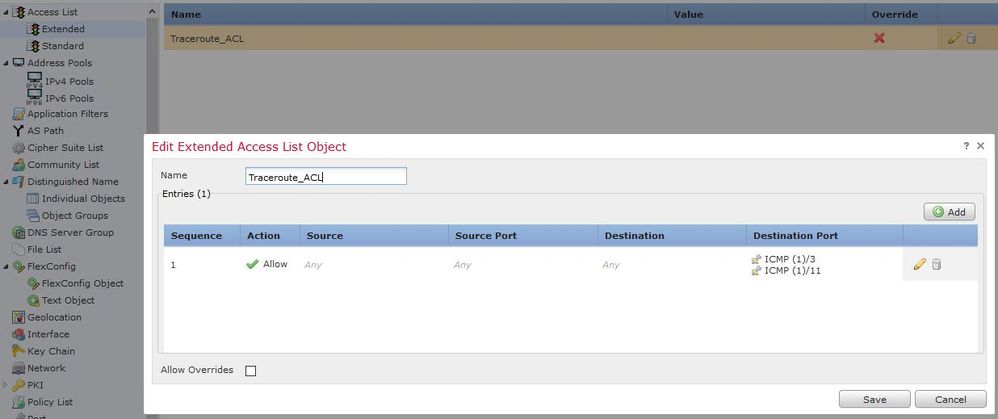
2.登入到FMC GUI,然後導覽至對象>對象管理>訪問清單。從目錄中選擇擴展,然後選擇添加新的擴展訪問清單。
3.輸入對象的名稱,例如,在Traceroute_ACL下,新增允許ICMP型別3和11的規則並儲存,如下圖所示:
4.配置減少生存時間的服務策略規則。
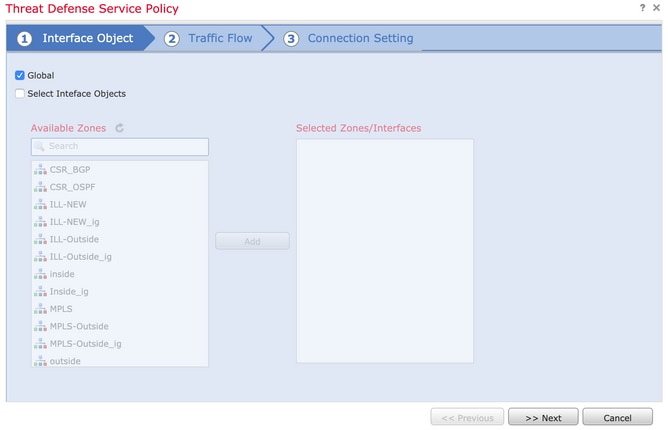
5.依次導航至Policies > Access Control ,然後Edit分配給裝置的策略。在「Advanced」頁籤下,編輯Threat Defense Service Policy,然後從Add Rule頁籤中新增新規則,然後選中Global覈取方塊以全域性應用該規則或選擇要應用TTL遞減的特定區域),然後按一下Next,如下圖所示:
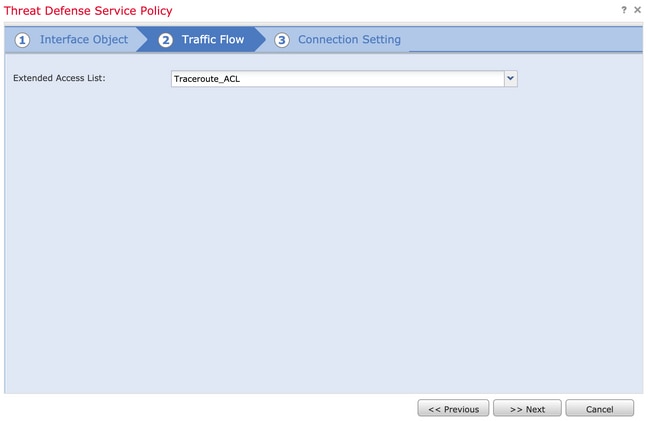
6.導航至Traffic Flow > Extended Access List,然後從下拉選單中選擇Extended Access List Object(在前面步驟中建立)。現在按一下Next,如下圖所示:
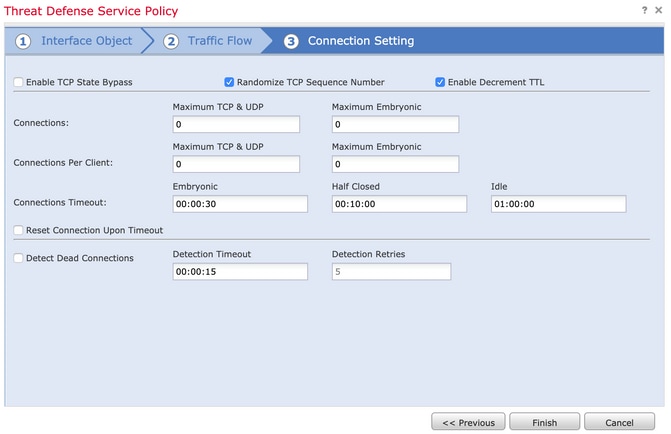
7.選擇啟用遞減TTL覈取方塊,然後修改其他連線選項(可選)。 現在,按一下Finish以新增規則,然後按一下OK,然後按一下Save以儲存對Threat Defense Service Policy所做的更改,如下圖所示:
8.完成上述步驟後,儲存訪問控制策略。
允許內部和外部的ICMP,並將速率限制增加到50 — 可選
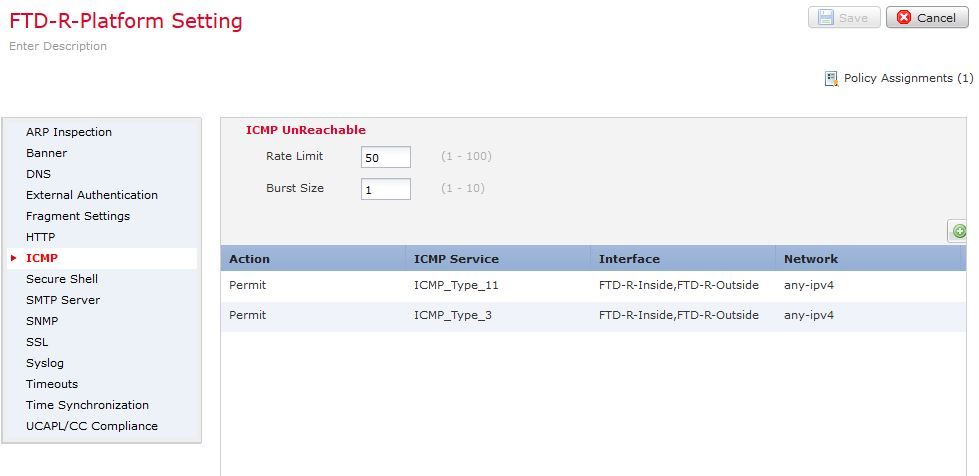
1.依次導航到Devices > Platform Settings,然後Edit或Create新的Firepower威脅防禦平台設定策略並將其與裝置關聯。從內容表中選擇ICMP,然後增大速率限制。例如,設定為50(可以忽略突發大小),然後按一下Save,然後繼續到Deploy將策略部署到裝置,如下圖所示:
-
速率限制:設定每秒1到100條消息之間的無法到達消息的速率限制。預設為每秒1條消息。
-
突發大小:將突發速率設定為1到10之間。系統當前未使用此值。
注意:確保在ACL策略中允許從外部到內部或透過預過濾器策略中的快速路徑對要測試的相關流量執行ICMP目的地無法連線(型別3)和ICMP超出時間(型別11)。

附註:如果為雙ISP方案配置了IP SLA或PBR,請確保將ICMP型別0和8新增為ICMP配置的一部分,並將其作為平台設定下的ICMP配置的一部分。否則,SLA可能會失敗,而且與SLA關聯的預設路由可能會從RIB中取出,從而導致流量中斷。
驗證
完成策略部署後,從FTD CLI檢查配置:
FTD# show run policy-map
!
policy-map type inspect dns preset_dns_map
---Output omitted---

class class_map_Traceroute_ACL
set connection timeout idle 1:00:00
set connection decrement-ttl
class class-default
!

FTD# show run class-map
!
class-map inspection_default

---Output omitted---

class-map class_map_Traceroute_ACL
match access-list Traceroute_ACL
!

FTD# show run access-list Traceroute_ACL
access-list Traceroute_ACL extended permit object-group ProxySG_ExtendedACL_30064773500 any any log
FTD#
疑難排解
您可以在FTD輸入和輸出介面上擷取唯一流量,以進一步解決此問題。在Lina上擷取封包,雖然正在從主機執行traceroute,但路由中的各躍點均可顯示此情況,直到到達目標IP:
ftd64# capture icmp interface inside real-time match icmp any any

Warning: using this option with a slow console connection may
         result in an excessive amount of non-displayed packets
         due to performance limitations.

Use ctrl-c to terminate real-time capture


   1: 00:22:04.192800       10.0.0.1 > 10.10.10.11 icmp: time exceeded in-transit
   2: 00:22:04.194432       10.0.0.1 > 10.10.10.11 icmp: time exceeded in-transit
   3: 00:22:04.194447       10.0.0.1 > 10.10.10.11 icmp: time exceeded in-transit
   4: 00:22:04.194981       172.16.1.1 > 10.10.10.11 icmp: time exceeded in-transit
   5: 00:22:04.194997       172.16.1.1 > 10.10.10.11 icmp: time exceeded in-transit
   6: 00:22:04.201130       10.122.149.1 > 10.10.10.11 icmp: time exceeded in-transit
   7: 00:22:04.201146       10.122.149.1 > 10.10.10.11 icmp: time exceeded in-transit
   8: 00:22:04.201161       172.16.1.1 > 10.10.10.11 icmp: time exceeded in-transit
   9: 00:22:04.201375       10.0.114.197 > 10.10.10.11 icmp: time exceeded in-transit
  10: 00:22:04.201420       10.0.254.225 > 10.10.10.11 icmp: time exceeded in-transit
  11: 00:22:04.202336       10.122.149.1 > 10.10.10.11 icmp: time exceeded in-transit
  12: 00:22:04.202519       10.0.127.113 > 10.10.10.11 icmp: time exceeded in-transit
  13: 00:22:04.216022       10.0.127.113 > 10.10.10.11 icmp: time exceeded in-transit
  14: 00:22:04.216038       10.0.127.113 > 10.10.10.11 icmp: time exceeded in-transit
  15: 00:22:04.216038       10.0.114.197 > 10.10.10.11 icmp: time exceeded in-transit
  16: 00:22:04.216053       10.0.114.197 > 10.10.10.11 icmp: time exceeded in-transit
  17: 00:22:04.216297       172.18.127.245 > 10.10.10.11 icmp: 172.18.127.245 udp port 33452 unreachable
  18: 00:22:04.216312       10.0.254.225 > 10.10.10.11 icmp: time exceeded in-transit
  19: 00:22:04.216327       10.0.254.225 > 10.10.10.11 icmp: time exceeded in-transit
如果您使用列出的「 — I」和「 — n」交換器執行traceroute,可在Lina CLI上取得更詳細的輸出:
[ On the Client PC ]

# traceroute 10.18.127.245 -I -n

Note: You may not observe any difference between traceroute with or without -I switch. The difference is noticeable in the packet captures.


[ On FTD Lina CLI ]

ftd64# capture icmp interface inside real-time match icmp any any

Warning: using this option with a slow console connection may
         result in an excessive amount of non-displayed packets
         due to performance limitations.

Use ctrl-c to terminate real-time capture


   1: 18:37:33.517307       10.10.10.11 > 172.18.127.245 icmp: echo request
   2: 18:37:33.517642       10.10.10.11 > 172.18.127.245 icmp: echo request
   3: 18:37:33.517658       10.10.10.11 > 172.18.127.245 icmp: echo request
   4: 18:37:33.517658       10.10.10.11 > 172.18.127.245 icmp: echo request
   5: 18:37:33.517673       10.10.10.11 > 172.18.127.245 icmp: echo request
   6: 18:37:33.517673       10.10.10.11 > 172.18.127.245 icmp: echo request
   7: 18:37:33.517673       10.10.10.11 > 172.18.127.245 icmp: echo request
   8: 18:37:33.517749       10.10.10.11 > 172.18.127.245 icmp: echo request
   9: 18:37:33.517749       10.10.10.11 > 172.18.127.245 icmp: echo request
  10: 18:37:33.517764       10.10.10.11 > 172.18.127.245 icmp: echo request
  11: 18:37:33.517764       10.10.10.11 > 172.18.127.245 icmp: echo request
  12: 18:37:33.517826       10.10.10.11 > 172.18.127.245 icmp: echo request
  13: 18:37:33.517826       10.10.10.11 > 172.18.127.245 icmp: echo request
  14: 18:37:33.517826       10.10.10.11 > 172.18.127.245 icmp: echo request
  15: 18:37:33.517932       10.10.10.11 > 172.18.127.245 icmp: echo request
  16: 18:37:33.517932       10.10.10.11 > 172.18.127.245 icmp: echo request
  17: 18:37:33.522464       10.0.0.1 > 10.10.10.11 icmp: time exceeded in-transit
  18: 18:37:33.522510       10.0.0.1 > 10.10.10.11 icmp: time exceeded in-transit
  19: 18:37:33.522510       10.0.0.1 > 10.10.10.11 icmp: time exceeded in-transit
  20: 18:37:33.522632       172.16.1.1 > 10.10.10.11 icmp: time exceeded in-transit
  21: 18:37:33.522647       172.16.1.1 > 10.10.10.11 icmp: time exceeded in-transit
  22: 18:37:33.522647       172.16.1.1 > 10.10.10.11 icmp: time exceeded in-transit
  23: 18:37:33.523852       10.0.114.197 > 10.10.10.11 icmp: time exceeded in-transit
  24: 18:37:33.523929       10.0.114.197 > 10.10.10.11 icmp: time exceeded in-transit
  25: 18:37:33.523944       10.0.114.197 > 10.10.10.11 icmp: time exceeded in-transit
  26: 18:37:33.524066       10.0.127.113 > 10.10.10.11 icmp: time exceeded in-transit
  27: 18:37:33.524127       10.0.254.225 > 10.10.10.11 icmp: time exceeded in-transit
  28: 18:37:33.524127       10.0.127.113 > 10.10.10.11 icmp: time exceeded in-transit
  29: 18:37:33.524142       10.0.127.113 > 10.10.10.11 icmp: time exceeded in-transit
  30: 18:37:33.526767       10.122.149.1 > 10.10.10.11 icmp: time exceeded in-transit
  31: 18:37:33.526843       10.122.149.1 > 10.10.10.11 icmp: time exceeded in-transit
  32: 18:37:33.526843       10.122.149.1 > 10.10.10.11 icmp: time exceeded in-transit
  33: 18:37:33.527652       10.10.10.11 > 172.18.127.245 icmp: echo request
  34: 18:37:33.527697       10.10.10.11 > 172.18.127.245 icmp: echo request
  35: 18:37:33.527713       10.10.10.11 > 172.18.127.245 icmp: echo request
  36: 18:37:33.527728       10.10.10.11 > 172.18.127.245 icmp: echo request
  37: 18:37:33.527987       10.10.10.11 > 172.18.127.245 icmp: echo request
  38: 18:37:33.528033       10.10.10.11 > 172.18.127.245 icmp: echo request
  39: 18:37:33.528048       10.10.10.11 > 172.18.127.245 icmp: echo request
  40: 18:37:33.528048       10.10.10.11 > 172.18.127.245 icmp: echo request
  41: 18:37:33.528064       10.10.10.11 > 172.18.127.245 icmp: echo request
  42: 18:37:33.528064       10.10.10.11 > 172.18.127.245 icmp: echo request
  43: 18:37:33.528079       10.10.10.11 > 172.18.127.245 icmp: echo request
  44: 18:37:33.528094       10.10.10.11 > 172.18.127.245 icmp: echo request
  45: 18:37:33.528094       10.10.10.11 > 172.18.127.245 icmp: echo request
  46: 18:37:33.532870       10.0.254.225 > 10.10.10.11 icmp: time exceeded in-transit
  47: 18:37:33.532885       10.0.254.225 > 10.10.10.11 icmp: time exceeded in-transit
  48: 18:37:33.533679       172.18.127.245 > 10.10.10.11 icmp: echo reply
  49: 18:37:33.533694       172.18.127.245 > 10.10.10.11 icmp: echo reply
  50: 18:37:33.533694       172.18.127.245 > 10.10.10.11 icmp: echo reply
  51: 18:37:33.533694       172.18.127.245 > 10.10.10.11 icmp: echo reply
  52: 18:37:33.533694       172.18.127.245 > 10.10.10.11 icmp: echo reply
  53: 18:37:33.533724       172.18.127.245 > 10.10.10.11 icmp: echo reply
  54: 18:37:33.533724       172.18.127.245 > 10.10.10.11 icmp: echo reply
  55: 18:37:33.533724       172.18.127.245 > 10.10.10.11 icmp: echo reply
  56: 18:37:33.533740       10.10.10.11 > 172.18.127.245 icmp: echo request
  57: 18:37:33.533816       10.10.10.11 > 172.18.127.245 icmp: echo request
  58: 18:37:33.533831       10.10.10.11 > 172.18.127.245 icmp: echo request
  59: 18:37:33.537066       172.18.127.245 > 10.10.10.11 icmp: echo reply
  60: 18:37:33.537081       172.18.127.245 > 10.10.10.11 icmp: echo reply
  61: 18:37:33.537081       172.18.127.245 > 10.10.10.11 icmp: echo reply
  62: 18:37:33.538500       172.18.127.245 > 10.10.10.11 icmp: echo reply
  63: 18:37:33.538500       172.18.127.245 > 10.10.10.11 icmp: echo reply
  64: 18:37:33.539217       172.18.127.245 > 10.10.10.11 icmp: echo reply
64 packets shown.
0 packets not shown due to performance limitations.

提示:思科錯誤ID CSCvq79913 — 對於Null pdts_info,已丟棄ICMP錯誤資料包。確保對ICMP使用預過濾器,最好對型別3和11的返回流量使用預過濾器。
相關資訊
修訂記錄
| 修訂 | 發佈日期 | 意見 |
|---|---|---|
4.0 |
17-Aug-2026
|
已更新標題、拼寫、語法、插入水平線以分隔各個部分,以瞭解可讀性、固定URL和CCW錯誤。 |
3.0 |
24-May-2024
|
重新認證 |
2.0 |
24-Mar-2023
|
已更新標題、簡介、替代文本、機器翻譯、樣式要求、種語和格式。 |
1.0 |
12-Feb-2020
|
初始版本 |
 意見
意見