配置第3層TLOC擴展

簡介
本檔案介紹如何在軟體定義廣域網(SD-WAN)上設定TLOC擴充第3層(L3)。
必要條件
需求
思科建議您瞭解以下主題:
- 模板
- TLOC擴展
- 路由通訊協定
- SD-WAN概述
採用元件
本文中的資訊係根據以下軟體和硬體版本:
- vBond版本20.7.2
- vSmart版本20.7.2
- vManage版本20.7.2
- Cisco vManage 20.7.x版或更高版本
- 整合服務路由器(ISR)4451/K9版本17.7.2
本文中的資訊是根據特定實驗室環境內的裝置所建立。文中使用到的所有裝置皆從已清除(預設)的組態來啟動。如果您的網路運作中,請確保您瞭解任何指令可能造成的影響。
背景資訊
TLOC擴展允許廣域網邊緣路由器執行以下操作:
- 通過TLOC擴展介面通過WAN傳輸(連線到相鄰的WAN邊緣路由器)進行通訊。
- 擴展TLOC以在傳輸端具有冗餘。
配置TLOC擴展有兩種方法:
通過L2
- 在同一物理站點連線另一個SD-WAN路由器。
通過L3
- 要求路由器具備用於配置任何路由協定的L3功能。
- 在SD-WAN裝置和非SD-WAN裝置之間連線。
- 必須通過GRE隧道擴展TLOC。
設定
網路圖表
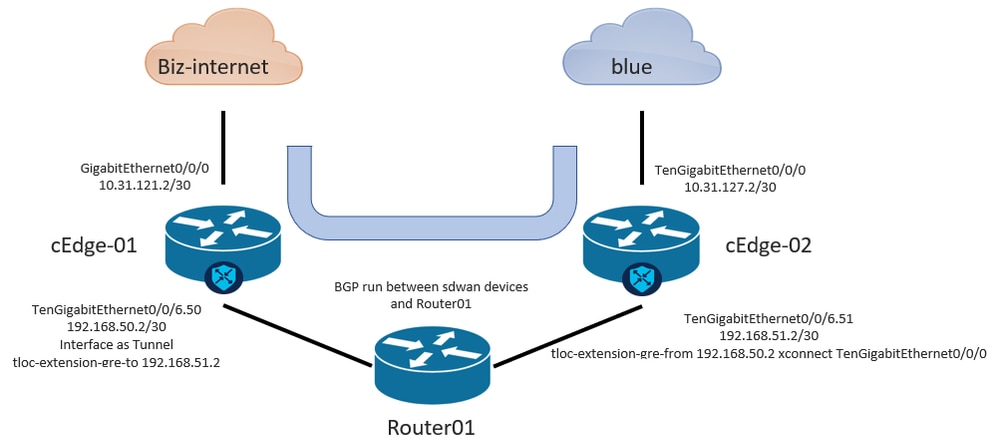
從vManage GUI配置TLOC擴展L3

附註:必須配置路由協定,以便在SD-WAN裝置與非SW-WAN裝置之間通訊。在此範例中,已設定BGP。
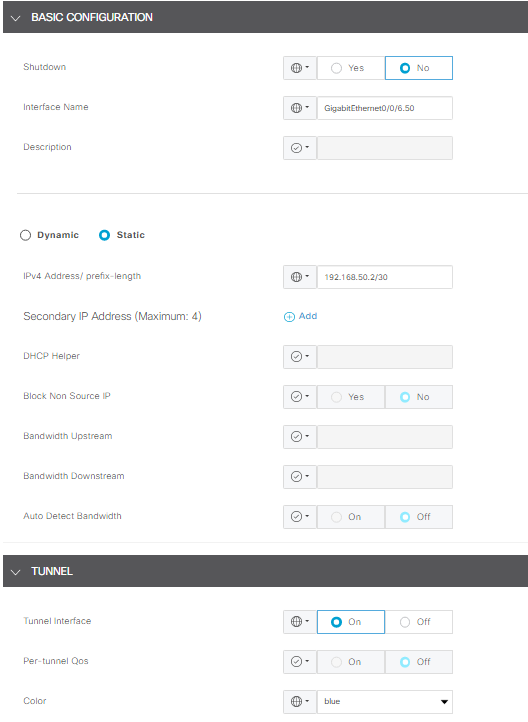
步驟1. cEdge-01上的配置
- 為TLOC-L3連線配置介面,並將其分配給隧道介面。
- 在vManage GUI中,導航至Configuration > Templates > Feature Template > Select Device > VPN Interface Ethernet。
- 配置介面的基本配置,分配IP地址;在本例中,interface GigabitEthernet0/0/6.50。
- 導航到Tunnel部分並開啟它開啟。使用與其他SD-WAN裝置相同的顏色作為本地顏色,在本例中為藍色。
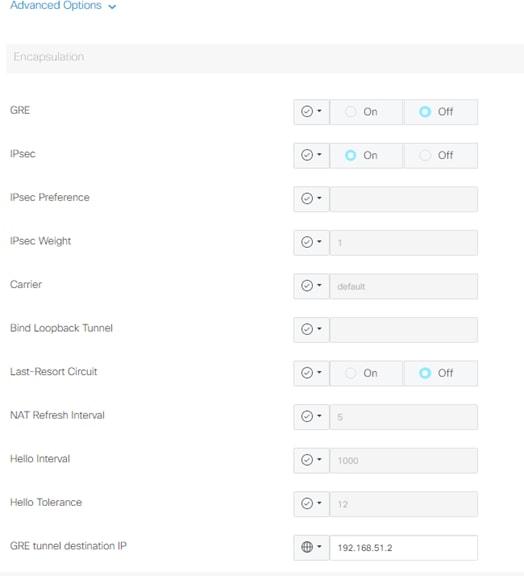
2.從接收TLOC的裝置啟用TLOC擴展語句。
- 導覽至Tunnel > Advance Option > GRE Tunnel destination IP。
附註:IP地址必須是分配給用於第3層連線的另一台SD-WAN裝置的介面地址。例如,介面TengigabitEthernet0/0/6.51的cEdge-02上的IP地址。
3.在裝置獲取TLOC的位置啟用TLOC擴展語句。
- 導覽至Tunnel > Advance Option > GRE Tunnel destination IP。
4. IP地址必須是分配給用於第3層連線的另一台SD-WAN裝置的介面。在本例中,是介面TenGigabitEthernet0/0/6.51的cEdge-02上的IP地址。
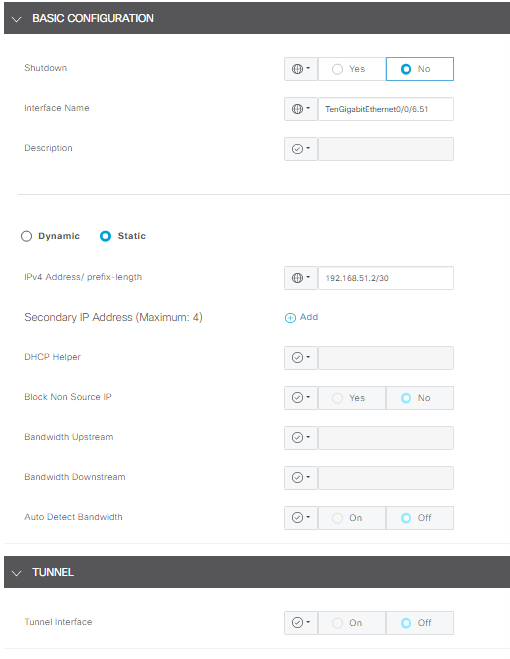
步驟2. cEdge-02上的配置
1. 在vManage GUI中,導航至Configuration > Templates > Feature Template > Select Device > VPN Interface Ethernet。
附註:在此介面中,通道必須關閉。
- 配置介面的基本配置。
- 分配IP地址(本例中為TenGigabitEthernet0/0/6.51)。
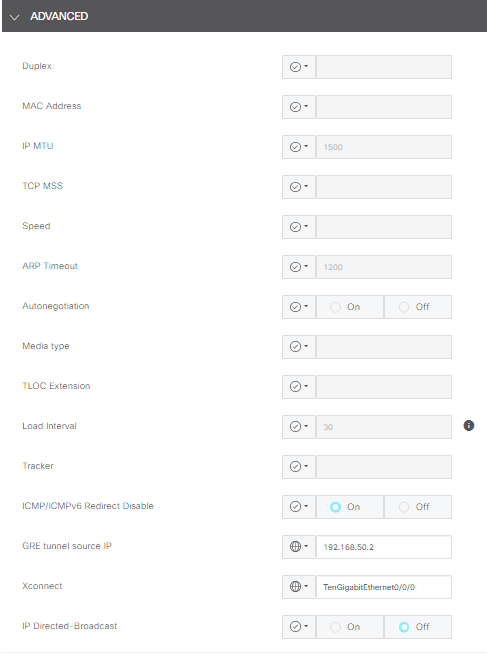
2.定位至高級部分,然後完成GRE隧道源IP的相關資訊。
附註:
- IP地址必須是分配給用於第3層連線的另一台SD-WAN裝置的介面地址。
- xconnect必須是用於通過擴展TLOC傳送流量的WAN介面。
例如,介面TengigabitEthernet0/0/6.51的cEdge-02上的IP地址。
從CLI配置TlOC擴展L3
在本節中,您可以檢查模板推送後CLI上的配置外觀。
cEdge-01上的配置:
cEdge-01#show sdwan running-config
system
 system-ip
 site-id
 organization-name
 vbond
!
hostname cEdge-01
!
ip route 0.0.0.0 0.0.0.0 10.31.121.1
interface GigabitEthernet0/0/0
 no shutdown
 ip address 10.31.121.2 255.255.255.252
exit
interface GigabitEthernet0/0/6
 no shutdown
 ip mtu 1504
 mtu 1504
 negotiation auto
exit
interface GigabitEthernet0/0/6.50
 no shutdown
 encapsulation dot1Q 50
 ip address 192.168.50.2 255.255.255.252
exit
interface Loopback100
 no shutdown
 ip address 10.10.10.10 255.255.255.255
exit
interface Tunnel0
 no shutdown
 ip unnumbered GigabitEthernet0/0/0
 tunnel source GigabitEthernet0/0/0
 tunnel mode sdwan
exit
interface Tunnel10101012
 no shutdown
 ip unnumbered GigabitEthernet0/0/6.50
 no ip redirects
 ipv6 unnumbered GigabitEthernet0/0/6.50
 no ipv6 redirects
 tunnel source GigabitEthernet0/0/6.50
 tunnel mode sdwan
exit
router bgp 65001
 bgp log-neighbor-changes
 bgp router-id 10.10.10.10
 neighbor 192.168.50.1 remote-as 65003
 address-family ipv4 unicast
  neighbor 192.168.50.1 activate
  network 192.168.50.0 mask 255.255.255.252
  exit-address-family
 !
sdwan
 interface GigabitEthernet0/0/0
  tunnel-interface
   encapsulation ipsec
   color biz-internet
   allow-service all
  exit
 exit
 interface GigabitEthernet0/0/6.50
  tunnel-interface
   encapsulation ipsec
   color blue
   tloc-extension-gre-to 192.168.51.2
  exit
exit
cEdge-01#
Edge-02上的配置:
cEdge-02#show sdwan running-config
system
 system-ip
 site-id
 organization-name
 vbond
!
hostname cEdge-02
!
ip route 0.0.0.0 0.0.0.0 10.31.127.1
ip nat inside source list nat-dia-vpn-hop-access-list interface TenGigabitEthernet0/0/0 overload
interface TenGigabitEthernet0/0/0
 no shutdown
 ip address 10.31.127.2 255.255.255.252
 ip nat outside
exit
interface TenGigabitEthernet0/0/6
 no shutdown
 mtu 1504
exit
interface TenGigabitEthernet0/0/6.51
 no shutdown
 encapsulation dot1Q 51
 ip address 192.168.51.2 255.255.255.252
exit
interface Loopback200
 no shutdown
 ip address 10.200.200.200 255.255.255.255
exit
interface Tunnel0
 no shutdown
 ip unnumbered TenGigabitEthernet0/0/0
 ipv6 unnumbered TenGigabitEthernet0/0/0
 tunnel source TenGigabitEthernet0/0/0
 tunnel mode sdwan
exit
router bgp 65002
 bgp log-neighbor-changes
 bgp router-id 10.200.200.200
 neighbor 192.168.51.1 remote-as 65003
 address-family ipv4 unicast
  neighbor 192.168.51.1 activate
  network 192.168.51.0 mask 255.255.255.252
  exit-address-family
 !
sdwan
 interface TenGigabitEthernet0/0/0
  tunnel-interface
   encapsulation ipsec
   color blue
   allow-service all
   allow-service bgp
   allow-service dhcp
   allow-service dns
   allow-service icmp
   no allow-service sshd
   no allow-service netconf
   no allow-service ntp
   no allow-service ospf
   no allow-service stun
   allow-service https
   no allow-service snmp
   no allow-service bfd
  exit
 exit
 interface TenGigabitEthernet0/0/6.51
  tloc-extension-gre-from 192.168.50.2 xconnect TenGigabitEthernet0/0/0
 exit
cEdge-02#
驗證
在cEdge-01上驗證:
cEdge-01必須使用本地TLOC(biz-internet)和TLOC擴展(藍色)建立控制連線。
cEdge-01L#show sdwan control connections
                                                                                       PEER                                          PEER                                          CONTROLLER
PEER    PEER PEER            SITE       DOMAIN PEER                                    PRIV  PEER                                    PUB                                           GROUP
TYPE    PROT SYSTEM IP       ID         ID     PRIVATE IP                              PORT  PUBLIC IP                               PORT  ORGANIZATION            LOCAL COLOR     PROXY STATE UPTIME      ID
----------------------------------------------------------------------------------------------------------------------------------------------------------------------------------------
vsmart  dtls                 10         1      192.168.21.34                           32953 172.18.121.106                          32953 CISCORTPLAB             biz-internet    No    up     3:00:16:15 0
vsmart  dtls                 10         1      192.168.21.34                           32953 172.18.121.106                          32953 CISCORTPLAB             blue            No    up     3:00:16:20 0
vbond   dtls                 0          0      172.18.121.105                          32853 172.18.121.105                          32853 CISCORTPLAB             biz-internet    -     up     3:00:16:22 0
vbond   dtls                 0          0      172.18.121.105                          32853 172.18.121.105                          32853 CISCORTPLAB             blue            -     up     3:00:16:24 0
vmanage dtls                 10         0      192.168.28.25                           32953 172.18.121.106                          44803 CISCORTPLAB             blue            No    up     3:00:16:18 0

cEdge-01#show sdwan control local-properties

                         PUBLIC          PUBLIC PRIVATE         PRIVATE                                 PRIVATE                              MAX   RESTRICT/           LAST         SPI TIME    NAT  VM
INTERFACE                IPv4            PORT   IPv4            IPv6                                    PORT    VS/VM COLOR            STATE CNTRL CONTROL/     LR/LB  CONNECTION   REMAINING   TYPE CON REG
                                                                                                                                                   STUN                                              PRF IDs
-------------------------------------------------------------------------------------------------------------------------------------------------------------------------------------------------------------
GigabitEthernet0/0/0          10.31.121.87    32853  10.31.121.87    ::                                      32853    1/0  biz-internet     up     2      no/yes/no   No/No  0:00:00:15   0:11:42:53  N    5  Default
GigabitEthernet0/0/6.50       10.31.127.62    5063   192.168.50.2    ::                                      32853    1/1  blue             up     2      no/yes/no   No/No  0:00:00:11   0:11:42:53  N    5  Default
疑難排解
如果有問題,請參閱排除SD-WAN控制連線故障
修訂記錄
| 修訂 | 發佈日期 | 意見 |
|---|---|---|
4.0 |
13-Aug-2026
|
已更新拼寫、語法,插入水平線以分隔各節的可讀性,固定alt文本。 |
3.0 |
21-Jul-2025
|
重新認證 |
2.0 |
13-Jun-2024
|
更新的Alt文本和格式。 |
1.0 |
03-Apr-2023
|
初始版本 |
 意見
意見