處理ASR 920中的微突發,使用隊列限制處理位元組數和百分比之間的差異

下載選項
無偏見用語
本產品的文件集力求使用無偏見用語。針對本文件集的目的,無偏見係定義為未根據年齡、身心障礙、性別、種族身分、民族身分、性別傾向、社會經濟地位及交織性表示歧視的用語。由於本產品軟體使用者介面中硬式編碼的語言、根據 RFP 文件使用的語言,或引用第三方產品的語言,因此本文件中可能會出現例外狀況。深入瞭解思科如何使用包容性用語。
關於此翻譯
思科已使用電腦和人工技術翻譯本文件,讓全世界的使用者能夠以自己的語言理解支援內容。請注意,即使是最佳機器翻譯,也不如專業譯者翻譯的內容準確。Cisco Systems, Inc. 對這些翻譯的準確度概不負責,並建議一律查看原始英文文件(提供連結)。
目錄
簡介
本文檔介紹如何使用queue-limit命令處理ASR 920路由器中的微突發,以及位元組數和百分比之間的差異。
必要條件
需求
思科建議您瞭解以下主題:
ASR 920系列路由器
QoS策略
採用元件
本文檔中的資訊基於運行軟體版本Cisco IOS-XE 16.9.6的ASR 920路由器。
IXIA用作實驗室測試的流量生成器。
本文中的資訊是根據特定實驗室環境內的裝置所建立。文中使用到的所有裝置皆從已清除(預設)的組態來啟動。如果您的網路運作中,請確保您瞭解任何指令可能造成的影響。
背景資訊
微爆發是指網路流量出現的小峰值,通常是介面輸出資料包丟棄的原因。例如,在服務供應商存取網路中,這通常發生於速度不相符的情況中,流量從高速介面(例如10GB乙太網路(GE))進入路由器,然後透過低速介面(例如1 GE)出去。
在ASR 920路由器中,微型站造成的最常見問題是輸出方向的介面資料包丟棄。當傳入介面上的突發速率高於傳出介面的速率非常短的一段時間(以毫秒為單位)時,會發生這種情況。 在此期間,需要對資料包進行緩衝。
在ASR 920/RSP2平台上,為每個1 GE介面上的隊列分配的預設緩衝區為48 KB,而為每個10 GE介面上的隊列分配的預設緩衝區為120 KB。
此外,還有一個11.75 MB的共用緩衝區。當預設介面緩衝區不足以容納資料包突發時,可以使用共用緩衝區。
為了對介面啟用共用緩衝區,需要在該介面下配置定義queue-limit引數的QoS策略。
配置Queue-Limit
以下是介面GE 0/0/1的隊列限制配置示例:
class-map match-all DUMMY
 match qos-group 99  <--- it can be any unused group

policy-map QUEUE-LIMIT
 class DUMMY
 class class-default
  queue-limit percent 5

interface GigabitEthernet 0/0/1
 service-policy output QUEUE-LIMIT
此策略不匹配任何流量,因此也不會影響流量。此策略的作用只是增加介面GE 0/0/1的隊列緩衝區。
需要命令match qos-group 99,因為不支援在非葉類中配置queue-limit,因此您需要使用虛構類對映作為父類,以便在leaf class-default下配置queue-limit命令:
ASR-920-1(config)#policy-map QUEUE-LIMIT
ASR-920-1(config-pmap)#class class-default
ASR-920-1(config-pmap-c)# queue-limit percent 5
QOS: queue-limit command not supported in non-leaf classes
queue-limit: platform params check fail
可以通過不同方式設定隊列限制:
(config-pmap-c)#queue-limit ?
  <1-2097152> in bytes, <1-1677721> in us, <1-8192000> in packets by default
  percent % of threshol
必須根據網路要求選擇引數和值。
為了瞭解這些引數以及值的更改如何影響緩衝區的使用,您可以參考下一節中提供的實驗室測試。
附註:不支援在port-channel介面下配置QoS策略,而只能在port-channel的物理介面部分下配置
ASR-920-1(config)#interface port-channel 2
ASR-920-1(config-if)#service-policy output qos-tac
QoS: Configuration failed. Policy-map with Queueing actions not supported on EC main-interface/EFP
QoS: Configuration errors for policymap qos-tac
與RSP3和NCS 520的區別
- RSP3模組每個NPU具有4 GB外部資料包緩衝區
- RSP3模組支援48000隊列
- 預設情況下,RSP3模組支援每個隊列最多1 MB的隊列限制
- 隊列限制百分比被視為超出總緩衝區的1 GB
對於具有RSP3管理引擎和NCS 520的路由器,可以配置的qos組數限製為0-7:
ASR-903-1(config)#class-map match-all qos-tac
ASR-903-1(config-cmap)#match qos-group ?
<0-7> Qos Group value
在NCS 520中,預設情況下所有介面之間共用一個2 MB的隊列緩衝區,當配置了具有隊列限制的策略對映時,可訪問外部2 GB緩衝區。queue-limit的位元組和使用者引數也有所不同:
ASR-520-1(config-pmap-c)# queue-limit ?
<1-8192000> in bytes, <1-40000> in us, <1-8192000> in packets by default
percent % of threshold
Queue-Limit(QL)Lab Test, Difference Between Bytes and Percent(隊列限制(QL)實驗室測試,位元組和百分比之間的差異)
測試範圍和引數
如前所述,可配置的隊列限制最大值為2097152(以位元組為單位),大約是ASR 920平台上共用緩衝區的18%(11.75 MB ~ 45898 * 256位元組)。
如果以百分比形式配置隊列限制,則最多可以達到100%。因此,為了將百分比和位元組數與等效值進行比較,該測試使用位元組數從117498到2097152位元組和隊列限制百分比值從1%到18%:
queue-limit percent 1 <=> queue-limit 117498 bytes
queue-limit percent 2 <=> queue-limit 234996 bytes
queue-limit percent 3 <=> queue-limit 352494 bytes
queue-limit percent 4 <=> queue-limit 469992 bytes
queue-limit percent 5 <=> queue-limit 587490 bytes
queue-limit percent 6 <=> queue-limit 704988 bytes
queue-limit percent 7 <=> queue-limit 822486 bytes
queue-limit percent 8 <=> queue-limit 939984 bytes
queue-limit percent 9 <=> queue-limit 1057482 bytes
queue-limit percent 10 <=> queue-limit 1174980 bytes
queue-limit percent 11 <=> queue-limit 1292478 bytes
queue-limit percent 12 <=> queue-limit 1409976 bytes
queue-limit percent 13 <=> queue-limit 1527474 bytes
queue-limit percent 14 <=> queue-limit 1644972 bytes
queue-limit percent 15 <=> queue-limit 1762470 bytes
queue-limit percent 16 <=> queue-limit 1879968 bytes
queue-limit percent 17 <=> queue-limit 1997466 bytes
queue-limit percent 18 <=> queue-limit 2097152 bytes
配置了36個策略對映:18,隊列限制值範圍為1%至18%,其他18的隊列限制值範圍為117498至2097152位元組。
policy-map QUEUE-LIMIT-PERCENT-X
class DUMMY
class class-default
  queue-limit percent X

policy-map QUEUE-LIMIT-BYTES-X
class DUMMY
class class-default
  queue-limit Y bytes

=> X values range from 1 to 18
=> Y values range from 117498 to 2097152
針對使用IXIA生成的相同微突發流量測試每個策略。此流量到達ASR 920的10 GE埠,並退出同一路由器的1 GE埠。
這些突發包20000以4Gbps的速度傳輸,間隔為5秒。這是給定特定封包大小的突發持續時間:
1280000 bytes at 64 packet size, Burst duration: 0.00256 second
4000000 bytes at 200 packet size, Burst duration: 0.008 second
6000000 bytes at 300 packet size, Burst duration: 0.012 second
10360000 bytes at 518 packet size, Burst duration: 0.02072 second
16000000 bytes at 800 packet size, Burst duration: 0.032 second
20480000 bytes at 1024 packet size, Burst duration: 0.04096 second
28000000 bytes at 1400 packet size, Burst duration: 0.056 second
測試程式
步驟1.在出站介面下應用帶位元組Y=117498的策略對映QUEUE-LIMIT-BYTES-X(X=1)。
步驟2.運行微突發流量1分鐘。
步驟3.測量輸出中的資料包總數和丟棄的資料包數。
步驟4.計算丟棄的資料包與總輸出資料包之間的比率。
步驟5.從步驟1重複一次,這次使用策略對映QUEUE-LIMIT-PERCENT-X和隊列限制百分比X,其中X=1。
步驟6.重複步驟1中的步驟,其中X=X+1表示策略對映名稱和百分比值,Y=Y+117498位元組。重複直到X=18和Y=2097152。
範例
使用QUEUE-LIMIT-BYTES-1策略對映的度量:
ASR-920-1#show int Gi0/0/1
GigabitEthernet0/0/1 is up, line protocol is up
  Hardware is 24xGE-4x10GE-FIXED-S, address is 70df.2f2f.ed01 (bia 70df.2f2f.ed01)
  Internet address is 10.12.10.47/31
  MTU 8900 bytes, BW 1000000 Kbit/sec, DLY 10 usec,
     reliability 255/255, txload 4/255, rxload 4/255
  Encapsulation ARPA, loopback not set
  Keepalive set (10 sec)
  Full Duplex, 1000Mbps, link type is auto, media type is T
  output flow-control is unsupported, input flow-control is on
  Carrier delay is 0 msec
  ARP type: ARPA, ARP Timeout 04:00:00
  Last input 00:00:01, output 00:00:02, output hang never
  Last clearing of "show interface" counters never
  Input queue: 0/375/0/0 (size/max/drops/flushes); Total output drops: 684263427
  Queueing strategy: Class-based queueing
  Output queue: 0/40 (size/max)
  30 second input rate 19475000 bits/sec, 19533 packets/sec
  30 second output rate 19157000 bits/sec, 13356 packets/sec
     5064106237 packets input, 4333296255278 bytes, 0 no buffer
     Received 29 broadcasts (0 IP multicasts)
     0 runts, 0 giants, 0 throttles
     0 input errors, 0 CRC, 0 frame, 0 overrun, 0 ignored
     0 watchdog, 726180 multicast, 0 pause input
     7829367523 packets output, 4217074973677 bytes, 0 underruns
     0 output errors, 0 collisions, 3 interface resets
     0 unknown protocol drops
     0 babbles, 0 late collision, 0 deferred
     0 lost carrier, 0 no carrier, 0 pause output
     0 output buffer failures, 0 output buffers swapped out

ASR-920-1#show policy-map int Gi0/0/1 output
GigabitEthernet0/0/1


  Service-policy output: QUEUE-LIMIT-BYTES-1


    Class-map: DUMMY (match-all)
      0 packets, 0 bytes
      30 second offered rate 0000 bps
      Match: qos-group 99


    Class-map: class-default (match-any)
      1044078 packets, 73085460 bytes
      30 second offered rate 9759000 bps, drop rate 0000 bps
      Match: any


      queue limit 117498 bytes
      (queue depth/total drops/no-buffer drops) 0/0/0
      (pkts output/bytes output) 0/0
1分鐘後的微突發流量測量:
ASR-920-1#show int Gi0/0/1
GigabitEthernet0/0/1 is up, line protocol is up
  Hardware is 24xGE-4x10GE-FIXED-S, address is 70df.2f2f.ed01 (bia 70df.2f2f.ed01)
  Internet address is 10.12.10.47/31
  MTU 8900 bytes, BW 1000000 Kbit/sec, DLY 10 usec,
     reliability 255/255, txload 2/255, rxload 3/255
  Encapsulation ARPA, loopback not set
  Keepalive set (10 sec)
  Full Duplex, 1000Mbps, link type is auto, media type is T
  output flow-control is unsupported, input flow-control is on
  Carrier delay is 0 msec
  ARP type: ARPA, ARP Timeout 04:00:00
  Last input 00:00:01, output 00:00:01, output hang never
  Last clearing of "show interface" counters never
  Input queue: 0/375/0/0 (size/max/drops/flushes); Total output drops: 684561562
  Queueing strategy: Class-based queueing
  Output queue: 0/40 (size/max)
  30 second input rate 13981000 bits/sec, 19643 packets/sec
  30 second output rate 11256000 bits/sec, 12784 packets/sec
     5064715137 packets input, 4333338878716 bytes, 0 no buffer
     Received 29 broadcasts (0 IP multicasts)
     0 runts, 0 giants, 0 throttles
     0 input errors, 0 CRC, 0 frame, 0 overrun, 0 ignored
     0 watchdog, 726190 multicast, 0 pause input
     7829753878 packets output, 4217102018968 bytes, 0 underruns
     0 output errors, 0 collisions, 3 interface resets
     0 unknown protocol drops
     0 babbles, 0 late collision, 0 deferred
     0 lost carrier, 0 no carrier, 0 pause output
     0 output buffer failures, 0 output buffers swapped out

ASR-920-1#show policy-map int Gi0/0/1 output
GigabitEthernet0/0/1


  Service-policy output: QUEUE-LIMIT-BYTES-1


    Class-map: DUMMY (match-all)
      0 packets, 0 bytes
      30 second offered rate 0000 bps
      Match: qos-group 99


    Class-map: class-default (match-any)
      1847215 packets, 129305050 bytes
      30 second offered rate 10804000 bps, drop rate 0000 bps
      Match: any


      queue limit 117498 bytes
      (queue depth/total drops/no-buffer drops) 0/387570/0
      (pkts output/bytes output) 656508/45955560
丟包增量:684561562 - 684263427 = 298135
總資料包輸出增量:7829753878 - 7829367523 = 386355
封包捨棄和封包捨棄之間的比率:298135 / 386355 = 77%
實驗室測試結果
如上文所述,測試了36個策略對映:配置了1%到18%的隊列限制值的18個策略將與其他18個配置了117498到2097152位元組的隊列限制值進行測試。每個策略對映都針對使用IXIA生成的同一微突發流量進行測試。
本節將暴露此測試的結果(重複7次),以便檢查不同封包大小(以位元組為單位)的結果:64、200、300、518、800、1024、1400。
為了方便閱讀,對於每個資料包大小,將結果顯示到表格中,然後繪製圖表。
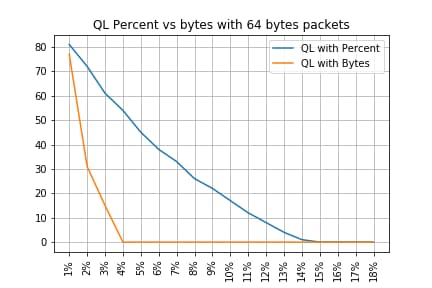
QL百分比與具有64位元組資料包的位元組
-------------------------------------------------------------------
Policy-map          |      Drop rate with PC | Drop rate with Bytes
-------------------------------------------------------------------
QL Bytes/Percent  1 |                   81% |                   77%
QL Bytes/Percent  2 |                   72% |                   31%
QL Bytes/Percent  3 |                   61% |                   15%
QL Bytes/Percent  4 |                   54% |                    0%
QL Bytes/Percent  5 |                   45% |                    0%
QL Bytes/Percent  6 |                   38% |                    0%
QL Bytes/Percent  7 |                   33% |                    0%
QL Bytes/Percent  8 |                   26% |                    0%
QL Bytes/Percent  9 |                   22% |                    0%
QL Bytes/Percent 10 |                   17% |                    0%
QL Bytes/Percent 11 |                   12% |                    0%
QL Bytes/Percent 12 |                    8% |                    0%
QL Bytes/Percent 13 |                    4% |                    0%
QL Bytes/Percent 14 |                    1% |                    0%
QL Bytes/Percent 15 |                    0% |                    0%
QL Bytes/Percent 16 |                    0% |                    0%
QL Bytes/Percent 17 |                    0% |                    0%
QL Bytes/Percent 18 |                    0% |                    0%
-------------------------------------------------------------------
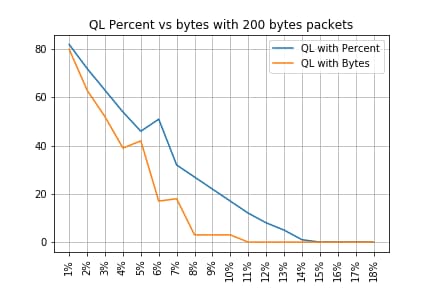
QL Percent vs Bytes with 200 Bytes資料包
-------------------------------------------------------------------
Policy-map          |      Drop rate with PC | Drop rate with Bytes
-------------------------------------------------------------------
QL Bytes/Percent  1 |                   82% |                   80%
QL Bytes/Percent  2 |                   72% |                   63%
QL Bytes/Percent  3 |                   63% |                   52%
QL Bytes/Percent  4 |                   54% |                   39%
QL Bytes/Percent  5 |                   46% |                   42%
QL Bytes/Percent  6 |                   51% |                   17%
QL Bytes/Percent  7 |                   32% |                   18%
QL Bytes/Percent  8 |                   27% |                    3%
QL Bytes/Percent  9 |                   22% |                    3%
QL Bytes/Percent 10 |                   17% |                    3%
QL Bytes/Percent 11 |                   12% |                    0%
QL Bytes/Percent 12 |                    8% |                    0%
QL Bytes/Percent 13 |                    5% |                    0%
QL Bytes/Percent 14 |                    1% |                    0%
QL Bytes/Percent 15 |                    0% |                    0%
QL Bytes/Percent 16 |                    0% |                    0%
QL Bytes/Percent 17 |                    0% |                    0%
QL Bytes/Percent 18 |                    0% |                    0%
-------------------------------------------------------------------
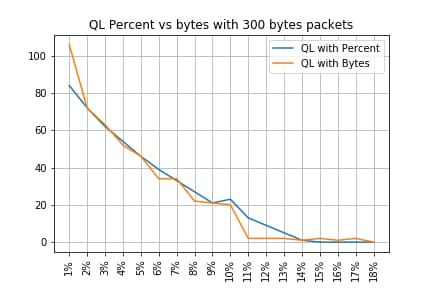
QL百分比與具有300位元組資料包的位元組數
-------------------------------------------------------------------
Policy-map          |      Drop rate with PC | Drop rate with Bytes
-------------------------------------------------------------------
QL Bytes/Percent  1 |                   84% |                  106%
QL Bytes/Percent  2 |                   72% |                   72%
QL Bytes/Percent  3 |                   62% |                   63%
QL Bytes/Percent  4 |                   54% |                   52%
QL Bytes/Percent  5 |                   46% |                   46%
QL Bytes/Percent  6 |                   39% |                   34%
QL Bytes/Percent  7 |                   33% |                   34%
QL Bytes/Percent  8 |                   27% |                   22%
QL Bytes/Percent  9 |                   21% |                   21%
QL Bytes/Percent 10 |                   23% |                   20%
QL Bytes/Percent 11 |                   13% |                    2%
QL Bytes/Percent 12 |                    9% |                    2%
QL Bytes/Percent 13 |                    5% |                    2%
QL Bytes/Percent 14 |                    1% |                    1%
QL Bytes/Percent 15 |                    0% |                    2%
QL Bytes/Percent 16 |                    0% |                    1%
QL Bytes/Percent 17 |                    0% |                    2%
QL Bytes/Percent 18 |                    0% |                    0%
-------------------------------------------------------------------
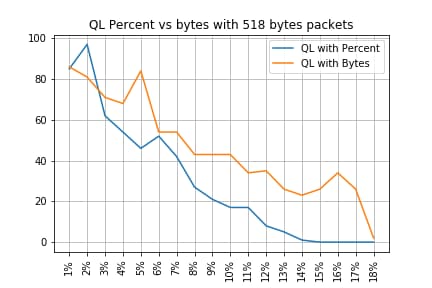
QL Percent vs Bytes with 518 Bytes資料包
-------------------------------------------------------------------
Policy-map          |      Drop rate with PC | Drop rate with Bytes
-------------------------------------------------------------------
QL Bytes/Percent  1 |                   85% |                   86%
QL Bytes/Percent  2 |                   97% |                   81%
QL Bytes/Percent  3 |                   62% |                   71%
QL Bytes/Percent  4 |                   54% |                   68%
QL Bytes/Percent  5 |                   46% |                   84%
QL Bytes/Percent  6 |                   52% |                   54%
QL Bytes/Percent  7 |                   42% |                   54%
QL Bytes/Percent  8 |                   27% |                   43%
QL Bytes/Percent  9 |                   21% |                   43%
QL Bytes/Percent 10 |                   17% |                   43%
QL Bytes/Percent 11 |                   17% |                   34%
QL Bytes/Percent 12 |                    8% |                   35%
QL Bytes/Percent 13 |                    5% |                   26%
QL Bytes/Percent 14 |                    1% |                   23%
QL Bytes/Percent 15 |                    0% |                   26%
QL Bytes/Percent 16 |                    0% |                   34%
QL Bytes/Percent 17 |                    0% |                   26%
QL Bytes/Percent 18 |                    0% |                    2%
-------------------------------------------------------------------
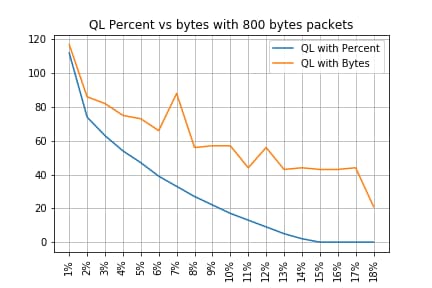
QL Percent vs Bytes with 800 Bytes資料包
-------------------------------------------------------------------
Policy-map          |      Drop rate with PC | Drop rate with Bytes
-------------------------------------------------------------------
QL Bytes/Percent  1 |                  112% |                  117%
QL Bytes/Percent  2 |                   74% |                   86%
QL Bytes/Percent  3 |                   63% |                   82%
QL Bytes/Percent  4 |                   54% |                   75%
QL Bytes/Percent  5 |                   47% |                   73%
QL Bytes/Percent  6 |                   39% |                   66%
QL Bytes/Percent  7 |                   33% |                   88%
QL Bytes/Percent  8 |                   27% |                   56%
QL Bytes/Percent  9 |                   22% |                   57%
QL Bytes/Percent 10 |                   17% |                   57%
QL Bytes/Percent 11 |                   13% |                   44%
QL Bytes/Percent 12 |                    9% |                   56%
QL Bytes/Percent 13 |                    5% |                   43%
QL Bytes/Percent 14 |                    2% |                   44%
QL Bytes/Percent 15 |                    0% |                   43%
QL Bytes/Percent 16 |                    0% |                   43%
QL Bytes/Percent 17 |                    0% |                   44%
QL Bytes/Percent 18 |                    0% |                   21%
-------------------------------------------------------------------
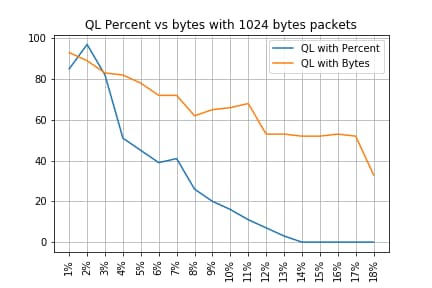
QL Percent vs Bytes with 1024 Bytes資料包
-------------------------------------------------------------------
Policy-map          |      Drop rate with PC | Drop rate with Bytes
-------------------------------------------------------------------
QL Bytes/Percent  1 |                   85% |                   93%
QL Bytes/Percent  2 |                   97% |                   89%
QL Bytes/Percent  3 |                   82% |                   83%
QL Bytes/Percent  4 |                   51% |                   82%
QL Bytes/Percent  5 |                   45% |                   78%
QL Bytes/Percent  6 |                   39% |                   72%
QL Bytes/Percent  7 |                   41% |                   72%
QL Bytes/Percent  8 |                   26% |                   62%
QL Bytes/Percent  9 |                   20% |                   65%
QL Bytes/Percent 10 |                   16% |                   66%
QL Bytes/Percent 11 |                   11% |                   68%
QL Bytes/Percent 12 |                    7% |                   53%
QL Bytes/Percent 13 |                    3% |                   53%
QL Bytes/Percent 14 |                    0% |                   52%
QL Bytes/Percent 15 |                    0% |                   52%
QL Bytes/Percent 16 |                    0% |                   53%
QL Bytes/Percent 17 |                    0% |                   52%
QL Bytes/Percent 18 |                    0% |                   33%
-------------------------------------------------------------------
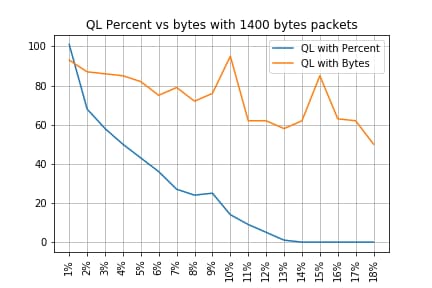
QL Percent vs Bytes with 1400 Bytes資料包
-------------------------------------------------------------------
Policy-map          |      Drop rate with PC | Drop rate with Bytes
-------------------------------------------------------------------
QL Bytes/Percent  1 |                  101% |                   93%
QL Bytes/Percent  2 |                   68% |                   87%
QL Bytes/Percent  3 |                   58% |                   86%
QL Bytes/Percent  4 |                   50% |                   85%
QL Bytes/Percent  5 |                   43% |                   82%
QL Bytes/Percent  6 |                   36% |                   75%
QL Bytes/Percent  7 |                   27% |                   79%
QL Bytes/Percent  8 |                   24% |                   72%
QL Bytes/Percent  9 |                   25% |                   76%
QL Bytes/Percent 10 |                   14% |                   95%
QL Bytes/Percent 11 |                    9% |                   62%
QL Bytes/Percent 12 |                    5% |                   62%
QL Bytes/Percent 13 |                    1% |                   58%
QL Bytes/Percent 14 |                    0% |                   62%
QL Bytes/Percent 15 |                    0% |                   85%
QL Bytes/Percent 16 |                    0% |                   63%
QL Bytes/Percent 17 |                    0% |                   62%
QL Bytes/Percent 18 |                    0% |                   50%
-------------------------------------------------------------------
丟棄與資料包大小之間的關係
如前所述,ASR 920具有11.75 MB的內部資料包緩衝區,該內部資料包緩衝區45898分為256個位元組的Qnodes。
- 對於大小小於256位元組的資料包,恰好使用1 Qnode
- 對於大小為1024位元組的資料包,使用4個Qnodes
- 對於大小為257位元組的資料包,使用2個Qnodes,未使用的255位元組將丟失
因此,與使用小資料包儲存的資料相比,您可以儲存更少量的大資料包。在等效隊列限制大小處,丟棄率和資料包大小之間的關係是預期的。
等效位元組數和百分比值之間的差異
如前所述,11.75 MB45898用緩衝區中存在Qnodes,為了便於計算,已舍入45900。
隊列限制百分比計算不計算11.75 MB的百分比,而是計算45900 Qnodes的百分比。因此,隊列限制百分比10表示10%的45900,它提供4590個Qnodes。
此外,分配的Qnodes百分比被視為可儲存在隊列中的資料包數,與其大小無關。回到上一個示例,這意味著:
queue-limit percent 10 = 4590 Qnodes = 4590 packets。
由於此計算與資料包大小無關,因此,對於大小為256位元組或更小的資料包,實際上只使用一個Qnode,並維護Qnode與資料包之間的等效性:
queue-limit percent 10 = 4590 Qnodes = 4590 packets of 256 bytes = 4590*256 bytes = 1.175 MB = 10%的緩衝區
但是,對於較大的資料包,會分配更慷慨的緩衝區部分。例如,這是針對1024位元組封包的計算,其中每個封包耗用4個Qnode:
queue-limit percent 10 = 4590 Qnodes = 4590 packets of 1024 bytes = 4590*4*256 bytes = 4.7 MB = 40%的緩衝區
注意:建議不要配置較大的queue-limit percent值。
如果配置的隊列限制百分比值較高,則單個介面可能會臨時佔用11.75 MB的所有共用緩衝區。
結論
- 您可以清楚地看到,使用小資料包時,queue-limit bytes的效率更高 — queue-limit bytes <x>在最多300個位元組的時間內比queue-limit <x>的效果更好
- 在300 bytes資料包時,queue-limit bytes和queue-limit percent的效率是相同的
- 超過300位元組的資料包大小,隊列限制百分比更有效。由於Internet流量平均為518個位元組,因此如客戶所報告,實際場景從隊列限制百分比中獲益更多
- 隊列限制百分比的效率與資料包大小呈線性關係(資料包越大,隊列限制百分比與隊列限制位元組的比率越高)
- 為超過256 MB大小的資料包分配緩衝區空間時,將實施更寬鬆的隊列限制百分比
如何估算實際流量方案中的百分比值
如果資料包的大小為256位元組,隊列限製為10%,您已經知道此等價是有效的:
minimum queue-limit = 4590 Qnodes = 4590*256 bytes = 1.175 MB = 10% of the buffer
對於512位元組的資料包,僅使用雙精度值,而對於1024位元組的資料包,使用率是四倍,依此類推。
這表示實際的隊列限制至少是緩衝區的10%,如果您假定最大MTU為1500位元組,那麼需要6個Qnodes來儲存單個資料包,這樣最大隊列限製為:
maximum queue-limit = 4590*6 Qnodes = 4590*256*6 bytes = 7.05 MB = 60% of the buffer
通過這種方式,您可以使用隊列限制百分比10來定義緩衝區使用的下限和上限,因此,更一般的情形是,平均最大緩衝區使用量大約為:
ceil(avg_pkt_size/256)*((qlimit_percent/45900)*100)
來自實驗裝置的示例:
GigabitEthernet0/0/1 is up, line protocol is up
  Hardware is 24xGE-4x10GE-FIXED-S, address is 70df.2f2f.ed01 (bia 70df.2f2f.ed01)
  Internet address is 10.12.10.47/31
  MTU 8900 bytes, BW 1000000 Kbit/sec, DLY 10 usec,
     reliability 255/255, txload 25/255, rxload 30/255
  Encapsulation ARPA, loopback not set
  Keepalive set (10 sec)
  Full Duplex, 1000Mbps, link type is auto, media type is T
  output flow-control is unsupported, input flow-control is on
  Carrier delay is 0 msec
  ARP type: ARPA, ARP Timeout 04:00:00
  Last input 00:00:00, output 00:00:01, output hang never
  Last clearing of "show interface" counters 00:11:43
  Input queue: 0/375/0/0 (size/max/drops/flushes); Total output drops: 2036062
  Queueing strategy: Class-based queueing
  Output queue: 0/40 (size/max)
  30 second input rate 118520000 bits/sec, 18902 packets/sec
  30 second output rate 101646000 bits/sec, 16124 packets/sec
     13185272 packets input, 10328798549 bytes, 0 no buffer
     Received 0 broadcasts (0 IP multicasts)
     0 runts, 0 giants, 0 throttles
     0 input errors, 0 CRC, 0 frame, 0 overrun, 0 ignored
     0 watchdog, 235 multicast, 0 pause input
     11247114 packets output, 8870166880 bytes, 0 underruns  <<<  avg_pkt_size = 8870166880/11247114 = 788.66 bytes
     0 output errors, 0 collisions, 0 interface resets
     0 unknown protocol drops
     0 babbles, 0 late collision, 0 deferred
     0 lost carrier, 0 no carrier, 0 pause output
     0 output buffer failures, 0 output buffers swapped out
您可以將avg_pkt_size計算為8870166880/11247114 ~ 788位元組。
如果隊列限制百分比為10,則平均最大緩衝區使用量為:
ceil(avg_pkt_size/256)*((45900/100)*qlimit_percent)

Calculation example with Python:
>>> import math
>>> math.ceil(788/256)*((45900/100)*10)
18360.0

=> 18360 Qnodes = 18360 * 256 bytes = 4.7 MB = 40% of the buffer
如何驗證微突發緩衝區的使用情況
在16.9.3之前的Cisco IOS-XE版本中,介面的共用緩衝區用於資料和控制資料包(例如BFD、路由協定、ARP、LDP、punt keepalive)。 若要驗證即時緩衝區的使用情況,您可以使用以下命令:
ASR-920-1#request platform software sdcli "nile bm reg buffertablefreelistcount show 0 0 0"
在16.9.3之後,引入了某些更改來提高緩衝區的使用,將其分為2:1024個條目(256KB)已保留用於控制流量,其餘條目保留用於資料流量。
在此案例中,可以使用以下命令監控緩衝區使用情況:
ASR-920-1#request platform software sdcli "nile bm reg supervisorresourcereservedcounttableaccess sh 0 0 0"
reservedUsedCount = 48 (0x30)
reservedFreeCount = 976 (0x3d0)

ASR-920-1#request platform software sdcli "nile bm reg supervisorresourcereservedcounttableaccess sh 0 2 0"
reservedUsedCount = 8114 (0x1fb2)
reservedFreeCount = 37784 (0x9398)
請注意,考慮到緩衝區處理微突發,您必須多次重複該命令,才能看到不同於0的reservedUsedCount值。
可以使用reservedUsedCount/reservedFreeCount簡單地計算緩衝區使用情況,例如8114/37784 = 21,5%已使用。一旦突發結束,緩衝區必須快速回落到0或接近。
從Cisco IOS-XE版本17.6.1開始,可以選擇對資料和控制流量使用整個緩衝區(如果您的網路控制流量速率較高則更適合),也可以按照前面所述的方式,將緩衝區分割為2。選擇此指令的配置時(預設會停用):
ACDC-920-1(config)#platform qos-buffer enhance enable
ACDC-920-1(config)#no platform qos-buffer enhance enable
從Cisco IOS-XE版本17.7.1開始,也可以選擇要分配給控制流量的大小:
ACDC-920-1(config)#platform qos-buffer enhance [1-4]
其中:
- 1表示控制緩衝區為256 KB
- 2表示500 KB
- 3表示756 KB
- 4表示1 MB
修訂記錄
| 修訂 | 發佈日期 | 意見 |
|---|---|---|
1.0 |
10-Oct-2022
|
初始版本 |
 意見
意見