配置通過OTV單播的ASR1000加密

下載選項
無偏見用語
本產品的文件集力求使用無偏見用語。針對本文件集的目的,無偏見係定義為未根據年齡、身心障礙、性別、種族身分、民族身分、性別傾向、社會經濟地位及交織性表示歧視的用語。由於本產品軟體使用者介面中硬式編碼的語言、根據 RFP 文件使用的語言,或引用第三方產品的語言,因此本文件中可能會出現例外狀況。深入瞭解思科如何使用包容性用語。
關於此翻譯
思科已使用電腦和人工技術翻譯本文件,讓全世界的使用者能夠以自己的語言理解支援內容。請注意,即使是最佳機器翻譯,也不如專業譯者翻譯的內容準確。Cisco Systems, Inc. 對這些翻譯的準確度概不負責,並建議一律查看原始英文文件(提供連結)。
簡介
本檔案介紹用於啟用具有IPSec加密的重疊傳輸虛擬化(OTV)的基本配置集。通過OTV加密不需要OTV端的任何其他配置。您只需要瞭解OTV和IPSEC如何共存。
若要在OTV上新增加密,您需要在OTV PDU之上新增封裝安全負載(ESP)標頭。您可以通過兩種方式在ASR1000邊緣裝置(ED)上實現加密:IPSec(ii)GETVPN。
必要條件
需求
本文件沒有特定需求。
採用元件
本文中的資訊係根據以下軟體和硬體版本:
- 適用於邊緣裝置的ASR1000路由器(ED)
- 核心(ISP雲)
- Catalyst 2960交換機作為任一站點上的接入交換機
本文中的資訊是根據特定實驗室環境內的裝置所建立。文中使用到的所有裝置皆從已清除(預設)的組態來啟動。如果您的網路運作中,請確保您瞭解任何指令可能造成的影響。
背景資訊
OTV的基本功能和配置假定為本文檔的使用者所知。
您也可以遵循以下相同文檔:
設定
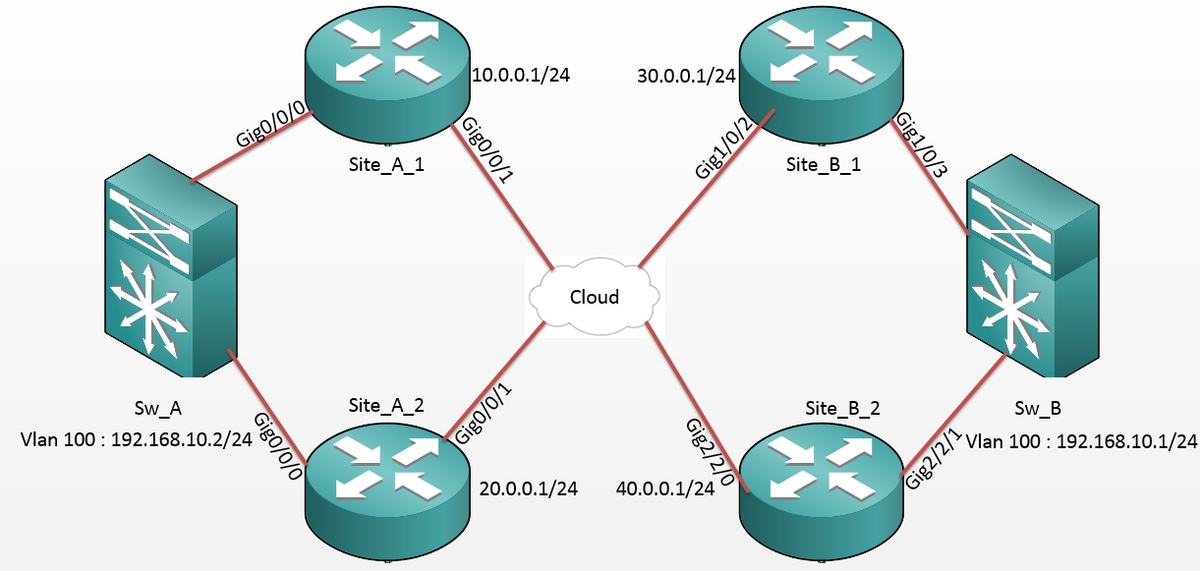
網路圖表
組態
站點A: ED配置:
Site_A_1#show run |
Site_A_2#show run |
站點B:ED配置:
Site_B_1#sh run |
Site_B_2#sh run |
驗證
使用本節內容,確認您的組態是否正常運作。
- 檢查是否已在OTV路由表中獲取內部VLAN主機的MAC地址(本例中為2960 catalyst交換機上的SVI)。
- 檢查是否為重疊(OTV流量)流量執行加密封裝和解除封裝。
在加入介面上配置加密對映後,OTV啟動後,請檢查本地VLAN(本例中為VLAN 100和101)的活動轉發器。 這顯示Site_A_1和Site_B_2是偶數VLAN的活動轉送者,因為您要測試從站點A的VLAN 100向站點B的VLAN 100發出的ping的流量加密:
Site_A_1#show otv vlan

Key:  SI - Service Instance, NA - Non AED, NFC - Not Forward Capable.

Overlay 99 VLAN Configuration Information

 Inst VLAN BD   Auth ED              State                Site If(s)

 0    100  100  *Site_A_1            active              Gi0/0/0:SI100

 0    101  101   Site_A_2            inactive(NA)        Gi0/0/0:SI101

 0    200  200  *Site_A_1            active              Gi0/0/0:SI200

 0    201  201   Site_A_2            inactive(NA)        Gi0/0/0:SI201

 Total VLAN(s): 4
Site_B_2#show otv vlan

Key:  SI - Service Instance, NA - Non AED, NFC - Not Forward Capable.


Overlay 99 VLAN Configuration Information

 Inst VLAN BD   Auth ED              State                Site If(s)

0    100  100  *Site_B_2            active              Gi2/2/1:SI100

 0    101  101   Site_B_1            inactive(NA)        Gi2/2/1:SI101

 0    200  200  *Site_B_2            active              Gi2/2/1:SI200

 0    201  201   Site_B_1            inactive(NA)        Gi2/2/1:SI201

 Total VLAN(s): 4
若要檢查封包是否確實封裝和解除封裝在任一ED上,您應該檢查IPSec作業階段是否處於作用中以及加密作業階段中的計數器值,以確認封包確實已加密和解密。要檢查IPSec會話是否處於活動狀態,因為它僅在有流量流經時變為活動狀態,請檢查show crypto isakmp sa的輸出。在這裡,只檢查活動轉發器的輸出,但是這應該顯示所有ED上的活動狀態,以便OTV over encryption正常工作。
Site_A_1#show crypto isakmp sa

IPv4 Crypto ISAKMP SA

dst             src             state          conn-id status

10.0.0.1        30.0.0.1        QM_IDLE           1008 ACTIVE

10.0.0.1        40.0.0.1        QM_IDLE           1007 ACTIVE

Site_B_2#sh crypto isakmp sa

IPv4 Crypto ISAKMP SA

dst             src             state          conn-id status

20.0.0.1        40.0.0.1        QM_IDLE           1007 ACTIVE

10.0.0.1        40.0.0.1        QM_IDLE           1006 ACTIVE
現在,為了確認資料包是否經過加密和解密,您首先需要知道show crypto session detail的輸出中會出現什麼情況。因此,當您從Sw_A交換器向Sw_B起始ICMP回應封包時,預期會發生以下情況:
- 當ICMP回應從Site_A_1 ED離開時(Site_A_1 ED是VLAN 100的作用中轉送者),它必須封裝OTV負載(ICMP回應+ MPLS + GRE)
- 接著,ICMP回應到達作為VLAN 100的作用中轉送者的Site_B_2 ED後,必須解封OTV負載(ICMP Echo + MPLS + GRE)
- 現在,Site_B_2 ED收到Sw_B的ICMP回應回覆後,必須再次封裝OTV負載(ICMP回應+ MPLS + GRE)
- 一旦ICMP回應回復到達Site_A_1 ED,我必須再次解封OTV負載(ICMP回應+ MPLS + GRE)
從Sw_A成功向Sw_B執行ping後,預計兩個活動轉發器ED的show crypto session detail輸出的「enc」和「dec」部分下會出現5個計數器的增量。
現在,從ED中檢查相同內容:
Site_A_1(config-if)#do show crypto session detail | section enc

K - Keepalives, N - NAT-traversal, T - cTCP encapsulation

        Outbound: #pkts enc'ed 0 drop 0 life (KB/Sec) 4608000/3345

        Outbound: #pkts enc'ed 10 drop 0 life (KB/Sec) 4607998/3291 <<<< 10 counter before ping
Site_A_1(config-if)#do show crypto session detail | section dec

        Inbound:  #pkts dec'ed 0 drop 0 life (KB/Sec) 4608000/3343

        Inbound:  #pkts dec'ed 18 drop 0 life (KB/Sec) 4607997/3289 <<<< 18 counter before ping
Site_B_2(config-if)#do show crypto session detail | section enc

K - Keepalives, N - NAT-traversal, T - cTCP encapsulation

        Outbound: #pkts enc'ed 18 drop 0 life (KB/Sec) 4607997/3295 <<<< 18 counter before ping

        Outbound: #pkts enc'ed 9 drop 0 life (KB/Sec) 4607999/3295
Site_B_2(config-if)#do show crypto session detail | section dec

        Inbound:  #pkts dec'ed 10 drop 0 life (KB/Sec) 4607998/3293 <<<< 10 counter before ping

        Inbound:  #pkts dec'ed 1 drop 0 life (KB/Sec) 4607999/3293
Sw_A(config)#do ping 192.168.10.1 source vlan 100


Type escape sequence to abort.

Sending 5, 100-byte ICMP Echos to 192.168.10.1, timeout is 2 seconds:

Packet sent with a source address of 192.168.10.2

!!!!!

Success rate is 100 percent (5/5), round-trip min/avg/max = 1/3/10 ms

Sw_A(config)#
Site_A_1(config-if)#do show crypto session detail | section enc

K - Keepalives, N - NAT-traversal, T - cTCP encapsulation

        Outbound: #pkts enc'ed 0 drop 0 life (KB/Sec) 4608000/3339

        Outbound: #pkts enc'ed 15 drop 0 life (KB/Sec) 4607997/3284 <<<< 15 counter after ping (After ICMP Echo)
Site_A_1(config-if)#do show crypto session detail | section dec

        Inbound:  #pkts dec'ed 0 drop 0 life (KB/Sec) 4608000/3338

        Inbound:  #pkts dec'ed 23 drop 0 life (KB/Sec) 4607997/3283 <<<< 23 counter after ping (After ICMP Echo Reply)
Site_B_2(config-if)#do show crypto session detail | section enc

K - Keepalives, N - NAT-traversal, T - cTCP encapsulation

        Outbound: #pkts enc'ed 23 drop 0 life (KB/Sec) 4607997/3282 <<<< 23 counter after ping (After ICMP Echo Reply)

        Outbound: #pkts enc'ed 9 drop 0 life (KB/Sec) 4607999/3282
Site_B_2(config-if)#do show crypto session detail | section dec

        Inbound:  #pkts dec'ed 15 drop 0 life (KB/Sec) 4607997/3281 <<<< 15 counter after ping (After ICMP Echo)

        Inbound:  #pkts dec'ed 1 drop 0 life (KB/Sec) 4607999/3281
本配置指南能夠傳遞使用IPSec進行單播核心雙宿主設定所需的配置詳細資訊。
疑難排解
目前尚無適用於此組態的具體疑難排解資訊。
 意見
意見