已阻止事件處理隊列
適用性
Splunk企業版說明
一些資料直接載入到索引器,一些源通過大量轉發器傳送資料。調查
1.在splunkd.log中,某些源型別存在換行和AggregatorMiningProcessor錯誤。
WARN  AggregatorMiningProcessor - Breaking event because limit of 256 has been exceeded - data_source="/path/to/the/logs/", data_host="hostname.com",
data_sourcetype="sourcetype_name"WARN  AggregatorMiningProcessor - Breaking event because limit of 1000 has been exceeded - data_source="/path/to/the/logs/"", data_host="other_hostname.com",
data_sourcetype="other_sourcetype_name"
2. Indexing Performance控制面板顯示「Aggregator」Splunk處理器佔用的CPU高。
3.修復導致錯誤的源型別未解決(錯誤消失,問題依然存在)。
4.聚合隊列中存在瓶頸,pstack顯示聚合處理器正忙於將線路合併為一個事件,從而造成瓶頸。
當聚合處理器將大量行合併到單個事件中時,會發生此問題。從代碼中,每當有行需要合併到當前事件時,都會出現以下代碼所示的string::reserve和記憶體移動。因此,如果一次比賽有1000行,那麼就會有1000次的預備和記憶量。
void CowPipelineData::appendAndReset(CowPipelineData& other)
{
...
            _pd->_rawAsStr.reserve(_pd->_rawSeg.size() + other._pd->_rawSeg.size() + 1);
            append_other_raw:
            _pd->_rawAsStr.push_back('\n');
            _pd->_rawAsStr.append(other._pd->_rawSeg);
...
}
收集一些包含大量行的示例事件,以瞭解導致問題的事件,確定具有大量總行的前三個源型別:
| tstats count where index=* OR index=_* by linecount sourcetype
| where linecount > 2
| stats sum(eval(linecount*count)) as totallines by sourcetype
| sort -totallines
概念:
原因是:
- 我們通常將解析隊列作為第一個隊列,將聚合隊列作為第二個隊列。
- 解析隊列是指如果沒有定義LINE_BREAKER,則按照預設字元\r\n將流資料解析為行。
- 然後,聚合隊列將根據TIME_FORMAT等配置合併這些行
- 通過設定LINE_BREAKER,它可以告知Splunk如何在分析階段將流資料解析為行,以及
- 通過設定SHOULD_LINEMERGE = false,表示聚合過程不應將行合併到事件中。
- 因此,LINE_BREAKER和SHOULD_LINEMERGE = false基本上是解決客戶問題的解決方案。
解析
1.通過更改limits.conf來啟用agg_processor的CPU時間度量以用於調試目的,如下所示:
.../limits.conf
[default]
agg_cpu_profiling = true
2.運行以下搜尋以確定對聚合器處理器造成更大壓力的源型別:
index=_internal source=*metrics.log* per_sourcetype_agg_cpu Metrics
| timechart span=10s avg(cpu) by series
3.將SHOULD_LINEMERGE設定為"false",並為進入搜尋圖中的每個源型別編寫"LINE_BREAKER"的正規表示式。Exp是我從故障排除培訓文檔中得到的。
附註:螢幕截圖顯示了如何搜尋regex處理器: 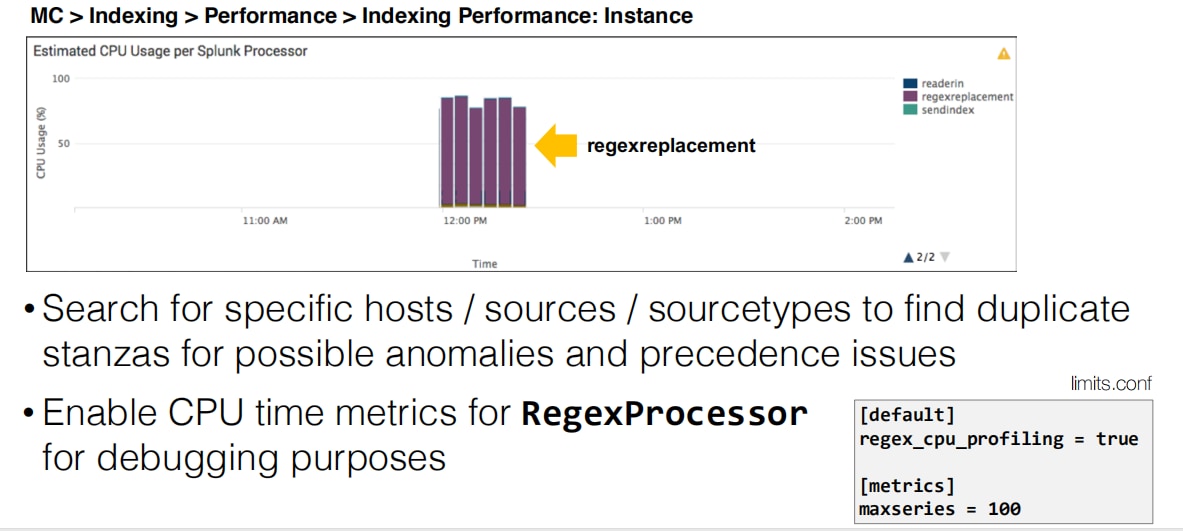
4.修復所有此類源型別將解決隊列填充問題。
其他資源:
以下來自社群辦公時間的影片顯示了如何對受阻隊列進行故障排除的更多內容。
相關連結
Limits.conf手冊https://docs.splunk.com/Documentation/Splunk/7.3.0/Admin/Limitsconf
修訂記錄
| 修訂 | 發佈日期 | 意見 |
|---|---|---|
1.0 |
28-Sep-2026
|
初始版本 |
 意見
意見