在 Cat9500 和 ISR4K 之間設定 VPLS

下載選項
無偏見用語
本產品的文件集力求使用無偏見用語。針對本文件集的目的,無偏見係定義為未根據年齡、身心障礙、性別、種族身分、民族身分、性別傾向、社會經濟地位及交織性表示歧視的用語。由於本產品軟體使用者介面中硬式編碼的語言、根據 RFP 文件使用的語言,或引用第三方產品的語言,因此本文件中可能會出現例外狀況。深入瞭解思科如何使用包容性用語。
關於此翻譯
思科已使用電腦和人工技術翻譯本文件,讓全世界的使用者能夠以自己的語言理解支援內容。請注意,即使是最佳機器翻譯,也不如專業譯者翻譯的內容準確。Cisco Systems, Inc. 對這些翻譯的準確度概不負責,並建議一律查看原始英文文件(提供連結)。
簡介
VPLS 是第 2 層擴充技術,大多數客戶將其搭配 ISP,並透過與第三方供應商借用/租賃的服務一起使用。VPLS的使用超出本配置指南的範圍。本基本配置指南旨在幫助客戶在現有ISR4K平台和新的Cat9500交換機之間配置L2VPN。
必要條件
您應該瞭解基本的L2VPN概念,並配置用於配置L2 VFI上下文的偽線模板
需求
ISR4K路由器(任何ISR4400/ISR4300)、Cat9500交換機和兩個裝置用作CE裝置
採用元件
ISR4451-X
C9500-40X-A
CISCO1921
CISCO2911
設定
該配置說明VPLS上下文的使用情況和支援的VC型別/詳細資訊
網路圖表
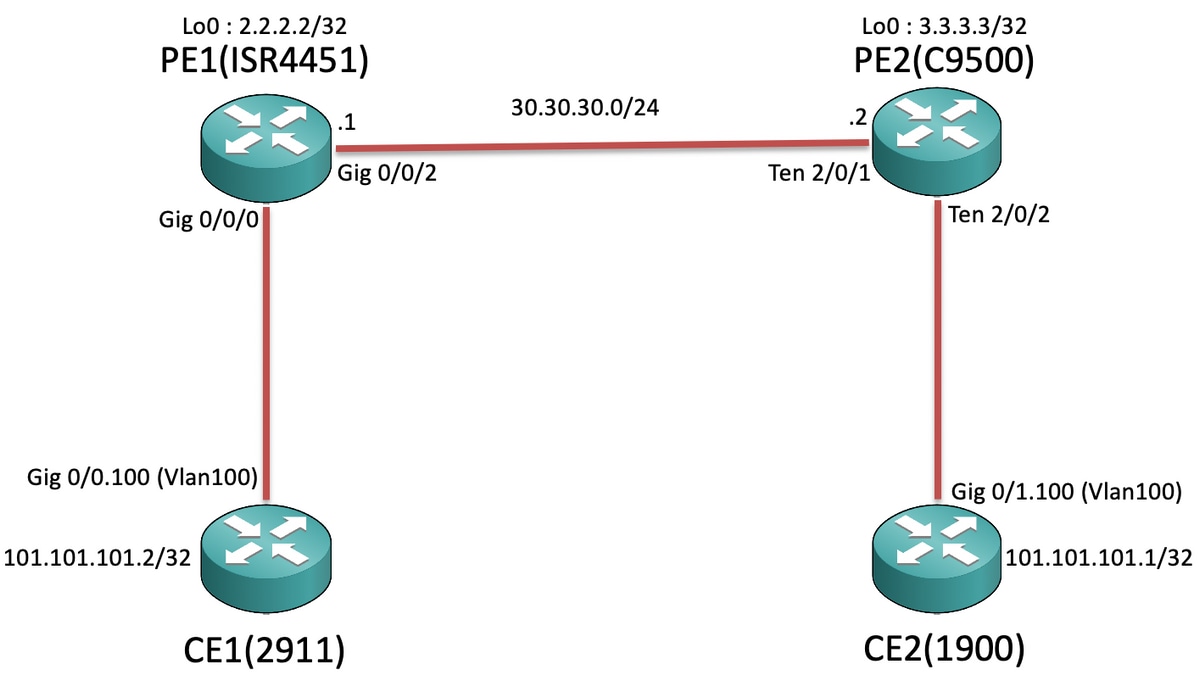
組態
在CE1和CE2上:
CE1#sh run Building configuration... Current configuration : 105 bytes ! interface GigabitEthernet0/0 no ip address duplex auto speed auto ! interface GigabitEthernet0/0.100 encapsulation dot1Q 100 ip address 101.101.101.2 255.255.255.0 ! |
CE2#sh run Building configuration... Current configuration : 1718 bytes ! interface GigabitEthernet0/1 no ip address duplex auto speed auto ! interface GigabitEthernet0/1.100 encapsulation dot1Q 100 ip address 101.101.101.1 255.255.255.0 ! |
在PE1和PE2上:
PE1#sh run Building configuration... Current configuration : 5049 bytes ! pseudowire-class VPLS100 encapsulation mpls no control-word ! l2 vfi 100 manual vpn id 100 bridge-domain 100 mtu 9180 neighbor 3.3.3.3 pw-class VPLS100 ! interface Loopback0 ip address 2.2.2.2 255.255.255.255 ! interface GigabitEthernet0/0/0 mtu 9180 no ip address negotiation auto service instance 100 ethernet encapsulation dot1q 100 rewrite ingress tag pop 1 symmetric bridge-domain 100 ! ! interface GigabitEthernet0/0/2 ip address 30.30.30.1 255.255.255.0 negotiation auto mpls ip ! ip route 3.3.3.3 255.255.255.255 30.30.30.2 ! mpls ldp router-id Loopback0 force ! |
PE2#sh run Building configuration... Current configuration : 10722 bytes ! ip routing ! pseudowire-class VPLS100 encapsulation mpls no control-word ! l2 vfi 100 manual vpn id 100 neighbor 2.2.2.2 pw-class VPLS100 ! interface Loopback0 ip address 3.3.3.3 255.255.255.255 ! interface TenGigabitEthernet2/0/1 no switchport ip address 30.30.30.2 255.255.255.0 mpls ip ! interface TenGigabitEthernet2/0/2 switchport trunk allowed vlan 100 switchport mode trunk ! interface Vlan100 no ip address xconnect vfi 100 ! ip route 2.2.2.2 255.255.255.255 30.30.30.1 ! mpls ldp router-id Loopback0 force ! |

附註:在運行EFP(乙太網流點)服務例項的ISR4K和ASR1000裝置上,確保我們在要擴展子網/廣播域的各個SI(服務例項)下配置「rewrite ingress tag pop 1 symmetric」命令,以便ISR4K/ASR1k能夠接收從CE端傳送的已標籤(802.1Q Vlan Tag)資料包。
驗證
到目前為止,Cat9500平台在VPLS下支援與「乙太網」的互聯。因此首先檢查VC型別是否為ethernet(這是預設設定):
PE1#show mpls l2transport binding
  Destination Address: 3.3.3.3,VC ID: 100
    Local Label:  19
        Cbit: 0,    VC Type: Ethernet,    GroupID: n/a
        MTU: 9180,   Interface Desc: n/a
        VCCV: CC Type: RA [2], TTL [3]
              CV Type: LSPV [2]
    Remote Label: 17
        Cbit: 0,    VC Type: Ethernet,    GroupID: 0
        MTU: 9180,   Interface Desc: n/a
        VCCV: CC Type: RA [2], TTL [3]
              CV Type: LSPV [2]
PE2#show mpls l2transport binding
  Destination Address: 2.2.2.2,VC ID: 100
    Local Label:  17
        Cbit: 0,    VC Type: Ethernet,    GroupID: n/a
        MTU: 9180,   Interface Desc: n/a
        VCCV: CC Type: RA [2], TTL [3]
              CV Type: LSPV [2]
    Remote Label: 19
        Cbit: 0,    VC Type: Ethernet,    GroupID: 0
        MTU: 9180,   Interface Desc: n/a
        VCCV: CC Type: RA [2], TTL [3]
              CV Type: LSPV [2]
現在,其餘命令與驗證L2VPN VC的方式類似。但是瞭解Cat9500具有系統mtu非常重要,因此您將無法修改面向LAN端的各個介面MTU值。因此,您需要在ISR4K平台上的l2 vfi上下文中明確配置「mtu <>」,以便根據Cat9500交換機上配置的系統mtu來協商MTU值:
PE2:
PE2#show system mtu
Global Ethernet MTU is 9180 bytes.
PE1 :
PE1#show mpls l2transport vc detail
Local interface: VFI 100 vfi up
  Interworking type is Ethernet
  Destination address: 3.3.3.3, VC ID: 100, VC status: up
    Output interface: Gi0/0/2, imposed label stack {17}
    Preferred path: not configured
    Default path: active
    Next hop: 30.30.30.2
  Create time: 00:02:10, last status change time: 00:02:10
    Last label FSM state change time: 00:02:10
  Signaling protocol: LDP, peer 3.3.3.3:0 up
    Targeted Hello: 2.2.2.2(LDP Id) -> 3.3.3.3, LDP is UP
    Graceful restart: not configured and not enabled
    Non stop routing: not configured and not enabled
    Status TLV support (local/remote)   : enabled/supported
      LDP route watch                   : enabled
      Label/status state machine        : established, LruRru
      Last local dataplane   status rcvd: No fault
      Last BFD dataplane     status rcvd: Not sent
      Last BFD peer monitor  status rcvd: No fault
      Last local AC  circuit status rcvd: No fault
      Last local AC  circuit status sent: No fault
      Last local PW i/f circ status rcvd: No fault
      Last local LDP TLV     status sent: No fault
      Last remote LDP TLV    status rcvd: No fault
      Last remote LDP ADJ    status rcvd: No fault
    MPLS VC labels: local 19, remote 17
    Group ID: local n/a, remote 0
    MTU: local 9180, remote 9180
    Remote interface description:
  Sequencing: receive disabled, send disabled
  Control Word: Off
  SSO Descriptor: 3.3.3.3/100, local label: 19
  Dataplane:
    SSM segment/switch IDs: 8387/4289 (used), PWID: 4
  VC statistics:
    transit packet totals: receive 0, send 0
    transit byte totals:   receive 0, send 0
    transit packet drops:  receive 0, seq error 0, send 0
PE2:
PE2#show mpls l2transport vc detail
Local interface: VFI 100 vfi up
  Interworking type is Ethernet
  Destination address: 2.2.2.2, VC ID: 100, VC status: up
    Output interface: Te2/0/1, imposed label stack {19}
    Preferred path: not configured
    Default path: active
    Next hop: 30.30.30.1
  Create time: 01:02:03, last status change time: 00:03:09
    Last label FSM state change time: 00:03:09
  Signaling protocol: LDP, peer 2.2.2.2:0 up
    Targeted Hello: 3.3.3.3(LDP Id) -> 2.2.2.2, LDP is UP
    Graceful restart: not configured and not enabled
    Non stop routing: not configured and not enabled
    Status TLV support (local/remote)   : enabled/supported
      LDP route watch                   : enabled
      Label/status state machine        : established, LruRru
      Last local dataplane   status rcvd: No fault
      Last BFD dataplane     status rcvd: Not sent
      Last BFD peer monitor  status rcvd: No fault
      Last local AC  circuit status rcvd: No fault
      Last local AC  circuit status sent: No fault
      Last local PW i/f circ status rcvd: No fault
      Last local LDP TLV     status sent: No fault
      Last remote LDP TLV    status rcvd: No fault
      Last remote LDP ADJ    status rcvd: No fault
    MPLS VC labels: local 17, remote 19
    Group ID: local n/a, remote 0
    MTU: local 9180, remote 9180
    Remote interface description:
  Sequencing: receive disabled, send disabled
  Control Word: Off
  SSO Descriptor: 2.2.2.2/100, local label: 17
  Dataplane:
    SSM segment/switch IDs: 12297/8194 (used), PWID: 1
  VC statistics:
    transit packet totals: receive 0, send 0
    transit byte totals:   receive 0, send 0
    transit packet drops:  receive 0, seq error 0, send 0
現在,當我們嘗試從CE1向CE2發出ping命令時:
CE1#ping 101.101.101.1 source 101.101.101.2
Type escape sequence to abort.
Sending 5, 100-byte ICMP Echos to 101.101.101.1, timeout is 2 seconds:
Packet sent with a source address of 101.101.101.2
!!!!!
Success rate is 100 percent (5/5), round-trip min/avg/max = 1/1/4 ms
然後檢查VC統計資訊以確保資料包通過VPLS:
PE1 :
PE1#show mpls l2transport vc detail | sec statistics
  VC statistics:
    transit packet totals: receive 5, send 5
    transit byte totals:   receive 660, send 660
    transit packet drops:  receive 0, seq error 0, send 0
PE2:
PE2#show mpls l2transport vc detail | sec statistics
  VC statistics:
    transit packet totals: receive 5, send 5
    transit byte totals:   receive 680, send 680
    transit packet drops:  receive 0, seq error 0, send 0
疑難排解
本文檔旨在強調在ISR/ASR路由器與充當PE節點的Cat9500交換機之間配置VPLS VC時的相容性問題,因此目前沒有故障排除步驟。
 意見
意見