升級 Nexus 3524 和 3548 NX-OS 軟體

目錄
簡介
本文檔介紹主要軟體版本之間Cisco Nexus 3524和3548系列交換機的中斷NX-OS軟體升級過程。
必要條件
需求
思科建議您瞭解在 Cisco NX-OS 中複製檔案的基本知識。有關此功能的詳細資訊,請參閱適用的文檔之一:
- Cisco Nexus 3548 交換器 NX-OS 基礎組態指南,9.3(x) 版
- Cisco Nexus 3548 交換器 NX-OS 基礎組態指南,9.2(x) 版
- Cisco Nexus 3548 交換器 NX-OS 基礎組態指南,7.x 版
- Cisco Nexus 3548 交換器 NX-OS 基礎組態指南,6.x 版
思科建議您瞭解在 Cisco Nexus 3524 和 3548 系列交換器上升級 NX-OS 軟體的基本知識。有關此過程的詳細資訊,請參閱適用的文檔之一:
- Cisco Nexus 3500 系列 NX-OS 軟體升級和降級指南,9.3(x) 版
- Cisco Nexus 3500 系列 NX-OS 軟體升級和降級指南,9.2(x) 版
- Cisco Nexus 3500 系列 NX-OS 軟體升級和降級指南,7.x 版
- Cisco Nexus 3500 系列 NX-OS 軟體升級和降級指南,6.x 版
採用元件
本文件中的資訊是以本文件之「適用硬體」一節中所列的 Cisco Nexus 3524 和 3548 系列交換器為依據。本文件中的裝置輸出取自於執行各種不同 NX-OS 軟體版本的 Nexus 3548(型號 N3K-C3548-10G)。
本文中的資訊是根據特定實驗室環境內的裝置所建立。文中使用到的所有裝置皆從已清除(預設)的組態來啟動。如果您的網路運作中,請確保您瞭解任何指令可能造成的影響。
背景資訊
本文件說明使用支援的中斷性升級路徑,將 Cisco Nexus 3524 和 3548 系列交換器上的 Cisco NX-OS 軟體從各種 NX-OS 軟體版升級至各種其他版本的步驟。本文檔旨在提供在常見次要NX-OS軟體版本和主要NX-OS軟體版本之間執行受支援的NX-OS軟體升級的逐步說明。
本文檔未介紹在Cisco Nexus 3524和3548系列交換機上對Cisco NX-OS軟體執行任何無中斷升級的步驟。ISSU 軟體升級不在本文件內容範圍內。
NX-OS 軟體版本的版本分類法
Cisco NX-OS軟體版本名稱包含本文檔中經常引用的多個元件。這些元件的名稱在Cisco IOS®和Cisco NX-OS軟體版本參考指南的Cisco NX-OS軟體版本命名部分中定義。具體來說,請注意以下術語:
- 主要版本編號
- 次要版本編號
- 維護版本編號
- 平台指示項
- 平台次要版本編號
- 平台維護版本編號
- 平台重建識別碼
NX-OS軟體版本7.0(3)I7(5a)具有以下元件:
| 元件名稱 | 元件值 |
|---|---|
| 主要版本編號 | 7 |
| 次要版本編號 | 0 |
| 維護版本編號 | 3 |
| 平台指示項 | I |
| 平台次要版本編號 | 7 |
| 平台維護版本編號 | 5 |
| 平台重建識別碼 | 答 |
做為其他範例,NX-OS 軟體版本 9.3(5) 包含以下要素:
| 元件名稱 | 元件值 |
|---|---|
| 主要版本編號 | 9 |
| 次要版本編號 | 3 |
| 維護版本編號 | 5 |
Cisco Nexus 組態指南通常按照 NX-OS 主要版本編號分組。在這些配置指南的標題中,NX-OS主版本號通常按主版本號顯示,並附加一個變數x,該變數指的是次版本(如6.x、7.x等)。 例如,Cisco Nexus 9000系列NX-OS基礎配置指南7.x版適用於所有NX-OS 7主要版本(雖然特定警告、限制和配置示例可能特定於某些次要或維護版本號)。
此規則的例外狀況為 NX-OS 9 主要版本。對於NX-OS 9主要版本,Cisco Nexus配置指南按NX-OS次要版本和主要版本號分組,並附加一個參考維護版本的變數x(如9.2(x)和9.3(x))。
本文使用Cisco Nexus配置指南(6.x、7.x、9.2(x)、9.3(x)等)標題的格式來描述兩個NX-OS軟體版本之間的標準中斷NX-OS軟體升級。
NX-OS 軟體升級術語
來源版本、目標版本及中繼版本
NX-OS軟體升級通常在兩個版本之間執行,即源版本(您要升級的NX-OS軟體版本)和目標版本(您要升級的NX-OS軟體版本)。 例如,如果您將Nexus 3548交換機從NX-OS軟體版本7.0(3)I7(8)升級到NX-OS軟體版本9.3(5),則7.0(3)I7(8)將是您的源版本,而9.3(5)將是您的目標版本。
若要從特定來源版本升級為特定目標版本,升級路徑可能需要升級為一個或多個中間版本。例如,如果您將Nexus 3548交換機從NX-OS軟體版本7.0(3)I7(5a)升級到NX-OS軟體版本9.3(5),則必須先升級到7.0(3)I7(8)或9.2(4)的中間版本,才能成功升級到NX-OS軟體版本9.3(5)。
NX-OS 軟體升級類型
NX-OS 軟體升級可以分成兩種類別:
- 中斷性升級 - 來源版本與目標版本之間的中斷性升級,其中 Nexus 交換器會在升級程序結束時重新載入。重新載入導致 Nexus 交換器的資料平面、控制平面及管理平面在短時間內離線。
- 服務中軟體升級 (ISSU) - 來源版本與目標版本之間的非中斷性升級,其中 Nexus 交換器的資料平面會保持連線狀態,並轉送「不間斷轉送」(NSF) 所產生的流量。
非中斷性 ISSU NX-OS 軟體升級的程序不在本文件內容的範圍內。本文件內容僅涵蓋標準中斷性 NX-OS 軟體升級。
適用硬體
本檔案中的步驟適用於此清單中的硬體:
- N3K-C3524P-10G
- N3K-C3524P-10GX
- N3K-C3524P-XL
- N3K-C3548P-10G
- N3K-C3548P-10GX
- N3K-C3548P-XL
NX-OS 軟體升級程序
本節介紹如何執行從各種源版本到各種目標版本的標準中斷NX-OS軟體升級。
從 NX-OS 6.x 升級至 NX-OS 6.x
本節介紹如何從NX-OS 6.x主版本中的源版本到NX-OS 6.x主版本中的目標版本執行標準中斷NX-OS軟體升級。
在Cisco Nexus 3548交換機上執行標準中斷NX-OS軟體升級的示例,從源版本6.0(2)A4(5)升級到目標版本6.0(2)A8(11b):
N3K-C3548# show module
Mod Ports Module-Type                         Model                  Status
--- ----- ----------------------------------- ---------------------- ------------
1   48    48x10GE Supervisor                  N3K-C3548P-10G-SUP     active *

Mod  Sw              Hw      World-Wide-Name(s) (WWN)
---  --------------  ------  ----------------------------------------------------
1    6.0(2)A4(5)     1.0     --
升級路徑摘要
從NX-OS 6.x主版本中的源版本到NX-OS 6.x主版本中的目標版本的升級路徑摘要:
6.x -> 6.x
步驟 1. 從思科軟體下載下載目標版本
NX-OS 6.x 軟體總共需要兩個 NX-OS 二進位映像檔:系統映像和kickstart映像。您必須將這些映像從思科軟體下載網站下載到您的本地電腦。您從思科軟體下載網站下載軟體所需執行的具體步驟不在本檔案的範圍之內。
步驟 2. 將目標版本複製到 Cisco Nexus 交換器
將NX-OS 6.x kickstart和系統二進位制映像檔案複製到您要使用所選檔案傳輸協定進行中斷升級的Nexus 3524或3548系列交換機。此範例示範如何透過檔案傳輸通訊協定(FTP)從透過管理VRF可連線的FTP伺服器192.0.2.100複製NX-OS 6.0(2)A8(11b)軟體版本的kickstart和系統二進位映像檔案。
N3K-C3548# dir | include bin
   36742656    Nov 19 14:24:14 2020  n3500-uk9-kickstart.6.0.2.A4.5.bin
  166878338    Nov 19 14:22:40 2020  n3500-uk9.6.0.2.A4.5.bin
N3K-C3548# copy ftp://username@192.0.2.100/n3500-uk9-kickstart.6.0.2.A8.11b.bin bootflash: vrf management
Password:
Copy complete, now saving to disk (wait)...
Copy complete.
N3K-C3548# copy ftp://username@192.0.2.100/n3500-uk9.6.0.2.A8.11b.bin bootflash: vrf management
Password:
Copy complete, now saving to disk (wait)...
Copy complete.
N3K-C3548# dir | include bin
   36742656    Nov 19 14:24:14 2020  n3500-uk9-kickstart.6.0.2.A4.5.bin
   37739008    Nov 19 18:13:12 2020  n3500-uk9-kickstart.6.0.2.A8.11b.bin
  166878338    Nov 19 14:22:40 2020  n3500-uk9.6.0.2.A4.5.bin
  197055713    Nov 19 18:14:46 2020  n3500-uk9.6.0.2.A8.11b.bin
步驟 3. 驗證目標版本的 MD5 或 SHA512 總和檢查碼
將NX-OS 6.x kickstart和系統二進位制映像檔案複製到Nexus 3524或3548系列交換機後,您希望使用您選擇的檔案傳輸協定進行中斷升級,通過確保MD5或SHA512校驗和與Cisco軟體下載網站上發佈的內容匹配,來驗證二進位制映像檔案在傳輸過程中未損壞。
通過將游標懸停在網站上的映像上,可以通過Cisco軟體下載網站識別NX-OS二進位制映像檔案的MD5和SHA512校驗和。請參閱範例:
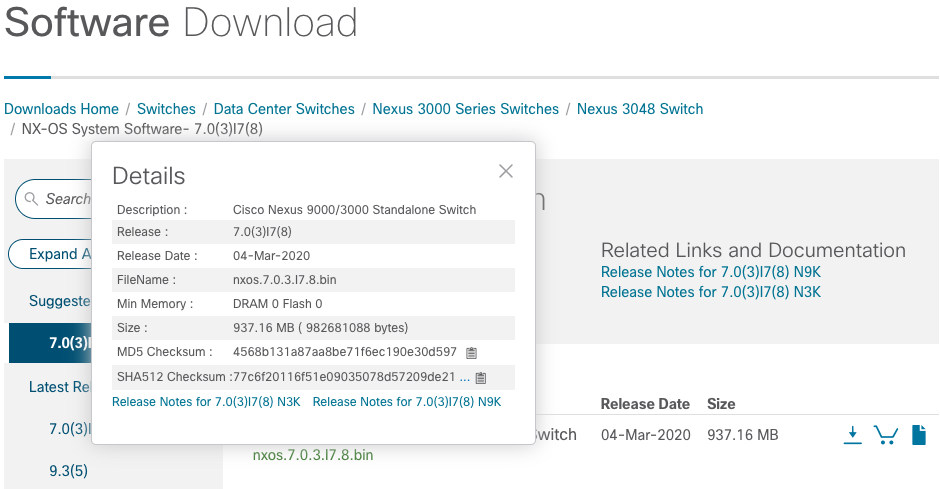
此範例示範如何透過 show file bootflash:{filename} md5sum 命令為 NX-OS 6.0(2)A8(11b) 軟體版本確認 kickstart 和 system 二進位映像檔的 MD5 總和檢查碼。NX-OS6.0(2)A8(11b) kickstart 二進位映像檔的預期 MD5 總和檢查碼為 1b025734ed34aeb7a0ea48f55897b09a,而 NX-OS 6.0(2)A8(11b) system 二進位映像檔的預期 MD5 總和檢查碼為 1f8bfb0b3d59049d5bf385ed7866ee25。
N3K-C3548# show file bootflash:n3500-uk9-kickstart.6.0.2.A8.11b.bin md5sum
1b025734ed34aeb7a0ea48f55897b09a
N3K-C3548# show file bootflash:n3500-uk9.6.0.2.A8.11b.bin md5sum
1f8bfb0b3d59049d5bf385ed7866ee25
步驟 4. 透過 Install All 命令升級 NX-OS 軟體
透過 install all 命令開始標準中斷性 NX-OS 軟體升級。此命令要求同時傳遞kickstart和系統引數,同時傳遞與目標版本對應的NX-OS kickstart和系統二進位制映像檔案的絕對檔案路徑。
此範例顯示install all命令,其中kickstart引數指向NX-OS kickstart二進位制映像檔案(bootflash:n3500-uk9-kickstart.6.0.2.A8.11b.bin)的絕對檔案路徑,系統引數指向NX-OS系統二進位制映像檔案(bootflash:n3500-uk9.6.0.2.A8.11b.bin)的絕對檔案路徑。
N3K-C3548# install all kickstart bootflash:n3500-uk9-kickstart.6.0.2.A8.11b.bin system bootflash:n3500-uk9.6.0.2.A8.11b.bin
Installer is forced disruptive

Verifying image bootflash:/n3500-uk9-kickstart.6.0.2.A8.11b.bin for boot variable "kickstart".
[########################################] 100% -- SUCCESS

Verifying image bootflash:/n3500-uk9.6.0.2.A8.11b.bin for boot variable "system".
[########################################] 100% -- SUCCESS

Verifying image type.
[########################################] 100% -- SUCCESS

Extracting "system" version from image bootflash:/n3500-uk9.6.0.2.A8.11b.bin.
[########################################] 100% -- SUCCESS

Extracting "kickstart" version from image bootflash:/n3500-uk9-kickstart.6.0.2.A8.11b.bin.
[########################################] 100% -- SUCCESS

Extracting "bios" version from image bootflash:/n3500-uk9.6.0.2.A8.11b.bin.
[########################################] 100% -- SUCCESS

Performing module support checks.
[########################################] 100% -- SUCCESS

Notifying services about system upgrade.
[########################################] 100% -- SUCCESS


Compatibility check is done:
Module  bootable          Impact  Install-type  Reason
------  --------  --------------  ------------  ------
     1       yes      disruptive         reset  Forced by the user


Images will be upgraded according to this table:
Module             Image         Running-Version             New-Version  Upg-Required
------  ----------------  ----------------------  ----------------------  ------------
     1            system             6.0(2)A4(5)           6.0(2)A8(11b)           yes
     1         kickstart             6.0(2)A4(5)           6.0(2)A8(11b)           yes
     1              bios      v1.9.0(10/13/2012)      v1.9.0(10/13/2012)            no
     1         power-seq                    v2.1                    v2.1            no


Switch will be reloaded for disruptive upgrade.
Do you want to continue with the installation (y/n)?  [n] y
Time Stamp: Thu Nov 19 18:32:15 2020


Install is in progress, please wait.

Performing runtime checks.
[########################################] 100% -- SUCCESS

Setting boot variables.
[########################################] 100% -- SUCCESS

Performing configuration copy.
[########################################] 100% -- SUCCESS
Time Stamp: Thu Nov 19 18:32:39 2020


Finishing the upgrade, switch will reboot in 10 seconds.
步驟 5. 驗證 NX-OS 軟體升級是否成功
重新載入Nexus 3524或3548交換機後,使用show module命令驗證升級是否成功。此命令的輸出顯示了所需的目標版本。請參閱以下範例,其中交換器已成功升級為NX-OS軟體版本6.0(2)A8(11b)。
N3K-C3548# show module
Mod Ports Module-Type                         Model                  Status
--- ----- ----------------------------------- ---------------------- ------------
1   48    48x10GE Supervisor                  N3K-C3548P-10G-SUP     active *

Mod  Sw              Hw      World-Wide-Name(s) (WWN)
---  --------------  ------  ----------------------------------------------------
1    6.0(2)A8(11b)   1.0     --
步驟 6. 從 Cisco Nexus 交換器刪除來源版本二進位映像檔
確認從源版本到目標版本的NX-OS軟體升級成功後,請從裝置的bootflash中刪除源版本的kickstart和系統二進位制映像檔案,從而保留bootflash交換機上的可用空間。可以使用delete bootflash:{filename}命令完成此操作。
請參閱以下範例,其中從bootflash交換器中刪除NX-OS 6.0(2)A4(5)kickstart和系統二進位制映像檔案。
N3K-C3548# dir | include bin
   36742656    Nov 19 14:24:14 2020  n3500-uk9-kickstart.6.0.2.A4.5.bin
   37739008    Nov 19 18:13:12 2020  n3500-uk9-kickstart.6.0.2.A8.11b.bin
  166878338    Nov 19 14:22:40 2020  n3500-uk9.6.0.2.A4.5.bin
  197055713    Nov 19 18:14:46 2020  n3500-uk9.6.0.2.A8.11b.bin
N3K-C3548# delete bootflash:n3500-uk9-kickstart.6.0.2.A4.5.bin
N3K-C3548# delete bootflash:n3500-uk9.6.0.2.A4.5.bin
N3K-C3548# dir | include bin
   37739008    Nov 19 18:13:12 2020  n3500-uk9-kickstart.6.0.2.A8.11b.bin
  197055713    Nov 19 18:14:46 2020  n3500-uk9.6.0.2.A8.11b.bin
步驟 7. 執行初始設定指令碼以重新套用 CoPP 原則
使用 setup 命令執行初始設定指令碼。輸入yes進入基本配置對話方塊,然後重複按Enter鍵接受所有預設選項,直到返回NX-OS CLI提示。
請參閱以下範例:
N3K-C3548# setup


         ---- Basic System Configuration Dialog ----

This setup utility will guide you through the basic configuration of
the system. Setup configures only enough connectivity for management
of the system.

*Note: setup is mainly used for configuring the system initially,
when no configuration is present. So setup always assumes system
defaults and not the current system configuration values.

Press Enter at anytime to skip a dialog. Use ctrl-c at anytime
to skip the remaining dialogs.

Would you like to enter the basic configuration dialog (yes/no): yes


  Create another login account (yes/no) [n]:

  Configure read-only SNMP community string (yes/no) [n]:

  Configure read-write SNMP community string (yes/no) [n]:

  Enter the switch name :

  Continue with Out-of-band (mgmt0) management configuration? (yes/no) [y]:

    Mgmt0 IPv4 address :

  Configure the default gateway? (yes/no) [y]:

    IPv4 address of the default gateway :

  Enable the telnet service? (yes/no) [n]:

  Enable the ssh service? (yes/no) [y]:

    Type of ssh key you would like to generate (dsa/rsa) :

  Configure the ntp server? (yes/no) [n]:

  Configure default interface layer (L3/L2) [L2]:

  Configure default switchport interface state (shut/noshut) [noshut]:

  Configure CoPP System Policy Profile ( default / l2 / l3 ) [default]:

This configuration will be applied:
  no telnet server enable
  system default switchport
  no system default switchport shutdown
  policy-map type control-plane copp-system-policy ( default )

Would you like to edit the configuration? (yes/no) [n]:

Use this configuration and save it? (yes/no) [y]:

[########################################] 100%
Copy complete, now saving to disk (wait)...
Copy complete.
從 NX-OS 6.x 升級至 NX-OS 7.x
本節介紹如何從NX-OS 6.x主版本中的源版本到NX-OS 7.x主版本中的目標版本執行標準中斷NX-OS軟體升級。
在Cisco Nexus 3548交換機上執行標準中斷NX-OS軟體升級的示例,從源版本6.0(2)A4(5)升級到目標版本7.0(3)I7(9):
N3K-C3548# show module
Mod Ports Module-Type                         Model                  Status
--- ----- ----------------------------------- ---------------------- ------------
1   48    48x10GE Supervisor                  N3K-C3548P-10G-SUP     active *

Mod  Sw              Hw      World-Wide-Name(s) (WWN)
---  --------------  ------  ----------------------------------------------------
1    6.0(2)A4(5)     1.0     --
升級路徑摘要
從NX-OS 6.x主版本中的源版本到NX-OS 7.x主版本中通過中間版本6.0(2)A8(11b)的目標版本的升級路徑摘要:
6.x -> 6.0(2)A8(11b) -> 7.x
步驟 1. 從 NX-OS 6.x 升級至 NX-OS 6.0(2)A8(11b)
使用本文檔的從NX-OS 6.x升級到NX-OS 6.x部分,執行從源版本到NX-OS軟體版本6.0(2)A8(11b)中間版本的標準中斷NX-OS軟體升級。 要成功升級到NX-OS 7.x主版本中的目標版本,必須執行此操作。
步驟 2. 從思科軟體下載下載目標版本
NX-OS 7.x 軟體使用單一 NX-OS 二進位映像檔(有時稱為統一映像檔)。 您必須從思科軟體下載網站將此映像下載到您的本地電腦。您從思科軟體下載網站下載軟體所需執行的具體步驟不在本檔案的範圍之內。
步驟 3. 透過 SCP 的壓縮映像程序將目標版本複製到 Cisco Nexus 交換器
通過通過SCP執行NX-OS精簡映像過程,將目標版本統一二進位制映像檔案複製到要中斷升級的Nexus 3524或3548系列交換機。
有關此過程的詳細資訊,請參閱Nexus 3000、3100和3500 NX-OS精簡映像過程文檔。
此示例演示如何從SCP伺服器192.0.2.100(可通過管理VRF訪問)通過Compact Image Procedure(由compact關鍵字表示)從SCP複製NX-OS 7.0(3)I7(9)軟體版本的統一二進位制映像檔案。
N3K-C3548# dir | include bin
   37739008    Nov 19 18:13:12 2020  n3500-uk9-kickstart.6.0.2.A8.11b.bin
  197055713    Nov 19 18:14:46 2020  n3500-uk9.6.0.2.A8.11b.bin
N3K-C3548# copy scp://username@192.0.2.100/nxos.7.0.3.I7.9.bin bootflash: compact vrf management
The authenticity of host '192.0.2.100 (192.0.2.100)' can't be established.
ECDSA key fingerprint is SHA1:00:11:06:bf:16:10:7b:e4:95:41:f3:75:4d:cb:41:d7:c7:8a:63:d1.
Are you sure you want to continue connecting (yes/no)? yes
Warning: Permanently added '192.0.2.100' (ECDSA) to the list of known hosts.
username@192.0.2.100's password:
nxos.7.0.3.I7.9.bin                                100%  937MB   2.6MB/s   06:06
Copy complete, now saving to disk (wait)...
Copy complete.
N3K-C3548# dir | include bin
   37739008    Nov 19 18:13:12 2020  n3500-uk9-kickstart.6.0.2.A8.11b.bin
  197055713    Nov 19 18:14:46 2020  n3500-uk9.6.0.2.A8.11b.bin
  459209441    Nov 19 20:28:50 2020  nxos.7.0.3.I7.9.bin
步驟 3a.驗證目標版本的相容性(可選)
執行升級時,請檢查以確定運行此命令的影響:
nexus-3500# show install all impact kickstart bootflash:system bootflash:
此命令不適用於7.x版本系列中的統一映像,因為只有一個檔案。如果嘗試將先前的命令修改為僅包含系統映像,則可能會失敗,並顯示以下消息:
nexus-3500# show install all impact system bootflash:nxos.7.0.3.I7.8.bin
Installer is forced disruptive

Verifying image bootflash:/n3500-uk9-kickstart.6.0.2.A8.11b.bin for boot variable "kickstart".
[########################################] 100% -- SUCCESS

Verifying image bootflash:/nxos.7.0.3.I7.8.bin for boot variable "system".
[########################################] 100% -- SUCCESS

Verifying image type.
[########################################] 100% -- SUCCESS

Extracting "system" version from image bootflash:/nxos.7.0.3.I7.8.bin.
[# ] 0% -- FAIL. Return code 0x404F0003 (SRG file not present/cannot be opened).
Pre-upgrade check failed. Return code 0x40930012 (SRG extraction failed).
要在Nexus 3500交換機上成功運行升級相容性檢查,必須僅使用該命令的kickstart部分和精簡映像來運行該命令。在運行kickstart版本的命令時,如果未能使用精簡映像,也會生成錯誤:
nexus-3500# show install all impact kickstart bootflash:nxos.7.0.3.I7.8.bin
Verifying image bootflash:/nxos.7.0.3.I7.8.bin for boot variable "kickstart".
[# ] 2% -- FAIL. Return code 0x40930084 (Upgrade cannot be continued with non-compact image!. Please use scp compacting for a compact image and retry ISSU.).
Pre-upgrade check failed. Return code 0x40930011 (Image verification failed).

nexus-3500#
nexus-3500# show install all impact kickstart bootflash:n3500-compact.7.0.3.I7.8.bin
Installer is forced disruptive

Verifying image bootflash:/nxos.7.0.3.I7.8.bin for boot variable "kickstart".
[########################################] 100% -- SUCCESS

Verifying image bootflash:/n3500-uk9-kickstart.6.0.2.A8.11b.bin for boot variable "system".
[########################################] 100% -- SUCCESS

Verifying image type.
[########################################] 100% -- SUCCESS

Extracting "system" version from image bootflash:/n3500-uk9-kickstart.6.0.2.A8.11b.bin
[########################################] 100% -- SUCCESS

Extracting "kickstart" version from image bootflash:/nxos.7.0.3.I7.8.bin.
[########################################] 100% -- SUCCESS

Extracting "bios" version from image bootflash:/n3500-uk9-kickstart.6.0.2.A8.11b.bin
[########################################] 100% -- SUCCESS

Collecting "running" plugin(s) information.
[########################################] 100% -- SUCCESS

Collecting plugin(s) information from "new" image.
[########################################] 100% -- SUCCESS

Performing runtime checks.
[########################################] 100% -- SUCCESS

Performing module support checks.
[########################################] 100% -- SUCCESS

Notifying services about system upgrade.
[########################################] 100% -- SUCCESS


Compatibility check is done:
Module bootable Impact Install-type Reason
------ -------- -------------- ------------ ------
1 no n/a n/a Wrong image


Module Image Running-Version New-Version Upg-Required
------ ---------------- ---------------------- ---------------------- ------------
1 system 6.0(2)A8(11b) 6.0(2)A8(11b) no
1 kickstart 6.0(2)A8(11b) 7.0(3)I5(2) no
1 bios v4.0.0(12/05/2016) v2.8.0(12/22/2015) no
1 SFP-uC v2.12 v2.12 no


Additional info for this installation:
--------------------------------------

Service "stp" : Port: Ethernet1/1 in VLAN0001 is Designated. Topology change could occur during upgrade.
Upgrade will be disruptive!!!
步驟 4. 透過 Install All 命令升級 NX-OS 軟體
透過 install all 命令開始標準中斷性 NX-OS 軟體升級。此命令要求傳入帶有與目標版本對應的NX-OS統一二進位制映像檔案的絕對檔案路徑的nxos引數。
此示例顯示install all命令,其中nxos引數指向NX-OS 7.0(3)I7(9)統一二進位制映像檔案(bootflash:nxos.7.0.3.I7.9.bin)的絕對檔案路徑。
N3K-C3548# install all nxos bootflash:nxos.7.0.3.I7.9.bin
Installer is forced disruptive

Verifying image bootflash:/nxos.7.0.3.I7.9.bin for boot variable "nxos".
[########################################] 100% -- SUCCESS

Verifying image type.
[########################################] 100% -- SUCCESS

Extracting "nxos" version from image bootflash:/nxos.7.0.3.I7.9.bin.
[########################################] 100% -- SUCCESS

Extracting "bios" version from image bootflash:/nxos.7.0.3.I7.9.bin.
[########################################] 100% -- SUCCESS

Performing runtime checks.
[########################################] 100% -- SUCCESS

Performing module support checks.
[########################################] 100% -- SUCCESS

Notifying services about system upgrade.
[########################################] 100% -- SUCCESS


Compatibility check is done:
Module  bootable          Impact  Install-type  Reason
------  --------  --------------  ------------  ------
     1       yes      disruptive         reset  Unsupported in new image, module needs to be powered off


Images will be upgraded according to this table:
Module             Image         Running-Version             New-Version  Upg-Required
------  ----------------  ----------------------  ----------------------  ------------
     1         kickstart           6.0(2)A8(11b)             7.0(3)I7(9)           yes
     1              bios      v1.9.0(10/13/2012)      v5.4.0(10/23/2019)           yes
     1         power-seq                    v2.1                    v2.1            no


Switch will be reloaded for disruptive upgrade.
Do you want to continue with the installation (y/n)?  [n] y

Time Stamp: Thu Nov 19 21:41:54 2020


Install is in progress, please wait.

Performing runtime checks.
[########################################] 100% -- SUCCESS

Setting boot variables.
[########################################] 100% -- SUCCESS

Performing configuration copy.
[########################################] 100% -- SUCCESS

Module 1: Refreshing compact flash and upgrading bios/loader/bootrom/power-seq.
Warning: please do not remove or power off the module at this time.
Note: Power-seq upgrade needs a power-cycle to take into effect.
On success of power-seq upgrade, SWITCH OFF THE POWER to the system and then, power it up.
[#                                       ]   0%
Time Stamp: Thu Nov 19 21:46:02 2020


Finishing the upgrade, switch will reboot in 10 seconds.
步驟 5. 驗證 NX-OS 軟體升級是否成功
重新載入Nexus 3524或3548交換機後,使用show module命令驗證升級是否成功。此命令的輸出顯示了所需的目標版本。請參閱此範例,其中交換器已成功升級至NX-OS軟體版本7.0(3)I7(9)。
N3K-C3548# show module
Mod Ports             Module-Type                       Model          Status
--- ----- ------------------------------------- --------------------- ---------
1    48   48x10GE Supervisor                    N3K-C3548P-10G        active *

Mod  Sw                Hw     Slot
---  ----------------  ------ ----
1    7.0(3)I7(9)       1.0    NA
步驟 6. 從 Cisco Nexus 交換器刪除中繼版本二進位映像檔
確認從中間版本到目標版本的NX-OS軟體升級成功後,通過從裝置的bootflash中刪除中間版本的kickstart和系統二進位制映像檔案,在bootflash交換機上保留可用空間。您可以使用 delete bootflash:{filename} 命令來完成此作業。
請參閱以下示例,其中從bootflash交換機中刪除NX-OS 6.0(2)A8(11b)kickstart和系統二進位制映像檔案。
N3K-C3548# dir | include bin
   37739008    Nov 19 18:13:12 2020  n3500-uk9-kickstart.6.0.2.A8.11b.bin
  197055713    Nov 19 18:14:46 2020  n3500-uk9.6.0.2.A8.11b.bin
  459209441    Nov 19 20:28:50 2020  nxos.7.0.3.I7.9.bin
N3K-C3548# delete bootflash:n3500-uk9-kickstart.6.0.2.A8.11b.bin
Do you want to delete "/n3500-uk9-kickstart.6.0.2.A8.11b.bin" ? (yes/no/abort)   [y]
N3K-C3548# delete bootflash:n3500-uk9.6.0.2.A8.11b.bin
Do you want to delete "/n3500-uk9.6.0.2.A8.11b.bin" ? (yes/no/abort)   [y]
N3K-C3548# dir | include bin
  459209441    Nov 19 20:28:50 2020  nxos.7.0.3.I7.9.bin
步驟 7. 執行初始設定指令碼以重新套用 CoPP 原則
使用 setup 命令執行初始設定指令碼。輸入yes進入基本配置對話方塊,然後重複按Enter鍵接受所有預設選項,直到返回NX-OS CLI提示。
請參閱以下範例:
N3K-C3548# setup


         ---- Basic System Configuration Dialog ----

This setup utility will guide you through the basic configuration of
the system. Setup configures only enough connectivity for management
of the system.

*Note: setup is mainly used for configuring the system initially,
when no configuration is present. So setup always assumes system
defaults and not the current system configuration values.

Press Enter at anytime to skip a dialog. Use ctrl-c at anytime
to skip the remaining dialogs.

Would you like to enter the basic configuration dialog (yes/no): yes


  Create another login account (yes/no) [n]:

  Configure read-only SNMP community string (yes/no) [n]:

  Configure read-write SNMP community string (yes/no) [n]:

  Enter the switch name :

  Continue with Out-of-band (mgmt0) management configuration? (yes/no) [y]:

    Mgmt0 IPv4 address :

  Configure the default gateway? (yes/no) [y]:

    IPv4 address of the default gateway :

  Enable the telnet service? (yes/no) [n]:


  Enable the ssh service? (yes/no) [y]:


    Type of ssh key you would like to generate (dsa/rsa) :

  Configure the ntp server? (yes/no) [n]:

  Configure default interface layer (L3/L2) [L2]:


  Configure default switchport interface state (shut/noshut) [noshut]:

  Configure CoPP System Policy Profile ( default / l2 / l3 ) [default]:

This configuration will be applied:
  no telnet server enable
  system default switchport
  no system default switchport shutdown
  policy-map type control-plane copp-system-policy ( default )

Would you like to edit the configuration? (yes/no) [n]:


Use this configuration and save it? (yes/no) [y]:

MTC:Executing copp config


[########################################] 100%
Copy complete, now saving to disk (wait)...
Copy complete.
從 NX-OS 6.x 升級至 NX-OS 9.2(x)
本節介紹如何從NX-OS 6.x主版本中的源版本到NX-OS 9.2(x)次版本中的目標版本執行標準中斷NX-OS軟體升級。
以下範例說明在 Cisco Nexus 3548 交換器上執行從來源版本 6.0(2)A4(5) 到目標版本 9.2(4) 的標準中斷性 NX-OS 軟體升級:
N3K-C3548# show module
Mod Ports Module-Type                         Model                  Status
--- ----- ----------------------------------- ---------------------- ------------
1   48    48x10GE Supervisor                  N3K-C3548P-10G-SUP     active *

Mod  Sw              Hw      World-Wide-Name(s) (WWN)
---  --------------  ------  ----------------------------------------------------
1    6.0(2)A4(5)     1.0     --
升級路徑摘要
從NX-OS 6.x主要版本中的源版本到NX-OS 9.2(x)次要版本中通過中間版本6.0(2)A8(11b)的目標版本的升級路徑摘要:
6.x -> 6.0(2)A8(11b) -> 9.2(x)
步驟 1. 從 NX-OS 6.x 升級至 NX-OS 6.0(2)A8(11b)
使用本文檔的從NX-OS 6.x升級到NX-OS 6.x部分,執行從源版本到NX-OS軟體版本6.0(2)A8(11b)中間版本的標準中斷NX-OS軟體升級。 要成功升級到NX-OS 9.2(x)次要版本中的目標版本,必須執行此操作。
步驟 2. 從思科軟體下載下載目標版本
NX-OS 9.2(x) 軟體使用單一 NX-OS 二進位映像檔(有時稱為統一映像檔)。 您必須從思科軟體下載網站將此映像下載到您的本地電腦。您從思科軟體下載網站下載軟體所需執行的具體步驟不在本檔案的範圍之內。
步驟 3. 透過 SCP 的壓縮映像程序將目標版本複製到 Cisco Nexus 交換器
通過通過SCP執行NX-OS精簡映像過程,將目標版本統一二進位制映像檔案複製到要中斷升級的Nexus 3524或3548系列交換機。
有關此過程的詳細資訊,請參閱Nexus 3000、3100和3500 NX-OS精簡型映像過程文檔
此示例演示如何從SCP伺服器192.0.2.100(可通過管理VRF訪問)通過Compact Image Procedure(由compact關鍵字表示)從SCP複製NX-OS 9.2(4)軟體版本統一二進位制映像檔案。
N3K-C3548# dir | include bin
   37739008    Nov 19 22:06:28 2020  n3500-uk9-kickstart.6.0.2.A8.11b.bin
  197055713    Nov 19 22:15:20 2020  n3500-uk9.6.0.2.A8.11b.bin
N3K-C3548# copy scp://username@192.0.2.100/nxos.9.2.4.bin bootflash: compact vrf management
The authenticity of host '192.0.2.100 (192.0.2.100)' can't be established.
ECDSA key fingerprint is SHA1:00:11:06:bf:16:10:7b:e4:95:41:f3:75:4d:cb:41:d7:c7:8a:63:d1.
Are you sure you want to continue connecting (yes/no)? yes
Warning: Permanently added '192.0.2.100' (ECDSA) to the list of known hosts.
username@192.0.2.100's password:
nxos.9.2.4.bin                                100% 1278MB   2.4MB/s   08:45
Copy complete, now saving to disk (wait)...
Copy complete.
N3K-C3548# dir | include bin
   37739008    Nov 19 22:06:28 2020  n3500-uk9-kickstart.6.0.2.A8.11b.bin
  197055713    Nov 19 22:15:20 2020  n3500-uk9.6.0.2.A8.11b.bin
  530509806    Nov 19 22:41:28 2020  nxos.9.2.4.bin
步驟 4. 透過 Install All 命令升級 NX-OS 軟體
透過 install all 命令開始標準中斷性 NX-OS 軟體升級。此命令要求傳入帶有與目標版本對應的NX-OS統一二進位制映像檔案的絕對檔案路徑的nxos引數。
此示例顯示install all命令,其中nxos引數指向NX-OS 9.2(4)統一二進位制映像檔案(bootflash:nxos.9.2.4.bin)的絕對檔案路徑。
N3K-C3548# install all nxos bootflash:nxos.9.2.4.bin
Installer is forced disruptive

Verifying image bootflash:/nxos.9.2.4.bin for boot variable "nxos".
[########################################] 100% -- SUCCESS

Verifying image type.
[########################################] 100% -- SUCCESS

Extracting "nxos" version from image bootflash:/nxos.9.2.4.bin.
[########################################] 100% -- SUCCESS

Extracting "bios" version from image bootflash:/nxos.9.2.4.bin.
[########################################] 100% -- SUCCESS

Performing runtime checks.
[########################################] 100% -- SUCCESS

Performing module support checks.
[########################################] 100% -- SUCCESS

Notifying services about system upgrade.
[########################################] 100% -- SUCCESS


Compatibility check is done:
Module  bootable          Impact  Install-type  Reason
------  --------  --------------  ------------  ------
     1       yes      disruptive         reset  Unsupported in new image, module needs to be powered off


Images will be upgraded according to this table:
Module             Image         Running-Version             New-Version  Upg-Required
------  ----------------  ----------------------  ----------------------  ------------
     1         kickstart           6.0(2)A8(11b)             9.2(4)I9(1)           yes
     1              bios      v1.9.0(10/13/2012)      v5.3.0(06/08/2019)           yes
     1         power-seq                    v2.1                    v2.1            no


Switch will be reloaded for disruptive upgrade.
Do you want to continue with the installation (y/n)?  [n] y

Time Stamp: Thu Nov 19 22:56:09 2020


Install is in progress, please wait.

Performing runtime checks.
[########################################] 100% -- SUCCESS

Setting boot variables.
[########################################] 100% -- SUCCESS

Performing configuration copy.
[########################################] 100% -- SUCCESS

Module 1: Refreshing compact flash and upgrading bios/loader/bootrom/power-seq.
Warning: please do not remove or power off the module at this time.
Note: Power-seq upgrade needs a power-cycle to take into effect.
On success of power-seq upgrade, SWITCH OFF THE POWER to the system and then, power it up.
[#                                       ]   0%
Time Stamp: Thu Nov 19 23:00:22 2020


Finishing the upgrade, switch will reboot in 10 seconds.
步驟 5. 驗證 NX-OS 軟體升級是否成功
重新載入Nexus 3524或3548交換機後,使用show module命令驗證升級是否成功。此命令的輸出顯示了所需的目標版本。請參閱此範例,其中交換器已成功升級到NX-OS軟體版本9.2(4)。
N3K-C3548# show module
Mod Ports             Module-Type                       Model          Status
--- ----- ------------------------------------- --------------------- ---------
1    48   48x10GE Supervisor                    N3K-C3548P-10G        active *

Mod  Sw                       Hw    Slot
---  ----------------------- ------ ----
1    9.2(4)                   1.0    NA
步驟 6. 從 Cisco Nexus 交換器刪除中繼版本二進位映像檔
確認從中間版本到目標版本的NX-OS軟體升級成功後,通過從裝置的bootflash中刪除中間版本的kickstart和系統二進位制映像檔案,在bootflash交換機上保留可用空間。您可以使用 delete bootflash:{filename} 命令來完成此作業。請參閱以下示例,其中從bootflash交換機中刪除NX-OS 6.0(2)A8(11b)kickstart和系統二進位制映像檔案。
N3K-C3548# dir | include bin
   37739008    Nov 19 22:06:28 2020  n3500-uk9-kickstart.6.0.2.A8.11b.bin
  197055713    Nov 19 22:15:20 2020  n3500-uk9.6.0.2.A8.11b.bin
  530509806    Nov 19 22:41:28 2020  nxos.9.2.4.bin
N3K-C3548# delete bootflash:n3500-uk9-kickstart.6.0.2.A8.11b.bin
Do you want to delete "/n3500-uk9-kickstart.6.0.2.A8.11b.bin" ? (yes/no/abort)   [y]
N3K-C3548# delete bootflash:n3500-uk9.6.0.2.A8.11b.bin
Do you want to delete "/n3500-uk9.6.0.2.A8.11b.bin" ? (yes/no/abort)   [y]
N3K-C3548# dir | include bin
  530509806    Nov 19 22:41:28 2020  nxos.9.2.4.bin
步驟 7. 執行初始設定指令碼以重新套用 CoPP 原則
使用 setup 命令執行初始設定指令碼。輸入yes進入基本配置對話方塊,然後重複按Enter鍵接受所有預設選項,直到返回NX-OS CLI提示。
請參閱以下範例:
N3K-C3548# setup


         ---- Basic System Configuration Dialog ----

This setup utility will guide you through the basic configuration of
the system. Setup configures only enough connectivity for management
of the system.

*Note: setup is mainly used for configuring the system initially,
when no configuration is present. So setup always assumes system
defaults and not the current system configuration values.

Press Enter at anytime to skip a dialog. Use ctrl-c at anytime
to skip the remaining dialogs.

Would you like to enter the basic configuration dialog (yes/no): yes


  Create another login account (yes/no) [n]:

  Configure read-only SNMP community string (yes/no) [n]:

  Configure read-write SNMP community string (yes/no) [n]:

  Enter the switch name :

  Continue with Out-of-band (mgmt0) management configuration? (yes/no) [y]:

    Mgmt0 IPv4 address :

  Configure the default gateway? (yes/no) [y]:

    IPv4 address of the default gateway :

  Enable the telnet service? (yes/no) [n]:

  Enable the ssh service? (yes/no) [y]:

    Type of ssh key you would like to generate (dsa/rsa) :

  Configure the ntp server? (yes/no) [n]:

  Configure default interface layer (L3/L2) [L2]:

  Configure default switchport interface state (shut/noshut) [noshut]:

  Configure CoPP System Policy Profile ( default / l2 / l3 ) [default]:

This configuration will be applied:
  no telnet server enable
  system default switchport
  no system default switchport shutdown
  policy-map type control-plane copp-system-policy ( default )

Would you like to edit the configuration? (yes/no) [n]:

Use this configuration and save it? (yes/no) [y]:
MTC:Executing copp config

[########################################] 100%
Copy complete, now saving to disk (wait)...
Copy complete.
從 NX-OS 6.x 升級至 NX-OS 9.3(x)
本節介紹如何從NX-OS 6.x主版本中的源版本到NX-OS 9.3(x)次版本中的目標版本執行標準中斷NX-OS軟體升級。
在Cisco Nexus 3548交換機上執行標準中斷NX-OS軟體升級的示例,從源版本6.0(2)A4(5)升級到目標版本9.3(6):
N3K-C3548# show module
Mod Ports Module-Type                         Model                  Status
--- ----- ----------------------------------- ---------------------- ------------
1   48    48x10GE Supervisor                  N3K-C3548P-10G-SUP     active *

Mod  Sw              Hw      World-Wide-Name(s) (WWN)
---  --------------  ------  ----------------------------------------------------
1    6.0(2)A4(5)     1.0     --
升級路徑摘要
從NX-OS 6.x主要版本中的源版本到NX-OS 9.3(x)次要版本中從6.0(2)A8(11b)和7.0(3)I7(9)中間版本的升級路徑摘要:
6.x -> 6.0(2)A8(11b) -> 7.0(3)I7(9) -> 9.3(x)
步驟 1. 從 NX-OS 6.x 升級至 NX-OS 6.0(2)A8(11b)
使用本文檔的從NX-OS 6.x升級到NX-OS 6.x部分,執行從源版本到NX-OS軟體版本6.0(2)A8(11b)中間版本的標準中斷NX-OS軟體升級。 若要成功升級到7.0(3)I7(9)的中間版本,需要此步驟。
步驟 2. 從 NX-OS 6.0(2)A8(11b) 升級至 NX-OS 7.0(3)I7(9)
使用本文檔的從NX-OS 6.x升級到NX-OS 7.x部分,執行從中間版本6.0(2)A8(11b)到中間版本7.0(3)I7(9)的標準中斷NX-OS軟體升級。 要成功升級到NX-OS 9.2(x)次要版本中的目標版本,必須執行此操作。
步驟 3. 從 NX-OS 7.0(3)I7(9) 升級至 NX-OS 9.3(x)
使用本文檔的從NX-OS 7.x升級到NX-OS 9.3(x)部分,執行從7.0(3)I7(9)中間版本到NX-OS 9.3(x)次要版本中所需目標版本的標準中斷NX-OS軟體升級。
從 NX-OS 7.x 升級至 NX-OS 7.x
本文件的此章節說明如何執行從 NX-OS 7.x 主要版本中之來源版本到 NX-OS 7.x 主要版本中之目標版本的標準中斷性 NX-OS 軟體升級。
以下範例說明在 Cisco Nexus 3548 交換器上執行從來源版本 7.0(3)I7(2) 到目標版本 7.0(3)I7(9) 的標準中斷性 NX-OS 軟體升級:
N3K-C3548# show module
Mod Ports             Module-Type                       Model          Status
--- ----- ------------------------------------- --------------------- ---------
1    48   48x10GE Supervisor                    N3K-C3548P-10G        active *

Mod  Sw                Hw     Slot
---  ----------------  ------ ----
1    7.0(3)I7(2)       1.0    NA
升級路徑摘要
從NX-OS 7.x主版本中的源版本到NX-OS 7.x主版本中的目標版本的升級路徑摘要:
7.x -> 7.x
步驟 1. 從思科軟體下載下載目標版本
NX-OS 7.x 軟體使用單一 NX-OS 二進位映像檔(有時稱為統一映像檔)。 您必須從思科軟體下載網站將此映像下載到您的本地電腦。您從思科軟體下載網站下載軟體所需執行的具體步驟不在本檔案的範圍之內。
步驟 2. 透過 SCP 的壓縮映像程序將目標版本複製到 Cisco Nexus 交換器
通過通過SCP執行NX-OS精簡映像過程,將目標版本統一二進位制映像檔案複製到要中斷升級的Nexus 3524或3548系列交換機。
有關此過程的詳細資訊,請參閱Nexus 3000、3100和3500 NX-OS精簡型映像過程文檔
此示例演示如何從SCP伺服器192.0.2.100(可通過管理VRF訪問)通過Compact Image Procedure(由compact關鍵字表示)從SCP複製NX-OS 7.0(3)I7(9)軟體版本的統一二進位制映像檔案。
N3K-C3548# dir | include bin
  416939523    Nov 20 03:26:37 2020  nxos.7.0.3.I7.2.bin
N3K-C3548# copy scp://username@192.0.2.100/nxos.7.0.3.I7.9.bin bootflash: compact vrf management
The authenticity of host '192.0.2.100 (192.0.2.100)' can't be established.
ECDSA key fingerprint is SHA256:TwkQiylhtFDFPPwqh3U2Oq9ugrDuTQ50bB3boV5DkXM.
Are you sure you want to continue connecting (yes/no)? yes
Warning: Permanently added '192.0.2.100' (ECDSA) to the list of known hosts.
username@192.0.2.100's password:
nxos.7.0.3.I7.9.bin                                100%  937MB   3.6MB/s   04:24
Copy complete, now saving to disk (wait)...
Copy complete.
N3K-C3548# dir | include bin
  416939523    Nov 20 03:26:37 2020  nxos.7.0.3.I7.2.bin
  459209441    Nov 20 03:43:38 2020  nxos.7.0.3.I7.9.bin
步驟3.通過Install All命令升級NX-OS軟體
透過 install all 命令開始標準中斷性 NX-OS 軟體升級。此命令要求傳入帶有與目標版本對應的NX-OS統一二進位制映像檔案的絕對檔案路徑的nxos引數。
此示例顯示install all命令,其中nxos引數指向NX-OS 7.0(3)I7(9)統一二進位制映像檔案(bootflash:nxos.7.0.3.I7.9.bin)的絕對檔案路徑。
N3K-C3548# install all nxos bootflash:nxos.7.0.3.I7.9.bin
Installer will perform compatibility check first. Please wait.
Installer is forced disruptive

Verifying image bootflash:/nxos.7.0.3.I7.9.bin for boot variable "nxos".
[####################] 100% -- SUCCESS

Verifying image type.
[####################] 100% -- SUCCESS

Preparing "nxos" version info using image bootflash:/nxos.7.0.3.I7.9.bin.
[####################] 100% -- SUCCESS

Preparing "bios" version info using image bootflash:/nxos.7.0.3.I7.9.bin.
[####################] 100% -- SUCCESS

Collecting "running" plugin(s) information.
[####################] 100% -- SUCCESS

Collecting plugin(s) information from "new" image.
[####################] 100% -- SUCCESS
[####################] 100% -- SUCCESS

Performing module support checks.
[####################] 100% -- SUCCESS

Notifying services about system upgrade.
[####################] 100% -- SUCCESS


Compatibility check is done:
Module  bootable          Impact  Install-type  Reason
------  --------  --------------  ------------  ------
     1       yes      disruptive         reset  default upgrade is not hitless


Images will be upgraded according to this table:
Module       Image                  Running-Version(pri:alt)           New-Version  Upg-Required
------  ----------  ----------------------------------------  --------------------  ------------
     1        nxos                               7.0(3)I7(2)           7.0(3)I7(9)           yes
     1        bios                        v5.4.0(10/23/2019)    v5.4.0(10/23/2019)            no


Switch will be reloaded for disruptive upgrade.
Do you want to continue with the installation (y/n)?  [n] y


Install is in progress, please wait.

Performing runtime checks.
[####################] 100% -- SUCCESS

Setting boot variables.
[####################] 100% -- SUCCESS

Performing configuration copy.
[####################] 100% -- SUCCESS

Module 1: Refreshing compact flash and upgrading bios/loader/bootrom.
Warning: please do not remove or power off the module at this time.
[####################] 100% -- SUCCESS


Finishing the upgrade, switch will reboot in 10 seconds.
步驟 4. 驗證 NX-OS 軟體升級是否成功
重新載入 Nexus 3524 或 3548 交換器後,請使用 show module 命令確認升級是否成功。此命令的輸出顯示了所需的目標版本。請參閱此範例,其中交換器已成功升級至NX-OS軟體版本7.0(3)I7(9)。
N3K-C3548# show module
Mod Ports             Module-Type                       Model          Status
--- ----- ------------------------------------- --------------------- ---------
1    48   48x10GE Supervisor                    N3K-C3548P-10G        active *

Mod  Sw                Hw     Slot
---  ----------------  ------ ----
1    7.0(3)I7(9)       1.0    NA
步驟 5. 從 Cisco Nexus 交換器刪除來源版本二進位映像檔
確認從源版本到目標版本的NX-OS軟體升級成功後,請從裝置的bootflash中刪除源版本的統一二進位制映像檔案,從而在bootflash交換機上保留可用空間。您可以使用 delete bootflash:{filename} 命令來完成此作業。請參閱以下示例,其中從bootflash交換機中刪除NX-OS 7.0(3)I7(2)統一二進位制映像檔案。
N3K-C3548# dir | include bin
  416939523    Nov 20 03:26:37 2020  nxos.7.0.3.I7.2.bin
  459209441    Nov 20 03:43:38 2020  nxos.7.0.3.I7.9.bin
N3K-C3548# delete bootflash:nxos.7.0.3.I7.2.bin
Do you want to delete "/nxos.7.0.3.I7.2.bin" ? (yes/no/abort)   [y]
N3K-C3548# dir | include bin
  459209441    Nov 20 03:43:38 2020  nxos.7.0.3.I7.9.bin
步驟 6. 執行初始設定指令碼以重新套用 CoPP 原則
使用 setup 命令執行初始設定指令碼。輸入yes進入基本配置對話方塊,然後重複按Enter鍵接受所有預設選項,直到返回NX-OS CLI提示。
請參閱以下範例:
N3K-C3548# setup


         ---- Basic System Configuration Dialog ----

This setup utility will guide you through the basic configuration of
the system. Setup configures only enough connectivity for management
of the system.

*Note: setup is mainly used for configuring the system initially,
when no configuration is present. So setup always assumes system
defaults and not the current system configuration values.

Press Enter at anytime to skip a dialog. Use ctrl-c at anytime
to skip the remaining dialogs.

Would you like to enter the basic configuration dialog (yes/no): yes


  Create another login account (yes/no) [n]:

  Configure read-only SNMP community string (yes/no) [n]:

  Configure read-write SNMP community string (yes/no) [n]:

  Enter the switch name :

  Continue with Out-of-band (mgmt0) management configuration? (yes/no) [y]:

    Mgmt0 IPv4 address :

  Configure the default gateway? (yes/no) [y]:

    IPv4 address of the default gateway :

  Enable the telnet service? (yes/no) [n]:

  Enable the ssh service? (yes/no) [y]:

    Type of ssh key you would like to generate (dsa/rsa) :

  Configure the ntp server? (yes/no) [n]:

  Configure default interface layer (L3/L2) [L2]:

  Configure default switchport interface state (shut/noshut) [noshut]:

  Configure CoPP System Policy Profile ( default / l2 / l3 ) [default]:

This configuration will be applied:
  no telnet server enable
  system default switchport
  no system default switchport shutdown
  policy-map type control-plane copp-system-policy ( default )

Would you like to edit the configuration? (yes/no) [n]:

Use this configuration and save it? (yes/no) [y]:
MTC:Executing copp config

[########################################] 100%
Copy complete, now saving to disk (please wait)...
Copy complete.
從 NX-OS 7.x 升級至 NX-OS 9.2(x)
本文件的此章節說明如何執行從 NX-OS 7.x 主要版本中之來源版本到 NX-OS 9.2(x) 次要版本中之目標版本的標準中斷性 NX-OS 軟體升級。
以下範例說明在 Cisco Nexus 3548 交換器上執行從來源版本 7.0(3)I7(2) 到目標版本 9.2(4) 的標準中斷性 NX-OS 軟體升級:
N3K-C3548# show module
Mod Ports             Module-Type                       Model          Status
--- ----- ------------------------------------- --------------------- ---------
1    48   48x10GE Supervisor                    N3K-C3548P-10G        active *

Mod  Sw                Hw     Slot
---  ----------------  ------ ----
1    7.0(3)I7(2)       1.0    NA
升級路徑摘要
以下顯示透過中繼版本 7.0(3)I7(9),從 NX-OS 7.x 主要版本中之來源版本升級至 NX-OS 9.2(x) 次要版本中之目標版本的路徑摘要:
7.x -> 7.0(3)I7(9) -> 9.2(x)
步驟 1. 從 NX-OS 7.x 升級至 NX-OS 7.0(3)I7(9)
使用本文檔的從NX-OS 7.x升級到NX-OS 7.x部分,執行從源版本到NX-OS軟體版本7.0(3)I7(9)中間版本的標準中斷NX-OS軟體升級。 您必須執行此步驟,才能成功升級至 NX-OS 9.2(x) 次要版本中的目標版本。
步驟 2. 從思科軟體下載下載目標版本
NX-OS 9.2(x) 軟體使用單一 NX-OS 二進位映像檔(有時稱為統一映像檔)。 您必須從思科軟體下載網站將此映像下載到您的本地電腦。您從思科軟體下載網站下載軟體所需執行的具體步驟不在本檔案的範圍之內。
步驟 3. 透過 SCP 的壓縮映像程序將目標版本複製到 Cisco Nexus 交換器
通過通過SCP執行NX-OS精簡映像過程,將目標版本統一二進位制映像檔案複製到要中斷升級的Nexus 3524或3548系列交換機。
有關此過程的詳細資訊,請參閱Nexus 3000、3100和3500 NX-OS精簡型映像過程文檔
此示例演示如何從SCP伺服器192.0.2.100(可通過管理VRF訪問)通過Compact Image Procedure(由compact關鍵字表示)從SCP複製NX-OS 9.2(4)軟體版本統一二進位制映像檔案。
N3K-C3548# dir | include bin
  459209441    Nov 20 03:43:38 2020  nxos.7.0.3.I7.9.bin
N3K-C3548# copy scp://username@192.0.2.100/nxos.9.2.4.bin bootflash: compact vrf management
The authenticity of host '192.0.2.100 (192.0.2.100)' can't be established.
ECDSA key fingerprint is SHA256:TwkQiylhtFDFPPwqh3U2Oq9ugrDuTQ50bB3boV5DkXM.
Are you sure you want to continue connecting (yes/no)? yes
Warning: Permanently added '192.0.2.100' (ECDSA) to the list of known hosts.
username@192.0.2.100's password:
nxos.9.2.4.bin                                100% 1278MB   3.0MB/s   07:09
Copy complete, now saving to disk (please wait)...
Copy complete.
N3K-C3548# dir | include bin
  459209441    Nov 20 03:43:38 2020  nxos.7.0.3.I7.9.bin
  530509806    Nov 20 04:30:47 2020  nxos.9.2.4.bin
步驟 4. 透過 Install All 命令升級 NX-OS 軟體
透過 install all 命令開始標準中斷性 NX-OS 軟體升級。此命令要求傳入帶有與目標版本對應的NX-OS統一二進位制映像檔案的絕對檔案路徑的nxos引數。
此示例顯示install all命令,其中nxos引數指向NX-OS 9.2(4)統一二進位制映像檔案(bootflash:nxos.9.2.4.bin)的絕對檔案路徑。
N3K-C3548# install all nxos bootflash:nxos.9.2.4.bin
Installer will perform compatibility check first. Please wait.
Installer is forced disruptive

Verifying image bootflash:/nxos.9.2.4.bin for boot variable "nxos".
[####################] 100% -- SUCCESS

Verifying image type.
[####################] 100% -- SUCCESS
[##                  ]   5% -- SUCCESS

Preparing "nxos" version info using image bootflash:/nxos.9.2.4.bin.
[####################] 100% -- SUCCESS

Preparing "bios" version info using image bootflash:/nxos.9.2.4.bin.
[####################] 100% -- SUCCESS

Collecting "running" plugin(s) information.
[####################] 100% -- SUCCESS

Collecting plugin(s) information from "new" image.
[####################] 100% -- SUCCESS
[####################] 100% -- SUCCESS

Performing module support checks.
[####################] 100% -- SUCCESS

Notifying services about system upgrade.
[####################] 100% -- SUCCESS


Compatibility check is done:
Module  bootable          Impact  Install-type  Reason
------  --------  --------------  ------------  ------
     1       yes      disruptive         reset  default upgrade is not hitless


Images will be upgraded according to this table:
Module       Image                  Running-Version(pri:alt)           New-Version  Upg-Required
------  ----------  ----------------------------------------  --------------------  ------------
     1        nxos                               7.0(3)I7(9)                9.2(4)           yes
     1        bios                        v5.4.0(10/23/2019)    v5.3.0(06/08/2019)            no


Switch will be reloaded for disruptive upgrade.
Do you want to continue with the installation (y/n)?  [n] y


Install is in progress, please wait.

Performing runtime checks.
[####################] 100% -- SUCCESS

Setting boot variables.
[####################] 100% -- SUCCESS

Performing configuration copy.
[####################] 100% -- SUCCESS

Module 1: Refreshing compact flash and upgrading bios/loader/bootrom.
Warning: please do not remove or power off the module at this time.
[####################] 100% -- SUCCESS


Finishing the upgrade, switch will reboot in 10 seconds.
步驟 5. 驗證 NX-OS 軟體升級是否成功
重新載入Nexus 3524或3548交換機後,使用show module命令驗證升級是否成功。此命令的輸出顯示了所需的目標版本。請參閱此範例,其中交換器已成功升級到NX-OS軟體版本9.2(4)。
N3K-C3548# show module
Mod Ports             Module-Type                       Model          Status
--- ----- ------------------------------------- --------------------- ---------
1    48   48x10GE Supervisor                    N3K-C3548P-10G        active *

Mod  Sw                       Hw    Slot
---  ----------------------- ------ ----
1    9.2(4)                   1.0    NA
步驟 6. 從 Cisco Nexus 交換器刪除中繼版本二進位映像檔
確認從中間版本到目標版本的NX-OS軟體升級成功後,通過從裝置的bootflash中刪除中間版本的統一映像檔案,在bootflash交換機上保留可用空間。您可以使用 delete bootflash:{filename} 命令來完成此作業。請參閱以下示例,其中從bootflash交換機中刪除NX-OS 7.0(3)I7(9)統一二進位制映像檔案。
N3K-C3548# dir | include bin
  459209441    Nov 20 03:43:38 2020  nxos.7.0.3.I7.9.bin
  530509806    Nov 20 04:30:47 2020  nxos.9.2.4.bin
N3K-C3548# delete bootflash:nxos.7.0.3.I7.9.bin
Do you want to delete "/nxos.7.0.3.I7.9.bin" ? (yes/no/abort)   [y]
N3K-C3548# dir | include bin
  530509806    Nov 20 04:30:47 2020  nxos.9.2.4.bin
步驟 7. 執行初始設定指令碼以重新套用 CoPP 原則
使用 setup 命令執行初始設定指令碼。輸入yes進入基本配置對話方塊,然後重複按Enter鍵接受所有預設選項,直到返回NX-OS CLI提示。
請參閱以下範例:
N3K-C3548# setup


         ---- Basic System Configuration Dialog ----

This setup utility will guide you through the basic configuration of
the system. Setup configures only enough connectivity for management
of the system.

*Note: setup is mainly used for configuring the system initially,
when no configuration is present. So setup always assumes system
defaults and not the current system configuration values.

Press Enter at anytime to skip a dialog. Use ctrl-c at anytime
to skip the remaining dialogs.

Would you like to enter the basic configuration dialog (yes/no): yes


  Create another login account (yes/no) [n]:

  Configure read-only SNMP community string (yes/no) [n]:

  Configure read-write SNMP community string (yes/no) [n]:

  Enter the switch name :

  Continue with Out-of-band (mgmt0) management configuration? (yes/no) [y]:

    Mgmt0 IPv4 address :

  Configure the default gateway? (yes/no) [y]:

    IPv4 address of the default gateway :

  Enable the telnet service? (yes/no) [n]:

  Enable the ssh service? (yes/no) [y]:

    Type of ssh key you would like to generate (dsa/rsa) :

  Configure the ntp server? (yes/no) [n]:

  Configure default interface layer (L3/L2) [L2]:

  Configure default switchport interface state (shut/noshut) [noshut]:

  Configure CoPP System Policy Profile ( default / l2 / l3 ) [default]:

This configuration will be applied:
  no telnet server enable
  system default switchport
  no system default switchport shutdown
  policy-map type control-plane copp-system-policy ( default )

Would you like to edit the configuration? (yes/no) [n]:

Use this configuration and save it? (yes/no) [y]:
MTC:Executing copp config

[########################################] 100%
Copy complete, now saving to disk (wait)...
Copy complete.
從 NX-OS 7.x 升級至 NX-OS 9.3(x)
本節介紹如何從NX-OS 7.x主要版本中的源版本升級到NX-OS 9.3(x)次要版本中的目標版本的標準中斷NX-OS軟體升級。
以下範例說明在 Cisco Nexus 3548 交換器上執行從來源版本 7.0(3)I7(2) 到目標版本 9.3(6) 的標準中斷性 NX-OS 軟體升級:
N3K-C3548# show module
Mod Ports             Module-Type                       Model          Status
--- ----- ------------------------------------- --------------------- ---------
1    48   48x10GE Supervisor                    N3K-C3548P-10G        active *

Mod  Sw                Hw     Slot
---  ----------------  ------ ----
1    7.0(3)I7(2)       1.0    NA
升級路徑摘要
從NX-OS 7.x主要版本中的源版本到NX-OS 9.3(x)次要版本中通過7.0(3)I7(9)中間版本的升級路徑摘要:
7.x -> 7.0(3)I7(9) -> 9.3(x)
步驟 1. 從 NX-OS 7.x 升級至 NX-OS 7.0(3)I7(9)
使用本文檔的從NX-OS 7.x升級到NX-OS 7.x部分,執行從源版本到NX-OS軟體版本7.0(3)I7(9)中間版本的標準中斷NX-OS軟體升級。 要成功升級到NX-OS 9.3(x)次要版本中的目標版本,必須執行此操作。
步驟 2. 從思科軟體下載下載目標版本
NX-OS 9.3(x) 軟體使用單一 NX-OS 二進位映像檔(有時稱為統一映像檔)。 您必須從思科軟體下載網站將此映像下載到您的本地電腦。您從思科軟體下載網站下載軟體所需執行的具體步驟不在本檔案的範圍之內。
步驟 3. 透過 SCP 的壓縮映像程序將目標版本複製到 Cisco Nexus 交換器
通過通過SCP執行NX-OS精簡映像過程,將目標版本統一二進位制映像檔案複製到要中斷升級的Nexus 3524或3548系列交換機。
有關此過程的詳細資訊,請參閱Nexus 3000、3100和3500 NX-OS精簡型映像過程文檔
此示例演示如何從SCP伺服器192.0.2.100(可通過管理VRF訪問)通過Compact Image Procedure(由compact關鍵字表示)從SCP複製NX-OS 9.3(6)軟體版本的統一二進位制映像檔案。
N3K-C3548# dir | include bin
  459209441    Nov 19 23:44:19 2020  nxos.7.0.3.I7.9.bin
N3K-C3548# copy scp://username@192.0.2.100/nxos.9.3.6.bin bootflash: compact vrf management
The authenticity of host '192.0.2.100 (192.0.2.100)' can't be established.
ECDSA key fingerprint is SHA256:TwkQiylhtFDFPPwqh3U2Oq9ugrDuTQ50bB3boV5DkXM.
Are you sure you want to continue connecting (yes/no)? yes
Warning: Permanently added '192.0.2.100' (ECDSA) to the list of known hosts.
username@192.0.2.100's password:
nxos.9.3.6.bin                                100% 1882MB   3.1MB/s   10:09
Copy complete, now saving to disk (wait)...
Copy complete.
N3K-C3548# dir | include bin
  459209441    Nov 19 23:44:19 2020  nxos.7.0.3.I7.9.bin
  671643688    Nov 20 00:47:00 2020  nxos.9.3.6.bin
步驟 4. 透過 Install All 命令升級 NX-OS 軟體
透過 install all 命令開始標準中斷性 NX-OS 軟體升級。此命令要求傳入帶有與目標版本對應的NX-OS統一二進位制映像檔案的絕對檔案路徑的nxos引數。
此示例顯示install all命令,其中nxos引數指向NX-OS 9.3(6)統一二進位制映像檔案(bootflash:nxos.9.3.6.bin)的絕對檔案路徑。
N3K-C3548# install all nxos bootflash:nxos.9.3.6.bin
Installer will perform compatibility check first. Please wait.
Installer is forced disruptive

Verifying image bootflash:/nxos.9.3.6.bin for boot variable "nxos".
[####################] 100% -- SUCCESS

Verifying image type.
[####################] 100% -- SUCCESS

Preparing "nxos" version info using image bootflash:/nxos.9.3.6.bin.
[####################] 100% -- SUCCESS

Preparing "bios" version info using image bootflash:/nxos.9.3.6.bin.
[####################] 100% -- SUCCESS

Collecting "running" plugin(s) information.
[####################] 100% -- SUCCESS

Collecting plugin(s) information from "new" image.
[####################] 100% -- SUCCESS

Performing module support checks.
[####################] 100% -- SUCCESS

Notifying services about system upgrade.
[####################] 100% -- SUCCESS


Compatibility check is done:
Module  bootable          Impact  Install-type  Reason
------  --------  --------------  ------------  ------
     1       yes      disruptive         reset  default upgrade is not hitless


Images will be upgraded according to this table:
Module       Image                  Running-Version(pri:alt)           New-Version  Upg-Required
------  ----------  ----------------------------------------  --------------------  ------------
     1        nxos                               7.0(3)I7(9)                9.3(6)           yes
     1        bios                        v5.4.0(10/23/2019)    v5.4.0(10/23/2019)            no


Switch will be reloaded for disruptive upgrade.
Do you want to continue with the installation (y/n)?  [n] y


Install is in progress, please wait.

Performing runtime checks.
[####################] 100% -- SUCCESS

Setting boot variables.
[####################] 100% -- SUCCESS

Performing configuration copy.
[####################] 100% -- SUCCESS

Module 1: Refreshing compact flash and upgrading bios/loader/bootrom.
Warning: please do not remove or power off the module at this time.
[####################] 100% -- SUCCESS


Finishing the upgrade, switch will reboot in 10 seconds.
步驟 5. 驗證 NX-OS 軟體升級是否成功
重新載入Nexus 3524或3548交換機後,使用show module命令驗證升級是否成功。此命令的輸出顯示了所需的目標版本。請參閱此範例,其中交換器已成功升級到NX-OS軟體版本9.3(6)。
N3K-C3548# show module
Mod Ports             Module-Type                      Model           Status
--- ----- ------------------------------------- --------------------- ---------
1    48   48x10GE Supervisor                    N3K-C3548P-10G        active *

Mod  Sw                       Hw    Slot
---  ----------------------- ------ ----
1    9.3(6)                   1.0    NA
步驟 6. 從 Cisco Nexus 交換器刪除中繼版本二進位映像檔
確認從中間版本到目標版本的NX-OS軟體升級成功後,請從裝置的bootflash中刪除中間版本的統一二進位制映像檔案,從而在bootflash交換機上保留可用空間。您可以使用 delete bootflash:{filename} 命令來完成此作業。請參閱以下示例,其中從bootflash交換機中刪除NX-OS 7.0(3)I7(9)統一二進位制映像檔案。
N3K-C3548# dir | include bin
  459209441    Nov 19 23:44:19 2020  nxos.7.0.3.I7.9.bin
  671643688    Nov 20 00:47:00 2020  nxos.9.3.6.bin
N3K-C3548# delete bootflash:nxos.7.0.3.I7.9.bin
Do you want to delete "/nxos.7.0.3.I7.9.bin" ? (yes/no/abort)   [y]
N3K-C3548# dir | include bin
  671643688    Nov 20 00:47:00 2020  nxos.9.3.6.bin
步驟 7. 執行初始設定指令碼以重新套用 CoPP 原則
使用 setup 命令執行初始設定指令碼。輸入yes進入基本配置對話方塊,然後重複按Enter鍵接受所有預設選項,直到返回NX-OS CLI提示。
請參閱以下範例:
N3K-C3548# setup


         ---- Basic System Configuration Dialog ----

This setup utility will guide you through the basic configuration of
the system. Setup configures only enough connectivity for management
of the system.

*Note: setup is mainly used for configuring the system initially,
when no configuration is present. So setup always assumes system
defaults and not the current system configuration values.

Press Enter at anytime to skip a dialog. Use ctrl-c at anytime
to skip the remaining dialogs.

Would you like to enter the basic configuration dialog (yes/no): yes


  Create another login account (yes/no) [n]:

  Configure read-only SNMP community string (yes/no) [n]:

  Configure read-write SNMP community string (yes/no) [n]:

  Enter the switch name :

  Continue with Out-of-band (mgmt0) management configuration? (yes/no) [y]:

    Mgmt0 IPv4 address :

  Configure the default gateway? (yes/no) [y]:

    IPv4 address of the default gateway :

  Enable the telnet service? (yes/no) [n]:

  Enable the ssh service? (yes/no) [y]:

    Type of ssh key you would like to generate (dsa/rsa) :

  Configure the ntp server? (yes/no) [n]:

  Configure default interface layer (L3/L2) [L2]:

  Configure default switchport interface state (shut/noshut) [noshut]:

  Configure CoPP System Policy Profile ( default / l2 / l3 ) [default]:

This configuration will be applied:
  no telnet server enable
  system default switchport
  no system default switchport shutdown
  policy-map type control-plane copp-system-policy ( default )

Would you like to edit the configuration? (yes/no) [n]:

Use this configuration and save it? (yes/no) [y]:
MTC:Executing copp config

[########################################] 100%
Copy complete, now saving to disk (please wait)...
Copy complete.
從 NX-OS 9.2(x) 升級至 NX-OS 9.2(x)
本節介紹如何執行標準中斷NX-OS軟體從NX-OS 9.2(x)次要版本中的源版本升級到NX-OS 9.2(x)次要版本中的目標版本。
以下範例說明在 Cisco Nexus 3548 交換器上執行從來源版本 9.2(1) 到目標版本 9.2(4) 的標準中斷性 NX-OS 軟體升級:
N3K-C3548# show module
Mod Ports             Module-Type                       Model          Status
--- ----- ------------------------------------- --------------------- ---------
1    48   48x10GE Supervisor                    N3K-C3548P-10G        active *

Mod  Sw                       Hw    Slot
---  ----------------------- ------ ----
1    9.2(1)                   1.0    NA
升級路徑摘要
從NX-OS 9.2(x)次要版本中的源版本到NX-OS 9.2(x)中的目標版本的升級路徑摘要:
9.2(x) -> 9.2(x)
步驟 1. 從思科軟體下載下載目標版本
NX-OS 9.2(x) 軟體使用單一 NX-OS 二進位映像檔(有時稱為統一映像檔)。 您必須從思科軟體下載網站將此映像下載到您的本地電腦。您從思科軟體下載網站下載軟體所需執行的具體步驟不在本檔案的範圍之內。
步驟 2. 透過 SCP 的壓縮映像程序將目標版本複製到 Cisco Nexus 交換器
通過通過SCP執行NX-OS精簡映像過程,將目標版本統一二進位制映像檔案複製到要中斷升級的Nexus 3524或3548系列交換機。
有關此過程的詳細資訊,請參閱Nexus 3000、3100和3500 NX-OS精簡型映像過程文檔
此示例演示如何從SCP伺服器192.0.2.100(可通過管理VRF訪問)複製NX-OS 9.2(4)軟體版本的統一二進位制映像檔案,該檔案通過精簡映像過程(由compact關鍵字表示)通過SCP(安全複製協定)進行複製。
N3K-C3548# dir | include bin
  512339094    Nov 20 16:58:21 2020  nxos.9.2.1.bin
N3K-C3548# copy scp://username@192.0.2.100/nxos.9.2.4.bin bootflash: compact vrf management
The authenticity of host '192.0.2.100 (192.0.2.100)' can't be established.
ECDSA key fingerprint is SHA256:TwkQiylhtFDFPPwqh3U2Oq9ugrDuTQ50bB3boV5DkXM.
Are you sure you want to continue connecting (yes/no)? yes
Warning: Permanently added '192.0.2.100' (ECDSA) to the list of known hosts.
username@192.0.2.100's password:
nxos.9.2.4.bin                                100% 1278MB   3.9MB/s   05:31
Copy complete, now saving to disk (please wait)...
Copy complete.
N3K-C3548# dir | include bin
  512339094    Nov 20 16:58:21 2020  nxos.9.2.1.bin
  530509806    Nov 23 18:58:45 2020  nxos.9.2.4.bin
步驟3.通過Install All命令升級NX-OS軟體
透過 install all 命令開始標準中斷性 NX-OS 軟體升級。此命令要求傳入帶有與目標版本對應的NX-OS統一二進位制映像檔案的絕對檔案路徑的nxos引數。
此示例顯示install all命令,其中nxos引數指向NX-OS 9.2(4)統一二進位制映像檔案(bootflash:nxos.9.2.4.bin)的絕對檔案路徑。
N3K-C3548# install all nxos bootflash:nxos.9.2.4.bin
Installer will perform compatibility check first. Please wait.
Installer is forced disruptive

Verifying image bootflash:/nxos.9.2.4.bin for boot variable "nxos".
[####################] 100% -- SUCCESS

Verifying image type.
[####################] 100% -- SUCCESS

Preparing "nxos" version info using image bootflash:/nxos.9.2.4.bin.
[####################] 100% -- SUCCESS

Preparing "bios" version info using image bootflash:/nxos.9.2.4.bin.
[####################] 100% -- SUCCESS

Collecting "running" plugin(s) information.
[####################] 100% -- SUCCESS

Collecting plugin(s) information from "new" image.
[####################] 100% -- SUCCESS
[####################] 100% -- SUCCESS

Performing module support checks.
[####################] 100% -- SUCCESS

Notifying services about system upgrade.
[####################] 100% -- SUCCESS


Compatibility check is done:
Module  bootable          Impact  Install-type  Reason
------  --------  --------------  ------------  ------
     1       yes      disruptive         reset  default upgrade is not hitless


Images will be upgraded according to this table:
Module       Image                  Running-Version(pri:alt)           New-Version  Upg-Required
------  ----------  ----------------------------------------  --------------------  ------------
     1        nxos                                    9.2(1)                9.2(4)           yes
     1        bios                        v5.4.0(10/23/2019)    v5.3.0(06/08/2019)            no


Switch will be reloaded for disruptive upgrade.
Do you want to continue with the installation (y/n)?  [n] y


Install is in progress, please wait.

Performing runtime checks.
[####################] 100% -- SUCCESS

Setting boot variables.
[####################] 100% -- SUCCESS

Performing configuration copy.
[####################] 100% -- SUCCESS

Module 1: Refreshing compact flash and upgrading bios/loader/bootrom.
Warning: please do not remove or power off the module at this time.
[####################] 100% -- SUCCESS


Finishing the upgrade, switch will reboot in 10 seconds.
步驟 4. 驗證 NX-OS 軟體升級是否成功
重新載入Nexus 3524或3548交換機後,使用show module命令驗證升級是否成功。此命令的輸出顯示了所需的目標版本。請參閱此範例,其中交換器已成功升級到NX-OS軟體版本9.2(4)。
N3K-C3548# show module
Mod Ports             Module-Type                       Model          Status
--- ----- ------------------------------------- --------------------- ---------
1    48   48x10GE Supervisor                    N3K-C3548P-10G        active *

Mod  Sw                       Hw    Slot
---  ----------------------- ------ ----
1    9.2(4)                   1.0    NA
步驟 5. 從 Cisco Nexus 交換器刪除來源版本二進位映像檔
確認從源版本到目標版本的NX-OS軟體升級成功後,請從裝置的bootflash中刪除源版本的統一二進位制映像檔案,從而在bootflash交換機上保留可用空間。您可以使用 delete bootflash:{filename} 命令來完成此作業。請參閱以下示例,其中從bootflash交換機中刪除NX-OS 9.2(1)統一二進位制映像檔案。
N3K-C3548# dir | include bin
  512339094    Nov 20 16:58:21 2020  nxos.9.2.1.bin
  530509806    Nov 23 18:58:45 2020  nxos.9.2.4.bin
N3K-C3548# delete bootflash:nxos.9.2.1.bin
Do you want to delete "/nxos.9.2.1.bin" ? (yes/no/abort)   [y]
N3K-C3548# dir | include bin
  530509806    Nov 23 18:58:45 2020  nxos.9.2.4.bin
步驟 6. 執行初始設定指令碼以重新套用 CoPP 原則
使用 setup 命令執行初始設定指令碼。輸入yes進入基本配置對話方塊,然後重複按Enter鍵接受所有預設選項,直到返回NX-OS CLI提示。
請參閱以下範例:
N3K-C3548# setup


         ---- Basic System Configuration Dialog ----

This setup utility will guide you through the basic configuration of
the system. Setup configures only enough connectivity for management
of the system.

*Note: setup is mainly used for configuring the system initially,
when no configuration is present. So setup always assumes system
defaults and not the current system configuration values.

Press Enter at anytime to skip a dialog. Use ctrl-c at anytime
to skip the remaining dialogs.

Would you like to enter the basic configuration dialog (yes/no): yes


  Create another login account (yes/no) [n]:

  Configure read-only SNMP community string (yes/no) [n]:

  Configure read-write SNMP community string (yes/no) [n]:

  Enter the switch name :

  Continue with Out-of-band (mgmt0) management configuration? (yes/no) [y]:

    Mgmt0 IPv4 address :

  Configure the default gateway? (yes/no) [y]:

    IPv4 address of the default gateway :

  Enable the telnet service? (yes/no) [n]:

  Enable the ssh service? (yes/no) [y]:

    Type of ssh key you would like to generate (dsa/rsa) :

  Configure the ntp server? (yes/no) [n]:

  Configure default interface layer (L3/L2) [L2]:

  Configure default switchport interface state (shut/noshut) [noshut]:

  Configure CoPP System Policy Profile ( default / l2 / l3 ) [default]:

This configuration will be applied:
  no telnet server enable
  system default switchport
  no system default switchport shutdown
  policy-map type control-plane copp-system-policy ( default )

Would you like to edit the configuration? (yes/no) [n]:

Use this configuration and save it? (yes/no) [y]:
MTC:Executing copp config

[########################################] 100%
Copy complete, now saving to disk (please wait)...
Copy complete.
從 NX-OS 9.2(x) 升級至 NX-OS 9.3(x)
本節介紹如何執行標準中斷NX-OS軟體從NX-OS 9.2(x)次要版本中的源版本升級到NX-OS 9.3(x)次要版本中的目標版本。
以下範例說明在 Cisco Nexus 3548 交換器上執行從來源版本 9.2(1) 到目標版本 9.3(6) 的標準中斷性 NX-OS 軟體升級:
N3K-C3548# show module
Mod Ports             Module-Type                       Model          Status
--- ----- ------------------------------------- --------------------- ---------
1    48   48x10GE Supervisor                    N3K-C3548P-10G        active *

Mod  Sw                       Hw    Slot
---  ----------------------- ------ ----
1    9.2(1)                   1.0    NA
升級路徑摘要
從NX-OS 9.2(x)次要版本中的源版本到NX-OS 9.3(x)次要版本中的目標版本的升級路徑摘要:
9.2(x) -> 9.2(4) -> 9.3(x)
步驟 1. 從 NX-OS 9.2(x) 升級至 NX-OS 9.2(4)
使用本文檔的從NX-OS 9.2(x)升級到NX-OS 9.2(x)部分,執行從源版本到NX-OS軟體版本9.2(4)中間版本的標準中斷NX-OS軟體升級。 要成功升級到NX-OS 9.3(x)次要版本中的目標版本,必須執行此操作。
步驟 2. 從思科軟體下載下載目標版本
NX-OS 9.3(x) 軟體使用單一 NX-OS 二進位映像檔(有時稱為統一映像檔)。 您必須從思科軟體下載網站將此映像下載到您的本地電腦。您從思科軟體下載網站下載軟體所需執行的具體步驟不在本檔案的範圍之內。
步驟 3. 透過 SCP 的壓縮映像程序將目標版本複製到 Cisco Nexus 交換器
通過通過SCP執行NX-OS精簡映像過程,將目標版本統一二進位制映像檔案複製到要中斷升級的Nexus 3524或3548系列交換機。
有關此過程的詳細資訊,請參閱Nexus 3000、3100和3500 NX-OS精簡型映像過程文檔
此示例演示如何從SCP伺服器192.0.2.100(可通過管理VRF訪問)通過Compact Image Procedure(由compact關鍵字表示)從SCP複製NX-OS 9.3(6)軟體版本的統一二進位制映像檔案。
N3K-C3548# dir | include bin
  530509806    Nov 23 18:58:45 2020  nxos.9.2.4.bin
N3K-C3548# copy scp://username@192.0.2.100/nxos.9.3.6.bin bootflash: compact vrf management
The authenticity of host '192.0.2.100 (192.0.2.100)' can't be established.
ECDSA key fingerprint is SHA256:TwkQiylhtFDFPPwqh3U2Oq9ugrDuTQ50bB3boV5DkXM.
Are you sure you want to continue connecting (yes/no)? yes
Warning: Permanently added '192.0.2.100' (ECDSA) to the list of known hosts.
username@192.0.2.100's password:
nxos.9.3.6.bin                                100% 1882MB   3.9MB/s   08:09
Copy complete, now saving to disk (please wait)...
Copy complete.
N3K-C3548# dir | include bin
  530509806    Nov 23 18:58:45 2020  nxos.9.2.4.bin
  671643688    Nov 23 19:51:21 2020  nxos.9.3.6.bin
步驟 4. 透過 Install All 命令升級 NX-OS 軟體。
透過 install all 命令開始標準中斷性 NX-OS 軟體升級。此命令要求傳入帶有與目標版本對應的NX-OS統一二進位制映像檔案的絕對檔案路徑的nxos引數。
此示例顯示install all命令,其中nxos引數指向NX-OS 9.3(6)統一二進位制映像檔案(bootflash:nxos.9.3.6.bin)的絕對檔案路徑。
N3K-C3548# install all nxos bootflash:nxos.9.3.6.bin
Installer will perform compatibility check first. Please wait.
Installer is forced disruptive

Verifying image bootflash:/nxos.9.3.6.bin for boot variable "nxos".
[####################] 100% -- SUCCESS

Verifying image type.
[####################] 100% -- SUCCESS
[##                  ]   5% -- SUCCESS

Preparing "nxos" version info using image bootflash:/nxos.9.3.6.bin.
[####################] 100% -- SUCCESS

Preparing "bios" version info using image bootflash:/nxos.9.3.6.bin.
[####################] 100% -- SUCCESS

Collecting "running" plugin(s) information.
[####################] 100% -- SUCCESS

Collecting plugin(s) information from "new" image.
[####################] 100% -- SUCCESS
[####################] 100% -- SUCCESS

Performing module support checks.
[####################] 100% -- SUCCESS

Notifying services about system upgrade.
[####################] 100% -- SUCCESS


Compatibility check is done:
Module  bootable          Impact  Install-type  Reason
------  --------  --------------  ------------  ------
     1       yes      disruptive         reset  default upgrade is not hitless


Images will be upgraded according to this table:
Module       Image                  Running-Version(pri:alt)           New-Version  Upg-Required
------  ----------  ----------------------------------------  --------------------  ------------
     1        nxos                                    9.2(4)                9.3(6)           yes
     1        bios                        v5.4.0(10/23/2019)    v5.4.0(10/23/2019)            no


Switch will be reloaded for disruptive upgrade.
Do you want to continue with the installation (y/n)?  [n] y


Install is in progress, please wait.

Performing runtime checks.
[####################] 100% -- SUCCESS

Setting boot variables.
[####################] 100% -- SUCCESS

Performing configuration copy.
[####################] 100% -- SUCCESS

Module 1: Refreshing compact flash and upgrading bios/loader/bootrom.
Warning: please do not remove or power off the module at this time.
[####################] 100% -- SUCCESS


Finishing the upgrade, switch will reboot in 10 seconds.
步驟 5. 驗證 NX-OS 軟體升級是否成功
重新載入 Nexus 3524 或 3548 交換器後,請使用 show module 命令確認升級是否成功。此命令的輸出顯示了所需的目標版本。請參閱此範例,其中交換器已成功升級到NX-OS軟體版本9.3(6)。
N3K-C3548# show module
Mod Ports             Module-Type                      Model           Status
--- ----- ------------------------------------- --------------------- ---------
1    48   48x10GE Supervisor                    N3K-C3548P-10G        active *

Mod  Sw                       Hw    Slot
---  ----------------------- ------ ----
1    9.3(6)                   1.0    NA
步驟 6. 從 Cisco Nexus 交換器刪除中繼版本二進位映像檔
確認從源版本到目標版本的NX-OS軟體升級成功後,請從裝置的bootflash中刪除源版本的統一二進位制映像檔案,從而在bootflash交換機上保留可用空間。您可以使用 delete bootflash:{filename} 命令來完成此作業。請參閱以下示例,其中從bootflash交換機中刪除NX-OS 9.2(4)統一二進位制映像檔案。
N3K-C3548# dir | include bin
  530509806    Nov 23 18:58:45 2020  nxos.9.2.4.bin
  671643688    Nov 23 19:51:21 2020  nxos.9.3.6.bin
N3K-C3548# delete bootflash:nxos.9.2.4.bin
Do you want to delete "/nxos.9.2.4.bin" ? (yes/no/abort)   [y]
N3K-C3548# dir | include bin
  671643688    Nov 23 19:51:21 2020  nxos.9.3.6.bin
步驟 7. 執行初始設定指令碼以重新套用 CoPP 原則
使用 setup 命令執行初始設定指令碼。輸入yes進入基本配置對話方塊,然後重複按Enter鍵接受所有預設選項,直到返回NX-OS CLI提示。
請參閱以下範例:
N3K-C3548# setup


         ---- Basic System Configuration Dialog ----

This setup utility will guide you through the basic configuration of
the system. Setup configures only enough connectivity for management
of the system.

*Note: setup is mainly used for configuring the system initially,
when no configuration is present. So setup always assumes system
defaults and not the current system configuration values.

Press Enter at anytime to skip a dialog. Use ctrl-c at anytime
to skip the remaining dialogs.

Would you like to enter the basic configuration dialog (yes/no): yes


  Create another login account (yes/no) [n]:

  Configure read-only SNMP community string (yes/no) [n]:

  Configure read-write SNMP community string (yes/no) [n]:

  Enter the switch name :

  Continue with Out-of-band (mgmt0) management configuration? (yes/no) [y]:

    Mgmt0 IPv4 address :

  Configure the default gateway? (yes/no) [y]:

    IPv4 address of the default gateway :

  Enable the telnet service? (yes/no) [n]:

  Enable the ssh service? (yes/no) [y]:


    Type of ssh key you would like to generate (dsa/rsa) :

  Configure the ntp server? (yes/no) [n]:

  Configure default interface layer (L3/L2) [L2]:

  Configure default switchport interface state (shut/noshut) [noshut]:

  Configure CoPP System Policy Profile ( default / l2 / l3 ) [default]:

This configuration will be applied:
  no telnet server enable
  system default switchport
  no system default switchport shutdown
  policy-map type control-plane copp-system-policy ( default )

Would you like to edit the configuration? (yes/no) [n]:

Use this configuration and save it? (yes/no) [y]:
MTC:Executing copp config

[########################################] 100%
Copy complete, now saving to disk (please wait)...
Copy complete.
從 NX-OS 9.3(x) 升級至 NX-OS 9.3(x)
本節介紹如何執行標準中斷NX-OS軟體從NX-OS 9.3(x)次要版本中的源版本升級到NX-OS 9.3(x)次要版本中的目標版本。
以下範例說明在 Cisco Nexus 3548 交換器上執行從來源版本 9.3(1) 到目標版本 9.3(6) 的標準中斷性 NX-OS 軟體升級:
N3K-C3548# show module
Mod Ports             Module-Type                       Model          Status
--- ----- ------------------------------------- --------------------- ---------
1    48   48x10GE Supervisor                    N3K-C3548P-10G        active *

Mod  Sw                       Hw    Slot
---  ----------------------- ------ ----
1    9.3(1)                   1.0    NA
升級路徑摘要
從NX-OS 9.3(x)次要版本中的源版本到NX-OS 9.3(x)次要版本中的目標版本的升級路徑摘要:
9.3(x) -> 9.3(x)
步驟 1. 從思科軟體下載下載目標版本
NX-OS 9.3(x) 軟體使用單一 NX-OS 二進位映像檔(有時稱為統一映像檔)。 您必須從思科軟體下載網站將此映像下載到您的本地電腦。您從思科軟體下載網站下載軟體所需執行的具體步驟不在本檔案的範圍之內。
步驟 2. 透過 SCP 的壓縮映像程序將目標版本複製到 Cisco Nexus 交換器
通過通過SCP執行NX-OS精簡映像過程,將目標版本統一二進位制映像檔案複製到要中斷升級的Nexus 3524或3548系列交換機。
有關此過程的詳細資訊,請參閱Nexus 3000、3100和3500 NX-OS精簡型映像過程文檔
此示例演示如何從SCP伺服器192.0.2.100(可通過管理VRF訪問)通過Compact Image Procedure(由compact關鍵字表示)從SCP複製NX-OS 9.3(6)軟體版本的統一二進位制映像檔案。
N3K-C3548# dir | include bin
  511694599    Nov 23 20:34:22 2020  nxos.9.3.1.bin
N3K-C3548# copy scp://username@192.0.2.100/nxos.9.3.6.bin bootflash: compact vrf management
The authenticity of host '192.0.2.100 (192.0.2.100)' can't be established.
ECDSA key fingerprint is SHA256:TwkQiylhtFDFPPwqh3U2Oq9ugrDuTQ50bB3boV5DkXM.
Are you sure you want to continue connecting (yes/no)? yes
Warning: Permanently added '192.0.2.100' (ECDSA) to the list of known hosts.
username@192.0.2.100's password:
nxos.9.3.6.bin                                100% 1882MB   4.4MB/s   07:09
Copy complete, now saving to disk (please wait)...
Copy complete.
N3K-C3548# dir | include bin
  511694599    Nov 23 20:34:22 2020  nxos.9.3.1.bin
  671643688    Nov 23 20:52:16 2020  nxos.9.3.6.bin
步驟3.通過Install All命令升級NX-OS軟體
透過 install all 命令開始標準中斷性 NX-OS 軟體升級。此命令要求傳入帶有與目標版本對應的NX-OS統一二進位制映像檔案的絕對檔案路徑的nxos引數。
此示例顯示install all命令,其中nxos引數指向NX-OS 9.3(6)統一二進位制映像檔案(bootflash:nxos.9.3.6.bin)的絕對檔案路徑。
N3K-C3548# install all nxos bootflash:nxos.9.3.6.bin
Installer will perform compatibility check first. Please wait.
Installer is forced disruptive

Verifying image bootflash:/nxos.9.3.6.bin for boot variable "nxos".
[####################] 100% -- SUCCESS

Verifying image type.
[####################] 100% -- SUCCESS

Preparing "nxos" version info using image bootflash:/nxos.9.3.6.bin.
[####################] 100% -- SUCCESS

Preparing "bios" version info using image bootflash:/nxos.9.3.6.bin.
[####################] 100% -- SUCCESS

Collecting "running" plugin(s) information.
[####################] 100% -- SUCCESS

Collecting plugin(s) information from "new" image.
[####################] 100% -- SUCCESS
[####################] 100% -- SUCCESS

Performing module support checks.
[####################] 100% -- SUCCESS

Notifying services about system upgrade.
[####################] 100% -- SUCCESS


Compatibility check is done:
Module  bootable          Impact  Install-type  Reason
------  --------  --------------  ------------  ------
     1       yes      disruptive         reset  default upgrade is not hitless


Images will be upgraded according to this table:
Module       Image                  Running-Version(pri:alt)           New-Version  Upg-Required
------  ----------  ----------------------------------------  --------------------  ------------
     1        nxos                                    9.3(1)                9.3(6)           yes
     1        bios                        v5.4.0(10/23/2019)    v5.4.0(10/23/2019)            no


Switch will be reloaded for disruptive upgrade.
Do you want to continue with the installation (y/n)?  [n] y


Install is in progress, please wait.

Performing runtime checks.
[####################] 100% -- SUCCESS

Setting boot variables.
[####################] 100% -- SUCCESS

Performing configuration copy.
[####################] 100% -- SUCCESS

Module 1: Refreshing compact flash and upgrading bios/loader/bootrom.
Warning: please do not remove or power off the module at this time.
[####################] 100% -- SUCCESS


Finishing the upgrade, switch will reboot in 10 seconds.
步驟 4. 驗證 NX-OS 軟體升級是否成功
重新載入Nexus 3524或3548交換機後,使用show module命令驗證升級是否成功。此命令的輸出顯示了所需的目標版本。請參閱此範例,其中交換器已成功升級到NX-OS軟體版本9.3(6)。
N3K-C3548# show module
Mod Ports             Module-Type                      Model           Status
--- ----- ------------------------------------- --------------------- ---------
1    48   48x10GE Supervisor                    N3K-C3548P-10G        active *

Mod  Sw                       Hw    Slot
---  ----------------------- ------ ----
1    9.3(6)                   1.0    NA
步驟 5. 從 Cisco Nexus 交換器刪除來源版本二進位映像檔
確認從源版本到目標版本的NX-OS軟體升級成功後,請從裝置的bootflash中刪除源版本的統一二進位制映像檔案,從而在bootflash交換機上保留可用空間。您可以使用 delete bootflash:{filename} 命令來完成此作業。請參閱以下示例,其中從bootflash交換機中刪除NX-OS 9.3(1)統一二進位制映像檔案。
N3K-C3548# dir | include bin
  511694599    Nov 23 20:34:22 2020  nxos.9.3.1.bin
  671643688    Nov 23 20:52:16 2020  nxos.9.3.6.bin
N3K-C3548# delete bootflash:nxos.9.3.1.bin
Do you want to delete "/nxos.9.3.1.bin" ? (yes/no/abort)   [y]
N3K-C3548# dir | include bin
  671643688    Nov 23 20:52:16 2020  nxos.9.3.6.bin
步驟 6. 執行初始設定指令碼以重新套用 CoPP 原則
使用 setup 命令執行初始設定指令碼。輸入yes進入基本配置對話方塊,然後重複按Enter鍵接受所有預設選項,直到返回NX-OS CLI提示。
請參閱以下範例:
N3K-C3548# setup


         ---- Basic System Configuration Dialog ----

This setup utility will guide you through the basic configuration of
the system. Setup configures only enough connectivity for management
of the system.

*Note: setup is mainly used for configuring the system initially,
when no configuration is present. So setup always assumes system
defaults and not the current system configuration values.

Press Enter at anytime to skip a dialog. Use ctrl-c at anytime
to skip the remaining dialogs.

Would you like to enter the basic configuration dialog (yes/no): yes


  Create another login account (yes/no) [n]:

  Configure read-only SNMP community string (yes/no) [n]:

  Configure read-write SNMP community string (yes/no) [n]:

  Enter the switch name :

  Continue with Out-of-band (mgmt0) management configuration? (yes/no) [y]:

    Mgmt0 IPv4 address :

  Configure the default gateway? (yes/no) [y]:

    IPv4 address of the default gateway :

  Enable the telnet service? (yes/no) [n]:

  Enable the ssh service? (yes/no) [y]:

    Type of ssh key you would like to generate (dsa/rsa) :

  Configure the ntp server? (yes/no) [n]:

  Configure default interface layer (L3/L2) [L2]:

  Configure default switchport interface state (shut/noshut) [noshut]:

  Configure CoPP System Policy Profile ( default / l2 / l3 ) [default]:

This configuration will be applied:
  no telnet server enable
  system default switchport
  no system default switchport shutdown
  policy-map type control-plane copp-system-policy ( default )

Would you like to edit the configuration? (yes/no) [n]:

Use this configuration and save it? (yes/no) [y]:
MTC:Executing copp config

[########################################] 100%
Copy complete, now saving to disk (please wait)...
Copy complete.
相關資訊
- 在NX-OS軟體升級之前要審閱的文檔
- 從NX-OS 7.x升級到NX-OS 7.x的示例
- 從NX-OS 6.x升級到NX-OS 7.x的示例
- Cisco Nexus 3000 系列交換器安裝和升級指南
- Cisco Nexus 3500 系列 NX-OS 軟體升級和降級指南,9.3(x) 版
- Cisco Nexus 3500 系列 NX-OS 軟體升級和降級指南,9.2(x) 版
- Cisco Nexus 3500 系列 NX-OS 軟體升級和降級指南,7.x 版
- Cisco Nexus 3500 系列 NX-OS 軟體升級和降級指南,6.x 版
- Cisco Nexus 3000 系列交換器版本資訊
- Nexus 3000、3100 及 3500 NX-OS 壓縮映像程序
- 技術支援與文件 - Cisco Systems
修訂記錄
| 修訂 | 發佈日期 | 意見 |
|---|---|---|
4.0 |
12-Jun-2026
|
更新的拼寫、間距、語法、句子結構和所有CCW建議。 |
3.0 |
06-Jan-2025
|
格式、樣式和機器翻譯更改。 |
2.0 |
25-Jul-2023
|
技術更新。更新的PII、品牌要求、機器翻譯、樣式要求、語法和格式。 |
1.0 |
26-Nov-2020
|
初始版本 |
 意見
意見