簡介
本文說明如何驗證intersight中的webhook。
必要條件
當Cisco Intersight向您的應用程式傳送webhook時,它實際上就是傳送事件(如伺服器警報)。 但是,您如何知道該消息實際上來自思科,而不是由試圖在您的系統中觸發虛假操作的其他人傳送的?
為了解決這個問題,Intersight使用Webhook Secret。想象它就像信封上的封條:如果封條破損或者看起來與預期不同,您就不會相信這封信。
設定密碼
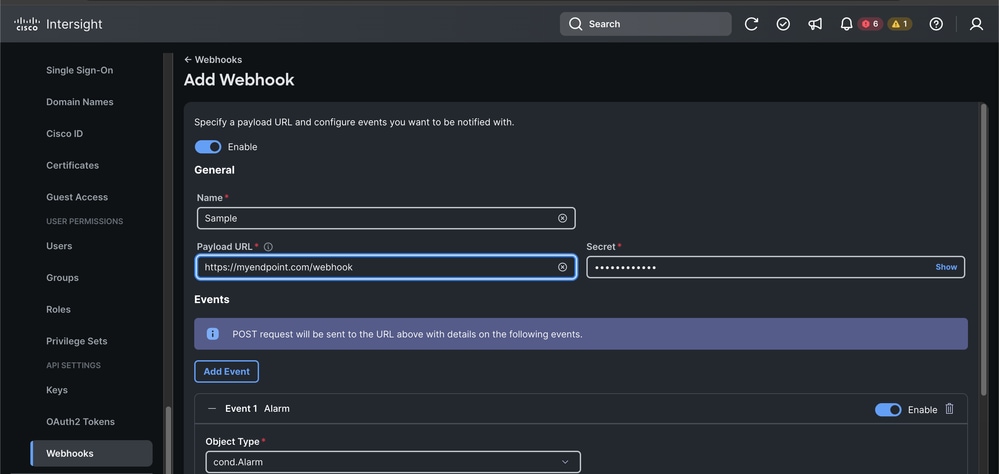
第一步是在Intersight中配置Webhook並建立共享金鑰。
- 登入Cisco Intersight。
- 導覽至Settings > Webhooks。
- 建立或編輯Webhook時,可以看到標籤為Secret的欄位。
- 自己定義此字串(例如ecret)。 儲存後,Intersight使用此選項對傳送的每條消息進行簽名。
- 重要信息:以安全方式儲存此金鑰,不要公開共用。
驗證邏輯
步驟 1:驗證密封(正文摘要)
首先要檢查的是郵件正文是否在其旅途中進行了更改。我們使用雜湊(尤其是SHA-256)執行此操作。
什麼是Hash?
就像指紋一樣。即使您在10頁的文檔中更改了一個逗號,指紋也會完全更改。
邏輯:
- 採用原始請求正文(JSON文本與它到達的完全相同)。
- 通過aSHA-256雜湊函式運行它。
- 使用Base64編碼將二進位制指紋轉換為可讀字串。
- 將您的結果與Intersight傳送的Digestheader進行比較。
- 它必須如下所示:SHA-256=your_calculated_string。
步驟 2:準備請求目標
Intersight在其簽名中包含消息的目標以防止重放攻擊(在此處,有人竊取了有效消息並將其傳送到其他終結點)。
Logic:建立一個將HTTP方法和路徑組合在一起的字串。
格式:(request-target):post /your/endpoint/path
步驟 3:建立簽名字串
必須嚴格地按順序進行。
大多數開發商都在這裡遇到了麻煩。Intersight對用於簽名的信頭的順序、區分大小寫和格式設定極為嚴格。您必須構建單個文本塊,其中每行都為header-name:價值.
所需的確切順序:
- (request-target)(來自步驟2)
- 主機
- 日期
- digest(步驟1中Digest標頭的完整值)
- content-type
- content-length
(request-target): post /api/webhook
host: myapp.example.com
date: Mon, 09 Mar 2026 12:50:29 GMT
digest: SHA-256=L6Y...
content-type: application/json
content-length: 542
步驟 4:生成簽名(HMAC)
現在,使用Secret Key(來自Intersight UI)在我們剛構建的字串上簽名。我們使用名為HMAC-SHA256的方法。
什麼是HMAC?
這是一種使用金鑰對消息進行簽名的方式。只有擁有相同金鑰的人才能生成相同的簽名。
邏輯:
- 輸入:步驟3中的簽名字串。
- 金鑰:您的Webhook金鑰。
- 流程:運行HMAC-SHA256演算法。
- 輸出:獲取生成的二進位制數據和Base64 Encodeit。
步驟 5:最終比較
Intersight傳送Authorization標頭。您需要使用您剛剛生成的簽名來重建期望的報頭外觀。
如果計算出的字串與請求中提供的Authorization標頭匹配,則消息是可信的。
重要注意事項
- 時鐘偏差:始終檢查日期標題。如果請求與伺服器時間相比超過5分鐘,則拒絕該請求以防止重放攻擊。
- 原始本文:在驗證摘要之前不要分析JSON然後重新對其進行結構化。不同的庫會新增不同的間距,這將打破雜湊。
- 標題順序:Intersight根據Authorization標頭的headers="。."部分中定義的順序驗證簽名。確保要簽名的字串與該順序完全匹配。
可驗證的示例
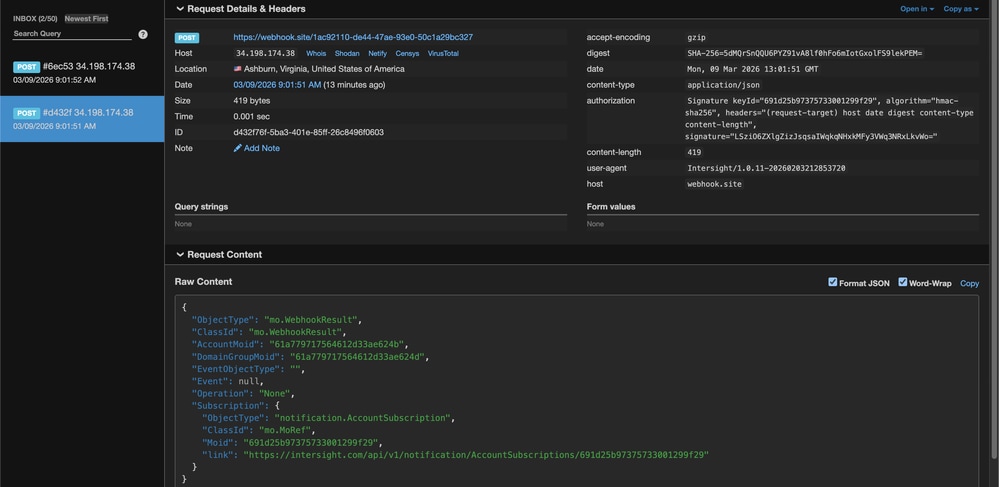
為了幫助您測試代碼,下面是一個基於Intersight傳送的實際webhook負載的示例。
測試引數
Secret:secret
Host:webhook.site
Path:/1ac92110-de44-47ae-93e0-50c1a29bc327
Mon, 09 Mar 2026 13:01:51 GMT
Content-Length:419
Payload:{"ObjectType":"mo.WebhookResult","ClassId":"mo.WebhookResult","AccountMoid":"61a779717564612d33ae624b","DomainGroupMoid":"61a779717564612d33ae624d","EventObjectType":"","Event":null,"Operation":"None","Subscription":{"ObjectType":"notification.AccountSubscription","ClassId":"mo.MoRef","Moid":"691d25b97375733001299f29","link":"https://intersight.com/api/v1/notification/AccountSubscriptions/691d25b97375733001299f29"}}
Expected Signature:LSziO6ZXlgZizJsqsaIWqkqNHxkMFy3VWq3NRxLkvWo=
Bash和OpenSSL驗證
#!/bin/bash

# 1. Setup the inputs
SECRET="secret"
EXPECTED_SIG="LSziO6ZXlgZizJsqsaIWqkqNHxkMFy3VWq3NRxLkvWo="
PAYLOAD='{"ObjectType":"mo.WebhookResult","ClassId":"mo.WebhookResult","AccountMoid":"61a779717564612d33ae624b","DomainGroupMoid":"61a779717564612d33ae624d","EventObjectType":"","Event":null,"Operation":"None","Subscription":{"ObjectType":"notification.AccountSubscription","ClassId":"mo.MoRef","Moid":"691d25b97375733001299f29","link":"https://intersight.com/api/v1/notification/AccountSubscriptions/691d25b97375733001299f29"}}'

# 2. Calculate the Body Digest
# We use echo -n to ensure no trailing newline is added to the payload
DIGEST=$(echo -n "$PAYLOAD" | openssl dgst -sha256 -binary | openssl base64)
FULL_DIGEST="SHA-256=$DIGEST"

# 3. Build the Signing String (Strict Order!)
# Note: The format must be exactly: header: value\n
SIGNING_STR="(request-target): post /1ac92110-de44-47ae-93e0-50c1a29bc327
host: webhook.site
date: Mon, 09 Mar 2026 13:01:51 GMT
digest: $FULL_DIGEST
content-type: application/json
content-length: 419"

# 4. Generate the HMAC-SHA256 Signature
CALCULATED_SIG=$(echo -n "$SIGNING_STR" | openssl dgst -sha256 -hmac "$SECRET" -binary | openssl base64)

# 5. Output the results for comparison
echo "--- Verification Results ---"
echo "Expected Signature:   $EXPECTED_SIG"
echo "Calculated Signature: $CALCULATED_SIG"

if [ "$EXPECTED_SIG" == "$CALCULATED_SIG" ]; then
    echo "SUCCESS: The signatures match!"
else
    echo "FAILURE: The signatures do not match."
fi
PowerShell驗證
# 1. Setup the inputs
$Secret = "secret"
$ExpectedDigest = "5dMQrSnQQU6PYZ91vA8lf0hFo6mIotGxolFS9lekPEM="
$ExpectedSig    = "LSziO6ZXlgZizJsqsaIWqkqNHxkMFy3VWq3NRxLkvWo="

$Payload = '{"ObjectType":"mo.WebhookResult","ClassId":"mo.WebhookResult","AccountMoid":"61a779717564612d33ae624b","DomainGroupMoid":"61a779717564612d33ae624d","EventObjectType":"","Event":null,"Operation":"None","Subscription":{"ObjectType":"notification.AccountSubscription","ClassId":"mo.MoRef","Moid":"691d25b97375733001299f29","link":"https://intersight.com/api/v1/notification/AccountSubscriptions/691d25b97375733001299f29"}}'

# 2. Calculate the Body Digest
$Sha256 = [System.Security.Cryptography.SHA256]::Create()
$PayloadBytes = [System.Text.Encoding]::UTF8.GetBytes($Payload)
$HashBytes = $Sha256.ComputeHash($PayloadBytes)
$CalculatedDigest = [Convert]::ToBase64String($HashBytes)

# 3. Build the Signing String (Strict Order!)
# Note: `n is the PowerShell newline character.
# The string must match the order in the Authorization header exactly.
$SigningStr = "(request-target): post /1ac92110-de44-47ae-93e0-50c1a29bc327`n" +
              "host: webhook.site`n" +
              "date: Mon, 09 Mar 2026 13:01:51 GMT`n" +
              "digest: SHA-256=$CalculatedDigest`n" +
              "content-type: application/json`n" +
              "content-length: 419"

# 4. Generate the HMAC-SHA256 Signature
$Hmac = New-Object System.Security.Cryptography.HMACSHA256
$Hmac.Key = [System.Text.Encoding]::UTF8.GetBytes($Secret)
$SigBytes = $Hmac.ComputeHash([System.Text.Encoding]::UTF8.GetBytes($SigningStr))
$CalculatedSig = [Convert]::ToBase64String($SigBytes)

# 5. Output the results for comparison
Write-Host "--- Verification Results ---" -ForegroundColor Cyan

Write-Host "Digest Match: " -NoNewline
if ($CalculatedDigest -eq $ExpectedDigest) {
    Write-Host "SUCCESS" -ForegroundColor Green
} else {
    Write-Host "FAILED" -ForegroundColor Red
}

Write-Host "Expected Signature:   $ExpectedSig"
Write-Host "Calculated Signature: $CalculatedSig"

if ($CalculatedSig -eq $ExpectedSig) {
    Write-Host "SUCCESS: The signatures match!" -ForegroundColor Green
} else {
    Write-Host "FAILURE: The signatures do not match." -ForegroundColor Red
}
相關資訊

 意見
意見