排除ACI交換矩陣中的遠端訪問問題
簡介
本檔案介紹如何在思科以應用為中心的基礎設施(ACI)交換矩陣中驗證、排除和解決遠端訪問問題。它涵蓋安全殼層(SSH)和超文字傳輸通訊協定對APIC和光纖交換器的安全存取(HTTPS)、使用終端存取控制器存取控制系統Plus(TACACS+)的遠端驗證、授權和計量(AAA)、遠端驗證撥入使用者服務(RADIUS)和輕量目錄存取通訊協定(LDAP),以及角色型存取控制(RBAC)授權。每個區域都包含診斷樹和詳細的故障排除方案。
背景資訊
本文檔中的材料是從ACI管理和核心服務故障排除 — Pod策略指南、Cisco APIC基本配置指南6.1(x)版 — Management一章和Cisco APIC安全配置指南 — Access, Authentication, and Accounting一章中合成的。
概觀
對ACI交換矩陣的遠端訪問包括三個不同的層,每個層都必須使工程師成功登入並操作:
- 傳輸 — 必須能夠訪問並啟用管理網路路徑(OOB或帶內)和協定服務(SSH或HTTPS)。
- 驗證 — 必須驗證使用者的憑據,這些憑據可在APIC本地驗證,或針對遠端AAA伺服器(TACACS+、RADIUS或LDAP)驗證。
- 授權 — 必須為經過身份驗證的使用者分配正確的RBAC角色和安全域,以便檢視和修改所需的ACI對象。
任何層的故障都會產生不同的症狀。傳輸故障會完全阻止連線。身份驗證失敗將返回憑證錯誤。授權失敗允許登入,但會限制可見性或在API中產生「403禁止」錯誤。
管理訪問策略
管理訪問策略(commPol)是控制交換矩陣上啟用哪些遠端訪問協定的中心對象。它位於Fabric > Fabric Policies > Policies > Pod > Management Access > default下。策略包含配置以下內容的子對象:
- SSH(
commSsh) — 管理狀態、埠、密碼、金鑰交換(KEX)演算法、消息身份驗證代碼(MAC)和主機金鑰演算法。 - HTTPS()-
commHttps管理狀態、埠、傳輸層安全(TLS)協定版本、限制速率和客戶端證書身份驗證。 - Telnet(
commTelnet) — 管理狀態和埠。Telnet預設禁用,思科建議保持禁用狀態。
OOB和帶內管理
ACI節點支援兩種管理訪問路徑:
- 帶外(OOB) — 使用APIC或交換機上的專用管理埠。OOB管理地址從mgmt租戶下的池中分配,並通過分配給節
mgmtRsOoBStNode點。在APIC上,OOB合約通過規則執iptables行。如果應用了OOB合約,則只有合約明確允許的流量才能到達APIC管理介面。 - 帶內(INB) — 使用交換矩陣資料平面管理流量。帶內管理需要網橋域(BD)、子網、終端組(EPG)、合約和節點管理地址分配。如果沒有額外的路由或策略配置,則無法從交換矩陣外部訪問帶內IP地址。
AAA架構
ACI使用三層AAA模型:
- Login Domain()-
aaaLoginDomain在命名領域下對AAA提供程式分組。使用者在登入螢幕上指定登入域(例如,apic:TACACS-Domain或通過UI中的下拉選單)。特殊的回退登入網域始終存在,並且對映到本機驗證。 - 提供商組(
aaaTacacsPlusProviderGroup、aaaRadiusProviderGroup、aaaLdapProviderGroup) — 引用一個或多個AAA伺服器並定義其嘗試的順序。 - 提供程式(
aaaTacacsPlusProvider、aaaRadiusProvider、aaaLdapProvider) — 定義伺服器IP、埠、共用金鑰(或繫結LDAP的DN)、超時、重試、管理EPG和監控憑證。
Default Authentication Realm(aaaDefaultAuth)確定在使用者登入時未指定登入域時使用哪個登入域。控制檯身份驗證領域控制控制檯會話的身份驗證。
主要AAA日誌檔案
AAA身份驗證事件記錄在APIC和交換矩陣交換機的多個檔案中。這些日誌是驗證身份驗證結果、標識正在使用的領域和提供程式組以及診斷角色分配失敗的主要工具。
| 日誌檔案 | 位置(APIC) | 位置(交換機) | 說明 |
|---|---|---|---|
| nginx.bin.log(APIC) nginx.log(交換機) |
/var/log/dme/log/nginx.bin.log |
/var/sysmgr/tmp_logs/dme_logs/nginx.log |
主AAA日誌。包含完整的身份驗證流程:PAM請求、領域選擇、提供程式查詢、LDAP/TACACS+/RADIUS通訊、AV對解析、域和角色分配,以及成功或拒絕結果。不同平台的檔名不同,但內容格式相同。 |
| access.log | /var/log/dme/log/access.log |
/var/log/dme/log/access.log |
NGINX HTTP請求日誌。每個API請求一行。在APIC上,顯示具有HTTP狀態代碼(200 =成功,401 =拒絕)的aaaLogin和aaaRefresh呼叫。 在交換機上,顯示內部DME API請求和aaaRefresh呼叫。 |
| pam.module.log | /var/log/dme/log/pam.module.log |
/var/log/dme/log/pam.module.log |
PAM模組日誌。顯示SSH會話的身份驗證結果:經過身份驗證的使用者、源IP和分配的UNIX使用者ID。在交換器上,這是確認使用者是否通過驗證或拒絕的最快方式。 |
nginx日誌中的AAA條目遵循以下格式:
PID||TIMESTAMP||aaa||SEVERITY||CONTEXT||MESSAGE||SOURCE_FILE||LINE
過濾特定使用者身份驗證流的AAA相關日誌條目:
! On the APIC:
apic1# grep '||aaa||' /var/log/dme/log/nginx.bin.log | grep -i 'username' | tail -20

! On a leaf or spine switch:
leaf101# grep '||aaa||' /var/sysmgr/tmp_logs/dme_logs/nginx.log | grep -i 'username' | tail -20
或檢視所有最近的身份驗證請求和結果:
! On the APIC:
apic1# grep '||aaa||' /var/log/dme/log/nginx.bin.log | grep -i 'PAM authenticate\|was denied\|Unauthorized\|DENIED' | tail -20

! On a leaf or spine switch:
leaf101# grep '||aaa||' /var/sysmgr/tmp_logs/dme_logs/nginx.log | grep -i 'PAM authenticate\|was denied\|Unauthorized\|DENIED' | tail -20
典型的成功身份驗證流程按順序顯示這些金鑰消息:
已收到來自nginx的PAM身份驗證請求,用於獲取使用者名稱:<user>— 收到登入請求。DefaultAuthMo指定領域<N>。提供商組<名稱> !— 已選擇領域(0=回退/本地,2=TACACS+,3=LDAP)。- 提供程式特定的消息(LDAP繫結、TACACS+提供程式查詢或RADIUS請求)。
在遠端使用者名稱下找到UserDomain <domain>:<user>— 從AAA響應分配的域。找到的使用者名稱:admin在UserDomain all下具有管理員寫入許可權 — user是管理員使用者— 通過了角色檢查。
失敗的身份驗證日誌:
使用者<user>在AAA身份驗證期間被拒絕未經授權的使用者<user>錯誤:AAA伺服器驗證遭拒絕
! On the APIC:
apic1# zegrep '||aaa||' /var/log/dme/log/nginx.bin.log.*.gz | grep 'PAM authenticate'

! On a leaf or spine switch:
leaf101# zegrep '||aaa||' /var/sysmgr/tmp_logs/dme_logs/nginx.log.*.gz | grep 'PAM authenticate'
RBAC模型
ACI RBAC控制經過身份驗證的使用者可以檢視和執行的操作。該模型有三個組成部分:
- 安全域(
aaaDomain) — 對映到ACI對象(租戶、訪問策略、交換矩陣策略)的範圍限制器。 內建域all、common和mgmt始終存在。自定義域將使用者的可見性限製為特定租戶或策略區域。 - Role(
aaaRole) — 定義一組許可權。預構建角色包括admin、aaa、tenant-admin、tenant-ext-admin、read-all、access-admin、fabric-admin、ops和nw-svc-admin。 - 許可權 — 每個角色都授予對特定功能區域的read或write(這意味著讀取)訪問許可權。
為使用者帳戶分配一個或多個安全域和角色對。對於通過TACACS+、RADIUS或LDAP進行身份驗證的遠端使用者,角色對映通過AAA響應中的供應商特定屬性(例如,屬性)cisco-av-pair提供。
分類決策樹
當使用者報告無法遠端訪問ACI交換矩陣時,請使用此診斷樹:
- 是否能ping通APIC或交換機管理IP?
- 無故障→排除管理網路路徑故障。請參考「排除OOB和帶內管理故障」部分。
- 是→繼續。
- 是否可建立SSH或HTTPS連線(該連線是否完全開啟)?
- 無→可以禁用協定服務,過濾埠,或可能出現密碼不匹配。請參考「排除SSH訪問故障」或「排除HTTPS訪問故障」部分。
- 是→繼續。
- 是否顯示登入螢幕(HTTPS),或SSH握手是否完成並提示輸入憑證?
- 沒有→金鑰交換或TLS握手失敗。有關密碼和KEX不匹配,請參考「排除SSH訪問故障」部分。
- 是→繼續。
- 憑證是否因「驗證失敗」或類似原因而失敗?
- 是 — →證問題。請參考「AAA身份驗證故障排除」部分(TACACS+、RADIUS或LDAP,具體取決於使用的登入域)。
- 無→繼續。
- 使用者是否登入但看不到預期對象,或者收到「403 Forbidden」錯誤?
- 是→授權或RBAC問題。請參考「排除RBAC和使用者許可權故障」部分。
- 無→訪問正常。驗證使用者遇到的特定問題。
驗證設定
在對運行狀態進行故障排除之前,請驗證配置鏈是否完成。配置錯誤是遠端訪問問題最常見的根本原因。
驗證管理訪問策略(SSH和HTTPS)
導航到Fabric > Fabric Policies > Policies > Pod > Management Access > default。
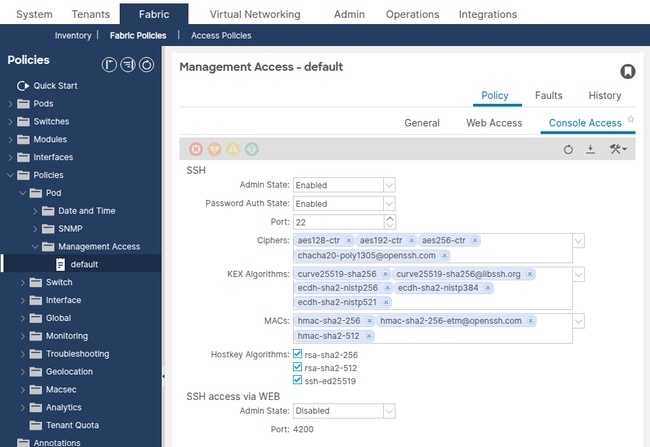
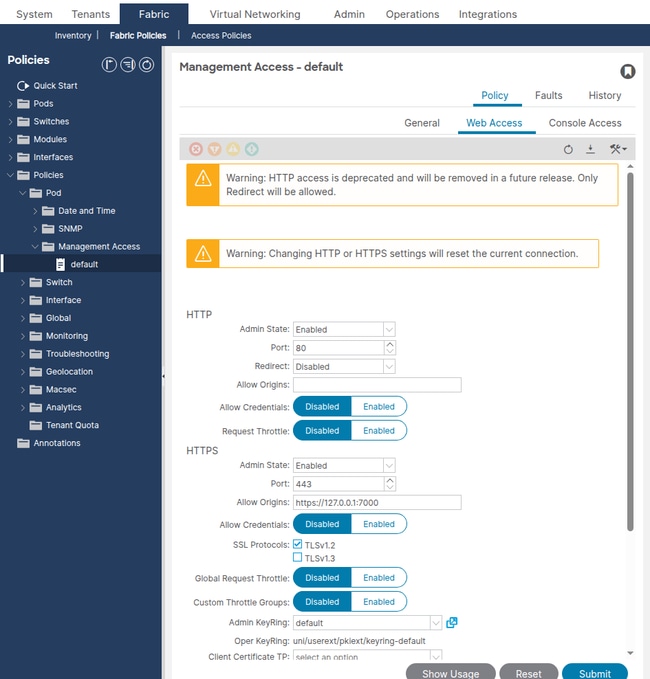
確認以下SSH設定:
- 管理狀態 — 必須啟用。
- 埠 — 預設值22。如果更改,SSH客戶端必須使用自定義埠。
- Password Authentication - enabled(除非需要僅證書身份驗證)。
- SSH密碼 — 必須包括SSH客戶端支援的至少一個密碼。
- KEX演算法 — 必須至少包括SSH客戶端支援的一種演算法。
- SSH MACs — 必須至少包含SSH客戶端支援的一個MAC。
通過API查詢SSH託管對象:
apic1# moquery -c commSsh
dn              : uni/fabric/comm-default/ssh
adminSt         : enabled                      <--- must be enabled
port            : 22
passwordAuth    : enabled
sshCiphers      : aes128-ctr,aes192-ctr,aes256-ctr,chacha20-poly1305@openssh.com
kexAlgos        : curve25519-sha256,curve25519-sha256@libssh.org,ecdh-sha2-nistp256,ecdh-sha2-nistp384,ecdh-sha2-nistp521
sshMacs         : hmac-sha2-256,hmac-sha2-256-etm@openssh.com,hmac-sha2-512
hostkeyAlgos    : rsa-sha2-256,rsa-sha2-512,ssh-ed25519
確認以下HTTPS設定:
- 管理狀態 — 必須啟用。
- 埠 — 默認443。
- SSL協定— TLSv1.2(預設)。 較舊的客戶端可能需要顯式新增TLSv1.1。
- 限制狀態 — 如果啟用,限制速率將限制每個使用者每秒的請求數。非常低的值可能會導致API超時錯誤。
apic1# moquery -c commHttps
dn              : uni/fabric/comm-default/https
adminSt         : enabled                      <--- must be enabled
port            : 443
sslProtocols    : TLSv1.2
throttleSt      : enabled
throttleRate    : 2
常見配置錯誤
- SSH密碼限制過於嚴格 — 在ACI 5.2(1)版及更高版本中,預設的SSH密碼被強化。較舊的SSH客戶端(例如,0.75之前的PuTTY版本或僅提供的OpenSSH版本)
diffie-hellman-group14-sha1可能會使金鑰交換失敗。SSH客戶端顯示「未找到匹配的密碼」或「未找到匹配的金鑰交換方法」。 - 已禁用密碼驗證
passwordAuth如果設定為disabled,則僅允許基於SSH金鑰的驗證。使用密碼進行連線的使用者將看到「許可權被拒絕(公鑰)」。 - 自定義SSH埠,無客戶端感知 — 如果SSH埠從22更改,則SSH客戶端必須指定新埠(例如
ssh -p 2222 admin@10.1.1.1)。
驗證OOB管理地址
導航到租戶>管理>節點管理地址。
確認每個APIC和交換機節點都分配了帶有有效網關的OOB管理IP地址。沒有管理地址的節點將無法通過管理網路訪問。
通過API查詢OOB靜態節點分配:
apic1# moquery -c mgmtRsOoBStNode
# Example output for one node:
dn      : uni/tn-mgmt/mgmtp-default/oob-default/rsooBStNode-[topology/pod-1/node-201]
addr    : 10.1.1.104/27                <--- OOB IP assigned
gw      : 10.1.1.97                    <--- gateway for the OOB subnet
tDn     : topology/pod-1/node-201      <--- target node
常見配置錯誤
- 缺少OOB地址分配 — 交換機下沒有項
mgmtRsOoBStNode目。該節點沒有管理IP,並且不會響應OOB介面上的SSH或HTTPS。 - 網關不正確 — 網關地址與OOB管理網路上的實際網關不匹配。節點可以接收資料包,但無法傳送返回流量。
- 子網掩碼不匹配 — OOB子網掩碼與物理管理網路不匹配。這會導致節點認為管理站位於不同的子網上,並通過不存在或不正確的網關路由流量。
驗證OOB合約
導航到租戶>管理>合約。
如果將OOB合約應用於OOB管理EPG,則只有該合約明確允許的流量才能到達APIC管理介面。在APIC上,OOB合約通過規則執iptables行。
查詢OOB EPG提供的合約:
apic1# moquery -c mgmtRsOoBProv -x 'query-target-filter=wcard(mgmtRsOoBProv.dn,"oob-default")'
如果查詢返回結果,則將應用合約。驗證合約主題和過濾器允許所需的協定:
- SSH — TCP埠22(或自定義埠)
- HTTPS — TCP埠443(或自定義埠)
- ICMP — 用於ping驗證
常見配置錯誤
- OOB合約不包括SSH或HTTPS — 工程師可以ping通APIC,但無法通過SSH或HTTPS連線。APIC上
iptables的規則以靜默方式丟棄流量。 - OOB合約過濾器中的源IP限制 — 合約過濾器限制對特定源子網的訪問。該子網之外的工程師無法連線。
驗證AAA配置
導覽至Admin > AAA > Authentication > AAA。
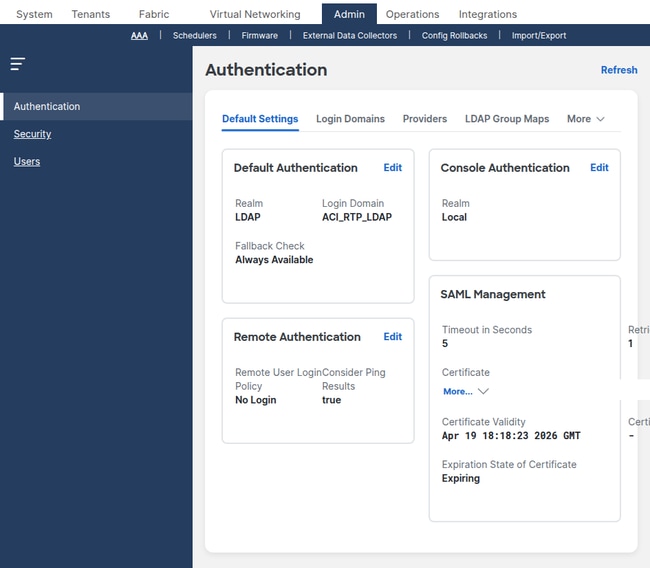
確認以下內容:
- 預設身份驗證領域 — 標識使用者未指定登入域時使用哪個登入域。如果設定為遠端AAA登入域,則必須可訪問相應的伺服器。
- 控制檯身份驗證領域 — 控制控制檯訪問。如果設定為local,則控制檯登入始終使用本地憑據(推薦)。
驗證登入域
導覽至Admin > AAA > Authentication > Login Domains。
apic1# moquery -c aaaLoginDomain
# Example output:
dn    : uni/userext/logindomain-TACACS-Domain
name  : TACACS-Domain

dn    : uni/userext/logindomain-LOCAL
name  : LOCAL

dn    : uni/userext/logindomain-fallback
name  : fallback
descr : Special login domain to allow fallback to local authentication
驗證用於身份驗證的登入域是否存在,以及它是否引用正確的提供程式組。
驗證TACACS+提供程式
導覽至Admin > AAA > Authentication > TACACS+ > TACACS+ Providers。
apic1# moquery -c aaaTacacsPlusProvider
dn              : uni/userext/tacacsext/tacacsplusprovider-10.1.1.50
name            : 10.1.1.50
authProtocol    : pap
port            : 49                          <--- default TACACS+ port
monitorServer   : disabled
epgDn           : uni/tn-mgmt/mgmtp-default/oob-default    <--- management EPG
驗證RADIUS提供程式
導覽至Admin > AAA > Authentication > RADIUS > RADIUS Providers。
apic1# moquery -c aaaRadiusProvider
dn              : uni/userext/radiusext/radiusprovider-10.1.1.51
name            : 10.1.1.51
authPort        : 1812                        <--- default RADIUS auth port
authProtocol    : pap
retries         : 1
timeout         : 5
epgDn           : uni/tn-mgmt/mgmtp-default/oob-default    <--- management EPG
驗證LDAP提供程式
導航到Admin > AAA > Authentication > LDAP > LDAP Providers。
apic1# moquery -c aaaLdapProvider
dn              : uni/userext/ldapext/ldapprovider-10.1.1.52
name            : 10.1.1.52
port            : 389                         <--- 389 for LDAP, 636 for LDAPS
enableSSL       : no
rootdn          : CN=binduser,CN=Users,DC=example,DC=com
basedn          : CN=Users,DC=example,DC=com
filter          : sAMAccountName=$userid
attribute       : memberOf                    <--- attribute used for group map
epgDn           : uni/tn-mgmt/mgmtp-default/oob-default    <--- management EPG
常見AAA配置錯誤
- 共用金鑰不匹配 — ACI TACACS+或RADIUS提供程式上配置的金鑰與伺服器上的金鑰不匹配。身份驗證以靜默方式失敗。
- 管理EPG錯誤 — 提供商的
epgDnEPG為空或指向錯誤的EPG(例如,當伺服器位於OOB網路上時為帶內)。 APIC無法訪問伺服器。 - 登入域領域不匹配 — 登入域配置為LDAP,但使用者需要TACACS+身份驗證。登入域必須引用正確的提供程式組型別。
- LDAP繫結DN不正確 — (
rootdn繫結DN)或basedn錯誤。即使使用者憑據正確,LDAP身份驗證也會失敗,並出現繫結錯誤。 - LDAP篩選器與目錄架構不匹配 — 對於Active Directory,請使用
sAMAccountName=$userid。對於OpenLDAP,請使cn=$userid用或uid=$userid。
驗證RBAC配置
導航到Admin > AAA > Users,以檢視本地使用者帳戶及其安全域和角色分配。
通過API查詢安全域:
apic1# moquery -c aaaDomain
# Built-in domains:
dn      : uni/userext/domain-all
name    : all                              <--- full fabric access

dn      : uni/userext/domain-common
name    : common                           <--- access to tenant common

dn      : uni/userext/domain-mgmt
name    : mgmt                             <--- access to tenant mgmt
分配給domain all 且角色為admin的使用者對整個交換矩陣具有完全讀寫訪問許可權。分配至具有tenant-admin角色的自定義安全域的使用者只能管理與該域關聯的租戶。
常見RBAC配置錯誤
- 建立沒有安全域的用戶 — 使用者可以登入,但看不到租戶,並且在API呼叫中接收「403禁止」。必須至少分配一個安全域。
- 在需要寫入訪問許可權時分配的只讀角色 — 使用者可以檢視對象,但不能提交更改。驗證角色許可權是否設定為writePriv。
- AAA伺服器缺少遠端使用者角色對映 — TACACS+或RADIUS伺服器不返回包含的
cisco-av-pair屬性shell:domains=all/admin/。使用者身份驗證成功,但沒有角色,並且無法在交換矩陣中看到任何內容。
排除OOB和帶內管理故障
如果在網路上無法訪問APIC或交換機管理IP,請在調查SSH、HTTPS或AAA之前對管理路徑進行故障排除。
案例:無法Ping APIC OOB IP
問題:管理站無法ping通APIC OOB管理IP地址。
驗證步驟:
- 驗證APIC管理埠是否物理連線且鏈路是否開啟。
- 驗證管理站是否位於同一個L2網段上,或者是否有到達OOB子網的路由。
- 驗證是否正確分配了OOB管理IP:
apic1# ifconfig oobmgmt oobmgmt: flags=4163<UP,BROADCAST,RUNNING,MULTICAST> mtu 1500 inet 10.1.1.1 netmask 255.255.255.224 broadcast 10.1.1.31 - 驗證預設閘道是否可連線:
apic1# netstat -rn | grep oobmgmt
0.0.0.0         10.1.1.97       0.0.0.0         UG    0      0        0 oobmgmt
10.1.1.96       0.0.0.0         255.255.255.224  U     0      0        0 oobmgmt
- 如果應用了OOB合約,請驗證它是否允許所需的協定。按照「驗證OOB合約」部分所示查詢OOB EPG提供的合約。OOB合約作為APIC
iptables上的規則實施。您可以從APIC shell檢視儲存的規則:apic1# cat /etc/sysconfig/iptables | grep -A 20 "filter"
如果INPUT策略為DROP,並且所需協定沒有ACCEPT規則,則OOB合約將過濾流量。
根本原因:OOB管理地址丟失或配置錯誤、網關不正確或OOB合約過濾流量。
解決方案:更正OOB地址分配、驗證物理網路路徑或更新OOB合約以允許所需的協定。
案例:無法到達交換機管理IP
問題:管理站可以訪問APIC,但無法通過OOB訪問交換機。
驗證步驟:
- 驗證交換機是否已分配OOB地址:
apic1# moquery -c mgmtRsOoBStNode -x 'query-target-filter=eq(mgmtRsOoBStNode.tDn,"topology/pod-1/node-101")'
dn      : uni/tn-mgmt/mgmtp-default/oob-default/rsooBStNode-[topology/pod-1/node-101]
addr    : 10.1.1.101/27
gw      : 10.1.1.97
- 確認交換器管理介面具有指派的IP:
leaf101# ifconfig eth0 eth0 Link encap:Ethernet HWaddr 20:db:ea:14:42:54 inet addr:10.1.1.101 Bcast:10.1.1.127 Mask:255.255.255.224 UP BROADCAST RUNNING MULTICAST MTU:1500 - 驗證管理VRF預設路由:
leaf101# ip route show
default via 10.1.1.97 dev eth0
10.1.1.96/27 dev eth0 proto kernel scope link src 10.1.1.101
根本原因:缺少OOB地址分配、網關不正確或交換機管理物理埠關閉。
解決方案:在Tenants > mgmt > Node Management Addresses下分配OOB地址。驗證物理管理鏈路是否已啟動。
排除SSH訪問故障
本節介紹可以到達管理IP(ping成功)但SSH會話無法建立或驗證的情況。
案例:SSH連線被拒絕
問題:SSH客戶端在連線到APIC或交換機時報告「連線被拒絕」。
驗證步驟:
- 驗證管理訪問策略中是否啟用了SSH:
apic1# moquery -c commSsh -x 'query-target-filter=eq(commSsh.adminSt,"enabled")'
dn        : uni/fabric/comm-default/ssh
adminSt   : enabled
port      : 22
如果
adminSt禁用,則會拒絕SSH連線。 - 驗證使用的埠是否正確。如果SSH埠從22:
$ ssh -p custom-port admin@10.1.1.1
- 驗證OOB合約是否允許SSH埠上的TCP。請參考「驗證OOB合約」部分。
根本原因:在管理訪問策略中禁用SSH、客戶端未知的自定義埠或OOB合約過濾。
解決方案:在管理訪問策略中啟用SSH或使用正確的埠。
案例:SSH金鑰交換失敗(密碼或KEX不匹配)
問題:SSH客戶端失敗並顯示「未找到匹配密碼」、「未找到匹配金鑰交換方法」或「未找到匹配的MAC」。
驗證步驟:
- 檢查SSH客戶端詳細輸出,以確定客戶端提供的演算法:
$ ssh -vv admin@10.1.1.1
debug2: KEX algorithms: curve25519-sha256,diffie-hellman-group14-sha256,diffie-hellman-group14-sha1
debug2: host key algorithms: ssh-ed25519,rsa-sha2-512,rsa-sha2-256
debug2: ciphers ctos: aes128-ctr,aes192-ctr,aes256-ctr
debug2: MACs ctos: hmac-sha2-256,hmac-sha1
- 將客戶端提供的演算法與APIC配置的演算法進行比較:
apic1# moquery -c commSsh
sshCiphers   : aes128-ctr,aes192-ctr,aes256-ctr,chacha20-poly1305@openssh.com
kexAlgos     : curve25519-sha256,curve25519-sha256@libssh.org,ecdh-sha2-nistp256,ecdh-sha2-nistp384,ecdh-sha2-nistp521
sshMacs      : hmac-sha2-256,hmac-sha2-256-etm@openssh.com,hmac-sha2-512
hostkeyAlgos : rsa-sha2-256,rsa-sha2-512,ssh-ed25519
- 標識交叉點。如果任何類別中沒有通用演算法,握手將失敗。
根本原因:ACI升級或密碼強化後,SSH客戶端和APIC之間沒有通用的密碼、KEX演算法或MAC。
解決方案:更新SSH客戶端以支援現代演算法,或者將所需的傳統演算法重新新增到管理訪問策略。重新新增舊版演算法會帶來安全風險,不建議長期使用。
案例:SSH連線,但本地使用者的身份驗證失敗
問題:SSH握手成功(出現密碼提示),但本地使用者的密碼被拒絕。
驗證步驟:
- 驗證使用者是否本地存在:
apic1# moquery -c aaaUser -x 'query-target-filter=eq(aaaUser.name,"admin")'
dn        : uni/userext/user-admin
name      : admin
accountStatus : active                 <--- must be active, not inactive or locked
- 檢查帳戶是否由於登入嘗試失敗過多而被鎖定:
apic1# moquery -c aaaUserEp
dn                 : uni/userext
pwdStrengthCheck   : no
檢查Admin > AAA > Security Management > Lockout Policy下的登入域鎖定策略。
- 驗證使用者是否使用正確的登入域登入。如果「預設身份驗證領域」設定為遠端AAA登入域,則使用者必須預先
apic:LOCAL\\username或apic:fallback\\username才能強制進行本地身份驗證。 - 驗證日誌中的身份驗證結果。在
nginx.bin.logAPIC上檢查登入事件:apic1# grep '||aaa||' /var/log/dme/log/nginx.bin.log | grep -i 'admin' | tail -20
查詢分配給登入嘗試的領域和提供程式組:
! Working — Successful local authentication via the fallback domain (Realm 0 = fallback/local):
||aaa||INFO||Received PAM authenticate request from nginx for Username:  apic#fallback\\admin
||aaa||INFO||auth-domain realm = local, LocalUser admin
||aaa||DBG4||Decoded username string to Domain: fallback Username: admin Realm 0, PG
||aaa||DBG4||Found password for local Username: apic#fallback\\admin
||aaa||DBG4||Calling UpdateLastLogin method for user: apic#fallback\\admin

! Not Working — Login was sent to the LDAP realm because the Default Authentication Realm is set to LDAP.
! The admin user does not exist in the LDAP directory, so the LDAP search returns empty and the login is denied:
||aaa||INFO||Received PAM authenticate request from nginx for Username:  apic#LDAP-Domain\\admin
||aaa||DBG4||Decoded username string to Domain: LDAP-Domain Username: admin Realm 3, PG LDAP-Domain
||aaa||DBG4||Adding LdapProvider ldap-server.example.com to the list, order 1
||aaa||INFO||LDAP search to server ldap-server.example.com for baseDn CN=Users,DC=example,DC=com, filter sAMAccountName=admin
||aaa||INFO||LDAP search to server ldap-server.example.com for baseDn CN=Users,DC=example,DC=com, filter sAMAccountName=admin returned empty set
||aaa||INFO||User apic#LDAP-Domain\\admin was denied during AAA authentication
||aaa||DBG4||Setting error LDAP/AD Server Authentication DENIED
||aaa||ERROR||Unauthorized Username: admin error: LDAP/AD Server Authentication DENIED
如果領域不是0(回退/本地),則登入會被傳送到遠端AAA伺服器而不是本地資料庫。使用者必須預先
apic:fallback\\username或apic:LOCAL\\username才能強制進行本地身份驗證。
根本原因:不正確的密碼、鎖定的帳戶或正在向遠端AAA伺服器而不是本地資料庫傳送登入嘗試。
解決方案:重置密碼、解鎖帳戶或使用正確的登入域字首。
排除HTTPS訪問故障
本節介紹APIC Web UI或表示狀態傳輸(REST)應用程式設計介面(API)無法通過HTTPS訪問的場景。
案例:HTTPS連線超時
問題:瀏覽器顯示「ERR_CONNECTION_TIMED_OUT」或API呼叫在埠443上連線到APIC時掛起。
驗證步驟:
- 驗證HTTPS是否已啟用:
apic1# moquery -c commHttps -x 'query-target-filter=eq(commHttps.adminSt,"enabled")'
dn        : uni/fabric/comm-default/https
adminSt   : enabled
port      : 443
- 驗證OOB合約允許TCP 443。請參閱「驗證OOB合約」部分。
- 從APIC本身進行測試,以確認HTTPS進程正在偵聽:
apic1# ss -tlnp | grep 443
LISTEN  0  128  *:443  *:*  users:(("nginx",pid=12345,fd=6))
根本原因:已禁用HTTPS、OOB合約過濾TCP 443或APIC上的nginx進程崩潰。
解決方案:在管理訪問策略中啟用HTTPS、更新OOB合約或重新啟動APIC上的Web服務。
案例:瀏覽器顯示TLS握手錯誤
問題:瀏覽器顯示「ERR_SSL_VERSION_OR_CIPHER_MISMATCH」或類似的TLS錯誤。
驗證步驟:
- 檢查APIC上配置的TLS協定版本:
apic1# moquery -c commHttps
sslProtocols : TLSv1.2
- 驗證瀏覽器是否支援TLSv1.2。預設情況下,非常舊的瀏覽器(例如Internet Explorer 10及更早版本)不支援TLSv1.2。
根本原因:APIC僅提供TLSv1.2(預設值),而瀏覽器或API客戶端僅支援較舊的TLS版本。
解決方案:更新瀏覽器或客戶端。如果必須臨時支援較舊的客戶端,請將TLSv1.1新增到管理訪問策略,但這會導致安全風險。
案例:API限制限制
問題:REST API呼叫間歇性失敗,出現HTTP 503錯誤,或者Web UI在繁重的自動化過程中變得遲緩。
驗證步驟:
apic1# moquery -c commHttps
throttleSt   : enabled
throttleRate : 2                       <--- requests per second per user
如果限制速率非常低,並且自動化指令碼每秒傳送許多請求,則APIC將拒絕多餘的請求。
根本原因:對於自動化工作負載,每使用者限制速率過低。
解決方案:在管理訪問策略下增加限制速率,或最佳化自動化指令碼以減少請求頻率。或者,如果交換矩陣未共用,請禁用限制。
AAA故障排除 — TACACS+
本節介紹TACACS+身份驗證失敗。APIC通過TCP埠49與TACACS+伺服器通訊。
操作驗證
ACI交換機不支援在test aaa獨立NX-OS上可用的命令。要驗證TACACS+操作,請使用APIC檢查提供程式狀態、故障和登入會話歷史記錄。
檢查TACACS+提供程式上的活動故障:
apic1# moquery -c faultInst -x 'query-target-filter=wcard(faultInst.dn,"tacacsplusprovider")'
如果未返回錯誤,則APIC會考慮提供程式可訪問。如果存在故障,則輸出包括故障代碼,如F1773(提供程式無法訪問)或F1774(身份驗證失敗)。
驗證TACACS+提供程式配置:
apic1# moquery -c aaaTacacsPlusProvider
dn              : uni/userext/tacacsext/tacacsplusprovider-10.1.1.50
name            : 10.1.1.50
authProtocol    : pap
port            : 49
epgDn           : uni/tn-mgmt/mgmtp-default/oob-default
驗證從APIC到TACACS+伺服器的基本網路連通性:
apic1# ping 10.1.1.50
PING 10.1.1.50 (10.1.1.50): 56 data bytes
64 bytes from 10.1.1.50: icmp_seq=0 ttl=64 time=0.5 ms
嘗試使用TACACS+登入網域登入APIC,並檢查作業階段結果:
apic1# moquery -c aaaSessionLR -x 'order-by=aaaSessionLR.created|desc' -x page-size=5
檢視該欄位descr,確定故障是由於身份驗證拒絕還是連線問題造成的。
驗證APIC日誌中的TACACS+身份驗證流程。相關使用者名稱的篩選條件:
apic1# grep '||aaa||' /var/log/dme/log/nginx.bin.log | grep -i 'username' | tail -20
TACACS+登入遵循與LDAP相同的nginx.bin.log身份驗證流程(有關完整的實際日誌示例,請參閱LDAP操作驗證部分)。 TACACS+的主要差異如下:
DefaultAuthMo指定領域2— 領域2表示TACACS+(與LDAP的領域3相比)。正在將TacacsProvider <IP>新增到清單— 標識正在聯絡的TACACS+伺服器(與LDAP的LdapProvider相比)。TACACS+ Cisco-avpair(shell:domains=all/admin/)— TACACS+伺服器直接返回AV配對(與從LDAP組對映轉換相比)。
成功的TACACS+登入顯示相同的程式:PAM請求→域選擇→提供程→查詢解析UserDomain→使用者註→和admin寫入許可權的→角色分配。
failed TACACS+登入以User <username>(在AAA驗證期間遭到拒絕)和Unauthorized ...錯誤結束:AAA Server Authentication DENIED,與LDAP拒絕的模式相同。
案例:TACACS+驗證失敗
問題:當使用者選擇TACACS+登入域時,登入失敗並顯示「身份驗證失敗」。
驗證步驟:
- 檢查TACACS+提供程式上的活動故障:
apic1# moquery -c faultInst -x 'query-target-filter=wcard(faultInst.dn,"tacacsplusprovider")'
故障F1773表示連線問題。故障F1774表示身份驗證被拒絕。
- 驗證從APIC到TACACS+伺服器的網路連通性:
apic1# ping 10.1.1.50
PING 10.1.1.50 (10.1.1.50): 56 data bytes
64 bytes from 10.1.1.50: icmp_seq=0 ttl=64 time=0.5 ms
- 如果ping成功但身份驗證失敗,請驗證APIC提供程式配置和TACACS+伺服器配置上的共用金鑰是否匹配。
- 檢查最新的登入會話以檢視故障詳細資訊:
apic1# moquery -c aaaSessionLR -x 'order-by=aaaSessionLR.created|desc' -x page-size=5
- 檢查TACACS+伺服器日誌以驗證嘗試。在伺服器上登入成功但被拒絕的嘗試表示在伺服器端存在使用者配置問題(例如,密碼不匹配或缺少使用者帳戶)。
- 檢查APIC的
nginx.bin.log完整身份驗證流程。按使用者名稱而不是特定關鍵字進行過濾,以便不會丟失中間消息:apic1# grep '||aaa||' /var/log/dme/log/nginx.bin.log | grep -i 'tacuser1' | tail -20
將上面的操作驗證部分中的輸出與工作示例和非工作示例進行比較。主要指標:
已拒絕或拒絕— 已到達TACACS+伺服器但拒絕憑據。驗證伺服器上是否存在該使用者並且密碼是否匹配。Adding TacacsProvider後無提供程式特定消息 — 伺服器無法訪問或超時。驗證網路可達性和管理EPG。已完成遠端使用者的注入,然後是角色檢查行 — 身份驗證成功,但問題可能與角色分配有關(請參閱下面的AV配對部分)。
適用於RBAC的TACACS+ cisco-av配對
對於通過TACACS+進行身份驗證的遠端使用者,伺服器必須在授cisco-av-pair權響應中返回屬性。此屬性將使用者對映到ACI安全域和角色。
Format:
shell:domains=domain/role/
範例:
- Full admin:
shell:domains=all/admin/ - 全部為只讀:
shell:domains=all/read-all/ - 特定域的租戶管理員:
shell:domains=TenantA/tenant-admin/ - 多個域:
shell:domains=all/admin/,TenantA/tenant-admin/
如果此屬性缺失或格式不正確,則使用者將成功進行身份驗證,但沒有角色,並且無法在APIC UI中看到任何對象。
驗證通過檢查接收的AV對nginx.bin.log。按使用者名稱過濾,以便檢視完整角色注入流:
apic1# grep '||aaa||' /var/log/dme/log/nginx.bin.log | grep -i 'username' | tail -20
對於TACACS+,AV對記錄為TACACS+ Cisco-avpair(shell:domains=...)。成功注入顯示已完成遠端使用者<username>的注入,然後是Found UserDomain和admin寫入許可權行(請參閱LDAP操作驗證部分,以獲得包含實際日誌輸出的此流的完整示例)。
如果AV配對格式無效,日誌顯示Injection of remote user <username> data FAILED - error message is Invalid shell:domains string。如果使用者使用非管理員角色進行身份驗證,則到交換機的SSH會被拒絕,而交換機上的非管理員登入會被拒絕。
根本原因:共用金鑰不匹配、伺服器無法從管理網路訪問、TACACS+伺服器上不存在使用者,或提供程式上的管理EPG不正確。
解決方案:更正共用金鑰、修復可訪問性或在TACACS+伺服器上建立使用者。
驗證枝葉交換機身份驗證日誌
在枝葉和主幹交換機上,SSH登入事件同時記錄和pam.module.log內nginx.log容。顯示pam.module.logPAM身份驗證結果(接受或拒絕)。 包含nginx.log與APIC上相同的完整AAA流(領域選擇、提供程式查詢、LDAP/TACACS+/RADIUS通訊、AV配對分析和角色分配nginx.bin.log)。這些日誌適用於所有遠端AAA型別(TACACS+、RADIUS、LDAP)。
檢查pam.module.log驗證結果:
leaf101# cat /var/sysmgr/tmp_logs/pam.module.log | tail -30
正在運作 — 已成功在交換機上進行遠端身份驗證:
||pam||INFO||Received pamauth request for jsmith
||pam||INFO||User: jsmith, rhost: 10.1.1.50, tty: ssh
||pam||INFO||Connecting to default PAM socket path /var/run/mgmt/socket/pam
||pam||INFO||Securitymgr is ALIVE
||pam||INFO||Connection successful - attempting to authenticate user jsmith client ssh
||pam||INFO||Sent authentication credentials (total pkt len 58)
||pam||INFO||Received authentication response from PAM server
||pam||INFO||User jsmith from 10.1.1.50 authenticated by securitymgrAG with UNIX user id 16004
||pam||INFO||pam_putenv username=jsmith
||pam||INFO||pam_putenv remote=1
||pam||INFO||pam_putenv unix_user_id=16004
||pam||INFO||pam_putenv groupuid=15374
||pam||INFO||returning success
該標remote=1記確認使用者已通過遠端AAA伺服器的身份驗證。
無法工作 — 使用者被拒絕。securitymgrAG拒絕使用者和交換機嘗試查詢本地使用者,作為最終回退:
||pam||INFO||Received pamauth request for baduser
||pam||INFO||User: baduser, rhost: 10.1.1.50, tty: ssh
||pam||INFO||Connection successful - attempting to authenticate user baduser client ssh
||pam||INFO||ERROR: securitymgrAG rejected user baduser from 10.1.1.50
||pam||INFO||You entered user baduser ...attempting to match against local users
||pam||INFO||Username baduser is not a special local auth user
如果使用者完全沒有顯示PAM條目,則在到達PAM階段之前,SSH連線可能被拒絕(例如,由於密碼不匹配或使用者取消連線)。
有關交換機上身份驗證流的更詳細檢視,請檢nginx.log查。此日誌包含完整的AAA決策鏈 — 格式和消息與APICnginx.bin.log上的相同:
leaf101# grep '||aaa||' /var/sysmgr/tmp_logs/dme_logs/nginx.log | grep -i 'username' | tail -20
工作 — 交換機上的LDAP身份驗證成功(與「LDAP操作驗證」部分中的APIC LDAP示例比較 — 消息相同):
||aaa||INFO||Received PAM authenticate request from nginx for Username:  jsmith
||aaa||DBG4||Decoded username string to Domain:  Username: jsmith Realm 3, PG LDAP-Domain
||aaa||DBG4||Username: jsmith does not exist locally
||aaa||DBG4||Initialized LdapAuthenticationBroker for lookup of jsmith (address 10.1.1.100, hostname ssh)
||aaa||INFO||LDAP search to server ldap-server.example.com for baseDn CN=Users,DC=example,DC=com, filter sAMAccountName=jsmith
||aaa||INFO||LDAP Record DN : CN=jsmith,CN=Users,DC=example,DC=com
||aaa||DBG4||Bind to UserDN CN=jsmith,CN=Users,DC=example,DC=com using user password successful
||aaa||INFO||User AAA authentication was successful
||aaa||DBG4||Injection of remote user jsmith was completed
||aaa||DBG4||Checking all UserDomains under remote Username: jsmith
||aaa||DBG4||Found UserDomain all under remote Username: jsmith
||aaa||DBG4||Found Username: admin with admin write privileges under UserDomain all - user is an admin user
此開關在顯nginx.log示拒絕時特別有pam.module.log用,但無法解釋原因所在。nginx.log顯示AAA領域、提供程式和特定失敗原因(例如,LDAP搜尋返回為空、TACACS+超時或AV對注入失敗)。
AAA故障排除 — RADIUS
本節介紹RADIUS身份驗證失敗。APIC通過UDP埠1812(身份驗證)和UDP埠1813(記帳)與RADIUS伺服器通訊。
操作驗證
ACI交換機不支援在test aaa獨立NX-OS上可用的命令。使用以下方法驗證RADIUS操作。
從枝葉交換機檢驗RADIUS伺服器配置和可達性統計資訊:
leaf101# show radius-server
timeout value:5
retransmission count:3
deadtime value:0
source interface:any available
total number of servers:1

following RADIUS servers are configured:
        10.1.1.51:
                available for authentication on port: 1812
                Radius shared secret:********
                timeout:5
                retries:1
案例:RADIUS驗證失敗
問題:當使用者選擇RADIUS登入域時,登入失敗。
驗證步驟:
- 檢查交換機的RADIUS伺服器統計資訊是否有超時或故障跡象:
leaf101# show radius-server statistics 10.1.1.51
Authentication Statistics
	failed transactions: 0
	sucessfull transactions: 5
	requests sent: 5
	requests timed out: 0
requests timed out下的高計數表示RADIUS伺服器無法連線或共用密碼不相符(RADIUS會在共用密碼不相符時以靜默方式捨棄封包)。
- 驗證與RADIUS伺服器之間的網路連通性:
apic1# ping 10.1.1.51
PING 10.1.1.51 (10.1.1.51): 56 data bytes
64 bytes from 10.1.1.51: icmp_seq=0 ttl=64 time=0.5 ms
- 驗證APIC和RADIUS伺服器之間的共用金鑰是否匹配。與使用TCP和報告連線失敗的TACACS+不同,RADIUS使用UDP,並在共用密碼不匹配時以靜默方式捨棄封包。唯一的症狀是超時。
- 檢查RADIUS伺服器日誌。在偵錯模式(
radiusd -X)下的FreeRADIUS顯示每個請求,並指示其是否被接受、拒絕或共用金鑰不匹配。 - 檢查APIC
nginx.bin.log以獲取RADIUS身份驗證流。按使用者名稱篩選:apic1# grep '||aaa||' /var/log/dme/log/nginx.bin.log | grep -i 'username' | tail -20
RADIUS登入遵循與LDAP
nginx.bin.log和TACACS+相同的身份驗證流程(請參閱LDAP操作驗證部分以瞭解完整的真實日誌示例)。 RADIUS的主要差異如下:將RadiusProvider <IP>新增到清單— 標識RADIUS伺服器(與TacacsProvider或LdapProvider)。- RADIUS的領域編號因配置而異。
成功的RADIUS登入以遠端使用者的
注入結束……已完成,並具有管理員寫入許可權。在AAA驗證期間
和DENIED期間,failed RADIUS登入以結尾。如果
新增RadiusProvider行後未顯示特定於RADIUS的消息,則伺服器超時。與使用TCP和報告連線失敗的TACACS+不同,RADIUS使用UDP,並在共用密碼不匹配時以靜默方式捨棄封包。唯一的症狀是超時和拒絕。 - 檢查RADIUS提供程式上的活動故障:
apic1# moquery -c faultInst -x 'query-target-filter=wcard(faultInst.dn,"radiusprovider")'
適用於RBAC的RADIUS cisco-av配對
RADIUS使用與TACACS+cisco-av-pair相同的屬性進行RBAC角色對映。RADIUS伺服器必須在Access-Accept回應中傳回此屬性:
# FreeRADIUS users file entry:
labadmin  Cleartext-Password := "password"
          Cisco-AVPair = "shell:domains=all/admin/"
在FreeRADIUS中,該檔案或LDAP後users端中配置它。對於ISE,在授權配置檔案下將其配置為高級屬性。
根本原因:共用金鑰不匹配(最常見的是RADIUS — 導致靜默超時)、伺服器無法訪問、身份驗證埠不正確或RADIUS伺服器上缺少使用者帳戶。
解決方案:更正共用金鑰、驗證UDP 1812可達性或在RADIUS伺服器上配置使用者。
AAA故障排除 — LDAP
本節介紹LDAP身份驗證失敗。APIC通過TCP埠389(LDAP)或TCP埠636(使用SSL的LDAPS)連線到LDAP伺服器。
操作驗證
ACI交換機不支援在test aaa獨立NX-OS上可用的命令。要驗證LDAP操作,請從APIC檢查提供程式錯誤和配置。
檢查LDAP提供程式上的活動故障:
apic1# moquery -c faultInst -x 'query-target-filter=wcard(faultInst.dn,"ldapprovider")'
故障F1777表示連線問題。故障F1778表示身份驗證或繫結失敗。如果未返回錯誤,則APIC會考慮提供程式可訪問。
驗證到LDAP伺服器的基本網路連通性:
apic1# ping 10.1.1.52
PING 10.1.1.52 (10.1.1.52): 56 data bytes
64 bytes from 10.1.1.52: icmp_seq=0 ttl=64 time=0.5 ms
對於LDAP,還要驗證到埠389的TCP連線(對於LDAPS,則為636)。 如果APIC可以ping伺服器,但LDAP故障仍然存在,則問題通常是不正確的繫結DN、錯誤的密碼或防火牆阻止LDAP埠。
驗證APIC日誌中的LDAP身份驗證流程。按使用者名稱篩選:
apic1# grep '||aaa||' /var/log/dme/log/nginx.bin.log | grep -i 'jsmith' | tail -20
工作 — 成功的LDAP登入顯示完整的搜尋、繫結和角色分配流程:
||aaa||INFO||Received PAM authenticate request from nginx for Username:  jsmith
||aaa||DBG4||DefaultAuthMo specifies realm 3. Provider Group LDAP-Domain !
||aaa||DBG4||Decoded username string to Domain:  Username: jsmith Realm 3, PG LDAP-Domain
||aaa||DBG4||Username: jsmith does not exist locally
||aaa||DBG4||Initialized LdapAuthenticationBroker for lookup of jsmith (address 10.1.1.50, hostname ssh)
||aaa||INFO||LDAP search to server ldap-server.example.com for baseDn CN=Users,DC=example,DC=com, filter sAMAccountName=jsmith
||aaa||INFO||LDAP Record DN : CN=jsmith,CN=Users,DC=example,DC=com
||aaa||DBG4||Bind to UserDN CN=jsmith,CN=Users,DC=example,DC=com using user password successful
||aaa||DBG4||	Adding WriteRole: admin
||aaa||DBG4||Converted to CiscoAVPair string shell:domains = all/admin/
||aaa||DBG4||Injection of remote user jsmith was completed
||aaa||DBG4||Checking all UserDomains under remote Username: jsmith
||aaa||DBG4||Found UserDomain all under remote Username: jsmith
||aaa||DBG4||Found Username: admin with admin write privileges under UserDomain all - user is an admin user
無法工作 — 在LDAP目錄中找不到使用者(搜尋返回空集):
||aaa||INFO||Received PAM authenticate request from nginx for Username:  baduser
||aaa||DBG4||Decoded username string to Domain:  Username: baduser Realm 3, PG LDAP-Domain
||aaa||DBG4||Username: baduser does not exist locally
||aaa||DBG4||Initialized LdapAuthenticationBroker for lookup of baduser (address 10.1.1.50, hostname REST)
||aaa||INFO||LDAP search to server ldap-server.example.com for baseDn CN=Users,DC=example,DC=com, filter sAMAccountName=baduser
||aaa||INFO||LDAP search to server ldap-server.example.com for baseDn CN=Users,DC=example,DC=com, filter sAMAccountName=baduser returned empty set
||aaa||INFO||User baduser was denied during AAA authentication
||aaa||ERROR||Unauthorized Username: baduser error: LDAP/AD Server Authentication DENIED
案例:LDAP身份驗證失敗
問題:當使用者選擇LDAP登入域時,登入失敗。
驗證步驟:
- 從APIC驗證LDAP伺服器可訪問性:
apic1# ping 10.1.1.52
PING 10.1.1.52 (10.1.1.52): 56 data bytes
64 bytes from 10.1.1.52: icmp_seq=0 ttl=64 time=0.5 ms
- 檢查活動的LDAP提供程式錯誤:
apic1# moquery -c faultInst -x 'query-target-filter=wcard(faultInst.dn,"ldapprovider")'
- 驗證LDAP提供程式配置:
apic1# moquery -c aaaLdapProvider -x 'query-target-filter=eq(aaaLdapProvider.name,"10.1.1.52")'
rootdn    : CN=binduser,CN=Users,DC=example,DC=com    <--- bind DN
basedn    : CN=Users,DC=example,DC=com                 <--- search base
filter    : sAMAccountName=$userid                      <--- search filter
attribute : memberOf                                    <--- group mapping attribute
enableSSL : no                                          <--- LDAP vs LDAPS
port      : 389
- 驗證該使用者是否存在於已配置基本DN下的LDAP目錄中,並與過濾器匹配。對於Active Directory,使用者的屬性必
sAMAccountName須與登入時輸入的使用者名稱匹配。對於OpenLDAP,或cn屬uid性必須匹配。 - 如果使用LDAPS(連線埠636),請驗證SSL憑證鏈結。如果設
SSLValidationLevel置為strict,則在伺服器證書不可信或已過期時,APIC將拒絕連線。 - 檢查APIC中
nginx.bin.log是否有完整的LDAP身份驗證流程。按使用者名稱過濾,以便不會丟失中間消息:apic1# grep '||aaa||' /var/log/dme/log/nginx.bin.log | grep -i 'jsmith' | tail -20
將上面的操作驗證部分中的輸出與工作示例和非工作示例進行比較。通過廣泛搜尋日誌可以找到其他特定於LDAP的故障模式:
apic1# grep '||aaa||' /var/log/dme/log/nginx.bin.log | grep -i 'LDAP\|ldap' | tail -20
常見的非工作模式(與上面針對整個流程的操作驗證示例進行比較):
! Not Working — User not found (wrong baseDn, wrong filter, or user does not exist).
! Real example — "baduser" does not exist in the LDAP directory:
||aaa||INFO||LDAP search to server ldap-server.example.com for baseDn CN=Users,DC=example,DC=com, filter sAMAccountName=baduser
||aaa||INFO||LDAP search to server ldap-server.example.com for baseDn CN=Users,DC=example,DC=com, filter sAMAccountName=baduser returned empty set
||aaa||INFO||User baduser was denied during AAA authentication
||aaa||ERROR||Unauthorized Username: baduser error: LDAP/AD Server Authentication DENIED
要查詢的其他LDAP故障模式:
- LDAP搜尋超時(伺服器無法訪問、速度緩慢或防火牆阻止埠389/636) — 查詢
Ldap搜尋失敗:ldap_search_ext_s的返回代碼:-5:逾時 - 繫結失敗(根或繫結密碼不正確,或者伺服器拒絕連線) — 查詢
Ldap搜尋失敗:ldap_search_ext_s的返回代碼:-1:無法聯絡LDAP伺服器 - 找到使用者但密碼錯誤(使用使用者密碼繫結失敗) — 日誌顯示
LDAP記錄DN行,但後跟一條被拒絕的消息,其中沒有Bind to UserDN ...成功行數據。
- LDAP搜尋超時(伺服器無法訪問、速度緩慢或防火牆阻止埠389/636) — 查詢
RBAC的LDAP組對映
LDAP使用組對映而不是屬cisco-av-pair性。LDAP提供程式的欄位attribute指定哪個LDAP屬性包含組資訊。對於Active Directory,這通常是memberOf的。
APIC將返回的組DN與配置的LDAP組對映規則(aaaLdapGroupMapRule)進行匹配,以便分配適當的安全域和角色。如果沒有符合的組對映規則,則使用者將進行身份驗證,但沒有角色。
或者,您可以將attribute設CiscoAVPair置為並將值直接儲存在使用者的LDAP屬性shell:domains=all/admin/中,該屬性採用與TACACS+和RADIUS相同的格式。
根本原因:繫結DN或密碼不正確、基本DN不包含使用者、搜尋篩選器與目錄架構不匹配、LDAPS證書驗證失敗或缺少組對映規則。
解決方案:更正提供程式配置(繫結DN、基本DN、過濾器、SSL設定)。 針對RBAC問題,請驗證組對映規則是否與使用者所屬的LDAP組匹配。
排除RBAC和使用者許可權故障
本節介紹使用者成功進行身份驗證但沒有預期訪問級別的情況。
案例:使用者已登入,但看不到租戶
問題:遠端使用者透過TACACS+、RADIUS或LDAP登入。登入成功,但使用者在UI中看不到租戶,並且API呼叫返回空結果或「403 Forbidden」。
驗證步驟:
- 檢查使用者的會話以檢視登入時分配了哪些角色:
apic1# moquery -c aaaSessionLR -x 'query-target-filter=wcard(aaaSessionLR.descr,"jsmith")' -x 'order-by=aaaSessionLR.created|desc' -x page-size=1
dn          : subj-[uni/userext/remoteuser-jsmith]/sess-123456789
descr       : [user jsmith] From-10.1.1.100-client-type-https-Success
該欄
descr位顯示登入結果。如果使用者成功通過身份驗證但沒有RBAC角色,則AAA伺服器未返回有效或cisco-av-pairLDAP組對映匹配項。 - 檢查APIC以
nginx.bin.log檢視登入期間的AV配對和角色分配。按使用者名稱篩選:apic1# grep '||aaa||' /var/log/dme/log/nginx.bin.log | grep -i 'jsmith' | tail -20
查詢角色插入和域分配消息:
工作 — 從LDAP組對映轉換的AV配對,使用者獲得管理員角色:
||aaa||DBG4||	Adding WriteRole: admin
||aaa||DBG4||Converted to CiscoAVPair string shell:domains = all/admin/
||aaa||DBG4||Injection of remote user jsmith was completed
||aaa||DBG4||Checking all UserDomains under remote Username: jsmith
||aaa||DBG4||Found UserDomain all under remote Username: jsmith
||aaa||DBG4||Found Username: admin with admin write privileges under UserDomain all - user is an admin user
不工作 — 如果
Cisco-avpairConverted to CiscoAVPair流中未顯示或行,則AAA伺服器未返回屬性,並且沒有匹配的LDAP組對映規則。查詢其Checking all UserDomains後面沒Found UserDomain有行的使用者 — 使用者已經過身份驗證,但沒有角色分配。如果顯Injection ... data FAILED示消息,則AV配對字串格式無效。 - 驗證AAA伺服器正在傳回
cisco-av-pair屬性(對於TACACS+或RADIUS)或正確的LDAP群組成員身分(對於LDAP)。 檢查AAA伺服器配置:- TACACS+:驗證包含格式的
cisco-av-pair使用者配置文shell:domains=all/admin/件。 - RADIUS:驗證Access-Accept中返回
Cisco-AVPair = "shell:domains=all/admin/"的使用者配置檔案。 - LDAP:驗證該使用者是否為與配置的LDAP組對映規則(
aaaLdapGroupMapRule)匹配的LDAP組的成員。
- TACACS+:驗證包含格式的
- 如果屬性存在,但使用者仍然沒有訪問許可權,請驗證屬性中的安全域名與APIC上的現有安全域匹配:
apic1# moquery -c aaaDomain
如果引
cisco-av-pair用不存在的域(例如),則角色shell:domains=NonExistentDomain/admin/分配將以靜默方式失敗。
根本原因:AAA伺服器不返回RBAC對映屬性,屬性格式不正確,或者APIC上不存在屬性中引用的安全域。
解決方案:配置AAA伺服器以返回正確的或cisco-av-pair組對映。驗證APIC上是否存在安全域。
案例:使用者可以檢視但不能修改配置
問題:使用者可以登入並瀏覽對象,但在使用者嘗試提交更改時收到錯誤。
驗證步驟:
- 檢查使用者的角色分配:
apic1# moquery -c aaaUserRole -x 'query-target-filter=wcard(aaaUserRole.dn,"user-jsmith")'
dn        : uni/userext/user-jsmith/userdomain-all/role-read-all
name      : read-all
privType  : readPriv                   <--- read only, no write privilege
- 如果使用者需要寫訪問許可權,則角色必須授
writePriv權。具有寫入許可權的常見角色包括admin、tenant-admin、access-admin和fabric-admin。 - 驗證APIC日誌中的角色分配。按使用者名稱篩選:
apic1# grep '||aaa||' /var/log/dme/log/nginx.bin.log | grep -i 'jsmith' | tail -20
查詢身份驗證流程末尾附近的角色分配消息:
工作 — 使用者具有管理員寫入角色(通過實際LDAP登入):
||aaa||DBG4||Checking all UserDomains under remote Username: jsmith
||aaa||DBG4||Found UserDomain all under remote Username: jsmith
||aaa||DBG4||Found Username: admin with admin write privileges under UserDomain all - user is an admin user
不工作 — 如果日誌顯示
非admin UserRole,具有讀取許可權而不是admin write許可權,則使用者具有只讀角色,無法修改配置。查詢如下行:||aaa||DBG4||Found non-admin UserRole read-all (read privileges) under UserDomain all
如果日誌僅顯示
讀取許可權,而沒有寫入許可權,請更新AAA伺服器上的使用者角色或AV對。
根本原因:使用者具有唯讀角色(例如全部讀取或ops),而不是具寫許可權的角色。
解決方案:在APIC上更新使用者的角色分配(本地使用者)或在AAA伺服器上更新cisco-av-pair(遠端使用者),以便包括具有寫入許可權的角色。
案例:使用者可以訪問某些租戶,但不能訪問其他租戶
問題:使用者可以檢視和管理一個租戶,但無法檢視其他租戶,即使這些租戶需要訪問許可權。
驗證步驟:
- 檢查使用者的安全域分配:
apic1# moquery -c aaaUserDomain -x 'query-target-filter=wcard(aaaUserDomain.dn,"user-jsmith")'
dn    : uni/userext/user-jsmith/userdomain-TenantA
name  : TenantA                       <--- only has access to TenantA
- 安全域對映到租戶。如果使用者需要訪問TenantB,也必須將其分配給與TenantB關聯的安全域,或將其分配到所有域。
- 對於遠端使用者,請確認AV配對或LDAP組對映分配正確的域。在登入時
nginx.bin.log檢查APIC中的域分配。按使用者名稱篩選:apic1# grep '||aaa||' /var/log/dme/log/nginx.bin.log | grep -i 'jsmith' | tail -20
工作 — 使用者通過實際LDAP登入擁有所有域(完全可視性):
||aaa||DBG4||Converted to CiscoAVPair string shell:domains = all/admin/
||aaa||DBG4||Injection of remote user jsmith was completed
||aaa||DBG4||Found UserDomain all under remote Username: jsmith
||aaa||DBG4||Found Username: admin with admin write privileges under UserDomain all - user is an admin user
無法工作 — 如果使用者只有一個租戶域,則消息中只顯示該域,
Found UserDomain而不是所有域中。例如,Found UserDomain TenantA表示使用者只能看到TenantA。使用者需要向AAA伺服器上的AV對新增其他域,或者需要將all域新增到完全訪問。
根本原因:使用者被分配到只包含特定租戶的受限安全域。
解決方案:將所需的安全域新增到使用者的配置中,或使用all域進行完全訪問。
密碼恢復和緊急訪問
如果所有管理員帳戶均已鎖定或遠端AAA伺服器無法訪問,且預設領域已更改,請使用以下恢複方法之一:
回退登入域
ACI提供始終使用本地身份驗證的內建回退登入域,無論預設身份驗證領域如何。要使用它,請執行以下操作:
- SSH:登入身份
apic:fallback\\admin(或apic#fallback\\admin取決於版本)。 - GUI:在登入螢幕的Domain(域)下拉選單中,選擇fallback並使用本地憑據。
控制檯訪問
如果控制檯身份驗證領域設定為local(預設值),則您始終可以使用本地憑據通過APIC控制檯埠登入。如果本地管理員密碼未知,可以通過思科整合管理控制器(CIMC)(用於物理APIC)或虛擬機器監控程式控制檯(用於虛擬APIC)重置密碼。
常見故障參考
以下ACI故障通常與遠端訪問和AAA問題相關:
- F1773 - TACACS+提供程式連線問題。APIC無法訪問TACACS+伺服器。
- F1774 - TACACS+身份驗證失敗。伺服器可連線,但驗證嘗試遭拒絕。
- F1775 — RADIUS提供程式連線問題。
- F1776 — RADIUS身份驗證失敗。
- F1777 — LDAP提供程式連線問題。
- F1778 — LDAP身份驗證失敗。
- F0532 — 未為節點配置管理子網。
查詢活動AAA故障:
apic1# moquery -c faultInst -x 'query-target-filter=or(wcard(faultInst.dn,"tacacsplusprovider"),wcard(faultInst.dn,"radiusprovider"),wcard(faultInst.dn,"ldapprovider"))'
參考資料
修訂記錄
| 修訂 | 發佈日期 | 意見 |
|---|---|---|
1.0 |
09-Apr-2026
|
初始版本 |

 意見
意見