通过U-boot配置C9120/C9115接入点

简介
本文档介绍恢复引导到U-boot提示而不是正常操作系统的Catalyst 9115/9120接入点的过程。
背景信息
在2021年10月20日至2021年10月27日期间,思科制造了大量具有不良映像的C9115和C9120接入点。这些设备在启动期间将“无法纠正的ECC错误”消息记录到控制台,并且无法成功启动。要恢复它们,您必须通过控制台连接到每个AP,并通过TFTP加载到特殊映像中。
此问题记录为Field Notice:FN - 72278 — 某些C9120和C9115 AP在启动时可能卡住,并显示“Uncorrectable ECC Error(无法纠正的ECC错误)” — 提供解决方案,并以Cisco Bug ID CSCwa12652表示。
如果适用,本文档还涵盖可能在其他WiFi 6(非6E)接入点上存在差异的命令。U-Boot不能在Wi-Fi 6E和Wi-Fi 7 AP上访问。
本文档不适用于2800/3800 AP,不能以相同方式恢复。
恢复过程 — 概述
- 下载特殊映像套件 — axel-SS-8_10_130_0.img。
- 将映像放在TFTP服务器上。
- 通过控制台连接到受影响的AP。
- 进入u-boot模式。
- 使用u-boot模式通过TFTP将映像复制到AP。
详细步骤
下载特殊映像套件 — Axel-SS-8_10_130.0.img
- 浏览到隐藏的公告。
- 下载Catalyst 9115AX/9120AX Access Point Manufacturing Image捆绑包 — axel-SS-8_10_130_0.img。

注意:这些映像仅用于恢复无法启动的AP。
将特殊映像复制到TFTP服务器
- 在连接到AP LAN端口(标记为“2.5G”)的网络中设置TFTP服务器。
- 有关在Windows中设置Tftpd64服务器的示例,请参阅附录A。
进入控制台上的U-boot
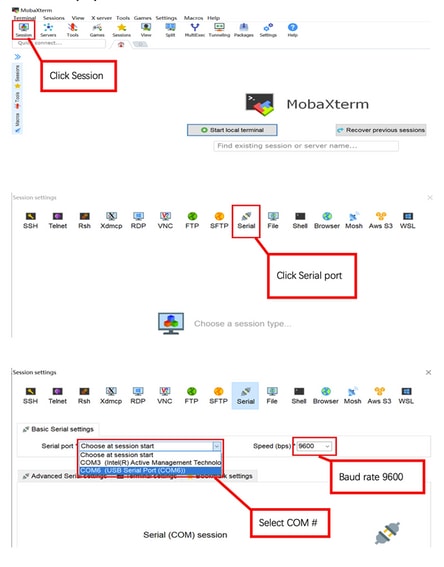
- 将串行电缆连接到AP控制台端口(此端口有一个未标记为“2.5G”的淡蓝色标签)。 串行端口可配置为9600 bps、8个数据库、1个停止位、无奇偶校验、无流量控制。
- 请参阅附录B,了解使用MobaXterm连接到串行端口的示例。
- 打开AP电源。
一旦AP开始加电,在终端窗口中重复输入ESC键,直到您看到u-boot提示符。
    Verify that the firmware has been loaded with good CRC: OK
    Firmware loading completed successfully
    bcm4908_eth-0
    MAC: 70:69:5a:76:40:3c

    Hit ESC key to stop autoboot:
    u-boot>
将特殊映像下载到AP闪存
配置u-boot以通过IP访问TFTP服务器。通过终端手动输入的文本以粗体显示。
- 为AP配置TFTP服务器子网中未使用的IP地址。
u-boot> setenv ipaddr 10.1.1.101
- 配置AP网络掩码。
u-boot> setenv netmask 255.255.255.0
- 配置TFTP服务器的IP地址。
u-boot> setenv serverip 10.1.1.1
- 配置默认网关的IP地址。如果TFTP服务器与AP位于同一子网中,您可以在此处输入TFTP服务器地址。
u-boot> setenv gatewayip 10.1.1.1
- 清除目标TFTP目录并保存设置。
注意:要验证当前设置,您可以使用printenv命令。
u-boot> setenv tftpdir
u-boot> saveenv

Saving Environment to SPI Flash...
Erasing at 0x0 -- 100% complete.
SF: Detected mx25l6405d with page size 256 Bytes, erase size 4 KiB, total 8 MiB
Erasing SPI flash...Writing to SPI flash...done
- 对TFTP服务器执行ping操作以确保其可访问。
u-boot> ping 10.1.1.1
Use bcm4908_eth-0 device
host 10.1.1.1 is alive - 将映像下载到AP闪存中,并提供对提示的答案,如本示例所示(加载映像后可能会出现交互式提示)。
注意:请勿在此步骤中重新启动AP。
u-boot> boardinit bundle-axel-SS-8_10_130_0.img
// Some output here was removed in order to emphasize the interactive prompts. Full outputs are shown after the final step.
Program PHY firmware? [y/N]: y
Program UBIFS image? [y/N]: y
Program bootloaders? [y/N]: n   //pay attention: the last option must be “n”
注意:9130 AP上不存在board_init命令。请改用以下命令:(BTLDR)# sf probe && tftpboot 0x60000000 && imgaddr=0x60000000 && source $imgaddr:script ====>这是要将映像下载到AP闪存(BTLDR)#重置。完成后,它会启动并提示您。但是,最初,您缺少GW工具(在同一个vlan中不需要该工具,但最好也应用该工具)。 设置IP/mask/GW/server IP后,ping GW和服务器IP以确保其可访问。9130的映像文件可以在本文开头给出的相同位置找到。
- 重新启动AP并使用reset命令。完全重新启动后,它必须使用Username:提示符响应Enter。
u-boot> reset
闪烁期间的输出示例:
u-boot> boardinit bundle-axel-SS-8_10_130_0.img
Download image bundle-axel-SS-8_10_130_0.img...
Use bcm4908_eth-0 device
TFTP from server 10.1.1.1; our IP address is 10.1.1.104
Filename 'bundle-axel-SS-8_10_130_0.img'.
Load address: 0x501144b0
Loading: #################################################################

// Note: The # symbols can continue to print until the image is fully transfered, this can take a few minutes //

done
Bytes transferred = 147999664 (8d24bb0 hex)
Program PHY firmware? [y/N]: y
Writing PHY firmware to NOR flash...
>>> Backup current PHY firmware image @300000:45000...[Success]
>>> Erase flash blocks ..........[Success]
>>> Write PHY firmware image ...[Success]
[Success]
Program UBIFS image? [y/N]: y
Writing UBIFS to NAND...

NAND erase.part: device 0 offset 0x6c0000, size 0x3f940000
Skipping bad block at  0x00e00000 ……
Erasing at 0x3ffc0000 -- 100% complete.
OK

NAND write: device 0 offset 0x6c0000, size 0x8c80000
Skip bad block 0x00e00000
 147324928 bytes written: OK
[Success]
Program bootloaders? [y/N]: n   //pay attention: the last option must be “n”
u-boot>
u-boot> reset
附录A — 在Windows中设置Tftpd64
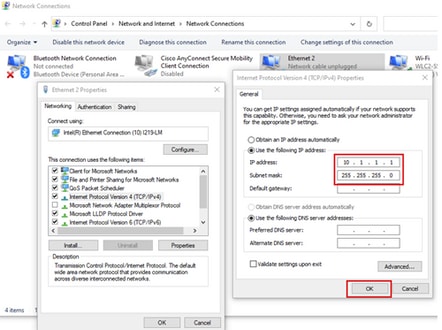
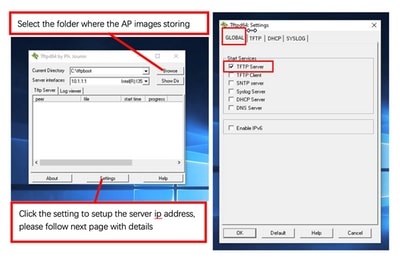
在本示例中,Windows PC手动配置了地址10.1.1.1,并且Ttftpd64设置为提供特殊映像。
将个人电脑地址配置为10.1.1.1
下载Tftpd64
将特殊映像复制到TFTP基本文件夹
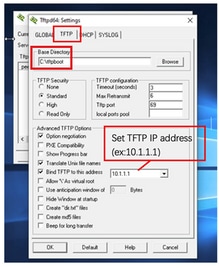
将bundle-axel-SS-8_10_130_0.img文件复制到TFTP基本目录(例如C:\tftpboot)。
附录B — 通过MobaXterm连接到AP控制台
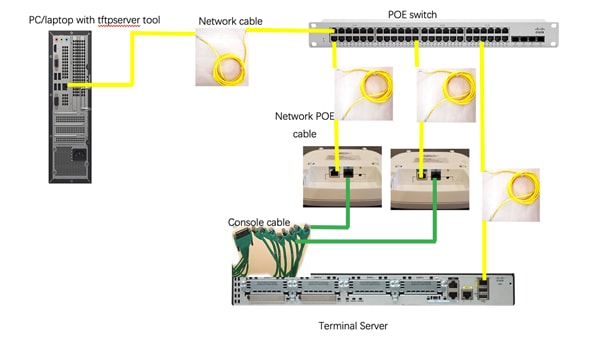
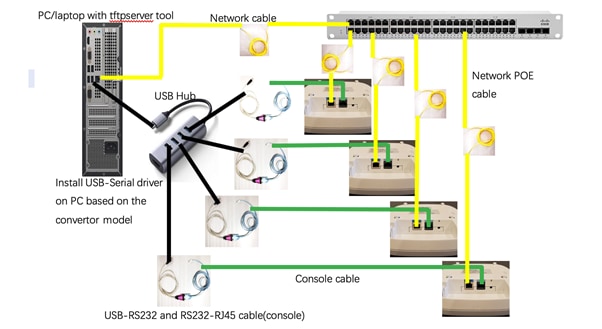
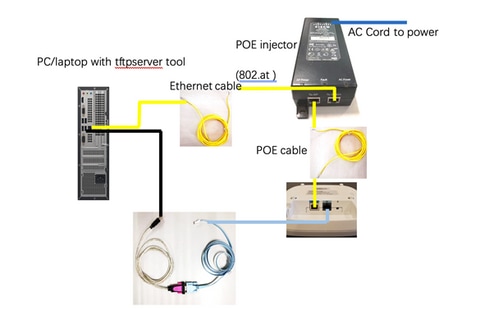
附录C — 拓扑示例
选项1 — 多个AP、PoE交换机和终端服务器
选项2 — 多个AP、PoE交换机和USB集线器,带有多个USB转RS232适配器
选项3 — 单AP,PoE馈电器
修订历史记录
| 版本 | 发布日期 | 备注 |
|---|---|---|
8.0 |
21-May-2026
|
更新的拼写、间距、语法、清晰的格式等 |
7.0 |
25-Nov-2025
|
一些格式修正。 |
6.0 |
11-Jun-2025
|
已使用9130变体更新此程序 |
5.0 |
07-Feb-2023
|
已删除PII。已更新标题、简介、可选文字、机器翻译、德语、样式要求和格式。 |
4.0 |
09-Nov-2021
|
较小的格式更改 |
3.0 |
06-Nov-2021
|
细微编辑。 |
2.0 |
05-Nov-2021
|
首次公开发布 |
1.0 |
05-Nov-2021
|
初始版本 |
 反馈
反馈