在9800 WLC上配置本地重要证书调配的SCEP

简介
本文档介绍如何通过Windows Server 2012 R2标准中的Microsoft网络设备注册服务(NDES)和简单证书注册协议(SCEP)功能为接入点(AP)加入目的配置9800无线局域网控制器(WLC)本地重要证书(LSC)注册。
先决条件
要成功执行Windows Server的SCEP,9800 WLC必须满足以下要求:
- 控制器和服务器之间必须可以连通。
- 控制器和服务器同步到同一NTP服务器,或共享相同的日期和时区(如果CA服务器之间的时间与来自AP的时间不同,则AP存在证书验证和安装问题)。
Windows Server必须事先启用Internet信息服务(IIS)。
要求
思科建议您了解以下技术:
- 9800无线LAN控制器版本16.10.1或更高版本。
- Microsoft Windows Server 2012标准版。
- 私钥基础设施(PKI)和证书。
使用的组件
本文档中的信息基于以下软件和硬件版本:
- 9800-L WLC软件版本17.2.1。
- Windows Server 2012 Standard R2。
- 3802接入点。
本文档中的信息都是基于特定实验室环境中的设备编写的。本文档中使用的所有设备最初均采用原始(默认)配置。如果您的网络处于活动状态,请确保您了解所有命令的潜在影响。
背景信息
新的LSC证书(包括证书颁发机构(CA)根证书和设备证书)必须安装在控制器上,以便最终在AP中下载该证书。使用SCEP时,会从CA服务器接收CA和设备证书,并在以后自动安装在控制器中。
为AP调配LSC时,也会执行相同的认证流程;为此,控制器充当CA代理,并帮助获取CA为AP签名的证书请求(自生)。
配置
网络图
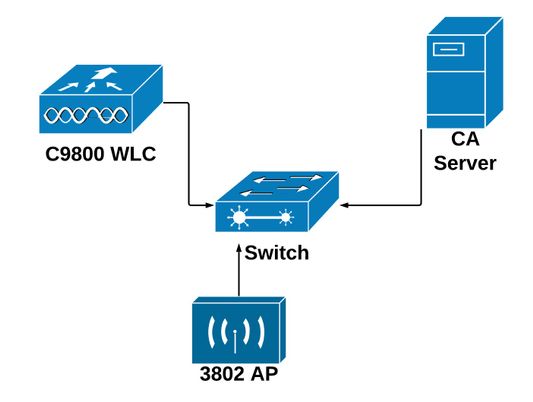
在Windows Server中启用SCEP服务
第1步:在Server Manager应用程序中,选择Manage 菜单,然后选择Add Roles and Features选项以打开角色Add Roles and Features Configuration Wizard。从此处选择用于SCEP服务器注册的服务器实例。
步骤2.验证已选择Certification Authority、Network Device Enrollment Service和Online Responder功能,然后选择Next:
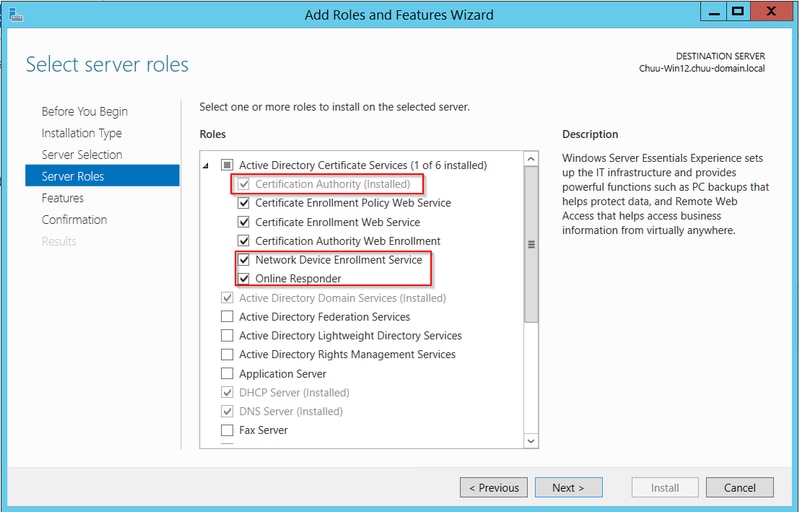
步骤3.选择Next两次,然后选择Finish结束配置向导。等待服务器完成功能安装过程,然后选择Close关闭向导。
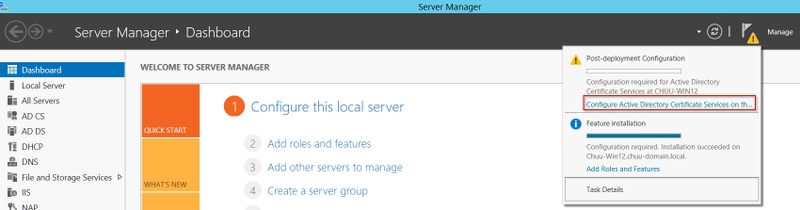
步骤4.安装完成后,服务器管理器通知图标中将显示警告图标。选择它并选择在目标服务器上配置Active Directory服务选项链接以启动AD CS配置向导菜单。
第5步:在菜单中选择Network Device Enrollment Service和Online Responder角色服务,然后选择Next。
第6步:在NDES的服务帐户中,选择内置应用程序池或服务帐户之间的任一选项,然后选择下一步。
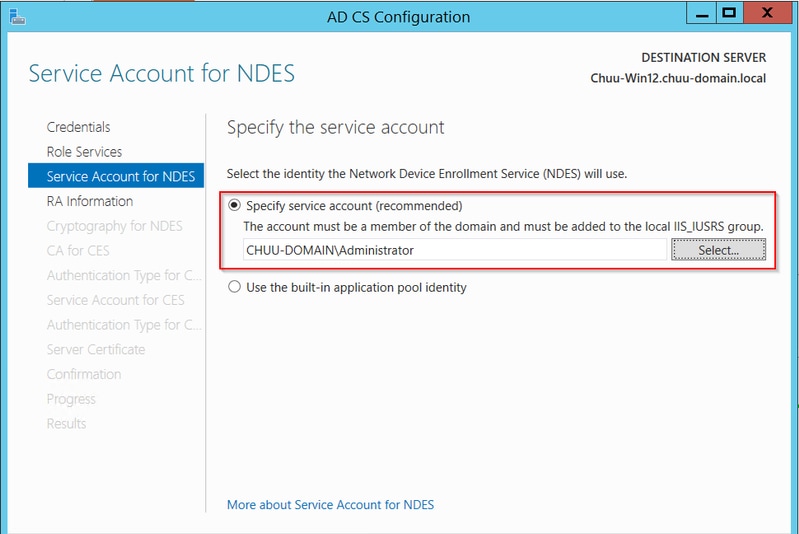
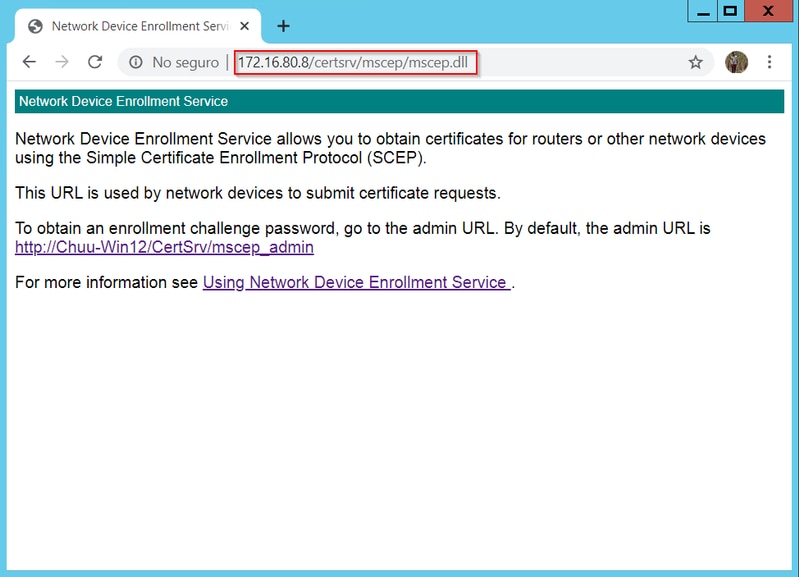
步骤7.选择Next作为下一屏幕,然后完成安装过程。安装完成后,SCEP URL可用于任何Web浏览器。导航至URL http://<server ip>/certsrv/mscep/mscep.dll以验证服务是否可用。
禁用SCEP注册质询密码要求
默认情况下,Windows Server在注册到Microsoft SCEP(MSCEP)之前使用动态质询密码对客户端和终端请求进行身份验证。 这需要管理员帐户浏览到Web GUI,为每个请求生成按需密码(密码必须包含在请求中)。控制器不能将此密码包含在发送给服务器的请求中。要删除此功能,需要修改NDES服务器上的注册表项:
步骤1.打开注册表编辑器,在“开始”菜单中搜索“Regedit”。
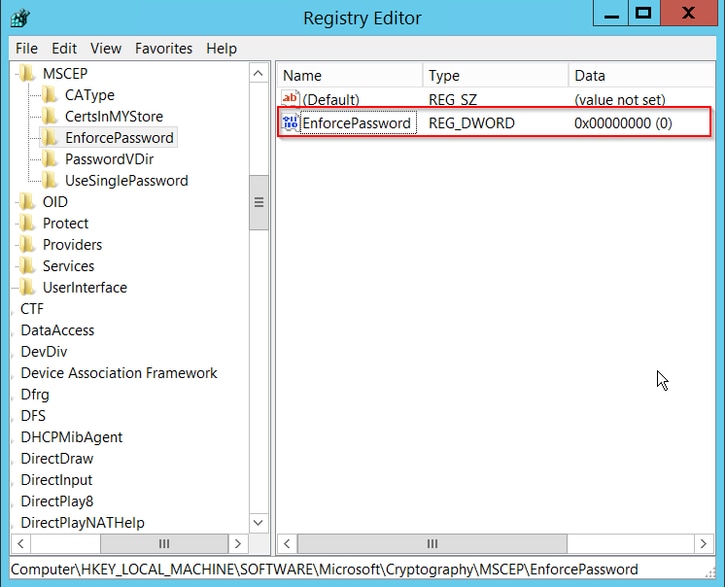
步骤2.导航到计算机> HKEY_LOCAL_MACHINE >软件> Microsoft >加密> MSCEP >强制密码
步骤3.将EnforcePassword值更改为0。如果已经为0,则保留原样。
配置证书模板和注册表
证书及其关联密钥可在多个场景中使用,用于由CA服务器内的应用策略定义的不同目的。应用策略存储在证书的Extended Key Usage(EKU)字段中。验证器会分析此字段,以验证客户端是否将其用于预期目的。要确保将正确的应用策略集成到WLC和AP证书,请创建正确的证书模板并将其映射到NDES注册表:
步骤1.导航到开始>管理工具>证书颁发机构。
步骤2.展开CA服务器文件夹树,右键单击“证书模板”文件夹,然后选择管理。
步骤3.右键单击Users证书模板,然后在上下文菜单中选择Duplicate Template。
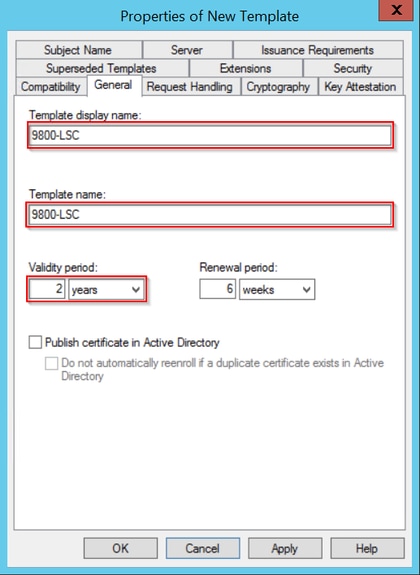
步骤4.定位至“常规”选项卡,根据需要更改模板名称和有效期,保留所有其它选项未选定。
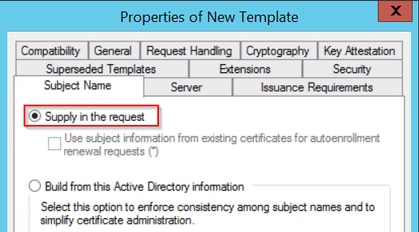
步骤5.定位至“主题名称”标签,确保已选择请求中的“供应”。系统将显示一个弹出窗口,指示用户不需要管理员批准即可获得证书签名,请选择OK。
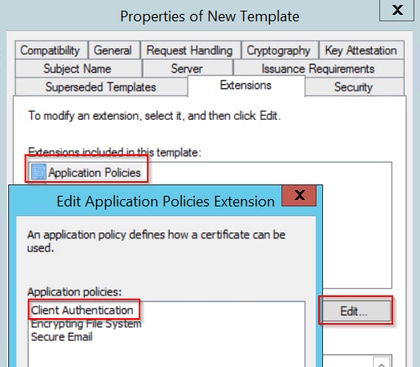
第6步:导航到“扩展”选项卡,然后选择“应用程序策略”选项,然后选择“编辑……”按钮。确保Application Policies窗口中的Client Authentication;否则,请选择Add并添加它。
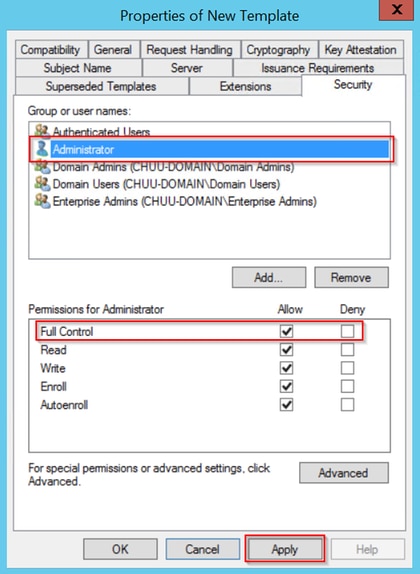
第7步:导航到安全(Security)选项卡,确保在Windows Server中启用SCEP服务(Enable SCEP Services)的第6步中定义的服务帐户具有模板的完全控制权限,然后选择应用(Apply)和OK。
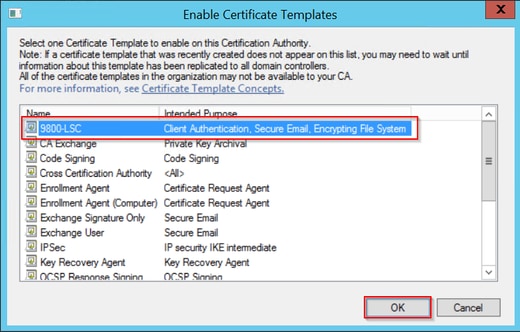
步骤8.返回“证书颁发机构”窗口,右键单击“证书模板”文件夹,然后选择新建>要颁发的证书模板。
步骤9.选择以前创建的证书模板(在本例中为9800-LSC),然后选择确定。
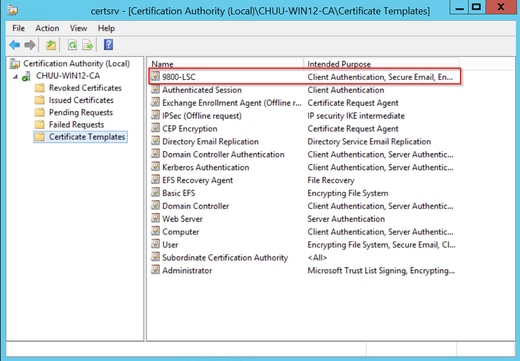
新证书模板现在在Certificate Templates文件夹内容中列出。
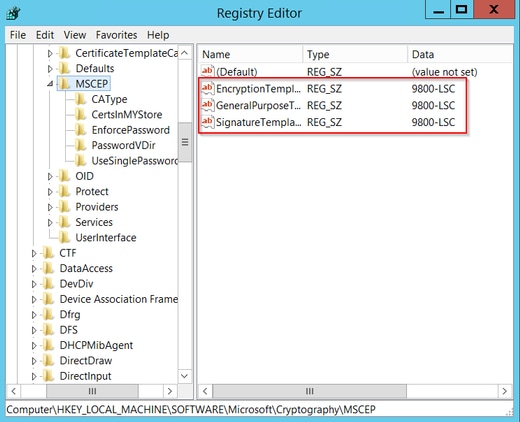
步骤10.返回Registry Editor窗口,导航到Computer > HKEY_LOCAL_MACHINE > SOFTWARE > Microsoft > Cryptography > MSCEP。
步骤11.编辑EncryptionTemplate、GeneralPurposeTemplate和SignatureTemplate注册表,使其指向新创建的证书模板。
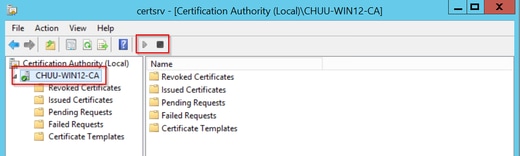
步骤12.重新启动NDES服务器,以便返回证书颁发机构窗口,选择服务器名称,然后依次选择停止和播放按钮。
配置9800设备信任点
控制器需要定义一个信任点,以便在调配AP后对其进行身份验证。信任点包括9800设备证书以及均从同一CA服务器(本示例中为Microsoft CA)获取的CA根证书。 对于要安装在信任点中的证书,它必须包含主题属性以及与其关联的一对RSA密钥。配置通过Web界面或命令行执行。
第1步:导航到配置>安全> PKI管理,然后选择RSA Keypair Generation选项卡。选择+ Add按钮。
步骤2.定义与密钥对关联的标签,并确保选中Exportable复选框。
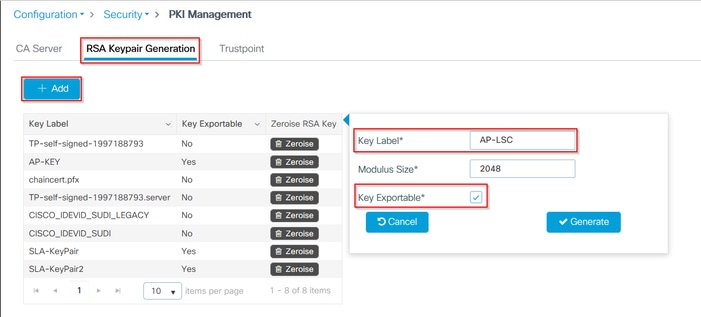
第1步和第2步的CLI配置,在此配置示例中,使用标签AP-LSC和模数大小2048位生成密钥对:
9800-L(config)#crypto key generate rsa exportable general-keys moduluslabel The name for the keys will be: AP-LSC % The key modulus size is 2048 bits % Generating 2048 bit RSA keys, keys will be exportable... [OK] (elapsed time was 1 seconds)
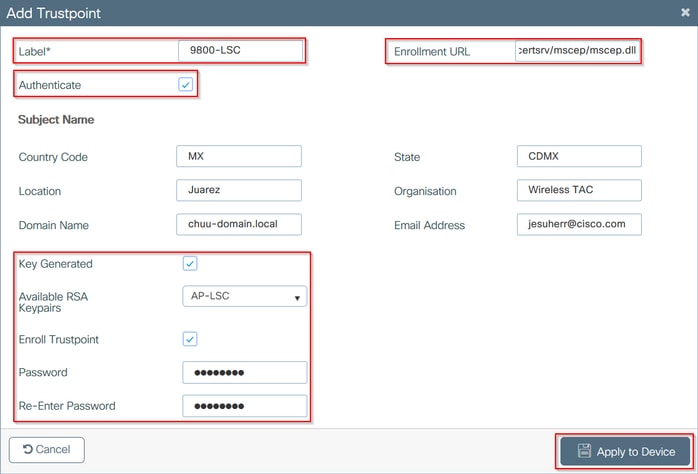
步骤3.在同一部分中,选择Trustpoint选项卡,然后选择+Add按钮。
步骤4.使用设备信息填写信任点详细信息,然后选择Apply to Device:
- Label字段是与信任点关联的名称
- 对于注册URL,请使用在Windows Server部分中启用SCEP服务的第7步中定义的注册URL
- 选中Authenticate复选框以下载CA证书
- Domain Name字段被放置为证书请求的公用名属性
- 选中Key Generated复选框,此时将显示一个下拉菜单,选择第2步中生成的密钥对
- 选中Enroll Trustpoint复选框,将显示两个密码字段;键入密码。这用于将证书密钥与设备证书和CA证书链
CLI配置用于步骤3和步骤4:
9800-L(config)#crypto pki trustpoint9800-L(ca-trustpoint)#enrollment url http:// /certsrv/mscep/mscep.dll 9800-L(ca-trustpoint)#subject-name C=, ST= 9800-L(ca-trustpoint)#rsakeypair, L= , O= , CN= /emailAddress= 9800-L(ca-trustpoint)#revocation-check none 9800-L(ca-trustpoint)#exit 9800-L(config)#crypto pki authenticate Certificate has the following attributes: Fingerprint MD5: E630EAE6 FB824658 690EB0F5 638D7224 Fingerprint SHA1: 97070ACD CAD03D5D 0C1A6085 19992E0D 6B8C4D8B % Do you accept this certificate? [yes/no]: yes Trustpoint CA certificate accepted. 9800-L(config)#crypto pki enroll <trustpoint name> % % Start certificate enrollment .. % Create a challenge password. You will need to verbally provide this password to the CA Administrator in order to revoke your certificate. For security reasons your password will not be saved in the configuration. Please make a note of it. Password: Re-enter password: % The subject name in the certificate will include: C=MX, ST=CDMX, L=Juarez, O=Wireless TAC, CN=9800-L.chuu-domain.local/emailAddress=jesuherr@cisco.com % The subject name in the certificate will include: 9800-L.alzavala.local % Include the router serial number in the subject name? [yes/no]: no % Include an IP address in the subject name? [no]: no Request certificate from CA? [yes/no]: yes % Certificate request sent to Certificate Authority % The 'show crypto pki certificate verbose AP-LSC' commandwill show the fingerprint.
定义AP注册参数并更新管理信任点
AP注册使用之前定义的信任点详细信息来确定控制器将证书请求转发到的服务器详细信息。由于控制器用作证书注册的代理,它需要知道证书请求中包含的主题参数。配置通过Web界面或命令行执行。
步骤1.导航到配置>无线>接入点,然后展开LSC调配菜单。
步骤2.使用在AP证书请求中填充的属性填充Subject Name Parameters,然后选择Apply。

CLI配置用于步骤一和步骤2:
9800-L(config)#ap lsc-provision subject-name-parameter countrycity domain org email-address

第3步:在同一菜单中,从下拉列表中选择先前定义的信任点,指定AP加入尝试次数(这定义再次使用MIC之前的加入尝试次数),并设置证书密钥大小。然后,单击 Apply。
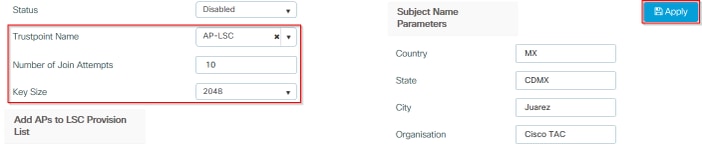
第三步的CLI配置:
9800-L(config)#ap lsc-provision join-attempt9800-L(config)#ap lsc-provision trustpoint 9800-L(config)#ap lsc-provision key-size
步骤4.(可选)可以为加入控制器的所有AP或MAC地址列表中定义的特定AP触发AP LSC调配。在同一菜单中,在文本字段中输入xxxx.xxxx.xxxx格式的AP以太网MAC地址,然后单击+。或者,上传包含AP mac地址的csv文件,选择该文件,然后选择上传文件。
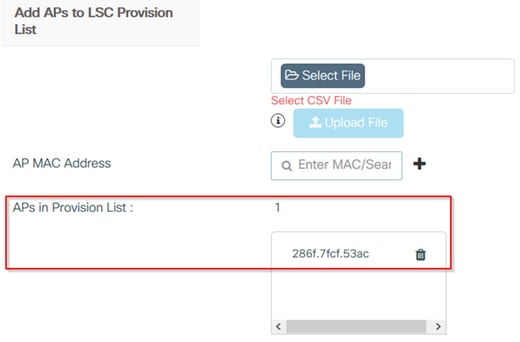
CLI配置用于第四步:
9800-L(config)#ap lsc-provision mac-address
第 5 步: 从Status 标签旁边的下拉菜单中选择Enabled 或Provision List ,然后单击Apply 以触发AP LSC登记。

CLI配置用于第五步:
9800-L(config)#ap lsc-provision
In Non-WLANCC mode APs will be provisioning with RSA certificates with specified key-size configuration. In WLANCC mode APs will be provisioning with EC certificates with a 384 bit key by-default or 256 bit key if configured.
Are you sure you want to continue? (y/n): y
If specific AP list provisioning is preferred then use:
9800-L(config)#ap lsc-provision provision-list
步骤6.导航到Configuration > Interface > Wireless,然后选择管理接口。在信任点字段中,从下拉菜单中选择新的信任点,然后单击更新并应用到设备。
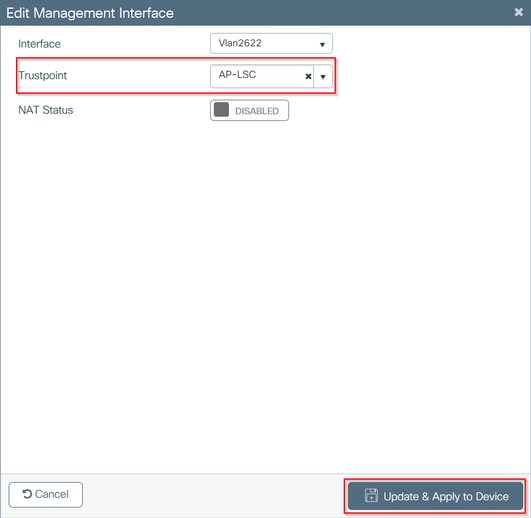
第6步的CLI配置:
9800-L(config)#wireless management trustpoint
验证
验证控制器证书安装
要验证9800 WLC信任点中是否存在LSC信息,请发出命令show crypto pki certificates verbose <trustpoint name>,两个证书将关联到为LSC调配和注册创建的信任点。在本示例中,信任点名称为“microsoft-ca”(仅显示相关输出):
9800-L#show crypto pki certificates verbose microsoft-ca
Certificate
  Status: Available
  Version: 3
  Certificate Usage: General Purpose
  Issuer:
    cn=CHUU-WIN12-CA
    dc=chuu-domain
    dc=local
  Subject:
    Name: 9800-L.alzavala.local
    cn=9800-L.chuu-domain.local/emailAddress=jesuherr@cisco.com
    o=Wireless TAC
    l=Juarez
    st=CDMX
    c=MX
    hostname=9800-L.alzavala.local
  CRL Distribution Points:
    ldap:///CN=CHUU-WIN12-CA,CN=Chuu-Win12,CN=CDP,CN=Public%20Key%20Services,CN=Services,CN=Coint
  Validity Date:
    start date: 04:25:59 Central May 11 2020
    end date: 04:25:59 Central May 11 2022
  Subject Key Info:
    Public Key Algorithm: rsaEncryption
    RSA Public Key: (2048 bit)
  Signature Algorithm: SHA256 with RSA Encryption
  [...]
    Authority Info Access:
        CA ISSUERS: ldap:///CN=CHUU-WIN12-CA,CN=AIA,CN=Public%20Key%20Services,CN=Services,CN=Configuration,DC=chuu-domain,DC=local?cACertificate?base?objectClass=certificationAuthority
  [...]
CA Certificate
  Status: Available
  Version: 3
  Certificate Serial Number (hex): 37268ED56080CB974EF3806CCACC77EC
  Certificate Usage: Signature
  Issuer:
    cn=CHUU-WIN12-CA
    dc=chuu-domain
    dc=local
  Subject:
    cn=CHUU-WIN12-CA
    dc=chuu-domain
    dc=local
 Validity Date:
    start date: 05:58:01 Central May 10 2019
    end date: 06:08:01 Central May 10 2024
  Subject Key Info:
    Public Key Algorithm: rsaEncryption
    RSA Public Key: (2048 bit)
  Signature Algorithm: SHA256 with RSA Encryption
验证9800 WLC LSC配置
要验证有关无线管理信任点的详细信息,请运行show wireless management trustpoint命令,确保使用正确的信任点(本示例中包含LSC详细信息的信任点,即AP-LSC),并将其标记为可用:
9800-L#show wireless management trustpoint

Trustpoint  Name : AP-LSC
Certificate Info : Available
Certificate Type : LSC
Certificate Hash : 9e5623adba5307facf778e6ea2f5082877ea4beb
Private key Info : Available
要验证有关AP LSC调配配置的详细信息以及添加到调配列表的AP列表,请运行show ap lsc-provision summary命令。确保显示正确的调配状态:
9800-L#show ap lsc-provision summary
AP LSC-provisioning : Enabled for all APs
Trustpoint used for LSC-provisioning : AP-LSC
LSC Revert Count in AP reboots : 10

AP LSC Parameters :
Country : MX
State : CDMX
City : Juarez
Orgn : Cisco TAC
Dept : Wireless TAC
Email : josuvill@cisco.com
Key Size : 2048
EC Key Size : 384 bit

AP LSC-provision List :

Total number of APs in provision list: 2

Mac Addresses :
--------------
xxxx.xxxx.xxxx
xxxx.xxxx.xxxx
验证接入点证书安装
要验证AP中安装的证书,请从AP CLI运行show crypto命令,确保CA根证书和设备证书都存在(输出仅显示相关数据):
AP3802#show crypto

[...]

------------------------------------------------------------------------------
LSC: Enabled
----------------------------- Device Certificate -----------------------------
Certificate:
    Data:
        Version: 3 (0x2)
        Serial Number:
            73:00:00:00:0b:9e:c4:2e:6c:e1:54:84:96:00:00:00:00:00:0b
    Signature Algorithm: sha256WithRSAEncryption
        Issuer: DC=local, DC=chuu-domain, CN=CHUU-WIN12-CA
        Validity
            Not Before: May 13 01:22:13 2020 GMT
            Not After : May 13 01:22:13 2022 GMT
        Subject: C=MX, ST=CDMX, L=Juarez, O=Cisco TAC, CN=ap3g3-286F7FCF53AC/emailAddress=josuvill@cisco.com
        Subject Public Key Info:
            Public Key Algorithm: rsaEncryption
                Public-Key: (2048 bit)

----------------------------- Root Certificate -------------------------------
Certificate:
    Data:
        Version: 3 (0x2)
        Serial Number:
            32:61:fb:93:a8:0a:4a:97:42:5b:5e:32:28:29:0d:32
    Signature Algorithm: sha256WithRSAEncryption
        Issuer: DC=local, DC=chuu-domain, CN=CHUU-WIN12-CA
        Validity
            Not Before: May 10 05:58:01 2019 GMT
            Not After : May 10 05:58:01 2024 GMT
        Subject: DC=local, DC=chuu-domain, CN=CHUU-WIN12-CA
        Subject Public Key Info:
            Public Key Algorithm: rsaEncryption
                Public-Key: (2048 bit)
如果使用交换机端口dot1x身份验证的LSC,则可以从AP验证端口身份验证是否已启用。
AP3802#show ap authentication status
AP dot1x feature is disabled.
故障排除
常见问题
- 如果模板在服务器注册表中未正确映射,或者服务器需要密码质询,则会拒绝9800 WLC或AP的证书请求。
- 如果IIS默认站点被禁用,则SCEP服务也将被禁用,因此无法访问信任点中定义的URL,并且9800 WLC不会发送任何证书请求。
- 如果服务器和9800 WLC之间的时间不同步,则由于时间有效性检查失败,不会安装证书。
Debug和Log命令
使用以下命令排除9800控制器证书注册故障:
9800-L#debug crypto pki transactions
9800-L#debug crypto pki validation
9800-L#debug crypto pki scep
要对AP注册进行故障排除和监控,请使用以下命令:
AP3802#debug capwap client payload
AP3802#debug capwap client events
在AP命令行中,show logging显示AP是否出现证书安装问题,并且提供有关未安装证书原因的详细信息:
[...]
Mar 19 19:39:13 kernel: *03/19/2020 19:39:13.3429] AP has joined controller 9800-L
Mar 19 19:39:13 kernel: 03/19/2020 19:39:13.3500] SELinux: initialized (dev mtd_inodefs, type mtd_inodefs), not configured for labeling
Mar 19 19:39:13 kernel: *03/19/2020 19:39:13.5982] Generating a RSA private key
Mar 19 19:39:14 kernel: *03/19/2020 19:39:13.5989] .......................
Mar 19 19:39:15 kernel: *03/19/2020 19:39:14.4179] ..
Mar 19 19:39:15 kernel: *03/19/2020 19:39:15.2952] writing new private key to '/tmp/lsc/priv_key'
Mar 19 19:39:15 kernel: *03/19/2020 19:39:15.2955] -----
Mar 19 19:39:15 kernel: *03/19/2020 19:39:15.5421] cen_validate_lsc: Verification failed for certificate:
Mar 19 19:39:15 kernel: *03/19/2020 19:39:15.5421] countryName               = MX
Mar 19 19:39:15 kernel: *03/19/2020 19:39:15.5421] stateOrProvinceName       = CDMX
Mar 19 19:39:15 kernel: *03/19/2020 19:39:15.5421] localityName              = Juarez
Mar 19 19:39:15 kernel: *03/19/2020 19:39:15.5421] organizationName          = cisco-tac
Mar 19 19:39:15 kernel: *03/19/2020 19:39:15.5421] commonName                = ap3g3-
Mar 19 19:39:15 kernel: *03/19/2020 19:39:15.5421] emailAddress              = jesuherr@cisco.com
Mar 19 19:39:15 kernel: *03/19/2020 19:39:15.5427] LSC certificates/key failed validation!
Mar 19 19:39:15 kernel: *03/19/2020 19:39:15.5427]
成功注册示例
这是前面提到的成功注册控制器及其关联AP的调试输出。
CA根证书导入到9800 WLC:
[...]
Certificate has the following attributes:
       Fingerprint MD5: E630EAE6 FB824658 690EB0F5 638D7224
      Fingerprint SHA1: 97070ACD CAD03D5D 0C1A6085 19992E0D 6B8C4D8B

% Do you accept this certificate? [yes/no]: yes
CRYPTO_PKI_SCEP: Client sending GetCACert request
CRYPTO_PKI: Sending CA Certificate Request:
GET /certsrv/mscep/mscep.dll/pkiclient.exe?operation=GetCACert&message=AP-LSC HTTP/1.0
User-Agent: Mozilla/4.0 (compatible; MSIE 5.0; Cisco PKI)
Host: 172.16.80.8

CRYPTO_PKI: locked trustpoint AP-LSC, refcount is 1
CRYPTO_PKI: http connection opened
CRYPTO_PKI: Sending HTTP message

CRYPTO_PKI: Reply HTTP header:
HTTP/1.0
User-Agent: Mozilla/4.0 (compatible; MSIE 5.0; Cisco PKI)
Host: 172.16.80.8

CRYPTO_PKI: unlocked trustpoint AP-LSC, refcount is 0
CRYPTO_PKI: locked trustpoint AP-LSC, refcount is 1
CRYPTO_PKI: Header length received: 192
CRYPTO_PKI: parse content-length header. return code: (0) and content-length : (3638)
CRYPTO_PKI: Complete data arrived
CRYPTO_PKI: unlocked trustpoint AP-LSC, refcount is 0
CRYPTO_PKI: Reply HTTP header:
HTTP/1.1 200 OK
Content-Type: application/x-x509-ca-ra-cert
Server: Microsoft-IIS/8.5
X-Powered-By: ASP.NET
Date: Tue, 19 May 2020 21:47:34 GMT
Connection: close
Content-Length: 3638
Content-Type indicates we have received CA and RA certificates.

CRYPTO_PKI_SCEP: Client received CA and RA certificate
CRYPTO_PKI:crypto_process_ca_ra_cert(trustpoint=AP-LSC)

The PKCS #7 message contains 3 certificates.
CRYPTO_PKI:crypto_pkcs7_extract_ca_cert found cert
CRYPTO_PKI: Bypassing SCEP capabilities request 0
CRYPTO_PKI: transaction CRYPTO_REQ_CA_CERT completed
CRYPTO_PKI: CA certificate received.
CRYPTO_PKI: CA certificate received.
CRYPTO_PKI: crypto_pki_get_cert_record_by_cert()
CRYPTO_PKI: crypto_pki_authenticate_tp_cert()
CRYPTO_PKI: trustpoint AP-LSC authentication status = 0
Trustpoint CA certificate accepted.
9800 WLC设备注册:
[...]
CRYPTO_PKI: using private key AP-LSC for enrollment
CRYPTO_PKI_SCEP: Client sending GetCACert request
CRYPTO_PKI: Sending CA Certificate Request:
GET /certsrv/mscep/mscep.dll/pkiclient.exe?operation=GetCACert&message=AP-LSC HTTP/1.0
User-Agent: Mozilla/4.0 (compatible; MSIE 5.0; Cisco PKI)
Host: 172.16.80.8

CRYPTO_PKI: locked trustpoint AP-LSC, refcount is 1
CRYPTO_PKI: http connection opened
CRYPTO_PKI: Sending HTTP message
CRYPTO_PKI: Reply HTTP header:
HTTP/1.0
User-Agent: Mozilla/4.0 (compatible; MSIE 5.0; Cisco PKI)
Host: 172.16.80.8

CRYPTO_PKI: unlocked trustpoint AP-LSC, refcount is 0
CRYPTO_PKI: locked trustpoint AP-LSC, refcount is 1
CRYPTO_PKI: Header length received: 192
CRYPTO_PKI: parse content-length header. return code: (0) and content-length : (3638)
CRYPTO_PKI: Complete data arrived
CRYPTO_PKI: unlocked trustpoint AP-LSC, refcount is 0
CRYPTO_PKI: Reply HTTP header:
HTTP/1.1 200 OK
Content-Type: application/x-x509-ca-ra-cert
Server: Microsoft-IIS/8.5
X-Powered-By: ASP.NET
Date: Tue, 19 May 2020 21:48:33 GMT
Connection: close
Content-Length: 3638
Content-Type indicates we have received CA and RA certificates.

CRYPTO_PKI_SCEP: Client received CA and RA certificate
CRYPTO_PKI:crypto_process_ca_ra_cert(trustpoint=AP-LSC)
The PKCS #7 message contains 3 certificates.
CRYPTO_PKI:crypto_pkcs7_insert_ra_certs found RA certs
CRYPTO_PKI:crypto_pkcs7_insert_ra_certs found RA certs

CRYPTO_PKI_SCEP: Client Sending GetCACaps request with msg = GET /certsrv/mscep/mscep.dll/pkiclient.exe?operation=GetCACaps&message=AP-LSC HTTP/1.0
User-Agent: Mozilla/4.0 (compatible; MSIE 5.0; Cisco PKI)
Host: 172.16.80.8

CRYPTO_PKI: locked trustpoint AP-LSC, refcount is 1
CRYPTO_PKI: http connection opened
CRYPTO_PKI: Sending HTTP message
CRYPTO_PKI: Reply HTTP header:
HTTP/1.0
User-Agent: Mozilla/4.0 (compatible; MSIE 5.0; Cisco PKI)
Host: 172.16.80.8

CRYPTO_PKI: unlocked trustpoint AP-LSC, refcount is 0
CRYPTO_PKI: locked trustpoint AP-LSC, refcount is 1
CRYPTO_PKI: Header length received: 171
CRYPTO_PKI: parse content-length header. return code: (0) and content-length : (34)
CRYPTO_PKI: Complete data arrived
CRYPTO_PKI: unlocked trustpoint AP-LSC, refcount is 0
CRYPTO_PKI: Reply HTTP header:
HTTP/1.1 200 OK
Content-Type: text/plain
Server: Microsoft-IIS/8.5
X-Powered-By: ASP.NET
Date: Tue, 19 May 2020 21:48:33 GMT
Connection: close
Content-Length: 34

CRYPTO_PKI: HTTP header content length is 34 bytes
CRYPTO_PKI_SCEP: Server returned capabilities: 92
CA_CAP_RENEWAL CA_CAP_S
alz_9800(config)#HA_1 CA_CAP_SHA_256  CA_CAP_SHA_512
CRYPTO_PKI: transaction CRYPTO_REQ_CERT completed
CRYPTO_PKI: status:
%PKI-6-CSR_FINGERPRINT:
                      CSR Fingerprint MD5 : 9BFBA438303487562E888087168F05D4
                      CSR Fingerprint SHA1: 58DC7DB84C632A7307631A97A6ABCF65A3DEFEEF
CRYPTO_PKI:  Certificate Request Fingerprint MD5: 9BFBA438 30348756 2E888087 168F05D4
CRYPTO_PKI:  Certificate Request Fingerprint SHA1: 58DC7DB8 4C632A73 07631A97 A6ABCF65 A3DEFEEF
PKI:PKCS7 to issuer cn=CHUU-WIN12-CA,dc=chuu-domain,dc=local serial
     18 00 00 00 38 DB 68 64 C0 52 C0 0F 0E 00 00 00
     00 00 38

CRYPTO_PKI: Deleting cached key having key id 65
CRYPTO_PKI: Attempting to insert the peer's public key into cache
CRYPTO_PKI:Peer's public inserted successfully with key id 66
CRYPTO_PKI: Expiring peer's cached key with key id 66
PKI: Trustpoint AP-LSC has no router cert
PKI: Signing pkcs7 with AP-LSC trustpoint temp self-signed cert
CRYPTO_PKI_SCEP: Client sending PKCSReq
CRYPTO_PKI: locked trustpoint AP-LSC, refcount is 1
CRYPTO_PKI: http connection opened
CRYPTO_PKI: Sending HTTP message
CRYPTO_PKI: Reply HTTP header:
HTTP/1.0
Host: 172.16.80.8

CRYPTO_PKI: unlocked trustpoint AP-LSC, refcount is 0
CRYPTO_PKI: locked trustpoint AP-LSC, refcount is 1
CRYPTO_PKI: locked trustpoint AP-LSC, refcount is 2
CRYPTO_PKI: Header length received: 188
CRYPTO_PKI: parse content-length header. return code: (0) and content-length : (2807)
CRYPTO_PKI: Complete data arrived
CRYPTO_PKI: unlocked trustpoint AP-LSC, refcount is 1
CRYPTO_PKI:  received msg of 2995 bytes
CRYPTO_PKI: Reply HTTP header:
HTTP/1.1 200 OK
Content-Type: application/x-pki-message
Server: Microsoft-IIS/8.5
X-Powered-By: ASP.NET
Date: Tue, 19 May 2020 21:48:33 GMT
Connection: close
Content-Length: 2807

CRYPTO_PKI: Prepare global revocation service providers
CRYPTO_PKI: Deleting cached key having key id 66
CRYPTO_PKI: Attempting to insert the peer's public key into cache
CRYPTO_PKI:Peer's public inserted successfully with key id 67
CRYPTO_PKI: Expiring peer's cached key with key id 67
CRYPTO_PKI: Remove global revocation service providers
The PKCS #7 message has 1 verified signers.
signing cert: issuer cn=CHUU-WIN12-CA,dc=chuu-domain,dc=local serial 1800037A239DF5180C0672C0000037
Signed Attributes:

CRYPTO_PKI_SCEP: Client received CertRep - GRANTED (AF58BA9313638026C5DC151AF474723F)
CRYPTO_PKI: status = 100: certificate is granted
The PKCS #7 message contains 1 certs and 0 crls.
Newly-issued Router Cert: issuer=cn=CHUU-WIN12-CA,dc=chuu-domain,dc=local serial=1800043245DC93E1D943CA70000043
start  date: 21:38:34 Central May 19 2020
end    date: 21:38:34 Central May 19 2022
Router date: 21:48:35 Central May 19 2020
%PKI-6-CERT_INSTALL: An ID certificate has been installed under
                      Trustpoint   : AP-LSC
                      Issuer-name  : cn=CHUU-WIN12-CA,dc=chuu-domain,dc=local
                      Subject-name : cn=9800-L.chuu-domain.local/emailAddress=jesuherr@cisco.com,o=Wireless TAC,l=Juarez,st=CDMX,c=MX,hostname=alz_9800.alzavala.local
                      Serial-number: 1800000043245DC93E1D943CA7000000000043
                      End-date     : 2022-05-19T21:38:34Z
Received router cert from CA
CRYPTO_PKI: Not adding alz_9800.alzavala.local to subject-alt-name field because : Character allowed in the domain name.

 Calling pkiSendCertInstallTrap to send alert
CRYPTO_PKI: All enrollment requests completed for trustpoint AP-LSC
AP注册调试来自控制器端的输出,对于加入到9800 WLC的每个AP,此输出重复多次:
[...]
CRYPTO_PKI: (A6964) Session started - identity selected (AP-LSC)
CRYPTO_PKI: Doing re-auth to fetch RA certificate.
CRYPTO_PKI_SCEP: Client sending GetCACert request
CRYPTO_PKI: Sending CA Certificate Request:
GET /certsrv/mscep/mscep.dll/pkiclient.exe?operation=GetCACert&message=AP-LSC HTTP/1.0
User-Agent: Mozilla/4.0 (compatible; MSIE 5.0; Cisco PKI)
Host: 172.16.80.8

CRYPTO_PKI: locked trustpoint AP-LSC, refcount is 2
CRYPTO_PKI: http connection opened
CRYPTO_PKI: Sending HTTP message
CRYPTO_PKI: Reply HTTP header:
HTTP/1.0
User-Agent: Mozilla/4.0 (compatible; MSIE 5.0; Cisco PKI)
Host: 172.16.80.8

CRYPTO_PKI: unlocked trustpoint AP-LSC, refcount is 1
CRYPTO_PKI: locked trustpoint AP-LSC, refcount is 2
CRYPTO_PKI: Header length received: 192
CRYPTO_PKI: parse content-length header. return code: (0) and content-length : (3638)
CRYPTO_PKI: Complete data arrived
CRYPTO_PKI: unlocked trustpoint AP-LSC, refcount is 1
CRYPTO_PKI: Reply HTTP header:
HTTP/1.1 200 OK

Content-Type: application/x-x509-ca-ra-cert
Server: Microsoft-IIS/8.5
X-Powered-By: ASP.NET
Date: Tue, 19 May 2020 21:51:03 GMT
Connection: close
Content-Length: 3638
Content-Type indicates we have received CA and RA certificates.

CRYPTO_PKI_SCEP: Client received CA and RA certificate
CRYPTO_PKI:crypto_process_ca_ra_cert(trustpoint=AP-LSC)
The PKCS #7 message contains 3 certificates.
CRYPTO_PKI:crypto_pkcs7_insert_ra_certs found RA certs
CRYPTO_PKI:crypto_pkcs7_insert_ra_certs found RA certs
CRYPTO_PKI: Capabilites already obtained CA_CAP_RENEWAL CA_CAP_SHA_1 CA_CAP_SHA_256  CA_CAP_SHA_512
 PKCS10 request is compulsory
CRYPTO_PKI: byte 2 in key usage in PKCS#10 is 0x5
May 19 21:
alz_9800(config)#51:04.985: CRYPTO_PKI: all usage
CRYPTO_PKI: key_usage is 4
CRYPTO_PKI: creating trustpoint clone Proxy-AP-LSC8
CRYPTO_PKI: Creating proxy trustpoint Proxy-AP-LSC8
CRYPTO_PKI: Proxy enrollment request trans id = 7CBB299A2D9BC77DBB1A8716E6474C0C
CRYPTO_PKI: Proxy forwading an enrollment request
CRYPTO_PKI: using private key AP-LSC for enrollment
CRYPTO_PKI: Proxy send CA enrollment request with trans id: 7CBB299A2D9BC77DBB1A8716E6474C0C
CRYPTO_PKI: No need to re-auth as we have RA in place
CRYPTO_PKI: Capabilites already obtained CA_CAP_RENEWAL CA_CAP_SHA_1 CA_CAP_SHA_256  CA_CAP_SHA_512
CRYPTO_PKI: transaction CRYPTO_REQ_CERT completed
CRYPTO_PKI: status:
PKI:PKCS7 to issuer cn=CHUU-WIN12-CA,dc=chuu-domain,dc=local serial
     18 00 00 00 38 DB 68 64 C0 52 C0 0F 0E 00 00 00
     00 00 38

CRYPTO_PKI: Deleting cached key having key id 67
CRYPTO_PKI: Attempting to insert the peer's public key into cache
CRYPTO_PKI:Peer's public inserted successfully with key id 68
CRYPTO_PKI: Expiring peer's cached key with key id 68
PKI: Trustpoint Proxy-AP-LSC8 has no router cert and loaded
PKI: Signing pkcs7 with Proxy-AP-LSC8 trustpoint temp self-signed cert
CRYPTO_PKI_SCEP: Client sending PKCSReq
CRYPTO_PKI: locked trustpoint Proxy-AP-LSC8, refcount is 2
CRYPTO_PKI: http connection opened
CRYPTO_PKI: Sending HTTP message
CRYPTO_PKI: Reply HTTP header:
HTTP/1.0
Host: 172.16.80.8

CRYPTO_PKI: unlocked trustpoint Proxy-AP-LSC8, refcount is 1
CRYPTO_PKI: locked trustpoint Proxy-AP-LSC8, refcount is 2
CRYPTO_PKI: locked trustpoint Proxy-AP-LSC8, refcount is 3
CRYPTO_PKI: Header length received: 188
CRYPTO_PKI: parse content-length header. return code: (0) and content-length : (2727)
CRYPTO_PKI: Complete data arrived
CRYPTO_PKI: unlocked trustpoint Proxy-AP-LSC8, refcount is 2
CRYPTO_PKI:  received msg of 2915 bytes
CRYPTO_PKI: Reply HTTP header:
HTTP/1.1 200 OK
Content-Type: application/x-pki-message
Server: Microsoft-IIS/8.5
X-Powered-By: ASP.NET
Date: Tue, 19 May 2020 21:51:03 GMT
Connection: close
Content-Length: 2727

CRYPTO_PKI: Prepare global revocation service providers
CRYPTO_PKI: Deleting cached key having key id 68
CRYPTO_PKI: Attempting to insert the peer's public key into cache
CRYPTO_PKI:Peer's public inserted successfully with key id 69
CRYPTO_PKI: Expiring peer's cached key with key id 69
CRYPTO_PKI: Remove global revocation service providers
The PKCS #7 message has 1
alz_9800(config)# verified signers.
signing cert: issuer cn=CHUU-WIN12-CA,dc=chuu-domain,dc=local serial 1800037A239DF5180C0672C0000037
Signed Attributes:
CRYPTO_PKI_SCEP: Client received CertRep - GRANTED (7CBB299A2D9BC77DBB1A8716E6474C0C)
CRYPTO_PKI: status = 100: certificate is granted
The PKCS #7 message contains 1 certs and 0 crls.
Received router cert from CA
CRYPTO_PKI: Enrollment poroxy callback status: CERT_REQ_GRANTED
CRYPTO_PKI: Proxy received router cert from CA
CRYPTO_PKI: Rcvd request to end PKI session A6964.
CRYPTO_PKI: PKI session A6964 has ended. Freeing all resources.
CRYPTO_PKI: unlocked trustpoint AP-LSC, refcount is 0
CRYPTO_PKI: Cleaning RA certificate for TP : AP-LSC
CRYPTO_PKI: All enrollment requests completed for trustpoint Proxy-AP-LSC8.
CRYPTO_PKI: All enrollment requests completed for trustpoint Proxy-AP-LSC8.
CRYPTO_PKI: unlocked trustpoint Proxy-AP-LSC8, refcount is 1
CRYPTO_PKI: All enrollment requests completed for trustpoint Proxy-AP-LSC8.
CRYPTO_CS: removing trustpoint clone Proxy-AP-LSC8
来自AP端的AP注册调试输出:
[DEC] CAPWAP_CONFIGURATION_UPDATE_REQUEST(7) seq 40 len 407
..Vendor Type: SPAM_VENDOR_ID_PAYLOAD(104) vendId 409600
...Vendor SubType: CERTIFICATE_PARAMETER_PAYLOAD(63) vendId 409600
LSC set retry number from WLC: 1

Generating a RSA private key
...
..............................
writing new private key to '/tmp/lsc/priv_key'
-----
[ENC] CAPWAP_WTP_EVENT_REQUEST(9)
...Vendor SubType: LSC_CERTIFICATE_PAYLOAD(64) Len 1135 Total 1135
[ENC] CAPWAP_CONFIGURATION_UPDATE_RESPONSE(8)
.Msg Elem Type: CAPWAP_MSGELE_RESULT_CODE(33) Len 8 Total 8
[DEC] CAPWAP_CONFIGURATION_UPDATE_REQUEST(7) seq 41 len 20
..Vendor Type: SPAM_VENDOR_ID_PAYLOAD(104) vendId 409600
...Vendor SubType: LSC_CERTIFICATE_PAYLOAD(64) vendId 409600
LSC_CERT_ENROLL_PENDING from WLC

[ENC] CAPWAP_CONFIGURATION_UPDATE_RESPONSE(8)
.Msg Elem Type: CAPWAP_MSGELE_RESULT_CODE(33) Len 8 Total 8
Received Capwap watchdog update msg.
[DEC] CAPWAP_CONFIGURATION_UPDATE_REQUEST(7) seq 42 len 1277
..Vendor Type: SPAM_VENDOR_ID_PAYLOAD(104) vendId 409600
...Vendor SubType: LSC_CERTIFICATE_PAYLOAD(64) vendId 409600
LSC_ENABLE: saving ROOT_CERT

[ENC] CAPWAP_CONFIGURATION_UPDATE_RESPONSE(8)
.Msg Elem Type: CAPWAP_MSGELE_RESULT_CODE(33) Len 8 Total 8
[DEC] CAPWAP_CONFIGURATION_UPDATE_REQUEST(7) seq 43 len 2233
..Vendor Type: SPAM_VENDOR_ID_PAYLOAD(104) vendId 409600
...Vendor SubType: LSC_CERTIFICATE_PAYLOAD(64) vendId 409600
LSC_ENABLE: saving DEVICE_CERT

SC private key written to hardware TAM

root: 2:  LSC enabled
AP Rebooting: Reset Reason - LSC enabled
通过SCEP进行LSC注册的配置示例到此结束。
修订历史记录
| 版本 | 发布日期 | 备注 |
|---|---|---|
1.0 |
28-May-2020
|
初始版本 |
 反馈
反馈