在ISE中配置使用OCSP的EAP-TLS身份验证

目录
简介
本文档介绍使用OCSP设置EAP-TLS身份验证以进行实时客户端证书撤销检查所需的步骤。
先决条件
要求
Cisco 建议您了解以下主题:
- 思科身份服务引擎(ISE)的配置
- Cisco Catalyst的配置
- 在线证书状态协议
使用的组件
本文档中的信息基于以下软件和硬件版本:
- 身份服务引擎虚拟3.2补丁6
- C1000-48FP-4G-L 15.2(7)E9
- Windows Server 2016
- Windows 10
本文档中的信息都是基于特定实验室环境中的设备编写的。本文档中使用的所有设备最初均采用原始(默认)配置。如果您的网络处于活动状态,请确保您了解所有命令的潜在影响。
网络图
下图显示了用于本文档示例的拓扑。
 网络图
网络图
背景信息
在EAP-TLS中,客户端将其数字证书作为身份验证过程的一部分呈现给服务器。本文档介绍ISE如何通过检查证书公用名(CN)与AD服务器,并通过使用提供实时协议状态的在线证书状态协议确认证书是否已撤销来验证客户端证书。
在Windows Server 2016上配置的域名是ad.rem-xxx.com,本文档中将其用作示例。
本文档中引用的在线证书状态协议(OCSP)和Active Directory(AD)服务器用于证书验证。
- Active Directory FQDN:winserver.ad.re m-xxx.com
- CRL分发URL:http://winserver.ad.rem-xxx.com/ocsp-ca.crl
- 授权URL:http://winserver.ad.rem-xxx.com/ocsp
这是证书链,带有文档中使用的每个证书的公用名称。
- CA:ocsp-ca-common-name
- 客户端证书:clientcertCN
- 服务器证书:ise32-01.ad.re m-xxx.com
- OCSP签名证书:ocspSignCommonName
配置
C1000中的配置
这是C1000 CLI中的最小配置。
aaa new-model

radius server ISE32
address ipv4 1.x.x.181
key cisco123

aaa group server radius AAASERVER
server name ISE32

aaa authentication dot1x default group AAASERVER
aaa authorization network default group AAASERVER
aaa accounting dot1x default start-stop group AAASERVER
dot1x system-auth-control

interface Vlan12
ip address 192.168.10.254 255.255.255.0

interface Vlan14
ip address 1.x.x.101 255.0.0.0

interface GigabitEthernet1/0/1
Switch port access vlan 14
Switch port mode access

interface GigabitEthernet1/0/3
switchport access vlan 12
switchport mode access
authentication host-mode multi-auth
authentication port-control auto
dot1x pae authenticator
spanning-tree portfast edge
Windows PC中的配置
步骤1.配置用户身份验证
导航到Authentication,选中Enable IEEE 802.1X authentication,然后选择Microsoft:智能卡或其他证书。
单击“设置”按钮,选中“在此计算机上使用证书”,然后选择Windows PC的受信任CA。
 启用证书身份验证
导航到Authentication,选中Additional Settings。从下拉列表中选择用户或计算机身份验证。
 指定身份验证模式
步骤2.确认客户端证书
导航到证书 — 当前用户>个人>证书,并检查用于身份验证的客户端证书。
 确认客户端证书
双击客户端证书,导航到Details,检查Subject、CRL Distribution Points和Authority Information Access的详细信息。
- 主题:CN = clientcertcn
- CRL分发点:http://winserver.ad.rem-xxx.com/ocsp-ca.crl
- 授权信息访问:http://winserver.ad.rem-xxx.com/ocsp
 客户端证书的详细信息
Windows Server中的配置
步骤1.添加用户
导航到Active Directory Users and Computers,然后单击Users。将clientcertCN添加为用户登录名。
 用户登录名
用户登录名
步骤2.确认OCSP服务
导航到Windows,单击Online Responder Management。确认OCSP服务器的状态。
 OCSP服务器的状态
单击winserver.ad.rem-xxx.com,检查OCSP签名证书的状态。
 OCSP签名证书的状态
ISE中的配置
步骤1.添加设备
依次导航到管理(Administration)>网络设备(Network Devices),单击添加按钮(Addbutton)以添加C1000设备。
 添加设备
添加设备
步骤2.添加Active Directory
导航至Administration > External Identity Sources > Active Directory,点击Connectiontab,将Active Directory添加到ISE。
- 加入点名称:AD_Join_Point
- Active Directory域:ad.rem-xxx.com
 添加Active Directory
导航到Groups选项卡,选择Select Groups From Directoryfrom下拉列表。
 从目录中选择组
单击Retrieve Groups from下拉列表。Checkad.rem-xxx.com/Users/Cert Publishers并点击OK。
 检查证书发布者
步骤3.添加证书身份验证配置文件
导航到Administration > External Identity Sources > Certificate Authentication Profile,点击Add按钮以添加新的证书身份验证配置文件。
- 名称:cert_authen_profile_test
- 身份库:AD_Join_Point
- 使用来自证书属性的身份:主题 — 公用名称。
- 将客户端证书与身份库中的证书进行匹配:仅用于解决身份模糊问题。
 添加证书身份验证配置文件
步骤4.添加身份源序列
依次导航到管理(Administration)>身份源序列(Identity Source Sequences),添加身份源序列(Identity Source Sequence)。
- 名称:Identity_AD
- 选择Certificate Authentication Profile: cert_authen_profile_test
- 身份验证搜索列表:AD_Join_Point
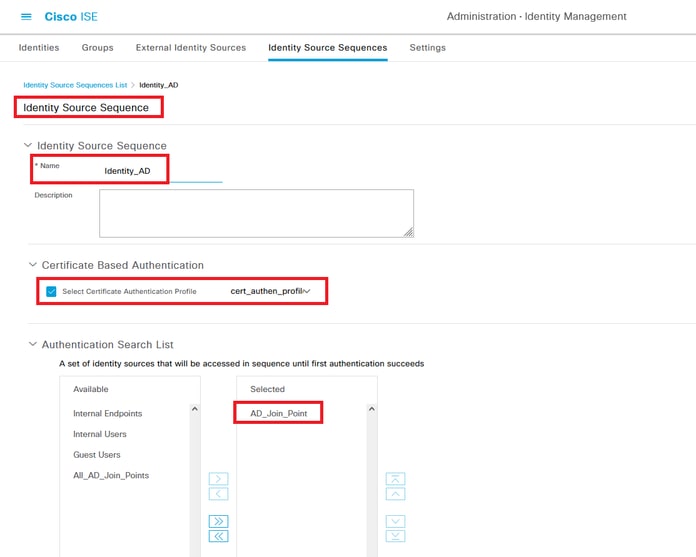 添加身份源序列
步骤5.在ISE中确认证书
导航到Administration > Certificates > System Certificates,确认服务器证书是由受信任CA签名的。
 服务器证书
服务器证书
导航到Administration > Certificates > OCSP Client Profile,单击Add按钮以添加新的OCSP客户端配置文件。
- 名称:ocsp_test_profile
- 配置OCSP Responder URL:http://winserver.ad.rem-xxx.com/ocsp
 OCSP客户端配置文件
导航到Administration > Certificates > Trusted Certificates,确认受信任CA已导入到ISE。
 受信任CA
受信任CA
选中CA并单击Edit按钮,输入证书状态验证的OCSP配置详细信息。
- 根据OCSP服务进行验证:ocsp_test_profile
- 如果OCSP返回UNKNOWN状态,则拒绝请求:检查
- 如果OCSP Responder无法访问,则拒绝请求:检查
 证书状态验证
步骤6.添加允许的协议
导航到Policy > Results > Authentication > Allowed Protocols,编辑Default Network Access服务列表,然后选中Allow EAP-TLS。
 允许EAP-TLS
步骤7.添加策略集
导航到Policy > Policy Sets,点击+ 以添加策略集。
- 策略集名称:EAP-TLS-Test
- 条件:网络访问协议等于RADIUS
- 允许的协议/服务器序列:默认网络访问
 添加策略集
添加策略集
步骤8.添加身份验证策略
导航到Policy Sets,点击EAP-TLS-Tests以添加身份验证策略。
- 规则名称:EAP-TLS-Authentication
- 条件:网络访问EapAuthentication等于EAP-TLS和Wired_802.1 X
- 使用:Identity_AD
 添加身份验证策略
步骤9.添加授权策略
导航到Policy Sets,点击EAP-TLS-Test以添加授权策略。
- 规则名称:EAP-TLS-Authorization
- 条件:证书主题 — 公用名等于clientcertCN
- 成果:PermitAccess
 添加授权策略
验证
步骤1.确认身份验证会话
运行show authentication sessions interface GigabitEthernet1/0/3 details命令确认C1000中的身份验证会话。
Switch#show authentication sessions interface GigabitEthernet1/0/3 details
Interface: GigabitEthernet1/0/3
MAC Address: b496.9114.398c
IPv6 Address: Unknown
IPv4 Address: 192.168.10.10
User-Name: clientcertCN
Status: Authorized
Domain: DATA
Oper host mode: multi-auth
Oper control dir: both
Session timeout: N/A
Restart timeout: N/A
Periodic Acct timeout: N/A
Session Uptime: 111s
Common Session ID: 01C20065000000933E4E87D9
Acct Session ID: 0x00000078
Handle: 0xB6000043
Current Policy: POLICY_Gi1/0/3

Local Policies:
Service Template: DEFAULT_LINKSEC_POLICY_SHOULD_SECURE (priority 150)

Server Policies:


Method status list:
Method State

dot1x Authc Success
步骤2.确认Radius实时日志
在ISE GUI中导航到操作(Operations)> RADIUS >实时日志(Live Login),确认身份验证的实时日志。
 Radius实时日志
确认身份验证的详细实时日志。
 身份验证详细信息
故障排除
1.调试日志
此调试日志(prrt-server.log)可帮助您确认ISE中身份验证的详细行为。
- 运行时AAA
// OCSP request and response
Crypto,2024-06-05 09:43:33,064,DEBUG,0x7f9822961700,NIL-CONTEXT,Crypto::Result=0, CryptoLib.CSSL.OCSP Callback - starting OCSP request to primary,SSL.cpp:1444
Crypto,2024-06-05 09:43:33,064,DEBUG,0x7f9822961700,NIL-CONTEXT,Crypto::Result=0, Crypto.OcspClient::performRequest - Start processing OCSP request, URL=http://winserver.ad.rem-xxx.com/ocsp, use nonce=1,OcspClient.cpp:144

Crypto,2024-06-05 09:43:33,104,DEBUG,0x7f9822961700,NIL-CONTEXT,Crypto::Result=0, Crypto.OcspClient::performRequest - Received OCSP server response,OcspClient.cpp:411
Crypto,2024-06-05 09:43:33,104,DEBUG,0x7f9822961700,NIL-CONTEXT,Crypto::Result=0, Crypto.OcspClient::performRequest - Nonce verification passed,OcspClient.cpp:426

Crypto,2024-06-05 09:43:33,104,DEBUG,0x7f9822961700,NIL-CONTEXT,Crypto::Result=0, Crypto.OcspClient::performRequest - OCSP responser name 8CD12ECAB78607FA07194126EDA82BA7789CE00C,OcspClient.cpp:462
Crypto,2024-06-05 09:43:33,104,DEBUG,0x7f9822961700,NIL-CONTEXT,Crypto::Result=0, Crypto.OcspClient::performRequest - Verify response signature and KU/EKU attributes of response signer certificate,OcspClient.cpp:472

Crypto,2024-06-05 09:43:33,104,DEBUG,0x7f9822961700,NIL-CONTEXT,Crypto::Result=0, Crypto.OcspClient::performRequest - Response signature verification passed,OcspClient.cpp:482
Crypto,2024-06-05 09:43:33,104,DEBUG,0x7f9822961700,NIL-CONTEXT,Crypto::Result=0, Crypto.OcspClient::performRequest - Response contains 1 single responses for certificates,OcspClient.cpp:490

Crypto,2024-06-05 09:43:33,104,DEBUG,0x7f9822961700,NIL-CONTEXT,Crypto::Result=0, Crypto.OcspClient::performRequest - User certificate status: Good,OcspClient.cpp:598
Crypto,2024-06-05 09:43:33,104,DEBUG,0x7f9822961700,NIL-CONTEXT,Crypto::Result=0, CryptoLib.CSSL.OCSP Callback - perform OCSP request succeeded, status: Good,SSL.cpp:1684

// Radius session
Radius,2024-06-05 09:43:33,120,DEBUG,0x7f982d7b9700,cntx=0000017387,sesn=ise32-01/506864164/73,CPMSessionID=01C20065000000933E4E87D9,CallingStationID=B4-96-91-14-39-8C,RADIUS PACKET:: Code=1(AccessRequest) Identifier=238 Length=324
[1] User-Name - value: [clientcertCN]
[4] NAS-IP-Address - value: [1.x.x.101]
[5] NAS-Port - value: [50103]
[24] State - value: [37CPMSessionID=01C20065000000933E4E87D9;31SessionID=ise32-01/506864164/73;]
[87] NAS-Port-Id - value: [GigabitEthernet1/0/3]

Radius,2024-06-05 09:43:33,270,DEBUG,0x7f982d9ba700,cntx=0000017387,sesn=ise32-01/506864164/73,CPMSessionID=01C20065000000933E4E87D9,user=clientcertCN,CallingStationID=B4-96-91-14-39-8C,RADIUS PACKET:: Code=2(AccessAccept) Identifier=238 Length=294
[1] User-Name - value: [clientcertCN]

Radius,2024-06-05 09:43:33,342,DEBUG,0x7f982d1b6700,cntx=0000017401,sesn=ise32-01/506864164/74,CPMSessionID=01C20065000000933E4E87D9,CallingStationID=B4-96-91-14-39-8C,RADIUS PACKET:: Code=4(AccountingRequest) Identifier=10 Length=286
[1] User-Name - value: [clientcertCN]
[4] NAS-IP-Address - value: [1.x.x.101]
[5] NAS-Port - value: [50103]
[40] Acct-Status-Type - value: [Interim-Update]
[87] NAS-Port-Id - value: [GigabitEthernet1/0/3]
[26] cisco-av-pair - value: [audit-session-id=01C20065000000933E4E87D9]
[26] cisco-av-pair - value: [method=dot1x] ,RADIUSHandler.cpp:2455

Radius,2024-06-05 09:43:33,350,DEBUG,0x7f982e1be700,cntx=0000017401,sesn=ise32-01/506864164/74,CPMSessionID=01C20065000000933E4E87D9,user=clientcertCN,CallingStationID=B4-96-91-14-39-8C,RADIUS PACKET:: Code=5(AccountingResponse) Identifier=10 Length=20,RADIUSHandler.cpp:2455
2. TCP转储
在ISE中的TCP转储中,您期望找到有关OCSP响应和Radius会话的信息。
OCSP请求和响应:
 OCSP请求和响应的数据包捕获
 捕获OCSP响应的详细信息
Radius会话:
 Radius会话的数据包捕获
相关信息
修订历史记录
| 版本 | 发布日期 | 备注 |
|---|---|---|
2.0 |
17-Apr-2026
|
重新认证 |
1.0 |
19-Jul-2024
|
初始版本 |
 反馈
反馈