在ISE中配置NTP身份验证

简介
本文档介绍如何在思科身份服务引擎(ISE)上配置NTP身份验证并排除NTP身份验证问题。
先决条件
要求
建议您了解以下主题:
- Cisco ISE CLI配置
- 网络时间协议(NTP)基础知识
使用的组件
本文档中的信息基于以下软件和硬件版本:
- ISE 2.7独立节点
- CISCO2911/K9版本15.2(1)T2
本文档中的信息都是基于特定实验室环境中的设备编写的。本文档中使用的所有设备最初均采用原始(默认)配置。如果您的网络处于活动状态,请确保您了解所有命令的潜在影响。
配置
网络图
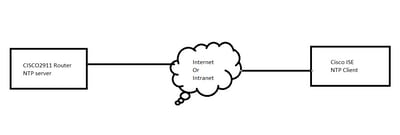
配置
开始使用前
您必须分配超级管理员或系统管理员角色才能访问ISE。
确保NTP端口在ISE和NTP服务器之间的传输路径中未被阻止。
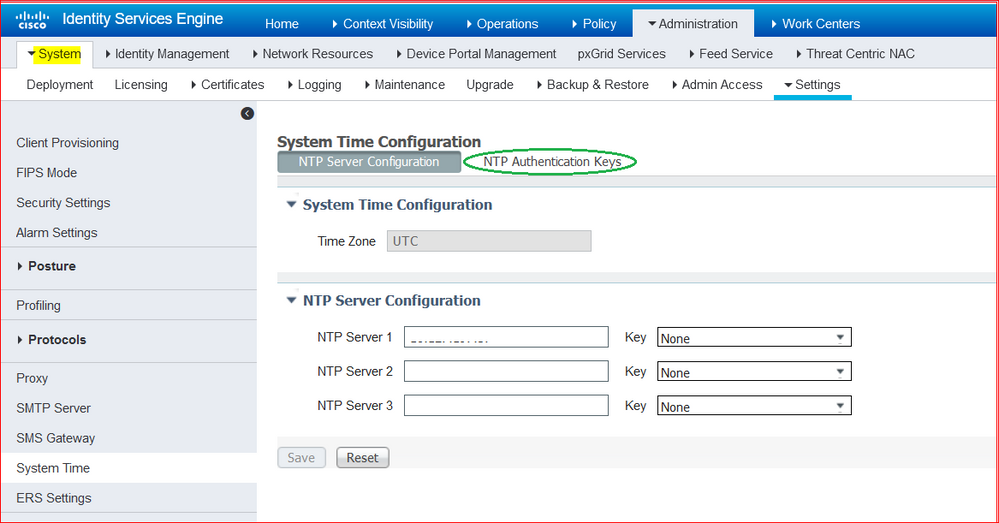
假设您在ISE上配置了NTP服务器。如果要更改NTP服务器,请导航到管理>系统>设置>系统时间。对于短视频,您可以看到ISE NTP配置

如果您的部署中有主要和辅助Cisco ISE节点,您必须登录每个节点的用户界面并配置系统时间和网络时间协议(NTP)服务器设置。
您可以从GUI或CLI在ISE中配置NTP身份验证。
GUI步骤
步骤1.导航到管理>System >设置>系统时间,然后单击NTP身份验证密钥,如下图所示。
步骤2.您可以在此处添加一个或多个身份验证密钥。单击Add,然后您将看到一个弹出窗口。此处,Key ID字段支持1到65535之间的数值,Key Value字段支持最多15个字母数字字符。Key Value是用于向NTP服务器验证ISE作为客户端的实际NTP密钥。此外,密钥ID必须与NTP服务器上配置的密钥ID匹配。从HMAC下拉列表中选择所需的散列消息验证码(HMAC)值。
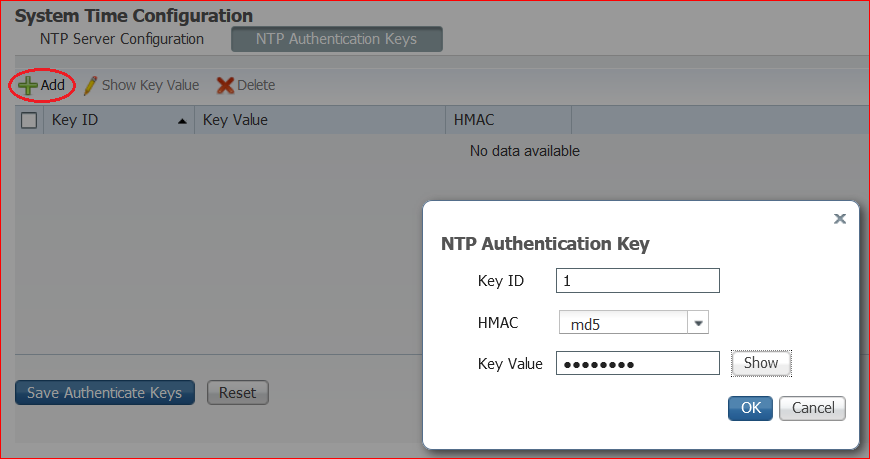
步骤3.单击OK,然后单击Save Authentication Key。您将返回NTP服务器配置选项卡。
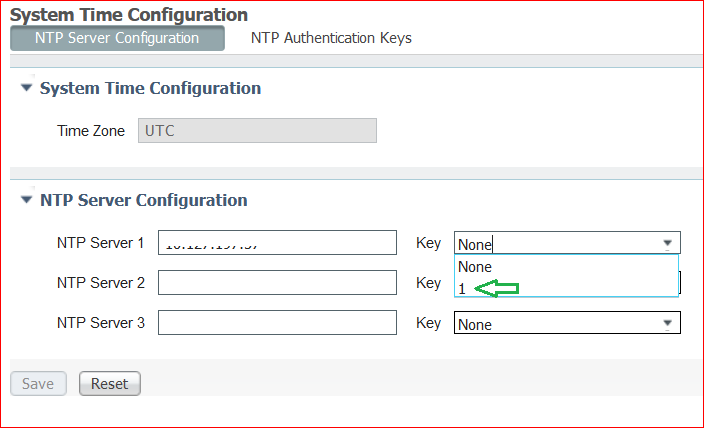
步骤4.现在在密钥下拉列表中,您会看到在步骤3中配置的密钥ID。如果配置了多个密钥ID,请单击相应的密钥ID。然后,单击Save。
CLI步骤
步骤1.配置NTP身份验证密钥。
admin(config)# ntp authentication-key ?
<1-65535> Key number >>> This is the Key ID
admin(config)# ntp authentication-key 1 ? >>> Here you can choose the HMAC value
md5 MD5 authentication
sha1 SHA1 authentication
sha256 SHA256 authentication
sha512 SHA512 authentication
admin(config)# ntp authentication-key 1 md5 ? >>> You can choose either to paste the hash of the actual key or type the key in plain text.
hash Specifies an ENCRYPTED (hashed) key follows
plain Specifies an UNENCRYPTED plain text key follows

admin(config)# ntp authentication-key 1 md5 plain Ntp123 >>> Ensure there are no spaces given at the end of the key.
步骤2.定义NTP服务器并关联步骤1中配置的密钥ID。
admin(config)# ntp server IP/HOSTNAME ?
key Peer key number
<cr> Carriage return.

admin(config)# ntp serve IP/HOSTNAME key ?
<1-65535>

admin(config)# ntp serve IP/HOSTNAME key 1 ?
<cr> Carriage return.

admin(config)# ntp serve IP/HOSTNAME key 1
路由器配置
路由器充当NTP服务器。配置这些命令,使路由器成为具有NTP身份验证的NTP服务器。
ntp authentication-key 1 md5 Ntp123 >>> The same key that you configured on ISE
ntp authenticate
ntp master STRATUM
验证
在ISE上:
使用show ntp命令。如果NTP身份验证成功,您必须看到ISE与NTP服务器同步。
admin# sh ntp
Configured NTP Servers:
NTP_SERVER_IP

Reference ID : 0A6A23B1 (NTP_SERVER_IP)
Stratum : 3
Ref time (UTC) : Fri Mar 26 09:14:31 2021
System time : 0.000008235 seconds fast of NTP time
Last offset : +0.000003193 seconds
RMS offset : 0.000020295 seconds
Frequency : 10.472 ppm slow
Residual freq : +0.000 ppm
Skew : 0.018 ppm
Root delay : 0.000571255 seconds
Root dispersion : 0.000375993 seconds
Update interval : 519.3 seconds
Leap status : Normal >>> If there is any issue in NTP synchronization, it shows "Not synchronised".

210 Number of sources = 1
MS Name/IP address Stratum Poll Reach LastRx Last sample
===============================================================================
^* NTP_SERVER_IP 2 9 377 100 +3853ns[+7046ns] +/- 684us

M indicates the mode of the source.
^ server, = peer, # local reference clock.

S indicates the state of the sources.
* Current time source, + Candidate, x False ticker, ? Connectivity lost, ~ Too much variability

Warning: Output results can conflict at the time of changing synchronization.

admin#
故障排除
本部分提供了可用于对配置进行故障排除的信息。
- 如果NTP身份验证不起作用,首先要确保ISE和NTP服务器之间的可达性。
- 确保ISE和NTP服务器上的密钥ID配置匹配。
- 确保密钥ID在NTP服务器上配置为受信任密钥。
- ISE的早期版本(如2.4和2.6)支持ntp trusted-key命令。请确保已在这些ISE版本上将NTP密钥配置为trusted-key。
- ISE 2.7引入了NTP同步行为的更改。以前的版本使用ntpd,而2.7及更高版本则使用chronoy。Chrony与ntpd的要求不同。其中最值得注意的一点是,当ntpd与根色散高达10秒的服务器同步时,仅当根色散低于3秒时进行同步。这会导致能够同步升级前的NTP服务器在2.7上不同步,而没有任何明显原因。
由于此更改,如果使用Windows NTP服务器,NTP同步问题会经常出现,因为它们报告非常大的根色散(3秒或更长时间),这会导致计时器忽略NTP服务器,认为它太不准确。
参考缺陷
Cisco Bug ID CSCvw78019
Cisco Bug ID CSCvw03693
相关信息
修订历史记录
| 版本 | 发布日期 | 备注 |
|---|---|---|
4.0 |
04-Aug-2026
|
重新认证 — 更新的格式 |
3.0 |
28-May-2024
|
更新的标题、替代文本和格式。 |
2.0 |
16-May-2023
|
重新认证 |
1.0 |
28-Jun-2021
|
初始版本 |
 反馈
反馈