简介
本文档介绍思科注册信封服务加密(CRES)配置文件在邮件安全设备(ESA)中的配置,重点介绍允许的不同安全级别。
先决条件
要求
Cisco 建议您了解以下主题:
- ESA基本配置
- 基于内容过滤器配置的加密
- 思科注册信封服务
使用的组件
本文档不限于特定的软件和硬件版本。
本文档中的信息都是基于特定实验室环境中的设备编写的。本文档中使用的所有设备最初均采用原始(默认)配置。如果您的网络处于活动状态,请确保您了解所有命令的潜在影响。
背景信息
创建CRES配置文件是通过ESA激活和使用加密服务的核心任务。创建多个配置文件之前,请确保您已通过创建CRES帐户完成为ESA调配的帐户。
可以有多个配置文件,每个配置文件都可以配置不同的安全级别。这样,网络就可以按域、用户或组保持不同的安全级别。
配置
您可以使用encryptionconfig CLI命令或通过GUI中的安全服务> Cisco IronPort邮件加密启用和配置加密配置文件。
从GUI进行配置
从ESA导航至安全服务> Cisco IronPort邮件加密>添加加密配置文件。
系统将显示一个包含加密配置文件设置的屏幕。配置文件名称和配置的其余部分均可自定义,具体取决于组织的标识标签或方法。
定义每个配置文件安全级别的配置是“信封设置”,如图所示:
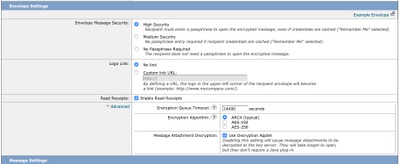
注意:建议配置文件名称包含:“高”、“低”等,以匹配配置的安全级别或配置文件所关联的组的名称,以便在内容过滤器的创建和验证过程中进行快速识别。
ESA允许的三个安全级别是:
- 高安全性:收件人必须始终输入密码才能打开加密邮件。
- 中等安全:如果收件人凭据已缓存,则收件人无需输入凭据即可打开加密邮件。
- 无需密码:这是加密邮件安全性的最低级别。收件人无需输入密码即可打开加密邮件。您仍然可以为未受密码保护的信封启用读回执、安全回复所有和安全邮件转发功能。
您可以在这些对象上配置不同级别的安全性:
信封邮件安全:
徽标链接:为了使用户能够打开贵组织的URL,请点击其徽标,您可以添加徽标链接。从以下选项中选择:
- 没有链路。消息信封中未添加实时链接。
- 自定义链接URL。输入URL以将实时链接添加到邮件信封。
已读回执:如果启用此选项,则当收件人打开安全信封时,发件人将收到回执。这是可选选择。
高级:
加密队列超时:输入消息在超时之前可以在加密队列中的时间长度(秒)。邮件超时后,设备会退回邮件并向发件人发送通知。
加密算法:
- ARC4。ARC4是最常见的选择,它为消息接收方提供强大的加密功能,同时最大限度地减少解密延迟。
- AES。AES提供更强的加密功能,但解密需要更长的时间,这会导致收件人延迟。AES通常用于政府和银行应用。
邮件附件解密:启用或禁用解密小程序。启用此选项后,它将在浏览器环境中打开邮件附件。禁用此选项后,会导致邮件附件在密钥服务器上解密。默认情况下,在信封中禁用Java小程序。
注意:由于安全原因,最常用的浏览器已禁用Java Applet。
创建加密配置文件后。 确保已调配,如图所示:

这些配置文件中的每一个都必须通过内容过滤器进行关联才能应用。
警告:如果配置文件不是由内容过滤器调用的,则无法应用加密设置。
从ESA导航到邮件策略> 传出内容过滤器> 添加过滤器
一旦在过滤器中配置了用户、主题、组、发件人等的条件,请定义传出过滤器的加密级别,如图所示:
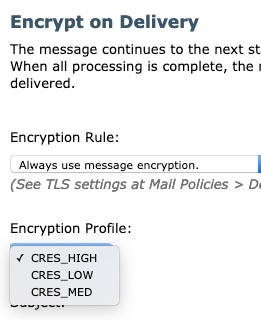
警告:所有内容过滤器都必须与传出邮件策略相关联,才能正常工作。
注意:您可以为托管密钥服务配置多个加密配置文件。如果您的组织有多个品牌,这允许您引用存储在PXE信封密钥服务器上的不同徽标。
从CLI配置
从ESA CLI键入encryptionconfig命令:
ESA.com> encryptionconfig

IronPort Email Encryption: Enabled

Choose the operation you want to perform:
- SETUP - Enable/Disable IronPort Email Encryption
- PROFILES - Configure email encryption profiles
- PROVISION - Provision with the Cisco Registered Envelope Service

[]> profiles

Proxy: Not Configured

Profile Name         Key Service            Proxied     Provision Status
------------         -----------            -------     ----------------
HIGH-CRES              Hosted Service         No          Not Provisioned
Choose the operation you want to perform:
- NEW - Create a new encryption profile
- EDIT - Edit an existing encryption profile
- DELETE - Delete an encryption profile
- PRINT - Print all configuration profiles
- CLEAR - Clear all configuration profiles
- PROXY - Configure a key server proxy
[]> new

1. Cisco Registered Envelope Service
2. IronPort Encryption Appliance (in network)
Choose a key service:
[1]>

Enter a name for this encryption profile:
[]> HIGH

Current Cisco Registered Key Service URL: https://res.cisco.com
Do you wish to alter the Cisco Registered Envelope Service URL? [N]> N

1. ARC4
2. AES-192
3. AES-256
Please enter the encryption algorithm to use when encrypting envelopes:
[1]>

1. Use envelope service URL with HTTP (Recommended). Improves performance for opening envelopes.
2. Use the envelope service URL with HTTPS.
3. Specify a separate URL for payload transport.
Configure the Payload Transport URL
[1]>

1. High Security (Recipient must enter a passphrase to open the encrypted message, even if credentials are cached ("Remember Me" selected).)
2. Medium Security (No passphrase entry required if recipient credentials are cached ("Remember Me" selected).)
3. No Passphrase Required (The recipient does not need a passphrase to open the encrypted message.)
Please enter the envelope security level:
[1]>

Would you like to enable read receipts? [Y]>

Would you like to enable "Secure Reply All"? [N]> y

Would you like to enable "Secure Forward"? [N]> y

Enter a URL to serve as a link for the envelope logo image (may be blank):
[]>

Would you like envelopes to be displayed in a language other than English ? [N]>

Enter the maximum number of seconds for which a message could remain queued waiting to be encrypted. Delays could be caused by key server outages or resource limitations:
[14400]>

Enter the subject to use for failure notifications:
[[ENCRYPTION FAILURE]]>

Please enter file name of the envelope attached to the encryption notification:
[securedoc_${date}T${time}.html]>


A Cisco Registered Envelope Service profile "HIGH" was added.

   1. Commit this configuration change before continuing.
   2. Return to the encryptionconfig menu and select PROVISION to complete
the configuration.

Proxy: Not Configured

Profile Name         Key Service            Proxied     Provision Status
------------         -----------            -------     ----------------
HIGH-CRES            Hosted Service         No          Not Provisioned
LOW-CRES             Hosted Service         No          Not Provisioned

Choose the operation you want to perform:
- SETUP - Enable/Disable IronPort Email Encryption
- PROFILES - Configure email encryption profiles
- PROVISION - Provision with the Cisco Registered Envelope Service

[]> provision
验证
使用本部分可确认配置能否正常运行。
从GUI验证
从ESA导航至安全服务> Cisco IronPort邮件加密,如图所示:
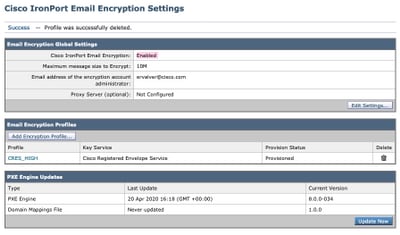
注意:确保启用加密并调配配置的配置文件。如图所示.
从CLI验证
从CLI键入encryptconfig和type profiles命令。
ESA.com> encryptionconfig

IronPort Email Encryption: Enabled

Choose the operation you want to perform:
- SETUP - Enable/Disable IronPort Email Encryption
- PROFILES - Configure email encryption profiles
- PROVISION - Provision with the Cisco Registered Envelope Service
[]> profiles

Proxy: Not Configured

Profile Name         Key Service            Proxied     Provision Status
------------         -----------            -------     ----------------
CRES_HIGH             Hosted Service         No          Provisioned
注意:确保启用加密并调配配置的配置文件。如图所示.
故障排除
本部分提供了可用于对配置进行故障排除的信息。
从ESA导航到系统管理>功能密钥
验证功能密钥已应用且处于活动状态。密钥:IronPort邮件加密必须处于活动状态。
从ESA导航到安全服务> Cisco IronPort邮件加密
验证加密服务是否已正确启用。
验证加密配置文件是否未处于“未调配”状态,如图所示:

验证引擎上次更新,如图所示:

从“邮件跟踪”(Message Tracking)详细信息,验证是否显示错误。
最常见的错误:
5.x.3 - Temporary PXE Encryption failure
解决方案:服务当前不可用或无法访问。检验连通性和网络问题。
5.x.3 - PXE Encryption failure. (Message could not be encrypted due to a system configuration issue. Please contact your administrator
解决方案:此错误与:
- 许可问题.请验证功能密钥
- 未调配使用的配置文件。从邮件中识别在内容过滤器和调配上配置的配置文件
- 没有配置文件与内容过滤器关联。有时,加密配置文件会被删除、使用不同的名称修改等。并且配置的内容过滤器无法找到关联的配置文件
5.x.3 - PXE Encryption failure. (Error 30 - The message has an invalid "From" address.)
5.x.3 - PXE Encryption failure. (Error 102 - The message has an invalid "To" address.)
解决方案:通常,此问题是由内部发件人的电子邮件客户端(例如Outlook)自动填充收件人电子邮件地址而引起的,该电子邮件地址包含无效的“发件人”/“收件人”地址。
通常,这由电子邮件地址或电子邮件地址中的其他非法字符周围使用引号引起。
相关信息

 反馈
反馈