禁用ASA上的服务模块监控以避免不需要的故障切换事件(SFR/CX/IPS/CSC)。

下载选项
非歧视性语言
此产品的文档集力求使用非歧视性语言。在本文档集中,非歧视性语言是指不隐含针对年龄、残障、性别、种族身份、族群身份、性取向、社会经济地位和交叉性的歧视的语言。由于产品软件的用户界面中使用的硬编码语言、基于 RFP 文档使用的语言或引用的第三方产品使用的语言,文档中可能无法确保完全使用非歧视性语言。 深入了解思科如何使用包容性语言。
关于此翻译
思科采用人工翻译与机器翻译相结合的方式将此文档翻译成不同语言,希望全球的用户都能通过各自的语言得到支持性的内容。 请注意:即使是最好的机器翻译,其准确度也不及专业翻译人员的水平。 Cisco Systems, Inc. 对于翻译的准确性不承担任何责任,并建议您总是参考英文原始文档(已提供链接)。
目录
简介
本文档介绍如何在自适应安全设备(ASA)故障切换环境中禁用模块SourceFire(SFR)、情景感知(CX)、入侵防御系统(IPS)、内容安全和控制(CSC)上的监控。
作者:Cesar Lopez,思科TAC工程师。
先决条件
要求
Cisco 建议您了解以下主题:
- 自适应安全设备的配置。
- 高可用性的ASA故障转移知识。
从9.3(1)版本开始,此功能是可配置的。在上述版本之前,将始终监控模块。解决方法可用于本文档中介绍的以前版本。
使用的组件
本文档基于以下软件和硬件版本:
- 思科 ASA 版本 9.3(1) 及更高版本.
- 具备FirePOWER服务的ASA 5500-X系列、ASA CX环境感知安全或IPS模块。
本文档中的信息都是基于特定实验室环境中的设备编写的。本文档中使用的所有设备最初均采用原始(默认)配置。如果您的网络处于活动状态,请确保您了解所有命令的潜在影响。
背景信息
默认情况下,ASA监控已安装的服务模块。如果在主用设备模块中检测到故障,则会触发设备故障切换。
当计划服务模块重新加载或模块连续故障发生时,禁用此监控器可能非常有用,因为此时不允许ASA故障切换事件。
注意:ASA需要将流量转移到模块,以便由故障转移进程进行监控。
配置
网络图
本文档使用以下设置:
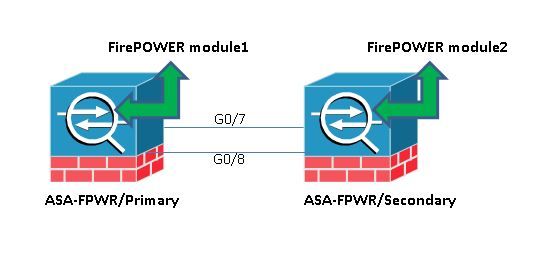
配置
此配置用于实验设备,以演示本文档中提到的监控功能。仅包括相关配置。此输出的某些行被省略。
ASA Version 9.3(3)
!
hostname ASA-FPWR
!
interface GigabitEthernet0/0
 nameif outside
 security-level 0
 ip address 10.88.247.5 255.255.255.224 standby 10.88.247.6
!
interface GigabitEthernet0/1
 nameif inside
 security-level 100
 ip address 192.168.10.111 255.255.255.0 standby 192.168.10.112
!
...
!
interface GigabitEthernet0/6
 description LAN Failover Interface
!
interface GigabitEthernet0/7
 description STATE Failover Interface
!
...

failover
failover lan unit primary
failover lan interface folink GigabitEthernet0/6
failover link statelink GigabitEthernet0/7
failover interface ip folink 1.1.1.1 255.255.255.0 standby 1.1.1.2
failover interface ip statelink 2.2.2.1 255.255.255.0 standby 2.2.2.2
!

...

!
class-map SFR
 match any
class-map inspection_default
 match default-inspection-traffic
!
!
policy-map type inspect dns migrated_dns_map_1
 parameters
 message-length maximum client auto
 message-length maximum 512
policy-map global_policy
 class inspection_default
 inspect dns migrated_dns_map_1
 inspect ftp
 inspect h323 h225
 inspect h323 ras
 inspect ip-options
 inspect netbios
 inspect rsh
 inspect rtsp
 inspect skinny
 inspect esmtp
 inspect sqlnet
 inspect sunrpc
 inspect tftp
 inspect sip
 inspect xdmcp
 class SFR
 sfr fail-open
!
service-policy global_policy global
prompt hostname context priority state
no call-home reporting anonymous
Cryptochecksum:b268e0095f175a26aa94d120e9041c29
: end
检查当前监控的组件。
当ASA处于故障切换模式时,默认情况下会监控安装的服务模块,就像设备接口一样。可以使用以下命令查看哪些当前组件受到监控:
ASA-FPWR/pri/act# show run all monitor-interface
monitor-interface outside
monitor-interface inside
monitor-interface service-module
检查ASA设备服务模块状态。
show failover输出显示每个单元模块的当前状态:
ASA-FPWR/pri/act# show failover
Failover On
Failover unit Primary
Failover LAN Interface: folink GigabitEthernet0/6 (up)
Reconnect timeout 0:00:00
Unit Poll frequency 1 seconds, holdtime 15 seconds
Interface Poll frequency 5 seconds, holdtime 25 seconds
Interface Policy 1
Monitored Interfaces 2 of 316 maximum
MAC Address Move Notification Interval not set
Version: Ours 9.3(3), Mate 9.3(3)
Last Failover at: 14:30:44 UTC Aug 6 2015
 This host: Primary - Active
 Active time: 85 (sec)
 slot 0: ASA5545 hw/sw rev (1.0/9.3(3)) status (Up Sys)
 Interface outside (10.88.247.5): Normal (Monitored)
 Interface inside (192.168.10.111): Normal (Monitored)
 slot 1: SFR5545 hw/sw rev (N/A/5.3.1-152) status (Up/Up)
 ASA FirePOWER, 5.3.1-152, Up
 Other host: Secondary - Standby Ready
 Active time: 396 (sec)
 slot 0: ASA5545 hw/sw rev (1.0/9.3(3)) status (Up Sys)
 Interface outside (10.88.247.6): Normal (Monitored)
 Interface inside (192.168.10.112): Normal (Monitored)
 slot 1: SFR5545 hw/sw rev (N/A/5.3.1-155) status (Up/Up)
 ASA FirePOWER, 5.3.1-155, Up
如果主用设备的服务模块发生故障,则会发生故障切换事件。主用设备变为备用设备,而上一个备用设备则成为主用设备。在某些情况下,这会导致状态故障切换不支持的一些功能重新收敛。
验证服务模块故障模式策略:
如果使用fail-openpolicy将流量发送到模块,则流量继续通过ASA而不发送到服务模块。这是一种更透明的方法,可以克服预期的模块关闭状态。
警告:如果已应用失败关闭策略,则ASA会丢弃与用于将流量转移至模块的类映射匹配的所有流量。
要了解使用的策略状态,请运行命令show service-policy [sfr|cx|ips|csc] 。
ASA-FPWR/pri/act# show service-policy sfr

Global policy:
 Service-policy: global_policy
 Class-map: SFR
 SFR: card status Up, mode fail-open
 packet input 0, packet output 0, drop 0, reset-drop 0
通过检查模块化策略框架(MPF)配置可以看到相同的情况:
ASA-FPWR/pri/act# show run policy-map
!
policy-map type inspect dns migrated_dns_map_1
 parameters
 message-length maximum client auto
 message-length maximum 512
policy-map global_policy
 class inspection_default
 inspect dns migrated_dns_map_1
 inspect ftp
 inspect h323 h225
 inspect h323 ras
 inspect ip-options
 inspect netbios
 inspect rsh
 inspect rtsp
 inspect skinny
 inspect esmtp
 inspect sqlnet
 inspect sunrpc
 inspect tftp
 inspect sip
 inspect xdmcp
 class SFR
 sfr fail-open
!
ASA-FPWR/pri/act#
禁用服务模块监控。
此命令使故障切换过程停止对服务模块的监控。如果模块进入“关闭”或“无响应”状态,则任何计划的重新加载或故障排除都可以在不进行故障切换的情况下对模块进行。
no monitor-interface service-module
验证
验证服务模块监控是否已禁用。
在运行配置下,monitor-interface命令被否定。
ASA-FPWR/pri/act(config)# show run all monitor-interface
monitor-interface outside
monitor-interface inside
no monitor-interface service-module
测试重新加载由主用设备托管的模块。
出于演示目的,将重新加载此设备上的FirePOWER模块,以确认主用故障切换设备是否保留此角色。
ASA主/主用设备中FirePOWER模块的输出。
Sourcefire ASA5545 v5.3.1 (build 152)

Last login: Thu Aug 6 14:40:46 on ttyS1
>
> system reboot
This command will reboot the system. Continue?
Please enter 'YES' or 'NO': YES

Broadcast message from root (Thu Aug 6 14:40:59 2015):

The system is going down for reboot NOW!

Escape Sequence detected
Console session with module sfr terminated.
模块重新加载时ASA主/主用设备的输出。
设备仍处于Active角色。
ASA-FPWR/pri/act# show failover
Failover On
Failover unit Primary
Failover LAN Interface: folink GigabitEthernet0/6 (up)
Reconnect timeout 0:00:00
Unit Poll frequency 1 seconds, holdtime 15 seconds
Interface Poll frequency 5 seconds, holdtime 25 seconds
Interface Policy 1
Monitored Interfaces 2 of 316 maximum
MAC Address Move Notification Interval not set
Version: Ours 9.3(3), Mate 9.3(3)
Last Failover at: 14:30:44 UTC Aug 6 2015
 This host: Primary - Active
 Active time: 616 (sec)
 slot 0: ASA5545 hw/sw rev (1.0/9.3(3)) status (Up Sys)
 Interface outside (10.88.247.5): Normal (Monitored)
 Interface inside (192.168.10.111): Normal (Monitored)
 slot 1: SFR5545 hw/sw rev (N/A/5.3.1-152) status (Unresponsive/Down)
 ASA FirePOWER, 5.3.1-152, Not Applicable
 Other host: Secondary - Standby Ready
 Active time: 396 (sec)
 slot 0: ASA5545 hw/sw rev (1.0/9.3(3)) status (Up Sys)
 Interface outside (10.88.247.6): Normal (Monitored)
 Interface inside (192.168.10.112): Normal (Monitored)
 slot 1: SFR5545 hw/sw rev (N/A/5.3.1-155) status (Up/Up)
 ASA FirePOWER, 5.3.1-155, Up
模块重新加载时ASA辅助/备用设备的输出:
备用设备不会将此状态检测为故障,并且不承担主用角色。
ASA-FPWR/sec/stby# show failover
Failover On
Failover unit Secondary
Failover LAN Interface: folink GigabitEthernet0/6 (up)
Reconnect timeout 0:00:00
Unit Poll frequency 1 seconds, holdtime 15 seconds
Interface Poll frequency 5 seconds, holdtime 25 seconds
Interface Policy 1
Monitored Interfaces 2 of 316 maximum
MAC Address Move Notification Interval not set
Version: Ours 9.3(3), Mate 9.3(3)
Last Failover at: 14:30:59 UTC Aug 6 2015
 This host: Secondary - Standby Ready
 Active time: 396 (sec)
 slot 0: ASA5545 hw/sw rev (1.0/9.3(3)) status (Up Sys)
 Interface outside (10.88.247.6): Normal (Monitored)
 Interface inside (192.168.10.112): Normal (Monitored)
 slot 1: SFR5545 hw/sw rev (N/A/5.3.1-155) status (Up/Up)
 ASA FirePOWER, 5.3.1-155, Up
 Other host: Primary - Active
 Active time: 670 (sec)
 slot 0: ASA5545 hw/sw rev (1.0/9.3(3)) status (Up Sys)
 Interface outside (10.88.247.5): Normal (Monitored)
 Interface inside (192.168.10.111): Normal (Monitored)
 slot 1: SFR5545 hw/sw rev (N/A/5.3.1-152) status (Unresponsive/Down)
 ASA FirePOWER, 5.3.1-152, Not Applicable
启用服务模块监控。
要启用模块监控,请运行以下命令:
monitor-interface service-module
验证服务模块是否已启用。
不再否定服务模块命令。
ASA-FPWR/pri/act(config)# show run all monitor-interface
monitor-interface outside
monitor-interface inside
monitor-interface service-module
故障排除
问题1. ASA继续故障切换,并显示以下消息“Service card in other unit has failed”(其他单元中的服务卡出现故障)。
如果检测到一个或多个故障切换事件,则可以使用show failover history了解可能的原因。
ASA-FPWR/sec/act# show failover history
==========================================================================
From State To State Reason
==========================================================================
14:38:58 UTC Aug 5 2015
Bulk Sync Standby Ready Detected an Active mate

14:39:05 UTC Aug 5 2015
Standby Ready Bulk Sync No Error

14:39:17 UTC Aug 5 2015
Bulk Sync Standby Ready No Error

14:48:12 UTC Aug 6 2015
Standby Ready Just Active Service card in other unit has failed

14:48:12 UTC Aug 6 2015
Just Active Active Drain Service card in other unit has failed

14:48:12 UTC Aug 6 2015
Active Drain Active Applying Config Service card in other unit has failed

14:48:12 UTC Aug 6 2015
Active Applying Config Active Config Applied Service card in other unit has failed

14:48:12 UTC Aug 6 2015
Active Config Applied Active Service card in other unit has failed
现在备用设备显示以下消息:
14:47:56 UTC Aug 6 2015
Standby Ready Failed Detect service card failure
如果显示“Service card in other unit has failed”消息,则发生故障转移是因为主用设备检测到其自己的模块无响应。
如果模块处于“无响应”状态,受影响的ASA将处于失败模式。
ASA-FPWR/sec/stby# Waiting for the earlier webvpn instance to terminate...
Previous instance shut down. Starting a new one.

 Switching to Active

ASA-FPWR/sec/act#
ASA-FPWR/sec/act# show failover
Failover On
Failover unit Secondary
Failover LAN Interface: folink GigabitEthernet0/6 (up)
Reconnect timeout 0:00:00
Unit Poll frequency 1 seconds, holdtime 15 seconds
Interface Poll frequency 5 seconds, holdtime 25 seconds
Interface Policy 1
Monitored Interfaces 2 of 316 maximum
MAC Address Move Notification Interval not set
Version: Ours 9.3(3), Mate 9.3(3)
Last Failover at: 14:24:23 UTC Aug 6 2015
 This host: Secondary - Active
 Active time: 38 (sec)
 slot 0: ASA5545 hw/sw rev (1.0/9.3(3)) status (Up Sys)
 Interface outside (10.88.247.5): Normal (Waiting)
 Interface inside (192.168.10.111): Normal (Waiting)
 slot 1: SFR5545 hw/sw rev (N/A/5.3.1-155) status (Up/Up)
 ASA FirePOWER, 5.3.1-155, Up
 Other host: Primary - Failed
 Active time: 182 (sec)
 slot 0: ASA5545 hw/sw rev (1.0/9.3(3)) status (Up Sys)
 Interface outside (10.88.247.6): Normal (Waiting)
 Interface inside (192.168.10.112): Normal (Waiting)
 slot 1: SFR5545 hw/sw rev (N/A/5.3.1-152) status (Unresponsive/Down)
 ASA FirePOWER, 5.3.1-152, Not Applicable
解决方案
可以禁用服务模块监控,同时可以执行进一步步骤来排除问题,以便恢复模块。
no monitor-interface service-module
问题2:我的ASA不支持9.3(1)或我无法升级它。如何避免故障切换事件?
传统ASA5500系列不支持9.3(1)版本,即使它们不支持软件模块,也有些具有硬件模块,如CSC或IPS。
即使使用新的ASA5500-X系列,也有一些设备的版本低于支持禁用监控的设备。
解决方案
ASA仅监控模块,前提是有策略配置为将流量传递到模块。因此,为了避免故障切换,可以删除模块策略。
标识使用的类映射和策略。
在这种情况下,此配置用于删除FirePOWER模块的流量转移。
class-map SFR
 match any
class-map inspection_default
 match default-inspection-traffic
!
!
policy-map type inspect dns migrated_dns_map_1
 parameters
 message-length maximum client auto
 message-length maximum 512
policy-map global_policy
 class inspection_default
 inspect dns migrated_dns_map_1
 inspect ftp
 inspect h323 h225
 inspect h323 ras
 inspect ip-options
 inspect netbios
 inspect rsh
 inspect rtsp
 inspect skinny
 inspect esmtp
 inspect sqlnet
 inspect sunrpc
 inspect tftp
 inspect sip
 inspect xdmcp
 class SFR
 sfr fail-open
!
命令show service-policy [csc|cxsc|ips|sfr] 可用于检测类映射和当前状态。
ASA-FPWR/pri/act# show service-policy sfr

Global policy:
 Service-policy: global_policy
 Class-map: SFR
 SFR: card status Up, mode fail-open
 packet input 0, packet output 0, drop 0, reset-drop
禁用到模块的流量重定向。
删除策略后,不会将其他流量从ASA发送到模块。
ASA-FPWR/pri/act# conf t
ASA-FPWR/pri/act(config)# policy-map global_policy
ASA-FPWR/pri/act(config-pmap)# class SFR
ASA-FPWR/pri/act(config-pmap-c)# no sfr fail-open
ASA-FPWR/pri/act(config-pmap-c)# end
ASA-FPWR/pri/act#
验证是否已禁用到模块的ASA重定向。
同一show命令可用于验证流量不再流向模块。输出必须为空。
 ASA-FPWR/pri/act# show service-policy sfr
ASA-FPWR/pri/act#
即使模块无响应,主用设备仍保持相同的角色。
ASA-FPWR/pri/act# show module sfr

Mod Card Type Model Serial No.
---- -------------------------------------------- ------------------ -----------
 sfr FirePOWER Services Software Module ASA5545 FCH18457CNM

Mod MAC Address Range Hw Version Fw Version Sw Version
---- --------------------------------- ------------ ------------ ---------------
 sfr 74a0.2fa4.6c7a to 74a0.2fa4.6c7a N/A N/A 5.3.1-152

Mod SSM Application Name Status SSM Application Version
---- ------------------------------ ---------------- --------------------------
 sfr ASA FirePOWER Not Applicable 5.3.1-152

Mod Status Data Plane Status Compatibility
---- ------------------ --------------------- -------------
 sfr Unresponsive Not Applicable

ASA-FPWR/pri/act# show failover
Failover On
Failover unit Primary
Failover LAN Interface: folink GigabitEthernet0/6 (up)
Reconnect timeout 0:00:00
Unit Poll frequency 1 seconds, holdtime 15 seconds
Interface Poll frequency 5 seconds, holdtime 25 seconds
Interface Policy 1
Monitored Interfaces 2 of 316 maximum
MAC Address Move Notification Interval not set
Version: Ours 9.3(3), Mate 9.3(3)
Last Failover at: 14:51:20 UTC Aug 6 2015
 This host: Primary - Active
 Active time: 428 (sec)
 slot 0: ASA5545 hw/sw rev (1.0/9.3(3)) status (Up Sys)
 Interface outside (10.88.247.5): Normal (Monitored)
 Interface inside (192.168.10.111): Normal (Monitored)
 slot 1: SFR5545 hw/sw rev (N/A/5.3.1-152) status (Unresponsive/Down)
 ASA FirePOWER, 5.3.1-152, Not Applicable
 Other host: Secondary - Standby Ready
 Active time: 204 (sec)
 slot 0: ASA5545 hw/sw rev (1.0/9.3(3)) status (Up Sys)
 Interface outside (10.88.247.6): Normal (Monitored)
 Interface inside (192.168.10.112): Normal (Monitored)
 slot 1: SFR5545 hw/sw rev (N/A/5.3.1-155) status (Up/Up)
 ASA FirePOWER, 5.3.1-155, Up
启用重定向到模块的流量。
需要将流量发送回模块后,即可重新添加失效开放或失效关闭策略。
ASA-FPWR/pri/act(config)# policy-map global_policy
ASA-FPWR/pri/act(config-pmap)# class SFR
ASA-FPWR/pri/act(config-pmap-c)# sfr fail-open
ASA-FPWR/pri/act(config-pmap-c)# end
ASA-FPWR/pri/act#
修订历史记录
| 版本 | 发布日期 | 备注 |
|---|---|---|
1.0 |
25-Jan-2017
|
初始版本 |
 反馈
反馈