在 Catalyst 交换机上配置隔离的专用 VLAN

简介
本文档介绍如何在运行Cisco IOS XE软件的Cisco Catalyst 9000系列交换机上配置隔离专用VLAN(PVLAN)。
先决条件
要求
Cisco 建议您了解以下主题:
- VLAN 配置
- 802.1Q中继
- 基本Cisco IOS XE命令行界面(CLI)
使用的组件
本文档基于这些软件和硬件版本;但是,PVLAN不限于这些版本。在部署之前验证特定平台和Cisco IOS XE版本的PVLAN支持、命令语法和限制:
-
运行Cisco IOS XE软件版本17.X和26.X的Cisco Catalyst 9300系列交换机
本文档中的信息都是基于特定实验室环境中的设备编写的。本文档中使用的所有设备最初均采用原始(默认)配置。如果您的网络处于活动状态,请确保您了解所有命令的潜在影响。
规则
有关文档规则的详细信息,请参阅 Cisco 技术提示规则。
背景信息
在某些情况下,您需要在不将设备置于不同IP子网的情况下阻止交换机上的终端设备之间的第2层连接。PVLAN在属于同一IP子网的端口之间提供第2层隔离。当主机必须到达默认网关、防火墙、负载均衡器或共享服务,但不得与同一VLAN中的其他隔离主机直接通信时,此设计非常有用,而且有助于保留IP子网。
PVLAN将第2层广播域分为主要VLAN和一个或多个辅助VLAN。您可以在PVLAN内分配一组特定的端口,从而控制第2层端口之间的访问。您可以在同一交换机上配置PVLAN和普通VLAN。
有三种类型的 PVLAN 端口:混合型、隔离型和社区型。
PVLAN端口类型
| 端口类型 |
描述 |
广播、未知单播和组播行为 |
|---|---|---|
| 混杂 |
与关联PVLAN域中的所有端口通信。此端口通常连接到默认网关、防火墙、路由器、负载均衡器或共享服务。 |
混杂端口可以接收来自隔离和社区端口的流量。源自混杂端口的广播、未知单播和组播流量可转发到关联的辅助VLAN端口。来自辅助VLAN端口的广播流量可以转发到混杂端口。 |
| 隔离 |
仅与混杂端口通信。它不会与同一PVLAN中的其他隔离端口通信。 |
源自隔离端口的广播、未知单播和组播流量仅转发到关联的混杂端口。它不会转发到其他隔离端口或社区端口。隔离端口不会接收来自其他隔离端口的广播流量。 |
| 社区 |
与同一团体中的端口和混杂端口通信。 |
源自团体端口的广播、未知单播和组播流量会转发到同一团体VLAN中的其他端口和关联的混杂端口。它不会转发到隔离端口或其他社区VLAN中的端口。 |
PVLAN VLAN类型
| VLAN 类型 |
描述 |
|---|---|
| 主VLAN |
传输来自混杂端口的流量并将其映射到辅助VLAN。 |
| 隔离 VLAN |
用于主机隔离的辅助VLAN。此VLAN中的隔离端口在第2层无法相互通信。 |

注意:PVLAN在同一主要VLAN域内控制第2层转发。隔离端口与主VLAN保留在同一IP子网中,但会阻塞隔离主机之间的第2层流量。这包括隔离主机之间的广播流量,例如地址解析协议(ARP)。隔离主机仍然可以解析并到达默认网关或通过关联的混杂端口连接的其他服务。
规则和限制
本部分提供了一些在实施 PVLAN 时必须留意的规则和限制。
-
PVLAN不能包括VLAN 1或1002-1005。
-
VTP 1、2和3的透明模式支持PVLAN。VTP 3的服务器模式也支持专用VLAN。
-
仅为主要VLAN配置第3层VLAN接口(SVI)。
-
只能将没有当前接入端口分配的 VLAN 指定为 PVLAN。将 VLAN 指定为 PVLAN 之前,请先删除该 VLAN 中的所有端口。
注意:有关详细的PVLAN限制(包括平台特定限制和PVLAN中继模式的EtherChannel支持),请参阅目标Catalyst平台的Cisco IOS XE VLAN配置指南中的专用VLAN限制:Catalyst 9500系列、专用VLAN限制和Catalyst 9300系列、专用VLAN限制
配置
示例 1:一台Cisco IOS XE交换机上的隔离PVLAN
- 主机1连接到TenGigabitEthernet1/1/7。
- 主机2连接到TenGigabitEthernet1/1/8。
- 防火墙、路由器或共享服务连接到TenGigabitEthernet1/1/5。
- VLAN 100是主要VLAN。
- VLAN 101是隔离VLAN。
- 隔离主机使用10.1.1.1作为默认网关。
| 主机 |
交换机 |
接口 |
VLAN角色 |
IP Address |
|---|---|---|---|---|
| 主机1 |
9300-2 |
Te1/1/7 |
隔离,VLAN 101 |
10.1.1.99/24 |
| 主机2 |
9300-2 |
Te1/1/8 |
隔离,VLAN 101 |
10.1.1.100/24 |
| 网关 |
9300-2 |
Te1/1/5 |
混杂 |
10.1.1.1/24 |
网络图
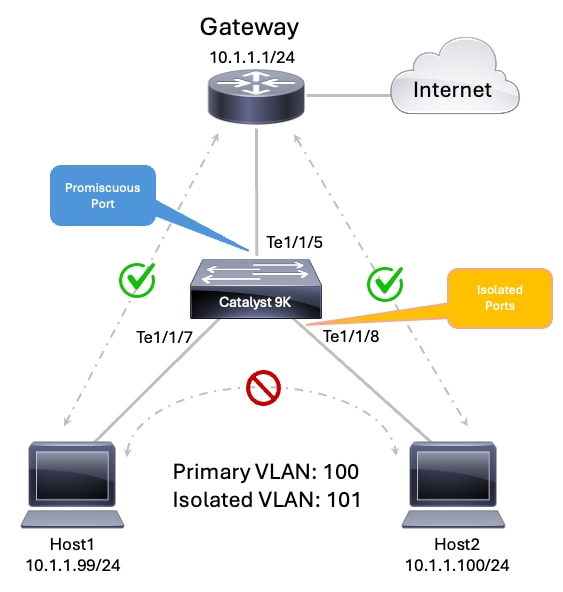 PVLAN拓扑
步骤1.配置VTP透明模式
9300-2#configure terminal
Enter configuration commands, one per line.  End with CNTL/Z.
9300-2(config)#vtp mode transparent
Setting device to VTP Transparent mode for VLANS.
9300-2(config)#end
步骤2.配置主要和隔离VLAN
9300-2#configure terminal Enter configuration commands, one per line. End with CNTL/Z. 9300-2(config)#vlan 100 9300-2(config-vlan)#name PVLAN_PRIMARY_100 9300-2(config-vlan)#private-vlan primary 9300-2(config-vlan)#private-vlan association 101 9300-2(config-vlan)#exit 9300-2(config)# 9300-2(config)#vlan 101 9300-2(config-vlan)#name PVLAN_ISOLATED_101 9300-2(config-vlan)#private-vlan isolated 9300-2(config-vlan)#exit 9300-2(config)#end注意:命令private-vlan association <vlan-id>用于将隔离VLAN绑定到主VLAN。
步骤3.配置隔离主机端口
9300-2#configure terminal Enter configuration commands, one per line. End with CNTL/Z. 9300-2(config)#interface TenGigabitEthernet1/1/7 9300-2(config-if)#description Isolated Host 1 9300-2(config-if)#switchport 9300-2(config-if)#switchport mode private-vlan host 9300-2(config-if)#switchport private-vlan host-association 100 101 9300-2(config-if)#spanning-tree portfast 9300-2(config-if)#exit 9300-2(config)# 9300-2(config)#interface TenGigabitEthernet1/1/8 9300-2(config-if)#description Isolated Host 2 9300-2(config-if)#switchport 9300-2(config-if)#switchport mode private-vlan host 9300-2(config-if)#switchport private-vlan host-association 100 101 9300-2(config-if)#spanning-tree portfast 9300-2(config-if)#exit 9300-2(config)#end步骤4.配置混杂端口
9300-2#configure terminal
Enter configuration commands, one per line.  End with CNTL/Z.
9300-2(config)#interface TenGigabitEthernet1/1/5
9300-2(config-if)#description Firewall Router or Shared Service
9300-2(config-if)#switchport
9300-2(config-if)#switchport mode private-vlan promiscuous
9300-2(config-if)#switchport private-vlan mapping 100 101
9300-2(config-if)#exit
9300-2(config)#end
第 3 层配置
PVLAN在同一IP子网内提供第2层隔离。当隔离主机需要到达本地子网外的网络(例如Internet、数据中心服务或上游路由网络)时,仍需要第3层连接。
为隔离PVLAN主机提供第3层连接有两种常用方法:
- 在交换机上配置主要VLAN交换虚拟接口(SVI)。
- 将默认网关直接连接到混杂端口。
注意:为PVLAN子网选择一个第3层网关方法。使用交换机上的主VLAN SVI或连接到混杂端口的外部网关。
方法 1:配置主VLAN SVI
当Cisco IOS XE交换机为隔离主机提供默认网关时,请使用此方法。
在PVLAN设计中,第3层SVI必须仅针对主VLAN进行配置。隔离VLAN是辅助VLAN,不提供第3层网关服务。
在本例中:
-
VLAN 100是主要VLAN。
-
VLAN 101是隔离的辅助VLAN。
-
接口Vlan100提供默认网关。
-
隔离VLAN 101中的主机使用10.1.1.1/24 as作为默认网关。
9300-2#configure terminal
Enter configuration commands, one per line.  End with CNTL/Z.
9300-2(config)#interface Vlan100
9300-2(config-if)#description Primary PVLAN Gateway
9300-2(config-if)#ip address 10.1.1.1 255.255.255.0
9300-2(config-if)#private-vlan mapping 101
9300-2(config-if)#no shutdown
9300-2(config-if)#exit
9300-2(config)#end
要点
- 仅为主要VLAN配置SVI。
- 使用private-vlan mapping命令将隔离辅助VLAN映射到主VLAN SVI。
- 请勿将隔离VLAN配置为网关服务的SVI:
- 隔离主机与主要VLAN SVI保留在同一IP子网中。
- 隔离主机可以到达主VLAN SVI。
- 隔离主机无法直接与第2层的其他隔离主机通信。
注意:仅为主要VLAN配置第3层SVI。在隔离或社区 VLAN 配置下,隔离及社区 VLAN 的 VLAN 接口将处于非活动状态。
方法 2:将网关连接到混杂端口
当外部设备为隔离主机提供默认网关时,请使用此方法。外部设备可以是路由器、防火墙或其他第3层网关设备。
在此设计中,Cisco IOS XE交换机不需要PVLAN子网的SVI。相反,外部网关连接到混杂端口。混杂端口将主要VLAN映射到隔离辅助VLAN,使隔离主机可以到达外部网关。
在本例中:
- VLAN 100是主要VLAN。
- VLAN 101是隔离的辅助VLAN。
- 外部网关连接到TenGigabitEthernet1/1/5。
- 外部网关IP地址为10.1.1.1/24。
- 隔离主机使用10.1.1.1作为其默认网关。
9300-2#configure terminal
Enter configuration commands, one per line.  End with CNTL/Z.
9300-2(config)#interface TenGigabitEthernet1/1/5
9300-2(config-if)#description Firewall Router or Shared Service
9300-2(config-if)#switchport
9300-2(config-if)#switchport mode private-vlan promiscuous
9300-2(config-if)#switchport private-vlan mapping 100 101
9300-2(config-if)#exit
9300-2(config)#end
要点
- 当网关直接连接到混杂端口时,PVLAN子网的交换机上不需要SVI。
- 外部网关接口必须使用与隔离主机位于同一子网中的IP地址。
- 混杂端口必须将主要VLAN映射到隔离VLAN。
- 隔离主机可以通过混杂端口到达外部网关。
- 隔离主机仍无法直接相互通信。
确认
使用show vlan private-vlan命令验证PVLAN关联:
9300-2#show vlan private-vlan

Primary Secondary Type              Ports
------- --------- ----------------- ------------------------------------------
100 101 isolated Te1/1/5, Te1/1/7, Te1/1/8注意:在show vlan private-vlan输出中,Type列标识辅助VLAN类型,例如隔离或社区。它不确定Ports列中列出的每个接口的运行角色。端口列列出与主要和辅助VLAN对关联的接口,包括映射到该辅助VLAN的隔离主机端口和混杂端口。
使用show interface <interface-id> switchport命令验证主机端口运行状态,在此场景中,TenGigabitEthernet1/1/7和TenGigabitEthernet1/1/8:
9300-2#show interface TenGigabitEthernet1/1/7 switchport
Name: Te1/1/7
Switchport: Enabled
Administrative Mode: private-vlan host
Operational Mode: private-vlan host
Administrative Trunking Encapsulation: dot1q
Operational Trunking Encapsulation: native
Negotiation of Trunking: Off
Access Mode VLAN: 1 (default)
Trunking Native Mode VLAN: 1 (default)
Administrative Native VLAN tagging: enabled
Voice VLAN: none
Administrative private-vlan host-association: 100 (PVLAN_PRIMARY_100) 101 (PVLAN_ISOLATED_101)
Administrative private-vlan mapping: none
Administrative private-vlan trunk native VLAN: none
Administrative private-vlan trunk Native VLAN tagging: enabled
Administrative private-vlan trunk encapsulation: dot1q
Administrative private-vlan trunk normal VLANs: none
Administrative private-vlan trunk associations: none
Administrative private-vlan trunk mappings: none
Operational private-vlan: 100 (PVLAN_PRIMARY_100) 101 (PVLAN_ISOLATED_101)
Trunking VLANs Enabled: ALL
Pruning VLANs Enabled: 2-1001
Capture Mode Disabled
Capture VLANs Allowed: ALL

Protected: false
Unknown unicast blocked: disabled
Unknown multicast blocked: disabled
Vepa Enabled: false
App Interface: false
Appliance trust: none

9300-2#show interface TenGigabitEthernet1/1/8 switchport
Name: Te1/1/8
Switchport: Enabled
Administrative Mode: private-vlan host
Operational Mode: private-vlan host
Administrative Trunking Encapsulation: dot1q
Operational Trunking Encapsulation: native
Negotiation of Trunking: Off
Access Mode VLAN: 1 (default)
Trunking Native Mode VLAN: 1 (default)
Administrative Native VLAN tagging: enabled
Voice VLAN: none
Administrative private-vlan host-association: 100 (PVLAN_PRIMARY_100) 101 (PVLAN_ISOLATED_101)
Administrative private-vlan mapping: none
Administrative private-vlan trunk native VLAN: none
Administrative private-vlan trunk Native VLAN tagging: enabled
Administrative private-vlan trunk encapsulation: dot1q
Administrative private-vlan trunk normal VLANs: none
Administrative private-vlan trunk associations: none
Administrative private-vlan trunk mappings: none
Operational private-vlan: 100 (PVLAN_PRIMARY_100) 101 (PVLAN_ISOLATED_101)
Trunking VLANs Enabled: ALL
Pruning VLANs Enabled: 2-1001
Capture Mode Disabled
Capture VLANs Allowed: ALL

Protected: false
Unknown unicast blocked: disabled
Unknown multicast blocked: disabled
Vepa Enabled: false
App Interface: false
Appliance trust: none
验证混杂端口运行状态,在本例中为TenGigabitEthernet1/1/5:
9300-2#show interface TenGigabitEthernet1/1/5 switchport
Name: Te1/1/5
Switchport: Enabled
Administrative Mode: private-vlan promiscuous
Operational Mode: private-vlan promiscuous
Administrative Trunking Encapsulation: dot1q
Operational Trunking Encapsulation: native
Negotiation of Trunking: Off
Access Mode VLAN: 1 (default)
Trunking Native Mode VLAN: 1 (default)
Administrative Native VLAN tagging: enabled
Voice VLAN: none
Administrative private-vlan host-association: none
Administrative private-vlan mapping: 100 (PVLAN_PRIMARY_100) 101 (PVLAN_ISOLATED_101)
Administrative private-vlan trunk native VLAN: none
Administrative private-vlan trunk Native VLAN tagging: enabled
Administrative private-vlan trunk encapsulation: dot1q
Administrative private-vlan trunk normal VLANs: none
Administrative private-vlan trunk associations: none
Administrative private-vlan trunk mappings: none
Operational private-vlan: 100 (PVLAN_PRIMARY_100) 101 (PVLAN_ISOLATED_101)
Trunking VLANs Enabled: ALL
Pruning VLANs Enabled: 2-1001
Capture Mode Disabled
Capture VLANs Allowed: ALL

Protected: false
Unknown unicast blocked: disabled
Unknown multicast blocked: disabled
Vepa Enabled: false
App Interface: false
Appliance trust: none
现在,检验隔离主机是否可以到达网关10.1.1.1/24,但无法彼此ping通10.1.1.99/24和10.1.1.100/24
流量行为
| 来源 |
目的地 |
预期结果 |
|---|---|---|
| 主机1 |
主机2 |
失败 |
| 主机2 |
主机1 |
失败 |
| 主机1 |
默认网关 |
成功 |
| 主机2 |
默认网关 |
成功 |
| 混杂端口 |
隔离的主机 |
成功 |
| 流量结果 |
|
在检查MAC地址表时,您可以观察两个BLOCKED条目。这些条目适用于隔离PVLAN主机。它们表示辅助VLAN中的第2层隔离规则,交换机可防止将这些MAC地址用于直接隔离到隔离转发。
隔离主机MAC地址出现两次,因为PVLAN转发同时使用主要VLAN和辅助VLAN情景:
- 在辅助VLAN 101中,MAC被阻止,用于直接隔离VLAN转发。
- 在主VLAN 100中,MAC可用于通过混杂路径进行PVLAN转发。
9300-2#show mac address-table dynamic
          Mac Address Table
-------------------------------------------

Vlan    Mac Address       Type        Ports
----    -----------       --------    -----
   1    000c.000c.000c    DYNAMIC     Te1/1/3
   1    f87a.41a8.c1b5    DYNAMIC     Te1/1/1
   1    f87a.41a8.c1ba    DYNAMIC     Te1/1/6
   1    f87a.41a8.c1d1    DYNAMIC     Te1/1/6
 101 000a.000a.000a BLOCKED Te1/1/7 101 000b.000b.000b BLOCKED Te1/1/8 100 000a.000a.000a DYNAMIC pv Te1/1/7 100 000b.000b.000b DYNAMIC pv Te1/1/8 100 9077.ee3c.7b02 DYNAMIC Te1/1/5
Total Mac Addresses for this criterion: 9
示例 2:跨多个Cisco IOS XE交换机的PVLAN
-
SW1和SW2是Catalyst 9000 Cisco IOS XE交换机。
-
没有为PVLAN子网配置SVI。
-
外部网关提供第3层连接。
-
外部网关IP地址为10.1.1.1/24。
-
外部网关连接到SW2上的混杂端口。
-
VLAN 100是主要VLAN。
-
VLAN 101是隔离的辅助VLAN。
-
VLAN 102是团体辅助VLAN。
-
SW1和SW2通过标准802.1Q中继连接。
-
隔离主机只能到达混杂网关。
-
VLAN 102中的社区主机可以相互通信并与混杂网关通信。
-
隔离主机无法与社区主机通信。
| 主机 |
交换机 |
接口 |
PVLAN角色 |
VLAN关联 |
IP Address |
默认网关 |
|---|---|---|---|---|---|---|
| 主机3 |
SW1 / 9300-1 |
万兆以太网1/1/3 |
社区主机 |
主VLAN 100、社区VLAN 102 |
10.1.1.97/24 |
10.1.1.1 |
| 主机4 |
SW2/9300-2 |
万兆以太网1/1/3 |
社区主机 |
主VLAN 100、社区VLAN 102 |
10.1.1.98/24 |
10.1.1.1 |
| 主机1 |
SW2/9300-2 |
万兆以太网1/1/7 |
隔离主机 |
主VLAN 100、隔离VLAN 101 |
10.1.1.99/24 |
10.1.1.1 |
| 主机2 |
SW2/9300-2 |
万兆以太网1/1/8 |
隔离主机 |
主VLAN 100、隔离VLAN 101 |
10.1.1.100/24 |
10.1.1.1 |
| 外部网关 |
SW2/9300-2 |
万兆以太网1/1/5 |
混杂(面向网关的设备) |
主VLAN 100映射到VLAN 101和102 |
10.1.1.1/24 |
不适用 |
网络图
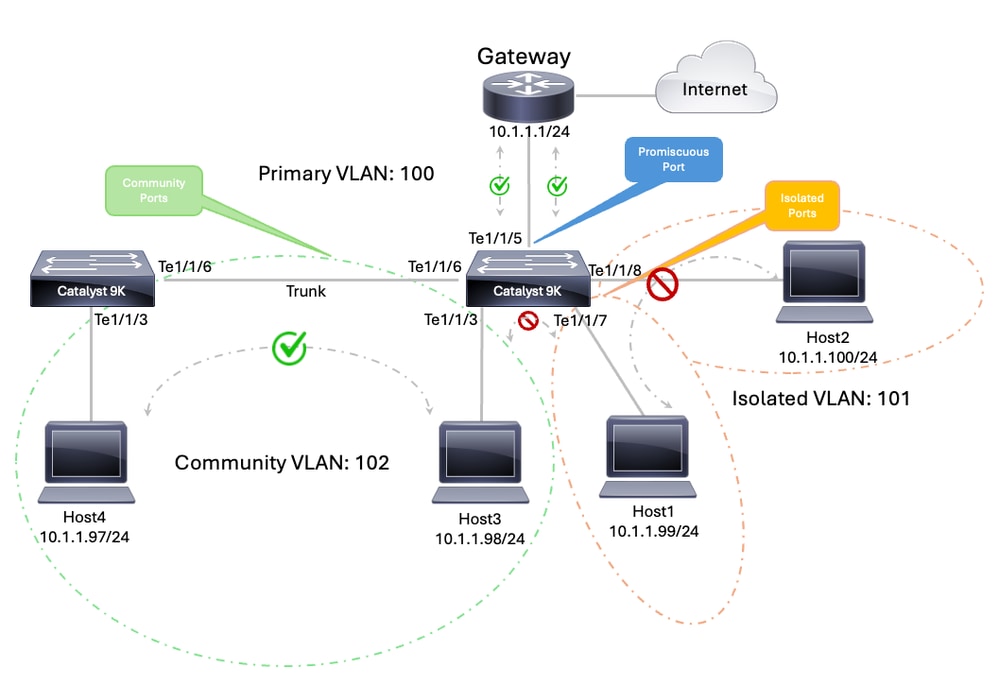 跨交换机的PVLAN
VLAN和接口规划
| 设备 |
接口 |
角色 |
|---|---|---|
| SW1 |
万兆以太网1/1/3 |
社区主机,VLAN 102 |
| SW1 |
万兆以太网1/1/6 |
TRUNK到SW2 |
| SW2 |
万兆以太网1/1/3 |
社区主机,VLAN 102 |
| SW2 |
万兆以太网1/1/7 |
隔离主机,VLAN 101 |
| SW2 |
万兆以太网1/1/8 |
隔离主机,VLAN 101 |
| SW2 |
万兆以太网1/1/6 |
TRUNK到SW1 |
| SW2 |
万兆以太网1/1/5 |
到外部网关10.1.1.1/24的混杂端口 |
注意:可以使用以下方法跨多台交换机使用专用VLAN:标准中继端口、隔离专用VLAN中继端口或混合专用VLAN中继端口。有关详细信息,请参阅跨多台交换机专用VLAN文档指南。
| SW1 - 9300-1 — 运行配置 | SW2 - 9300-2 — 运行配置 |
|
|
注意:在本例中,由于两台交换机均在透明模式下使用VTP,因此必须在每台交换机上手动配置PVLAN。
注意:VTP 1、2和3的透明模式支持专用VLAN。VTP 3的服务器模式也支持专用VLAN。
确认
| SW1 - 9300-1 — 状态 | SW2 - 9300-2 — 状态 |
|
|
流量行为
| 来源 |
目的地 |
预期结果 |
|---|---|---|
| Te1/1/7上的SW2隔离主机 |
Te1/1/8上的SW2隔离主机 |
失败 |
| Te1/1/7上的SW2隔离主机 |
Te1/1/3上的SW1社区主机 |
失败 |
| Te1/1/7上的SW2隔离主机 |
外部网关10.1.1.1 |
成功 |
| Te1/1/3上的SW1社区主机 |
Te1/1/3上的SW2社区主机 |
成功 |
| Te1/1/3上的SW1社区主机 |
外部网关10.1.1.1 |
成功 |
| Te1/1/3上的SW2社区主机 |
Te1/1/7上的SW2隔离主机 |
失败 |
|
注意:Internet可达性取决于上游路由和NAT设计实施。它仅用于显示外部网关提供路由连接。
相关信息
修订历史记录
| 版本 | 发布日期 | 备注 |
|---|---|---|
5.0 |
12-Aug-2026
|
重新认证 — 更新的技术内容。 |
4.0 |
12-Sep-2024
|
更新的SEO和格式。 |
3.0 |
13-Sep-2023
|
已从“相关信息”部分删除断开的链接。 |
2.0 |
26-Jun-2023
|
重新认证 |
1.0 |
24-Feb-2003
|
初始版本 |
 反馈
反馈