简介
本文档介绍在Cisco Prime基础设施(主/辅助)中生成新的证书签名请求(CSR)后,由于首次使用信任(TOFU)证书不匹配而导致的集成问题,以及如何进行故障排除和解决。
先决条件
要求
Cisco 建议您了解以下主题:
使用的组件
本文档中的信息基于Cisco Prime基础设施3.5版及更高版本。
本文档中的信息都是基于特定实验室环境中的设备编写的。本文档中使用的所有设备最初均采用原始(默认)配置。如果您的网络处于活动状态,请确保您了解所有命令的潜在影响。
背景信息
这些参考文档提供了有关Cisco Prime基础设施中的高可用性和证书生成的信息。
高可用性指南:https://www.cisco.com/c/en/us/td/docs/net_mgmt/prime/infrastructure/3-6/admin/guide/bk_CiscoPrimeInfrastructure_3_6_AdminGuide/bk_CiscoPrimeInfrastructure_3_6_AdminGuide_chapter_01011.html
管理员指南:https://www.cisco.com/c/en/us/td/docs/net_mgmt/prime/infrastructure/3-6/admin/guide/bk_CiscoPrimeInfrastructure_3_6_AdminGuide/bk_CiscoPrimeInfrastructure_3_6_AdminGuide_chapter_0100.html
问题
TOFU — 首次建立连接时,从远程主机收到的证书是受信任的。
如果生成新证书或者服务器重新部署到VM主机上,则prime基础设施或与prime连接的远程主机上的TOFU证书可以更改。
当服务重新启动后重新发起连接时,在主基础设施服务器(主/辅助)上生成和导入新的CSR会将新的TOFU证书信息发送到远程服务器。
如果远程主机在第一个之后为任何子后续连接发送不同的证书,则连接将被拒绝。
远程主机可以是旧的TOFU仍然存在的远程主机(HA部署中的主服务器或辅助服务器、集成服务引擎(ISE)服务器)。
这会导致主服务器和辅助服务器、Prime和ISE服务器之间注册失败。
“故障排除”部分描述可在此类情景的运行状况监控器日志中找到的错误消息。
故障排除
在主运行状况监视器日志中,可以找到这些错误消息指出辅助证书中的不匹配。
[system] [HealthMonitorThread] TOFU failed.
Check local trust Trust-on-first-use is configure for this connection.
Current certificate of the remote host is different from what was used earlier
- CN=prime-sec, OU=Prime Infra, O=Cisco Systems, L=SJ, ST=CA, C=US
javax.net.ssl.SSLHandshakeException: java.security.cert.CertificateException:
Trust-on-first-use is configure for this connection.
Current certificate of the remote host is different from what was used earlier
- CN=prime-sec
这些错误消息可在指向ISE服务器证书不匹配的主基础设施日志中找到。
[system] [seqtaskexecutor-3069] TOFU failed.
Check local trust Trust-on-first-use is configure for this connection.
Current certificate of the remote host is different from what was used earlier
- CN=ISE-server
javax.net.ssl.SSLHandshakeException: java.security.cert.
CertificateException: Trust-on-first-use is configure for this connection.
Current certificate of the remote host is different from what was used earlier
- CN=ISE-server
在辅助运行状况监视器日志中,可以找到这些错误消息,指出主证书中的不匹配。
[system] [HealthMonitorThread] TOFU failed.
Check local trust Trust-on-first-use is configure for this connection.
Current certificate of the remote host is different from what was used earlier
- CN=prime-pri, OU=Prime Infra, O=Cisco Systems, L=SJ, ST=CA, C=US
javax.net.ssl.SSLHandshakeException: java.security.cert.CertificateException:
Trust-on-first-use is configure for this connection.
Current certificate of the remote host is different from what was used earlier
- CN=prime-pri
解决方案
需要列出主用主机上的当前TOFU证书,从中应标识并删除相应远程主机的旧证书条目,然后再次尝试从主用主机进行集成。
配置
查看证书验证列表
命令ncs certvalidation tofu-certs listcerts可用于查看证书验证列表。
以下输出来自Cisco Prime基础设施主服务器[IP=1XX.XX.XX.XX]:
prime-pri/admin# ncs certvalidation tofu-certs listcerts

Host certificate are automatically added to this list on first connection,
if trust-on-first-use is configured - ncs certvalidation certificate-check ...

host=1X.XX.XX.XX_8082;  subject= /C=US/ST=CA/L=SJ/O=Cisco Systems/OU=Prime Infra/CN=prime-pri
host=1Z.ZZ.ZZ.ZZ_443;  subject= /C=US/ST=CA/L=SJ/O=Cisco Systems/OU=Prime Infra/CN=ISE-server
host=1YY.YY.YY.YY_8082;  subject= /C=US/ST=CA/L=SJ/O=Cisco Systems/OU=Prime Infra/CN=prime-sec

prime-pri/admin#
此输出来自Cisco Prime基础设施辅助服务器[IP=1YY.YY.YY.YY]
prime-sec/admin# ncs certvalidation tofu-certs listcerts

Host certificate are automatically added to this list on first connection,
if trust-on-first-use is configured - ncs certvalidation certificate-check ...

host=1YY.YY.YY.YY_8082;  subject= /C=US/ST=CA/L=SJ/O=Cisco Systems/OU=Prime Infra/CN=prime-sec
host=127.0.0.1_8082;  subject= /C=US/ST=CA/L=SJ/O=Cisco Systems/OU=Prime Infra/CN=prime-sec
host=1X.XX.XX.XX_8082; subject= /C=US/ST=CA/L=SJ/O=Cisco Systems/OU=Prime Infra/CN=prime-pri

prime-sec/admin#
删除证书
使用命令ncs certvalidation tofu-certs deletecert host <host>可删除到证书验证。
从主服务器分别检查并删除ISE和辅助服务器的豆腐证书的旧条目。
- ncs certvalidation tofu-certs deletecert host 1YY.YY.YY.YY_8082
- ncs certvalidation tofu-certs deletecert host 1Z.ZZ.ZZ.ZZ_443
从辅助服务器使用ncs certvalidation tofu-certs deletecert host 1X.XX.XX.XX_8082命令检查并删除主服务器的豆腐证书的旧条目。
将HA从主重新初始化为辅助
步骤1.使用具有管理员权限的用户ID和密码登录Cisco Prime基础设施。
步骤2.从菜单导航到管理>设置>高可用性。Cisco Prime基础设施显示HA状态页面。
步骤3.选择HA配置,然后填写以下字段:
- 辅助服务器:输入辅助服务器的IP地址或主机名。
- 验证密钥:输入您在辅助服务器安装过程中设置的身份验证密钥密码。
- 电子邮件地址:输入应向其发送有关HA状态更改通知的地址(或以逗号分隔的地址列表)。如果已使用“邮件服务器配置”(Mail Server Configuration)页面配置了邮件通知(请参阅“配置邮件服务器设置”(Configure Email Server Settings)),则您在此处输入的邮件地址将附加到已为邮件服务器配置的地址列表中。
- 故障切换类型:选择“手动”或“自动”。建议您选择“手动”。
建议使用DNS服务器将主机名解析为IP地址。如果使用/etc/hosts文件而不是DNS服务器,则应输入辅助IP地址而不是主机名。
步骤4.如果使用虚拟IP功能,请选中Enable Virtual IP复选框,然后按如下方式填写其他字段:
- IPV4虚拟IP:输入希望两个HA服务器都使用的虚拟IPv4地址。
- IPV6虚拟IP:(可选)输入希望两个HA服务器使用的IPv6地址。
虚拟IP寻址不起作用,除非两台服务器位于同一子网中。不应使用IPV6地址块fe80,该地址块已保留用于本地链路单播编址。
步骤5.单击Check Readiness以确保与HA相关的环境参数是否已准备好进行配置。
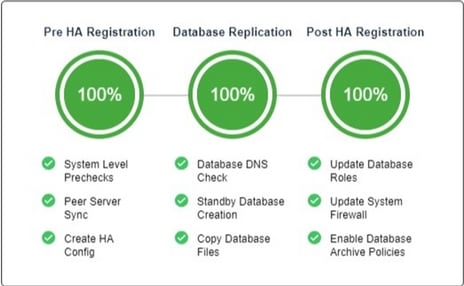
第6步:单击Register以查看里程碑进度条,以检查是否已完成100%的HA前注册、数据库复制和HA后注册,如此处所示。Cisco Prime基础设施启动HA注册流程。成功完成注册后,Configuration Mode将显示Primary Active的值。
重新配置ISE服务器
第1步:导航到管理>服务器> ISE服务器
第2步:导航到选择命令>添加ISE服务器,然后单击 前往
步骤3.输入ISE服务器的IP地址、用户名和密码
步骤4.确认ISE服务器密码。
步骤5.单击Save。
验证
命令ncs certvalidation tofu-certs listcerts可用于验证新证书。
相关信息

 反馈
反馈