通过点击操作将Google Cloud Interconnect配置为使用思科SD-WAN的传输

下载选项
非歧视性语言
此产品的文档集力求使用非歧视性语言。在本文档集中,非歧视性语言是指不隐含针对年龄、残障、性别、种族身份、族群身份、性取向、社会经济地位和交叉性的歧视的语言。由于产品软件的用户界面中使用的硬编码语言、基于 RFP 文档使用的语言或引用的第三方产品使用的语言,文档中可能无法确保完全使用非歧视性语言。 深入了解思科如何使用包容性语言。
关于此翻译
思科采用人工翻译与机器翻译相结合的方式将此文档翻译成不同语言,希望全球的用户都能通过各自的语言得到支持性的内容。 请注意:即使是最好的机器翻译,其准确度也不及专业翻译人员的水平。 Cisco Systems, Inc. 对于翻译的准确性不承担任何责任,并建议您总是参考英文原始文档(已提供链接)。
目录
简介
本文档介绍如何将Google Cloud Interconnect用作软件定义的广域网(SD-WAN)传输。
背景信息
在Google云平台(GCP)上运行工作负载的企业客户使用云互联进行数据中心或集线器连接。同时,公共Internet连接在数据中心的应用中也很常见,它被用作与其他位置建立SD-WAN连接的基础。本文描述如何将GCP云互联用作思科SD-WAN的基础。
这与AWS的相同解决方案描述非常相似。
将GCP云互联作为思科SD-WAN的另一种传输方式的主要优势在于,能够在包括GCP云互联在内的所有传输上使用SD-WAN策略。客户可以创建SD-WAN应用感知策略,并通过GCP云互联路由关键应用,并在发生SLA违规时通过公共互联网重新路由。
问题
GCP云互联不提供本地SD-WAN功能。企业SD-WAN客户的典型问题包括:
- “是否可以使用GCP云互联作为思科SD-WAN的基础”?
- “如何互连GCP云互联和思科SD-WAN”?
- “我如何创建弹性、安全且可扩展的解决方案”?
解决方案
设计概述
关键设计点是数据中心通过GCP云互联连接到由Cloud onRamp为多云调配创建的思科SD路由器,如图所示。
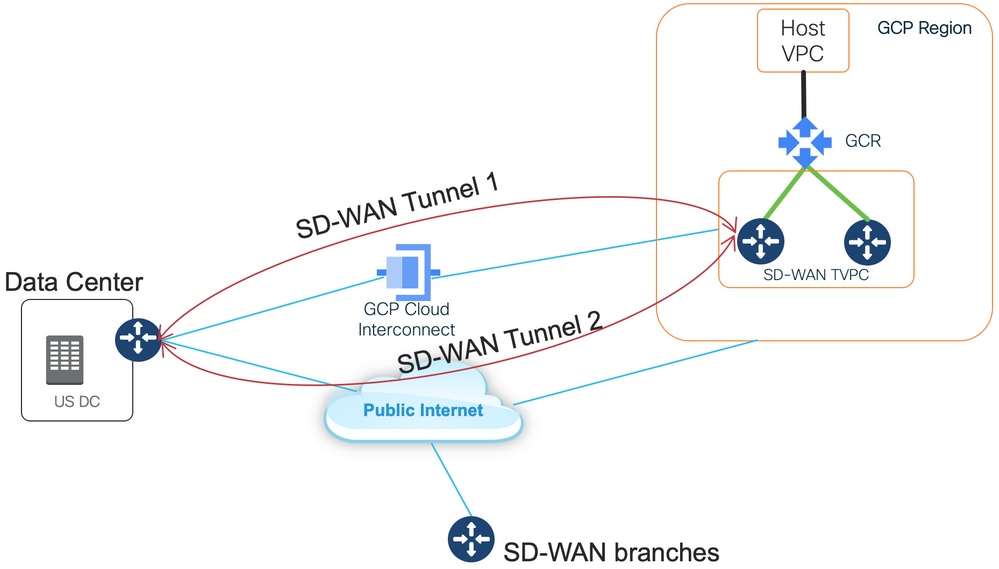
此解决方案的优势包括:
- 完全自动:适用于多云自动化的思科Cloud onRamp可用于部署带有两个SD-WAN路由器的SD-WAN传输VPC。主机VPC可作为Cloud onRamp的一部分被发现,只需点击一下即可映射到SD-WAN网络。
- 基于GCP的完整SD-WAN云互联:GCP云互联只是另一个SD-WAN传输。所有SD-WAN功能(如应用感知策略、加密等)可本地用于GCP云互联上的SD-WAN隧道。
请注意,此解决方案的可扩展性与C8000V在GCP上的性能是一致的。有关GCP上的C8000v性能的详细信息,请参阅SalesConnect。
解决方案详细信息
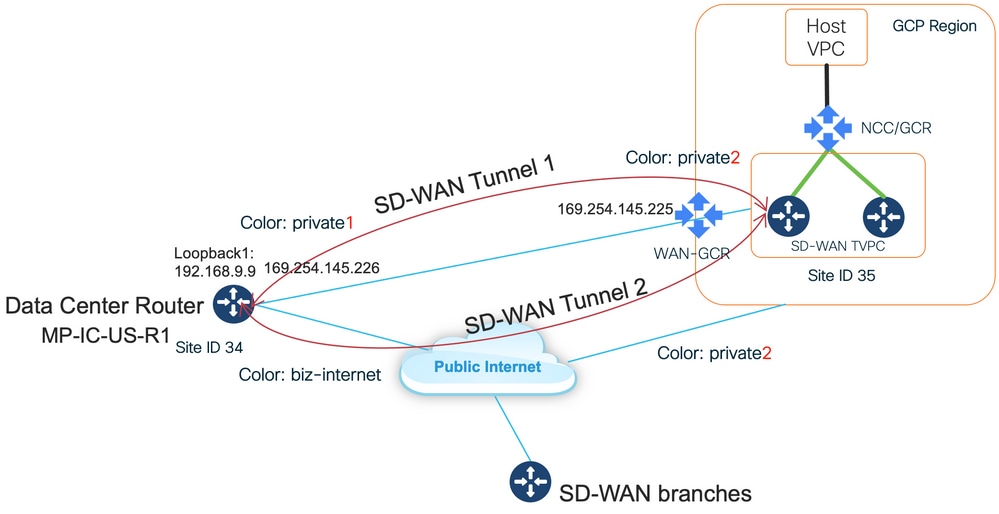
了解此解决方案的关键点是SD-WAN颜色。请注意,GCP SD-WAN路由器将具有private color private2用于互联网连接以及通过互联进行连接,SD-WAN隧道将通过互联网使用公有IP地址形成,SD-WAN隧道将通过互连电路使用私有IP地址建立(使用同一接口)到DC/站点。这意味着,数据中心路由器(商业Internet颜色)将通过具有公有IP地址的Internet和专用IP的Private color与GCP SD-WAN路由器(专用2颜色)建立连接。
有关SD-WAN颜色的常规信息:
传输定位器(TLOC)是指用于将SD-WAN路由器连接到底层网络的WAN传输(VPN 0)接口。每个TLOC通过SD-WAN路由器的系统IP地址、WAN接口的颜色和传输封装(GRE或IPsec)的组合进行唯一标识。 思科重叠管理协议(OMP)用于在SD-WAN路由器之间分发TLOC(也称为TLOC路由)、SD-WAN重叠前缀(也称为OMP路由)和其他信息。SD-WAN路由器知道如何通过TLOC路由相互访问并建立IPsec VPN隧道。
SD-WAN路由器和/或控制器(vManage、vSmart或vBond)可能位于网络中的网络地址转换(NAT)设备后面。 当SD-WAN路由器对vBond控制器进行身份验证时,vBond控制器将在交换过程中获取SD-WAN路由器的私有IP地址/端口号和公有IP地址/端口号设置。vBond控制器充当NAT(STUN)服务器的会话遍历实用程序,使SD-WAN路由器能够发现其WAN传输接口的映射和/或转换IP地址和端口号。
在SD-WAN路由器上,每个WAN传输都与一个公共和专用IP地址对相关联。私有IP地址被视为前NAT地址。这是分配给SD-WAN路由器的WAN接口的IP地址。虽然这被视为私有IP地址,但此IP地址可以是公开可路由IP地址空间的一部分,也可以是IETF RFC 1918非公开可路由IP地址空间的一部分。公有IP地址被视为后NAT地址。当SD-WAN路由器最初与vBond服务器进行通信和身份验证时,vBond服务器会检测到这种情况。公有IP地址也可以是公开可路由IP地址空间的一部分,也可以是IETF RFC 1918非公开可路由IP地址空间的一部分。在没有NAT的情况下,SD-WAN传输接口的公有IP地址和私有IP地址相同。
TLOC颜色是静态定义的关键字,用于标识每个SD-WAN路由器上的单个WAN传输。给定SD-WAN路由器上的每个WAN传输都必须具有唯一的颜色。颜色还用于将单个WAN传输标识为公共或私有。城域以太网、Mpls和private1、private2、private3、private4、private5和private6颜色被视为专用颜色。它们用于私有网络或没有NAT的地方。颜色为3g、biz-internet、blue、bronze、custom1、custom2、custom3、default、gold、green、lte、public-internet、red和silver被视为公共颜色。它们用于本地或通过NAT的公共网络或WAN传输接口具有公共IP地址的位置。
通过控制和数据平面进行通信时,颜色决定了私有IP地址或公有IP地址的用途。当两台SD-WAN路由器尝试相互通信时(两者均使用带专用颜色的WAN传输接口),两端都将尝试连接到远程路由器的专用IP地址。如果一端或两端使用公共颜色,则两端将尝试连接到远程路由器的公共IP地址。例外情况是两台设备的站点ID相同。当站点ID相同,但颜色为公共时,专用IP地址将用于通信。如果SD-WAN路由器尝试与位于同一站点的vManage或vSmart控制器通信,可能会出现这种情况。请注意,SD-WAN路由器具有相同站点ID时,默认情况下不会在彼此之间建立IPsec VPN隧道。
这是数据中心路由器的输出,其中显示了通过Internet的两个隧道(彩色商业Internet)和通过GCP云互联(彩色private1)到两个SD-WAN路由器的两个隧道。有关详细信息,请参阅附件中的完整DC路由器配置。
MP-IC-US-R1#sh sdwan bfd sessions
SOURCE TLOC REMOTE TLOC DST PUBLIC DST PUBLIC DETECT TX
SYSTEM IP SITE ID STATE COLOR COLOR SOURCE IP IP PORT ENCAP MULTIPLIER INTERVAL(msec UPTIME TRANSITIONS
------------------------------------------------------------------------------------------------------------------------------------------------------------------------------------------------------------------
35.35.35.2  35  up  biz-internet  private2   162.43.150.15  35.212.162.72  12347  ipsec  7  1000  10  4:02:55:32  0
35.35.35.1  35  up  biz-internet  private2   162.43.150.15  35.212.232.51  12347  ipsec  7  1000  10  4:02:55:32  0
35.35.35.1  35  up  private1      private2   192.168.9.9    10.35.0.2      12347  ipsec  7  1000  10  0:00:00:16  0
35.35.35.2  35  up  private1      private2   192.168.9.9    10.35.0.3      12347  ipsec  7  1000  10  0:00:00:16  0
...
MP-IC-US-R1#
此图显示了用于验证解决方案的IP地址和SD-WAN颜色的拓扑详细信息。
使用的软件:
- 运行CCO版本20.7.1.1的SD-WAN控制器
- 使用运行17.06.01a的C8000v模拟数据中心路由器,通过vManage Cloud onRamp进行调配,以实现与大型端口的互联
- GCP中的两台SD-WAN路由器:运行17.06.01a的C8000v通过vManage Cloud onRamp for Multicloud进行调配
步骤1.准备
确保Cisco vManage已定义一个正常运行的GCP帐户,并且正确配置了Cloud onRamp全局设置。
另请在vManage中定义互联合作伙伴帐户。在此博客中,Megaport用作互联合作伙伴,因此您可以定义相应的帐户和全局设置。
第2步:使用适用于多云工作流程的Cloud onRamp创建思科云网关
这是一个直截了当的过程:选择两台SD-WAN设备,连接默认GCP模板,部署。有关详细信息,请参阅Cloud onRamp for Multicloud文档。
步骤3.在GCP控制台中添加合作伙伴互联连接
使用GCP分步配置工作流程(Hybrid Connectivity > Interconnect)创建合作伙伴与选定合作伙伴(在本博客中)的互联连接 — 与Megaport(如图所示)。
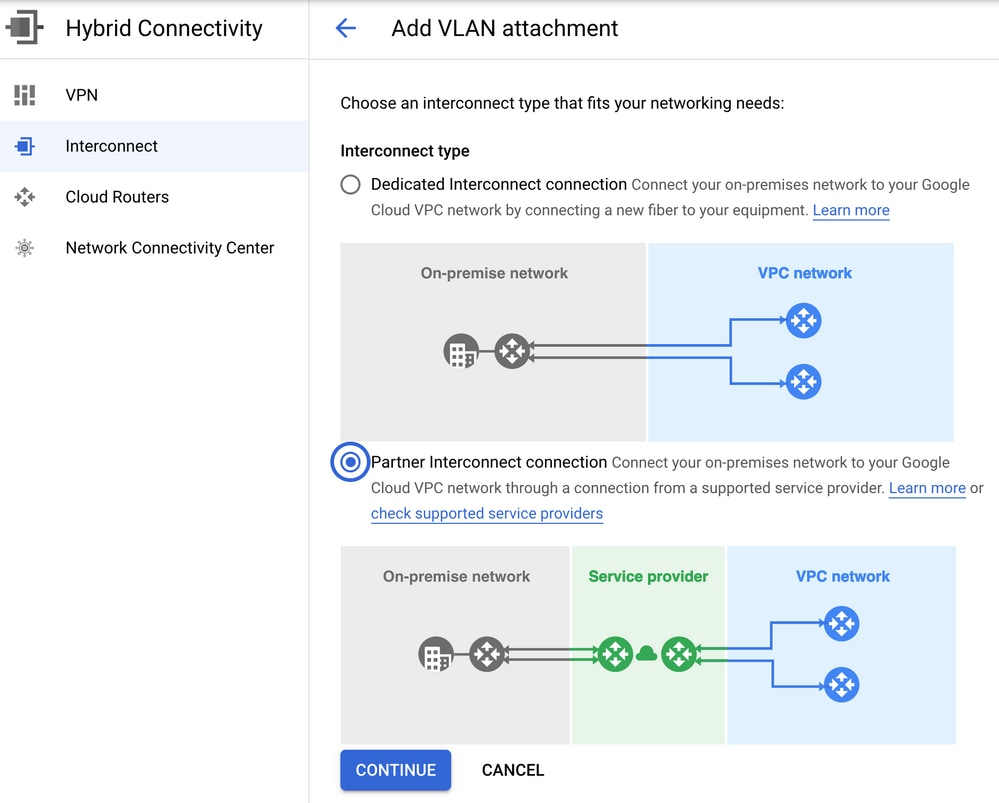
请选择我已有服务提供商的选项。
为便于演示,使用创建单个VLAN选项时没有冗余。
选择正确的网络名称,该名称之前由Cloud onRamp for Multicloud工作流程创建。在VLAN部分下,您可以创建新的GCR路由器并定义VLAN的名称,稍后将在Cloud onRamp Interconnect部分中显示。
此图像反映了所提到的所有点。
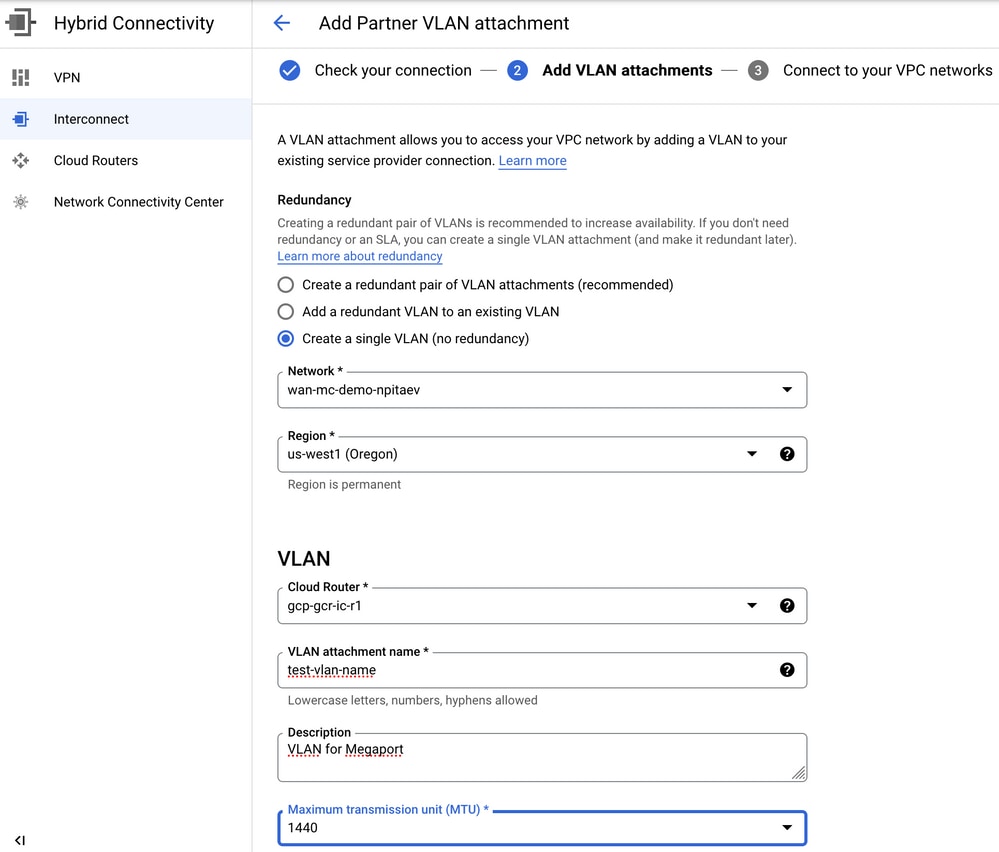
基本上,完成步骤3.后,您只需获取BGP配置并根据互联提供商使用的内容建立连接。在本例中,使用Megaport进行测试。但是,您可以使用任何类型的互联,可以通过Megaport、Equinix或MSP。
步骤4.使用Cisco vManage中的Cloud onRamp互联创建DC连接
与AWS博客相似,使用带有Megaport的Cisco Cloud onRamp Interconnect工作流程创建数据中心路由器并将其用于GCP云互联。请注意,此处使用Megaport只是为了进行测试,如果您已经设置了数据中心,则无需使用Megaport。
在Cisco vManage中,选择一个免费的SD-WAN路由器,附加默认CoR Megaport模板,并使用CoR Interconnect工作流程将其部署为Megaport中的思科云网关。
Megaport中的Cisco SD-WAN路由器处于活动状态后,请使用CoR互联工作流程创建连接,如图所示。
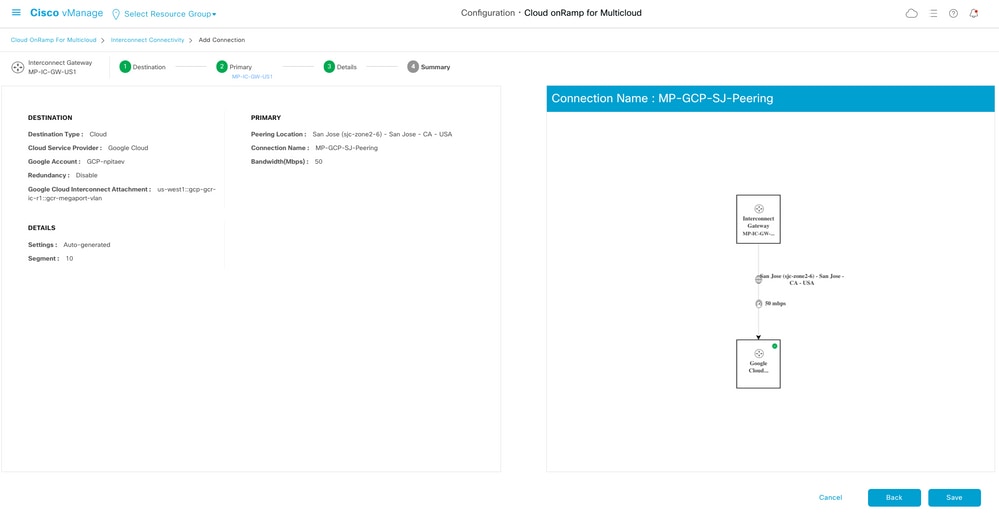
步骤5.配置DC路由器以通过Internet和GCP云互联建立隧道
将SD-WAN Megaport路由器设置为CLI模式,并将配置从服务端移至VPN0。由于GCP使用169.254.x.y IP地址,因此您可以在DC路由器上创建Loopback1接口,并将其用于GCP云互联上的SD-WAN通信。
以下是DC路由器配置的相关部分。
interface Loopback1
 no shutdown
 ip address 192.168.9.9 255.255.255.255
!
!
interface Tunnel2
 ip unnumbered Loopback1
 tunnel source Loopback1
 tunnel mode sdwan
!
!
interface GigabitEthernet1.215
 encapsulation dot1Q 215
 ip address 169.254.145.226 255.255.255.248
 ip mtu 1440
!
!
router bgp 64513
 bgp log-neighbor-changes
 neighbor 169.254.145.225 remote-as 16550
 neighbor 169.254.145.225 description MP-GCP-SJ-Peering
 neighbor 169.254.145.225 ebgp-multihop 4
 !
 address-family ipv4
  network 192.168.9.9 mask 255.255.255.255
  neighbor 169.254.145.225 activate
  neighbor 169.254.145.225 send-community both
 exit-address-family
!
!
sdwan
 interface Loopback1
  tunnel-interface
   encapsulation ipsec preference 100 weight 1
   color private1
   max-control-connections 0
   allow-service all
!
请参阅本文档后面部分中的完整DC路由器配置。
验证
GCP云互联状态:
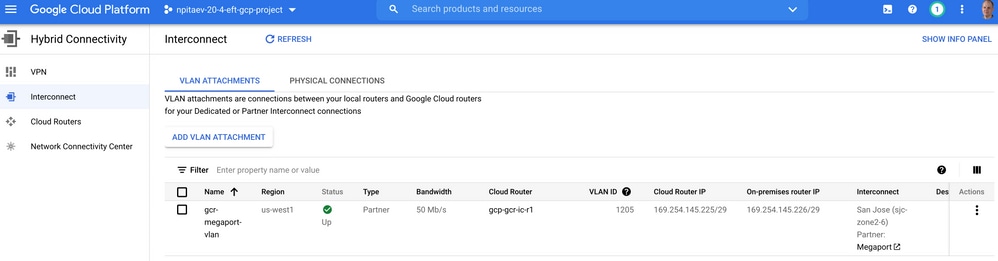
实施云互联的数据中心路由器和WAN GCR之间的BGP连接:
MP-IC-US-R1#sh ip ro bgp
...
10.0.0.0/27 is subnetted, 1 subnets
B 10.35.0.0 [20/100] via 169.254.145.225, 01:25:26
MP-IC-US-R1#
DC兆端口SD-WAN路由器配置
MP-IC-US-R1#sh sdwan bfd sessions
SOURCE TLOC REMOTE TLOC DST PUBLIC DST PUBLIC DETECT TX
SYSTEM IP SITE ID STATE COLOR COLOR SOURCE IP IP PORT ENCAP MULTIPLIER INTERVAL(msec UPTIME TRANSITIONS
------------------------------------------------------------------------------------------------------------------------------------------------------------------------------------------------------------------
10.12.1.11 12 up biz-internet public-internet 162.43.150.15 13.55.49.253 12426 ipsec 7 1000 10 4:02:55:32 0
35.35.35.2 35 up biz-internet private2 162.43.150.15 35.212.162.72 12347 ipsec 7 1000 10 4:02:55:32 0
35.35.35.1 35 up biz-internet private2 162.43.150.15 35.212.232.51 12347 ipsec 7 1000 10 4:02:55:32 0
61.61.61.61 61 down biz-internet biz-internet 162.43.150.15 162.43.145.3 12427 ipsec 7 1000 NA 0
61.61.61.61 61 down biz-internet private1 162.43.150.15 198.18.0.5 12367 ipsec 7 1000 NA 0
35.35.35.1 35 up private1 private2 192.168.9.9 10.35.0.2 12347 ipsec 7 1000 10 0:00:00:16 0
35.35.35.2 35 up private1 private2 192.168.9.9 10.35.0.3 12347 ipsec 7 1000 10 0:00:00:16 0
10.12.1.11 12 down private1 public-internet 192.168.9.9 13.55.49.253 12426 ipsec 7 1000 NA 0
61.61.61.61 61 down private1 biz-internet 192.168.9.9 162.43.145.3 12427 ipsec 7 1000 NA 0
61.61.61.61 61 down private1 private1 192.168.9.9 198.18.0.5 12367 ipsec 7 1000 NA 0

MP-IC-US-R1#sh ip ro bgp
Codes: L - local, C - connected, S - static, R - RIP, M - mobile, B - BGP
D - EIGRP, EX - EIGRP external, O - OSPF, IA - OSPF inter area
N1 - OSPF NSSA external type 1, N2 - OSPF NSSA external type 2
E1 - OSPF external type 1, E2 - OSPF external type 2, m - OMP
n - NAT, Ni - NAT inside, No - NAT outside, Nd - NAT DIA
i - IS-IS, su - IS-IS summary, L1 - IS-IS level-1, L2 - IS-IS level-2
ia - IS-IS inter area, * - candidate default, U - per-user static route
H - NHRP, G - NHRP registered, g - NHRP registration summary
o - ODR, P - periodic downloaded static route, l - LISP
a - application route
+ - replicated route, % - next hop override, p - overrides from PfR
& - replicated local route overrides by connected

Gateway of last resort is 162.43.150.14 to network 0.0.0.0

10.0.0.0/27 is subnetted, 1 subnets
B 10.35.0.0 [20/100] via 169.254.145.225, 00:03:17
MP-IC-US-R1#
MP-IC-US-R1#sh sdwa
MP-IC-US-R1#sh sdwan runn
MP-IC-US-R1#sh sdwan running-config
system
location "55 South Market Street, San Jose, CA -95113, USA"
gps-location latitude 37.33413
gps-location longitude -121.8916
system-ip 34.34.34.1
overlay-id 1
site-id 34
port-offset 1
control-session-pps 300
admin-tech-on-failure
sp-organization-name MC-Demo-npitaev
organization-name MC-Demo-npitaev
port-hop
track-transport
track-default-gateway
console-baud-rate 19200
no on-demand enable
on-demand idle-timeout 10
vbond 54.188.241.123 port 12346
!
service tcp-keepalives-in
service tcp-keepalives-out
no service tcp-small-servers
no service udp-small-servers
hostname MP-IC-US-R1
username admin privilege 15 secret 9 $9$3V6L3V6L2VUI2k$ysPnXOdg8RLj9KgMdmfHdSHkdaMmiHzGaUpcqH6pfTo
vrf definition 10
rd 1:10
address-family ipv4
route-target export 64513:10
route-target import 64513:10
exit-address-family
!
address-family ipv6
exit-address-family
!
!
ip arp proxy disable
no ip finger
no ip rcmd rcp-enable
no ip rcmd rsh-enable
no ip dhcp use class
ip bootp server
no ip source-route
no ip http server
no ip http secure-server
ip nat settings central-policy
cdp run
interface GigabitEthernet1
no shutdown
arp timeout 1200
ip address dhcp client-id GigabitEthernet1
no ip redirects
ip dhcp client default-router distance 1
ip mtu 1500
load-interval 30
mtu 1500
negotiation auto
exit
interface GigabitEthernet1.215
no shutdown
encapsulation dot1Q 215
ip address 169.254.145.226 255.255.255.248
no ip redirects
ip mtu 1440
exit
interface Loopback1
no shutdown
ip address 192.168.9.9 255.255.255.255
exit
interface Tunnel1
no shutdown
ip unnumbered GigabitEthernet1
no ip redirects
ipv6 unnumbered GigabitEthernet1
no ipv6 redirects
tunnel source GigabitEthernet1
tunnel mode sdwan
exit
interface Tunnel2
no shutdown
ip unnumbered Loopback1
no ip redirects
ipv6 unnumbered Loopback1
no ipv6 redirects
tunnel source Loopback1
tunnel mode sdwan
exit
clock timezone UTC 0 0
logging persistent size 104857600 filesize 10485760
no logging monitor
logging buffered 512000
logging console
aaa authentication login default local
aaa authorization exec default local
aaa server radius dynamic-author
!
router bgp 64513
bgp log-neighbor-changes
neighbor 169.254.145.225 remote-as 16550
neighbor 169.254.145.225 description MP-GCP-SJ-Peering
neighbor 169.254.145.225 ebgp-multihop 4
address-family ipv4 unicast
neighbor 169.254.145.225 activate
neighbor 169.254.145.225 send-community both
network 192.168.9.9 mask 255.255.255.255
exit-address-family
!
timers bgp 60 180
!
snmp-server ifindex persist
line aux 0
stopbits 1
!
line con 0
speed 19200
stopbits 1
!
line vty 0 4
transport input ssh
!
line vty 5 80
transport input ssh
!
lldp run
nat64 translation timeout tcp 3600
nat64 translation timeout udp 300
sdwan
interface GigabitEthernet1
tunnel-interface
encapsulation ipsec weight 1
no border
color biz-internet
no last-resort-circuit
no low-bandwidth-link
no vbond-as-stun-server
vmanage-connection-preference 5
port-hop
carrier default
nat-refresh-interval 5
hello-interval 1000
hello-tolerance 12
allow-service all
no allow-service bgp
allow-service dhcp
allow-service dns
allow-service icmp
allow-service sshd
no allow-service netconf
no allow-service ntp
no allow-service ospf
no allow-service stun
allow-service https
no allow-service snmp
no allow-service bfd
exit
exit
interface Loopback1
tunnel-interface
encapsulation ipsec preference 100 weight 1
color private1
max-control-connections 0
allow-service all
no allow-service bgp
allow-service dhcp
allow-service dns
allow-service icmp
no allow-service sshd
no allow-service netconf
no allow-service ntp
no allow-service ospf
no allow-service stun
allow-service https
no allow-service snmp
no allow-service bfd
exit
exit
appqoe
no tcpopt enable
no dreopt enable
!
omp
no shutdown
send-path-limit 4
ecmp-limit 4
graceful-restart
no as-dot-notation
timers
holdtime 60
advertisement-interval 1
graceful-restart-timer 43200
eor-timer 300
exit
address-family ipv4
advertise bgp
advertise connected
advertise static
!
address-family ipv6
advertise bgp
advertise connected
advertise static
!
!
!
licensing config enable false
licensing config privacy hostname false
licensing config privacy version false
licensing config utility utility-enable false
bfd color lte
hello-interval 1000
no pmtu-discovery
multiplier 1
!
bfd default-dscp 48
bfd app-route multiplier 2
bfd app-route poll-interval 123400
security
ipsec
rekey 86400
replay-window 512
!
!
sslproxy
no enable
rsa-key-modulus 2048
certificate-lifetime 730
eckey-type P256
ca-tp-label PROXY-SIGNING-CA
settings expired-certificate drop
settings untrusted-certificate drop
settings unknown-status drop
settings certificate-revocation-check none
settings unsupported-protocol-versions drop
settings unsupported-cipher-suites drop
settings failure-mode close
settings minimum-tls-ver TLSv1
dual-side optimization enable
!

MP-IC-US-R1#
MP-IC-US-R1#
MP-IC-US-R1#
MP-IC-US-R1#sh run
Building configuration...

Current configuration : 4628 bytes
!
! Last configuration change at 19:42:11 UTC Tue Jan 25 2022 by admin
!
version 17.6
service tcp-keepalives-in
service tcp-keepalives-out
service timestamps debug datetime msec
service timestamps log datetime msec
service password-encryption
! Call-home is enabled by Smart-Licensing.
service call-home
platform qfp utilization monitor load 80
no platform punt-keepalive disable-kernel-core
platform console virtual
!
hostname MP-IC-US-R1
!
boot-start-marker
boot-end-marker
!
!
vrf definition 10
rd 1:10
!
address-family ipv4
route-target export 64513:10
route-target import 64513:10
exit-address-family
!
address-family ipv6
exit-address-family
!
vrf definition 65528
!
address-family ipv4
exit-address-family
!
logging buffered 512000
logging persistent size 104857600 filesize 10485760
no logging monitor
!
aaa new-model
!
!
aaa authentication login default local
aaa authorization exec default local
!
!
!
!
!
aaa server radius dynamic-author
!
aaa session-id common
fhrp version vrrp v3
ip arp proxy disable
!
!
!
!
!
!
!
ip bootp server
no ip dhcp use class
!
!
!
no login on-success log
ipv6 unicast-routing
!
!
!
!
!
!
!
subscriber templating
!
!
!
!
!
!
!
multilink bundle-name authenticated
!
!
!
!
!
!
!
!
!
crypto pki trustpoint TP-self-signed-1238782368
enrollment selfsigned
subject-name cn=IOS-Self-Signed-Certificate-1238782368
revocation-check none
rsakeypair TP-self-signed-1238782368
!
crypto pki trustpoint SLA-TrustPoint
enrollment pkcs12
revocation-check crl
!
!
crypto pki certificate chain TP-self-signed-1238782368
crypto pki certificate chain SLA-TrustPoint
!
!
!
!
!
!
!
!
license udi pid C8000V sn 9SRWHHH66II
license boot level network-premier+dna-premier
diagnostic bootup level minimal
memory free low-watermark processor 202832
!
!
spanning-tree extend system-id
!
username admin privilege 15 secret 9 $9$3V6L3V6L2VUI2k$ysPnXOdg8RLj9KgMdmfHdSHkdaMmiHzGaUpcqH6pfTo
!
redundancy
!
!
!
!
no crypto ikev2 diagnose error
!
!
lldp run
cdp run
!
!
!
!
!
!
!
!
!
!
!
!
!
!
!
!
!
!
!
!
interface Loopback1
ip address 192.168.9.9 255.255.255.255
!
interface Loopback65528
vrf forwarding 65528
ip address 192.168.1.1 255.255.255.255
!
interface Tunnel1
ip unnumbered GigabitEthernet1
no ip redirects
ipv6 unnumbered GigabitEthernet1
no ipv6 redirects
tunnel source GigabitEthernet1
tunnel mode sdwan
!
interface Tunnel2
ip unnumbered Loopback1
no ip redirects
ipv6 unnumbered Loopback1
no ipv6 redirects
tunnel source Loopback1
tunnel mode sdwan
!
interface GigabitEthernet1
ip dhcp client default-router distance 1
ip address dhcp client-id GigabitEthernet1
no ip redirects
load-interval 30
negotiation auto
arp timeout 1200
!
interface GigabitEthernet1.215
encapsulation dot1Q 215
ip address 169.254.145.226 255.255.255.248
no ip redirects
ip mtu 1440
arp timeout 1200
!
router omp
!
router bgp 64513
bgp log-neighbor-changes
neighbor 169.254.145.225 remote-as 16550
neighbor 169.254.145.225 description MP-GCP-SJ-Peering
neighbor 169.254.145.225 ebgp-multihop 4
!
address-family ipv4
network 192.168.9.9 mask 255.255.255.255
neighbor 169.254.145.225 activate
neighbor 169.254.145.225 send-community both
exit-address-family
!
ip forward-protocol nd
no ip http server
no ip http secure-server
!
ip nat settings central-policy
ip nat route vrf 65528 0.0.0.0 0.0.0.0 global
no ip nat service H225
no ip nat service ras
no ip nat service rtsp udp
no ip nat service rtsp tcp
no ip nat service netbios-ns tcp
no ip nat service netbios-ns udp
no ip nat service netbios-ssn
no ip nat service netbios-dgm
no ip nat service ldap
no ip nat service sunrpc udp
no ip nat service sunrpc tcp
no ip nat service msrpc tcp
no ip nat service tftp
no ip nat service rcmd
no ip nat service pptp
no ip ftp passive
ip scp server enable
!
!
!
!
!
!
!
!
control-plane
!
!
mgcp behavior rsip-range tgcp-only
mgcp behavior comedia-role none
mgcp behavior comedia-check-media-src disable
mgcp behavior comedia-sdp-force disable
!
mgcp profile default
!
!
!
!
!
!
line con 0
stopbits 1
speed 19200
line aux 0
line vty 0 4
transport input ssh
line vty 5 80
transport input ssh
!
nat64 translation timeout udp 300
nat64 translation timeout tcp 3600
call-home
! If contact email address in call-home is configured as sch-smart-licensing@cisco.com
! the email address configured in Cisco Smart License Portal will be used as contact email address to send SCH notifications.
contact-email-addr sch-smart-licensing@cisco.com
profile "CiscoTAC-1"
active
destination transport-method http
!
!
!
!
!
!
netconf-yang
netconf-yang feature candidate-datastore
end

MP-IC-US-R1#
MP-IC-US-R1#
MP-IC-US-R1#sh ver
Cisco IOS XE Software, Version 17.06.01a
Cisco IOS Software [Bengaluru], Virtual XE Software (X86_64_LINUX_IOSD-UNIVERSALK9-M), Version 17.6.1a, RELEASE SOFTWARE (fc2)
Technical Support: http://www.cisco.com/techsupport
Copyright (c) 1986-2021 by Cisco Systems, Inc.
Compiled Sat 21-Aug-21 03:20 by mcpre


Cisco IOS-XE software, Copyright (c) 2005-2021 by cisco Systems, Inc.
All rights reserved. Certain components of Cisco IOS-XE software are
licensed under the GNU General Public License ("GPL") Version 2.0. The
software code licensed under GPL Version 2.0 is free software that comes
with ABSOLUTELY NO WARRANTY. You can redistribute and/or modify such
GPL code under the terms of GPL Version 2.0. For more details, see the
documentation or "License Notice" file accompanying the IOS-XE software,
or the applicable URL provided on the flyer accompanying the IOS-XE
software.


ROM: IOS-XE ROMMON

MP-IC-US-R1 uptime is 4 days, 3 hours, 2 minutes
Uptime for this control processor is 4 days, 3 hours, 3 minutes
System returned to ROM by reload
System image file is "bootflash:packages.conf"
Last reload reason: factory-reset


This product contains cryptographic features and is subject to United
States and local country laws governing import, export, transfer and
use. Delivery of Cisco cryptographic products does not imply
third-party authority to import, export, distribute or use encryption.
Importers, exporters, distributors and users are responsible for
compliance with U.S. and local country laws. By using this product you
agree to comply with applicable laws and regulations. If you are unable
to comply with U.S. and local laws, return this product immediately.

A summary of U.S. laws governing Cisco cryptographic products may be found at:
http://www.cisco.com/wwl/export/crypto/tool/stqrg.html

If you require further assistance please contact us by sending email to
export@cisco.com.


Technology Package License Information:
Controller-managed

The current throughput level is 250000 kbps

Smart Licensing Status: Registration Not Applicable/Not Applicable

cisco C8000V (VXE) processor (revision VXE) with 2028465K/3075K bytes of memory.
Processor board ID 9SRWHHH66II
Router operating mode: Controller-Managed
1 Gigabit Ethernet interface
32768K bytes of non-volatile configuration memory.
3965112K bytes of physical memory.
11526144K bytes of virtual hard disk at bootflash:.

Configuration register is 0x2102

MP-IC-US-R1#
修订历史记录
| 版本 | 发布日期 | 备注 |
|---|---|---|
1.0 |
10-Apr-2022
|
初始版本 |
由思科工程师提供
- 普拉尚特里帕蒂思科工程部
- 尼古拉·皮塔耶夫思科技术领导者
 反馈
反馈