Identificar e Solucionar Problemas do Serviço VPN Virtual Private LAN de Camada 2 no IOS XE
Contents
Introdução
Este documento descreve como solucionar problemas do VPLS (Virtual Private LAN Service) de VPN de Camada 2 em tecnologias para Cisco IOS® XE.
Pré-requisitos
Requisitos
A Cisco recomenda que você tenha conhecimento destes tópicos:
- Roteamento IP básico
- Serviço de LAN privada virtual VPN de camada 2
Componentes Utilizados
As informações neste documento são baseadas no software Cisco IOS XE.
As informações neste documento foram criadas a partir de dispositivos em um ambiente de laboratório específico. Todos os dispositivos utilizados neste documento foram iniciados com uma configuração (padrão) inicial. Se a rede estiver ativa, certifique-se de que você entenda o impacto potencial de qualquer comando.
Diagrama de Rede
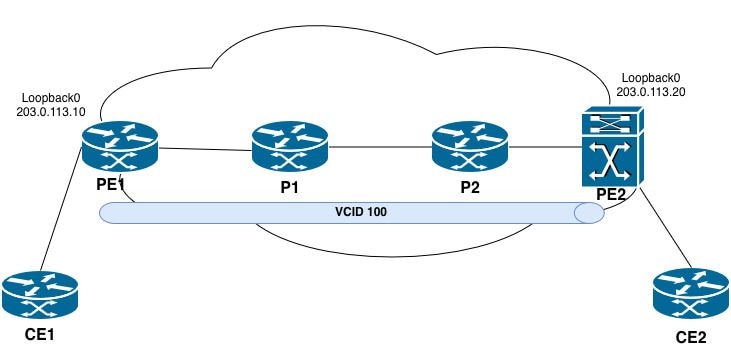 Topologia VPLS
A conexão cruzada VPLS não está operacional
Passos de Troubleshooting
A conexão cruzada VPLS está em um estado inativo após a sessão ser encerrada inesperadamente.
PE2#show xconnect all
Legend: XC ST=Xconnect State S1=Segment1 State S2=Segment2 State
UP=Up DN=Down AD=Admin Down IA=Inactive
SB=Standby HS=Hot Standby RV=Recovering NH=No Hardware

XC ST  Segment 1                         S1 Segment 2                         S2
------+---------------------------------+--+---------------------------------+--
DN pri vfi 100                           UP mpls 203.0.113.10:100             DN
UP pri ac Vl100:100(Eth VLAN)            UP vfi 100                           UP
UP pri bd 100                            UP vfi 100                           UP
Etapa 1. Confirme o estado exato do VC/VPLS.
PE2#show mpls l2transport vc 100 detail
Local interface: VFI 100 vfi up
   Interworking type is Ethernet
   Destination address: 203.0.113.10, VC ID: 100, VC status: down
     Last error: Local access circuit is not ready for label advertise << The local device is unable to advertise labels because the access circuit (AC) is not in a ready state.
     Output interface: none, imposed label stack {} << no MPLS labels are being imposed because no path exists.
     Preferred path: not configured << No explicit traffic engineering path is configured for this pseudowire.
     Default path: no route << No route to the remote PE (203.0.113.10) exists in the routing table.
     No adjacency
Create time: 10:50:35, last status change time: 00:17:39
  Last label FSM state change time: 00:17:33
Signaling protocol: LDP, peer x.x.x.x:0 up
  Targeted Hello: 203.0.113.20(LDP Id) -> 203.0.113.10, LDP is DOWN, no binding
  Graceful restart: not configured and not enabled
  Non stop routing: not configured and not enabled
  Status TLV support (local/remote) : enabled/None (no remote binding
    LDP route watch : enabled
    Label/status state machine : local ready, LruRnd
    Last local dataplane status rcvd: No fault
    Last BFD dataplane status rcvd: Not sent
    Last BFD peer monitor status rcvd: No fault
    Last local AC circuit status rcvd: No fault
    Last local AC circuit status sent: DOWN(hard-down) << The local device is advertising the access circuit as hard-down to the remote PE.
    Last local PW i/f circ status rcvd: No fault
    Last local LDP TLV status sent: No fault
    Last remote LDP TLV status rcvd: None (no remote binding) << No status has been received from the remote PE.
    Last remote LDP ADJ status rcvd: None (no remote binding) << No adjacency status received from the remote peer.
  MPLS VC labels: local 16, remote unassigned
  Group ID: local n/a, remote unknown
  MTU: local 1500, remote unknown
  Remote interface description:
Sequencing: receive disabled, send disabled
Control Word: On (configured: autosense)
SSO Descriptor: 203.0.113.10/100, local label: 16
Dataplane:
  SSM segment/switch IDs: 0/8194 (used), PWID: 1
VC statistics:
  transit packet totals: receive 0, send 0
  transit byte totals: receive 0, send 0
  transit packet drops: receive 0, seq error 0, send 0
A conexão cruzada de VPLS (ID do VC 100) passou para um estado inativo. A causa raiz é atribuída às condições descritas:
1. Sem rota para o PE remoto - O roteador não tem uma rota para 203.0.113.10 na tabela de roteamento (Caminho padrão: sem rota). Sem uma rota válida, nenhum caminho comutado por rótulo (LSP) de MPLS pode ser estabelecido.
2. Sessão LDP direcionada inoperante - A sessão LDP direcionada de 203.0.113.20 para 203.0.113.10 não foi estabelecida. Isso evita a troca de rótulos de pseudofios entre os roteadores PE.
3. Sem associação de rótulo remoto - Como a sessão LDP de destino está inoperante, nenhum rótulo remoto foi atribuído para VC 100. O pseudofio não pode encaminhar tráfego sem rótulos locais e remotos.
4. Sem adjacência - Sem uma rota válida e uma sessão LDP, não existe nenhuma adjacência MPLS em direção ao PE remoto.
Etapa 2. Verifique o circuito de conexão local.
No PE onde o VC está desativado:
PE2#show interfaces vlan 100 | include up|errors
Vlan100 is up, line protocol is up , Autostate Disabled
Keepalive not supported
0 input errors, 0 CRC, 0 frame, 0 overrun, 0 ignored
0 output errors, 1 interface resets

PE2#show running-config interface vlan 100
Building configuration...

Current configuration : 72 bytes
!
interface Vlan100
no ip address
no autostate
xconnect vfi 100
end
Etapa 3. Verificar a configuração do VFI.
PE2#show running-config | section l2 vfi
l2 vfi 100 manual
vpn id 100
neighbor 203.0.113.10 pw-class VPLS_100

PE2#show l2vpn vfi
Legend: RT=Route-target, S=Split-horizon, Y=Yes, N=No

VFI name: 100, state: up, type: multipoint, signaling: LDP
  VPN ID: 100
  Bridge-Domain 100 attachment circuits:
    Vlan100
  Pseudo-port interface: pseudowire100001
  Interface Peer Address VC ID S
  pseudowire100002 203.0.113.10 100 Y
Principais observações
1. VFI operacionalmente ativo - A instância local de VFI está ativa e pronta para encaminhar o tráfego.
2. O circuito de conexão está ligado - a Vlan100 está corretamente associada ao Bridge-Domain 100 e à VFI.
3. Pseudowire é configurado - Um pseudofio (pseudofio100002) é definido em direção ao PE remoto em 203.0.113.10 com ID de VC 100.
4. Split-horizon está habilitado - Esse é o comportamento esperado em um ambiente multiponto VPLS para evitar loops de Camada 2.
Etapa 4. Verificar a acessibilidade de loopback do PE:
PE2#ping 203.0.113.10
Type escape sequence to abort.
Sending 5, 100-byte ICMP Echos to 203.0.113.10, timeout is 2 seconds:
!!!!!
Success rate is 100 percent (5/5), round-trip min/avg/max = 1/1/1 ms

PE2#show ip route 203.0.113.10
Routing entry for 203.0.113.10/32
Known via "ospf 1", distance 110, metric 2, type intra area
Last update from 192.0.2.9 on TwentyFiveGigE1/0/3, 00:01:30 ago
Routing Descriptor Blocks:
* 192.0.2.9, from 198.51.100.2, 00:01:30 ago, via TwentyFiveGigE1/0/3
Route metric is 2, traffic share count is 1

PE2#ping mpls ipv4 203.0.113.10/32 source 203.0.113.20
Sending 5, 72-byte MPLS Echos to 203.0.113.10/32,
timeout is 2 seconds, send interval is 0 msec:

Codes: '!' - success, 'Q' - request not sent, '.' - timeout,
'L' - labeled output interface, 'B' - unlabeled output interface,
'D' - DS Map mismatch, 'F' - no FEC mapping, 'f' - FEC mismatch,
'M' - malformed request, 'm' - unsupported tlvs, 'N' - no label entry,
'P' - no rx intf label prot, 'p' - premature termination of LSP,
'R' - transit router, 'I' - unknown upstream index,
'l' - Label switched with FEC change, 'd' - see DDMAP for return code,
'X' - unknown return code, 'x' - return code 0

Type escape sequence to abort.
!!!!!
Success rate is 100 percent (5/5), round-trip min/avg/max = 1/1/2 ms
Total Time Elapsed 8 ms
Ping padrão versus Ping LSP MPLS: Principais distinções
Um ping padrão pode ter êxito mesmo quando o LSP MPLS é interrompido porque:
· O pacote ICMP pode ser roteado por IP (não comutado por rótulo) se o destino for diretamente alcançável via IP.
· Os roteadores de trânsito podem encaminhar o pacote ICMP usando a pesquisa de IP se nenhum rótulo for imposto.
Por outro lado, ping mpls ipv4 valida o plano de dados MPLS real forçando o pacote através do caminho de rótulo comutado. Isso garante que:
· Os rótulos são corretamente alocados e distribuídos.
· As entradas LFIB são consistentes a cada salto.
· O caminho de ponta a ponta do LSP é funcional.
Etapa 5. Verificar o MPLS e o LDP no núcleo:
PE2#show mpls ldp neighbor
    Peer LDP Ident: 203.0.113.10:0; Local LDP Ident 203.0.113.20:0
        TCP connection: 203.0.113.10.646 - 203.0.113.20.39001
        State: Oper; Msgs sent/rcvd: 16/15; Downstream
        Up time: 00:02:15
        LDP discovery sources:
          TwentyFiveGigE1/0/3, Src IP addr: 192.0.2.9
          Targeted Hello 203.0.113.20 -> 203.0.113.10, active, passive
        Addresses bound to peer LDP Ident:
          203.0.113.10 192.0.2.6 192.0.2.9
Esse comando apresenta as informações de sessão do vizinho LDP entre o roteador local (PE2) e o peer remoto. Cada campo na saída é descrito em detalhes.
- Identificação de Par:
Identificação de LDP de Par |203.0.113.10:0 | O ID do roteador LDP do peer remoto. O :0 indica o espaço de rótulo padrão em toda a plataforma. Normalmente, esse é o endereço de loopback do roteador remoto.
Identificação de LDP Local |203.0.113.20:0 | O ID do roteador LDP do roteador local (PE2). Normalmente, esse é o endereço de loopback de PE2.
- Informações da Sessão TCP:
conexão TCP | 203.0.113.10.646 - 203.0.113.20.39001 | A sessão TCP usada para comunicação LDP. O peer remoto (203.0.113.10) usa a conhecida porta LDP 646, e o roteador local (203.0.113.20) usa a porta efêmera 39001. O LDP usa o TCP para uma distribuição de rótulo confiável.
- Estado da sessão:
Estado | Oper | A sessão LDP está em um estado operacional, o que significa que a sessão está totalmente estabelecida e funcional.
Mensagens enviadas/recebidas |16/15 | O número de mensagens LDP enviadas (16) e recebidas (15) desde que a sessão foi estabelecida. Isso inclui manutenções de atividade, mapeamentos de rótulo e outras mensagens LDP.
Downstream |- | Indica o modo de distribuição do rótulo. Não solicitado downstream significa que o peer distribui rótulos para PE2 sem que PE2 os solicite explicitamente. Este é o modo padrão do LDP.
Tempo de atividade |00:02:15 | A sessão está operacional há 2 minutos e 15 segundos. - Fontes de descoberta do LDP:
Vinte e cinco GigE1/0/3 | Endereço IP de origem: 192.0.2.9 | Uma saudação de descoberta básica (nível de link) é recebida do peer na interface TwentyFiveGigE1/0/3 com um endereço IP origem de 192.0.2.9. Isso indica que os dois roteadores estão diretamente conectados nessa interface.
Saudação direcionada | 203.0.113.20 → 203.0.113.10, ativo, passivo | Existe um hello de descoberta direcionada (estendida) entre o roteador local (203.0.113.20) e o peer remoto (203.0.113.10). - Endereços Associados ao Identificador LDP do Par:
Endereços ligados ao par | 203.0.113.10, 192.0.2.6, 192.0.2.9 | A lista de endereços IP que o peer remoto anunciou através de mensagens de endereço LDP. Eles representam as interfaces no roteador remoto.
Etapa 5.1 Verificar o caminho comutado por rótulo MPLS para o correspondente VPLS remoto
PE2#show mpls forwarding-table 203.0.113.10
Local        Outgoing         Prefix               Bytes Label     Outgoing          Next Hop
Label        Label            or Tunnel Id         Switched        interface
25           Pop Label        203.0.113.10/32      0                Twe1/0/3         192.0.2.9

PE2#show mpls ldp bindings 203.0.113.10 32
  lib entry: 203.0.113.10/32, rev 69
        local binding: label: 25
        remote binding: lsr: 203.0.113.10:0, label: imp-null
PE2 recebe imp-null diretamente de PE1, ignorando o caminho do rótulo esperado através de P2 e P1. Isso indica uma sessão LDP ausente ou um problema de configuração MPLS entre PE2 e P2.
Etapa 5.2 Validar as informações do próximo salto executando os comandos fornecidos:
- show mpls ldp neighbor
- show mpls forwarding-table
P2#show mpls forwarding-table 203.0.113.10
Local        Outgoing          Prefix Bytes          Label           Outgoing       Next Hop
Label        Label             or Tunnel Id          Switched        interface
None         No Label          203.0.113.10/32       0
Observação principal
- Rótulo local: Nenhum | P2 não alocou um rótulo local para este prefixo.
- Rótulo de saída: Sem rótulo | Nenhuma operação de rótulo é executada.
- Sem interface de saída ou próximo salto | O prefixo é tratado como de propriedade local - não ocorre encaminhamento em direção ao PE1.
P2#show mpls ldp neighbor
    Peer LDP Ident: 203.0.113.20:0; Local LDP Ident 198.51.100.2:0
        TCP connection: 203.0.113.20.17326 - 198.51.100.2.646
        State: Oper; Msgs sent/rcvd: 30/29; Downstream
        Up time: 00:13:57
        LDP discovery sources:
           GigabitEthernet0/0/1, Src IP addr: 192.0.2.10
        Addresses bound to peer LDP Ident:
          203.0.113.20 192.0.2.10
Peer LDP Ident: 198.51.100.1:0; Local LDP Ident 198.51.100.2:0
    TCP connection: 198.51.100.1.646 - 198.51.100.2.12799
    State: Oper; Msgs sent/rcvd: 30/28; Downstream
    Up time: 00:13:56
    LDP discovery sources:
      GigabitEthernet0/0/0, Src IP addr: 192.0.2.5
    Addresses bound to peer LDP Ident:
      192.0.2.2 192.0.2.5 198.51.100.1

P2#show ip ospf neighbor

Neighbor ID       Pri   State           Dead Time    Address           Interface
198.51.100.3        0   FULL/ -         00:00:34     192.0.2.10        GigabitEthernet0/0/1
198.51.100.1        0   FULL/ -         00:00:34     192.0.2.5         GigabitEthernet0/0/0
Observação principal
- P2 não tem uma adjacência direta de LDP com PE1 (203.0.113.10). Isso é esperado, pois P1 reside entre P2 e PE1 na topologia. P2 é responsável pelo tráfego de switching de rótulo em direção a P1, que o encaminha para PE1.
- O LDP Ident de P2 é 198.51.100.2:0 | P2 usa 198.51.100.2 como ID do roteador LDP, não 203.0.113.10. No entanto, 203.0.113.10 ainda está configurado no Loopback10 e causa um conflito de roteamento.
Etapa 6. Verifique a rota para o endereço de loopback do PE remoto:
P2#show ip route 203.0.113.10
Routing entry for 203.0.113.10/32
  Known via "connected", distance 0, metric 0 (connected, via interface)
  Routing Descriptor Blocks:
  * directly connected, via Loopback10
      Route metric is 0, traffic share count is 1
Conclusão
- Endereço IP duplicado - o endereço IP 203.0.113.10 é configurado em P2 (Loopback10) e PE1 (Loopback0), o que cria um conflito no domínio MPLS.
- Conflito de roteamento - P2 instala 203.0.113.10/32 como uma rota conectada (distância administrativa 0), que tem precedência sobre qualquer rota aprendida por IGP originada por PE1.
- Falha de LSP - Como P2 considera o prefixo como de propriedade local, ele não aloca nem anuncia um rótulo de transporte para 203.0.113.10/32 para PE2.
- Impacto de VPLS - A ausência de um rótulo de transporte válido de P2 impede que PE2 estabeleça um LSP para PE1. Como resultado, o caminho de transporte de pseudofio de VPLS não pode ser formado.
Conexão cruzada VPLS estabelecida, mas nenhum tráfego de dados atravessa o pseudofio
Verificação operacional de VPLS para Catalyst 9000 Series
Passos de Troubleshooting
Etapa 1. Confirme se o pseudofio está em um estado operacional.
Verifique se os parâmetros estão corretos:
- O estado do VFI é ativo
- A interface pseudofio está listada
- O endereço de peer correto e o ID do VC são exibidos
PE2#show mpls l2transport vc

Local intf    Local circuit              Dest address    VC ID      Status
------------- -------------------------- --------------- ---------- ----------
VFI 100        vfi                       203.0.113.10    100        UP
PE2#show mpls l2transport vc 100 detail
Local interface: VFI 100 vfi up
  Interworking type is Ethernet
  Destination address: 203.0.113.10, VC ID: 100, VC status: up
    Output interface: Twe1/0/3, imposed label stack {17 16}
    Preferred path: not configured
    Default path: active
    Next hop: 192.0.2.9
Create time: 1d11h, last status change time: 00:30:50
  Last label FSM state change time: 00:30:26
Signaling protocol: LDP, peer 203.0.113.10:0 up
  Targeted Hello: 203.0.113.20(LDP Id) -> 203.0.113.10, LDP is UP
  Graceful restart: not configured and not enabled
  Non stop routing: not configured and not enabled
  Status TLV support (local/remote) : enabled/supported
    LDP route watch : enabled
    Label/status state machine : established, LruRru
    Last local dataplane status rcvd: No fault
    Last BFD dataplane status rcvd: Not sent
    Last BFD peer monitor status rcvd: No fault
    Last local AC circuit status rcvd: No fault
    Last local AC circuit status sent: No fault
    Last local PW i/f circ status rcvd: No fault
    Last local LDP TLV status sent: No fault
    Last remote LDP TLV status rcvd: No fault
    Last remote LDP ADJ status rcvd: No fault
  MPLS VC labels: local 16, remote 16
  Group ID: local n/a, remote 0
  MTU: local 1500, remote 1500
  Remote interface description:
  MAC Withdraw: sent:1, received:0
Sequencing: receive disabled, send disabled
Control Word: On (configured: autosense)
SSO Descriptor: 203.0.113.10/100, local label: 16
Dataplane:
  SSM segment/switch IDs: 16395/8194 (used), PWID: 1
VC statistics:
transit packet totals: receive 0, send 0
transit byte totals: receive 0, send 0
transit packet drops: receive 0, seq error 0, send 0
- status de VFI | para cima | O VFI está operacionalmente ativado no dispositivo local.
- Endereço de destino |203.0.113.10 | O ID do roteador PE remoto (endereço de loopback PE1).
- ID de VC 100 | O identificador de circuito virtual para este pseudofio. Deve corresponder em ambos os roteadores PE.
- status de VC | para cima | O pseudofio está operacionalmente ativo. A sinalização local e remota não indicam falhas.
- Pilha de rótulos imposta {17/16} | A pilha MPLS de dois rótulos imposta aos pacotes que entram no pseudofio. A etiqueta 17 é a etiqueta de transporte (externa) usada para acessar o PE remoto através do núcleo MPLS. O rótulo 16 é o rótulo VC (interno) usado para identificar o pseudofio no PE remoto.
- Saudação direcionada | 203.0.113.20 → 203.0.113.10, LDP is UP | A sessão de LDP entre PE2 (local) e PE1 (remoto) está estabelecida e operacional.
- Rótulo local | 16 | O rótulo VC atribuído pelo PE2 para este pseudofio. O PE remoto (PE1) usa esse rótulo ao enviar tráfego para PE2. Rótulo remoto | 16 | O rótulo VC anunciado pelo PE1 para este pseudofio. O PE2 impõe esse rótulo (rótulo interno) ao enviar tráfego para o PE1.
- Retirada de MAC enviada | 1 | O PE2 enviou 1 mensagem MAC Withdraw ao PE remoto. Isso é usado para limpar as tabelas de endereços MAC após uma alteração de topologia.
- Retirada de MAC recebida | 0 | Nenhuma mensagem MAC de retirada foi recebida do PE remoto.
- Estatísticas de VC | nenhum tráfego está sendo encaminhado em nenhuma direção (enviar: 0, receber: 0).
Etapa 2. Verificar o status do circuito de conexão (interface de tronco).
Confirme se a interface de tronco está operacional e associada à VLAN correta.
Verifique:
- A interface está em um estado up/up
- A VLAN associada ao domínio de bridge VPLS é permitida e está ativa no tronco
- A VLAN não é removida ou bloqueada pelo STP
PE2#show interfaces twentyFiveGigE 1/0/2 status
Port       Name        Status        Vlan          Duplex       Speed  Type
Twe1/0/2               connected     trunk           full         10G  SFP-10GBase-SR
PE2#show interfaces trunk
Port         Mode        Encapsulation   Status       Native vlan
Twe1/0/2     on          802.1q          trunking     1

Port         Vlans allowed on trunk
Twe1/0/2     100

Port         Vlans allowed and active in management domain
Twe1/0/2     100

Port         Vlans in spanning tree forwarding state and not pruned
Twe1/0/2     100
Etapa 3. Verificar a associação da vlan com o domínio da bridge.
No Catalyst 9000 com uma configuração de tronco (sem EVC), a vlan deve ser mapeada para o domínio da bridge.
Confirmar:
- A VLAN é associada ao domínio de bridge através da configuração do membro vfi ou do membro.
- A configuração de domínio de bridge faz referência ao VFI correto.
PE2#show running-config interface vlan100
Building configuration...

Current configuration : 72 bytes
!
interface Vlan100
no ip address
xconnect vfi 100
Etapa 4. Verificar o aprendizado do endereço MAC.
Confirme se os endereços MAC do circuito de conexão local e do pseudofio remoto estão sendo aprendidos.
Verifique:
- O endereço MAC CE1 local é aprendido na interface de tronco.
- O endereço MAC CE2 remoto é aprendido na interface pseudofio.
Se nenhum endereço MAC for aprendido no pseudofio:
- O tráfego não é recebido do PE remoto.
- O PE remoto tem um problema de configuração que impede que o tráfego entre no pseudofio.
- O domínio de bridge não está corretamente associado à interface pseudofio.
Se nenhum endereço MAC for aprendido no tronco local:
- O dispositivo CE não está transmitindo tráfego na VLAN esperada.
- A VLAN está em um estado bloqueado ou inativo na interface de tronco.
PE2#show mac address-table vlan 100
          Mac Address Table
-------------------------------------------

Vlan Mac Address Type     Ports
---- ----------- -------- -----
100 cc7f.76b7.525f STATIC Vl100
100 e462.c4bb.17f1 DYNAMIC Twe1/0/2  >> CE2 Mac address learned over Twe1/0/2 interface.
Etapa 5. Verificar o estado do protocolo STP.
O STP pode bloquear a VLAN na interface de tronco, o que evita que o tráfego entre no domínio da bridge.
Verifique:
· A porta de tronco está em um estado de encaminhamento para a VLAN associada ao domínio de bridge VPLS
· A porta não está em um estado blocking, listening ou learning
Se o STP estiver bloqueando a porta:
· Ajustar a prioridade de STP ou o custo da porta
· Considerar a configuração da porta de tronco como uma porta de borda STP (se apropriado para a topologia)
PE2#show spanning-tree vlan 100

VLAN0100
  Spanning tree enabled protocol rstp
  Root ID    Priority 32868
           Address cc7f.76b7.51c0
           This bridge is the root
           Hello Time 2 sec Max Age 20 sec Forward Delay 15 sec

Bridge ID  Priority  32868 (priority 32768 sys-id-ext 100)
           Address   cc7f.76b7.51c0
           Hello Time 2 sec Max Age 20 sec Forward Delay 15 sec
           Aging Time 300 sec

Interface           Role Sts Cost      Prio.Nbr Type
------------------- ---- --- --------- -------- --------------------------------
Twe1/0/2            Desg FWD 2000      128.2    P2p
Etapa 6. Verificar a pilha de rótulos do MPLS e o caminho de encaminhamento.
Confirme se os rótulos corretos foram impostos e se o caminho de encaminhamento é válido.
Verifique:
- Um rótulo de saída válido está presente (não Nenhum rótulo ou Nenhum)
- A interface de saída e o próximo salto estão corretos
Do caminho LSP PE2 para P2:
PE2#show mpls forwarding-table 203.0.113.10 32
Local     Outgoing     Prefix            Bytes Label     Outgoing      Next Hop
Label     Label        or Tunnel Id      Switched        interface
22        17           203.0.113.10/32   810             Twe1/0/3      192.0.2.9 << For the transport path to the remote PE1 loopback, the imposed outgoing label is 17. The router at 192.0.2.9 assigned this value as its local label binding for the destination prefix.
Do caminho LSP de P2 para P1:
P2#show mpls forwarding-table 203.0.113.10 32
Local     Outgoing    Prefix            Bytes Label     Outgoing       Next Hop
Label     Label       or Tunnel Id      Switched        interface
17        16          203.0.113.10/32   79290           Gi0/0/0        192.0.2.5 << Local label as 17 and the imposed outgoing label is 16. The router at 192.0.2.5 assigned this value as its local label binding for the destination prefix.
Do caminho LSP de P1 para PE1:
P1#show mpls forwarding-table 203.0.113.10 32
Local     Outgoing    Prefix            Bytes Label     Outgoing       Next Hop
Label     Label       or Tunnel Id      Switched        interface
16        Pop Label   203.0.113.10/32   76184           Gi0/0/0        192.0.2.1 << Pop Label is performed before forwarding the packet to the next hop. This confirms that the next hop (PE1) advertised implicit null to P1.
Do caminho LSP de P1 para PE1:
PE1#show mpls forwarding-table 203.0.113.10 32
Local      Outgoing   Prefix           Bytes Label         Outgoing       Next Hop
Label      Label      or Tunnel Id     Switched            interface
None       No Label   203.0.113.10/32  0
Confirmação do caminho do rótulo:
Com base nessa saída e nas saídas anteriores de PE2 e P2, o caminho completo comutado por rótulo de PE2 para PE1 é:
[PE2] Packet leaves with label stack: | 17 | (transport label)
        ↓
[P2]  Receives label 17, swaps to 16: | 16 | (transport label)
        ↓
[P1]  Receives label 16, pops label:  | IP | (pure IP packet)
        ↓
[PE1] Receives pure IP packet - local delivery
Quando o tráfego VPLS atravessa esse LSP, o pacote transporta uma pilha de dois rótulos (transporte : rótulo VC)
[PE2] Packet leaves with label stack: | 17 | 16 | (transport + VC label)
       ↓
[P2] Receives label 17, swaps to 16:  | 16 | 16 | (transport + VC label)
       ↓
[P1] Receives label 16, pops label:   | 16 | (VC label only)
       ↓
[PE1] Receives VC label 16 - pseudowire disposition into bridge domain
Conclusão
O LSP de transporte MPLS de PE2 para PE1 está totalmente operacional e corretamente programado em todos os roteadores no caminho. A sinalização pseudofio VPLS está completa, com rótulos locais e remotos trocados e nenhuma falha relatada.
No entanto, nenhum tráfego de usuário está sendo encaminhado através do pseudofio, apesar do plano de controle estar totalmente estabelecido. Isso confirma que o problema reside fora do núcleo MPLS e da sinalização pseudofio, especificamente na camada de circuito de conexão em um ou em ambos os roteadores PE
Verificação operacional VPLS para roteadores
Passos de Troubleshooting
Etapa 1. Confirme o estado exato do VC/VPLS.
Verifique se os parâmetros estão corretos:
PE1#show mpls l2transport vc

Local intf    Local circuit              Dest address     VC ID     Status
------------- -------------------------- --------------- ---------- ----------
VFI 100        vfi                       203.0.113.20    100         UP
PE1#show mpls l2transport vc 100 detail
Local interface: VFI 100 vfi up
  Interworking type is Ethernet
  Destination address: 203.0.113.20, VC ID: 100, VC status: up
    Output interface: Te0/0/4, imposed label stack {19 16}
    Preferred path: not configured
    Default path: active
    Next hop: 192.0.2.2
  Create time: 1d09h, last status change time: 08:38:02
    Last label FSM state change time: 08:38:25
  Signaling protocol: LDP, peer 203.0.113.20:0 up
    Targeted Hello: 203.0.113.10(LDP Id) -> 203.0.113.20, LDP is UP
    Graceful restart: not configured and not enabled
    Non stop routing: not configured and not enabled
    Status TLV support (local/remote) : enabled/supported
      LDP route watch : enabled
      Label/status state machine : established, LruRru
      Last local dataplane status rcvd: No fault
      Last BFD dataplane status rcvd: Not sent
      Last BFD peer monitor status rcvd: No fault
      Last local AC circuit status rcvd: No fault
      Last local AC circuit status sent: No fault
      Last local PW i/f circ status rcvd: No fault
      Last local LDP TLV status sent: No fault
      Last remote LDP TLV status rcvd: No fault
      Last remote LDP ADJ status rcvd: No fault
    MPLS VC labels: local 16, remote 16
    Group ID: local n/a, remote 0
    MTU: local 1500, remote 1500
    Remote interface description:
    MAC Withdraw: sent:0, received:1
  Sequencing: receive disabled, send disabled
  Control Word: On (configured: autosense)
  SSO Descriptor: 203.0.113.20/100, local label: 20
  Dataplane:
    SSM segment/switch IDs: 8199/4097 (used), PWID: 1
  VC statistics:
    transit packet totals: receive 336, send 0
    transit byte totals:   receive 27552, send 0
    transit packet drops: receive 0, seq error 0, send 0
- status de VFI | para cima | O IFV está operacionalmente ativado no PE1.
- Endereço de destino |203.0.113.20 | O ID do roteador PE remoto (endereço de loopback PE2).
- ID de VC 100 | O identificador de circuito virtual para este pseudofio. Esse valor corresponde em ambos os roteadores PE.
- status de VC | para cima | O pseudofio está operacionalmente ativo. A sinalização local e remota não indicam falhas.
- Interface local | IIF 100 | A Instância de Encaminhamento Virtual local associada a este pseudofio.
- Pilha de rótulos imposta | {19 16} | A pilha MPLS de dois rótulos imposta aos pacotes que entram no pseudofio. A etiqueta 19 é a etiqueta de transporte (externa) usada para alcançar PE2 através do núcleo MPLS. O rótulo 16 é o rótulo VC (interno) usado para identificar o pseudofio em PE2.
- Saudação direcionada | 203.0.113.10 → 203.0.113.20, LDP is UP | A sessão LDP de destino do PE1 (local) para o PE2 (remoto) está estabelecida e operacional.
- Rótulo local | 16 | O rótulo VC atribuído pelo PE1 para este pseudofio. O PE2 usa esse rótulo (como rótulo interno) ao enviar tráfego para o PE1.
- Retirada de MAC enviada | 0 | PE1 não enviou nenhuma mensagem MAC de retirada para PE2.
- Retirada de MAC recebida | 1 | PE1 recebeu 1 mensagem MAC draw de PE2. Isso indica que PE2 sofreu uma alteração de topologia e solicitou que PE1 libere sua tabela de endereços MAC para esse VFI.
- Estatísticas de VC | Pacotes de trânsito recebidos | 336 | Foram recebidos 336 pacotes do PE2 neste pseudofio.
Bytes de trânsito recebidos | 27 552 | 27.552 bytes foram recebidos de PE2.
Pacotes de trânsito enviados | 0 | Nenhum pacote foi enviado de PE1 para o pseudofio em direção a PE2.
Bytes de trânsito enviados | 0 | Nenhum byte foi enviado para PE2.
Etapa 2. Verificar a configuração e a associação do domínio de ligação.
Confirme se o domínio de ponte tem os membros corretos (interface da instância de serviço e pseudofio).
PE1#show running-config interface TenGigabitEthernet0/0/5
Building configuration...

Current configuration : 174 bytes
!
interface TenGigabitEthernet0/0/5
no ip address
service instance 100 ethernet
encapsulation dot1q 100
rewrite ingress tag pop 1 symmetric
bridge-domain 100
!
end

PE1#show interfaces tenGigabitEthernet 0/0/5 | include up|errors
TenGigabitEthernet0/0/5 is up, line protocol is up
  Keepalive not supported
  Full Duplex, 10000Mbps, link type is force-up, media type is H10GB-CU1M
     0 input errors, 0 CRC, 0 frame, 0 overrun, 0 ignored
     0 output errors, 0 collisions, 1 interface resets
Etapa 3. Verificar o aprendizado do endereço MAC.
Confirme se os endereços MAC do circuito de conexão local e do pseudofio remoto estão sendo aprendidos.
PE1#show bridge-domain
Bridge-domain 100 (2 ports in all)
State: UP                 Mac learning: Enabled
Aging-Timer: 300 second(s)
Unknown Unicast Flooding Suppression: Disabled
Maximum address limit: 65536
    TenGigabitEthernet0/0/5 service instance 100
    vfi 100 neighbor 203.0.113.20 100
   AED MAC address Policy Tag Age Pseudoport
-----------------------------------------------------------------------------
O domínio de bridge em si está ativo, mas a ausência de endereços MAC aprendidos é o detalhe principal. Isso geralmente aponta para nenhum tráfego aprendido ainda ou para um problema de mapeamento/encaminhamento de serviço em algum lugar entre a interface local, o domínio de ponte e o VFI remoto.
Etapa 4. Verificar a configuração do VFI:
PE1#show running-config | section vfi
l2 vfi 100 manual
 vpn id 100
 bridge-domain 100
neighbor 203.0.113.20 encapsulation mpls
Etapa 5. Verificar o caminho de transporte MPLS.
Execute uma validação rápida enviando um traceroute MPLS para o endereço de loopback remoto.
PE1#traceroute mpls ipv4 203.0.113.20 255.255.255.255 source 203.0.113.10
Tracing MPLS Label Switched Path to 203.0.113.20/32, timeout is 2 seconds

Codes: '!' - success, 'Q' - request not sent, '.' - timeout,
'L' - labeled output interface, 'B' - unlabeled output interface,
'D' - DS Map mismatch, 'F' - no FEC mapping, 'f' - FEC mismatch,
'M' - malformed request, 'm' - unsupported tlvs, 'N' - no label entry,
'P' - no rx intf label prot, 'p' - premature termination of LSP,
'R' - transit router, 'I' - unknown upstream index,
'l' - Label switched with FEC change, 'd' - see DDMAP for return code,
'X' - unknown return code, 'x' - return code 0

Type escape sequence to abort.
0 192.0.2.1 MRU 1500 [Labels: 17 Exp: 0]
L 1 192.0.2.2 MRU 1500 [Labels: 16 Exp: 0] 96 ms
L 2 192.0.2.6 MRU 1500 [Labels: implicit-null Exp: 0] 12 ms
! 3 192.0.2.10 2 ms
A saída do traceroute MPLS confirma o estabelecimento bem-sucedido de um Label Switched Path (LSP) entre o roteador PE origem (203.0.113.10) e o roteador PE destino (203.0.113.20).
O rastreamento mostra a imposição de rótulo no PE de ingresso, as operações de troca de rótulo através dos Label Switch Routers (LSRs) de trânsito e o Pop-up de Salto Penultimate (PHP) antes de atingir o PE de saída.
Especificamente:
- O salto 0 indica que o rótulo 17 é imposto para o tráfego destinado ao FEC de destino.
- O salto 1 mostra uma operação de troca de rótulo de 17 a 16, confirmando o encaminhamento de MPLS através do núcleo.
- O salto 2 anuncia implicit-null, indicando que o PHP está sendo executado pelo penúltimo roteador.
- O salto 3 alcança com êxito o destino, indicado por "!" código de retorno.
O traceroute não relata nenhuma anomalia de encaminhamento de MPLS, como ausência de associações de rótulo, incompatibilidades de FEC, término prematuro de LSP ou operações de rótulo sem suporte.
PE1
Push 17
  ↓
P1
Swap 17 → 16
  ↓
P2
Pop label
  ↓
PE2 receives pure IP packet
Etapa 6. Validar o Dataplane Pseudowire.
PE1#ping mpls pseudowire 203.0.113.20 100 source 203.0.113.10
Sending 5, 72-byte MPLS Echos to 203.0.113.20,
timeout is 2 seconds, send interval is 0 msec:

Codes: '!' - success, 'Q' - request not sent, '.' - timeout,
'L' - labeled output interface, 'B' - unlabeled output interface,
'D' - DS Map mismatch, 'F' - no FEC mapping, 'f' - FEC mismatch,
'M' - malformed request, 'm' - unsupported tlvs, 'N' - no label entry,
'P' - no rx intf label prot, 'p' - premature termination of LSP,
'R' - transit router, 'I' - unknown upstream index,
'l' - Label switched with FEC change, 'd' - see DDMAP for return code,
'X' - unknown return code, 'x' - return code 0

Type escape sequence to abort.
!!!!!
Success rate is 100 percent (5/5), round-trip min/avg/max = 1/1/1 ms
Total Time Elapsed 6 ms
PE2#ping mpls pseudowire 203.0.113.10 100 source 203.0.113.20
Sending 5, 72-byte MPLS Echos to 203.0.113.10,
timeout is 2 seconds, send interval is 0 msec:

Codes: '!' - success, 'Q' - request not sent, '.' - timeout,
'L' - labeled output interface, 'B' - unlabeled output interface,
'D' - DS Map mismatch, 'F' - no FEC mapping, 'f' - FEC mismatch,
'M' - malformed request, 'm' - unsupported tlvs, 'N' - no label entry,
'P' - no rx intf label prot, 'p' - premature termination of LSP,
'R' - transit router, 'I' - unknown upstream index,
'l' - Label switched with FEC change, 'd' - see DDMAP for return code,
'X' - unknown return code, 'x' - return code 0

Type escape sequence to abort.
!!!!!
Success rate is 100 percent (5/5), round-trip min/avg/max = 1/1/2 ms
Total Time Elapsed 9 ms
O plano de dados pseudofio MPLS é validado com êxito pelo teste ping mpls pseudowire. Como o ping do pseudofio é bem-sucedido e o domínio de ponte aprende um MAC remoto através de VPLS, o problema é mais provável no circuito de conexão local ou no caminho de encaminhamento de VLAN onde o endereço MAC local esperado não está sendo aprendido.
Conclusão
O ping pseudofio MPLS bem-sucedido confirma que o LSP de transporte MPLS e as associações de rótulo pseudofio estão operacionais entre os roteadores PE locais e remotos. O resultado indica que o encaminhamento MPLS, a distribuição de rótulo e a sinalização pseudofio estão funcionando corretamente e que o PE remoto é capaz de processar pacotes OAM pseudofio para o VC especificado.
Com base nesse resultado, a infraestrutura de núcleo e pseudofio do MPLS parece operacional. Se os problemas de tráfego persistirem, uma investigação mais profunda pode se concentrar nos circuitos de conexão, no comportamento de encaminhamento de VPLS, na aprendizagem de MAC, na consistência de MTU e na conectividade voltada para o CE, em vez do caminho de transporte MPLS subjacente.
Para obter mais informações sobre esses tópicos, consulte:
- Configuração de Multiprotocol Label Switching
- Configurando VPNs de Camada 2 do MPLS
- Configuração de VPLS entre Cat9500 e ISR4K
- VPLS com Nota Técnica de Sinalização BGP
Histórico de revisões
| Revisão | Data de publicação | Comentários |
|---|---|---|
1.0 |
07-Jul-2026
|
Versão inicial |

 Feedback
Contate a Cisco
- Abrir um caso de suporte

- (É necessário um Contrato de Serviço da Cisco)