Configurar a extensão TLOC da camada 3
Contents
Introdução
Este documento descreve como configurar a camada de extensão TLOC 3 (L3) em uma rede de longa distância definida por software (SD-WAN).
Pré-requisitos
Requisitos
A Cisco recomenda que você tenha conhecimento destes tópicos:
- Modelos
- TLOC-Extension
- Protocolos de Roteamento
- Visão geral da SD-WAN
Componentes Utilizados
As informações neste documento são baseadas nestas versões de software e hardware:
- vBond versão 20.7.2
- vSmart Versão 20.7.2
- vManage versão 20.7.2
- Cisco vManage versão 20.7.x ou posterior
- Integrated Service Routers (ISR)4451/K9 versão 17.7.2
As informações neste documento foram criadas a partir de dispositivos em um ambiente de laboratório específico. Todos os dispositivos utilizados neste documento foram iniciados com uma configuração (padrão) inicial. Se a rede estiver ativa, certifique-se de que você entenda o impacto potencial de qualquer comando.
Informações de Apoio
A extensão TLOC permite que um roteador de borda de WAN:
- Comunique-se pelo transporte de WAN (conectado ao roteador de borda de WAN adjacente) através de uma interface de extensão TLOC.
- Estenda o TLOC para ter redundância no lado do transporte.
Há duas maneiras de configurar a extensão TLOC:
Via L2
- Conecte outro roteador SD-WAN no mesmo local físico.
Via L3
- Requer um roteador com recursos de L3 usados para configurar qualquer protocolo de roteamento.
- Conecta dispositivos SD-WAN e dispositivos não SD-WAN.
- Deve ser através do túnel GRE para estender o TLOC.
Configurar
Diagrama de Rede
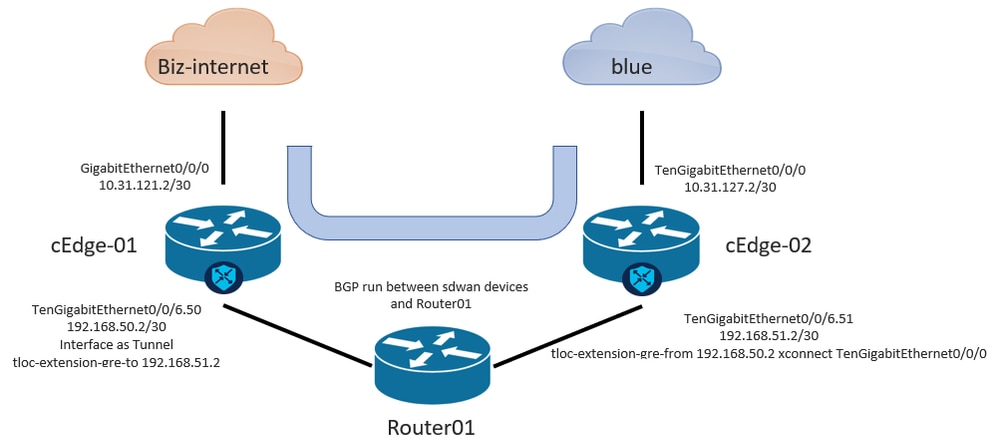
Configurar a extensão TLOC L3 a partir da GUI do vManage

Note: Deve configurar um protocolo de roteamento para se comunicar entre dispositivos SD-WAN com um dispositivo não SW-WAN. Neste exemplo, o BGP está configurado.
Etapa 1. Configuração no cEdge-01
- Configure a interface para conexão TLOC-L3 e atribua-a à interface túnel.
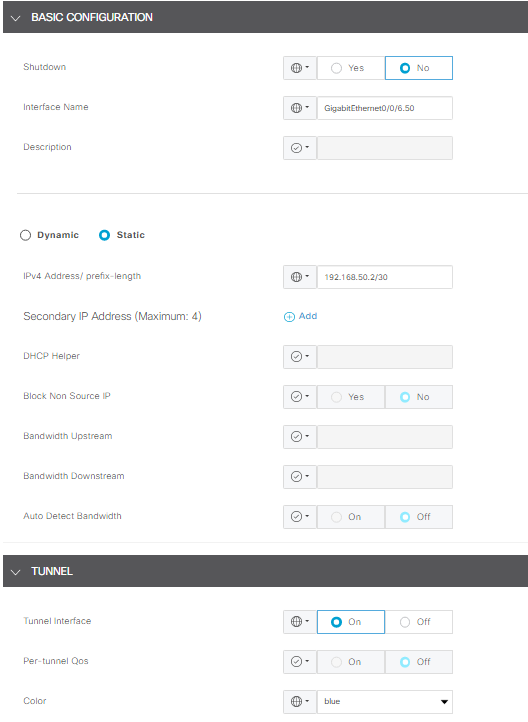
- Na GUI do vManage, navegue até Configuration > Templates > Feature Template > Select Device > VPN Interface Ethernet.
- Configurar a configuração básica da interface, atribuir um endereço IP; neste exemplo, a interface GigabitEthernet0/0/6.50.
- Navegue até a seção Tunnel e ative-a on. Use a mesma cor do outro dispositivo SD-WAN usado como a cor local, neste exemplo, azul.
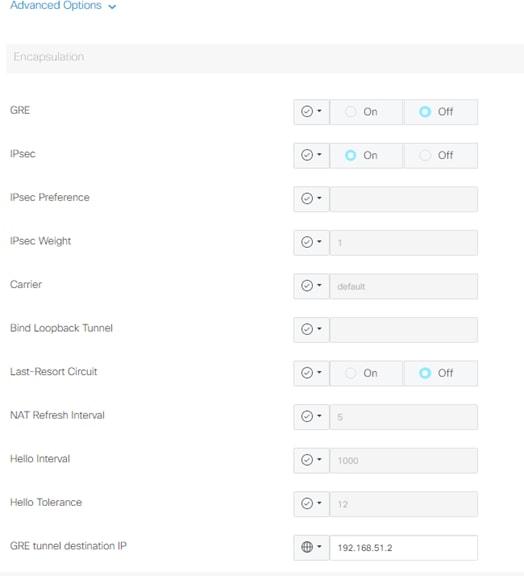
2. Ative a instrução de extensão TLOC do dispositivo que recebe o TLOC.
- Navegue até Tunnel > Advance Option > GRE Tunnel destination IP.
Note: O endereço IP deve ser o endereço de interface atribuído ao outro dispositivo SD-WAN usado para conexão L3. Um exemplo é o endereço IP no cEdge-02 da interface TengigabitEthernet0/0/6.51.
3. Ative a instrução de extensão TLOC de onde o dispositivo obtém o TLOC.
- Navegue até Tunnel > Advance Option > GRE Tunnel destination IP.
4. O endereço IP deve ser a interface atribuída ao outro dispositivo SD-WAN, que é usado para a conexão L3. Nesse caso, o endereço IP no cEdge-02 da interface TenGigabitEthernet0/0/6.51.
Etapa 2. Configuração no cEdge-02
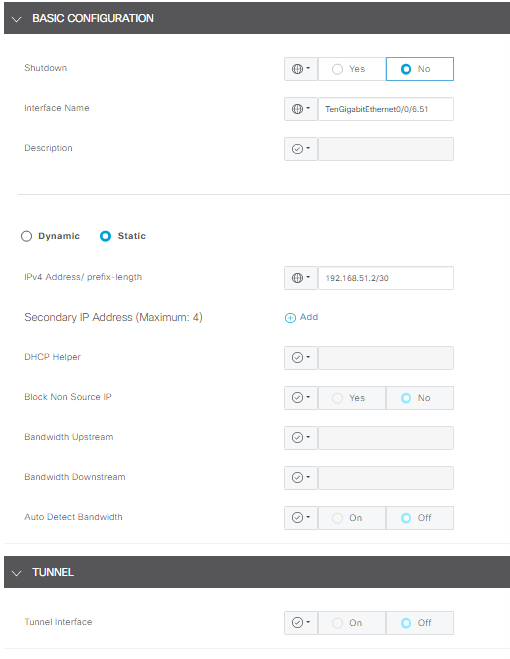
1. Na GUI do vManage, navegue para Configuration > Templates > Feature Template > Select Device > VPN Interface Ethernet.
Note: Nesta interface, Tunnel deve estar OFF.
- Configure a configuração básica da interface.
- Atribua um endereço IP (TenGigabitEthernet0/0/6.51 neste caso).
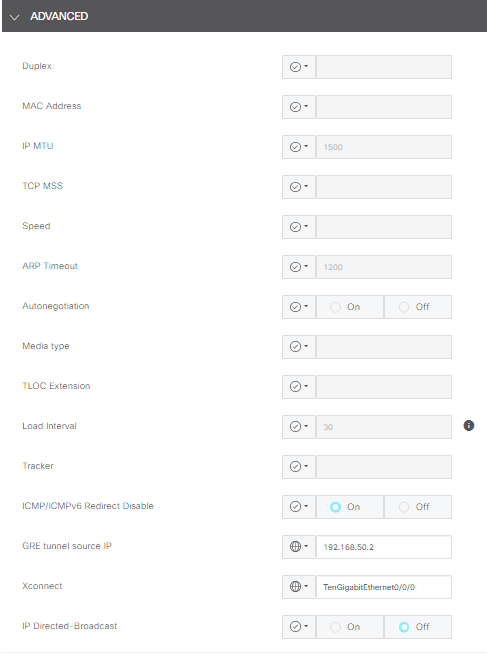
2. Navegue até a seção Advance e preencha as informações para GRE tunnel source IP.
Note:
- O endereço IP deve ser o endereço de interface atribuído ao outro dispositivo SD-WAN usado para conexão L3.
- xconnect deve ser a interface WAN usada para enviar tráfego pelo TLOC estendido.
Um exemplo é o endereço IP no cEdge-02 da interface TengigabitEthernet0/0/6.51.
Configurar a extensão TlOC L3 a partir da CLI
Nesta seção, você pode verificar a aparência da configuração na CLI após o envio do modelo.
Configuração no cEdge-01:
cEdge-01#show sdwan running-config
system
 system-ip             <system_ip>
 site-id               <site_id>
 organization-name     <organization_name>
 vbond <vbond>
!
hostname cEdge-01
!
ip route 0.0.0.0 0.0.0.0 10.31.121.1
interface GigabitEthernet0/0/0
 no shutdown
 ip address 10.31.121.2 255.255.255.252
exit
interface GigabitEthernet0/0/6
 no shutdown
 ip mtu 1504
 mtu 1504
 negotiation auto
exit
interface GigabitEthernet0/0/6.50
 no shutdown
 encapsulation dot1Q 50
 ip address 192.168.50.2 255.255.255.252
exit
interface Loopback100
 no shutdown
 ip address 10.10.10.10 255.255.255.255
exit
interface Tunnel0
 no shutdown
 ip unnumbered GigabitEthernet0/0/0
 tunnel source GigabitEthernet0/0/0
 tunnel mode sdwan
exit
interface Tunnel10101012
 no shutdown
 ip unnumbered GigabitEthernet0/0/6.50
 no ip redirects
 ipv6 unnumbered GigabitEthernet0/0/6.50
 no ipv6 redirects
 tunnel source GigabitEthernet0/0/6.50
 tunnel mode sdwan
exit
router bgp 65001
 bgp log-neighbor-changes
 bgp router-id 10.10.10.10
 neighbor 192.168.50.1 remote-as 65003
 address-family ipv4 unicast
  neighbor 192.168.50.1 activate
  network 192.168.50.0 mask 255.255.255.252
  exit-address-family
 !
sdwan
 interface GigabitEthernet0/0/0
  tunnel-interface
   encapsulation ipsec
   color biz-internet
   allow-service all
  exit
 exit
 interface GigabitEthernet0/0/6.50
  tunnel-interface
   encapsulation ipsec
   color blue
   tloc-extension-gre-to 192.168.51.2
  exit
exit
cEdge-01#
Configuração no cEdge-02:
cEdge-02#show sdwan running-config
system
 system-ip             <system_ip>
 site-id               <site_id>
 organization-name     <organization_name>
 vbond <vbond>
!
hostname cEdge-02
!
ip route 0.0.0.0 0.0.0.0 10.31.127.1
ip nat inside source list nat-dia-vpn-hop-access-list interface TenGigabitEthernet0/0/0 overload
interface TenGigabitEthernet0/0/0
 no shutdown
 ip address 10.31.127.2 255.255.255.252
 ip nat outside
exit
interface TenGigabitEthernet0/0/6
 no shutdown
 mtu 1504
exit
interface TenGigabitEthernet0/0/6.51
 no shutdown
 encapsulation dot1Q 51
 ip address 192.168.51.2 255.255.255.252
exit
interface Loopback200
 no shutdown
 ip address 10.200.200.200 255.255.255.255
exit
interface Tunnel0
 no shutdown
 ip unnumbered TenGigabitEthernet0/0/0
 ipv6 unnumbered TenGigabitEthernet0/0/0
 tunnel source TenGigabitEthernet0/0/0
 tunnel mode sdwan
exit
router bgp 65002
 bgp log-neighbor-changes
 bgp router-id 10.200.200.200
 neighbor 192.168.51.1 remote-as 65003
 address-family ipv4 unicast
  neighbor 192.168.51.1 activate
  network 192.168.51.0 mask 255.255.255.252
  exit-address-family
 !
sdwan
 interface TenGigabitEthernet0/0/0
  tunnel-interface
   encapsulation ipsec
   color blue
   allow-service all
   allow-service bgp
   allow-service dhcp
   allow-service dns
   allow-service icmp
   no allow-service sshd
   no allow-service netconf
   no allow-service ntp
   no allow-service ospf
   no allow-service stun
   allow-service https
   no allow-service snmp
   no allow-service bfd
  exit
 exit
 interface TenGigabitEthernet0/0/6.51
  tloc-extension-gre-from 192.168.50.2 xconnect TenGigabitEthernet0/0/0
 exit
cEdge-02#
Verificar
Validação no cEdge-01:
A cEdge-01 deve criar conexões de controle com TLOC local (internet biz) e TLOC Extension (azul).
cEdge-01L#show sdwan control connections
                                                                                       PEER                                          PEER                                          CONTROLLER
PEER    PEER PEER            SITE       DOMAIN PEER                                    PRIV  PEER                                    PUB                                           GROUP
TYPE    PROT SYSTEM IP       ID         ID     PRIVATE IP                              PORT  PUBLIC IP                               PORT  ORGANIZATION            LOCAL COLOR     PROXY STATE UPTIME      ID
----------------------------------------------------------------------------------------------------------------------------------------------------------------------------------------
vsmart  dtls                 10         1      192.168.21.34                           32953 172.18.121.106                          32953 CISCORTPLAB             biz-internet    No    up     3:00:16:15 0
vsmart  dtls                 10         1      192.168.21.34                           32953 172.18.121.106                          32953 CISCORTPLAB             blue            No    up     3:00:16:20 0
vbond   dtls                 0          0      172.18.121.105                          32853 172.18.121.105                          32853 CISCORTPLAB             biz-internet    -     up     3:00:16:22 0
vbond   dtls                 0          0      172.18.121.105                          32853 172.18.121.105                          32853 CISCORTPLAB             blue            -     up     3:00:16:24 0
vmanage dtls                 10         0      192.168.28.25                           32953 172.18.121.106                          44803 CISCORTPLAB             blue            No    up     3:00:16:18 0

cEdge-01#show sdwan control local-properties

                         PUBLIC          PUBLIC PRIVATE         PRIVATE                                 PRIVATE                              MAX   RESTRICT/           LAST         SPI TIME    NAT  VM
INTERFACE                IPv4            PORT   IPv4            IPv6                                    PORT    VS/VM COLOR            STATE CNTRL CONTROL/     LR/LB  CONNECTION   REMAINING   TYPE CON REG
                                                                                                                                                   STUN                                              PRF IDs
-------------------------------------------------------------------------------------------------------------------------------------------------------------------------------------------------------------
GigabitEthernet0/0/0          10.31.121.87    32853  10.31.121.87    ::                                      32853    1/0  biz-internet     up     2      no/yes/no   No/No  0:00:00:15   0:11:42:53  N    5  Default
GigabitEthernet0/0/6.50       10.31.127.62    5063   192.168.50.2    ::                                      32853    1/1  blue             up     2      no/yes/no   No/No  0:00:00:11   0:11:42:53  N    5  Default
Troubleshooting
Se você tiver problemas, consulte: Solução de problemas de conexões de controle SD-WAN
Histórico de revisões
| Revisão | Data de publicação | Comentários |
|---|---|---|
4.0 |
13-Aug-2026
|
Ortografia atualizada, gramática, linhas horizontais inseridas para separar seções para legibilidade, texto alt fixo. |
3.0 |
21-Jul-2025
|
Recertificação |
2.0 |
13-Jun-2024
|
Texto Alt e Formatação Atualizados. |
1.0 |
03-Apr-2023
|
Versão inicial |

 Feedback
Contate a Cisco
- Abrir um caso de suporte

- (É necessário um Contrato de Serviço da Cisco)