Problemen oplossen met licentiesynchronisatie op Catalyst SD-WAN Manager via on-prem-rapporteringsmodus
Inleiding
In dit document wordt beschreven hoe u een fout kunt oplossen die is opgetreden tijdens het synchroniseren van licenties op Catalyst SD-WAN Manager via de modus On-Prem-rapportage.
Voorwaarden
Vereisten
Voor scenario's waarin Catalyst SD-WAN Manager niet rechtstreeks is verbonden met internet, kan het gebruik van een proxyserver toegang bieden tot internetgebaseerde services, zoals Cisco SSM, of tot een lokaal on-prem SSM.
Minimale release: Catalyst SD-WAN Manager Release 20.9.1
Cisco Smart Software Manager on-prem (SSM on-prem) is een Cisco Smart Licensing-oplossing waarmee u licenties vanaf een server op uw locatie kunt beheren, in plaats van rechtstreeks verbinding te moeten maken met Cisco SSM. De oplossing omvat het opzetten van een Cisco SSM on-prem-licentieserver, die zijn licentiedatabase synchroniseert met Cisco SSM en periodiek functioneert op dezelfde manier als Cisco SSM, terwijl lokaal wordt uitgevoerd.
Catalyst SD-WAN Manager ondersteunt het beheer van licenties met behulp van een Cisco SSM on-prem server, met behulp van een modus genaamd on-prem. De on-prem-modus is handig voor organisaties die Cisco SSM on-prem gebruiken om een strikt beveiligingsbeleid toe te passen dat netwerkapparaten niet toestaat om met Cisco SSM te communiceren via een directe internetverbinding.
Wanneer u in de on-prem-modus werkt, synchroniseert Catalyst SD-WAN Manager elke 24 uur licentiegegevens met de Cisco SSM on-prem-licentieserver. Tijdens deze synchronisatie ontvangt Catalyst SD-WAN Manager updates van beschikbare licenties en verzendt het licentiegebruikrapporten naar de Cisco SSM on-prem licentieserver. U kunt licenties op elk moment synchroniseren.
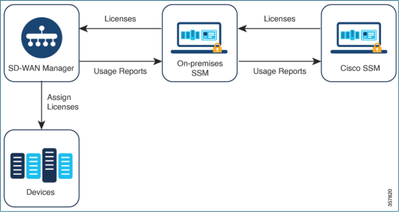
Voordelen van Cisco Smart Software Manager On-Prem
Organisaties waarvan het beveiligingsbeleid of andere omstandigheden vereisen dat Catalyst SD-WAN Manager niet is verbonden met internet, hebben twee opties voor het beheren van licenties voor het gebruik van Smart License Policy:
- Gebruik de offline modus, waarbij bestanden handmatig moeten worden overgedragen tussen Catalyst SD-WAN Manager en Cisco SSM.
- Gebruik een Cisco SSM on-prem-server die toegankelijk is via een lokale gebiedsverbinding met Catalyst SD-WAN Manager.
Beide methoden voorzien in de noodzaak om licentiegegevens over te dragen tussen Cisco SSM en Catalyst SD-WAN Manager. Waar het mogelijk is om de on-prem-modus te gebruiken, biedt deze modus het aanzienlijke voordeel van het verminderen van de onderhoudsoverhead van het handmatig overbrengen van bestanden tussen Catalyst SD-WAN Manager en Cisco SSM, zoals nodig is voor de offline modus.
Fout
Tijdens het synchroniseren van de Smart-referenties van Catalyst SD-WAN Manager GUI, krijgt u deze fout:
Failed to authenticate Smart Account credentials.: Failed to authenticate user - 'admin'. {"error":"invalid_client","error_message":"Grant not found. Ensure that the given grant details are correct."}
aanpak van probleemoplossing
- vManage moet op code 20.9.1 of hoger staan.
- Controleer de logs in de Catalyst SD-WAN Manager (vmanage-server.logs) en plaats de referenties voor Smart Account in de sectie Licentiebeheer voor Catalyst SD-WAN Manager.
- Zorg ervoor dat de juiste client-ID en geheime sleutel worden gedeeld door het on-prem SSM-team.
- TCPDUMP op de vManage for CSSM Server IP
- Controleer of DNS correct is geconfigureerd in de Catalyst SD-WAN Manager en kan pingen naar cloudsso.cisco.com
- Betrek het on-prem SSM-team en vraag het SSM-team om te debuggen aan het einde van de on-prem server.
Catalyst SD-WAN Manager IP: 10.66.76.81 / 192.168.10.1
CSSM Server IP: 10.106.66.55
TCPDump op de vManage for SSM IP-server:
um8_vManage# tcpdump vpn 0 interface eth0 options "host 10.106.66.55 -nn -vv"

tcpdump -p -i eth0 -s 128 host 10.106.66.55 -nn -vv in VPN 0

tcpdump: listening on eth0, link-type EN10MB (Ethernet), capture size 128 bytes

12:15:06.407513 IP (tos 0x0, ttl 64, id 24618, offset 0, flags [DF], proto TCP (6), length 52)

    192.168.10.1.57886 > 10.106.66.55.8443: Flags [S], cksum 0xfadb (incorrect -> 0xdf91), seq 746386211, win 29200, options [mss 1460,nop,nop,sackOK,nop,wscale 7], length 0

12:15:06.651698 IP (tos 0x20, ttl 44, id 0, offset 0, flags [DF], proto TCP (6), length 52)

    10.106.66.55.8443 > 192.168.10.1.57886: Flags [S.], cksum 0x1b34 (correct), seq 2758352947, ack 746386212, win 29200, options [mss 1380,nop,nop,sackOK,nop,wscale 7], length 0

12:15:06.651768 IP (tos 0x0, ttl 64, id 24619, offset 0, flags [DF], proto TCP (6), length 40)

    192.168.10.1.57886 > 10.106.66.55.8443: Flags [.], cksum 0xfacf (incorrect -> 0xcce1), seq 1, ack 1, win 229, length 0

12:15:06.654592 IP (tos 0x0, ttl 64, id 24620, offset 0, flags [DF], proto TCP (6), length 212)

    192.168.10.1.57886 > 10.106.66.55.8443: Flags [P.], seq 1:173, ack 1, win 229, length 172

12:15:06.899695 IP (tos 0x0, ttl 41, id 44470, offset 0, flags [DF], proto TCP (6), length 40)

    10.106.66.55.8443 > 192.168.10.1.57886: Flags [.], cksum 0xcc2d (correct), seq 1, ack 173, win 237, length 0

12:15:06.911484 IP (tos 0x0, ttl 41, id 44471, offset 0, flags [DF], proto TCP (6), length 1420)

    10.106.66.55.8443 > 192.168.10.1.57886: Flags [.], seq 1:1381, ack 173, win 237, length 1380

12:15:06.911542 IP (tos 0x0, ttl 41, id 44472, offset 0, flags [DF], proto TCP (6), length 254)

    10.106.66.55.8443 > 192.168.10.1.57886: Flags [P.], seq 1381:1595, ack 173, win 237, length 214

12:15:06.911573 IP (tos 0x0, ttl 64, id 24621, offset 0, flags [DF], proto TCP (6), length 40)

    192.168.10.1.57886 > 10.106.66.55.8443: Flags [.], cksum 0xfacf (incorrect -> 0xc6bb), seq 173, ack 1381, win 251, length 0

12:15:06.911598 IP (tos 0x0, ttl 64, id 24622, offset 0, flags [DF], proto TCP (6), length 40)

    192.168.10.1.57886 > 10.106.66.55.8443: Flags [.], cksum 0xfacf (incorrect -> 0xc5cf), seq 173, ack 1595, win 273, length 0

12:15:06.923929 IP (tos 0x0, ttl 64, id 24623, offset 0, flags [DF], proto TCP (6), length 234)

    192.168.10.1.57886 > 10.106.66.55.8443: Flags [P.], seq 173:367, ack 1595, win 273, length 194
Logbestanden van on-premise server:
[root@SSM-On-Prem log]# tail -f messages

Jan 13 11:13:36 SSM-On-Prem chronyd[1319]: Source 172.20.226.229https://172.20.226.229 replaced with 172.30.5.123https://172.30.5.123

Jan 13 11:14:09 SSM-On-Prem b09c1e3b5d81: 1:M 13 Jan 2023 11:14:09.049 * 100 changes in 300 seconds. Saving...

Jan 13 11:14:09 SSM-On-Prem b09c1e3b5d81: 1:M 13 Jan 2023 11:14:09.050 * Background saving started by pid 4617

Jan 13 11:14:09 SSM-On-Prem b09c1e3b5d81: 4617:C 13 Jan 2023 11:14:09.052 * DB saved on disk

Jan 13 11:14:09 SSM-On-Prem b09c1e3b5d81: 4617:C 13 Jan 2023 11:14:09.053 * RDB: 0 MB of memory used by copy-on-write

Jan 13 11:14:09 SSM-On-Prem b09c1e3b5d81: 1:M 13 Jan 2023 11:14:09.150 * Background saving terminated with success

Jan 13 11:14:46 SSM-On-Prem 1a1fca641d0a: Redis#exists(key) will return an Integer in redis-rb 4.3. exists? returns a boolean, you should use it instead. To opt-in to the new behavior now you can set Redis.exists_returns_integer =  true. To disable this message and keep the current (boolean) behaviour of 'exists' you can set Redis.exists_returns_integer = false, but this option will be removed in 5.0. (/usr/local/lib/ruby/gems/2.6.0/gems/redis-session-store-0.11.1/lib/redis-session-store.rb:70:in `session_exists?')

Jan 13 11:14:46 SSM-On-Prem 1a1fca641d0a: [active_model_serializers] Rendered UserSerializer with ActiveModelSerializers::Adapter::Attributes (3.0ms)

Jan 13 11:14:46 SSM-On-Prem 1a1fca641d0a: method=GET path=/sessions/get_user format=json controller=SessionsController action=get_user status=200 duration=24.86 view=3.23 db=7.98 params={"controller"=>"sessions", "action"=>"get_user", "session"=>{}} session_id=[FILTERED] uid=admin time=2023-07-13T11:14:46Z http_referer=https://172.20.85.137:8443/admin/ client_ip=10.110.35.124https://10.110.35.124 user_agent=Mozilla/5.0 (Windows NT 10.0; Win64; x64) AppleWebKit/537.36 (KHTML, like Gecko) Chrome/10.120.0.0 Safari/537.36

Jan 13 11:14:46 SSM-On-Prem 504f06c0d581: 10.110.35.124https://10.110.35.124 - - [13/Jan/2023:11:14:46 +0000] "GET /backend/sessions/get_user HTTP/1.1" 200 271 https://172.20.85.137:8443/admin/ "Mozilla/5.0 (Windows NT 10.0; Win64; x64) AppleWebKit/537.36 (KHTML, like Gecko) Chrome/10.120.0.0 Safari/537.36" "-"

Jan 13 11:17:01 SSM-On-Prem 504f06c0d581: 2023/07/13 11:17:01 [error] 47#47: *1576 connect() failed (111: Connection refused) while connecting to upstream, client: 10.66.76.85, server: , request: "POST /backend/oauth/token?grant_type=password&client_id=jF6qntGFm429n2B7tlgJPNHueoyjjn8p6zAn7BhYLUhjAY5BZlTUV9Q0r_Zk7uBf&client_secret=d1b_ZV4QWs4UzB00_YYHz0Ek_qxcvywN4d2GD40LQOyKfMOV6MoKmVchUBX3GsGx&username=admin&password=CiscoLab%21234567 HTTP/1.1", upstream: http://[fd00:dead:beef::5]:3000/oauth/token?grant_type=password&client_id=jF6qntGFm429n2B7tlgJPNHueoyjjn8p6zAn7BhYLUhjAY5BZlTUV9Q0r_Zk7uBf&client_secret=d1b_ZV4QWs4UzB00_YYHz0Ek_qxcvywN4d2GD40LQOyKfMOV6MoKmVchUBX3GsGx&username=admin&password=CiscoLab%21234567, host: "172.20.85.137:8443"

Jan 13 11:17:01 SSM-On-Prem 504f06c0d581: 2023/07/13 11:17:01 [warn] 47#47: *1576 upstream server temporarily disabled while connecting to upstream, client: 10.66.76.85, server: , request: "POST /backend/oauth/token?grant_type=password&client_id=jF6qntGFm429n2B7tlgJPNHueoyjjn8p6zAn7BhYLUhjAY5BZlTUV9Q0r_Zk7uBf&client_secret=d1b_ZV4QWs4UzB00_YYHz0Ek_qxcvywN4d2GD40LQOyKfMOV6MoKmVchUBX3GsGx&username=admin&password=CiscoLab%21234567 HTTP/1.1", upstream: http://[fd00:dead:beef::5]:3000/oauth/token?grant_type=password&client_id=jF6qntGFm429n2B7tlgJPNHueoyjjn8p6zAn7BhYLUhjAY5BZlTUV9Q0r_Zk7uBf&client_secret=d1b_ZV4QWs4UzB00_YYHz0Ek_qxcvywN4d2GD40LQOyKfMOV6MoKmVchUBX3GsGx&username=admin&password=CiscoLab%21234567, host: "172.20.85.137:8443"

Jan 13 11:17:01 SSM-On-Prem 1a1fca641d0a: [active_model_serializers] Rendered ActiveModel::Serializer::Null with Hash (0.09ms)

Jan 13 11:17:01 SSM-On-Prem 1a1fca641d0a: method=POST path=/oauth/token format=json controller=Doorkeeper::OauthTokensController action=create status=403 duration=4.21 view=0.53 db=1.12

Jan 13 11:17:01 SSM-On-Prem 504f06c0d581: 10.66.76.85https://10.66.76.85 - - [13/Jan/2023:11:17:01 +0000] "POST /backend/oauth/token?grant_type=password&client_id=jF6qntGFm429n2B7tlgJPNHueoyjjn8p6zAn7BhYLUhjAY5BZlTUV9Q0r_Zk7uBf&client_secret=d1b_ZV4QWs4UzB00_YYHz0Ek_qxcvywN4d2GD40LQOyKfMOV6MoKmVchUBX3GsGx&username=admin&password=CiscoLab%21234567 HTTP/1.1" 403 121 "-" "Apache-HttpClient/4.5.11 (Java/11.0.7)" "-"

Jan 13 11:17:14 SSM-On-Prem 1a1fca641d0a: [INFO] Session expiring outcome=success
Meld u aan bij vManage terwijl u gegevens over Smart Accounts in het gedeelte Licentiebeheer van vManage plaatst:
13-Jan-2023 17:29:02,775 IST INFO  [um8_vManage] [SmartLicensingIntegrationManager] (default task-24) |default| user is using in On Prem mode

13-Jan-2023 17:29:02,776 IST INFO  [um8_vManage] [SmartLicensingIntegrationManager] (default task-24) |default| Authenticating on-prem server

13-Jan-2023 17:29:02,780 IST INFO  [um8_vManage] [AbstractSettingsManager] (default task-24) |default| Found smart licensing mode is onprem

13-Jan-2023 17:29:02,781 IST INFO  [um8_vManage] [SmartLicensingUtil] (default task-24) |default| intializing client Map {clientUrl=172.20.85.137https://172.20.85.137, client_secret=d1b_ZV4QWs4UzB00_YYHz0Ek_qxcvywN4d2GD40LQOyKfMOV6MoKmVchUBX3GsGx, client_id=jF6qntGFm429n2B7tlgJPNHueoyjjn8p6zAn7BhYLUhjAY5BZlTUV9Q0r_Zk7uBf}

13-Jan-2023 17:29:02,781 IST INFO  [um8_vManage] [SmartLicensingUtil] (default task-24) |default| Getting onPrem server details

13-Jan-2023 17:29:02,793 IST INFO  [um8_vManage] [RestAPIClient] (default task-24) |default| RestAPI proxy host

13-Jan-2023 17:29:02,793 IST INFO  [um8_vManage] [RestAPIClient] (default task-24) |default| RestAPI proxy port

13-Jan-2023 17:29:02,798 IST INFO  [um8_vManage] [SmartLicensingUtil] (default task-24) |default| URL backend/oauth/token?grant_type=password&client_id=jF6qntGFm429n2B7tlgJPNHueoyjjn8p6zAn7BhYLUhjAY5BZlTUV9Q0r_Zk7uBf&client_secret=d1b_ZV4QWs4UzB00_YYHz0Ek_qxcvywN4d2GD40LQOyKfMOV6MoKmVchUBX3GsGx&username=ptundalw&password=Carnation%2321

13-Jan-2023 17:29:02,798 IST INFO  [um8_vManage] [SmartLicensingUtil] (default task-24) |default| Query Smart Account: backend/oauth/token?grant_type=password&client_id=jF6qntGFm429n2B7tlgJPNHueoyjjn8p6zAn7BhYLUhjAY5BZlTUV9Q0r_Zk7uBf&client_secret=d1b_ZV4QWs4UzB00_YYHz0Ek_qxcvywN4d2GD40LQOyKfMOV6MoKmVchUBX3GsGx&username=ptundalw&password=*******

13-Jan-2023 17:29:03,490 IST ERROR [um8_vManage] [RestAPIClient] (default task-24) |default| Failed to process POST request uri: backend/oauth/token?grant_type=password&client_id=jF6qntGFm429n2B7tlgJPNHueoyjjn8p6zAn7BhYLUhjAY5BZlTUV9Q0r_Zk7uBf&client_secret=d1b_ZV4QWs4UzB00_YYHz0Ek_qxcvywN4d2GD40LQOyKfMOV6MoKmVchUBX3GsGx&username=ptundalw&password=******* . Code: 403 Message: {"error":"invalid_client","error_message":"Grant not found. Ensure that the given grant details are correct."}

13-Jan-2023 17:29:03,491 IST ERROR [um8_vManage] [SmartLicensingUtil] (default task-24) |default| Failed to authenticate user - 'ptundalw'.

13-Jan-2023 17:29:03,491 IST ERROR [um8_vManage] [SmartLicensingIntegrationRestfulResource] (default task-24) |default| Smart Account User Authentication failed.
Opmerking: u krijgt fout 403 tijdens het synchroniseren van de slimme account van vManage GUI, wat aangeeft dat de server het verzoek begrijpt, maar weigert het te autoriseren.
Tijdelijke oplossing
- Meld u aan bij On Prem Server.
- Navigeer naar de API Tool Kit.
- Selecteer Resource Owner Grant. Voer de gegevens in als Naam en sla op.
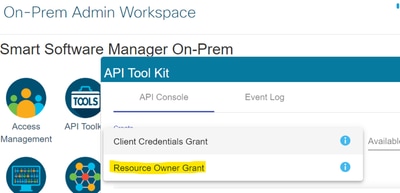
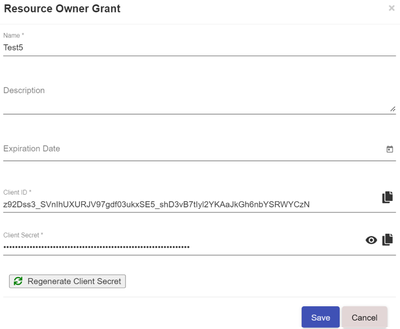
- Selecteer het opgeslagen record (vermeld in vorige momentopname) en controleer Client ID en Client Secret.
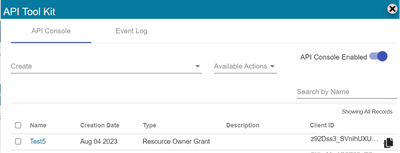
- Deel en voer de gedeelde client-ID en client-geheim in Catalyst SD-WAN Manager portal.
- Navigeer naar Licenties synchroniseren en Apparaten vernieuwen in vManage en gebruik dezelfde gegevens op prem-referenties waarmee u bent ingelogd om client-ID en clientgeheim te genereren.
Revisiegeschiedenis
| Revisie | Publicatiedatum | Opmerkingen |
|---|---|---|
2.0 |
05-Jun-2026
|
Bijgewerkte koppen en opmaak. |
1.0 |
11-Jul-2024
|
Eerste vrijgave |

 Feedback
Contact Cisco
- Een ondersteuningscase openen

- (Vereist een Cisco-servicecontract)