Problemen oplossen met Firepower Threat Defense en ASA Multicast PIM
Inhoud
Inleiding
Dit document beschrijft hoe Firepower Threat Defense (FTD) en Adaptive Security Appliance (ASA) Protocol Independent Multicast (PIM) implementeren.
Voorwaarden
Vereisten
Basiskennis van IP-routering.
Gebruikte componenten
De informatie in dit document is gebaseerd op de apparaten in een specifieke laboratoriumomgeving. Alle apparaten die in dit document worden beschreven, hadden een opgeschoonde (standaard)configuratie. Als uw netwerk live is, moet u zorgen dat u de potentiële impact van elke opdracht begrijpt.
De informatie in dit document is gebaseerd op de volgende software- en hardware-versies:
- Cisco Firepower 4125 Threat Defense versie 7.1.0.
- Firepower Management Center (FMC) versie 7.1.0.
- Software voor Cisco adaptieve security applicatie, versie 9.17(1)9.
Achtergrondinformatie
Basisprincipes voor multicast-routering
- Unicast stuurt pakketten naar de bestemming terwijl multicast pakketten van de bron naar voren stuurt.
- Multicast-netwerkapparaten (firewalls / routers, enzovoort) sturen de pakketten door via Reverse Path Forwarding (RPF). Merk op dat RPF niet hetzelfde is als uRPF die wordt gebruikt in unicast om specifieke soorten aanvallen te voorkomen. RPF kan worden gedefinieerd als een mechanisme dat multicast-pakketten van de bron naar de multicast-ontvangers leidt. De primaire rol is om verkeerslijnen te voorkomen en te zorgen voor correcte verkeerspaden.
- Een multicast-protocol zoals PIM heeft 3 hoofdfuncties:
1. Zoek de upstream-interface (interface die het dichtst bij de bron ligt).
2. Zoek de downstream-interfaces die zijn gekoppeld aan een specifieke multicast-stream (interfaces naar de ontvangers).
3. Onderhoud de multicast boom (voeg of verwijder de boomtakken).
- Een multicast boom kan worden gebouwd en onderhouden door een van de 2 methoden: impliciete voegen (flood-and-prune) of expliciete voegen (pull model). PIM Dense Mode (PIM-DM) maakt gebruik van impliciete joins, terwijl PIM Sparse Mode (PIM-SM) expliciete joins gebruikt.
- Een multicast-structuur kan worden gedeeld of brongebaseerd:
- Gedeelde bomen gebruiken het concept van Rendezvous Point (RP) en worden genoteerd als (*, G) waarbij G = multicast groep IP.
- Bomen op basis van bronnen zijn geworteld in de bron, gebruiken geen RP en worden genoteerd als (S, G) waarbij S = het IP van de multicast-bron / server.
- Multicast forwarding modellen:
- Any-Source Multicast (ASM) leveringsmodus maakt gebruik van gedeelde bomen (*, G) waar elke bron de multicast-stream kan verzenden.
- Source-Specific Multicast (SSM) maakt gebruik van source-based trees (S, G) en het IP-bereik 232/8.
- Bidirectioneel (BiDir) is een soort gedeelde boom (*, G) waar zowel control-plane als data-plane verkeer door de RP gaan.
- Een rendez-vous point kan worden geconfigureerd of geselecteerd met een van de volgende methoden:
- statische RP
- Auto-RP
- Bootstrap Router (BSR)
Samenvatting PIM-modi
| PIM-modus |
RP |
Gedeelde boom |
notatie |
IGMP |
Ondersteund door ASA/FTD |
| PIM Sparse-modus |
Ja |
Ja |
(*, G) en (S, G) |
v1/v2/v3 |
Ja |
| PIM-dichtheidsmodus |
Nee |
Nee |
(S, G) |
v1/v2/v3 |
Nee* |
| BIDIRECTIONELE PIM-modus |
Ja |
Ja |
(*, G) |
v1/v2/v3 |
Ja |
| PIM-bronspecifieke multicast (SSM)-modus |
Nee |
Nee |
(S, G) |
V3 |
Nee** |
*Auto-RP = Auto-RP verkeer kan passeren
** ASA/FTD kan geen last-hop apparaat zijn
Samenvatting RP-configuratie
| Rendez-vouspuntconfiguratie |
ASA/FTD |
| statische RP |
Ja |
| Auto-RP |
Nee, maar auto-RP control-plane verkeer kan passeren |
| BSR |
Ja, maar geen C-RP-ondersteuning |
Afkortingen/acroniemen
| Acroniemen |
verklaring |
| FHR |
First-Hop Router – een hop die direct verbonden is met de bron van het multicast-verkeer. |
| LHR |
Last-Hop Router – een hop die rechtstreeks verbonden is met de ontvangers van het multicast-verkeer. |
| RP |
ontmoetingspunt |
| DR |
aangewezen router |
| SPT |
boomstructuur met kortste pad |
| RPT |
Rendez-vous-Point (RP)-structuur, deelstructuur |
| RPF |
omgekeerde padforwarding |
| OLIE |
Uitgaande interfacelijst |
| MRIB |
Multicast Routing Information Base |
| MFIB |
Multicast Forwarding Information Base |
| ASM |
Any-Source Multicast |
| BSR |
Bootstrap-router |
| GTM |
bronspecifieke multicast |
| FP |
snel pad |
| SP |
langzame weg |
| CP |
Controlepunt |
| PPS |
Pakket per seconde tarief |
Taak 1 – PIM Sparse-modus (statische RP)
Topologie
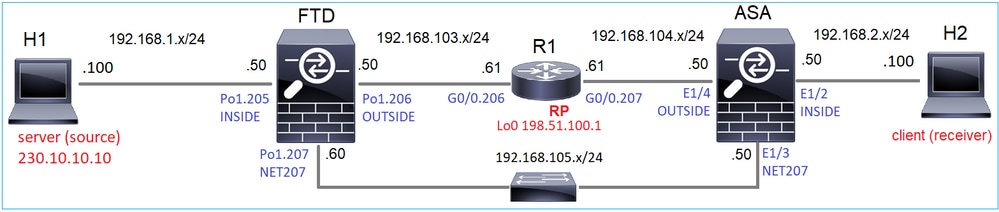
Configureer multicast PIM sparse-mode in de topologie met R1 (198.51.100.1) als RP.
Oplossing
FTD-configuratie:
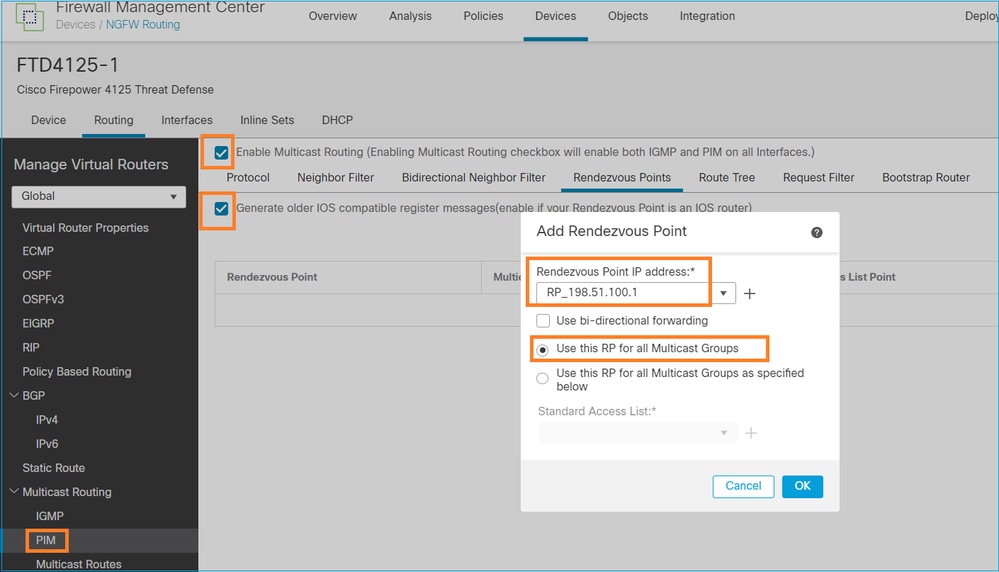
De ASA/FTD kan niet tegelijkertijd worden geconfigureerd voor IGMP Stub Routing en PIM:
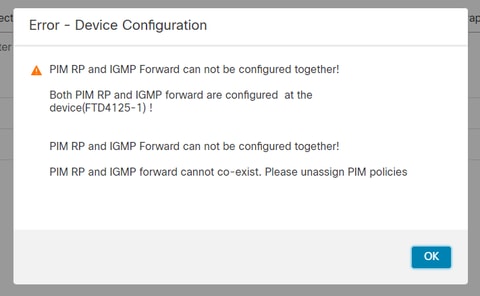
De resulterende configuratie op FTD:
firepower# show running-config multicast-routing
multicast-routing                        <-- Multicast routing is enabled globally on the device
firepower# show running-config pim

pim rp-address 198.51.100.1              <-- Static RP is configured on the firewall

firepower# ping 198.51.100.1
Type escape sequence to abort.
Sending 5, 100-byte ICMP Echos to 198.51.100.1, timeout is 2 seconds:
!!!!!                                    <-- The RP is reachable
Success rate is 100 percent (5/5), round-trip min/avg/max = 1/1/1 ms
Op ASA firewall is er een vergelijkbare configuratie:
asa(config)# multicast-routing
asa(config)# pim rp-address 198.51.100.1
RP-configuratie (Cisco-router):
ip multicast-routing
ip pim rp-address 198.51.100.1           <-- The router is the RP
!
interface GigabitEthernet0/0.206
 encapsulation dot1Q 206
 ip address 192.168.103.61 255.255.255.0
 ip pim sparse-dense-mode                <-- The interface participates in multicast routing
 ip ospf 1 area 0
!
interface GigabitEthernet0/0.207
 encapsulation dot1Q 207
 ip address 192.168.104.61 255.255.255.0
 ip pim sparse-dense-mode                <-- The interface participates in multicast routing
 ip ospf 1 area 0
!
interface Loopback0
 ip address 198.51.100.1 255.255.255.255   <-- The router is the RP
 ip pim sparse-dense-mode                <-- The interface participates in multicast routing
 ip ospf 1 area 0
Verificatie
Verifieer het multicast-besturingsvlak op FTD wanneer er geen multicast-verkeer (afzenders of ontvangers) is:
firepower# show pim interface
Address            Interface        PIM  Nbr   Hello  DR         DR
                                         Count Intvl  Prior
192.168.105.60     NET207           on   1     30     1          this system        <-- PIM enabled on the interface. There is 1 PIM neighbor
192.168.1.50       INSIDE           on   0     30     1          this system        <-- PIM enabled on the interface. There are no PIM neighbors
0.0.0.0            diagnostic       off  0     30     1          not elected
192.168.103.50     OUTSIDE          on   1     30     1          192.168.103.61     <-- PIM enabled on the interface. There is 1 PIM neighbor
Controleer de PIM-buren:
firepower# show pim neighbor
Neighbor Address    Interface          Uptime    Expires DR pri Bidir
192.168.105.50      NET207             00:05:41  00:01:28 1      B
192.168.103.61      OUTSIDE            00:05:39  00:01:32 1 (DR)
De RP adverteert voor het hele multicast-groepsassortiment:
firepower# show pim group-map
Group Range         Proto   Client   Groups RP address      Info
224.0.1.39/32*      DM      static   0      0.0.0.0
224.0.1.40/32*      DM      static   0      0.0.0.0
224.0.0.0/24*       L-Local static   1      0.0.0.0
232.0.0.0/8*        SSM     config   0      0.0.0.0
224.0.0.0/4*        SM      config   2      198.51.100.1    RPF: OUTSIDE,192.168.103.61     <-- The multicast group used by the firewall for the given RP
224.0.0.0/4         SM      static   0      0.0.0.0         RPF: ,0.0.0.0
De firewall mroute tabel heeft een aantal niet-relevante vermeldingen (239.255.255.250 is Simple Service Discovery Protocol (SSDP) gebruikt door leveranciers zoals MAC OS en Microsoft Windows):
firepower# show mroute
Multicast Routing Table
Flags: D - Dense, S - Sparse, B - Bidir Group, s - SSM Group,
       C - Connected, L - Local, I - Received Source Specific Host Report,
       P - Pruned, R - RP-bit set, F - Register flag, T - SPT-bit set,
       J - Join SPT
Timers: Uptime/Expires
Interface state: Interface, State

(*, 239.255.255.250), 00:17:35/never, RP 198.51.100.1, flags: SCJ
  Incoming interface: OUTSIDE
  RPF nbr: 192.168.103.61
  Immediate Outgoing interface list:
    INSIDE, Forward, 00:17:35/never
Er is een PIM-tunnel gebouwd tussen de firewalls en de RP:
firepower# show pim tunnel
Interface          RP Address        Source Address
Tunnel0            198.51.100.1      192.168.103.50                  <-- PIM tunnel between the FTD and the RP
De PIM-tunnel is ook te zien op de firewallaansluitingstabel:
firepower# show conn all detail address 198.51.100.1
...
PIM OUTSIDE: 198.51.100.1/0 NP Identity Ifc: 192.168.103.50/0,       <-- PIM tunnel between the FTD and the RP
, flags , idle 16s, uptime 3m8s, timeout 2m0s, bytes 6350
Connection lookup keyid: 153426246
Verificatie op de ASA-firewall:
asa# show pim neighbor
Neighbor Address   Interface      Uptime      Expires DR pri Bidir
192.168.105.60     NET207         2d21h       00:01:29 1 (DR) B
192.168.104.61     OUTSIDE        00:00:18    00:01:37 1 (DR)
asa# show pim tunnel
Interface          RP Address        Source Address
Tunnel0            198.51.100.1      192.168.104.50                 <-- PIM tunnel between the ASA and the RP
RP (Cisco router) RP-verificatie. Er zijn een aantal multicast groepen voor SSDP en Auto-RP:
Router1# show ip pim rp
Group: 239.255.255.250, RP: 198.51.100.1, next RP-reachable in 00:01:04
Group: 224.0.1.40, RP: 198.51.100.1, next RP-reachable in 00:00:54
Verificatie zodra een ontvanger zijn aanwezigheid aankondigt
De ASA krijgt het IGMP-lidmaatschapsrapport en maakt de IGMP- en mroute (*, G)-vermeldingen:
asa# show igmp group 230.10.10.10
IGMP Connected Group Membership
Group Address    Interface            Uptime    Expires   Last Reporter
230.10.10.10     INSIDE               00:01:15  00:03:22  192.168.2.100     <-- Host 192.168.2.100 reported that wants to join group 230.10.10.10 and receive multicast traffic
De ASA-firewall maakt een mroute voor de multicast-groep:
asa# show mroute 230.10.10.10

Multicast Routing Table
Flags: D - Dense, S - Sparse, B - Bidir Group, s - SSM Group,
       C - Connected, L - Local, I - Received Source Specific Host Report,
       P - Pruned, R - RP-bit set, F - Register flag, T - SPT-bit set,
       J - Join SPT
Timers: Uptime/Expires
Interface state: Interface, State

(*, 230.10.10.10), 00:00:17/never, RP 198.51.100.1, flags: SCJ       <-- The mroute for group 230.10.10.10
  Incoming interface: OUTSIDE                                        <-- Expected interface for a multicast packet from the source. If the packet is not received on this interface, it is discarded
  RPF nbr: 192.168.104.61
  Immediate Outgoing interface list:                                 <-- The OIL points towards the receivers. The packets are forwarded through this interface.
    INSIDE, Forward, 00:01:17/never
Een andere firewallverificatie is de PIM-topologieuitvoer:
asa# show pim topology 230.10.10.10
...
(*,230.10.10.10) SM Up: 00:07:15 RP: 198.51.100.1                    <-- An entry for multicast group 230.10.10.10
JP: Join(00:00:33) RPF: OUTSIDE,192.168.104.61 Flags: LH
  INSIDE             00:03:15  fwd LI LH
De RPF-opzoekfout in de debug pim-uitvoer:
asa# debug pim
IPv4 PIM: RPF lookup failed for root 198.51.100.1                    <-- The RPF look fails because there is no route to RP
IPv4 PIM: RPF lookup failed for root 198.51.100.1
IPv4 PIM: (*,230.10.10.10) Processing Periodic Join-Prune timer
IPv4 PIM: (*,230.10.10.10) J/P processing
IPv4 PIM: (*,230.10.10.10) Periodic J/P scheduled in 50 secs
IPv4 PIM: (*,230.10.10.10) No RPF neighbor to send J/P
In het geval dat alles in orde is, stuurt de firewall een PIM Join-Prune-bericht naar de RP:
asa# debug pim group 230.10.10.10
IPv4 PIM group debugging is on
for group 230.10.10.10

IPv4 PIM: (*,230.10.10.10) J/P scheduled in 0.0 secs
IPv4 PIM: [0] (*,230.10.10.10/32) MRIB modify A NS
IPv4 PIM: [0] (*,230.10.10.10/32) NULLIF-skip MRIB modify !A !NS
IPv4 PIM: [0] (*,230.10.10.10/32) OUTSIDE MRIB modify A NS
IPv4 PIM: (*,230.10.10.10) Processing timers
IPv4 PIM: (*,230.10.10.10) J/P processing
IPv4 PIM: (*,230.10.10.10) Periodic J/P scheduled in 50 secs
IPv4 PIM: (*,230.10.10.10) J/P adding Join on OUTSIDE
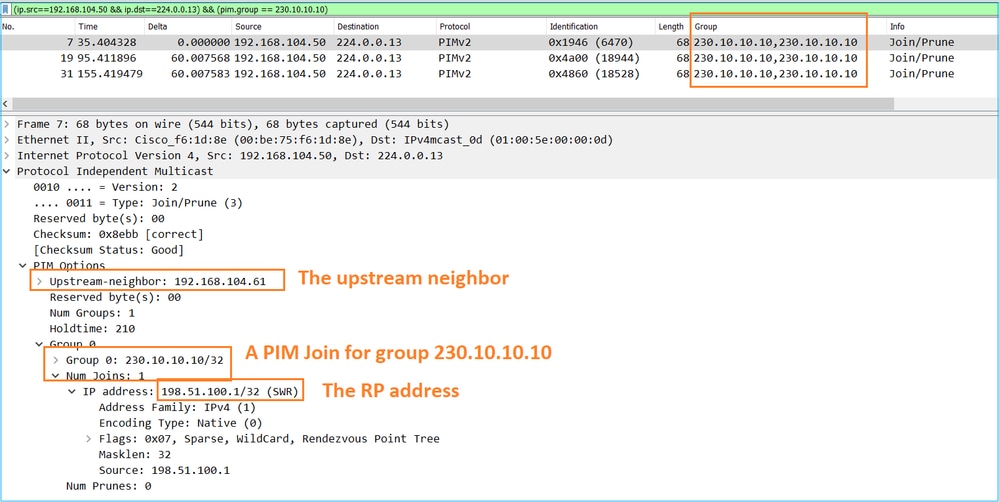
De opname laat zien dat de PIM Join-berichten elke 1 minuut worden verzonden en PIM Hellos elke 30 seconden. PIM gebruikt IP 224.0.0.13:
De RP maakt een (*, G) mroute. Merk op dat aangezien er nog geen servers zijn, de inkomende interface Null is:
Router1# show ip mroute 230.10.10.10 | b \(
(*, 230.10.10.10), 00:00:27/00:03:02, RP 198.51.100.1, flags: S          <-- The mroute for the multicast group
  Incoming interface: Null, RPF nbr 0.0.0.0        <-- No incoming multicast stream
  Outgoing interface list:
    GigabitEthernet0/0.207, Forward/Sparse-Dense, 00:00:27/00:03:02      <-- There was a PIM Join on this interface
Dit kan als volgt worden weergegeven:
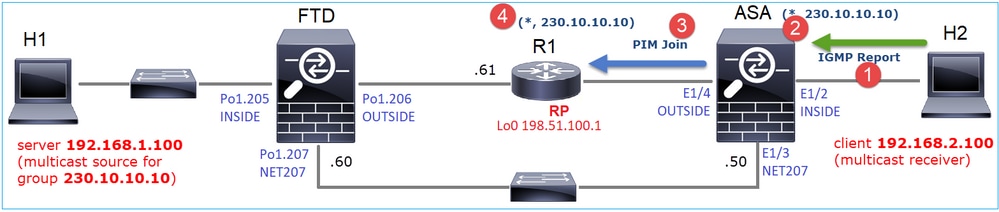
- IGMP-rapport wordt ontvangen op ASA.
- Er wordt een (*, G) mroute toegevoegd.
- De ASA stuurt een PIM Join-bericht naar de RP (198.51.100.1).
- De RP ontvangt het Join-bericht en voegt een (*, G) mroute toe.
Tegelijkertijd zijn er op FTD geen routes omdat er geen IGMP-rapport of PIM Join is ontvangen:
firepower# show mroute 230.10.10.10
No mroute entries found.
Verificatie wanneer de server een multicast-stream verzendt
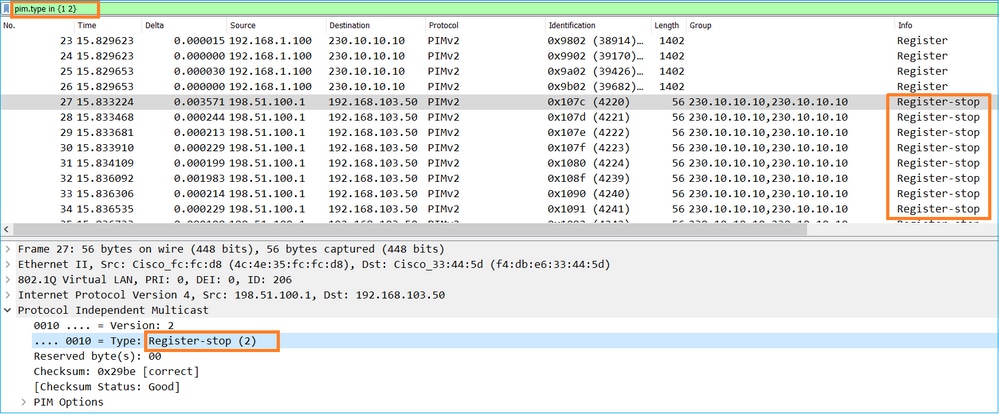
De FTD haalt de multicast stream uit H1 en start het PIM Registratieproces met de RP. De FTD stuurt een unicast PIM Register-bericht naar de RP. De RP stuurt een PIM Join-bericht naar de First-Hop-Router (FHR), in dit geval de FTD, om zich aan te sluiten bij de multicast-boom. Vervolgens wordt een bericht Register-Stop verstuurd.
firepower# debug pim group 230.10.10.10
IPv4 PIM group debugging is on
for group 230.10.10.10
firepower#
IPv4 PIM: [0] (192.168.1.100,230.10.10.10/32) INSIDE MRIB update (f=20,c=20)
IPv4 PIM: [0] (192.168.1.100,230.10.10.10) Signal presenta on INSIDE
IPv4 PIM: (192.168.1.100,230.10.10.10) Create entry
IPv4 PIM: (192.168.1.100,230.10.10.10) RPF changed from 0.0.0.0/- to 192.168.1.100/INSIDE    <-- The FTD receives a multicast stream on INSIDE interface for group 230.10.10.10
IPv4 PIM: (192.168.1.100,230.10.10.10) Connected status changed from off to on
IPv4 PIM: [0] (192.168.1.100,230.10.10.10/32) OUTSIDE MRIB modify NS
IPv4 PIM: [0] (192.168.1.100,230.10.10.10/32) MRIB modify DC
IPv4 PIM: [0] (192.168.1.100,230.10.10.10/32) OUTSIDE MRIB modify A NS
IPv4 PIM: (192.168.1.100,230.10.10.10) Set alive timer to 210 sec
IPv4 PIM: [0] (192.168.1.100,230.10.10.10/32) OUTSIDE MRIB modify !NS
IPv4 PIM: [0] (192.168.1.100,230.10.10.10/32) MRIB modify !DC
IPv4 PIM: (192.168.1.100,230.10.10.10) Start registering to 198.51.100.1                     <-- The FTD starts the registration process with the RP
IPv4 PIM: (192.168.1.100,230.10.10.10) Tunnel0 J/P state changed from Null to Join
IPv4 PIM: (192.168.1.100,230.10.10.10) Tunnel0 FWD state change from Prune to Forward
IPv4 PIM: (192.168.1.100,230.10.10.10) Updating J/P status from Null to Join
IPv4 PIM: (192.168.1.100,230.10.10.10) J/P scheduled in 0.0 secs
IPv4 PIM: [0] (192.168.1.100,230.10.10.10/32) INSIDE MRIB modify NS
IPv4 PIM: (192.168.1.100,230.10.10.10) Set SPT bit
IPv4 PIM: [0] (192.168.1.100,230.10.10.10/32) MRIB modify NS
IPv4 PIM: [0] (192.168.1.100,230.10.10.10/32) OUTSIDE MRIB modify !A
IPv4 PIM: [0] (192.168.1.100,230.10.10.10/32) INSIDE MRIB modify A !NS
IPv4 PIM: [0] (192.168.1.100,230.10.10.10/32) Tunnel0 MRIB modify F NS
IPv4 PIM: [0] (192.168.1.100,230.10.10.10/32) INSIDE MRIB modify !SP
IPv4 PIM: [0] (192.168.1.100,230.10.10.10/32) INSIDE MRIB update (f=2,c=20)
IPv4 PIM: J/P entry: Join root: 192.168.1.100 group: 230.10.10.10 flags: S                   <-- The FTD receives a PIM Join message from the RP for group 230.10.10.10
IPv4 PIM: (192.168.1.100,230.10.10.10) OUTSIDE J/P state changed from Null to Join
IPv4 PIM: (192.168.1.100,230.10.10.10) OUTSIDE FWD state change from Prune to Forward
IPv4 PIM: [0] (192.168.1.100,230.10.10.10/32) OUTSIDE MRIB modify F NS
IPv4 PIM: (192.168.1.100,230.10.10.10) OUTSIDE Raise J/P expiration timer to 210 seconds
IPv4 PIM: J/P entry: Join root: 192.168.1.100 group: 230.10.10.10 flags: S
IPv4 PIM: (192.168.1.100,230.10.10.10) OUTSIDE Raise J/P expiration timer to 210 seconds
IPv4 PIM: (192.168.1.100,230.10.10.10) Processing timers
IPv4 PIM: (192.168.1.100,230.10.10.10) J/P processing
IPv4 PIM: (192.168.1.100,230.10.10.10) Suppress J/P to connected source
IPv4 PIM: (192.168.1.100,230.10.10.10) Suppress J/P to connected source
IPv4 PIM: (192.168.1.100,230.10.10.10) Tunnel0 Processing timers
IPv4 PIM: J/P entry: Join root: 192.168.1.100 group: 230.10.10.10 flags: S
IPv4 PIM: (192.168.1.100,230.10.10.10) NET207 J/P state changed from Null to Join
IPv4 PIM: (192.168.1.100,230.10.10.10) NET207 FWD state change from Prune to Forward
IPv4 PIM: [0] (192.168.1.100,230.10.10.10/32) NET207 MRIB modify F NS
IPv4 PIM: (192.168.1.100,230.10.10.10) NET207 Raise J/P expiration timer to 210 seconds
IPv4 PIM: [0] (192.168.1.100,230.10.10.10/32) NET207 MRIB update (f=29,c=20)
IPv4 PIM: [0] (192.168.1.100,230.10.10.10) Signal presenta on NET207
IPv4 PIM: (192.168.1.100,230.10.10.10) Send [0/0] Assert on NET207
IPv4 PIM: [0] (192.168.1.100,230.10.10.10/32) NET207 MRIB modify !SP
IPv4 PIM: [0] (192.168.1.100,230.10.10.10/32) NET207 MRIB update (f=9,c=20)
IPv4 PIM: J/P entry: Prune root: 192.168.1.100 group: 230.10.10.10 flags: S
IPv4 PIM: (192.168.1.100,230.10.10.10) OUTSIDE J/P state changed from Join to Null
IPv4 PIM: (192.168.1.100,230.10.10.10) OUTSIDE FWD state change from Forward to Prune
IPv4 PIM: [0] (192.168.1.100,230.10.10.10/32) OUTSIDE MRIB modify !F !NS
IPv4 PIM: [0] (192.168.1.100,230.10.10.10/32) NET207 MRIB update (f=29,c=20)
IPv4 PIM: [0] (192.168.1.100,230.10.10.10) Signal presenta on NET207
IPv4 PIM: (192.168.1.100,230.10.10.10) Send [0/0] Assert on NET207
IPv4 PIM: [0] (192.168.1.100,230.10.10.10/32) NET207 MRIB modify !SP
IPv4 PIM: [0] (192.168.1.100,230.10.10.10/32) NET207 MRIB update (f=9,c=20)
IPv4 PIM: (192.168.1.100,230.10.10.10) OUTSIDE Processing timers
IPv4 PIM: (192.168.1.100,230.10.10.10) Received Register-Stop                               <-- The RP sends a Register-Stop message to FTD
IPv4 PIM: (192.168.1.100,230.10.10.10) Stop registering
IPv4 PIM: (192.168.1.100,230.10.10.10) Tunnel0 J/P state changed from Join to Null
IPv4 PIM: (192.168.1.100,230.10.10.10) Tunnel0 FWD state change from Forward to Prune
IPv4 PIM: [0] (192.168.1.100,230.10.10.10/32) Tunnel0 MRIB modify !F !NS
IPv4 PIM: (192.168.1.100,230.10.10.10) Received Register-Stop
IPv4 PIM: (192.168.1.100,230.10.10.10) Received Register-Stop
IPv4 PIM: (192.168.1.100,230.10.10.10) Received Register-Stop
IPv4 PIM: (192.168.1.100,230.10.10.10) Received Register-Stop
IPv4 PIM: (192.168.1.100,230.10.10.10) Received Register-Stop
IPv4 PIM: (192.168.1.100,230.10.10.10) Received Register-Stop
IPv4 PIM: (192.168.1.100,230.10.10.10) Received Register-Stop
IPv4 PIM: (192.168.1.100,230.10.10.10) Tunnel0 Processing timers
IPv4 PIM: [0] (192.168.1.100,230.10.10.10/32) INSIDE MRIB update (f=22,c=20)
IPv4 PIM: [0] (192.168.1.100,230.10.10.10) Signal presenta on INSIDE
IPv4 PIM: (192.168.1.100,230.10.10.10) Set alive timer to 210 sec
IPv4 PIM: [0] (192.168.1.100,230.10.10.10/32) INSIDE MRIB modify !SP
IPv4 PIM: [0] (192.168.1.100,230.10.10.10/32) INSIDE MRIB update (f=2,c=20)
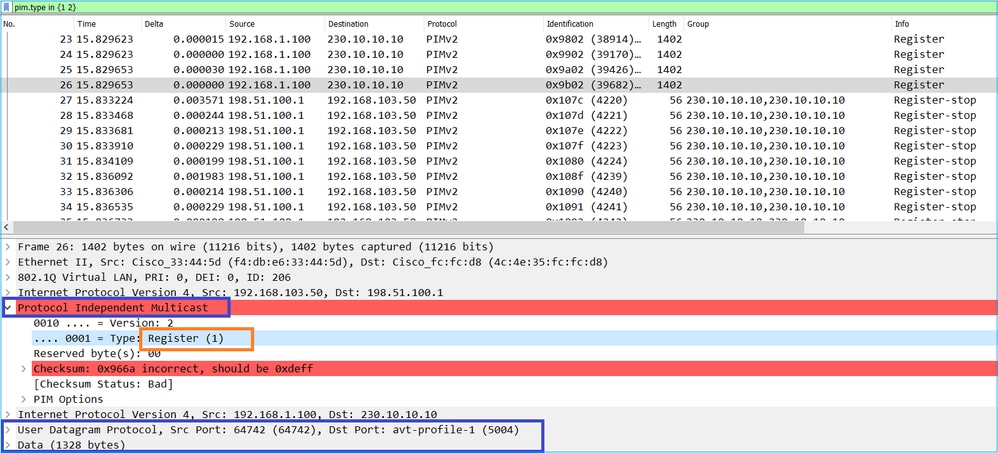
Het PIM Register-bericht is een PIM-bericht dat UDP-gegevens bevat, samen met de PIM Register-informatie:
Het bericht PIM Register-Stop:
De firewall (last-hop router) krijgt de multicast stream op interface OUTSIDE en initieert de Shortest Path Tree (SPT) switch naar interface NET207:
asa# debug pim group 230.10.10.10
IPv4 PIM group debugging is on
for group 230.10.10.10

IPv4 PIM: (*,230.10.10.10) Processing Periodic Join-Prune timer
IPv4 PIM: (*,230.10.10.10) J/P processing
IPv4 PIM: (*,230.10.10.10) Periodic J/P scheduled in 50 secs
IPv4 PIM: (*,230.10.10.10) J/P adding Join on OUTSIDE                                          <-- A PIM Join message is sent from the interface OUTSIDE
IPv4 PIM: [0] (192.168.1.100,230.10.10.10/32) OUTSIDE MRIB update (f=20,c=20)
IPv4 PIM: [0] (192.168.1.100,230.10.10.10) Signal presenta on OUTSIDE                          <-- The multicast packets arrive on the interface OUTSIDE
IPv4 PIM: (192.168.1.100,230.10.10.10) Create entry
IPv4 PIM: [0] (192.168.1.100,230.10.10.10/32) OUTSIDE MRIB modify NS
IPv4 PIM: (192.168.1.100,230.10.10.10) RPF changed from 0.0.0.0/- to 192.168.105.60/NET207     <-- The SPT switchover starts from the interface OUTSIDE to the interface NET207
IPv4 PIM: (192.168.1.100,230.10.10.10) Source metric changed from [0/0] to [110/20]
IPv4 PIM: [0] (192.168.1.100,230.10.10.10/32) MRIB modify DC
IPv4 PIM: [0] (192.168.1.100,230.10.10.10/32) OUTSIDE MRIB modify A NS
IPv4 PIM: [0] (192.168.1.100,230.10.10.10/32) INSIDE MRIB modify F NS
IPv4 PIM: (192.168.1.100,230.10.10.10) Set alive timer to 210 sec
IPv4 PIM: [0] (192.168.1.100,230.10.10.10/32) OUTSIDE MRIB modify !NS
IPv4 PIM: [0] (192.168.1.100,230.10.10.10/32) MRIB modify !DC
IPv4 PIM: (192.168.1.100,230.10.10.10) Updating J/P status from Null to Join
IPv4 PIM: (192.168.1.100,230.10.10.10) J/P scheduled in 0.0 secs
IPv4 PIM: [0] (192.168.1.100,230.10.10.10/32) NET207 MRIB modify NS
IPv4 PIM: [0] (192.168.1.100,230.10.10.10/32) OUTSIDE MRIB modify !SP
IPv4 PIM: [0] (192.168.1.100,230.10.10.10/32) OUTSIDE MRIB update (f=2,c=20)
IPv4 PIM: [0] (192.168.1.100,230.10.10.10/32) NET207 MRIB update (f=28,c=20)
IPv4 PIM: [0] (192.168.1.100,230.10.10.10) Signal presenta on NET207
IPv4 PIM: (192.168.1.100,230.10.10.10) Set SPT bit                                             <-- The SPT bit is set
IPv4 PIM: [0] (192.168.1.100,230.10.10.10/32) MRIB modify !SP
IPv4 PIM: [0] (192.168.1.100,230.10.10.10/32) OUTSIDE MRIB modify !A
IPv4 PIM: [0] (192.168.1.100,230.10.10.10/32) NET207 MRIB modify A !NS
IPv4 PIM: (192.168.1.100,230.10.10.10)RPT Updating J/P status from Null to Prune
IPv4 PIM: (192.168.1.100,230.10.10.10)RPT Create entry
IPv4 PIM: (192.168.1.100,230.10.10.10)RPT J/P scheduled in 0.0 secs
IPv4 PIM: (192.168.1.100,230.10.10.10) Set alive timer to 210 sec
IPv4 PIM: [0] (192.168.1.100,230.10.10.10/32) NET207 MRIB modify !SP
IPv4 PIM: [0] (192.168.1.100,230.10.10.10/32) NET207 MRIB update (f=2,c=20)
IPv4 PIM: (192.168.1.100,230.10.10.10)RPT Processing timers
IPv4 PIM: (192.168.1.100,230.10.10.10)RPT J/P processing
IPv4 PIM: (192.168.1.100,230.10.10.10)RPT J/P adding Prune on OUTSIDE                         <-- A PIM Prune message is sent from the interface OUTSIDE
IPv4 PIM: (192.168.1.100,230.10.10.10)RPT Delete entry
IPv4 PIM: (192.168.1.100,230.10.10.10) Processing timers
IPv4 PIM: (192.168.1.100,230.10.10.10) J/P processing
IPv4 PIM: (192.168.1.100,230.10.10.10) Periodic J/P scheduled in 50 secs
IPv4 PIM: (192.168.1.100,230.10.10.10) J/P adding Join on NET207                              <-- A PIM Join message is sent from the interface NET207
IPv4 PIM: [0] (192.168.1.100,230.10.10.10/32) NET207 MRIB update (f=22,c=20)
IPv4 PIM: [0] (192.168.1.100,230.10.10.10) Signal presenta on NET207
IPv4 PIM: (192.168.1.100,230.10.10.10) Set alive timer to 210 sec
IPv4 PIM: [0] (192.168.1.100,230.10.10.10/32) NET207 MRIB modify !SP
IPv4 PIM: [0] (192.168.1.100,230.10.10.10/32) NET207 MRIB update (f=2,c=20)
De PIM-debug op de FTD wanneer de switchover plaatsvindt:
IPv4 PIM: J/P entry: Join root: 192.168.1.100 group: 230.10.10.10 flags: S
IPv4 PIM: (192.168.1.100,230.10.10.10) NET207 J/P state changed from Null to Join            <-- A PIM Join message is sent from the interface NET207
IPv4 PIM: (192.168.1.100,230.10.10.10) NET207 FWD state change from Prune to Forward         <-- The packets are sent from the interface NET207
IPv4 PIM: [0] (192.168.1.100,230.10.10.10/32) NET207 MRIB modify F NS
IPv4 PIM: (192.168.1.100,230.10.10.10) NET207 Raise J/P expiration timer to 210 seconds
IPv4 PIM: (192.168.1.100,230.10.10.10) Tunnel0 Processing timers
...
IPv4 PIM: [0] (192.168.1.100,230.10.10.10/32) NET207 MRIB update (f=9,c=20)
IPv4 PIM: J/P entry: Prune root: 192.168.1.100 group: 230.10.10.10 flags: S
IPv4 PIM: (192.168.1.100,230.10.10.10) OUTSIDE J/P state changed from Join to Null
IPv4 PIM: (192.168.1.100,230.10.10.10) OUTSIDE FWD state change from Forward to Prune        <-- A PIM Prune message is sent from the interface OUTSIDE
De FTD mroute zodra de SPT-switchover begint:
firepower# show mroute 230.10.10.10

Multicast Routing Table
Flags: D - Dense, S - Sparse, B - Bidir Group, s - SSM Group,
       C - Connected, L - Local, I - Received Source Specific Host Report,
       P - Pruned, R - RP-bit set, F - Register flag, T - SPT-bit set,
       J - Join SPT
Timers: Uptime/Expires
Interface state: Interface, State

(192.168.1.100, 230.10.10.10), 00:00:06/00:03:23, flags: SFT                <-- SPT-bit is set when the switchover occurs
  Incoming interface: INSIDE
  RPF nbr: 192.168.1.100, Registering
  Immediate Outgoing interface list:
    NET207, Forward, 00:00:06/00:03:23                                      <-- Both interfaces are shown in OIL
    OUTSIDE, Forward, 00:00:06/00:03:23                                     <-- Both interfaces are shown in OIL
    Tunnel0, Forward, 00:00:06/never
Aan het einde van de SPT-switchover wordt alleen de NET207-interface weergegeven in de OIL van FTD:
firepower# show mroute 230.10.10.10

Multicast Routing Table
Flags: D - Dense, S - Sparse, B - Bidir Group, s - SSM Group,
       C - Connected, L - Local, I - Received Source Specific Host Report,
       P - Pruned, R - RP-bit set, F - Register flag, T - SPT-bit set,
       J - Join SPT
Timers: Uptime/Expires
Interface state: Interface, State

(192.168.1.100, 230.10.10.10), 00:00:28/00:03:01, flags: SFT
  Incoming interface: INSIDE
  RPF nbr: 192.168.1.100
  Immediate Outgoing interface list:
    NET207, Forward, 00:00:28/00:03:01             <-- The interface NET207 forwards the multicast stream after the SPT switchover
Op de last-hop router (ASA) is ook het SPT-bit ingesteld:
asa# show mroute 230.10.10.10
Multicast Routing Table
Flags: D - Dense, S - Sparse, B - Bidir Group, s - SSM Group,
       C - Connected, L - Local, I - Received Source Specific Host Report,
       P - Pruned, R - RP-bit set, F - Register flag, T - SPT-bit set,
       J - Join SPT
Timers: Uptime/Expires
Interface state: Interface, State

(*, 230.10.10.10), 01:43:09/never, RP 198.51.100.1, flags: SCJ
  Incoming interface: OUTSIDE
  RPF nbr: 192.168.104.61
  Immediate Outgoing interface list:
    INSIDE, Forward, 01:43:09/never

(192.168.1.100, 230.10.10.10), 00:00:03/00:03:27, flags: SJT        <-- SPT switchover for group 230.10.10.10
  Incoming interface: NET207                                        <-- The multicast packets arrive on interface NET207
  RPF nbr: 192.168.105.60
  Inherited Outgoing interface list:
    INSIDE, Forward, 01:43:09/never
De switchover van de ASA NET207 interface (de eerste hop router die de switchover deed). Een PIM Join-bericht wordt verzonden naar het upstream-apparaat (FTD):
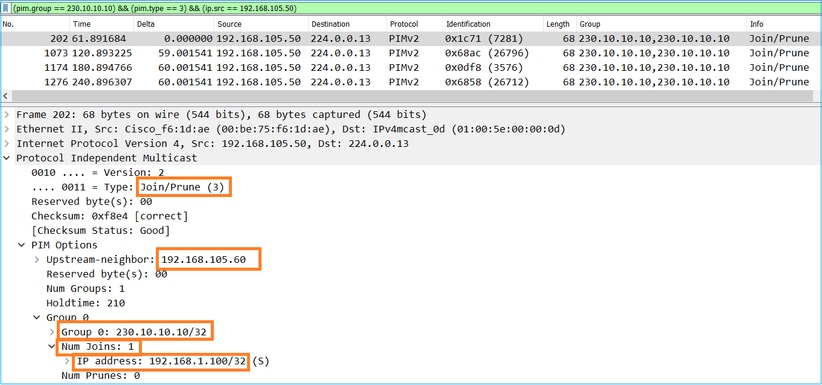
Op de EXTERNE interface wordt een PIM Prune-bericht naar de RP gestuurd om de multicast-stream te stoppen:
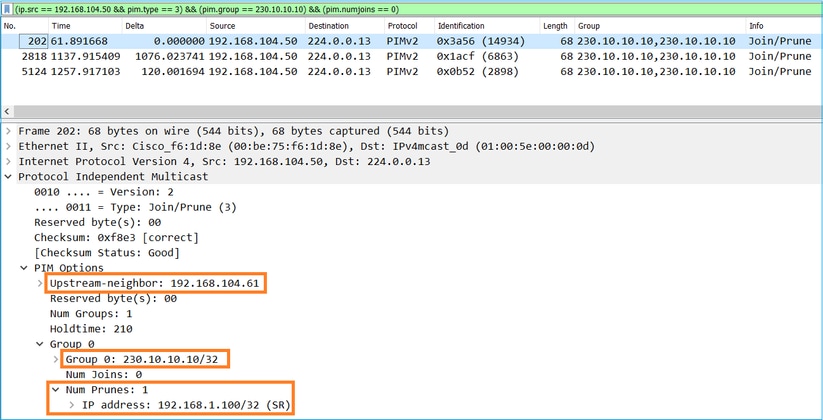
Verificatie van het PIM-verkeer:
firepower# show pim traffic

PIM Traffic Counters
Elapsed time since counters cleared: 1w2d

                              Received     Sent
Valid PIM Packets             53934        63983
Hello                         36905        77023
Join-Prune                    6495         494          <-- PIM Join/Prune messages
Register                      0            2052         <-- PIM Register messages
Register Stop                 1501         0            <-- PIM Register Stop messages
Assert                        289          362
Bidir DF Election             0            0

Errors:
Malformed Packets                           0
Bad Checksums                               0
Send Errors                                 0
Packet Sent on Loopback Errors              0
Packets Received on PIM-disabled Interface  0
Packets Received with Unknown PIM Version   0
Packets Received with Incorrect Addressing  0
Om het aantal pakketten te controleren dat wordt afgehandeld in het trage pad versus snelle pad versus controlepunt:
firepower# show asp cluster counter

Global dp-counters:


Context specific dp-counters:
MCAST_FP_FROM_PUNT                      2712    Number of multicast packets punted from CP to FP
MCAST_FP_FORWARDED                      94901   Number of multicast packets forwarded in FP
MCAST_FP_TO_SP                          1105138 Number of multicast packets punted from FP to SP
MCAST_SP_TOTAL                          1107850 Number of total multicast packets processed in SP
MCAST_SP_FROM_PUNT                      2712    Number of multicast packets punted from CP to SP
MCAST_SP_FROM_PUNT_FORWARD              2712    Number of multicast packets coming from CP that are forwarded
MCAST_SP_PKTS                           537562  Number of multicast packets that require slow-path attention
MCAST_SP_PKTS_TO_FP_FWD                 109     Number of multicast packets that skip over punt rule and are forwarded
MCAST_SP_PKTS_TO_CP                     166981  Number of multicast packets punted to CP from SP
MCAST_FP_CHK_FAIL_NO_HANDLE             567576  Number of multicast packets failed with no flow mcast_handle
MCAST_FP_CHK_FAIL_NO_ACCEPT_IFC         223847  Number of multicast packets failed with no accept interface
MCAST_FP_CHK_FAIL_NO_SEQ_NO_MATCH       131     Number of multicast packets failed with no matched sequence number
MCAST_FP_CHK_FAIL_NO_FP_FWD             313584  Number of multicast packets that cannot be fast-path forwarded
MCAST_FP_UPD_FOR_UNMATCH_IFC            91      Number of times that multicast flow's ifc_out  cannot be found on mcast entry's interface list
Een diagram dat stap voor stap laat zien wat er gebeurt:
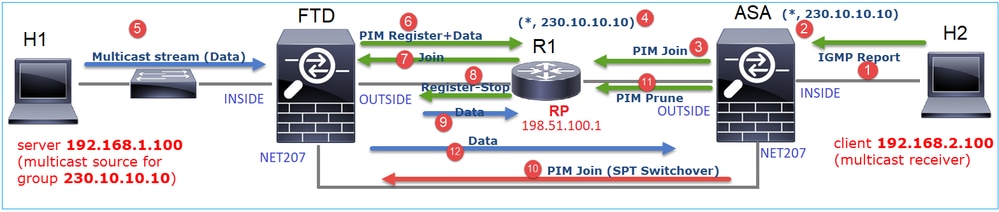
- De eindhost (H2) stuurt een IGMP-rapport om zich aan te sluiten bij de multicast-stream 230.10.10.10.
- De laatste-hop router (ASA) die de PIM DR is, maakt een (*, 230.10.10.10) item.
- De ASA stuurt een PIM Join-bericht naar RP voor groep 230.10.10.10.
- De RP maakt de (*, 230.10.10.10) vermelding.
- De server verzendt de multicast-streamgegevens.
- De FTD omhult de multicast pakketten in PIM Register berichten en stuurt ze (unicast) naar RP. Op dit punt ziet de RP dat hij een actieve ontvanger heeft, de multicast-pakketten ontkapselt en naar de ontvanger stuurt.
- De RP stuurt een PIM Join-bericht naar de FTD om lid te worden van de multicast-structuur.
- De RP stuurt een PIM Register-Stop bericht naar de FTD.
- De FTD stuurt een native multicast stream (geen PIM-inkapseling) naar de RP.
- De laatste-hop router (ASA) ziet dat de bron (192.168.1.100) een beter pad heeft van de NET207-interface en een switchover start. Het stuurt een PIM Join-bericht naar het upstream-apparaat (FTD).
- De laatste-hop router stuurt een PIM Prune bericht naar de RP.
- De FTD stuurt de multicast-stream door naar de NET207-interface. De ASA verplaatst zich van de gedeelde boom (RP-boom) naar de bronboom (SPT).
Taak 2 – PIM Bootstrap Router (BSR) configureren
Basisbeginselen van BSR
- BSR (RFC 5059) is een multicast-mechanisme voor besturingsvlakken dat het PIM-protocol gebruikt en apparaten in staat stelt de RP-informatie dynamisch te leren.
- BSR-definities:
- Kandidaat RP (C-RP): Een apparaat dat een RP wil zijn.
- Kandidaat-BSR (C-BSR): Een apparaat dat een BSR wil zijn en RP-sets op andere apparaten adverteert.
- BSR: Een apparaat dat wordt gekozen als een BSR onder veel C-BSR's. De hoogste BSR-prioriteit wint de verkiezingen.
- RP-set: een lijst van alle C-RP's en hun prioriteiten.
- RP: Het apparaat met de laagste RP-prioriteit wint de verkiezing.
- BSR PIM-bericht (leeg): Een PIM-bericht dat wordt gebruikt bij de BSR-verkiezing.
- BSR PIM-bericht (normaal): Een PIM-bericht verzonden naar 224.0.0.13 IP en bevat een RP-set en BSR-informatie.
Hoe BSR werkt
1. BSR-verkiezingsmechanisme.
Elke C-BSR stuurt lege PIM BSR-berichten die een prioriteit bevatten. Het apparaat met de hoogste prioriteit (fallback is de hoogste IP) wint de verkiezing en wordt de BSR. De rest van de apparaten versturen geen lege BSR-berichten meer.
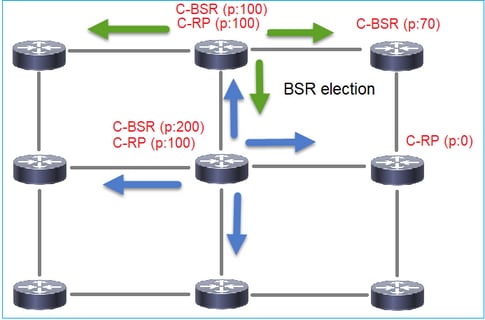
Een BSR-bericht dat tijdens het verkiezingsproces wordt gebruikt, bevat alleen prioriteitsinformatie van C-BSR:
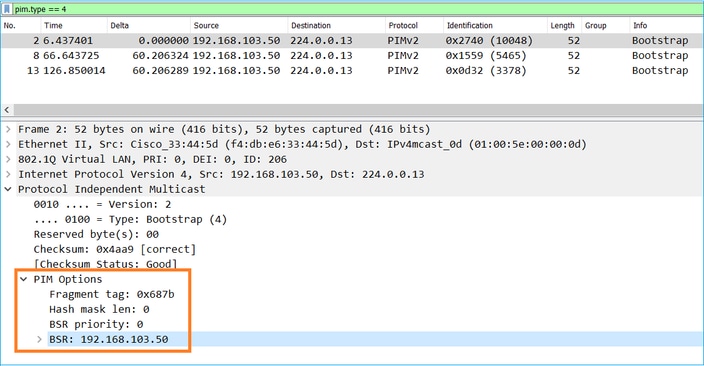
Gebruik dit weergavefilter om BSR-berichten in Wireshark weer te geven: pim.type == 4
2. De C-RP's sturen unicast BSR-berichten naar de BSR die hun C-RP-prioriteit bevatten:
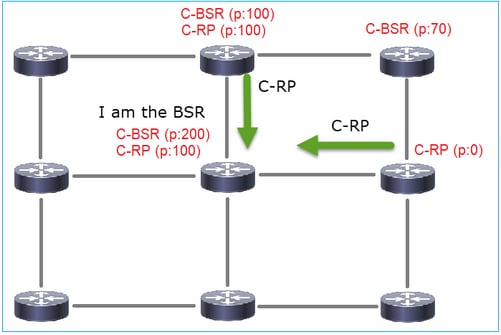
Een kandidaat-RP-bericht:
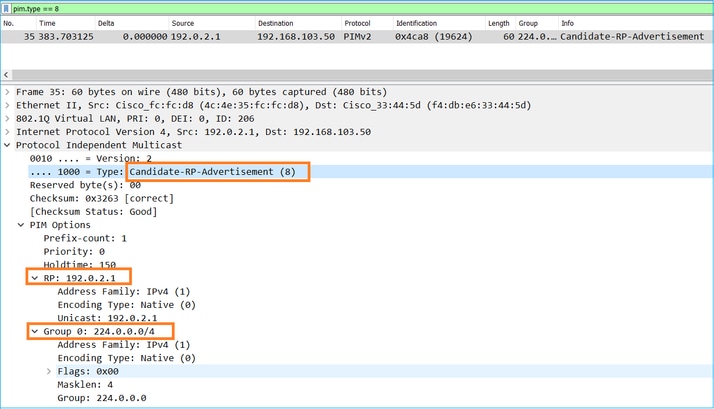
Gebruik dit weergavefilter om BSR-berichten in Wireshark weer te geven: pim.type == 8
3. De BSR stelt de RP-set samen en maakt deze bekend aan alle PIM-buren:
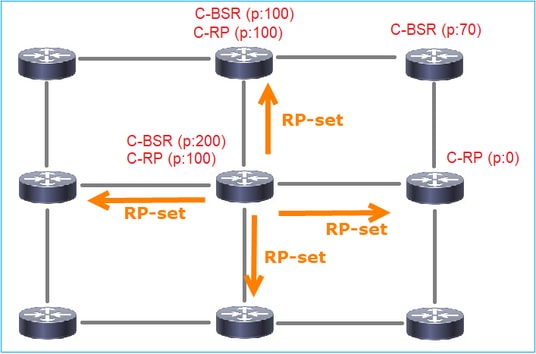
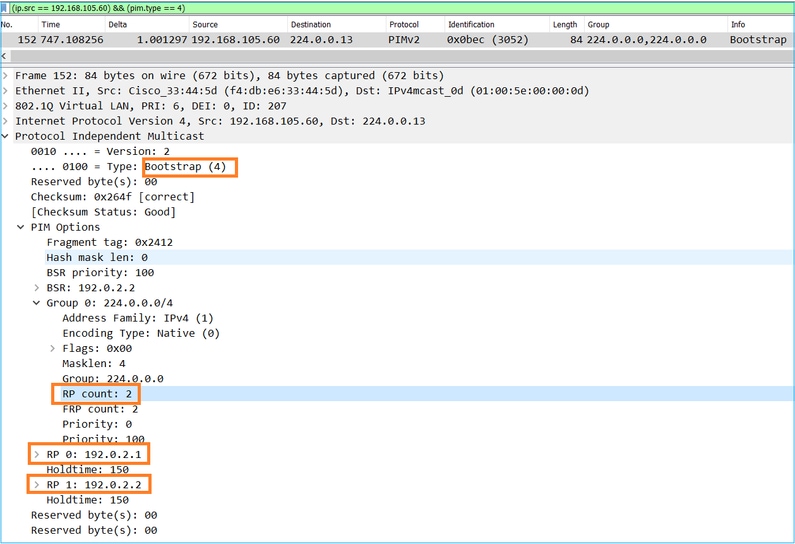
4. De routers/firewalls krijgen de RP-set en selecteren de RP op basis van de laagste prioriteit:
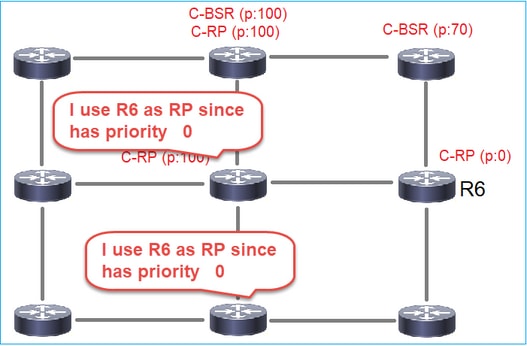
Taakvereiste
Configureer de C-BSR's en C-RP's volgens deze topologie:
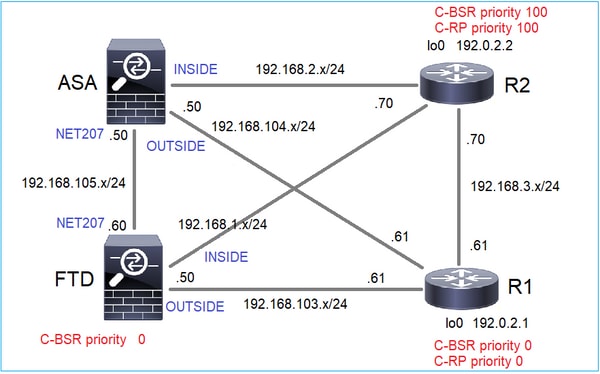
Voor deze taak moet de FTD zichzelf aankondigen als C-BSR op de EXTERNE interface met BSR-prioriteit 0.
Oplossing
FMC-configuratie voor FTD:
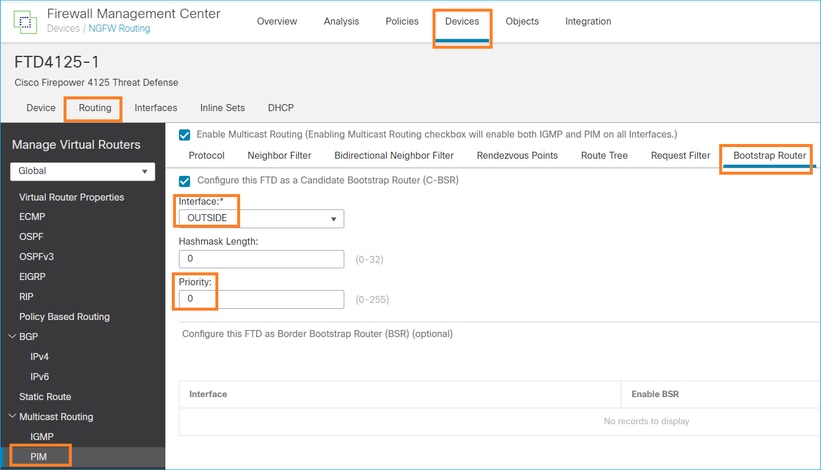
De geïmplementeerde configuratie:
multicast-routing
!
pim bsr-candidate OUTSIDE 0 0
Configuratie op de andere apparaten:
R1
ip multicast-routing
ip pim bsr-candidate Loopback0 0
ip pim rp-candidate Loopback0
!
interface Loopback0
 ip address 192.0.2.1 255.255.255.255
 ip pim sparse-mode
!
! PIM is also enabled on the transit interfaces (e.g. G0/0.203, G0/0.207, G0/0.205)
Hetzelfde voor R2, maar met verschillende C-BSR- en C-RP-prioriteiten
ip pim bsr-candidate Loopback0 0 100
ip pim rp-candidate Loopback0 priority 100
Op ASA is er alleen multicast wereldwijd ingeschakeld. Dit maakt PIM op alle interfaces mogelijk:
multicast-routing
Verificatie
R2 is de gekozen BSR vanwege de hoogste prioriteit:
firepower# show pim bsr-router

PIMv2 BSR information

BSR Election Information
     BSR Address: 192.0.2.2             <-- This is the IP of the BSR (R1 lo0)
     Uptime: 00:03:35, BSR Priority: 100, Hash mask length: 0
     RPF: 192.168.1.70,INSIDE           <-- The interface to the BSR
     BS Timer: 00:01:34
  This system is candidate BSR
      Candidate BSR address: 192.168.103.50, priority: 0, hash mask length: 0
R1 wordt gekozen als RP vanwege de laagste prioriteit:
firepower# show pim group-map

Group Range        Proto    Client    Groups RP address    Info

224.0.1.39/32*     DM       static    0      0.0.0.0
224.0.1.40/32*     DM       static    0      0.0.0.0
224.0.0.0/24*      L-Local  static    1      0.0.0.0
232.0.0.0/8*       SSM      config    0      0.0.0.0
224.0.0.0/4*       SM       BSR       0      192.0.2.1     RPF: OUTSIDE,192.168.103.61     <-- The elected BSR
224.0.0.0/4        SM       BSR       0      192.0.2.2     RPF: INSIDE,192.168.1.70
224.0.0.0/4        SM       static    0      0.0.0.0       RPF: ,0.0.0.0
De BSR-berichten zijn onderworpen aan een RPF-controle. U kunt debug pim bsr inschakelen om dit te verifiëren:
IPv4 BSR: Received BSR message from 192.168.105.50 for 192.0.2.2, BSR priority 100 hash mask length 0
IPv4 BSR: BSR message from 192.168.105.50/NET207 for 192.0.2.2 RPF failed, dropped         <-- The RPF check for the received BSR message failed
Als u de RPF-interface wilt wijzigen, kunt u een statische mroute configureren. In dit voorbeeld accepteert de firewall BSR-berichten van IP 192.168.105.50:
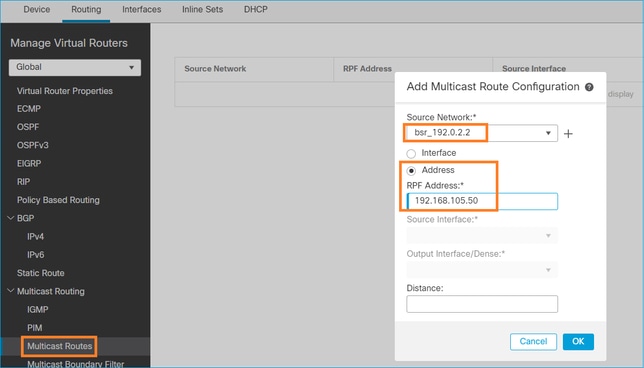
firepower# show run mroute
mroute 192.0.2.2 255.255.255.255 192.168.105.50
firepower# show pim bsr-router

PIMv2 BSR information

BSR Election Information
     BSR Address: 192.0.2.2
     Uptime: 01:21:38, BSR Priority: 100, Hash mask length: 0
     RPF: 192.168.105.50,NET207      <-- The RPF check points to the static mroute
     BS Timer: 00:01:37
This system is candidate BSR
      Candidate BSR address: 192.168.103.50, priority: 0, hash mask length: 0
Nu worden BSR-berichten op de NET207-interface geaccepteerd, maar aan de BINNENKANT worden gedropt:
IPv4 BSR: Received BSR message from 192.168.1.70 for 192.0.2.2, BSR priority 100 hash mask length 0
IPv4 BSR: BSR message from 192.168.1.70/INSIDE for 192.0.2.2 RPF failed, dropped                          <-- RPF failure on INSIDE
...
IPv4 BSR: Received BSR message from 192.168.105.50 for 192.0.2.2, BSR priority 100 hash mask length 0     <-- RPF check is OK
Schakel vastleggen met trace in op de firewall en controleer hoe de BSR-berichten worden verwerkt:
firepower# show capture
capture CAPI type raw-data trace interface INSIDE [Capturing - 276 bytes]
  match pim any any
capture CAPO type raw-data trace interface OUTSIDE [Capturing - 176 bytes]
  match pim any any
De PIM-verbindingen worden op de firewall beëindigd, zodat het spoor nuttige informatie kan weergeven, moet u de verbindingen met het vak wissen:
firepower# show conn all | i PIM
firepower# show conn all | include PIM
PIM OUTSIDE 192.168.103.61 NP Identity Ifc 224.0.0.13, idle 0:00:23, bytes 116802, flags
PIM NET207 192.168.104.50 NP Identity Ifc 224.0.0.13, idle 0:00:17, bytes 307296, flags
PIM NET207 192.168.104.61 NP Identity Ifc 224.0.0.13, idle 0:00:01, bytes 184544, flags
PIM NET207 192.168.105.50 NP Identity Ifc 224.0.0.13, idle 0:00:18, bytes 120248, flags
PIM INSIDE 192.168.1.70 NP Identity Ifc 224.0.0.13, idle 0:00:27, bytes 15334, flags
PIM OUTSIDE 224.0.0.13 NP Identity Ifc 192.168.103.50, idle 0:00:21, bytes 460834, flags
PIM INSIDE 224.0.0.13 NP Identity Ifc 192.168.1.50, idle 0:00:00, bytes 441106, flags
PIM NET207 224.0.0.13 NP Identity Ifc 192.168.105.60, idle 0:00:09, bytes 458462, flags

firepower# clear conn all addr 224.0.0.13
8 connection(s) deleted.
firepower# clear cap /all
firepower# show capture CAPI packet-number 2 trace

6 packets captured

2: 11:31:44.390421 802.1Q vlan#205 P6 192.168.1.70 > 224.0.0.13 ip-proto-103, length 38        <-- Ingress PIM packet
Phase: 1
Type: CAPTURE
Subtype:
Result: ALLOW
Elapsed time: 4880 ns
Config:
Additional Information:
MAC Access list

Phase: 2
Type: ACCESS-LIST
Subtype:
Result: ALLOW
Elapsed time: 4880 ns
Config:
Implicit Rule
Additional Information:
MAC Access list

Phase: 3
Type: ROUTE-LOOKUP
Subtype: No ECMP load balancing
Result: ALLOW
Elapsed time: 9760 ns
Config:
Additional Information:
Destination is locally connected. No ECMP load balancing.
Found next-hop 192.168.1.70 using egress ifc INSIDE(vrfid:0)

Phase: 4
Type: CLUSTER-DROP-ON-SLAVE
Subtype: cluster-drop-on-slave
Result: ALLOW
Elapsed time: 4392 ns
Config:
Additional Information:

Phase: 5
Type: ACCESS-LIST
Subtype:
Result: ALLOW
Elapsed time: 4392 ns
Config:
Implicit Rule
Additional Information:

Phase: 6
Type: NAT
Subtype: per-session
Result: ALLOW
Elapsed time: 4392 ns
Config:
Additional Information:

Phase: 7
Type: IP-OPTIONS
Subtype:
Result: ALLOW
Elapsed time: 4392 ns
Config:
Additional Information:

Phase: 8
Type: CLUSTER-REDIRECT
Subtype: cluster-redirect
Result: ALLOW
Elapsed time: 18056 ns
Config:
Additional Information:

Phase: 9
Type: MULTICAST             <-- The multicast process
Subtype: pim
Result: ALLOW
Elapsed time: 976 ns
Config:
Additional Information:

Phase: 10
Type: MULTICAST
Subtype:
Result: ALLOW
Elapsed time: 488 ns
Config:
Additional Information:

Phase: 11
Type: FLOW-CREATION
Subtype:
Result: ALLOW
Elapsed time: 20008 ns
Config:
Additional Information:
New flow created with id 25630, packet dispatched to next module

Result:
input-interface: INSIDE(vrfid:0)
input-status: up
input-line-status: up
output-interface: INSIDE(vrfid:0)
output-status: up
output-line-status: up
Action: allow
Time Taken: 76616 ns
Als het PIM-pakket is gedropt vanwege een RPF-fout, wordt op het trace het volgende weergegeven:
firepower# show capture NET207 packet-number 4 trace

85 packets captured

4: 11:31:42.385951 802.1Q vlan#207 P6 192.168.104.61 > 224.0.0.13 ip-proto-103, length 38        <-- Ingress PIM packet
Phase: 1
Type: CAPTURE
Subtype:
Result: ALLOW
Elapsed time: 5368 ns
Config:
Additional Information:
MAC Access list

Phase: 2
Type: ACCESS-LIST
Subtype:
Result: ALLOW
Elapsed time: 5368 ns
Config:
Implicit Rule
Additional Information:
MAC Access list

Phase: 3
Type: INPUT-ROUTE-LOOKUP
Subtype: Resolve Egress Interface
Result: ALLOW
Elapsed time: 11224 ns
Config:
Additional Information:
Found next-hop 192.168.103.61 using egress ifc OUTSIDE(vrfid:0)

Phase: 4
Type: INPUT-ROUTE-LOOKUP
Subtype: Resolve Egress Interface
Result: ALLOW
Elapsed time: 3416 ns
Config:
Additional Information:
Found next-hop 192.168.103.61 using egress ifc OUTSIDE(vrfid:0)

Result:
input-interface: NET207(vrfid:0)
input-status: up
input-line-status: up
output-interface: OUTSIDE(vrfid:0)
output-status: up
output-line-status: up
Action: drop
Time Taken: 25376 ns
Drop-reason: (rpf-violated) Reverse-path verify failed, Drop-location: frame 0x0000558f240d6e15 flow (NA)/NA    <-- the packet is dropped due to RPF check failure
De ASP-tabeldrops en -opnames tonen RPF-mislukte pakketten:
firepower# show asp drop

Frame drop:
  Reverse-path verify failed (rpf-violated)                                  122       <-- Multicast RPF drops
  Flow is denied by configured rule (acl-drop)                               256
  FP L2 rule drop (l2_acl)                                                   768
Om pakketten vast te leggen die zijn gevallen als gevolg van een RPF-fout:
firepower# capture ASP type asp-drop rpf-violated
firepower# show capture ASP | include 224.0.0.13
2: 11:36:20.445960 802.1Q vlan#207 P6 192.168.104.50 > 224.0.0.13 ip-proto-103, length 38
10: 11:36:38.787846 802.1Q vlan#207 P6 192.168.104.61 > 224.0.0.13 ip-proto-103, length 38
15: 11:36:48.299743 802.1Q vlan#207 P6 192.168.104.50 > 224.0.0.13 ip-proto-103, length 46
16: 11:36:48.300063 802.1Q vlan#207 P6 192.168.104.61 > 224.0.0.13 ip-proto-103, length 46
Methodologie voor probleemoplossing
De probleemoplossingsmethode voor de firewall is voornamelijk afhankelijk van de rol van de firewall in de multicast-topologie. Dit is de lijst met aanbevolen stappen voor het oplossen van problemen:
- Verduidelijk de details van de beschrijving van het probleem en de symptomen. Probeer het bereik te verkleinen tot het controlevlak (IGMP/PIM) of de problemen met het gegevensvlak (multicast stream).
- De verplichte voorwaarde voor het oplossen van problemen met multicast op de firewall is om de multicast-topologie te verduidelijken. U moet ten minste identificeren:
- rol van de firewall in de multicast-topologie - FHR, LHR, RP of een andere intermediaire rol.
- verwachte multicast-ingress- en egress-interfaces op de firewall.
- RP.
- IP-adressen van de afzender.
- multicast groepeert IP-adressen en bestemmingspoorten.
- ontvangers van de multicast stream.
3. Identificeer het type multicast-routering - Stub of PIM multicast-routering:
- Stub multicast-routering - het biedt dynamische hostregistratie en vergemakkelijkt multicast-routering. Wanneer de ASA is geconfigureerd voor stub multicast-routering, fungeert deze als een IGMP-proxyagent. In plaats van volledig deel te nemen aan multicast-routering, stuurt de ASA IGMP-berichten door naar een upstream multicast-router, die de levering van de multicast-gegevens instelt. Als u de stub-routeringsmodus wilt identificeren, gebruikt u de opdracht show igmp interface en controleert u de IGMP forward-configuratie:
firepower# show igmp interface
inside is up, line protocol is up
  Internet address is 192.168.2.2/24
  IGMP is disabled on interface
outside is up, line protocol is up
  Internet address is 192.168.3.1/24
  IGMP is enabled on interface
  Current IGMP version is 2
  IGMP query interval is 125 seconds
  IGMP querier timeout is 255 seconds
  IGMP max query response time is 10 seconds
  Last member query response interval is 1 seconds
  Inbound IGMP access group is:
  IGMP limit is 500, currently active joins: 0
  Cumulative IGMP activity: 0 joins, 0 leaves
  IGMP forwarding on interface inside
  IGMP querying router is 192.168.3.1 (this system)
PIM is ingeschakeld op de interfaces, maar de buurt is niet vastgesteld:
firepower# show pim interface
Address          Interface          PIM  Nbr   Hello  DR         DR
                                         Count Intvl  Prior

192.168.2.2      inside             on   0     30     1          this system
192.168.3.1      outside            on   0     30     1          this system

firepower# show pim neighbor
No neighbors found.
PIM-SM/Bidir en IGMP-forwarding worden niet gelijktijdig ondersteund.
U kunt geen opties zoals het RP-adres configureren:
%Error: PIM-SM/Bidir and IGMP forwarding are not supported concurrently
- PIM multicast routing - De PIM multicast routing is de meest voorkomende implementatie. De firewall ondersteunt zowel PIM-SM als bidirectionele PIM. PIM-SM is een multicast-routeringsprotocol dat gebruikmaakt van de onderliggende unicast-routeringsinformatiebasis of een afzonderlijke multicast-compatibele routeringsinformatiebasis. Het bouwt unidirectionele gedeelde boom geworteld op een enkele Rendezvous Point (RP) per multicast groep en maakt optioneel kortste pad bomen per multicast bron. In deze implementatiemodus configureren de gebruikers, in tegenstelling tot de stub-modus, meestal de RP-adresconfiguratie en stelt de firewall PIM-aangrenzingen in met de peers:
firepower# show run pim
pim rp-address 10.10.10.1

firepower# show pim group-map
Group Range         Proto   Client   Groups RP address      Info
224.0.1.39/32*      DM      static   0      0.0.0.0
224.0.1.40/32*      DM      static   0      0.0.0.0
224.0.0.0/24*       L-Local static   1      0.0.0.0
232.0.0.0/8*        SSM     config   0      0.0.0.0
224.0.0.0/4*        SM      config   1      10.10.10.1     RPF: inside,192.168.2.1 <--- RP address is 10.10.1.1
224.0.0.0/4         SM      static   0      0.0.0.0         RPF: ,0.0.0.0

firepower# show pim neighbor
Neighbor Address  Interface          Uptime    Expires DR pri Bidir
192.168.2.1       inside             00:02:52  00:01:19 1
192.168.3.100     outside            00:03:03  00:01:39 1 (DR)
4. Controleer of het RP IP-adres is geconfigureerd en of het bereikbaar is:
firepower# show run pim
pim rp-address 10.10.10.1

firepower# show pim group-map

Group Range         Proto   Client   Groups RP address      Info
224.0.1.39/32*      DM      static   0      0.0.0.0
224.0.1.40/32*      DM      static   0      0.0.0.0
224.0.0.0/24*       L-Local static   1      0.0.0.0
232.0.0.0/8*        SSM     config   0      0.0.0.0
224.0.0.0/4*        SM      config   1      10.10.10.1     RPF: inside,192.168.2.1 <--- RP is 10.10.10.1
224.0.0.0/4         SM      static   0      0.0.0.0         RPF: ,0.0.0.0
firepower# show pim group-map

Group Range         Proto   Client   Groups RP address      Info
224.0.1.39/32*      DM      static   0      0.0.0.0
224.0.1.40/32*      DM      static   0      0.0.0.0
224.0.0.0/24*       L-Local static   1      0.0.0.0
232.0.0.0/8*        SSM     config   0      0.0.0.0
224.0.0.0/4*        SM      config   1      192.168.2.2     RPF: Tunnel0,192.168.2.2 (us) <--- “us” means RP is the firewall. This means FTD is the RP
224.0.0.0/4         SM      static   0      0.0.0.0         RPF: ,0.0.0.0
5. Controleer extra uitgangen afhankelijk van de rol van de firewall in de multicast-topologie en de probleemsymptomen.
FHR
- Controleer de Tunnel0-status van de interface. Deze interface wordt gebruikt om onbewerkt multicast-verkeer in PIM-payload in te kapselen en unicast-pakket naar RP te verzenden voor met PIM-register-bitset:
firepower# show interface detail  | b Interface Tunnel0
Interface Tunnel0 "", is up, line protocol is up
  Hardware is   Available but not configured via nameif
        MAC address 0000.0000.0000, MTU not set
        IP address unassigned
  Control Point Interface States:
        Interface number is un-assigned
        Interface config status is active
        Interface state is active

firepower# show pim tunnel
Interface          RP Address        Source Address
Tunnel0            10.10.10.1       192.168.2.2
- Controleer routes:
firepower# show mroute
Multicast Routing Table
Flags: D - Dense, S - Sparse, B - Bidir Group, s - SSM Group,
       C - Connected, L - Local, I - Received Source Specific Host Report,
       P - Pruned, R - RP-bit set, F - Register flag, T - SPT-bit set,
       J - Join SPT
Timers: Uptime/Expires
Interface state: Interface, State

(192.168.2.1, 230.1.1.1), 00:00:07/00:03:22, flags: SFT
  Incoming interface: inside
  RPF nbr: 192.168.2.1, Registering <--- Registering state
  Immediate Outgoing interface list:
    outside, Forward, 00:00:07/00:03:26
    Tunnel0, Forward, 00:00:07/never <--- Tunnel0 is in OIL, that indicates raw traffic is encapsulated.
Wanneer de firewall PIM-pakket met Register-Stop-bit ontvangt, wordt Tunnel0 uit de OIL verwijderd. De firewall stopt dan de inkapseling en verzendt onbewerkt multicast-verkeer via de egress-interface:
firepower# show mroute
Multicast Routing Table
Flags: D - Dense, S - Sparse, B - Bidir Group, s - SSM Group,
       C - Connected, L - Local, I - Received Source Specific Host Report,
       P - Pruned, R - RP-bit set, F - Register flag, T - SPT-bit set,
       J - Join SPT
Timers: Uptime/Expires
Interface state: Interface, State

(192.168.2.1, 230.1.1.1), 00:07:26/00:02:59, flags: SFT
  Incoming interface: inside
  RPF nbr: 192.168.2.1
  Immediate Outgoing interface list:
    outside, Forward, 00:07:26/00:02:59
- Controleer PIM-registertellers:
firepower# show pim traffic

PIM Traffic Counters
Elapsed time since counters cleared: 00:13:13

                              Received     Sent
Valid PIM Packets             42           58
Hello                         27           53
Join-Prune                    9            0
Register                      0            8  <--- Sent to the RP
Register Stop                 6            0  <--- Received from the RP
Assert                        0            0
Bidir DF Election             0            0

Errors:
Malformed Packets                           0
Bad Checksums                               0
Send Errors                                 0
Packet Sent on Loopback Errors              0
Packets Received on PIM-disabled Interface  0
Packets Received with Unknown PIM Version   0
Packets Received with Incorrect Addressing  0
- Controleer of unicast PIM-pakketopnamen tussen de firewall en de RP zijn gemaakt:
firepower# capture capo interface outside match pim any host 10.10.10.1 <--- RP IP
firepower# show capture  capi

4 packets captured

  1: 09:53:28.097559       192.168.3.1 > 10.10.10.1  ip-proto-103, length 50     <--- Unicast to RP
  2: 09:53:32.089167       192.168.3.1 > 10.10.10.1  ip-proto-103, length 50
  3: 09:53:37.092890       192.168.3.1 > 10.10.10.1  ip-proto-103, length 50
  4: 09:53:37.095850       10.10.10.1 > 192.168.3.1  ip-proto-103, length 18     <--- Unicast from RP
- Verzamel extra uitgangen (x.x.x.x is de multicast groep, y.y.y is de RP IP). Het wordt aanbevolen om de uitgangen enkele keren te verzamelen:
show conn all protocol udp address x.x.x.x
show local-host x.x.x.x
show asp event dp-cp
show asp drop
show asp cluster counter
show asp table routing y.y.y.y
show route y.y.y.y
show mroute
show pim interface
show pim neighbor
show pim traffic
show igmp interface
show mfib count
- Raw multicast-interfacepakket en ASP-dropcaptures verzamelen.
capture capi interface <ingress intf> buffer 32000000 match udp host X host Z <--- (ingress capture for multicast UDP traffic from host X to group Z)
capture capo interface <egress intf> buffer 32000000 match udp host X host Z <--- (egress capture for multicast UDP traffic from host X to group Z)
capture asp type asp-drop buffer 32000000 match udp host X host Z <--- (ASP drop capture for multicast UDP traffic from host X to group Z)
- Syslog-berichten - gemeenschappelijke ID's zijn 302015, 302016 en 710005.
RP
- Controleer de status van de interface Tunnel0. Deze interface wordt gebruikt om onbewerkt multicast-verkeer in PIM-payload in te kapselen en unicast-pakket naar FHR te verzenden voor met PIM-stop-bitset:
firepower# show interface detail  | b Interface Tunnel0
Interface Tunnel0 "", is up, line protocol is up
  Hardware is   Available but not configured via nameif
        MAC address 0000.0000.0000, MTU not set
        IP address unassigned
  Control Point Interface States:
        Interface number is un-assigned
        Interface config status is active
        Interface state is active

firepower# show pim tunnel
Interface          RP Address        Source Address

Tunnel0            192.168.2.2       192.168.2.2
Tunnel0            192.168.2.2        -
- Controleer routes:
firepower# show mroute

Multicast Routing Table
Flags: D - Dense, S - Sparse, B - Bidir Group, s - SSM Group,
       C - Connected, L - Local, I - Received Source Specific Host Report,
       P - Pruned, R - RP-bit set, F - Register flag, T - SPT-bit set,
       J - Join SPT
Timers: Uptime/Expires
Interface state: Interface, State

(*, 230.1.1.1), 01:04:30/00:02:50, RP 192.168.2.2, flags: S <--- *,G entry
  Incoming interface: Tunnel0
  RPF nbr: 192.168.2.2
  Immediate Outgoing interface list:
    outside, Forward, 01:04:30/00:02:50

(192.168.1.100, 230.1.1.1), 00:00:04/00:03:28, flags: ST S <--- S,G entry
  Incoming interface: inside
  RPF nbr: 192.168.2.1
  Immediate Outgoing interface list:
    outside, Forward, 00:00:03/00:03:25
- Controleer PIM-tellers:
firepower # show pim traffic
PIM Traffic Counters
Elapsed time since counters cleared: 02:24:37

                              Received     Sent
Valid PIM Packets             948          755
Hello                         467          584
Join-Prune                    125          32
Register                      344          16
Register Stop                 12           129
Assert                        0            0
Bidir DF Election             0            0

Errors:
Malformed Packets                           0
Bad Checksums                               0
Send Errors                                 0
Packet Sent on Loopback Errors              0
Packets Received on PIM-disabled Interface  0
Packets Received with Unknown PIM Version   0
Packets Received with Incorrect Addressing  0
- Verzamel extra uitgangen (x.x.x.x is de multicast groep, y.y.y is de RP IP). Het wordt aanbevolen om de uitgangen enkele keren te verzamelen:
show conn all protocol udp address x.x.x.x
show conn all | i PIM
show local-host x.x.x.x
show asp event dp-cp
show asp drop
show asp cluster counter
show asp table routing y.y.y.y
show route y.y.y.y
show mroute
show pim interface
show pim neighbor
show igmp interface
show mfib count
- Raw multicast-interfacepakket en ASP-dropcaptures verzamelen:
capture capi interface <ingress intf> buffer 32000000 match udp host X host Z <--- (ingress capture for multicast UDP traffic from host X to group Z)
capture capo interface <egress intf> buffer 32000000 match udp host X host Z <--- (egress capture for multicast UDP traffic from host X to group Z)
capture asp type asp-drop buffer 32000000 match udp host X host Z <--- (ASP drop capture for multicast UDP traffic from host X to group Z)
- Syslog - gemeenschappelijke ID's zijn 302015, 302016 en 710005.
LHR
Overweeg de stappen die worden genoemd in de sectie voor de RP en deze aanvullende controles:
- Mroutes:
firepower# show mroute

Multicast Routing Table
Flags: D - Dense, S - Sparse, B - Bidir Group, s - SSM Group,
       C - Connected, L - Local, I - Received Source Specific Host Report,
       P - Pruned, R - RP-bit set, F - Register flag, T - SPT-bit set,
       J - Join SPT
Timers: Uptime/Expires
Interface state: Interface, State

(*, 230.1.1.1), 00:23:30/never, RP 10.10.10.1, flags: SCJ <--- C flag means connected receiver
  Incoming interface: inside
  RPF nbr: 192.168.2.1
  Immediate Outgoing interface list:
    outside, Forward, 00:23:30/never

(192.168.1.100, 230.1.1.1), 00:00:36/00:03:04, flags: SJT <--- J flag indicates switchover to SPT, T flag indicates that packets have been received on the shortest path source tree.
  Incoming interface: inside
  RPF nbr: 192.168.2.1
  Inherited Outgoing interface list:
    outside, Forward, 00:23:30/never

(*, 230.1.1.2), 00:01:50/never, RP 10.10.10.1, flags: SCJ <--- C flag means connected receiver
  Incoming interface: inside
  RPF nbr: 192.168.2.1
  Immediate Outgoing interface list:
    outside, Forward, 00:01:50/never

(192.168.1.100, 230.1.1.2), 00:00:10/00:03:29, flags: SJT <--- <--- J flag indicates switchover to SPT, T flag indicates that packets have been received on the shortest path source tree.
  Incoming interface: inside
  RPF nbr: 192.168.2.1
  Inherited Outgoing interface list:
    outside, Forward, 00:01:50/never
- IGMP-groepen:
firepower# show igmp groups detail <--- The list of IGMP groups
Interface:      outside
Group:          230.1.1.1
Uptime:         00:21:42
Router mode:    EXCLUDE (Expires: 00:03:17)
Host mode:      INCLUDE
Last reporter:  192.168.3.100 <--- Host joined group 230.1.1.1
Source list is empty
Interface:      outside

Group:          230.1.1.2
Uptime:         00:00:02
Router mode:    EXCLUDE (Expires: 00:04:17)
Host mode:      INCLUDE
Last reporter:  192.168.3.101 <--- Host joined group 230.1.1.2
Source list is empty
- IGMP-verkeersstatistieken:
firepower# show igmp traffic

IGMP Traffic Counters
Elapsed time since counters cleared: 1d04h

                              Received     Sent
Valid IGMP Packets            2468         856
Queries                       2448         856
Reports                       20           0
Leaves                        0            0
Mtrace packets                0            0
DVMRP packets                 0            0
PIM packets                   0            0

Errors:
Malformed Packets             0
Martian source                0
Bad Checksums                 0
PIM-opdrachten voor probleemoplossing (cheat sheet)
| Opdracht |
Beschrijving |
| Run-Config multicast-routing tonen |
Om te zien of multicast-routering is ingeschakeld op de firewall |
| Run mRoute weergeven
|
De statische routes weergeven die zijn geconfigureerd op de firewall |
| Pim met actieve configuratie weergeven
|
De PIM-configuratie op de firewall bekijken |
| PIM-interface tonen
|
Om te zien welke firewall-interfaces PIM hebben ingeschakeld en de PIM-buren. |
| Pim Buurman weergeven
|
Om de PIM buren te zien |
| PIM-groepskaart weergeven
|
De multicast-groepen weergeven die aan de RP zijn toegewezen |
| M-route weergeven
|
De volledige multicast-routeringstabel bekijken |
| Mroute weergeven 230.10.10.10
|
De multicast-tabel voor een specifieke multicast-groep bekijken |
| PIM-tunnel tonen
|
Om te zien of er een PIM-tunnel is gebouwd tussen de firewall en de RP |
| toon conn alle details adres RP_IP_ADDRESS
|
Om te zien of er een verbinding (PIM-tunnel) tot stand is gebracht tussen de firewall en de RP |
| PIM-topologie weergeven
|
De firewall PIM-topologieuitvoer bekijken |
| debug-PIM
|
Deze debug toont alle PIM-berichten van en naar de firewall |
| debug PIM-groep 230.10.10.10
|
Deze foutopsporing toont alle PIM-berichten van en naar de firewall voor de specifieke multicast-groep |
| PIM-verkeer weergeven
|
Statistieken bekijken over ontvangen en verzonden PIM-berichten |
| ASP-clusterteller weergeven
|
Het aantal pakketten controleren dat wordt afgehandeld in het trage pad versus snelle pad versus controlepunt |
| ASP-druppel tonen
|
Alle softwareniveau-dalingen op de firewall bekijken |
| Capture CAP interface INSIDE trace match pim any any |
Ingress PIM multicast-pakketten op de firewall vastleggen en traceren |
| Capture CAP interface INSIDE trace match UDP host 224.1.2.3 Any |
De binnenkomende multicaststroom vastleggen en traceren |
| Pim BSR-router weergeven
|
Om te controleren wie de gekozen BSR-router is |
| Toon conn Alle adressen 224.1.2.3 |
De bovenliggende multicast-verbinding weergeven |
| Lokale host weergeven 224.1.2.3 |
De multicast-verbindingen tussen kind en stub weergeven |
Kijk voor meer informatie over firewall-opnamen: Werken met Firepower Threat Defense Captures en Packet Tracer
Bekende problemen
Beperkingen Firepower multicast:
- Ondersteunt geen IPv6.
- PIM/IGMP multicast wordt niet ondersteund op interfaces in een verkeerszone (EMCP).
- De firewall kan niet tegelijkertijd een RP en een FHR zijn (behalve FTD versie 10.1.0 en hoger, ASA 9.24.10 versie en hoger).
- De opdracht show conn all toont alleen de multicast-identiteitsverbindingen. Als u de stub/secundaire multicast-verbinding wilt weergeven, gebruikt u de opdracht show local-host <group IP>.
PIM wordt niet ondersteund op een vPC Nexus
Als u probeert een PIM-aansluiting tussen een Nexus vPC en de Firewall te implementeren, is er een Nexus-beperking zoals hier beschreven:
Ondersteunde technologieën voor routing via Virtual Port Channel op Nexus-platforms
Vanuit het NGFW-oogpunt zie je in capture met trace deze druppel:
Result:
input-interface: NET102
input-status: up
input-line-status: up
output-interface: NET102
output-status: up
output-line-status: up
Action: drop
Drop-reason: (no-mcast-intrf) FP no mcast output intrf      <-- The ingress multicast packet is dropped
De firewall kan de RP-registratie niet voltooien:
firepower# show mroute 224.1.2.3

Multicast Routing Table
Flags: D - Dense, S - Sparse, B - Bidir Group, s - SSM Group,
       C - Connected, L - Local, I - Received Source Specific Host Report,
       P - Pruned, R - RP-bit set, F - Register flag, T - SPT-bit set,
       J - Join SPT
Timers: Uptime/Expires
Interface state: Interface, State

(*, 224.1.2.3), 01:05:21/never, RP 10.1.0.209, flags: SCJ
  Incoming interface: OUTSIDE
  RPF nbr: 10.1.104.10
  Immediate Outgoing interface list:
    Server_102, Forward, 01:05:21/never

(10.1.1.48, 224.1.2.3), 00:39:15/00:00:04, flags: SFJT
  Incoming interface: NET102
  RPF nbr: 10.1.1.48, Registering         <-- The RP Registration is stuck
  Immediate Outgoing interface list:
    Tunnel0, Forward, 00:39:15/never
Bestemmingszones worden niet ondersteund
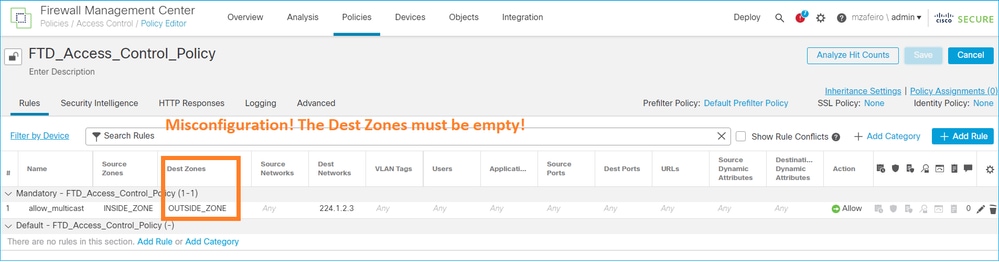
U kunt geen bestemmingsbeveiligingszone opgeven voor de regel Toegangsbeheerbeleid die overeenkomt met multicast-verkeer:
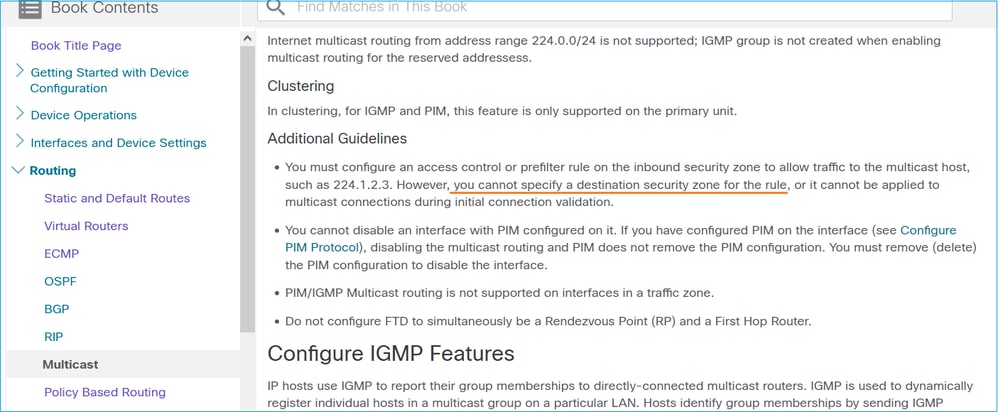
Dit wordt ook gedocumenteerd in de FMC-gebruikershandleiding:
Firewall stuurt geen PIM-berichten naar upstream-routers vanwege HSRP
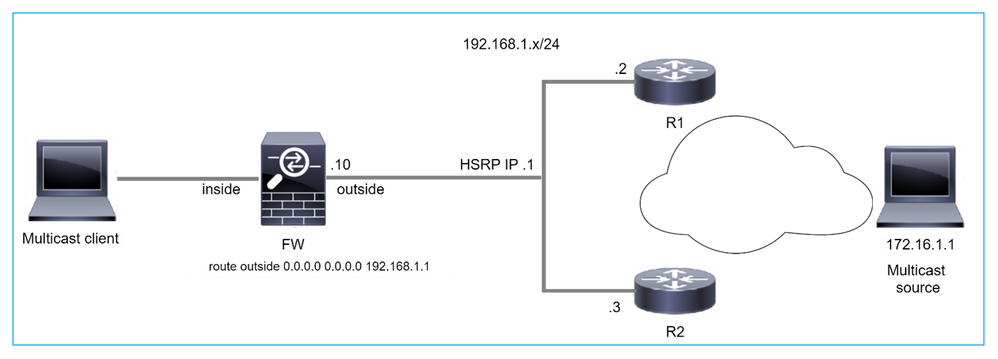
In dit geval heeft de firewall een standaardroute via het Hot Standby Redundancy Protocol (HSRP) IP 192.168.1.1 en de PIM-buurt met routers R1 en R2:
firepower# show run route
route outside 0.0.0.0 0.0.0.0 192.168.1.1 1
De firewall heeft PIM-aangrenzing tussen de buitenkant en de fysieke interface IP op R1 en R2:
firepower# show pim neighbor
Neighbor Address  Interface          Uptime    Expires DR pri Bidir
192.168.1.1       outside            01:18:27  00:01:25 1
192.168.1.2       outside            01:18:03  00:01:29 1 (DR)
De firewall verzendt geen PIM Join-bericht naar het upstreamnetwerk. De PIM debug command debug pim toont deze output:
firepower# debug pim
...
IPv4 PIM: Sending J/P to an invalid neighbor: outside 192.168.1.1
RFC 2362 stelt dat "een router een periodiek Join/Prune-bericht stuurt naar elke afzonderlijke RPF-buur die is gekoppeld aan elke (S, G), (*, G) en (*,*, RP) invoer. Join/Prune berichten worden alleen verzonden als de RPF buurman een PIM buurman is."
Om het probleem te beperken, kan de gebruiker een statische mroute-vermelding op de firewall toevoegen. De router moet verwijzen naar een van de twee IP-adressen van de routerinterface, 192.168.1.2 of 192.168.1.3, meestal de actieve HSRP-router IP.
Voorbeeld:
firepower# show run mroute
firepower# mroute 172.16.1.1 255.255.255.255 192.168.1.2
Zodra de statische mroute-configuratie op zijn plaats is, geeft de firewall voor het RPF-opzoeken de voorkeur aan de multicast-routeringstabel in plaats van de unicast-routeringstabel van de ASA en stuurt de PIM-berichten rechtstreeks naar de buurman 192.168.1.2.
Firewall wordt niet als LHR beschouwd als het niet de DR in het LAN-segment is
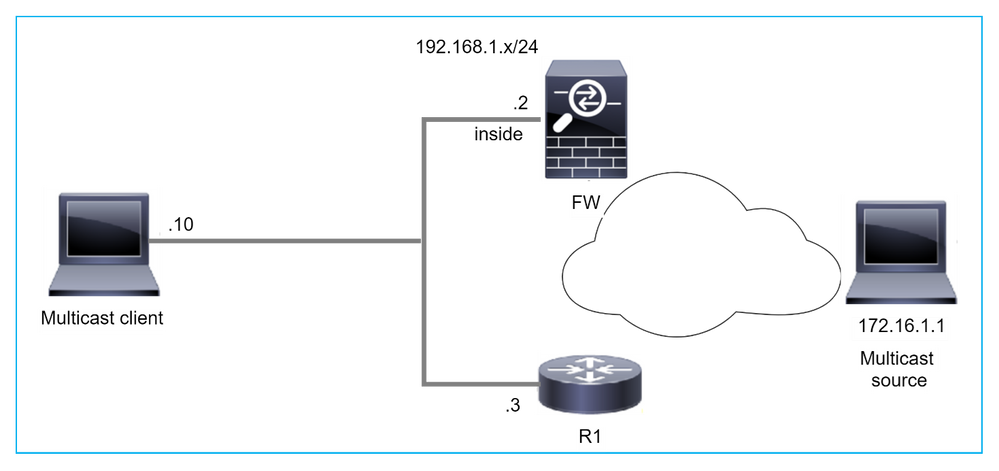
De firewall heeft R1 als de PIM-buren in het LAN-segment. R1 is de PIM DR:
firepower# show pim neighbor
Neighbor Address  Interface          Uptime    Expires DR pri Bidir
192.168.1.3       inside             00:12:50  00:01:38 1 (DR)
Als een IGMP-aanvraag voor een lidmaatschap van de client wordt ontvangen, wordt de firewall niet de LHR.
De route toont extra Null als de OLIE en heeft de gesnoeide vlag:
firepower# show mroute
Multicast Routing Table
Flags: D - Dense, S - Sparse, B - Bidir Group, s - SSM Group,
       C - Connected, L - Local, I - Received Source Specific Host Report,
       P - Pruned, R - RP-bit set, F - Register flag, T - SPT-bit set,
       J - Join SPT
Timers: Uptime/Expires
Interface state: Interface, State


(*, 230.1.1.1), 00:06:30/never, RP 0.0.0.0, flags: SPC
  Incoming interface: Null
  RPF nbr: 0.0.0.0
  Immediate Outgoing interface list:
    inside, Null, 00:06:30/never <--- OIL has inside and Null
Om de firewall de LHR te maken, kan de prioriteit van de DR-interface worden verhoogd.
firepower# interface GigabitEthernet0/0
firepower# pim dr-priority 2

firepower# show pim neighbor
Neighbor Address  Interface          Uptime    Expires DR pri Bidir
192.168.1.3       inside             17:05:28  00:01:41 1
De PIM debug command debug pim toont deze output:
firepower# debug pim
firepower#
IPv4 PIM: (*,230.1.1.1) inside Start being last hop <--- Firewall considers itself as the lasp hop
IPv4 PIM: (*,230.1.1.1) Start being last hop
IPv4 PIM: (*,230.1.1.1) Start signaling sources
IPv4 PIM: [0] (*,230.1.1.1/32) NULLIF-skip MRIB modify NS
IPv4 PIM: (*,230.1.1.1) inside FWD state change from Prune to Forward
IPv4 PIM: [0] (*,230.1.1.1/32) inside MRIB modify F NS
IPv4 PIM: (*,230.1.1.1) Updating J/P status from Null to Join
IPv4 PIM: (*,230.1.1.1) J/P scheduled in 0.0 secs
IPv4 PIM: (*,230.1.1.1) Processing timers
IPv4 PIM: (*,230.1.1.1) J/P processing
IPv4 PIM: (*,230.1.1.1) Periodic J/P scheduled in 50 secs
IPv4 PIM: (*,230.1.1.1) No RPF interface to send J/P
De gesnoeide vlag en de Null worden van de route verwijderd:
firepower# show mroute

Multicast Routing Table
Flags: D - Dense, S - Sparse, B - Bidir Group, s - SSM Group,
       C - Connected, L - Local, I - Received Source Specific Host Report,
       P - Pruned, R - RP-bit set, F - Register flag, T - SPT-bit set,
       J - Join SPT
Timers: Uptime/Expires
Interface state: Interface, State

(*, 230.1.1.1), 16:48:23/never, RP 0.0.0.0, flags: SCJ
  Incoming interface: Null
  RPF nbr: 0.0.0.0
  Immediate Outgoing interface list:
    inside, Forward, 16:48:23/never
Firewall laat multicast-pakketten vallen door fout bij doorsturen van pad omkeren
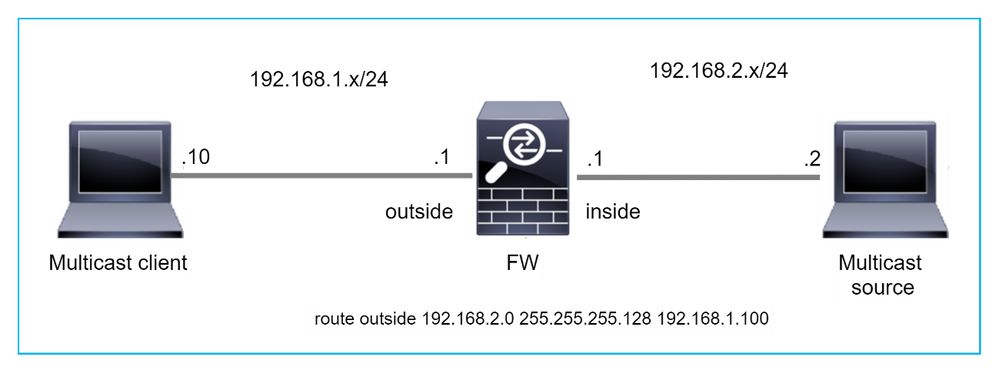
In dit geval worden de multicast UDP-pakketten gedropt vanwege RPF-storing, omdat de firewall een meer specifieke route heeft met het masker 255.255.255.128 via de externe interface.
firepower# capture capi type raw-data trace interface inside match udp any any
firepower# show captureture capi packet-number 1 trace

106 packets captured
   1: 08:57:18.867234       192.168.2.2.12345 > 230.1.1.1.12354:  udp 500
Phase: 1
Type: CAPTURE
Subtype:
Result: ALLOW
Elapsed time: 2684 ns
Config:
Additional Information:
MAC Access list


Phase: 2
Type: ACCESS-LIST
Subtype:
Result: ALLOW
Elapsed time: 2684 ns
Config:
Implicit Rule
Additional Information:
MAC Access list

Phase: 3
Type: INPUT-ROUTE-LOOKUP
Subtype: Resolve Egress Interface
Result: ALLOW
Elapsed time: 13664 ns
Config:
Additional Information:
Found next-hop 192.168.1.100 using egress ifc  outside

Phase: 4
Type: INPUT-ROUTE-LOOKUP
Subtype: Resolve Egress Interface
Result: ALLOW
Elapsed time: 8296 ns
Config:
Additional Information:
Found next-hop 192.168.1.100 using egress ifc  outside

Result:
input-interface: inside
input-status: up
input-line-status: up
output-interface: outside
output-status: up
output-line-status: up
Action: drop
Time Taken: 27328 ns

Drop-reason: (rpf-violated) Reverse-path verify failed, Drop-location: frame 0x0000556bcb1069dd flow (NA)/NA

firepower# show route static
Codes: L - local, C - connected, S - static, R - RIP, M - mobile, B - BGP
       D - EIGRP, EX - EIGRP external, O - OSPF, IA - OSPF inter area
       N1 - OSPF NSSA external type 1, N2 - OSPF NSSA external type 2
       E1 - OSPF external type 1, E2 - OSPF external type 2, V - VPN
       i - IS-IS, su - IS-IS summary, L1 - IS-IS level-1, L2 - IS-IS level-2
       ia - IS-IS inter area, * - candidate default, U - per-user static route
       o - ODR, P - periodic downloaded static route, + - replicated route
       SI - Static InterVRF, BI - BGP InterVRF
Gateway of last resort is not set
S        192.168.2.0 255.255.255.128 [1/0] via 192.168.1.100, outside
ASP drop captures tonen de rpf-overtreden drop reden:
firepower# show capture asp
Target:     OTHER
Hardware:   ASAv
Cisco Adaptive Security Appliance Software Version 9.19(1)
ASLR enabled, text region 556bc9390000-556bcd0603dd

21 packets captured

   1: 09:00:53.608290       192.168.2.2.12345 > 230.1.1.1.12354:  udp 500 Drop-reason: (rpf-violated) Reverse-path verify failed, Drop-location: frame 0x0000556bcb1069dd flow (NA)/NA
   2: 09:00:53.708032       192.168.2.2.12345 > 230.1.1.1.12354:  udp 500 Drop-reason: (rpf-violated) Reverse-path verify failed, Drop-location: frame 0x0000556bcb1069dd flow (NA)/NA
   3: 09:00:53.812152       192.168.2.2.12345 > 230.1.1.1.12354:  udp 500 Drop-reason: (rpf-violated) Reverse-path verify failed, Drop-location: frame 0x0000556bcb1069dd flow (NA)/NA
   4: 09:00:53.908613       192.168.2.2.12345 > 230.1.1.1.12354:  udp 500 Drop-reason: (rpf-violated) Reverse-path verify failed, Drop-location: frame 0x0000556bcb1069dd flow (NA)/NA
De RPF mislukte tellers in de MFIB-uitgang neemt toe:
firepower# show mfib 230.1.1.1 count
IP Multicast Statistics
7 routes, 4 groups, 0.00 average sources per group
Forwarding Counts: Pkt Count/Pkts per second/Avg Pkt Size/Kilobits per second
Other counts: Total/RPF failed/Other drops(OIF-null, rate-limit etc)
Group: 230.1.1.1
  RP-tree:
   Forwarding: 0/0/0/0, Other: 6788/6788/0

...
firepower# show mfib 230.1.1.1 count
IP Multicast Statistics
7 routes, 4 groups, 0.00 average sources per group
Forwarding Counts: Pkt Count/Pkts per second/Avg Pkt Size/Kilobits per second
Other counts: Total/RPF failed/Other drops(OIF-null, rate-limit etc)
Group: 230.1.1.1
  RP-tree:
   Forwarding: 0/0/0/0, Other: 6812/6812/0 <--- RPF failed counter increased
De oplossing is om de RPF-controlefout te verhelpen. Een optie is om de statische route te verwijderen.
Als er geen RPF-controlefout meer is, worden de pakketten doorgestuurd en neemt de Forwarding-teller in de MFIB-uitvoer toe:
firepower# show mfib 230.1.1.1 count
IP Multicast Statistics
8 routes, 4 groups, 0.25 average sources per group
Forwarding Counts: Pkt Count/Pkts per second/Avg Pkt Size/Kilobits per second
Other counts: Total/RPF failed/Other drops(OIF-null, rate-limit etc)
Group: 230.1.1.1
  RP-tree:
   Forwarding: 0/0/0/0, Other: 9342/9342/0
  Source: 192.168.2.2,
   Forwarding: 1033/9/528/39, Other: 0/0/0
  Tot. shown: Source count: 1, pkt count: 0
...
firepower# show mfib 230.1.1.1 count
IP Multicast Statistics
8 routes, 4 groups, 0.25 average sources per group
Forwarding Counts: Pkt Count/Pkts per second/Avg Pkt Size/Kilobits per second
Other counts: Total/RPF failed/Other drops(OIF-null, rate-limit etc)
Group: 230.1.1.1
  RP-tree:
   Forwarding: 0/0/0/0, Other: 9342/9342/0
  Source: 192.168.2.2,
   Forwarding: 1044/10/528/41, Other: 0/0/0 <--- Forward counter increased
  Tot. shown: Source count: 1, pkt count: 0
Firewall genereert geen PIM-join bij PIM-switch naar bronstructuur
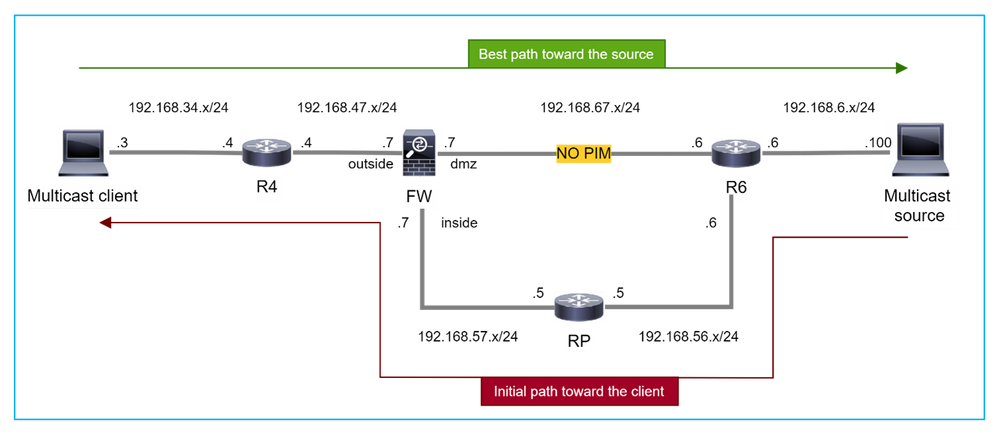
In dit geval leert de firewall het pad naar de multicast-bron via de dmz-interface R4 > FW > R6, terwijl het initiële verkeerspad van de bron naar de client R6 > RP > DW > R4 is:
firepower# show route 192.168.6.100

Routing entry for 192.168.6.0 255.255.255.0
  Known via "ospf 1", distance 110, metric 11, type intra area
  Last update from 192.168.67.6 on dmz, 0:36:22 ago
  Routing Descriptor Blocks:
  * 192.168.67.6, from 192.168.67.6, 0:36:22 ago, via dmz
      Route metric is 11, traffic share count is 1
R4 initieert SPT-switchover en verzendt bronspecifieke PIM-join-berichten zodra de SPT-switchover-drempel is bereikt. In de firewall vindt de SPT-switchover niet plaats, de (S, G) mroute heeft niet de T-vlag:
firepower# show mroute
Multicast Routing Table
Flags: D - Dense, S - Sparse, B - Bidir Group, s - SSM Group,
       C - Connected, L - Local, I - Received Source Specific Host Report,
       P - Pruned, R - RP-bit set, F - Register flag, T - SPT-bit set,
       J - Join SPT
Timers: Uptime/Expires
Interface state: Interface, State

(*, 230.1.1.1), 00:00:05/00:03:24, RP 10.5.5.5, flags: S
  Incoming interface: inside
  RPF nbr: 192.168.57.5
  Immediate Outgoing interface list:
    outside, Forward, 00:00:05/00:03:24

(192.168.6.100, 230.1.1.1), 00:00:05/00:03:24, flags: S
  Incoming interface: dmz
  RPF nbr: 192.168.67.6
  Immediate Outgoing interface list:
    outside, Forward, 00:00:05/00:03:2
De PIM debug opdracht debug pim toont 2 ontvangen PIM Join verzoek van de peer R4 – voor (*, G) en (S, G). De firewall verstuurde een PIM Join-aanvraag voor (*, G) upstream en verstuurde geen bronspecifieke aanvraag vanwege een ongeldige buurman 192.168.67.6:
firepower# debug pim
IPv4 PIM: Received J/P on outside from 192.168.47.4 target: 192.168.47.7 (to us) <--- 1st PIM join to the firewall
IPv4 PIM: J/P entry: Join root: 10.5.5.5 group: 230.1.1.1 flags:  RPT WC S <--- 1st PIM join with root at the RP
IPv4 PIM: (*,230.1.1.1) Create entry
IPv4 PIM: [0] (*,230.1.1.1/32) MRIB modify DC
IPv4 PIM: [0] (*,230.1.1.1/32) inside MRIB modify A
IPv4 PIM: (*,230.1.1.1) outside J/P state changed from Null to Join
IPv4 PIM: (*,230.1.1.1) outside Raise J/P expiration timer to 210 seconds
IPv4 PIM: (*,230.1.1.1) outside FWD state change from Prune to Forward
IPv4 PIM: [0] (*,230.1.1.1/32) outside MRIB modify F NS
IPv4 PIM: (*,230.1.1.1) Updating J/P status from Null to Join
IPv4 PIM: (*,230.1.1.1) J/P scheduled in 0.0 secs
IPv4 PIM: (*,230.1.1.1) Processing timers
IPv4 PIM: (*,230.1.1.1) J/P processing
IPv4 PIM: (*,230.1.1.1) Periodic J/P scheduled in 50 secs
IPv4 PIM: (*,230.1.1.1) J/P adding Join on inside
IPv4 PIM: Sending J/P message for neighbor 192.168.57.5 on inside for 1 groups   <--- PIM Join sent from the firewall
IPv4 PIM: Received J/P on outside from 192.168.47.4 target: 192.168.47.7 (to us) <--- 1st PIM join to the firewall
IPv4 PIM: J/P entry: Join root: 192.168.6.100 group: 230.1.1.1 flags:  S         <--- 1st PIM join with root at the source
IPv4 PIM: (192.168.6.100,230.1.1.1) Create entry
IPv4 PIM: Adding monitor for 192.168.6.100
IPv4 PIM: RPF lookup for root 192.168.6.100: nbr 192.168.67.6, dmz via the rib
IPv4 PIM: (192.168.6.100,230.1.1.1) RPF changed from 0.0.0.0/- to 192.168.67.6/dmz
IPv4 PIM: (192.168.6.100,230.1.1.1) Source metric changed from [0/0] to [110/11]
IPv4 PIM: [0] (192.168.6.100,230.1.1.1/32) MRIB modify DC
IPv4 PIM: [0] (192.168.6.100,230.1.1.1/32) inside MRIB modify A
IPv4 PIM: [0] (192.168.6.100,230.1.1.1/32) outside MRIB modify F NS
IPv4 PIM: (192.168.6.100,230.1.1.1) outside J/P state changed from Null to Join
IPv4 PIM: (192.168.6.100,230.1.1.1) outside Imm FWD state change from Prune to Forward
IPv4 PIM: (192.168.6.100,230.1.1.1) Updating J/P status from Null to Join
IPv4 PIM: (192.168.6.100,230.1.1.1) J/P scheduled in 0.0 secs
IPv4 PIM: [0] (192.168.6.100,230.1.1.1/32) dmz MRIB modify NS
IPv4 PIM: (192.168.6.100,230.1.1.1) outside Raise J/P expiration timer to 210 seconds
IPv4 PIM: (192.168.6.100,230.1.1.1) Processing timers
IPv4 PIM: (192.168.6.100,230.1.1.1) J/P processing
IPv4 PIM: (192.168.6.100,230.1.1.1) Periodic J/P scheduled in 50 secs
IPv4 PIM: (192.168.6.100,230.1.1.1) J/P adding Join on dmz
IPv4 PIM: Sending J/P to an invalid neighbor: dmz 192.168.67.6  <--- Invalid neighbor
De uitvoer van show pim-buurcommando's ontbreekt R6:
firepower# show pim neighbor

Neighbor Address  Interface          Uptime    Expires DR pri Bidir
192.168.47.4      outside            00:21:12  00:01:44 1
192.168.57.5      inside             02:43:43  00:01:15 1
PIM is ingeschakeld op de firewall-interface dmz:
firepower# show pim interface
Address          Interface          PIM  Nbr   Hello  DR         DR
                                         Count Intvl  Prior

192.168.47.7     outside            on   1     30     1          this system
192.168.67.7     dmz                on   0     30     1          this system
192.168.57.7     inside             on   1     30     1          this system
PIM is uitgeschakeld op de R6-interface:
R6# show ip interface brief
Interface                  IP-Address      OK? Method Status                Protocol
GigabitEthernet0/0         192.168.6.1     YES manual up                    up
GigabitEthernet0/1         192.168.56.6    YES manual up                    up
GigabitEthernet0/2         unassigned      YES unset  administratively down down
GigabitEthernet0/3         192.168.67.6    YES manual up                    up
Tunnel0                    192.168.56.6    YES unset  up                    up

R6# show ip pim interface GigabitEthernet0/3 detail
GigabitEthernet0/3 is up, line protocol is up
  Internet address is 192.168.67.6/24
  Multicast switching: fast
  Multicast packets in/out: 0/123628
  Multicast TTL threshold: 0
  PIM: disabled <--- PIM is disabled
  Multicast Tagswitching: disabled
De oplossing is om PIM-interface op Gigabit Ethernet0/3 op R6 in te schakelen:
R6(config-if)#interface GigabitEthernet0/3
R6(config-if)#ip pim sparse-mode
R6(config-if)#
*Apr 21 13:17:14.575: %PIM-5-NBRCHG: neighbor 192.168.67.7 UP on interface GigabitEthernet0/3
*Apr 21 13:17:14.577: %PIM-5-DRCHG: DR change from neighbor 0.0.0.0 to 192.168.67.7 on interface GigabitEthernet0/3 <--- DR changed
De firewall installeert de T-vlag, die de SPT-switch aangeeft:
firepower# show mroute

Multicast Routing Table
Flags: D - Dense, S - Sparse, B - Bidir Group, s - SSM Group,
       C - Connected, L - Local, I - Received Source Specific Host Report,
       P - Pruned, R - RP-bit set, F - Register flag, T - SPT-bit set,
       J - Join SPT
Timers: Uptime/Expires
Interface state: Interface, State

(*, 230.1.1.1), 00:26:30/00:02:50, RP 10.5.5.5, flags: S
  Incoming interface: inside
  RPF nbr: 192.168.57.5
  Immediate Outgoing interface list:
    outside, Forward, 00:26:30/00:02:50

(192.168.6.100, 230.1.1.1), 00:26:30/00:03:29, flags: ST
  Incoming interface: dmz
  RPF nbr: 192.168.67.6
  Immediate Outgoing interface list:
    outside, Forward, 00:26:30/00:02:39
Firewall laat eerste paar pakketten vallen vanwege limiet voor puntfrequentie
Wanneer de firewall de eerste pakketten van een nieuwe multicast-stream in FP ontvangt, kan extra verwerking door de CP vereist zijn. In dit geval plaatst de FP de pakketten via SP (FP > SP > CP) naar de CP voor extra bewerkingen:
- Creëren van een bovenliggende verbinding in FP tussen de ingress-interfaces en de identiteitsinterfaces.
- Aanvullende multicast-specifieke controles, zoals de RPF-validatie, PIM-inkapseling (in het geval dat de firewall de FHR is), OIL-controle, enzovoort.
- Creatie van een (S, G) ingang met de inkomende en uitgaande interfaces in de routetabel.
- Creëren van een kind/stub verbinding in FP tussen de inkomende en uitgaande interfaces.
Als onderdeel van de beveiliging van het controlevliegtuig beperkt de firewall intern de snelheid waarmee pakketten op de CP worden gepunteerd.
De pakketten die het tarief overschrijden, worden in de lijst gedropt met de reden voor de daling van de puntlimiet:
firepower# show asp drop
Frame drop:
Punt rate limit exceeded (punt-rate-limit) 2062
Gebruik de opdracht asp-clusterteller weergeven om het aantal multicast-pakketten te verifiëren dat vanaf SP op CP is gepunteerd:
firepower# show asp cluster counter
Global dp-counters:

Context specific dp-counters:

MCAST_FP_FROM_PUNT              30      Number of multicast packets punted from CP to FP
MCAST_FP_TO_SP                  2680    Number of multicast packets punted from FP to SP
MCAST_SP_TOTAL                  2710    Number of total multicast packets processed in SP
MCAST_SP_FROM_PUNT              30      Number of multicast packets punted from CP to SP
MCAST_SP_FROM_PUNT_FORWARD      30      Number of multicast packets coming from CP that are forwarded
MCAST_SP_PKTS                   30      Number of multicast packets that require slow-path attention
MCAST_SP_PKTS_TO_CP             30      Number of multicast packets punted to CP from SP <--- Number of packets punted to CP from SP
MCAST_FP_CHK_FAIL_NO_HANDLE     2650    Number of multicast packets failed with no flow mcast_handle
MCAST_FP_CHK_FAIL_NO_FP_FWD     30      Number of multicast packets that cannot be fast-path forwarded
Gebruik de opdracht asp event dp-cp punt tonen om het aantal pakketten in de FP > CP-wachtrij en de snelheid van 15 seconden te controleren:
firepower# show asp event dp-cp punt | begin EVENT-TYPE
EVENT-TYPE          ALLOC ALLOC-FAIL ENQUEUED ENQ-FAIL  RETIRED 15SEC-RATE
punt                  24452        0      24452      0      10852     1402
  multicast           23800        0      23800      0      10200     1402
  pim                 652          0      652        0      652          0
Wanneer de mroute is gevuld en de ouder/kind-verbindingen in de FP zijn vastgelegd, worden de pakketten in de FP doorgestuurd als onderdeel van de bestaande verbindingen. In dit geval wijst FP de pakketten niet naar de CP.
Hoe verwerkt de firewall de eerste pakketten van een nieuwe multicast stream?
Wanneer de firewall de eerste pakketten van een nieuwe multicast-stream in datapath ontvangt, onderneemt de firewall de volgende acties:
- Controleert of het beveiligingsbeleid pakketten toestaat.
- Hiermee worden de pakketten via pad FP naar de CP gestuurd.
- Hiermee maakt u een bovenliggende verbinding tussen de ingress-interfaces en de identiteitsinterfaces:
firepower# show capture capi packet-number 1 trace
10 packets captured
   1: 08:54:15.007003       192.168.1.100.12345 > 230.1.1.1.12345:  udp 400
Phase: 1
Type: CAPTURE
Subtype:
Result: ALLOW
Config:
Additional Information:
MAC Access list

Phase: 2
Type: ACCESS-LIST
Subtype:
Result: ALLOW
Config:
Implicit Rule
Additional Information:
MAC Access list

Phase: 3
Type: INPUT-ROUTE-LOOKUP
Subtype: Resolve Egress Interface
Result: ALLOW
Config:
Additional Information:
Found next-hop 192.168.2.1 using egress ifc  inside


Phase: 4
Type: ACCESS-LIST
Subtype:
Result: ALLOW
Config:
Implicit Rule
Additional Information:

Phase: 5
Type: NAT
Subtype: per-session
Result: ALLOW
Config:
Additional Information:

Phase: 6
Type: IP-OPTIONS
Subtype:
Result: ALLOW
Config:
Additional Information:

Phase: 7
Type: CLUSTER-REDIRECT
Subtype: cluster-redirect
Result: ALLOW
Config:
Additional Information:

Phase: 8
Type: QOS
Subtype:
Result: ALLOW
Config:
Additional Information:

Phase: 9
Type: MULTICAST
Subtype:
Result: ALLOW
Config:
Additional Information:


Phase: 10
Type: FLOW-CREATION
Subtype:
Result: ALLOW
Config:
Additional Information:
New flow created with id 19, packet dispatched to next module <--- New flow

Result:
input-interface: inside
input-status: up
input-line-status: up
output-interface: inside
output-status: up
output-line-status: up
Action: allow
Syslogs:
firepower# Apr 24 2023 08:54:15: %ASA-7-609001: Built local-host inside:192.168.1.100
Apr 24 2023 08:54:15: %FTD-7-609001: Built local-host identity:230.1.1.1
Apr 24 2023 08:54:15: %FTD-6-302015: Built inbound UDP connection 19 for inside:192.168.1.100/12345 (192.168.1.100/12345) to identity:230.1.1.1/12345 (230.1.1.1/12345) <--- Syslog for a newly built connection
Deze verbinding is zichtbaar in de uitvoer van de opdracht show conn all:
firepower# show conn all protocol udp
13 in use, 17 most used

UDP inside  192.168.1.100:12345 NP Identity Ifc  230.1.1.1:12345, idle 0:00:02, bytes 0, flags –
- De CP schakelt het multicast-proces in voor aanvullende multicast-specifieke controles, zoals de RPF-validatie, PIM-inkapseling (in het geval dat de firewall de FHR is), OIL-controle, enzovoort.
- De CP maakt een (S, G) ingang met de inkomende en uitgaande interfaces in de mroute:
firepower# show mroute

Multicast Routing Table
Flags: D - Dense, S - Sparse, B - Bidir Group, s - SSM Group,
       C - Connected, L - Local, I - Received Source Specific Host Report,
       P - Pruned, R - RP-bit set, F - Register flag, T - SPT-bit set,
       J - Join SPT
Timers: Uptime/Expires
Interface state: Interface, State

(*, 230.1.1.1), 00:19:28/00:03:13, RP 192.168.192.168, flags: S
  Incoming interface: inside
  RPF nbr: 192.168.2.1
  Immediate Outgoing interface list:
    outside, Forward, 00:19:28/00:03:13

(192.168.1.100, 230.1.1.1), 00:08:50/00:03:09, flags: ST
  Incoming interface: inside
  RPF nbr: 192.168.2.1
  Immediate Outgoing interface list:
    outside, Forward, 00:00:32/00:02:57
- De CP instrueert het pad FP via CP > SP > FP om een kind/stub-verbinding te maken tussen de inkomende en uitgaande interfaces:
Deze verbinding is alleen zichtbaar in de uitvoer van de opdracht show local-host:
firepower# show local-host

Interface outside: 5 active, 5 maximum active
local host: <224.0.0.13>,
local host: <192.168.3.100>,
local host: <230.1.1.1>,
  Conn:
    UDP outside  230.1.1.1:12345 inside  192.168.1.100:12345, idle 0:00:04, bytes 4000, flags -
local host: <224.0.0.5>,
local host: <224.0.0.1>,
Interface inside: 4 active, 5 maximum active
local host: <192.168.1.100>,

  Conn:
    UDP outside  230.1.1.1:12345 inside  192.168.1.100:12345, idle 0:00:04, bytes 4000, flags -
local host: <224.0.0.13>,
local host: <192.168.2.1>,
local host: <224.0.0.5>,
Interface nlp_int_tap: 0 active, 2 maximum active
Interface any: 0 active, 0 maximum active
In de softwareversies met de fix van de Cisco bug ID CSCwe21280  wordt ook het SYSLOG-bericht 302015 voor de kinder-/stubverbinding gegenereerd:
Apr 24 2023 08:54:15: %FTD-6-302015: Built outbound UDP connection 20 for outside:230.1.1.1/12345 (230.1.1.1/12345) to inside:192.168.1.100/12345 (192.168.1.100/12345) <--- Syslog for a newly built connection
Wanneer zowel de bovenliggende als de onderliggende/stub-verbindingen tot stand zijn gebracht, komen de toegangspakketten overeen met de bestaande verbinding en worden deze doorgestuurd in FP:
firepower# show capture capi trace packet-number 2
10 packets captured
   2: 08:54:15.020567       192.168.1.100.12345 > 230.1.1.1.12345:  udp 400
Phase: 1
Type: CAPTURE
Subtype:
Result: ALLOW
Config:
Additional Information:
MAC Access list

Phase: 2
Type: ACCESS-LIST
Subtype:
Result: ALLOW
Config:
Implicit Rule
Additional Information:
MAC Access list

Phase: 3
Type: FLOW-LOOKUP
Subtype:
Result: ALLOW
Config:
Additional Information:
Found flow with id 19, using existing flow <--- Existing flow


Result:
input-interface: inside
input-status: up
input-line-status: up
Action: allow
ICMP-multicastverkeer filteren
U kunt ICMP Multicast-verkeer niet filteren met een ACL. Gebruik het Control Plane Policy (ICMP):
Cisco bug ID CSCsl26860 ASA filtert geen multicast ICMP-pakketten
Bekende PIM multicast-defecten
U kunt de Bug Search Tool gebruiken voor bekende gebreken: https://bst.cloudapps.cisco.com/bugsearch
De meeste ASA- en FTD-defecten worden vermeld onder het 'Cisco Adaptive Security Appliance (ASA) Software'-product:
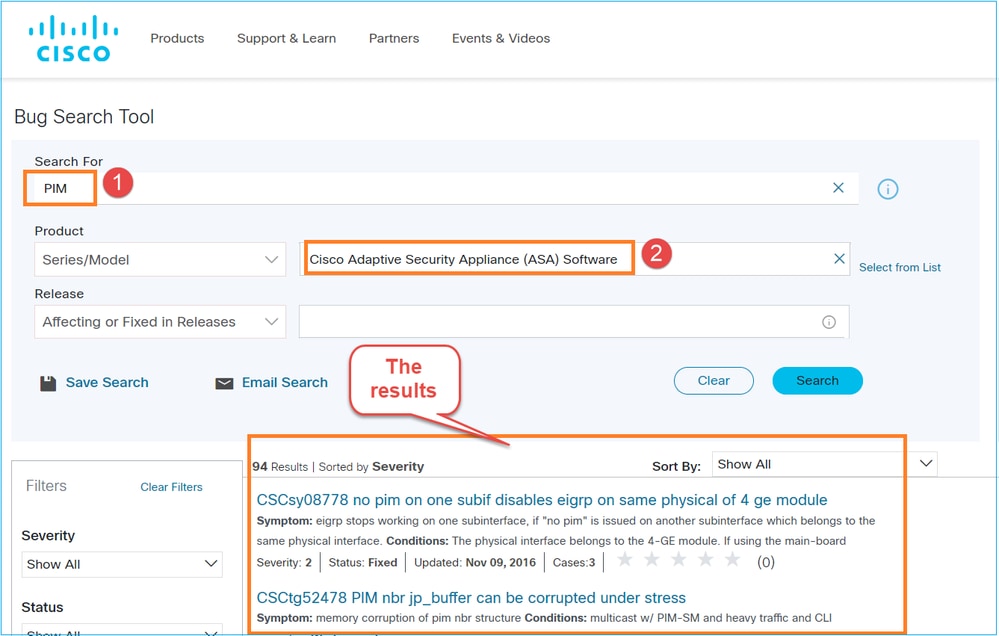
Firewall in PIM Bidir-modus beperkt multicast-verkeer en daalt boven pakketten met puntlimiet ASP-valreden
De uitvoerbehoeften van het commando "Show PIM Topology" zijn beperkt in leesbaarheid
"Multicast-verkeer is snelheidsbeperkt en daalt met een punt-rate-limiet als er geen bronspecifieke join wordt ontvangen of als er geen LHR SPT-switchover is"
"Join/Prune voor PIM SSM worden niet naar multicast-bron gestuurd"
"PIM-pakketten niet gegenereerd na het uitschakelen van IGMP-forwarding op deelnemende interfaces"
"PIM-registerpakket wordt naar 0.0.0.0 verzonden als de standaardroute is geconfigureerd"
ASA/FTD verlaagt multicast-verkeer wanneer er geen route-ingang is bij het gebruik van Bidir PIM
ENH: Verbetering van foutmeldingen/syslogs voor PIM-berichtenstroom registreren
CSCvy36751 S: S, G mroute register vlag F wordt niet gewist wanneer PIM register-stop pakket wordt ontvangen
CSCvy18138 PIM: Register verzonden teller neemt niet toe wanneer ingekapselde pakketten met registervlag naar RP worden verzonden
CSCvv16723 ENH: Een manier bieden om mroute-vermeldingen en mfib-vermeldingen handmatig te wissen
CSCvy51227 ENH: Hernoem 'show pim traffic' naar 'show pim counters'
CSCvy51232 ENH: Ondersteuning toevoegen voor meerdere multicast-groepen in foutopsporingsomstandigheden
CSCvy60096 ENH: Toon Assert winnaar uitgaande interface vlag in 'show mroute'
CSCvy67176 ENH: Ondersteuning voor het filteren van mroute/mrib/mfib-tabellen op basis van gedeelde of bronboomvermeldingen
CSCvy73891 ENH: Genereer een syslog-bericht wanneer Rendezvous Point (RP) niet is geconfigureerd of niet bereikbaar is
CSCvy67187 ENH: Ondersteuning filteren mroute/mfib tabellen op basis van uitgaande interface
CSCwe21280 Multicast-verbinding die is opgebouwd of syslog-berichten die worden afgebroken, worden mogelijk niet altijd gegenereerd
CSCwd41553 PIM-registerpakketten worden niet naar Rendezvous Point (RP) verzonden vanwege de downstatus van de PIM-tunnelinterface
CSCwe21187 ASA/FTD kan multicast-pakketten laten vallen vanwege een ASP-drop zonder mcast-intranet totdat de UDP-time-out verloopt
CSCwf07767 ASA/FTD kan dubbele multicast-verbinding teardown syslog-berichten genereren
CSCvu68826 Multicast-gegevensverbindingsposten niet gevonden op ASA na starten van multicast-verkeer
CSCvv14440 DOC: Multicast-gegevensverbindingen die onder 'show local-host' moeten worden weergegeven
CSCvx54396 Intermitterende beleidsimplementatiefout wanneer multicast-routering is ingeschakeld
CSCvy24859 Multicast pakketten kunnen worden gedropt met punt-rate-limit ASP drop reden
CSCwe21280 Multicast-verbinding gebouwd of teardown syslog-berichten worden mogelijk niet altijd gegenereerd
CSCwe21280 ASA/FTD kan multicast-pakketten laten vallen als gevolg van een niet-mcast-intruf ASP-drop-reden totdat de UDP-time-out verloopt
CSCwd41553 PIM-registerpakketten worden niet naar Rendezvous Point (RP) verzonden vanwege de downstatus van de PIM-tunnelinterface
CSCwb94431 MFIB RPF-teller is mislukt in plaats van stapsgewijs andere stappen wanneer de uitgaande interfacelijst Null is
CSCwf07767 ASA/FTD kan dubbele multicast-verbinding teardown syslog-berichten genereren
CSCwe61928 PIM-registerpakketten worden niet naar RP verzonden na een herbelasting als FTD een standaardgateway gebruikt om de RP te bereiken
CSCwj56862 ASA/FTD verzendt geen PIM Null-Register-pakketten wanneer de standaardroute wordt gebruikt om RP te bereiken
CSCwf52220 ENH: Ondersteuning voor configureerbare propagatievertraging en overschrijvingsinterval voor PIM
Gerelateerde informatie
- ASA Multicast Problemen oplossen en veelvoorkomende problemen
- Firepower Management Center Multicast
- Overzicht van de Firepower Multicast Flags
Revisiegeschiedenis
| Revisie | Publicatiedatum | Opmerkingen |
|---|---|---|
2.0 |
27-Apr-2023
|
Secties voor probleemoplossing en veelvoorkomende problemen werden toegevoegd. |
1.0 |
26-May-2022
|
Eerste vrijgave |

 Feedback
Contact Cisco
- Een ondersteuningscase openen

- (Vereist een Cisco-servicecontract)