Easy Virtual Network configureren
Inleiding
Dit document beschrijft de Easy Virtual Network (EVN) -functie, die een eenvoudig te configureren virtualisatiemechanisme in campusnetwerken biedt.
Voorwaarden
Vereisten
Er zijn geen specifieke vereisten van toepassing op dit document.
Gebruikte componenten
De informatie in dit document is gebaseerd op de volgende hardware- en softwareversies:
- Switches uit de Cisco Catalyst 6000 (Cat6k)-reeks met softwareversie 15.0(1)SY1
- Cisco 1000 Series Aggregated Services Routers (ASR1000) met softwareversie 3.2s
- Geïntegreerde servicerouters uit de Cisco 3925- en 3945-reeks met Cisco IOS®-versies 15.3(2)T en hoger
- Switches uit de Cisco Catalyst 4500 (Cat4500) en 4900 (Cat4900)-reeks met softwareversie 15.1(1)SG
De informatie in dit document is gebaseerd op de apparaten in een specifieke laboratoriumomgeving. Alle apparaten die in dit document worden beschreven, hadden een opgeschoonde (standaard)configuratie. Als uw netwerk live is, moet u zorgen dat u de potentiële impact van elke opdracht begrijpt.
Achtergrondinformatie
EVN maakt gebruik van huidige technologieën zoals Virtual Routing en Forwarding-Lite (VRF-Lite) en dot1q-inkapseling en introduceert geen nieuw protocol. Hier is een overzicht van de EVN-functie:

- De EVN-functie maakt gebruik van VRF-Lite om verschillende (tot 32) routeringscontexten te maken.
- De connectiviteit binnen de Virtual Routing and Forwarding (VRF) tussen Layer3-apparaten wordt gewaarborgd via Virtual Network (VNET)-trunks.
- De VNET-stammen zijn gewone dot1q-stammen.
- Configureer elke VRF die over de VNET-trunks moet worden getransporteerd met een VNET-tag.
- Elke VNET-tag is gelijk aan een dot1q-tag.
- De dot1q-subinterfaces worden automatisch gemaakt en verborgen.
- De configuratie van de hoofdinterface wordt geërfd door alle (verborgen) subinterfaces.
- Gebruik afzonderlijke instanties van routeringsprotocollen in elke VRF over de VNET-trunks om de bereikbaarheid van prefix te adverteren.
- Dynamische route lekken tussen VRF's (in tegenstelling tot statische routes) is toegestaan zonder het gebruik van Border Gateway Protocol (BGP).
- De functie wordt ondersteund voor IPv4 en IPv6.
Configureren
Gebruik de informatie die in deze sectie wordt beschreven om de EVN-functie te configureren.
Netwerkdiagram
Deze netwerkinstelling wordt gebruikt om de EVN-configuratie te illustreren en opdrachten weer te geven:

Hier zijn enkele belangrijke opmerkingen over deze setup:
- Er worden twee VRF’s gedefinieerd (CUST-A en CUST-B) die vanuit de kern van het netwerk via VNET-trunks worden uitgevoerd.
- Open Shortest Path First (OSPF) wordt gebruikt in de VRF's om de bereikbaarheid te adverteren.
- De VRF COM host een gemeenschappelijke server (100.1.1.100) die bereikbaar moet zijn vanaf zowel VRF CUST-A als CUST-B.
- De gebruikte afbeelding is i86bi_linux-adventerprisek9-ms.153-1.S.
EVN configureren
Voer de volgende stappen uit om de EVN-functie te configureren:
- De VRF-definitie configureren:
vrf definition [name]
vnet tag [2-4094]
!
address-family ipv4|ipv6
exit-address-family
!
Belangrijke opmerkingen over deze configuratie:
- Gebruik tags in het bereik van 2 tot 1000. Gebruik de gereserveerde VLAN's 1.001 tot en met 1.005 niet. Gebruik indien nodig uitgebreide VLAN's van 1.006 tot 4.094.
- Sta niet toe dat de VNET-tag door een huidig VLAN wordt gebruikt.
- Zorg ervoor dat de VNET-tags op alle apparaten voor een bepaalde VRF hetzelfde zijn.
- Configureer de adresfamilie ipv4|ipv6 om de VRF in het gerelateerde AF te activeren.
- Het is niet nodig om een routerichting (RD) te definiëren omdat EVN geen BGP gebruikt.
Met deze instelling worden de VRF's gedefinieerd op alle 4x-kernrouters. Bijvoorbeeld bij CORE-1:
vrf definition CUST-A
   vnet tag 100
   !
   address-family ipv4
   exit-address-family
  vrf definition CUST-B
   vnet tag 200
   !
   address-family ipv4
   exit-address-family
Gebruik dezelfde VNET-tag op alle routers voor deze VRF's. Op CORE-4 heeft VRF COM geen VNET-tag nodig. Het doel is om die VRF lokaal op CORE-4 te houden en het lekken en de herverdeling te configureren om toegang te bieden tot de gemeenschappelijke server van CUST-A en CUST-B.
Voer deze opdracht in om verschillende VNET-tellers te controleren:
CORE-1#show vnet counters
  Maximum number of VNETs supported: 32
  Current number of VNETs configured: 2
  Current number of VNET trunk interfaces: 2
  Current number of VNET subinterfaces: 4
  Current number of VNET forwarding interfaces: 6
CORE-1# - De VNET-stam configureren:
interface GigabitEthernetx/x
  vnet trunk
  ip address x.x.x.x y.y.y.y
  ...
Hier zijn enkele belangrijke opmerkingen over deze configuratie:
- De opdracht vnet trunk maakt evenveel dot1q-subinterfaces als het aantal VRF's dat is gedefinieerd met een VNET-tag.
- De opdracht vnet trunk kan niet naast enkele handmatig geconfigureerde subinterfaces op dezelfde fysieke interface bestaan.
- Deze configuratie is toegestaan op gerouteerde interfaces (geen switch-poorten), fysieke en portchannel.
- De IP-adressen (en andere opdrachten) die op de fysieke interface worden toegepast, worden geërfd door de subinterfaces.
- De subinterfaces voor alle VRF's gebruiken hetzelfde IP-adres.
Met deze installatie zijn er twee VNET VRF's, dus worden er automatisch twee subinterfaces gemaakt op de interface die is geconfigureerd als de VNET-trunk. U kunt de opdracht show derived-config invoeren om de verborgen configuratie te bekijken die automatisch wordt gemaakt:
Dit is de configuratie die momenteel wordt uitgevoerd:
CORE-1#show run | s Ethernet0/0
interface Ethernet0/0
 vnet trunk
 ip address 192.168.1.1 255.255.255.252
 !
CORE-1#
Hier is de afgeleide configuratie:
CORE-1#show derived-config | s Ethernet0/0
interface Ethernet0/0
 vnet trunk
 ip address 192.168.1.1 255.255.255.252
Interface Ethernet0/0.100
 description Subinterface for VNET CUST-A
 encapsulation dot1Q 100
 vrf forwarding CUST-A
 ip address 192.168.1.1 255.255.255.252
interface Ethernet0/0.200
 description Subinterface for VNET CUST-B
 encapsulation dot1Q 200
 vrf forwarding CUST-B
 ip address 192.168.1.1 255.255.255.252
CORE-1#
Zoals te zien is, erven alle subinterfaces het IP-adres van de hoofdinterface. - Rand (sub)interfaces toewijzen aan de VRF's. Om een interface of subinterface aan een VNET VRF toe te wijzen, gebruikt u dezelfde procedure als die welke wordt gebruikt om een VRF normaal toe te wijzen:
interface GigabitEthernet x/x.y
 vrf forwarding [name]
  ip address x.x.x.x y.y.y.y
  ...
Bij deze installatie wordt de configuratie toegepast op CORE-1 en CORE-4. Hier is een voorbeeld voor CORE-4:
interface Ethernet2/0
   vrf forwarding CUST-A
   ip address 10.1.2.1 255.255.255.0
  !
  interface Ethernet3/0
   vrf forwarding CUST-B
   ip address 10.2.2.1 255.255.255.0
  !
  interface Ethernet4/0
   vrf forwarding COM
ip address 100.1.1.1 255.255.255.0 - Routeringsprotocollen configureren voor elke VRF (dit is niet specifiek voor EVN of VNET):
router ospf x vrf [name]
  network x.x.x.x y.y.y.y area x
  ...
Met deze setup worden twee OSPF-processen gedefinieerd, één per VRF:
CORE-1#show run | s router os
  router ospf 1 vrf CUST-A
   network 10.1.1.0 0.0.0.255 area 0
   network 192.168.1.0 0.0.0.255 area 0
  router ospf 2 vrf CUST-B
   network 10.2.1.0 0.0.0.255 area 0
   network 192.168.1.0 0.0.0.255 area 0
  CORE-1#
U kunt de routeringscontextmodus invoeren om de informatie te bekijken die gerelateerd is aan een specifieke VRF zonder de VRF-specificaties in elke opdracht:
CORE-1#routing-context vrf CUST-A
  CORE-1%CUST-A#
  CORE-1%CUST-A#show ip protocols
  *** IP Routing is NSF aware ***

  Routing Protocol is "ospf 1"
    Outgoing update filter list for all interfaces is not set
    Incoming update filter list for all interfaces is not set
    Router ID 192.168.1.13
    It is an area border router
    Number of areas in this router is 1. 1 normal 0 stub 0 nssa
    Maximum path: 4
    Routing for Networks:
      10.1.1.0 0.0.0.255 area 0
      192.168.1.0 0.0.0.255 area 0
    Routing Information Sources:
      Gateway         Distance      Last Update
      192.168.1.9          110      1d00h
      192.168.1.14         110      1d00h
    Distance: (default is 110)

  CORE-1%CUST-A#

  CORE-1%CUST-A#show ip os neighbor

Neighbor ID     Pri   State         Dead Time   Address         Interface
192.168.1.14      1   FULL/DR       00:00:30    192.168.1.14    Ethernet1/0.100
192.168.1.5       1   FULL/BDR      00:00:37    192.168.1.2     Ethernet0/0.100
10.1.1.2          1   FULL/BDR      00:00:33    10.1.1.2        Ethernet2/0
CORE-1%CUST-A#
Wanneer u de Routing Information Base (RIB) voor beide VRF's bekijkt, kunt u het externe subnet verifiëren via de twee VNET-trunks:
CORE-1%CUST-A#show ip route 10.1.2.0

  Routing Table: CUST-A
  Routing entry for 10.1.2.0/24
    Known via "ospf 1", distance 110, metric 30, type intra area
    Last update from 192.168.1.2 on Ethernet0/0.100, 1d00h ago
    Routing Descriptor Blocks:
    * 192.168.1.14, from 192.168.1.9, 1d00h ago, via Ethernet1/0.100
        Route metric is 30, traffic share count is 1
      192.168.1.2, from 192.168.1.9, 1d00h ago, via Ethernet0/0.100
        Route metric is 30, traffic share count is 1
  CORE-1%CUST-A#
  CORE-1%CUST-A#routing-context vrf CUST-B
  CORE-1%CUST-B#
  CORE-1%CUST-B#show ip route 10.2.2.0

  Routing Table: CUST-B
  Routing entry for 10.2.2.0/24
    Known via "ospf 2", distance 110, metric 30, type intra area
    Last update from 192.168.1.2 on Ethernet0/0.200, 1d00h ago
    Routing Descriptor Blocks:
    * 192.168.1.14, from 192.168.1.6, 1d00h ago, via Ethernet1/0.200
        Route metric is 30, traffic share count is 1
      192.168.1.2, from 192.168.1.6, 1d00h ago, via Ethernet0/0.200
        Route metric is 30, traffic share count is 1
  CORE-1%CUST-B#
  CORE-1%CUST-B#exit
  CORE-1#
CORE-1# - Bepaal de route die lekt tussen de VRF's. Het lekken van de route gebeurt via routereplicatie. Sommige routes in een VRF kunnen bijvoorbeeld beschikbaar worden gesteld voor een andere VRF:
vrf definition VRF-X
  address-family ipv4|ipv6
   route-replicate from vrf VRF-Y unicast|multicast
    [route-origin] [route-map [name]]
Hier zijn enkele belangrijke opmerkingen over deze configuratie:
- De RIB voor VRF-X heeft toegang tot de geselecteerde routes, op basis van opdrachtparameters van VRF-Y.
- De gerepliceerde routes in VRF-X zijn gemarkeerd met een [+] vlag.
- De multicast optie maakt het gebruik van routes van een andere VRF voor Reverse Path Forwarding (RPF).
- De route-oorsprong kan een van deze waarden hebben:
- alles
- bgp
- verbonden
- EIGRP
- ISIS
- mobiel
- geurtje
- ospf
- scheuren
- statisch
Ondanks de naam repliceert of dupliceert routereplicatie geen routes. Dit is normaal lekken door BGP gemeenschappelijke RT en verbruikt geen extra geheugen.
Met deze opstelling wordt routelekken gebruikt op CORE-4 om toegang te bieden van CUST-A en CUST-B tot COM (en vice versa):
vrf definition CUST-A
  address-family ipv4
     route-replicate from vrf COM unicast connected
!
vrf definition CUST-B
  address-family ipv4
     route-replicate from vrf COM unicast connected
!
vrf definition COM
  address-family ipv4
     route-replicate from vrf CUST-A unicast ospf 1 route-map USERS
     route-replicate from vrf CUST-B unicast ospf 2 route-map USERS
!
route-map USERS permit 10
  match ip address prefix-list USER-SUBNETS
!
ip prefix-list USER-SUBNETS seq 5 permit 10.0.0.0/8 le 32

CORE-4#show ip route vrf CUST-A
Routing Table: COM
Codes: L - local, C - connected, S - static, R - RIP, M - mobile, B - BGP
       D - EIGRP, EX - EIGRP external, O - OSPF, IA - OSPF inter area
       N1 - OSPF NSSA external type 1, N2 - OSPF NSSA external type 2
       E1 - OSPF external type 1, E2 - OSPF external type 2
       i - IS-IS, su - IS-IS summary, L1 - IS-IS level-1, L2 - IS-IS level-2
       ia - IS-IS inter area,* - candidate default, U - per-user static route
       o - ODR, P - periodic downloaded static route, H - NHRP, l - LISP
       a - application route
       + - replicated route, % - next hop override
...
       10.0.0.0/8 is variably subnetted, 3 subnets, 2 masks
O        10.1.1.0/24 [110/30] via 192.168.1.10, 3d19h, Ethernet1/0.100
           [110/30] via 192.168.1.5, 3d19h, Ethernet0/0.100
       100.0.0.0/8 is variably subnetted, 2 subnets, 2 masks
C   +    100.1.1.0/24 is directly connected (COM), Ethernet4/0


CORE-4#show ip route vrf CUST-B
...
       10.0.0.0/8 is variably subnetted, 3 subnets, 2 masks
O        10.2.1.0/24 [110/30] via 192.168.1.10, 1d00h, Ethernet1/0.200
           [110/30] via 192.168.1.5, 1d00h, Ethernet0/0.200
       100.0.0.0/8 is variably subnetted, 2 subnets, 2 masks
C   +    100.1.1.0/24 is directly connected (COM), Ethernet4/0

CORE-4#show ip route vrf COM
...
       10.0.0.0/24 is subnetted, 2 subnets
O   +    10.1.1.0 [110/30] via 192.168.1.10 (CUST-A), 3d19h, Ethernet1/0.100
           [110/30] via 192.168.1.5 (CUST-A), 3d19h, Ethernet0/0.100
O   +    10.2.1.0 [110/30] via 192.168.1.10 (CUST-B), 1d00h, Ethernet1/0.200
           [110/30] via 192.168.1.5 (CUST-B), 1d00h, Ethernet0/0.200
       100.0.0.0/8 is variably subnetted, 2 subnets, 2 masks
C        100.1.1.0/24 is directly connected, Ethernet4/0
Op dit moment worden de gerepliceerde routes niet gepropageerd in het Interior Gateway Protocol (IGP), dus alleen CE-A-2 en CE-B-2 hebben toegang tot COM-service (100.1.1.100), niet CE-A-1 en CE-B-1.
U kunt ook routelekken van of naar een globale tabel gebruiken:
vrf definition VRF-X
 address-family ipv4
  route-replicate from vrf >global unicast|multicast [route-origin]
   [route-map [name]]
  exit-address-family
 !
 exit
!
global-address-family ipv4 unicast
 route-replicate from vrf [vrf-name] unicast|multicast [route-origin]
[route-map [name]] - Definieer de route voor het lekken van propagatie. De uitgelekte routes worden niet gedupliceerd in het doel VRF RIB. Met andere woorden, ze maken geen deel uit van de beoogde VRF RIB. Normale herverdeling tussen routerprocessen werkt niet, dus u moet expliciet de VRF-verbinding definiëren van de RIB waartoe de route behoort:
router ospf x vrf VRF-X
  redistribute vrf VRF-Y [route-origin] [route-map [name]]
De gelekte routes van VRF-Y worden herverdeeld in het OSPF-proces dat in VRF-X loopt. Hier is een voorbeeld van CORE-4:
router ospf 1 vrf CUST-A
   redistribute vrf COM connected subnets route-map CON-2-OSPF
!
route-map CON-2-OSPF permit 10
 match ip address prefix-list COM
!
ip prefix-list COM seq 5 permit 100.1.1.0/24
De routekaart is in dit geval niet nodig, aangezien er slechts één verbonden route in VRF COM is. Er is nu bereikbaarheid naar COM-service (100.1.1.100) van CE-A-1 en CE-B-1:
CE-A-1#ping 100.1.1.100
  Type escape sequence to abort.
  Sending 5, 100-byte ICMP Echos to 100.1.1.100, timeout is 2 seconds:
  !!!!!
  Success rate is 100 percent (5/5), round-trip min/avg/max = 1/1/1 ms
  CE-A-1#

CE-B-1#ping 100.1.1.100
  Type escape sequence to abort.
  Sending 5, 100-byte ICMP Echos to 100.1.1.100, timeout is 2 seconds:
  !!!!!
  Success rate is 100 percent (5/5), round-trip min/avg/max = 1/1/1 ms
  CE-B-1#
De VNET-trunk afstemmen
In dit gedeelte vindt u informatie die u kunt gebruiken om de VNET-romp af te stemmen.
Lijst van stammen
Standaard zijn alle VRF's die zijn geconfigureerd met een VNET-tag toegestaan op alle VNET-trunks. Met een trunklijst kunt u de lijst met geautoriseerde VRF's op de VNET-trunk opgeven:
vrf list [list-name]
  member [vrf-name]
!
interface GigabitEthernetx/x
  vnet trunk list [list-name]
Zo is CORE-1 afgestemd op de VRF CUST-B op de VNET-stam tussen CORE-1 en CORE-2:
vrf list TEST
 member CUST-A
!
interface ethernet0/0
 vnet trunk list TEST
Zoals te zien is, gaat het OSPF-peering voor VRF CUST-B over de romp omlaag:
%OSPF-5-ADJCHG: Process 2, Nbr 192.168.1.2 on Ethernet0/0.200 from FULL to DOWN,
 Neighbor Down: Interface down or detached
De subinterface voor VRF CUST-B wordt verwijderd:
CORE-1#show derived-config | b Ethernet0/0
  interface Ethernet0/0
   vnet trunk list TEST
   ip address 192.168.1.1 255.255.255.252
  !
  interface Ethernet0/0.100
   description Subinterface for VNET CUST-A
   encapsulation dot1Q 100
   vrf forwarding CUST-A
   ip address 192.168.1.1 255.255.255.252
  !
Eigenschappen per VRF-stam
Standaard erven de dot1q-subinterfaces de parameters van de fysieke interface, zodat de subinterfaces voor alle VRF's dezelfde kenmerken hebben (zoals kosten en verificatie). U kunt de stamparameters per VNET-tag afstemmen:
interface GigaEthernetx/x
  vnet trunk
  vnet name VRF-X
   ip ospf cost 100
  vnet name VRF-Y
   ip ospf cost 15
U kunt deze parameters afstemmen:
CORE-1(config-if-vnet)#?
      Interface VNET instance override configuration commands:
        bandwidth     Set bandwidth informational parameter
        default       Set a command to its defaults
        delay         Specify interface throughput delay
        exit-if-vnet  Exit from VNET submode
        ip            Interface VNET submode Internet Protocol config commands
        no            Negate a command or set its defaults
        vnet          Configure protocol-independent VNET interface options
      CORE-1(config-if-vnet)#

      CORE-1(config-if-vnet)#ip ?
        authentication      authentication subcommands
        bandwidth-percent   Set EIGRP bandwidth limit
        dampening-change    Percent interface metric must change to cause update
        dampening-interval  Time in seconds to check interface metrics
        hello-interval      Configures EIGRP-IPv4 hello interval
        hold-time           Configures EIGRP-IPv4 hold time
        igmp                IGMP interface commands
        mfib                Interface Specific MFIB Control
        multicast           IP multicast interface commands
        next-hop-self       Configures EIGRP-IPv4 next-hop-self
        ospf                OSPF interface commands
        pim                 PIM interface commands
        split-horizon       Perform split horizon
        summary-address     Perform address summarization
        verify              Enable per packet validation

      CORE-1(config-if-vnet)#ip
In dit voorbeeld worden de OSPF-kosten per VRF voor CORE-1 gewijzigd, zodat het CORE-2-pad wordt gebruikt voor CUST-A en het CORE-3-pad voor CUST-B (de standaardkosten zijn 10
interface Ethernet0/0
  vnet name CUST-A
    ip ospf cost 8
  !
  vnet name CUST-B
    ip ospf cost 12
  !

CORE-1#show ip route vrf CUST-A 10.1.2.0

Routing Table: CUST-A
Routing entry for 10.1.2.0/24
 Known via "ospf 1", distance 110, metric 28, type intra area
 Last update from 192.168.1.2 on Ethernet0/0.100, 00:05:42 ago
 Routing Descriptor Blocks:
 * 192.168.1.2, from 192.168.1.9, 00:05:42 ago, via Ethernet0/0.100
   Route metric is 28, traffic share count is 1
CORE-1#

CORE-1#show ip route vrf CUST-B 10.2.2.0

Routing Table: CUST-B
Routing entry for 10.2.2.0/24
 Known via "ospf 2", distance 110, metric 30, type intra area
 Last update from 192.168.1.14 on Ethernet1/0.200, 00:07:03 ago
 Routing Descriptor Blocks:
 * 192.168.1.14, from 192.168.1.6, 1d18h ago, via Ethernet1/0.200
   Route metric is 30, traffic share count is 1
CORE-1#
VNET-tags per koppeling
Standaard wordt de VNET-tag die is gedefinieerd in de VRF-definitie gebruikt voor alle trunks. U kunt echter een andere VNET-tag per stam gebruiken.
In dit voorbeeld wordt een scenario beschreven waarin u bent verbonden met een apparaat dat niet geschikt is voor EVN en u VRF-Lite gebruikt met een handmatige kofferbak, en de algemene VNET-tag wordt gebruikt door een ander VLAN:
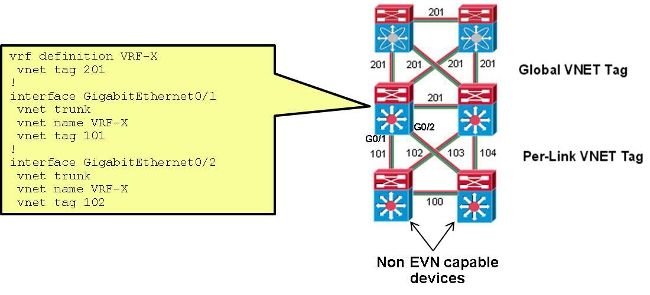
Met deze instelling wordt de VNET-tag die op de stam tussen CORE-1 en CORE-2 voor CUST-A wordt gebruikt, gewijzigd van 100 naar 101:
interface Ethernet0/0
  vnet name CUST-A
   vnet tag 101
Nadat deze wijziging zich voordoet op CORE-1, wordt een nieuwe subinterface gemaakt:
CORE-1#show derived-config | b Ethernet0/0
interface Ethernet0/0
 vnet trunk
 ip address 192.168.1.1 255.255.255.252
!
interface Ethernet0/0.101
 description Subinterface for VNET CUST-A
 encapsulation dot1Q 101
 vrf forwarding CUST-A
 ip address 192.168.1.1 255.255.255.252
!
interface Ethernet0/0.200
 description Subinterface for VNET CUST-B
 encapsulation dot1Q 200
 vrf forwarding CUST-B
 ip address 192.168.1.1 255.255.255.252
Als deze verandering zich slechts aan één kant voordoet, gaat de connectiviteit verloren in de bijbehorende VRF en gaat de OSPF naar beneden:
%OSPF-5-ADJCHG: Process 1, Nbr 192.168.1.5 on Ethernet0/0.101 from FULL to DOWN,
 Neighbor Down: Dead timer expired
Zodra dezelfde VNET-tag op CORE-2 is gebruikt, wordt de connectiviteit hersteld en wordt dot1q-tag 101 op die stam gebruikt, terwijl 100 nog steeds wordt gebruikt op de CORE-1 tot CORE-3-stam:
%OSPF-5-ADJCHG: Process 1, Nbr 192.168.1.5 on Ethernet0/0.101 from LOADING to
 FULL, Loading Done
Verifiëren
Er is momenteel geen verificatieprocedure beschikbaar voor deze configuratie.
Problemen oplossen
Er is momenteel geen specifieke troubleshooting-informatie beschikbaar voor deze configuratie.
Gerelateerde informatie
- Eenvoudig virtueel netwerk — Vereenvoudiging van Layer 3-netwerkvirtualisatie
- Technische ondersteuning en documentatie – Cisco Systems
Revisiegeschiedenis
| Revisie | Publicatiedatum | Opmerkingen |
|---|---|---|
1.0 |
04-Aug-2014
|
Eerste vrijgave |

 Feedback
Contact Cisco
- Een ondersteuningscase openen

- (Vereist een Cisco-servicecontract)