Vervang een Supervisor Module of Stack Member van Catalyst 9000 in HA
Inhoud
Inleiding
In dit document wordt beschreven hoe u een supervisor-module of een stapellid van Catalyst 9K-switches kunt vervangen in een configuratie met hoge beschikbaarheid (HA).
Voorwaarden
Vereisten
Cisco raadt u aan bekend te zijn met stapelen, stackwise-virtual (SVL) en bundel versus installeer opstartmodus gerelateerde concepten op Catalyst 9K-switches.
Gebruikte componenten
De informatie in dit document is gebaseerd op de volgende software- en hardware-versies:
- C9200
- C9300
- C9400
- C9500
- C9600
Opmerking: raadpleeg de juiste configuratiehandleiding voor de opdrachten die worden gebruikt om deze functies op andere Cisco-platforms in te schakelen.
De informatie in dit document is gebaseerd op de apparaten in een specifieke laboratoriumomgeving. Alle apparaten die in dit document worden beschreven, hadden een opgeschoonde (standaard)configuratie. Als uw netwerk live is, moet u zorgen dat u de potentiële impact van elke opdracht begrijpt.
Achtergrondinformatie
Dit document bevat de processen voor het vervangen van een lid van stapelbare switch types:
- C9200/C9300-stapellid
- C9500 met behulp van SVL
- Supervisor van een C9400/C9600-chassis in de verschillende werkingsmodi (standalone, dual-sup, SVL en quad-sup SVL).
Een lid van C9300- of C9200-stapel vervangen
In dit voorbeeld vervangt u een lid van een C9300-stapel. (De switch gebruikt in dit voorbeeld switch 2 in de opstartmodus installeren).
Opmerking: hetzelfde proces kan worden gebruikt voor de vervanging van een C9200-stapellid.
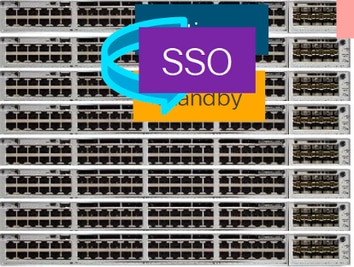
Voorafgaande vervanging controleren
Controleer de huidige stapelstatus en bereid je voor op de swap. Zorg ervoor dat de opstartvariabele op de switch is ingesteld op het juiste pakketbestand (als de opstartmodus Installeren is) of het bin-bestand (de opstartmodus Bundelen) en dat automatisch opstarten is ingeschakeld.
cat9K#show boot
---------------------------
Switch 1
---------------------------
Current Boot Variables:
BOOT variable = flash:packages.conf;
Boot Variables on next reload:
BOOT variable = flash:packages.conf;
Manual Boot = no
Enable Break = yes
Boot Mode = DEVICE
iPXE Timeout = 0
Opmerking: Als de switch zich in de opstartmodus van de installatie bevindt, controleert u of de automatische upgrade van de software is ingeschakeld. Als dat niet het geval is, schakelt u dat in door de automatische upgrade van de software te configureren en de globale configuratiemodus in te schakelen.
C9300#show run all | in software auto
no software auto-upgrade source url
software auto-upgrade enable
Opmerking: Als de stapel zich in de Bundle-opstartmodus bevindt, hebt u een kopie nodig van het IOS-XE .bin-bestand dat wordt gebruikt op een actieve USB-stick of lokale TFTP-server die toegankelijk is vanaf een nieuwe switch/lid, via de out-of-band (OOB) beheerpoort.
Controleer of de stapel fysiek is verbonden in volledige ring, d.w.z. als u het betreffende switch-lid uitschakelt, zou de bestaande stapel niet splitsen om stack-samenvoeging te veroorzaken. Nadat u het hebt geverifieerd, gaat u verder met de volgende stappen.
Switch#sh switch neighbors
Switch #  Port 1  Port 2
--------  ------  ------
1           2       3
2           3       2
3           1       2
Opmerking: Als een actief switch-lid moet worden vervangen, voert u een failover uit naar de stand-by-switch in de stapel en wacht u tot deze de actieve rol overneemt. Sla deze stap over als u een ander lid van de stapel gaat vervangen.
C9300#redundancy force-switchover

System configuration has been modified. Save? [yes/no]: yes
Building configuration...
Compressed configuration from 11673 bytes to 4403 bytes[OK]Proceed with switchover to standby RP? [confirm]
vervangen
Schakel de aangesloten switch uit die moet worden vervangen, koppel de stroomstack- en gegevensstapelkabels los. Vervang het lid door een nieuw lid bij uitgeschakelde toestand, sluit de kabels voor de datastack opnieuw aan en schakel deze in.
Opmerking: Als de nieuwe eenheid niet dezelfde softwareversie als de bestaande stapel uitvoert, moet u dat overeenkomen. Bijvoorbeeld, de bestaande stack draait 17.3.1 en de nieuwe unit draait 16.9.3.
Als uw stapel zich in de Bundle-opstartmodus bevindt, breekt u in op de ROMON van nieuwe switch terwijl deze wordt opgestart. Met behulp van een USB-stick of OOB TFTP-toegang start u de nieuwe switch handmatig op met dezelfde softwareversie als de bestaande stack.
Preparing to autoboot. [Press Ctrl-C to interrupt] 3 (interrupted)
rommon 1 >

rommon 2 > boot usbflash0:cat9k_iosxe.17.03.01.SPA.bin
Als de stapel zich in de opstartmodus van de installatie bevindt, moet de automatische software-upgrade worden gestart door de huidige actieve versie van de stapel, zodra deze een incompatibele softwareversie of opstartmodus op de nieuwe switch detecteert. In dit stadium is meestal geen handmatige interventie nodig.
Opmerking: tijdens het automatisch upgraden van de software kan het proces enkele minuten duren als er microcode_update nodig is. Wees geduldig en houd het proces nauwlettend in de gaten.
Logs from Stack Active

Sep 13 07:20:21.261 UTC: %STACKMGR-4-SWITCH_ADDED: Switch 1 R0/0: stack_mgr: Switch 2 has been added to the stack.
Sep 13 07:20:22.268 UTC: %STACKMGR-4-SWITCH_ADDED: Switch 1 R0/0: stack_mgr: Switch 2 has been added to the stack.
Sep 13 07:20:22.546 UTC: %BOOT-3-BOOTTIME_INCOMPATIBLE_SW_DETECTED: Switch 1 R0/0: issu_stack: Incompatible software detected.
** snip **

Sep 13 07:47:37.443 UTC: %AUTO_UPGRADE-5-AUTO_UPGRADE_INITIATED: Switch 1 R0/0: auto_upgrade_trigger: Auto upgrade initiated for switch 2.
Sep 13 07:47:37.496 UTC: %AUTO_UPGRADE-5-AUTO_UPGRADE_SEARCH: Switch 1 R0/0: auto_upgrade_trigger: Searching stack for software to upgrade switch 2.
Sep 13 07:47:37.519 UTC: %AUTO_UPGRADE-5-AUTO_UPGRADE_FOUND: Switch 1 R0/0: auto_upgrade_trigger: Found donor switch 1 to auto upgrade switch 2.
Sep 13 07:47:37.538 UTC: %AUTO_UPGRADE-5-AUTO_UPGRADE_START: Switch 1 R0/0: auto_upgrade_trigger: Upgrading switch 2 with software from switch 1.
Sep 13 07:47:46.769 UTC: %AUTO_UPGRADE_MODULAR-5-SMU_AUTO_UPGRADE_INITIATING: Switch 1 R0/0: auto_upgrade_trigger: Initiating SMU autoupgrade for switch 2
Sep 13 07:47:47.272 UTC: %AUTO_UPGRADE-5-AUTO_UPGRADE_FINISH: Switch 1 R0/0: auto_upgrade_trigger: Finished installing software on switch 2.

** snip **

Sep 13 07:57:18.981 UTC: %REDUNDANCY-5-PEER_MONITOR_EVENT: Active detected a standby insertion (raw-event=PEER_FOUND(4))
Sep 13 07:57:18.981 UTC: %REDUNDANCY-5-PEER_MONITOR_EVENT: Active detected a standby insertion (raw-event=PEER_REDUNDANCY_STATE_CHANGE(5))
Sep 13 07:57:49.863 UTC: %HA_CONFIG_SYNC-6-BULK_CFGSYNC_SUCCEED: Bulk Sync succeeded
Sep 13 07:57:50.865 UTC: %RF-5-RF_TERMINAL_STATE: Terminal state reached for (SSO)
Verifiëren na vervanging
Controleer de status van de switches zodra de SSO is voltooid. Op dit moment kunt u de stapelvoedingskabels opnieuw aansluiten, indien van toepassing.
C9300#show switch
Switch/Stack Mac Address : 70d3.79be.6c80 - Local Mac Address
Mac persistency wait time: Indefinite
H/W Current
Switch# Role    Mac Address    Priority Version  State
-------------------------------------------------------------------------------------
*1     Active   70d3.79be.6c80   1       V01     Ready
 2     Standby  70d3.7984.8580   2       V01     Ready
!
C9300# show module
Switch Ports  Model     Serial No. MAC address     Hw Ver. Sw Ver.
------ ----- --------- ----------- -------------- ------- --------
1      41    C9300-24U FCW2125L0BH 70d3.79be.6c80   V01    17.03.01
2      41    C9300-24U FCW2125L03W 70d3.7984.8580   V01    17.03.01
C9300#show redundancy
Redundant System Information :
------------------------------
Available system uptime = 58 minutes
Switchovers system experienced = 0
Standby failures = 0
Last switchover reason = none
Hardware Mode = Duplex
Configured Redundancy Mode = sso
Operating Redundancy Mode = sso
Maintenance Mode = Disabled
Communications = Up

Current Processor Information :
-------------------------------
Active Location = slot 1
Current Software state = ACTIVE
Uptime in current state = 58 minutes
Image Version = Cisco IOS Software [Amsterdam], Catalyst L3 Switch Software (CAT9K_IOSXE), Version 17.3.1, RELEASE SOFTWARE (fc5)
Technical Support: https://www.cisco.com/c/en/us/support/index.html
Copyright (c) 1986-2020 by Cisco Systems, Inc.
Compiled Fri 07-Aug-20 21:32 by mcpre
BOOT = flash:packages.conf;flash:;
CONFIG_FILE =
Configuration register = 0x102

Peer Processor Information :
----------------------------
Standby Location = slot 2
Current Software state = STANDBY HOT
Uptime in current state = 4 minutes
Image Version = Cisco IOS Software [Amsterdam], Catalyst L3 Switch Software (CAT9K_IOSXE), Version 17.3.1, RELEASE SOFTWARE (fc5)
Technical Support: https://www.cisco.com/c/en/us/support/index.html
Copyright (c) 1986-2020 by Cisco Systems, Inc.
Compiled Fri 07-Aug-20 21:32 by mcpre
BOOT = flash:packages.conf;flash:;
CONFIG_FILE =
Configuration register = 0x102
Een redundante supervisor van het C9400 standalone chassis vervangen
In dit voorbeeld vervangt u de actieve supervisor van een C9404-chassis. (De switch gebruikt in dit voorbeeld sleuf 3 in de opstartmodus installeren.)
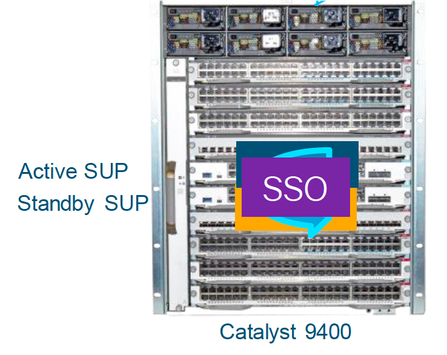
Voorafgaande vervanging controleren
Controleer of de opstartvariabele op de switch is ingesteld op het juiste pakketbestand (als de opstartmodus is geïnstalleerd) of het bin-bestand (de opstartmodus van de bundel) en of automatisch opstarten is ingeschakeld.
Opmerking: Als de switch zich in de opstartmodus van de installatie bevindt, controleert u of de automatische upgrade van de software is ingeschakeld. Als dat niet het geval is, schakelt u dat in door de automatische upgrade van de software te configureren en de globale configuratiemodus in te schakelen.
C9400#show run all | in software auto
no software auto-upgrade source url
software auto-upgrade enable
Opmerking: Als uw actieve supervisor in de Bundle-opstartmodus wordt uitgevoerd, moet u een kopie van het actieve softwarebestand (.bin-bestand waarop u actief bent) bewaren op een USB-stick of lokale TFTP-server die toegankelijk is vanaf een nieuwe supervisor via de out-of-band (OOB) beheerpoort.
Als een actieve supervisor moet worden vervangen (zoals in dit voorbeeld van ons), voert u een failover uit naar een standby-supervisor en wacht u tot deze de actieve rol overneemt. Sla deze stap over als u de standby-supervisor gaat vervangen.
C9400#redundancy force-switchover

System configuration has been modified. Save? [yes/no]: yes
Building configuration...
Compressed configuration from 11673 bytes to 4403 bytes[OK]Proceed with switchover to standby RP? [confirm]
vervangen
Verwijder een defecte supervisor uit het chassis en plaats de nieuwe met een aangesloten consolekabel.
Opmerking: in eerste instantie, als beide supervisors niet op dezelfde softwareversie, moet u ze overeenkomen. Een actieve supervisor kan bijvoorbeeld 16.9.5 en een nieuwe/standby 16.9.4 uitvoeren.
Als uw actieve supervisor in de Bundle-opstartmodus wordt uitgevoerd, breekt u in bij de ROMMON van de nieuwe supervisor terwijl deze wordt opgestart. Met behulp van een USB-stick of OOB TFTP-toegang start u de supervisor handmatig op met dezelfde softwareversie als uw actieve supervisor.
Preparing to autoboot. [Press Ctrl-C to interrupt] 3 (interrupted)
rommon 1 >
rommon 2 > boot usbflash0:cat9k_iosxe.16.09.05.SPA.bin
Als uw actieve supervisor in de opstartmodus installeert, moet de huidige actieve supervisor een automatische software-upgrade uitvoeren zodra deze een incompatibele softwareversie of opstartmodus detecteert in de nieuwe/standby-supervisor. In dit stadium is meestal geen handmatige interventie nodig.
*Jun 16 19:50:15.122: %IOSXE_OIR-6-INSSPA: SPA inserted in subslot 3/0
*Jun 16 19:50:42.374: %SPA_OIR-6-ONLINECARD: SPA (C9400-SUP-1) online in subslot 3/0
C9400#
*Jun 16 19:50:43.376: 3 0 0:Ignore this incremental sync, session not ready
C9400#
*Jun 16 19:52:10.003: %IOSXE_OIR-6-INSCARD: Card (fp) inserted in slot F1
C9400#
*Jun 16 19:51:16.469: %IOSXE-3-PLATFORM: R1/0: kernel: dplr_intrpt: Entered dplr_intrpt_module_init dplr_intrpt 1
*Jun 16 19:51:16.472: %IOSXE-3-PLATFORM: R1/0: kernel: chr_mmap: Allocating DMA Reserve Pool ...
*Jun 16 19:52:27.950: %IOSXE_OIR-6-ONLINECARD: Card (rp) online in slot R1
*Jun 16 19:52:28.727: %AUTO_UPGRADE-5-AUTO_UPGRADE_INITIATED: R0/0: auto_upgrade_client: Auto upgrade initiated for RP 1.
*Jun 16 19:52:28.748: %AUTO_UPGRADE-5-AUTO_UPGRADE_SEARCH: R0/0: auto_upgrade_client: Searching stack for software to upgrade RP 1.
*Jun 16 19:52:28.760: %AUTO_UPGRADE-5-AUTO_UPGRADE_FOUND: R0/0: auto_upgrade_client: Found donor RP 0 to auto upgrade RP 1.
*Jun 16 19:52:28.773: %AUTO_UPGRADE-5-AUTO_UPGRADE_START: R0/0: auto_upgrade_client: Upgrading RP 1 with software from RP 0.

*Jun 16 19:52:39.655: %REDUNDANCY-5-PEER_MONITOR_EVENT: Active detected a standby insertion (raw-event=PEER_FOUND(4))

*Jun 16 19:52:39.655: %REDUNDANCY-5-PEER_MONITOR_EVENT: Active detected a standby insertion (raw-event=PEER_REDUNDANCY_STATE_CHANGE(5))

*Jun 16 19:52:39.642: %AUTO_UPGRADE_MODULAR-5-SMU_AUTO_UPGRADE_INITIATING: R0/0: auto_upgrade_client: Initiating SMU autoupgrade for RP 1
*Jun 16 19:52:40.832: %AUTO_UPGRADE-5-AUTO_UPGRADE_FINISH: R0/0: auto_upgrade_client: Finished installing software on RP 1.
*Jun 16 19:52:40.847: %AUTO_UPGRADE-5-AUTO_UPGRADE_RELOAD: R0/0: auto_upgrade_client: Reloading RP 1 to complete the auto upgrade.
*Jun 16 19:52:41.622: %IOSXE_OIR-6-OFFLINECARD: Card (rp) offline in slot R1

** snip **

*Jun 16 19:56:10.356: %REDUNDANCY-5-PEER_MONITOR_EVENT: Active detected a standby insertion (raw-event=PEER_FOUND(4))

*Jun 16 19:56:10.356: %REDUNDANCY-5-PEER_MONITOR_EVENT: Active detected a standby insertion (raw-event=PEER_REDUNDANCY_STATE_CHANGE(5))

** snip **

*Jun 16 19:57:33.582: %HA_CONFIG_SYNC-6-BULK_CFGSYNC_SUCCEED: Bulk Sync succeeded
*Jun 16 19:57:34.623: %RF-5-RF_TERMINAL_STATE: Terminal state reached for (SSO)
Verifiëren na vervanging
Controleer de toestand van de toezichthouders zodra de SSO is voltooid
C9400#show module
Chassis Type: C9404R
Mod Ports                           Card Type                     Model                Serial No.
---+---------------------+-------------------------------+-----------------------+--------------------
2         10                     Supervisor 1 Module           C9400-SUP-1           JAE22100647
3         10                     Supervisor 1 Module           C9400-SUP-1

Mod                    MAC addresses              Hw         Fw              Sw         Status
---+----------------------------------------+----------+--------------+--------------+------------
2         A8B4.56BF.316C to A8B4.56BF.3175       1.0       16.12.1r       16.09.05        ok
3                                                                                         ok             <--- Started Syncing

Mod   Redundancy Role            Operating Redundancy Mode           Configured Redundancy Mode
---+----------------------+---------------------------------------+------------------------------------------------
2          Active                         sso                                  sso
3          Standby                        sso                                  sso

Chassis MAC address range: 44 addresses from a8b4.56bf.3140 to a8b4.56bf.316b
C9400#show redundancy
Redundant System Information :
------------------------------
Available system uptime = 10 minutes
Switchovers system experienced = 0
Standby failures = 0
Last switchover reason = none
Hardware Mode = Duplex
Configured Redundancy Mode = sso
Operating Redundancy Mode = sso
Maintenance Mode = Disabled
Communications = Up
Current Processor Information :
-------------------------------
Active Location = slot 2
Current Software state = ACTIVE
Uptime in current state = 10 minutes
Image Version = Cisco IOS Software [Fuji], Catalyst L3 Switch Software (CAT9K_IOSXE), Version 16.9.5, RELEASE SOFTWARE (fc2)
Technical Support: https://www.cisco.com/c/en/us/support/index.html
Copyright (c) 1986-2019 by Cisco Systems, Inc.
Compiled Thu 22-Aug-19 18:14 by mcpre
BOOT = bootflash:packages.conf;
CONFIG_FILE =
Configuration register = 0x102
Peer Processor Information :
----------------------------
Standby Location = slot 3
Current Software state = STANDBY HOT
Uptime in current state = 0 minutes
Image Version = Cisco IOS Software [Fuji], Catalyst L3 Switch Software (CAT9K_IOSXE), Version 16.9.5, RELEASE SOFTWARE (fc2)
Technical Support: https://www.cisco.com/c/en/us/support/index.html
Copyright (c) 1986-2019 by Cisco Systems, Inc.
Compiled Thu 22-Aug-19 18:14 by mcpre
BOOT = bootflash:packages.conf;
CONFIG_FILE =
Configuration register = 0x102
Vervang een supervisor van C9400 Dual-Sup StackWise-Virtual
Dit voorbeeld is voor een C9400 stapsgewijze-virtuele installatie (één supervisor in elk chassis), waarbij de supervisor van chassis-1 (Active switch) is mislukt en moet worden vervangen. De SVL wordt uitgevoerd in de opstartmodus van de installatie.
Voorafgaande vervanging controleren
Controleer de huidige StackWise-Virtual-gerelateerde configuraties en de status van de supervisors. Zorg ervoor dat de opstartvariabele op de switch correct is ingesteld, wijzend naar het juiste pakketbestand (als de opstartmodus Installeren is) of het bin-bestand (de opstartmodus van de bundel) en dat automatisch opstarten is ingeschakeld.
9400-3#show stackwise-virtual
Stackwise Virtual Configuration:
--------------------------------
Stackwise Virtual : Enabled
Domain Number : 100
Switch Stackwise Virtual Link Ports
------ ---------------------- ------
1             1               TenGigabitEthernet1/5/0/1 <<< switch 1 needs to be replaced here
2             1               TenGigabitEthernet2/5/0/1
9400-3#show bootvar
BOOT variable = flash:packages.conf;
Configuration Register is 0x102
MANUAL_BOOT variable = no
BAUD variable = 9600
ENABLE_BREAK variable = yes
BOOTMODE variable does not exist
IPXE_TIMEOUT variable does not exist
CONFIG_FILE variable =
9400-3#show run all | in software auto
no software auto-upgrade source url
software auto-upgrade enable
Als de actieve supervisor moet worden vervangen (zoals in ons voorbeeld), voert u een failover uit naar de standby-supervisor en wacht u tot de standby de actieve rol overneemt. Sla deze stap over als u de standby-toezichthouder vervangt.
9400-1#redundancy force-switchover

System configuration has been modified. Save? [yes/no]: yes
Building configuration...
Compressed configuration from 11673 bytes to 4403 bytes[OK]Proceed with switchover to standby RP? [confirm]
vervangen
Schakel het chassis uit waar de supervisor moet worden vervangen (in ons voorbeeld is dit chassis-1).
Verwijder de lijnkaarten uit de backplane van het betreffende chassis (waar de supervisor moet worden vervangen). Het is niet nodig om de lijnkaarten volledig uit het chassis te halen, zolang ze niet aan de backplane zijn bevestigd, is het prima. Op die manier, wanneer nieuwe supervisor wordt ingebracht en vooraf wordt geënsceneerd, zetten de externe switches van de aansluitingen (Multi-chassis etherchannel) hun lokale poorten niet in een foutgeschakelde toestand (LACP enzovoort).
9400-3#show module
Chassis Type: C9410R

Switch Number 1
Mod Ports Card Type Model Serial No.
---+-----+--------------------------------------+--------------+--------------
Mod MAC addresses Hw Fw Sw Status
---+--------------------------------+----+------------+------------------+--------
Mod  Redundancy Role      Operating Redundancy Mode    Configured Redundancy Mode
---+-------------------+-------------------------+---------------------------

Switch Number 2
Mod Ports Card Type                               Model           Serial No.
---+-----+--------------------------------------+--------------+--------------
1    48   48-Port UPOE w/ 24p mGig 24p RJ-45     C9400-LC-48UX   JAE2138067S
2    48   48-Port UPOE 10/100/1000 (RJ-45)       C9400-LC-48U    JAE2141091P
5   10    Supervisor 1 Module                    C9400-SUP-1     JAE2220082A

Mod          MAC addresses            Hw        Fw             Sw           Status
---+--------------------------------+----+------------+------------------+--------
1   707D.B9CF.6D1C to 707D.B9CF.6D4B 1.0    16.12.2r     16.12.03a           ok
2   6CB2.AE42.2704 to 6CB2.AE42.2733 1.0    16.12.2r     16.12.03a           ok
5   AC3A.675B.E26C to AC3A.675B.E275 1.0    16.12.2r     16.12.03a           ok

Mod  Redundancy Role        Operating Redundancy Mode  Configured Redundancy Mode
---+-------------------+-------------------------+---------------------------
5    Active                    non-redundant               sso
Plaats de nieuwe supervisor in dezelfde sleuf waar de defecte supervisor aanwezig was en schakel deze in. Het moet opstarten in de stand-alone modus (niet-SVL), laat de Stackwise-virtuele links voor nu verbroken.
- Als uw actieve supervisor in de Bundle-opstartmodus wordt uitgevoerd, kopieert u het bestand met de softwarebin (hetzelfde als de huidige actieve supervisor van SVL) naar bootflash van de nieuwe standby-supervisor en wijzigt u de opstarttekenreeks dienovereenkomstig.
- Als uw actieve supervisor wordt uitgevoerd in de opstartmodus installeren, is een handmatige software-upgrade niet nodig. De software en de opstartmodus van de nieuwe supervisor moeten automatisch worden bijgewerkt door de huidige actieve supervisor, zodra deze een incompatibele softwareversie of opstartmodus detecteert in de nieuwe/standby-supervisor.
Configureer de nieuwe supervisor met Stackwise-virtuele instellingen. (U moet hetzelfde SVL-domeinnummer gebruiken om overeen te komen met het bestaande lid.)
Switch#conf t
Enter configuration commands, one per line.  End with CNTL/Z.

Switch(config)#stackwise-virtual
Please reboot the switch for Stackwise Virtual configuration to take effect

Switch(config-stackwise-virtual)#domain 100
Switch(config-stackwise-virtual)#exit
Configureer de SVL- en DAD-poorten. Gebruik dezelfde poorten, die werden gebruikt op de defecte supervisor.
9400-1(config)#interface tenGigabitEthernet 5/0/1
9400-1(config-if)#stackwise-virtual link 1
WARNING: All the extraneous configurations will be removed for TenGigabitEthernet5/0/1 on reboot
INFO: Upon reboot, the config will be part of running config but not part of start up config.
Controleer of de SVL-configuratie correct is toegepast op de nieuwe switch.
Switch#show stackwise-virtual
Stackwise Virtual Configuration:
--------------------------------
Stackwise Virtual : Disabled
Switch	Stackwise Virtual Link	Ports
------	----------------------	------
Stackwise Virtual Configuration After Reboot:
---------------------------------------------
Stackwise Virtual : Enabled
Domain Number :	100
Switch	Stackwise Virtual Link	Ports
------	----------------------	------
1    	1                       TenGigabitEthernet5/0/1
Controleer de SVL-instellingen in ROMMON van IOSd CLI (beschikbaar in versies 16.12.x of hoger)
9400-1#show romvar
ROMMON variables:
MAC_ADDR="70:0F:6A:DE:54:34"
SWITCH_NUMBER="1"
MODEL_NUM="C9400-SUP-1"
SYSTEM_SERIAL_NUM=""
MOTHERBOARD_SERIAL_NUM="JAE221703NQ"
TEMPLATE="access"
BAUD="9600"
LICENSE_BOOT_LEVEL="network-advantage+dna-advantage,all:MACALLAN-CHASSIS;"
MCP_STARTUP_TRACEFLAGS="00000000:00000000"
CALL_HOME_DEBUG="0000000000000"
D_STACK_DAD=""
CONFIG_FILE=""
BOOTLDR=""
SWITCH_IGNORE_STARTUP_CFG="0"
MANUAL_BOOT="no"
AUTOREBOOT_RESTORE="0"
ENABLE_BREAK="yes"
RET_2_RTS=""
AUTO_SWITCH_CONSOLE_DISABLE="0"
BOOT="flash:cat9k_iosxe.16.12.03a.SPA.bin;"
D_STACK_DISTR_STACK_LINK2=""
ABNORMAL_RESET_COUNT="1"
ROMMON_AUTOBOOT_ATTEMPT="3"
BSI="0"
RET_2_RCALTS=""
RANDOM_NUM="421133355"
D_STACK_DISTR_STACK_LINK1="Te5/0/1,"
D_STACK_MODE="aggregation"
D_STACK_DOMAIN_NUM="100"
Sla de configuraties op en schakel het chassis uit waar de nieuwe supervisor in is geplaatst.
Verbind StackWise-Virtual-koppelingen tussen twee chassis en laat de Dual-active-detectiekoppeling (indien van toepassing) liever los.
Schakel het chassis in en bewaak het opstartproces via de console.
- Als uw SVL wordt uitgevoerd in de Bundle-opstartmodus, moet u ervoor zorgen dat de nieuwe supervisor dezelfde softwareversie als Active krijgt. Als dat niet het geval is, breekt u opnieuw in bij ROMMON en start u het handmatig op met de juiste softwareversie.
- Als de SVL wordt uitgevoerd in de opstartmodus installeren, moet "software auto-upgrade" ervoor zorgen dat de juiste softwareversie en opstartmodus naar een nieuwe supervisor worden geduwd, zonder enige handmatige interventie.
Active supervisor's log

*Sep 12 07:20:25.457: %ILPOWER-6-SET_ILPOWER: Set power allocated to POE to 4420 for slot 0
*Sep 12 07:20:30.621: %BOOT-3-BOOTTIME_INCOMPATIBLE_SW_DETECTED: Chassis 2 R0/0: issu_stack: Incompatible software detected. Details: Active's subpackage boot mode does not match with member's super boot mode. Please boot switch 1 in subpackage mode.

*Sep 12 07:20:40.779: %AUTO_UPGRADE-5-AUTO_UPGRADE_START_CHECK: Chassis 2 R0/0: auto_upgrade_client: Auto upgrade start checking for incompatible switches.
*Sep 12 07:21:00.978: %AUTO_UPGRADE-5-AUTO_UPGRADE_INITIATED: Chassis 2 R0/0: auto_upgrade_client: Auto upgrade initiated for switch 1.
*Sep 12 07:21:01.031: %AUTO_UPGRADE-5-AUTO_UPGRADE_SEARCH: Chassis 2 R0/0: auto_upgrade_client: Searching stack for software to upgrade switch 1.
*Sep 12 07:21:01.053: %AUTO_UPGRADE-5-AUTO_UPGRADE_FOUND: Chassis 2 R0/0: auto_upgrade_client: Found donor switch 2 to auto upgrade switch 1.
*Sep 12 07:21:01.074: %AUTO_UPGRADE-5-AUTO_UPGRADE_START: Chassis 2 R0/0: auto_upgrade_client: Upgrading switch 1 with software from switch 2.
Logs from new supervisor's console

Waiting for remote chassis to join
#########################################
Chassis number is 1
All chassis in the stack have been discovered. Accelerating discovery

Chassis 1 reloading, reason - System requested reload <<< reload is instructed by current active as part of software auto-upgrade
Sep 12 07:25:23.306: %PMAN-5-EXITACTION: R0/0: pvp: Process manager is exiting: process exit with reload fru code
Alle actieve configuraties moeten automatisch worden gesynchroniseerd van Active Supervisor naar de nieuwe. Wacht op deze logs van de actieve supervisor.
*Sep 12 07:33:39.803: %HA_CONFIG_SYNC-6-BULK_CFGSYNC_SUCCEED: Bulk Sync succeeded
*Sep 12 07:33:40.837: %RF-5-RF_TERMINAL_STATE: Terminal state reached for (SSO)
- Nadat de SSO is voltooid, gaat u verder met het aansluiten van de Dual-active detection (DAD) -koppeling en andere netwerkuplinkpoorten op een nieuwe supervisor, indien van toepassing.
- Duw de lijnkaarten terug naar binnen, om ze weer aan de backplane te bevestigen
- Controleer of alle lijnkaarten goed zijn opgestart, online diagnostische tests hebben doorstaan en hun interfaces hebben opgehaald, inclusief poort-kanaalbinding enzovoort.
Verifiëren na vervanging
Controleer de StackWise Virtual gerelateerde configuraties en de status van de switch met behulp van deze opdrachten.
9400-3#sh redundancy
Redundant System Information :
------------------------------
Available system uptime = 1 hour, 31 minutes
Switchovers system experienced = 0
Standby failures = 0
Last switchover reason = none

Hardware Mode = Duplex
Configured Redundancy Mode = sso
Operating Redundancy Mode = sso
Maintenance Mode = Disabled
Communications = Up

Current Processor Information :
-------------------------------
Active Location = Switch 2
Current Software state = ACTIVE
Uptime in current state = 31 minutes
Image Version = Cisco IOS Software [Gibraltar], Catalyst L3 Switch Software (CAT9K_IOSXE), Version 16.12.3a, RELEASE SOFTWARE (fc1)
Technical Support: https://www.cisco.com/c/en/us/support/index.html
Copyright (c) 1986-2020 by Cisco Systems, Inc.
Compiled Tue 28-Apr-20 09:37 by mcpre
BOOT = flash:packages.conf;
CONFIG_FILE =
Configuration register = 0x102

Peer Processor Information :
----------------------------
Standby Location = Switch 1
Current Software state = STANDBY HOT
Uptime in current state = 4 minutes
Image Version = Cisco IOS Software [Gibraltar], Catalyst L3 Switch Software (CAT9K_IOSXE), Version 16.12.3a, RELEASE SOFTWARE (fc1)
Technical Support: https://www.cisco.com/c/en/us/support/index.html
Copyright (c) 1986-2020 by Cisco Systems, Inc.
Compiled Tue 28-Apr-20 09:37 by mcpre
BOOT = flash:packages.conf;
CONFIG_FILE =
Configuration register = 0x102
!
9400-3#sh stackwise-virtual
Stackwise Virtual Configuration:
--------------------------------
Stackwise Virtual : Enabled
Domain Number : 100
Switch Stackwise Virtual Link Ports
------ ---------------------- ------
1          1                   TenGigabitEthernet1/5/0/1
2          1                   TenGigabitEthernet2/5/0/1
9400-3#sh module
Chassis Type: C9410R
Switch Number 1

Mod Ports         Card Type                       Model          Serial No.
---+-----+--------------------------------------+--------------+--------------
1    48     48-Port UPOE w/ 24p mGig 24p RJ-45   C9400-LC-48UX  JAE22360153
2    48     48-Port UPOE w/ 24p mGig 24p RJ-45   C9400-LC-48UX  JAE215103V7
5    10     Supervisor 1 Module                  C9400-SUP-1    JAE221703NQ

Mod   MAC addresses                   Hw     Fw          Sw                Status
---+--------------------------------+----+------------+------------------+--------
1    00B7.71FA.D878 to 00B7.71FA.D8A7 1.0  16.12.2r     16.12.03a           ok
2    4C77.6DBF.4A94 to 4C77.6DBF.4AC3 1.0  16.12.2r     16.12.03a           ok
5    AC3A.675B.E9AC to AC3A.675B.E9B5 1.0  16.12.2r     16.12.03a           ok

Mod Redundancy Role       Operating Redundancy Mode   Configured Redundancy Mode
---+-------------------+-------------------------+---------------------------
5     Standby                  sso                          sso
**snip**
Een lid van de C9500 StackWise-Virtual vervangen
In dit voorbeeld overweegt u een C9500 Stackwise Virtual setup met Switch-1 (de Active switch) als een defecte switch die moet worden vervangen. De SVL wordt uitgevoerd in de opstartmodus INSTALLEREN.
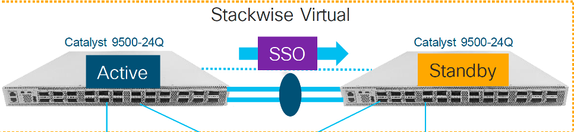
Voorafgaande vervanging controleren
Controleer de huidige StackWise-Virtual-gerelateerde configuraties en de status van de switches. Zorg ervoor dat de opstartvariabele correct is ingesteld, wijst naar packages.conf en config-register is ingesteld op 0x2102.
C9500-1#show stackwise-virtual
Stackwise Virtual Configuration:
--------------------------------
Stackwise Virtual : Enabled
Domain Number : 100
Switch Stackwise Virtual Link Ports
------ ---------------------- ------
1            1                TwentyFiveGigE1/0/1
                              TwentyFiveGigE1/0/2
2            1                TwentyFiveGigE2/0/1
                              TwentyFiveGigE2/0/2
C9500-1#show stackwise-virtual dual-active-detection
Dual-Active-Detection Configuration:
-------------------------------------
Switch	Dad port
------	------------
1       TwentyFiveGigE1/0/3
2       TwentyFiveGigE2/0/3    <<<<<<<<<< Ports configured for Dual-Active Detection (DAD)


Note : Configs of these DAD ports do not show up in running-config

!
interface TwentyFiveGigE 1/0/3
end
!
interface TwentyFiveGigE 2/0/3
end


C9500-1#show switch

Switch/Stack Mac Address : f4db.e619.0480 - Local Mac Address
Mac persistency wait time: Indefinite
H/W Current
Switch# Role      Mac Address    Priority  Version  State
-------------------------------------------------------------------------------------
*1     Active    f4db.e619.0480    15       V02     Ready
 2     Standby   f4db.e618.fa80     1       V02     Ready


C9500-1#show redundancy

Redundant System Information :
------------------------------
Available system uptime = 4 minutes
Switchovers system experienced = 0
Standby failures = 0
Last switchover reason = none
Hardware Mode = Duplex
Configured Redundancy Mode = sso
Operating Redundancy Mode = sso
Maintenance Mode = Disabled
Communications = Up

Current Processor Information :
-------------------------------
Active Location = slot 1
Current Software state = ACTIVE
Uptime in current state = 4 minutes
Image Version = Cisco IOS Software [Gibraltar], Catalyst L3 Switch Software (CAT9K_IOSXE), Version 16.12.02, RELEASE SOFTWARE (fc2)
Technical Support: https://www.cisco.com/c/en/us/support/index.html
Copyright (c) 1986-2019 by Cisco Systems, Inc.
Compiled Tue 19-Nov-19 10:04 by mcpre
BOOT = flash:packages.conf;
CONFIG_FILE =
Configuration register = 0x102

Peer Processor Information :
----------------------------
Standby Location = slot 2
Current Software state = STANDBY HOT
Uptime in current state = 1 minute
Image Version = Cisco IOS Software [Gibraltar], Catalyst L3 Switch Software (CAT9K_IOSXE), Version 16.12.02, RELEASE SOFTWARE (fc2)
Technical Support: https://www.cisco.com/c/en/us/support/index.html
Copyright (c) 1986-2019 by Cisco Systems, Inc.
Compiled Tue 19-Nov-19 10:04 by mcpre
BOOT = flash:packages.conf;
CONFIG_FILE =
Configuration register = 0x102
C9500-1#show run all | in software auto
no software auto-upgrade source url
software auto-upgrade enable
Als actieve switch moet worden vervangen, voert u een failover uit naar de stand-by-switch en wacht u tot de stand-by-modus de actieve rol overneemt. (Sla deze stap over als u het stand-by-apparaat vervangt).
C9500-1#redundancy force-switchover

System configuration has been modified. Save? [yes/no]: yes
Building configuration...
Compressed configuration from 11673 bytes to 4403 bytes[OK]Proceed with switchover to standby RP? [confirm]
vervangen
Schakel de Switch uit die moet worden vervangen. Koppel alle kabels los van die switch.
C9500-1#show switch
Switch/Stack Mac Address : f4db.e619.0480 - Foreign Mac Address
Mac persistency wait time: Indefinite
H/W Current
Switch# Role      Mac Address    Priority Version  State
-------------------------------------------------------------------------------------
 1     Member    0000.0000.0000    0        V02    Removed  << switch 1 is powered down
*2     Active    f4db.e618.fa80    1        V02    Ready
Schakel de nieuwe switch in. Het moet worden opgestart in de stand-alone modus (niet-SVL). (Sla deze stap over als de huidige actieve SVL wordt uitgevoerd in de opstartmodus INSTALLEREN)
Controleer de softwareversie op het nieuwe apparaat. Als het niet overeenkomt met het bestaande lid van StackWise-Virtual-eenheid, dan pre-stage dat overeenkomt met de softwareversie en licentie, met het bestaande lid van SVL. (U kunt de juiste softwareversie laden via TFTP / FTP / SFTP of met behulp van een USB-stick, en na het matchen van de softwareversie en licentie op nieuwe eenheid, ga verder met de volgende stap.
Cisco IOS XE Software, Version 16.12.02
Cisco IOS Software [Gibraltar], Catalyst L3 Switch Software (CAT9K_IOSXE), Version 16.12.02, RELEASE SOFTWARE (fc2)
Technical Support: https://www.cisco.com/c/en/us/support/index.html
Copyright (c) 1986-2019 by Cisco Systems, Inc.
Compiled Tue 19-Nov-19 10:04 by mcpre
Configureer StackWise Virtual op de nieuwe switch. U moet hetzelfde SVL-domeinnummer gebruiken om overeen te komen met het bestaande lid.
Switch#conf t
Enter configuration commands, one per line.  End with CNTL/Z.

Switch(config)#stackwise-virtual
Please reboot the switch for Stackwise Virtual configuration to take effect
Switch(config-stackwise-virtual)#domain 100
Switch(config-stackwise-virtual)#exit
Configureer de SVL- en DAD-poorten. Gebruik dezelfde poorten, die zijn gebruikt op de defecte switch.
Switch(config)#int range twe1/0/1-2
Switch(config-if-range)#stackwise-virtual link 1
WARNING: All the extraneous configurations will be removed for TwentyFiveGigE1/0/1 on reboot
WARNING: All the extraneous configurations will be removed for TwentyFiveGigE1/0/2 on reboot
Switch(config-if-range)#exit

Switch(config)#int twe1/0/3
Switch(config-if)#stackwise-virtual dual-active-detection
WARNING: All the extraneous configurations will be removed for TwentyFiveGigE1/0/3 on reboot.
Controleer of de SVL-configuratie correct is toegepast op de nieuwe switch.
Switch#show stackwise-virtual
Stackwise Virtual Configuration:
--------------------------------
Stackwise Virtual : Disabled
Switch	Stackwise Virtual Link	Ports
------	----------------------	------
Stackwise Virtual Configuration After Reboot:
---------------------------------------------
Stackwise Virtual : Enabled
Domain Number :	100
Switch	Stackwise Virtual Link	Ports
------	----------------------	------
1    	1                       TwentyFiveGigE1/0/1
                                TwentyFiveGigE1/0/2


Switch#show stackwise-virtual dual-active-detection
Dual-Active-Detection Configuration:
-------------------------------------
Switch	Dad port
------	------------
Distributed Stack DAD Configuration After Reboot:
------------------------------------------------
Switch	Dad port
------	--------
1        TwentyFiveGigE1/0/3
Sla de configuraties op en schakel de nieuwe switch uit.
Verbind StackWise-Virtual-koppelingen tussen het bestaande SVL-lid en de nieuwe eenheid. Laat de Dual-active-detectielink bij voorkeur los.
Schakel de nieuwe eenheid in. Als er een conflict is in het aantal switches, moet de nieuwe eenheid automatisch opnieuw worden genummerd.
Chassis is reloading, reason: Configured Switch num conflicts with peer, Changing local switch number to 1 and reloading to take effect
Sep 10 22:41:50.738: %PMAN-3-PROCHOLDDOWN: R0/0: The process nif_mgr has been helddown (rc 69)
*Sep 10 22:47:05.996: %AUTO_UPGRADE-5-AUTO_UPGRADE_START_CHECK: Chassis 2 R0/0: auto_upgrade_client: Auto upgrade start checking for incompatible switches.
Alle actieve configuraties worden automatisch gesynchroniseerd van Active switch naar de nieuwe switch. Er zijn geen extra configuraties nodig. Wacht op deze logs van actieve switch.
*Sep 11 01:02:28.974: %HA_CONFIG_SYNC-6-BULK_CFGSYNC_SUCCEED: Bulk Sync succeeded
C9500-1#
*Sep 11 01:02:30.009: %RF-5-RF_TERMINAL_STATE: Terminal state reached for (SSO)
Ga verder met het aansluiten van de Dual-active detection (DAD)-koppeling en andere netwerkpoorten. (Zodra de SSO is voltooid)
Verifiëren na vervanging
Controleer de StackWise Virtual gerelateerde configuraties en de status van de switch met behulp van deze opdrachten.
C9500-1#show stackwise-virtual
Stackwise Virtual : Enabled
Domain Number : 100
Switch Stackwise Virtual Link    Ports
------ ----------------------    ------
1              1              TwentyFiveGigE1/0/1
                              TwentyFiveGigE1/0/2
2              1              TwentyFiveGigE2/0/1
                              TwentyFiveGigE2/0/2

C9500-1#show redundancy
Redundant System Information :
------------------------------
Available system uptime = 14 minutes
Switchovers system experienced = 0
Standby failures = 0
Last switchover reason = none

Hardware Mode = Duplex
Configured Redundancy Mode = sso
Operating Redundancy Mode = sso
Maintenance Mode = Disabled
Communications = Up

Current Processor Information :
-------------------------------
Active Location = slot 2
Current Software state = ACTIVE
Uptime in current state = 14 minutes
Image Version = Cisco IOS Software [Gibraltar], Catalyst L3 Switch Software (CAT9K_IOSXE), Version 16.12.02, RELEASE SOFTWARE (fc2)
Technical Support: https://www.cisco.com/c/en/us/support/index.html
Copyright (c) 1986-2019 by Cisco Systems, Inc.
Compiled Tue 19-Nov-19 10:04 by mcpre
BOOT = flash:packages.conf;
CONFIG_FILE =
Configuration register = 0x102

Peer Processor Information :
----------------------------
Standby Location = slot 1
Current Software state = STANDBY HOT
Uptime in current state = 1 minute
Image Version = Cisco IOS Software [Gibraltar], Catalyst L3 Switch Software (CAT9K_IOSXE), Version 16.12.02, RELEASE SOFTWARE (fc2)
Technical Support: https://www.cisco.com/c/en/us/support/index.html
Copyright (c) 1986-2019 by Cisco Systems, Inc.
Compiled Tue 19-Nov-19 10:04 by mcpre
BOOT = flash:packages.conf;
CONFIG_FILE =
Configuration register = 0x102
Vervang een redundante supervisor van het C9600 Dual-Up standalone chassis
In dit voorbeeld overweegt u de actieve supervisor te vervangen bij sleuf 3 van een C9606-chassis. (De switch wordt uitgevoerd in de opstartmodus installeren.)
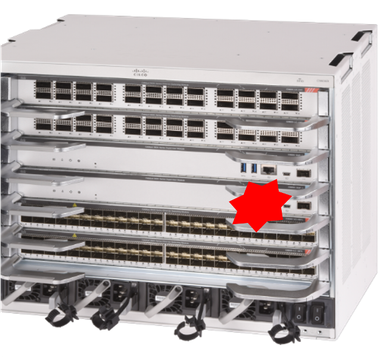
Voorafgaande vervanging controleren
Controleer of de opstartvariabele op de switch correct is ingesteld en wijst naar het juiste pakketbestand (als de opstartmodus Installeren is) of het bin-bestand (de opstartmodus van de bundel) en automatisch opstarten is ingeschakeld.
C9600R-1#show run all | in software auto
no software auto-upgrade source url
software auto-upgrade enable
vervangen
Als een actieve supervisor moet worden vervangen (zoals in dit voorbeeld van ons), voert u een failover uit naar een standby-supervisor en wacht u tot deze de actieve rol overneemt. (Sla deze stap over als u de standby-toezichthouder gaat vervangen).
C9600R-1#redundancy force-switchover

System configuration has been modified. Save? [yes/no]: yes
Building configuration...
Compressed configuration from 11673 bytes to 4403 bytes[OK]Proceed with switchover to standby RP? [confirm]
Verwijder defecte supervisor uit het chassis en plaats de nieuwe, met een console kabel aangesloten op het.
Als uw actieve supervisor in de Bundle-opstartmodus wordt uitgevoerd, breekt u in bij de ROMMON van de nieuwe supervisor terwijl deze wordt opgestart. Met behulp van een USB-stick of OOB TFTP-toegang start u de supervisor handmatig op met dezelfde softwareversie als uw actieve supervisor. Later, nadat de nieuwe stand-by zich bij SSO heeft aangesloten, kopieert u de actieve software naar de lokale bootflash.
Preparing to autoboot. [Press Ctrl-C to interrupt] 3 (interrupted)
rommon 1 >
rommon 2 > boot disk0:cat9k_iosxe.16.12.04.SPA.bin
Als uw actieve supervisor in de opstartmodus installeert, moet de huidige actieve supervisor een automatische software-upgrade uitvoeren zodra deze een incompatibele softwareversie of opstartmodus detecteert in de nieuwe/standby-supervisor. In dit stadium is meestal geen handmatige interventie nodig.
*Sep 12 21:32:04.886: %REDUNDANCY-5-PEER_MONITOR_EVENT: Active detected a standby insertion (raw-event=PEER_FOUND(4))
*Sep 12 21:32:04.886: %REDUNDANCY-5-PEER_MONITOR_EVENT: Active detected a standby insertion (raw-event=PEER_REDUNDANCY_STATE_CHANGE(5))
*Sep 12 21:32:07.773: %REDUNDANCY-2-IPC: IOS versions do not match.

*Sep 12 21:32:07.823: %SMART_LIC-5-EVAL_START: Entering evaluation period
*Sep 12 21:32:28.980: %AUTO_UPGRADE_MODULAR-5-SMU_AUTO_UPGRADE_INITIATING: R1/0: auto_upgrade_client: Initiating SMU autoupgrade for RP 0
*Sep 12 21:32:30.867: %AUTO_UPGRADE-5-AUTO_UPGRADE_FINISH: R1/0: auto_upgrade_client: Finished installing software on RP 0.
*Sep 12 21:32:30.908: %AUTO_UPGRADE-5-AUTO_UPGRADE_RELOAD: R1/0: auto_upgrade_client: Reloading RP 0 to complete the auto upgrade.

** snip **

*Jun 16 19:56:10.356: %REDUNDANCY-5-PEER_MONITOR_EVENT: Active detected a standby insertion (raw-event=PEER_FOUND(4))

*Jun 16 19:56:10.356: %REDUNDANCY-5-PEER_MONITOR_EVENT: Active detected a standby insertion (raw-event=PEER_REDUNDANCY_STATE_CHANGE(5))

** snip **
*Sep 12 21:36:37.786: %REDUNDANCY-5-PEER_MONITOR_EVENT: Active detected a standby insertion (raw-event=PEER_FOUND(4))
*Sep 12 21:36:37.786: %REDUNDANCY-5-PEER_MONITOR_EVENT: Active detected a standby insertion (raw-event=PEER_REDUNDANCY_STATE_CHANGE(5))
**snip**
*Sep 12 21:39:24.085: %HA_CONFIG_SYNC-6-BULK_CFGSYNC_SUCCEED: Bulk Sync succeeded
*Sep 12 21:39:25.124: %RF-5-RF_TERMINAL_STATE: Terminal state reached for (SSO)
Verifiëren na vervanging
Controleer de toestand van de toezichthouders zodra de SSO is voltooid.
C9606R-1#show mod
Chassis Type: C9606R

Mod  Ports  Card Type                               Model        Serial No.
---+-----+--------------------------------------+--------------+--------------
1    24    24-Port 40GE/12-Port 100GE             C9600-LC-24C   CAT2313L2WQ
2    48    48-Port 10GE / 25GE                    C9600-LC-48YL  CAT2314L36W
3    0     Supervisor 1 Module                    C9600-SUP-1    CAT2310L5C1
4    0     Supervisor 1 Module                    C9600-SUP-1    CAT2311L4DQ
5    48    48-Port 10GE / 25GE                    C9600-LC-48YL  CAT2310L57N

Mod       MAC addresses               Hw      Fw        Sw               Status
---+--------------------------------+----+------------+------------------+--------
1   DC8C.37C9.AC00 to DC8C.37C9.AC7F  1.0  17.1.1[FC2]  16.12.04           ok
2   DC8C.37C9.FD00 to DC8C.37C9.FD7F  1.0  17.1.1[FC2]  16.12.04           ok
3   DC8C.3772.C780 to DC8C.3772.C7FF  1.0  17.1.1[FC2]  16.12.04           ok
4   DC8C.3772.E580 to DC8C.3772.E5FF  1.0  17.1.1[FC2]  16.12.04           ok
5   DC8C.3773.0280 to DC8C.3773.02FF  1.0  17.1.1[FC2]  16.12.04           ok

Mod  Redundancy Role      Operating Redundancy Mode Configured Redundancy Mode
---+-------------------+-------------------------+---------------------------
3     Standby                     sso                      sso
4     Active                      sso                      sso
Chassis MAC address range: 64 addresses from 6cb2.ae4a.9680 to 6cb2.ae4a.96bf
C9606R-1#show redundancy
Redundant System Information :
------------------------------
Available system uptime = 1 day, 11 hours, 32 minutes
Switchovers system experienced = 1
Standby failures = 1
Last switchover reason = user forced
Hardware Mode = Duplex
Configured Redundancy Mode = sso
Operating Redundancy Mode = sso
Maintenance Mode = Disabled
Communications = Up

Current Processor Information :
-------------------------------
Active Location = slot 4
Current Software state = ACTIVE
Uptime in current state = 35 minutes
Image Version = Cisco IOS Software [Gibraltar], Catalyst L3 Switch Software (CAT9K_IOSXE), Version 16.12.4, RELEASE SOFTWARE (fc5)
Technical Support: http://www.cisco.com/techsupport
Copyright (c) 1986-2020 by Cisco Systems, Inc.
Compiled Thu 09-Jul-20 21:49 by mcpre
BOOT =
CONFIG_FILE =

Peer Processor Information :
----------------------------
Standby Location = slot 3
Current Software state = STANDBY HOT
Uptime in current state = 3 minutes
Image Version = Cisco IOS Software [Gibraltar], Catalyst L3 Switch Software (CAT9K_IOSXE), Version 16.12.4, RELEASE SOFTWARE (fc5)
Technical Support: http://www.cisco.com/techsupport
Copyright (c) 1986-2020 by Cisco Systems, Inc.
Compiled Thu 09-Jul-20 21:49 by mcpre
BOOT =
CONFIG_FILE =
Vervang een supervisor van C9600 Dual-Sup StackWise-Virtual
In dit voorbeeld overweegt u een C9600 stapsgewijze-virtuele installatie (één supervisor in elk chassis), waarbij de supervisor van chassis-1 (Active switch) is mislukt en moet worden vervangen. De SVL wordt uitgevoerd in de opstartmodus van de installatie.
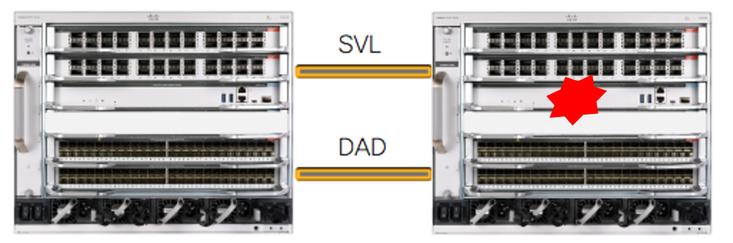
Voorafgaande vervanging controleren
Controleer de huidige StackWise-Virtual-gerelateerde configuraties en de status van de supervisors. Zorg ervoor dat de opstartvariabele op de switch correct is ingesteld, wijzend naar het juiste pakketbestand (als de opstartmodus Installeren is) of het bin-bestand (de opstartmodus van de bundel) en dat automatisch opstarten is ingeschakeld.
C9600_SVL#sh stackwise-virtual
Stackwise Virtual Configuration:
--------------------------------
Stackwise Virtual : Enabled
Domain Number : 100

Switch Stackwise Virtual Link Ports
------ ---------------------- ------
2           1                 FortyGigabitEthernet2/1/0/1
                              FortyGigabitEthernet2/1/0/2
1           1                 FortyGigabitEthernet1/1/0/1  << supervisor of SW1 needs to be replaced
                              FortyGigabitEthernet1/1/0/2
C9600_SVL#show bootvar
BOOT variable = bootflash:packages.conf;
MANUAL_BOOT variable = no
BAUD variable = 9600
ENABLE_BREAK variable = yes
BOOTMODE variable does not exist
IPXE_TIMEOUT variable does not exist
CONFIG_FILE variable =
C9600_SVL#show run all | in software auto
no software auto-upgrade source url
software auto-upgrade enable
Als uw actieve supervisor in de Bundle-opstartmodus wordt uitgevoerd, moet u een kopie van het actieve softwarebestand (.bin-bestand waarop u actief bent) bewaren op een USB-stick of lokale TFTP-server die toegankelijk is via de nieuwe supervisor, via de out-of-band (OOB) beheerpoort.
- Als de actieve supervisor moet worden vervangen (zoals in ons voorbeeld), voert u een failover uit naar de standby-supervisor en wacht u tot de standby de actieve rol overneemt. Sla deze stap over als u de standby-toezichthouder vervangt.
C9600_SVL#redundancy force-switchover

System configuration has been modified. Save? [yes/no]: yes
Building configuration...
Compressed configuration from 11673 bytes to 4403 bytes[OK]Proceed with switchover to standby RP? [confirm]
vervangen
Schakel het chassis uit wanneer de supervisor moet worden vervangen. In ons voorbeeld is het chassis-1.
Verwijder de lijnkaarten uit de backplane van het betreffende chassis (waar de supervisor moet worden vervangen), behalve lijnkaarten waar StackWise-Virtual links (SVL) of Dual-active detection (DAD) links zijn geconfigureerd. Voor lijnkaarten waarbij SVL's zijn geconfigureerd, verwijdert u alle verbindingen, inclusief de SVL's. Op die manier, wanneer de nieuwe supervisor wordt ingevoegd en vooraf wordt geënsceneerd, wordt deze geïsoleerd van de rest van het netwerk en veroorzaakt deze geen problemen met externe switch-aansluitingen (Multi-chassis etherchannel).
C9600_SVL#show module
Chassis Type: C9606R
Switch Number 1
Mod  Ports        Card Type                       Model           Serial No.
---+-----+--------------------------------------+--------------+--------------

Mod     MAC addresses                Hw      Fw            Sw           Status
---+--------------------------------+----+------------+------------------+--------

Mod  Redundancy Role    Operating Redundancy Mode  Configured Redundancy Mode
---+-------------------+-------------------------+---------------------------

Switch Number 2
Mod Ports           Card Type                       Model         Serial No.
---+-----+--------------------------------------+--------------+--------------
1    24    24-Port 40GE/12-Port 100GE              C9600-LC-24C   CAT2310L4DW
2    48    48-Port 10GE / 25GE                     C9600-LC-48YL  CAT2310L59S
3    0     Supervisor 1 Module                     C9600-SUP-1    CAT2340L40Q
5    24    24-Port 40GE/12-Port 100GE              C9600-LC-24C   CAT2313L2W1

Mod        MAC addresses              Hw    Fw             Sw              Status
---+--------------------------------+----+------------+------------------+--------
1   DC8C.379F.DB80 to DC8C.379F.DBFF  1.0  17.3.1r[FC2]  17.03.01           ok
2   DC8C.3772.FD80 to DC8C.3772.FDFF  1.0  17.3.1r[FC2]  17.03.01           ok
3   7C21.0E5D.0800 to 7C21.0E5D.087F  1.0  17.3.1r[FC2]  17.03.01           ok
5   DC8C.37A0.D180 to DC8C.37A0.D1FF  1.0  17.3.1r[FC2]  17.03.01           ok

Mod    Redundancy Role  Operating Redundancy Mode Configured Redundancy Mode
---+-------------------+-------------------------+---------------------------
3       Active               non-redundant                 sso

Chassis 2 MAC address range: 64 addresses from 2c4f.523b.bd00 to 2c4f.523b.bd3f
Plaats de nieuwe supervisor in dezelfde sleuf waar de defecte supervisor aanwezig was en schakel deze in. Het moet opstarten in de stand-alone modus (niet-SVL), laat de Stackwise-virtuele links en DAD-links voor nu verbroken.
- Als uw actieve supervisor in de Bundle-opstartmodus wordt uitgevoerd, kopieert u het bestand met de softwarebin (hetzelfde als de huidige actieve supervisor van SVL) naar bootflash van de nieuwe standby-supervisor en wijzigt u de bootstring dienovereenkomstig.
- Als uw actieve supervisor wordt uitgevoerd in de opstartmodus installeren, is een handmatige software-upgrade niet nodig. De software en de opstartmodus van de nieuwe supervisor moeten automatisch worden bijgewerkt door de huidige actieve supervisor, zodra deze een incompatibele softwareversie of opstartmodus detecteert in de nieuwe/standby-supervisor.
Configureer de nieuwe supervisor met Stackwise-virtuele instellingen. (U moet hetzelfde SVL-domeinnummer gebruiken om overeen te komen met het bestaande lid).
Switch#conf t
Enter configuration commands, one per line.  End with CNTL/Z.

Switch(config)#stackwise-virtual
Please reboot the switch for Stackwise Virtual configuration to take effect
Switch(config-stackwise-virtual)#domain 100
Switch(config-stackwise-virtual)#exit
Configureer de SVL- en DAD-poorten. Gebruik dezelfde poorten, die werden gebruikt op de defecte supervisor.
Switch(config)#int range fortyGigabitEthernet 1/0/1 -2
Switch(config-if-range)#stackwise-virtual link 1

Switch(config)#int range twentyFiveGigE 2/0/25 -26
Switch(config-if-range)#stackwise-virtual dual-active-detection
Controleer of de SVL-configuratie correct is toegepast op de nieuwe switch.
Switch#show stackwise-virtual
Stackwise Virtual Configuration:
--------------------------------
Stackwise Virtual Configuration After Reboot:
---------------------------------------------
Stackwise Virtual : Enabled
Domain Number : 100
Switch Stackwise Virtual Link  Ports
------ ----------------------  ------
1          1                   FortyGigabitEthernet1/0/1
                               FortyGigabitEthernet1/0/2

Switch#show stackwise-virtual dual-active-detection
In dual-active recovery mode: No
Dual-Active-Detection Configuration:
-------------------------------------
Switch Dad port Status
------ ------------ ---------
Distributed Stack DAD Configuration After Reboot:
------------------------------------------------
Switch     Dad port            Status
------      --------          ------
1      TwentyFiveGigE2/0/25   down
       TwentyFiveGigE2/0/26   down
Als de softwareversie 16.12.x of hoger is, kunt u de SVL-instellingen in ROMMON controleren vanuit IOSd CLI.
Switch#show romvar
ROMMON variables:
BOARDID="38"
ETHER_PORT="2"
PS1="rommon ! >"
MAC_ADDR="7C:21:0E:5D:04:00"
DOPPLER_E_WA="1"
RETRY="0"
MODEL_NUM="C9600-SUP-1"
SYSTEM_SERIAL_NUM="CAT2340L3Y5"
MOTHERBOARD_SERIAL_NUM="CAT2340L3Y5"
TEMPLATE="core"
BAUD="9600"
AUTO_SWITCH_CONSOLE_DISABLE="0"
PSEUDO_OIR_REMOVE_SET="1"
CALL_HOME_DEBUG="0000000000000"
ENABLE_BREAK="yes"
RET_2_RTS=""
CRASHINFO="bootflash:crashinfo_RP_00_00_20200225-024401-UTC"
MCP_STARTUP_TRACEFLAGS="00000000:00000000"
CONFIG_FILE=""
BOOTLDR=""
RECOVERY_RELOAD_DISABLE=""
SWITCH_PRIORITY="1"
SWITCH_NUMBER="1"
SWITCH_IGNORE_STARTUP_CFG="0"
D_STACK_DISTR_STACK_LINK2=""
MANUAL_BOOT="no"
AUTOREBOOT_RESTORE="0"
ABNORMAL_RESET_COUNT="0"
ROMMON_AUTOBOOT_ATTEMPT="3"
BSI="0"
RET_2_RCALTS=""
RANDOM_NUM="1430571596"
BOOT="bootflash:cat9k_iosxe.16.12.02.SPA.bin;"
D_STACK_DISTR_STACK_LINK1="Fo1/0/1,Fo1/0/2,"
D_STACK_DAD="Twe2/0/25,Twe2/0/26,"
D_STACK_MODE="aggregation"
D_STACK_DOMAIN_NUM="100"
Sla de configuraties op en schakel het chassis uit waar de nieuwe supervisor in is geplaatst.
Verbind StackWise-Virtual-koppelingen tussen twee chassis en laat de Dual-active-detectiekoppeling (indien van toepassing) liever los.
Schakel het chassis in en bewaak het opstartproces via de console.

Opmerking: als uw SVL wordt uitgevoerd in de opstartmodus van de bundel, moet u ervoor zorgen dat de nieuwe supervisor dezelfde softwareversie als Active krijgt. Als dat niet het geval is, breekt u opnieuw in bij ROMMON en start u het handmatig op met de juiste softwareversie.
Active supervisor's log-

*Sep 13 00:59:49.367: %STACKMGR-6-CHASSIS_ADDED: Chassis 1 R0/0: stack_mgr: Chassis 1 has been added to the stack.
*Sep 13 00:59:51.988: %STACKMGR-6-CHASSIS_ADDED: Chassis 1 R0/0: stack_mgr: Chassis 1 has been added to the stack.
*Sep 13 00:59:52.135: %BOOT-3-BOOTTIME_INCOMPATIBLE_SW_DETECTED: Chassis 2 R0/0: issu_stack: Incompatible software detected. Details: Active's subpackage boot mode does not match with member's super boot mode. Please boot switch 1 in subpackage mode.
*Sep 13 00:59:52.297: %AUTO_UPGRADE-5-AUTO_UPGRADE_START_CHECK: Chassis 2 R0/0: auto_upgrade_client: Auto upgrade start checking for incompatible switches.
*Sep 13 00:59:53.311: %AUTO_UPGRADE-5-AUTO_UPGRADE_INITIATED: Chassis 2 R0/0: auto_upgrade_client: Auto upgrade initiated for switch 1.
*Sep 13 00:59:53.368: %AUTO_UPGRADE-5-AUTO_UPGRADE_SEARCH: Chassis 2 R0/0: auto_upgrade_client: Searching stack for software to upgrade switch 1.
*Sep 13 00:59:53.397: %AUTO_UPGRADE-5-AUTO_UPGRADE_FOUND: Chassis 2 R0/0: auto_upgrade_client: Found donor switch 2 to auto upgrade switch 1.
*Sep 13 00:59:53.423: %AUTO_UPGRADE-5-AUTO_UPGRADE_START: Chassis 2 R0/0: auto_upgrade_client: Upgrading switch 1 with software from switch 2.
Logs from new supervisor's console-

Waiting for remote chassis to join
##################################################################################
Chassis number is 1
All chassis in the stack have been discovered. Accelerating discovery
Chassis 1 reloading, reason - System requested reload <<< reload is instructed by current active as part of software auto-upgrade
Alle actieve configuraties worden automatisch gesynchroniseerd van Active Supervisor naar de nieuwe. Wacht op deze logs van de actieve supervisor.
*Sep 13 01:14:18.552: %HA_CONFIG_SYNC-6-BULK_CFGSYNC_SUCCEED: Bulk Sync succeeded
*Sep 13 01:14:18.577: %RF-5-RF_TERMINAL_STATE: Terminal state reached for (SSO)
Zodra SSO is voltooid, gaat u verder met het aansluiten van de Dual-active detection (DAD) -koppeling.
- Duw de lijnkaarten terug naar binnen (voor chassis waar de supervisor is vervangen), om die weer aan de backplane te bevestigen. Sluit de kabels opnieuw aan.
- Controleer of alle lijnkaarten goed zijn opgestart, online diagnostische tests hebben doorstaan en hun interfaces hebben opgehaald, inclusief poort-kanaalbinding enzovoort.
Verifiëren na vervanging
Controleer de StackWise Virtual gerelateerde configuraties en de status van de switch met behulp van deze opdrachten.
C9600_SVL#show redundancy
Redundant System Information :
------------------------------
Available system uptime = 1 hour, 27 minutes
Switchovers system experienced = 0
Standby failures = 0
Last switchover reason = none
Hardware Mode = Duplex
Configured Redundancy Mode = sso
Operating Redundancy Mode = sso
Maintenance Mode = Disabled
Communications = Up

Current Processor Information :
-------------------------------
Active Location = Switch 2
Current Software state = ACTIVE
Uptime in current state = 1 hour, 27 minutes
Image Version = Cisco IOS Software [Amsterdam], Catalyst L3 Switch Software (CAT9K_IOSXE), Version 17.3.1, RELEASE SOFTWARE (fc5)
Technical Support: https://www.cisco.com/c/en/us/support/index.html
Copyright (c) 1986-2020 by Cisco Systems, Inc.
Compiled Fri 07-Aug-20 21:32 by mcpre
BOOT = bootflash:packages.conf;
CONFIG_FILE =

Peer Processor Information :
----------------------------
Standby Location = Switch 1
Current Software state = STANDBY HOT
Uptime in current state = 0 minutes
Image Version = Cisco IOS Software [Amsterdam], Catalyst L3 Switch Software (CAT9K_IOSXE), Version 17.3.1, RELEASE SOFTWARE (fc5)
Technical Support: https://www.cisco.com/c/en/us/support/index.html
Copyright (c) 1986-2020 by Cisco Systems, Inc.
Compiled Fri 07-Aug-20 21:32 by mcpre
BOOT = bootflash:packages.conf;
CONFIG_FILE =
C9600_SVL#show stackwise-virtual
Stackwise Virtual Configuration:
--------------------------------
Stackwise Virtual : Enabled
Domain Number : 100
Switch Stackwise Virtual Link Ports
------ ---------------------- ------
1          1                   FortyGigabitEthernet1/1/0/1
                               FortyGigabitEthernet1/1/0/2
2          1                   FortyGigabitEthernet2/1/0/1
                               FortyGigabitEthernet2/1/0/2

C9600_SVL#show stackwise-virtual dual-active-detection
In dual-active recovery mode: No
Recovery Reload: Enabled

Dual-Active-Detection Configuration:
-------------------------------------
Switch   Dad port             Status
------  ------------          ---------
1      TwentyFiveGigE1/2/0/25  up
       TwentyFiveGigE1/2/0/26  up
2      TwentyFiveGigE2/2/0/25  up
       TwentyFiveGigE2/2/0/26  up
C9600_SVL#show module
Chassis Type: C9606R

Switch Number 1

Mod Ports       Card Type                             Model       Serial No.
---+-----+--------------------------------------+--------------+--------------
1   24     24-Port 40GE/12-Port 100GE             C9600-LC-24C   CAT2252L0PR
2   48     48-Port 10GE / 25GE                    C9600-LC-48YL  CAT2334L0BA
3   0      Supervisor 1 Module                    C9600-SUP-1    CAT2340L3Y5
5   48     48-Port 10GE / 25GE                    C9600-LC-48YL  CAT2337L509

Mod   MAC addresses                    Hw  Fw              Sw              Status
---+--------------------------------+----+------------+------------------+--------
1    70B3.175A.8100 to 70B3.175A.817F 1.0  17.3.1r[FC2]  17.03.01            ok
2    10B3.D652.9900 to 10B3.D652.997F 1.0  17.3.1r[FC2]  17.03.01            ok
3    7C21.0E5D.0400 to 7C21.0E5D.047F 1.0  17.3.1r[FC2]  17.03.01            ok
5    4C71.0D7C.8400 to 4C71.0D7C.847F 1.0  17.3.1r[FC2]  17.03.01            ok

Mod  Redundancy Role     Operating Redundancy Mode  Configured Redundancy Mode
---+-------------------+-------------------------+---------------------------
3     Standby                sso                           sso

Switch Number 2
**snip**
Vervang een supervisor van C9600 Quad-Up StackWise-Virtual
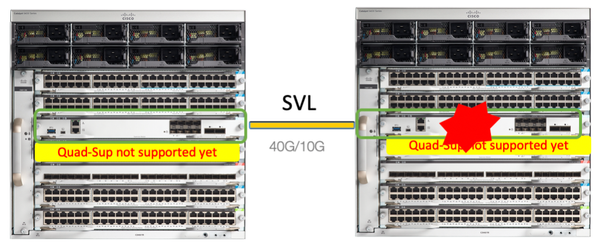
In dit voorbeeld overweegt u een C9600 Quad Sup stapelsgewijs-virtuele installatie (twee supervisors in elk chassis), waarbij een supervisor slecht is geworden en moet worden vervangen. De SVL wordt uitgevoerd in de opstartmodus "Installeren".
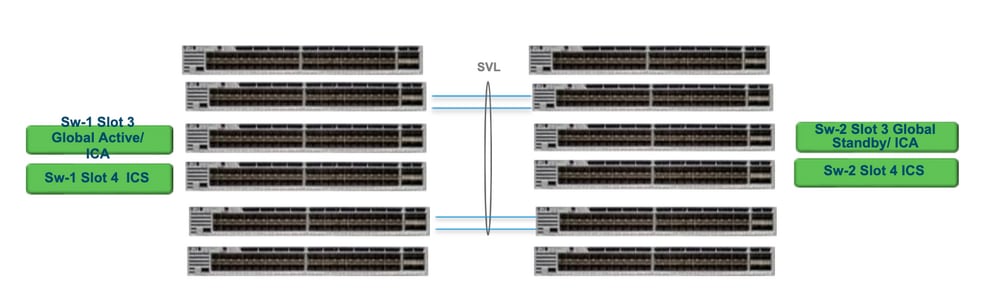
Vervangen en verifiëren
Verwijder de defecte supervisor
- Als de te vervangen supervisor Global Active supervisor is (Sw-1-sleuf 3 in de afbeelding), voert u een failover uit zodat de Global Standby (Sw-2-sleuf 3 in de vorige afbeelding) wordt overgenomen als Active. Wacht tot er een nieuwe Global Standby is en SSO is voltooid. (In dit geval wordt Sw-1 Slot 4 de nieuwe Global Standby).
- Als de te vervangen supervisor Global Standby supervisor is (Sw-2 Sleuf 3 in de afbeelding), trekt u de supervisor eruit. Wacht tot er een nieuwe Global Standby is en SSO is voltooid. (In dit geval wordt Sw-2 Slot 4 de nieuwe Global Standby)
- Als de te vervangen supervisor ICS-supervisor is (Sw-1-sleuf 4 of Sw-2-sleuf 4 in de afbeelding), trekt u de supervisor eruit.
De nieuwe toezichthouder invoegen
- Als de nieuwe supervisor op 17.x-code draait, zijn de stappen rechttoe rechtaan. Plaats de nieuwe supervisor. Als ICS-supervisors een 17.x-image hebben, starten ze automatisch op en worden ze onderdeel van Quad-sup. Zelfs als de software een andere 17.x-code heeft dan die van de software die op de productiestructuur wordt uitgevoerd, wordt de ICS-supervisor automatisch geüpgraded met dezelfde 17.x-code in de INSTALL-modus.
- Als de nieuwe supervisor draait op 16.x-code, of als u niet zeker bent van de code waarop deze wordt uitgevoerd, probeer dan de supervisor in te voegen op een reservechassis en deze te upgraden naar 17.x-code. Als er geen reservechassis is om te upgraden, moeten deze stappen worden uitgevoerd.
- Deze stap is heel belangrijk. Plaats de ICS-supervisor en gebruik Ctrl+C om ze te doorbreken naar Rommon.Als u mist om in te breken in ROMMON en supervisor-boots op 16.x-code, kan dit het volledige chassis verwijderen waar de supervisor is geplaatst
Zoek naar SVL-gerelateerde Rommon-variabelen. Deze variabelen beginnen met D_STACK. Meestal heeft een nieuwe toezichthouder deze variabelen niet ingesteld.
D_STACK_DISTR_STACK_LINK2=""
D_STACK_DAD="Fo1/0/13,Fo1/0/15,"
D_STACK_MODE="aggregation"
D_STACK_DOMAIN_NUM="255"
D_STACK_DISTR_STACK_LINK1="Fo1/0/10,Fo1/0/15,Fo1/0/16,Fo1/0/17,Fo1/0/3,Fo1/0/6,"
Alle eerder getoonde variabelen ongedaan maken
rommon 1 > unset D_STACK_DAD
rommon 1 > unset D_STACK_DISTR_STACK_LINK1
rommon 1 > unset D_STACK_DOMAIN_NUM
rommon 1 > unset D_STACK_MODE
Kijk voor de variabele SWITCH_NUMBER=1. Als het getal van de switch 2 is, stel de variabele dan in op 1. Als het al 1 is, ga dan naar de volgende stap.
rommon 1 > SWITCH_NUMBER=1
Stel de supervisor handmatig in.
rommon 1 > MANUAL_BOOT=YES
Start de ICS-supervisor handmatig op in de bundelmodus met behulp van USB/TFTP op 17.x-code. De opstartvariabele niet wijzigen in Rommon. Start het gewoon handmatig op vanuit rommon.
- De supervisor wordt opnieuw ingesteld omdat deze een bestaande ICS in SVL-modus detecteert, zodat deze wordt geconverteerd van stand-alone naar stapelbare virtuele modus. Het kan weer terugvallen in rommon, omdat automatisch opstarten is uitgeschakeld.
Schakel handmatig opstarten uit om automatisch opstarten in te schakelen.
rommon 1 > unset MANUAL_BOOT
Start de ICS-supervisor handmatig op in de bundelmodus met behulp van USB/TFTP op 17.x-code. De opstartvariabele niet wijzigen in Rommon. Start het gewoon handmatig op vanuit rommon. Deze stap start de ICS op in de BUNDLE-modus.
Revisiegeschiedenis
| Revisie | Publicatiedatum | Opmerkingen |
|---|---|---|
5.0 |
14-May-2026
|
Reformateren. |
4.0 |
31-Aug-2023
|
Een stijlprobleem opgeruimd om de leesbaarheid te verbeteren |
3.0 |
07-Jun-2023
|
Fout in een opmerking opgelost: "De nieuwe eenheid kan niet dezelfde softwareversie uitvoeren als de bestaande stack" |
2.0 |
05-May-2023
|
Alt-tekst toegevoegd.
Bijgewerkte titel, inleiding, SEO, brandingvereisten, machinevertaling, stijlvereisten, redenen en opmaak. |
1.0 |
04-Nov-2020
|
Eerste vrijgave |

 Feedback
Contact Cisco
- Een ondersteuningscase openen

- (Vereist een Cisco-servicecontract)