Verbeterde snelle software-upgrade begrijpen - Quad-SUP op Catalyst 6500 VSS

Downloadopties
Inclusief taalgebruik
De documentatie van dit product is waar mogelijk geschreven met inclusief taalgebruik. Inclusief taalgebruik wordt in deze documentatie gedefinieerd als taal die geen discriminatie op basis van leeftijd, handicap, gender, etniciteit, seksuele oriëntatie, sociaaleconomische status of combinaties hiervan weerspiegelt. In deze documentatie kunnen uitzonderingen voorkomen vanwege bewoordingen die in de gebruikersinterfaces van de productsoftware zijn gecodeerd, die op het taalgebruik in de RFP-documentatie zijn gebaseerd of die worden gebruikt in een product van een externe partij waarnaar wordt verwezen. Lees meer over hoe Cisco gebruikmaakt van inclusief taalgebruik.
Over deze vertaling
Cisco heeft dit document vertaald via een combinatie van machine- en menselijke technologie om onze gebruikers wereldwijd ondersteuningscontent te bieden in hun eigen taal. Houd er rekening mee dat zelfs de beste machinevertaling niet net zo nauwkeurig is als die van een professionele vertaler. Cisco Systems, Inc. is niet aansprakelijk voor de nauwkeurigheid van deze vertalingen en raadt aan altijd het oorspronkelijke Engelstalige document (link) te raadplegen.
Inhoud
Inleiding
In dit document wordt een stapsgewijze ISSU/eFSU-procedure beschreven voor Cisco Catalyst 6500 Series-Switches in VSS-modus met behulp van de Supervisor 6T met dual-homed in een Quad-SUP-configuratie.
Voorwaarden
Vereisten
Cisco raadt kennis van de volgende onderwerpen aan:
- Basiskennis van de installatie en configuratie van het QUAD-SUP Virtual Switching System (VSS) van de katalysator 6500
- Afbeeldingen kopiëren met de TFTP/USB/WebUI-methode
Gebruikte componenten
De informatie in dit document is gebaseerd op het Cisco Catalyst 6500 Virtual Switching System op Cisco IOS® Software Release 15.5(1)SY12 of hoger
software- en hardwareversies.
De informatie in dit document is gebaseerd op de apparaten in een specifieke laboratoriumomgeving. Alle apparaten die in dit document worden beschreven, hadden een opgeschoonde (standaard)configuratie. Als uw netwerk live is, moet u zorgen dat u de potentiële impact van elke opdracht begrijpt.
Topologie
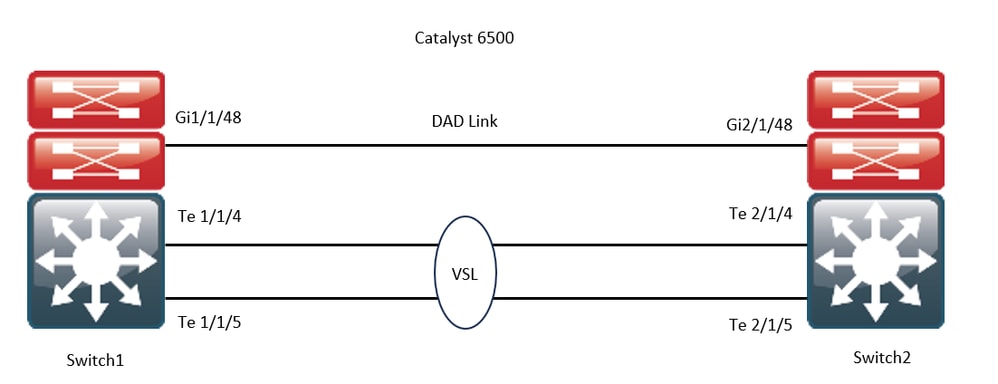
Compatibiliteitsmatrixcontrole
Stap 1. Raadpleeg dit Cisco-document; https://www.cisco.com/c/en/us/support/switches/catalyst-6500-series-switches/products-release-notes-list.html#anchor142.
Stap 2. Controleer met de opdracht in de apparaatCLI:
WS-C6504-E-1#show issu comp-matrix stored

Number of Matrices in Table = 1

(1) Matrix for s2t54-ADVENTERPRISEK9-M(10) - s2t54-ADVENTERPRISEK9-M(10)
==========================================
Start Flag (0xDEADBABE)

My Image ver: 15.5(1)SY13
Peer Version Compatibility
------------ -------------
15.1(2)SY Incomp(1)
15.1(2)SY1 Incomp(1)
15.1(2)SY2 Incomp(1)
15.5(1)SY Dynamic(0)
15.5(1)SY1 Dynamic(0)
15.1(2)SY12 Incomp(1)
15.2(1)SY6 Incomp(1)
15.4(1)SY4 Incomp(1)
15.5(1)SY2 Dynamic(0)
15.5(1)SY3 Dynamic(0)
15.5(1)SY4 Dynamic(0)
15.5(1)SY5 Dynamic(0)
15.5(1)SY6 Dynamic(0)
15.5(1)SY7 Dynamic(0)
15.5(1)SY8 Dynamic(0)
15.5(1)SY9 Dynamic(0)
15.5(1)SY10 Dynamic(0)
15.5(1)SY11 Dynamic(0)
15.5(1)SY12 Dynamic(0)
15.5(1)SY13 Comp(3)
Upgradeprocedure
Stap 1. Zorg ervoor dat het nieuwe Cisco IOS-image (Cisco IOS Software Release 15.5(1)SY13) aanwezig is in het bootdisk,slavebootdisk,ics-bootdisk,slave-ics-bootdisksysteem.
WS-C6504-E-1#dir bootdisk: | i SY13
8 -rw- 167430292 Apr 16 2024 22:55:58 +00:00 s2t54-adventerprisek9-mz.SPA.155-1.SY13.bin
WS-C6504-E-1#dir slavebootdisk: | i SY13
19 -rw- 167430292 Apr 16 2024 00:37:58 +00:00 s2t54-adventerprisek9-mz.SPA.155-1.SY13.bin
WS-C6504-E-1#dir ics-bootdisk: | i SY13
11 -rw- 167430292 Apr 16 2024 23:06:18 +00:00 s2t54-adventerprisek9-mz.SPA.155-1.SY13.bin
WS-C6504-E-1#dir slave-ics-bootdisk: | i SY13
5 -rw- 167430292 Apr 16 2024 23:20:18 +00:00 s2t54-adventerprisek9-mz.SPA.155-1.SY13.bin
Stap 2. Gebruik deze opdrachten om te controleren of de VSS klaar is om de upgradeprocedure uit te voeren:
WS-C6504-E-1#show redundancy
Redundant System Information :
------------------------------
       Available system uptime = 1 day, 4 hours, 41 minutes
Switchovers system experienced = 0
              Standby failures = 1
        Last switchover reason = none
                 Hardware Mode = Duplex
    Configured Redundancy Mode = sso
     Operating Redundancy Mode = sso
              Maintenance Mode = Disabled
                Communications = Up
Current Processor Information :
-------------------------------
               Active Location = slot 1/1
        Current Software state = ACTIVE                                                           >> Switch 1 Slot 1 is active
       Uptime in current state = 1 day, 4 hours, 41 minutes
                 Image Version = Cisco IOS Software, s2t54 Software (s2t54-ADVENTERPRISEK9-M), Version 15.5(1)SY12, RELEASE SOFTWARE (fc1)
Technical Support: http://www.cisco.com/techsupport
Copyright (c) 1986-2023 by Cisco Systems, Inc.
Compiled Tue 05-Sep-23 11:24 by mcpre
                          BOOT = bootdisk:s2t54-adventerprisek9-mz.SPA.155-1.SY12.bin,12;
                   CONFIG_FILE =
                       BOOTLDR =
        Configuration register = 0x2102
Peer Processor Information :
----------------------------
              Standby Location = slot 2/1
        Current Software state = STANDBY HOT                                                      >> Switch 2 Slot 1 is standby
       Uptime in current state = 19 hours, 43 minutes
                 Image Version = Cisco IOS Software, s2t54 Software (s2t54-ADVENTERPRISEK9-M), Version 15.5(1)SY12, RELEASE SOFTWARE (fc1)
Technical Support: http://www.cisco.com/techsupport
Copyright (c) 1986-2023 by Cisco Systems, Inc.
Compiled Tue 05-Sep-23 11:24 by mcpre
                          BOOT = bootdisk:s2t54-adventerprisek9-mz.SPA.155-1.SY12.bin,12;
                   CONFIG_FILE =
                       BOOTLDR =
        Configuration register = 0x2102
WS-C6504-E-1#show issu state detail
 The system is configured to be upgraded in staggered mode.
 4 supervisor nodes are found to be online.
 Summary: the system will be upgraded in staggered mode.

Slot = 1/1
RP State = Active
ISSU State = Init
Boot Variable = bootdisk:s2t54-adventerprisek9-mz.SPA.155-1.SY12.bin,12;
      Operating Mode = sso
      ISSU Sub-State = No Upgrade Operation in Progress
      Starting Image = N/A
        Target Image = N/A
     Current Version = bootdisk:s2t54-adventerprisek9-mz.SPA.155-1.SY12.bin

Slot = 2/1
RP State = Standby
ISSU State = Init
Boot Variable = bootdisk:s2t54-adventerprisek9-mz.SPA.155-1.SY12.bin,12;
      Operating Mode = sso
      ISSU Sub-State = No Upgrade Operation in Progress
      Starting Image = N/A
        Target Image = N/A
     Current Version = bootdisk:s2t54-adventerprisek9-mz.SPA.155-1.SY12.bin

Slot = 1/2
RP State = Active-ICS
ISSU State = Init
Boot Variable = bootdisk:s2t54-adventerprisek9-mz.SPA.155-1.SY12.bin,12;
      Operating Mode = sso
      ISSU Sub-State = No Upgrade Operation in Progress
      Starting Image = N/A
        Target Image = N/A
     Current Version = bootdisk:s2t54-adventerprisek9-mz.SPA.155-1.SY12.bin

Slot = 2/2
RP State = Standby-ICS
ISSU State = Init
Boot Variable = bootdisk:s2t54-adventerprisek9-mz.SPA.155-1.SY12.bin,12;
      Operating Mode = sso
      ISSU Sub-State = No Upgrade Operation in Progress
      Starting Image = N/A
        Target Image = N/A
     Current Version = bootdisk:s2t54-adventerprisek9-mz.SPA.155-1.SY12.bin
Stap 3. Gebruik de opdracht issu loadversionom het upgradeproces te starten.
In deze stap start het VSS-standby-chassis opnieuw op, laadt het opnieuw met het nieuwe image en initialiseert het als het VSS-standby-chassis in de redundantiemodus Stateful Switchover (SSO), waarbij het nieuwe image wordt uitgevoerd. Deze stap is voltooid wanneer de chassisconfiguratie is gesynchroniseerd, zoals wordt aangegeven in het bericht Bulksynchronisatie gelukt. Het kan enkele seconden tot enkele minuten duren voordat het nieuwe image is geladen en het VSS-stand-bychassis is overgeschakeld naar de SSO-modus.
WS-C6504-E-1#issu loadversion 1/1 bootdisk:s2t54-adventerprisek9-mz.SPA.155-1.SY13.bin 2/1 slavebootdisk:s2t54-adventerprisek9-mz.SPA.155-1.SY13.bin
System configuration has been modified. Save? [yes/no]: y
Building configuration...
[OK]
*Apr 17 00:43:14.195: %ISSU_PROCESS-SW1-3-LOADVERSION: Loadversion sequence will begin in 60 seconds. Enter 'issu abortversion' to cancel.
*Apr 17 00:43:44.195: %ISSU_PROCESS-SW1-6-LOADVERSION_INFO: Resetting Standby shortly
*Apr 17 00:43:44.195: %ISSU_PROCESS-SW1-6-LOADVERSION_INFO: Resetting Standby ICS shortly
*Apr 17 00:43:44.199: %ISSU_PROCESS-SW2_STBY-6-SELF_RELOAD: slot 33 countdown to self-reload started, 30 second delay
*Apr 17 00:43:44.199: %ISSU_PROCESS-SW2-2_STBY-6-SELF_RELOAD: slot 34 countdown to self-reload started, 30 second delay
*Apr 17 00:44:29.195: %ISSU_PROCESS-SW1-6-LOADVERSION_INFO: Standby ICS has gone offline
*Apr 17 00:44:29.195: %ISSU_PROCESS-SW1-6-LOADVERSION_INFO: Standby has gone offline
*Apr 17 00:46:59.195: %ISSU_PROCESS-SW1-6-LOADVERSION_INFO: Standby has come online, wait for Standby ICS
*Apr 17 00:47:44.503: %ISSU_PROCESS-SW1-6-LOADVERSION_INFO: Standby ICS has come online
*Apr 17 00:49:15.363: %ISSU_PROCESS-SW1-6-LOADVERSION_INFO: Standby reached terminal state
*Apr 17 00:49:29.199: %ISSU_PROCESS-SW1-6-LOADVERSION_INFO: Standby ICS reached terminal state, wait for system to settle
*Apr 17 00:49:59.195: %ISSU_PROCESS-SW1-3-LOADVERSION: Loadversion has completed. Please issue the 'issu runversion' command after all modules come online.
*Apr 17 00:49:59.195: %ISSU_PROCESS-SW1-3-LOADVERSION: Loadversion has completed. Please issue the 'issu runversion' command after all modules come online.
Stap 4. De opstartvariabele voor standby moet verwijzen naar een nieuw image in de show issu state detail uitvoer.
WS-C6504-E-1#show issu state detail
 The system is configured to be upgraded in in-tandem mode.
 4 supervisor nodes are found to be online.
         Summary: an in-tandem upgrade is in progress.

Slot = 1/1
RP State = Active
ISSU State = Load Version
Boot Variable = bootdisk:s2t54-adventerprisek9-mz.SPA.155-1.SY12.bin,12;bootdisk:s2t54-adventerprisek9-mz.SPA.155-1.SY13.bin,12
      Operating Mode = sso
      ISSU Sub-State = Load Version Completed
      Starting Image = bootdisk:s2t54-adventerprisek9-mz.SPA.155-1.SY12.bin
        Target Image = bootdisk:s2t54-adventerprisek9-mz.SPA.155-1.SY13.bin
     Current Version = bootdisk:s2t54-adventerprisek9-mz.SPA.155-1.SY12.bin

Slot = 2/1
RP State = Standby
ISSU State = Load Version
Boot Variable = bootdisk:s2t54-adventerprisek9-mz.SPA.155-1.SY13.bin,12;bootdisk:s2t54-adventerprisek9-mz.SPA.155-1.SY12.bin,12
      Operating Mode = sso
      ISSU Sub-State = Load Version Completed
      Starting Image = bootdisk:s2t54-adventerprisek9-mz.SPA.155-1.SY12.bin
        Target Image = bootdisk:s2t54-adventerprisek9-mz.SPA.155-1.SY13.bin
     Current Version = bootdisk:s2t54-adventerprisek9-mz.SPA.155-1.SY13.bin                       >> Standby Chassis has been upgraded to latest code

Slot = 1/2
RP State = Active-ICS
ISSU State = Load Version
Boot Variable = bootdisk:s2t54-adventerprisek9-mz.SPA.155-1.SY12.bin,12;bootdisk:s2t54-adventerprisek9-mz.SPA.155-1.SY13.bin,12
      Operating Mode = sso
      ISSU Sub-State = Load Version Completed
      Starting Image = bootdisk:s2t54-adventerprisek9-mz.SPA.155-1.SY12.bin
        Target Image = bootdisk:s2t54-adventerprisek9-mz.SPA.155-1.SY13.bin
     Current Version = bootdisk:s2t54-adventerprisek9-mz.SPA.155-1.SY12.bin

Slot = 2/2
RP State = Standby-ICS
ISSU State = Load Version
Boot Variable = bootdisk:s2t54-adventerprisek9-mz.SPA.155-1.SY13.bin,12;bootdisk:s2t54-adventerprisek9-mz.SPA.155-1.SY12.bin,12
      Operating Mode = sso
      ISSU Sub-State = Load Version Completed
      Starting Image = bootdisk:s2t54-adventerprisek9-mz.SPA.155-1.SY12.bin
        Target Image = bootdisk:s2t54-adventerprisek9-mz.SPA.155-1.SY13.bin
     Current Version = bootdisk:s2t54-adventerprisek9-mz.SPA.155-1.SY13.bin                       >> Standby Chassis has been upgraded to latest code
Stap 5. Wanneer het VSS-standby-chassis het nieuwe image met succes in de SSO-redundantietoestand uitvoert en alle lijnkaarten op het VSS-standby-chassis actief en online zijn, voert u de opdracht issurunversion in om een switchover te forceren. Het geüpgradede VSS-standby-chassis neemt het over als het nieuwe actieve chassis, waarop het nieuwe image wordt uitgevoerd. Het voorheen actieve chassis wordt opnieuw geladen en geïnitialiseerd als het nieuwe VSS-standby-chassis in de SSO-modus, waarbij het oude image wordt uitgevoerd (in het geval dat de software-upgrade moet worden afgebroken en het oude image moet worden hersteld). Deze stap is voltooid wanneer de chassisconfiguratie is gesynchroniseerd, zoals wordt aangegeven in het bericht Bulksynchronisatie gelukt.
WS-C6504-E-1#issu runversion
This command will reload the Active unit.  Proceed ? [confirm]y
%issu runversion initiated successfully
*Apr 17 00:54:42.707: %ISSU_PROCESS-SW1-2_STBY-6-SELF_RELOAD: slot 18 countdown to self-reload started, 3 second delay
*Apr 17 00:54:44.715: %RF-SW1-5-RF_RELOAD: Self reload. Reason: Admin ISSU runversion CLI
*Apr 17 00:54:46.719: %SYS-SW1-5-SWITCHOVER: Switchover requested by Exec. Reason: Admin ISSU runversion CLI.
Initializing as Virtual Switch STANDBY processor
*Apr 17 00:57:14.023: %VSLP-5-VSL_UP:  Ready for control traffic
*Apr 17 00:57:24.919: %PFREDUN-SW1_STBY-6-STANDBY: Initializing for SSO mode in Default Domain
Stap 6. Controleer de status zodra de omschakeling is voltooid.
WS-C6504-E-1#show issu state detail
 The system is configured to be upgraded in in-tandem mode.
 4 supervisor nodes are found to be online.
         Summary: an in-tandem upgrade is in progress.

Slot = 2/1
RP State = Active
ISSU State = Run Version
Boot Variable = bootdisk:s2t54-adventerprisek9-mz.SPA.155-1.SY13.bin,12;bootdisk:s2t54-adventerprisek9-mz.SPA.155-1.SY12.bin,12
      Operating Mode = sso
      ISSU Sub-State = Run Version after Switchover
      Starting Image = bootdisk:s2t54-adventerprisek9-mz.SPA.155-1.SY12.bin
        Target Image = bootdisk:s2t54-adventerprisek9-mz.SPA.155-1.SY13.bin
     Current Version = bootdisk:s2t54-adventerprisek9-mz.SPA.155-1.SY13.bin                       >> Switch 2 became the active after switchover

Slot = 1/1
RP State = Standby
ISSU State = Run Version
Boot Variable = bootdisk:s2t54-adventerprisek9-mz.SPA.155-1.SY12.bin,12;
      Operating Mode = sso
      ISSU Sub-State = Run Version in Progress
      Starting Image = bootdisk:s2t54-adventerprisek9-mz.SPA.155-1.SY12.bin
        Target Image = bootdisk:s2t54-adventerprisek9-mz.SPA.155-1.SY13.bin
     Current Version = bootdisk:s2t54-adventerprisek9-mz.SPA.155-1.SY12.bin

Slot = 2/2
RP State = Active-ICS
ISSU State = Run Version
Boot Variable = bootdisk:s2t54-adventerprisek9-mz.SPA.155-1.SY13.bin,12;bootdisk:s2t54-adventerprisek9-mz.SPA.155-1.SY12.bin,12
      Operating Mode = sso
      ISSU Sub-State = Run Version in Progress
      Starting Image = bootdisk:s2t54-adventerprisek9-mz.SPA.155-1.SY12.bin
        Target Image = bootdisk:s2t54-adventerprisek9-mz.SPA.155-1.SY13.bin
     Current Version = bootdisk:s2t54-adventerprisek9-mz.SPA.155-1.SY13.bin

Slot = 1/2
RP State = Standby-ICS
ISSU State = Run Version
Boot Variable = bootdisk:s2t54-adventerprisek9-mz.SPA.155-1.SY12.bin,12;
      Operating Mode = sso
      ISSU Sub-State = Run Version in Progress
      Starting Image = bootdisk:s2t54-adventerprisek9-mz.SPA.155-1.SY12.bin
        Target Image = bootdisk:s2t54-adventerprisek9-mz.SPA.155-1.SY13.bin
     Current Version = bootdisk:s2t54-adventerprisek9-mz.SPA.155-1.SY12.bin
WS-C6504-E-1#sh redundancy
Redundant System Information :
------------------------------
       Available system uptime = 44 minutes
Switchovers system experienced = 1
              Standby failures = 0
        Last switchover reason = user forced
                 Hardware Mode = Duplex
    Configured Redundancy Mode = sso
     Operating Redundancy Mode = sso
              Maintenance Mode = Disabled
                Communications = Up
Current Processor Information :
-------------------------------
               Active Location = slot 2/1
        Current Software state = ACTIVE
       Uptime in current state = 7 minutes
                 Image Version = Cisco IOS Software, s2t54 Software (s2t54-ADVENTERPRISEK9-M), Version 15.5(1)SY13, RELEASE SOFTWARE (fc1)
Technical Support: http://www.cisco.com/techsupport
Copyright (c) 1986-2024 by Cisco Systems, Inc.
Compiled Tue 19-Mar-24 06:59 by mcpre
                          BOOT = bootdisk:s2t54-adventerprisek9-mz.SPA.155-1.SY13.bin,12;bootdisk:s2t54-adventerprisek9-mz.SPA.155-1.SY12.bin,12
                   CONFIG_FILE =
                       BOOTLDR =
        Configuration register = 0x2102
Peer Processor Information :
----------------------------
              Standby Location = slot 1/1
        Current Software state = STANDBY HOT
       Uptime in current state = 2 minutes
                 Image Version = Cisco IOS Software, s2t54 Software (s2t54-ADVENTERPRISEK9-M), Version 15.5(1)SY12, RELEASE SOFTWARE (fc1)
Technical Support: http://www.cisco.com/techsupport
Copyright (c) 1986-2023 by Cisco Systems, Inc.
Compiled Tue 05-Sep-23 11:24 by mcpre
                          BOOT = bootdisk:s2t54-adventerprisek9-mz.SPA.155-1.SY12.bin,12;
                   CONFIG_FILE =
                       BOOTLDR =
        Configuration register = 0x2102
Stap 7. Gebruik de opdracht issuacceptversion om de rollback-timer te stoppen. Dit is nodig omdat als de timer verloopt, het opgewaardeerde chassis opnieuw wordt geladen en terugkeert naar de vorige softwareversie.
WS-C6504-E-1# show issu rollback-timer
Rollback Process State = In progress
 Configured Rollback Time = 00:45:00
 Automatic Rollback Time = 00:37:28
WS-C6504-E-1# issu acceptversion
% Rollback timer stopped. Please issue the commitversion command.
View the rollback timer to see that the rollback process has been stopped:
WS-C6504-E-1# show issu rollback-timer
Rollback Process State = Not in progress                                                         >> Rollback Process is stopped after the acceptversion
Stap 8. Als Fabric Extender (FEX) wordt gebruikt in de installatie, gebruikt u de opdracht fex all om de procedure voor het downloaden en upgraden van images op de FEX (6800IA) te starten. De FEX activeert de image download uit de nieuwe softwarebundel van de Supervisor6T (hier, Cisco IOS Software Release 15.5(1)SY13). Als u FEX-stapels gebruikt, is de master verantwoordelijk voor het extraheren van de afbeelding van de leden.
Stap 9. Voer om door te gaan de opdracht issucommitversion in om het VSS standby-chassis te upgraden en de in-service software-upgrade (ISSU)-reeks te voltooien. Het VSS-stand-bychassis wordt opnieuw opgestart, opnieuw geladen met het nieuwe image en geïnitialiseerd als het VSS-stand-bychassis in de stand voor SSO-redundantie, waarbij het nieuwe image wordt uitgevoerd. Deze stap is voltooid wanneer de chassisconfiguratie is gesynchroniseerd, zoals aangegeven in het bericht Bulk sync succeeded, en alle lijnkaarten op de nieuwe VSS-Standby zijn up and online.
WS-C6504-E-1# issu commitversion
%issu commitversion initiated successfully, upgrade sequence will continue shortly
WS-C6504-E-1#
*Apr 17 01:02:57.607: %ISSU_PROCESS-SW2-3-COMMITVERSION: issu commitversion; Commitversion sequence will begin in 60 seconds. Enter 'issu abortversion' to cancel.
*Apr 17 01:03:27.607: %ISSU_PROCESS-SW2-6-COMMITVERSION_INFO: Resetting Standby shortly
*Apr 17 01:03:27.607: %ISSU_PROCESS-SW2-6-COMMITVERSION_INFO: Resetting Standby ICS shortly
*Apr 17 01:03:27.611: %ISSU_PROCESS-SW1-2_STBY-6-SELF_RELOAD: slot 18 countdown to self-reload started, 30 second delay
*Apr 17 01:03:27.611: %ISSU_PROCESS-SW1_STBY-6-SELF_RELOAD: slot 17 countdown to self-reload started, 30 second delay
*Apr 17 01:04:12.607: %ISSU_PROCESS-SW2-6-COMMITVERSION_INFO: Standby ICS has gone offline
*Apr 17 01:04:12.607: %ISSU_PROCESS-SW2-6-COMMITVERSION_INFO: Standby has gone offline
*Apr 17 01:06:42.607: %ISSU_PROCESS-SW2-6-COMMITVERSION_INFO: Standby has come online, wait for Standby ICS
*Apr 17 01:07:28.315: %ISSU_PROCESS-SW2-6-COMMITVERSION_INFO: Standby ICS has come online
*Apr 17 01:08:59.623: %ISSU_PROCESS-SW2-6-COMMITVERSION_INFO: Standby has reached terminal state
*Apr 17 01:09:12.699: %ISSU_PROCESS-SW2-6-COMMITVERSION_INFO: Standby ICS reached terminal state
*Apr 17 01:09:12.751: %ISSU_PROCESS-SW2-6-COMMITVERSION_INFO: Upgrade has completed, updating boot configuration
Building configuration...
[OK]
Stap 10. Controleer of de upgrade is voltooid.
WS-C6504-E-1#sh redundancy
Redundant System Information :
------------------------------
       Available system uptime = 55 minutes
Switchovers system experienced = 1
              Standby failures = 1
        Last switchover reason = user forced
                 Hardware Mode = Duplex
    Configured Redundancy Mode = sso
     Operating Redundancy Mode = sso
              Maintenance Mode = Disabled
                Communications = Up
Current Processor Information :
-------------------------------
               Active Location = slot 2/1
        Current Software state = ACTIVE
       Uptime in current state = 17 minutes
                 Image Version = Cisco IOS Software, s2t54 Software (s2t54-ADVENTERPRISEK9-M), Version 15.5(1)SY13, RELEASE SOFTWARE (fc1)
Technical Support: http://www.cisco.com/techsupport
Copyright (c) 1986-2024 by Cisco Systems, Inc.
Compiled Tue 19-Mar-24 06:59 by mcpre
                          BOOT = bootdisk:s2t54-adventerprisek9-mz.SPA.155-1.SY13.bin,12;bootdisk:s2t54-adventerprisek9-mz.SPA.155-1.SY12.bin,12
                   CONFIG_FILE =
                       BOOTLDR =
        Configuration register = 0x2102
Peer Processor Information :
----------------------------
              Standby Location = slot 1/1
        Current Software state = STANDBY HOT
       Uptime in current state = 3 minutes
                 Image Version = Cisco IOS Software, s2t54 Software (s2t54-ADVENTERPRISEK9-M), Version 15.5(1)SY13, RELEASE SOFTWARE (fc1)
Technical Support: http://www.cisco.com/techsupport
Copyright (c) 1986-2024 by Cisco Systems, Inc.
Compiled Tue 19-Mar-24 06:59 by mcpre
                          BOOT = bootdisk:s2t54-adventerprisek9-mz.SPA.155-1.SY13.bin,12;bootdisk:s2t54-adventerprisek9-mz.SPA.155-1.SY12.bin,12                             >> Standby has been upgraded
                   CONFIG_FILE =
                       BOOTLDR =
        Configuration register = 0x2102
WS-C6504-E-1# show module switch all
 Switch Number:     1   Role:  Virtual Switch Standby
----------------------  -----------------------------
Mod Ports Card Type                              Model              Serial No.
--- ----- -------------------------------------- ------------------ -----------
  1    5  Supervisor Engine 2T 10GE w/ CTS (Hot) VS-SUP2T-10G       xxxx
  2    5  Supervisor Engine 2T 10GE w/ CTS (CSSO VS-SUP2T-10G       xxxx
  3   48  CEF720 48 port 10/100/1000mb Ethernet  WS-X6748-GE-TX     xxxx
Mod MAC addresses                       Hw    Fw           Sw           Status
--- ---------------------------------- ------ ------------ ------------ -------
  1  xxxx. xxxx. xxxx to xxxx. xxxx. xxxx 1.5   12.2(50r)SYS 15.5(1)SY13  Ok
  2  xxxx. xxxx. xxxx to xxxx. xxxx. xxxx 1.3   12.2(50r)SYS 15.5(1)SY13  Ok
  3  xxxx. xxxx. xxxx to xxxx. xxxx. xxxx 3.2   12.2(18r)S1  15.5(1)SY13  Ok
Mod  Sub-Module                  Model              Serial       Hw     Status
---- --------------------------- ------------------ ----------- ------- -------
  1  Policy Feature Card 4       VS-F6K-PFC4         xxxx        1.2    Ok
  1  CPU Daughterboard           VS-F6K-MSFC5        xxxx        2.0    Ok
  2  Policy Feature Card 4       VS-F6K-PFC4         xxxx        1.2    Ok
  2  CPU Daughterboard           VS-F6K-MSFC5        xxxx        1.4    Ok
  3  Centralized Forwarding Card WS-F6700-CFC        xxxx        4.1    Ok
Mod  Online Diag Status
---- -------------------
  1  Pass
  2  Pass
  3  Pass
 Switch Number:     2   Role:   Virtual Switch Active
----------------------  -----------------------------
Mod Ports Card Type                              Model              Serial No.
--- ----- -------------------------------------- ------------------ -----------
  1    5  Supervisor Engine 2T 10GE w/ CTS (Acti VS-SUP2T-10G       xxxx
  2    5  Supervisor Engine 2T 10GE w/ CTS (CSSO VS-SUP2T-10G       xxxx
  3   48  CEF720 48 port 10/100/1000mb Ethernet  WS-X6748-GE-TX     xxxx
Mod MAC addresses                       Hw    Fw           Sw           Status
--- ---------------------------------- ------ ------------ ------------ -------
  1  xxxx. xxxx. xxxx to xxxx. xxxx. xxxx 1.5   12.2(50r)SYS 15.5(1)SY13  Ok
  2  xxxx. xxxx. xxxx to xxxx. xxxx. xxxx 2.1   12.2(50r)SYS 15.5(1)SY13  Ok
  3  xxxx. xxxx. xxxx to xxxx. xxxx. xxxx 3.6   12.2(18r)S1  15.5(1)SY13  Ok
Mod  Sub-Module                  Model              Serial       Hw     Status
---- --------------------------- ------------------ ----------- ------- -------
  1  Policy Feature Card 4       VS-F6K-PFC4        xxxx         1.2    Ok
  1  CPU Daughterboard           VS-F6K-MSFC5       xxxx         2.0    Ok
  2  Policy Feature Card 4       VS-F6K-PFC4        xxxx         3.0    Ok
  2  CPU Daughterboard           VS-F6K-MSFC5       xxxx         3.1    Ok
  3  Centralized Forwarding Card WS-F6700-CFC       xxxx         4.1    Ok
Mod  Online Diag Status
---- -------------------
  1  Pass
  2  Pass
  3  Pass
WS-C6504-E-1# sh issu state detail
 The system is configured to be upgraded in in-tandem mode.
 4 supervisor nodes are found to be online.
 Summary: the system will be upgraded in in-tandem mode.
Slot = 2/1
RP State = Active
ISSU State = Init
Boot Variable = bootdisk:s2t54-adventerprisek9-mz.SPA.155-1.SY13.bin,12;bootdisk:s2t54-adventerprisek9-mz.SPA.155-1.SY12.bin,12
      Operating Mode = sso
      ISSU Sub-State = No Upgrade Operation in Progress
      Starting Image = N/A
        Target Image = N/A
     Current Version = bootdisk:s2t54-adventerprisek9-mz.SPA.155-1.SY13.bin
Slot = 1/1
RP State = Standby
ISSU State = Init
Boot Variable = bootdisk:s2t54-adventerprisek9-mz.SPA.155-1.SY13.bin,12;bootdisk:s2t54-adventerprisek9-mz.SPA.155-1.SY12.bin,12
      Operating Mode = sso
      ISSU Sub-State = No Upgrade Operation in Progress
      Starting Image = N/A
        Target Image = N/A
     Current Version = bootdisk:s2t54-adventerprisek9-mz.SPA.155-1.SY13.bin
Slot = 2/2
RP State = Active-ICS
ISSU State = Init
Boot Variable = bootdisk:s2t54-adventerprisek9-mz.SPA.155-1.SY13.bin,12;bootdisk:s2t54-adventerprisek9-mz.SPA.155-1.SY12.bin,12
      Operating Mode = sso
      ISSU Sub-State = No Upgrade Operation in Progress
      Starting Image = N/A
        Target Image = N/A
     Current Version = bootdisk:s2t54-adventerprisek9-mz.SPA.155-1.SY13.bin
Slot = 1/2
RP State = Standby-ICS
ISSU State = Init
Boot Variable = bootdisk:s2t54-adventerprisek9-mz.SPA.155-1.SY13.bin,12;bootdisk:s2t54-adventerprisek9-mz.SPA.155-1.SY12.bin,12
      Operating Mode = sso
      ISSU Sub-State = No Upgrade Operation in Progress
      Starting Image = N/A
        Target Image = N/A
     Current Version = bootdisk:s2t54-adventerprisek9-mz.SPA.155-1.SY13.bin
Casestudy's voor probleemoplossing
Scenario 1. Upgraden in gefaseerde modus wanneer Cross VSL-connectiviteit afwezig is
WS-C6504-E-1#issu loadversion 1/1 bootdisk:s2t54-adventerprisek9-mz.SPA.155-1.SY13.bin 2/1 slavebootdisk:s2t54-adventerprisek9-mz.SPA.155-1.SY13.bin
WS-C6504-E-1#*Apr 16 23:31:12.528: SW1:  Quad-sup ISSU Staggered mode VSL requirement(Parallel/Cross VSL connectivity) is NOT met. Disable Staggered mode using config cli "no issu upgrade staggered" to perform ISSU in default mode which is In-tandem.
U krijgt een foutmelding dat niet aan de vereiste is voldaan, omdat u geen VSL-verbinding hebt om door te gaan.
U kunt de upgrade uitvoeren door de gespreide modus uit te schakelen.
WS-C6504-E-1(conf t)# no issu upgrade staggered
WS-C6504-E-1#issu loadversion 1/1 bootdisk:s2t54-adventerprisek9-mz.SPA.155-1.SY13.bin 2/1 slavebootdisk:s2t54-adventerprisek9-mz.SPA.155-1.SY13.bin
System configuration has been modified. Save? [yes/no]: y
Building configuration...
[OK]
*Apr 17 00:43:14.195: %ISSU_PROCESS-SW1-3-LOADVERSION: Loadversion sequence will begin in 60 seconds. Enter 'issu abortversion' to cancel.
*Apr 17 00:43:44.195: %ISSU_PROCESS-SW1-6-LOADVERSION_INFO: Resetting Standby shortly
*Apr 17 00:43:44.195: %ISSU_PROCESS-SW1-6-LOADVERSION_INFO: Resetting Standby ICS shortly
Tandem versus gespreid
Het upgraden van de VSS voor tandem of dual Supervisor (SUP) is ook mogelijk, maar het duurt één chassis offline tijdens de hele opstartperiode van de supervisors.
Eén supervisor tegelijk wordt opnieuw geladen in de standaardmodus van de Sup2T, gespreide modus. Dit houdt in dat een supervisor die deze versie gebruikt aanwezig is wanneer de lijnkaarten worden voorbereid om opnieuw te laden. Omdat de lijnkaarten veel sneller herladen dan de supervisors, ervaart het chassis aanzienlijk minder downtime als gevolg.
Bovendien geeft het aan dat een supervisor met behulp van het verouderde programma beschikbaar is, met een veel snellere terugroltijd indien nodig. Voor Sup2T is de standaardmodus gespreid.
Met deze opdracht kunt u de methode voor gespreide upgrades uitschakelen.
Scenario 2. Active Struck met oudere afbeelding
Hier kun je in principe worden getroffen door de ISSU Run-versie.
Voor de ISSU Run Version is er al een roll-back timer ingeschakeld. Als u niet verder kunt gaan, wordt de timer automatisch teruggedraaid naar de oudere afbeelding.
Met betrekking tot de ISSU Commit Version, is de roll-back timer uitgeschakeld omdat u een geaccepteerde versie hebt gegeven. Daarom moet u deze opdracht uitvoeren om terug te keren naar de oudere afbeelding.
WS-C6504-E-1# issu abortversion
Scenario 3. Post Switchover de standby komt niet naar boven
Koppel de Virtual Switch Link (VSL)-koppeling fysiek los en upgrade het toestel naar het nieuwe image met de USB/TFTP-methode.
Na de upgrade schakelt u het apparaat uit. Sluit de VSL-koppeling aan en breng het apparaat in de VSS, zodat het een stand-by kan vormen.
Scenario 4. ICS SUP na upgrade blijft in oudere versie
Sluit de SUP alleen aan in een reservechassis of een stand-by-chassis waarbij de impact niet wordt gezien omdat de actieve component goed werkt.
Upgrade het apparaat naar een nieuw image met de USB/TFTP-methode.
Schakel het vervolgens uit en breng het naar dezelfde sleuf, zodat het beeld wordt bijgewerkt en weer terugkomt als In-Chassis Standby (ICS) met een nieuwer beeld.
Revisiegeschiedenis
| Revisie | Publicatiedatum | Opmerkingen |
|---|---|---|
1.0 |
10-May-2024
|
Eerste vrijgave |
Bijgedragen door Cisco-engineers
- Naresh MuraliCisco Technical Leader
- Arathy KrishnaCisco TAC Engineer
 Feedback
Contact Cisco
- Een ondersteuningscase openen

- (Vereist een Cisco-servicecontract)